











4. Corpus
A fuzzer is only as good as its ammo. The seed corpus gives AFL++ the launchpad it needs — valid and semi-valid sudo inputs that exercise real parsing logic instead of just crashing into usage().
4.1. Corpus Format
Since we're fuzzing with AFL's argv mode, each input file must encode arguments as NUL-separated strings, ending in a double NUL (\0\0).
Example:
echo -ne 'sudo\0-l\0\0' > sudo_listIt equals to sudo -l in AFL encoded hex format:
$ xxd -g1 sudo_list
00000000: 73 75 64 6f 00 6c 00 00 sudo.l..Empty arguments are encoded with AFL's special sequence \x02\x00, for example:
echo -ne 'sudo\0-s\0\x02\x00\0\0' > sudo_emptyYields:
argv[0] = "sudo"
argv[1] = "-s"
argv[2] = ""       // the empty argument
argv[3] = NULL // terminating null4.2. Seed Corpus
To build a diverse seed set, we start from sudo -h and sudoedit -h, harvesting their option space:
$ ./sudo -h
sudo - execute a command as another user

usage: sudo -h | -K | -k | -V
usage: sudo -v [-AknS] [-g group] [-h host] [-p prompt] [-u user]
usage: sudo -l [-AknS] [-g group] [-h host] [-p prompt] [-U user] [-u user] [command]
usage: sudo [-AbEHknPS] [-C num] [-D directory] [-g group] [-h host] [-p prompt] [-R directory] [-T timeout] [-u user] [VAR=value] [-i|-s] [<command>]
usage: sudo -e [-AknS] [-C num] [-D directory] [-g group] [-h host] [-p prompt] [-R directory] [-T timeout] [-u user] file ...

Options:
  -A, --askpass                 use a helper program for password prompting
  -b, --background              run command in the background
  -B, --bell                    ring bell when prompting
  -C, --close-from=num          close all file descriptors >= num
  -D, --chdir=directory         change the working directory before running command
  -E, --preserve-env            preserve user environment when running command
      --preserve-env=list       preserve specific environment variables
  -e, --edit                    edit files instead of running a command
  -g, --group=group             run command as the specified group name or ID
  -H, --set-home                set HOME variable to target user's home dir
  -h, --help                    display help message and exit
  -h, --host=host               run command on host (if supported by plugin)
  -i, --login                   run login shell as the target user; a command may also be specified
  -K, --remove-timestamp        remove timestamp file completely
  -k, --reset-timestamp         invalidate timestamp file
  -l, --list                    list user's privileges or check a specific command; use twice for longer format
  -n, --non-interactive         non-interactive mode, no prompts are used
  -P, --preserve-groups         preserve group vector instead of setting to target's
  -p, --prompt=prompt           use the specified password prompt
  -R, --chroot=directory        change the root directory before running command
  -S, --stdin                   read password from standard input
  -s, --shell                   run shell as the target user; a command may also be specified
  -T, --command-timeout=timeout terminate command after the specified time limit
  -U, --other-user=user         in list mode, display privileges for user
  -u, --user=user               run command (or edit file) as specified user name or ID
  -V, --version                 display version information and exit
  -v, --validate                update user's timestamp without running a command
  --                            stop processing command line arguments

$ sudoedit -h
sudoedit - edit files as another user

usage: sudoedit [-AknS] [-r role] [-t type] [-C num] [-g group] [-h host] [-p prompt] [-T timeout] [-u user] file ...

Options:
... (basically same as sudo options)Now that we've reviewed the supported sudo command-line options and confirmed that both sudo and sudoedit are accepted program names (via argv[0]), we can create a seed corpus with meaningful variations.
Build a minimal yet diverse set of seed inputs with the seed.sh:
#!/bin/bash

set -e

OUT_DIR=$HOME/fuzz/proj/sudo-1.9.5p1/seed
mkdir -p "$OUT_DIR"
cd "$OUT_DIR" || exit 1

# AFL corpus input generator
gen() {
  printf "%s" "$1" | tr ' ' '\0' | sed 's/$/\x00\x00/' > "$OUT_DIR/$2"
}

echo "[*] Generating corpus in: $OUT_DIR"

# === Dash options ===
gen "sudo -s"                     sudo_dash_opt
gen "sudo -u root"                sudo_dash_opt_arg
gen "sudo -u root whoami"         sudo_dash_opt_arg_cmd
gen "sudoedit -s"       		  sudoedit_dash_opt
gen "sudoedit -s target"		  sudoedit_dash_opt_arg
gen "sudedit -k root 123456"      sudoedit_dash_opt_arg_cmd

# === Double dash options ===
gen "sudo -- ls"                  sudo_dashdash_cmd
gen "sudo --shell"                sudo_dashdash_opt
gen "sudo --role root"            sudo_dashdash_opt_arg
gen "sudoedit -- /etc/shadows"    sudoedit_dashdash_cmd
gen "sudoedit --version"          sudoedit_dashdash_opt
gen "sudo --user root"            sudoedit_dashdash_opt_arg

# === Commands ===
gen "sudo ls"                     sudo_cmd
gen "sudo id root"                sudo_cmd_arg
gen "sudo sh -c id"               sudo_cmd_opt_arg
gen "sudoedit /etc/passwd"        sudoedit_file

# === Special cases ===
gen "sudo -"                      sudo_dash_only
gen "sudo --"                     sudo_dashdash_only
gen "sudoedit -"                  sudoedit_dash_only

echo "[+] Done generating $(ls -1 "$OUT_DIR" | wc -l) corpus inputs"This gives us ~20+ starting inputs:
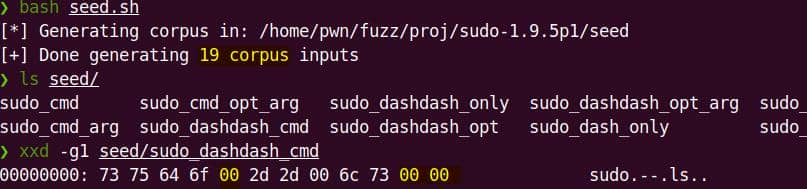
4.3. Corpus Minimizer
(This is optional for our case.)
Raw seeds are fine, but redundant inputs waste fuzzing cycles. AFL++ ships with minimizers:
afl-cmin→ trims the whole corpus down to the smallest set that preserves coverage.afl-tmin→ minimizes individual files.
Before running
afl-*, better configure the system first:Bashsudo afl-system-config
Try corpus minimization:
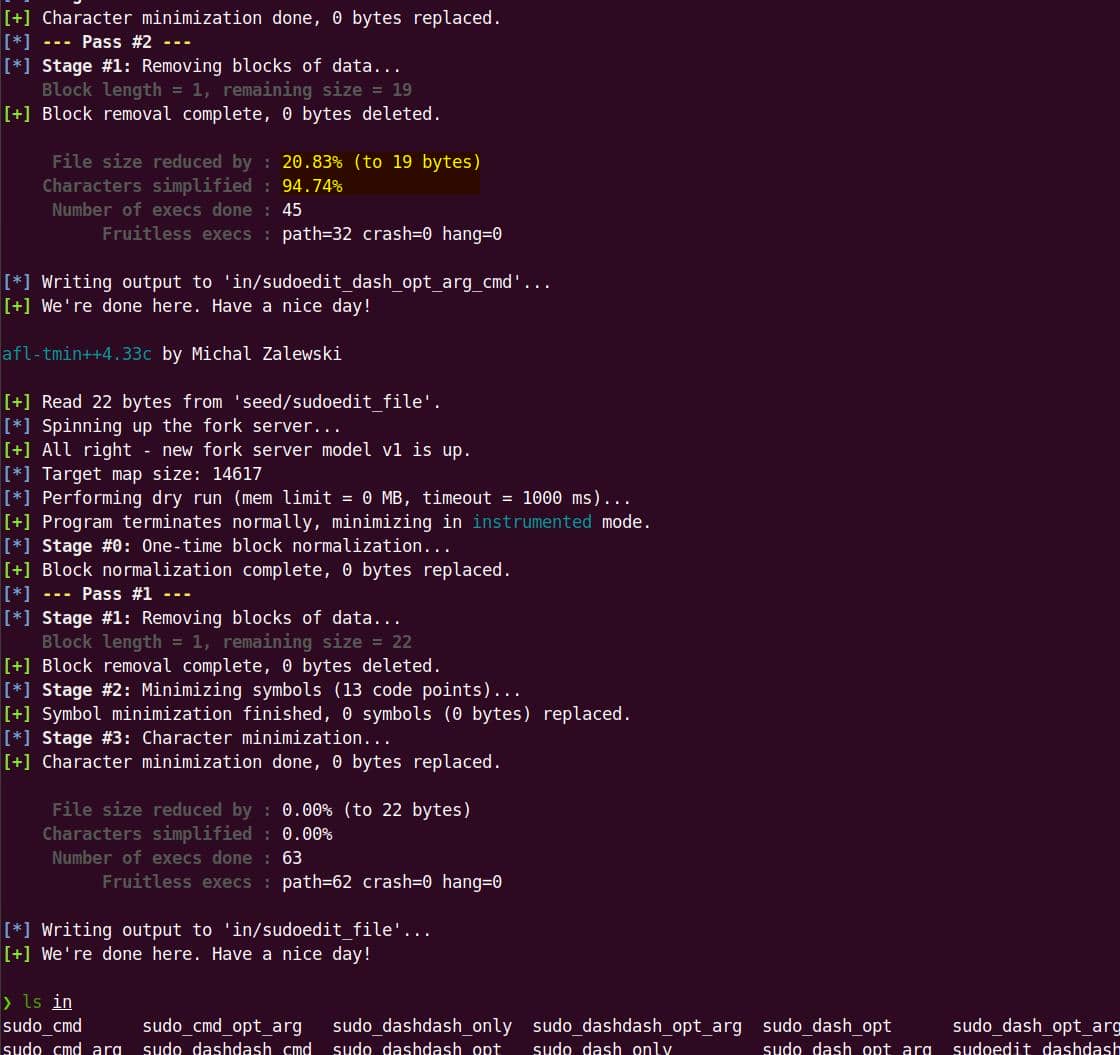
afl-cmin -i seed/ -o in/ -- harness/bin/sudoFile-by-file reduction:
mkdir -p in

for f in seed/*; do
    base=$(basename "$f")
    afl-tmin -i "$f" -o "in/$base" -- harness/bin/sudo
doneBetter than nothing:
Comments | 1 comment
what is the password for writeup