











3. Harness
With the workstation locked and loaded, we need a fuzzing harness. Throwing garbage at sudo blindly won't get us anywhere — it'll just hang at a password prompt or bail out at argument parsing. A good harness cuts through the noise, bypasses blockers, and forces the binary down dangerous paths.
For open-source targets like sudo, we have the luxury of source patches and controlled test scaffolds. This not only keeps fuzzing efficient, but also lets us zero in on logic flows where real bugs lurk.
3.1. Kill Password Auth
First roadblock: authentication. By default, sudo spawns a password prompt on tty. In a fuzz loop, that means hang city — no progress, no crashes.
Solution: neuter the auth check.
This means we can patch the password verification routine to always succeed (or fail immediately), avoiding the interactive prompt entirely.
Succeed or Fail?
In real-world exploitation, attackers often don't know valid creds. Imagine, a bug with password required is much worthless. Fuzzing unauthenticated paths always gives us more bounty.
Inside plugins/sudoers/auth/sudo_auth.c, the verify_user() routine controls login success. We patch it to short-circuit immediately:
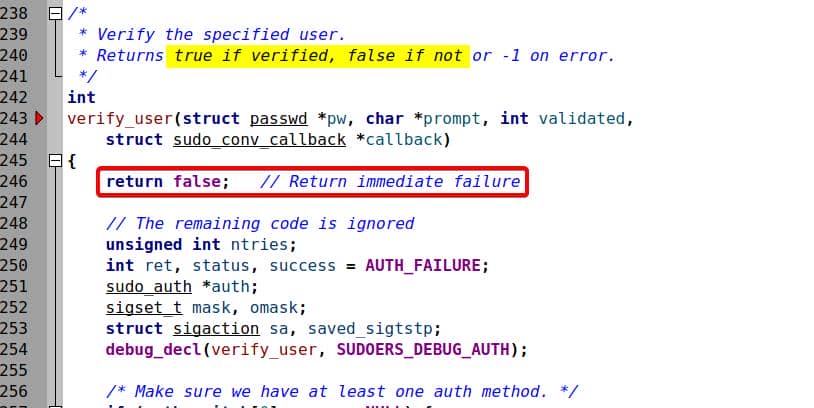
Always return false (0) to simulate failed login. By adding this very early false return, the rest code snippet is then cut off.
3.2. Arguments Fuzzing
Next hurdle: sudo doesn't slurp from stdin or files like a typical fuzz target. Its main input surface is command-line arguments (argv[]).
To fuzz this properly, we hook into AFL++'s argument fuzzing helper: argv-fuzz-inl.h. This little header turns AFL's mutated bytes into synthetic argv[] arrays for our binary.
3.2.1. AFL Implementation
The argv-fuzz-inl.h is a helper used to fuzz command-line arguments (argv[]) with AFL++, instead of fuzzing standard input (stdin) — the fuzzing payload becomes the simulated command-line arguments passed to main(int argc, char argv).
It provides several pre-defined macros and functions. The AFL_INIT_SET0 macro is commonly used for fuzzing programs that take command-line arguments, while keeping the program name (argv[0]) fixed and unmutated.
#define AFL_INIT_SET0(_p)        \
  do {                           \
                                 \
    argv = afl_init_argv(&argc); \
    argv[0] = (_p);              \
    if (!argc) argc = 1;         \
                                 \
} while (0)This does two things:
- Replace
argv[]with fuzzed input parsed fromstdin - Preserves
argv[0]as a fixed string (_p), e.g.,"sudo"or"sudoedit"
On the other hand,
AFL_INIT_ARGV()fuzzes the entireargv[]array, includingargv[0](i.e., the program name):C#define AFL_INIT_ARGV() \ do { \ argv = afl_init_argv(&argc); \ } while (0)Typically we use this one when we want to explore different execution modes of a binary that switches behavior based on different
progname.
Under the hood, the macros call afl_init_argv():
static char **afl_init_argv(int *argc) {

    static char  in_buf[MAX_CMDLINE_LEN];
    static char *ret[MAX_CMDLINE_PAR];

    char *ptr = in_buf;
    int   rc = 0;

    ssize_t num = read(0, in_buf, MAX_CMDLINE_LEN - 2);
    if (num < 1) { _exit(1); }
    in_buf[num] = '\0';
    in_buf[num + 1] = '\0';

    while (*ptr && rc < MAX_CMDLINE_PAR) {

    ret[rc] = ptr;
    if (ret[rc][0] == 0x02 && !ret[rc][1]) ret[rc]++;
    rc++;

    while (*ptr)
      ptr++;
    ptr++;

    }

    *argc = rc;

    return ret;

}Encoding quirks:
- Arguments are NUL-delimited (
\0). - End of argv is marked by double-NUL (
\0\0). - Empty args encoded as
0x02 0x00.
This approach allows afl-fuzz to mutate command-line arguments just like it mutates files — enabling deep testing of argument parsing logic.
Example: fuzz input that mimics
sudo -u root idwould be:73 75 64 6f 00 2d 75 00 72 6f 6f 74 00 69 64 00 00Which maps to:
"sudo\0-u\0root\0id\0\0"After calling
AFL_INIT_SET0("sudo"),argv[]becomes:argv[0] = "sudo"; // fixed manually argv[1] = "-u"; // from fuzzed input argv[2] = "root"; argv[3] = "id"; argv[4] = NULL;
The harness is our cheat code. By patching auth and wiring in argv[] fuzzing, we don't waste cycles on prompts or invalid entry points.
3.2.2. Hook Sudo Argv
To fuzz sudo's command-line arguments, we need to wire AFL++ into its main() by including the helper header:
#include "/home/pwn/fuzz/tools/AFLplusplus/utils/argv_fuzzing/argv-fuzz-inl.h"AFLplusplus provides
utils/argv_fuzzing/argv_fuzz_demo.cto illustrate the fundamental usage for these utilities.
Locate the main() function in src/sudo.c at line 150, and hook argv[] as follow:
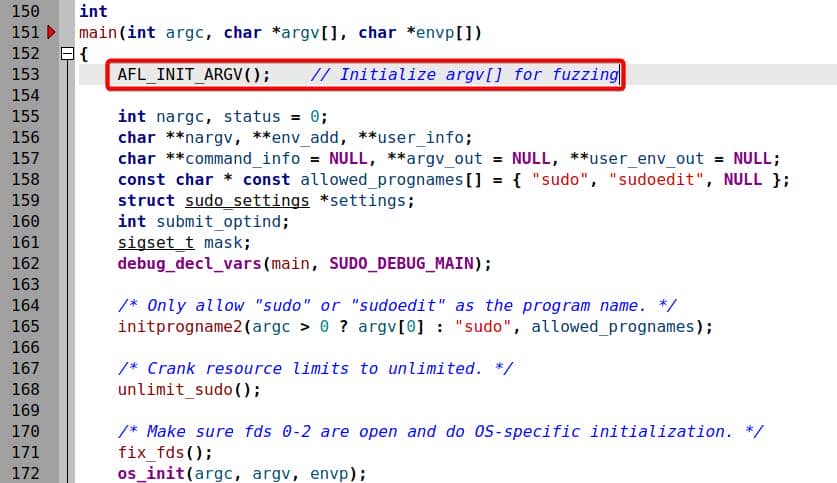
This way fuzz the first argument argv[0] (progname or __progname) as well. But from the previous analyzed source code, we see the it actually validates the program name—meaning we should try the other macro AFL_INIT_SET0.
3.2.3. Argv Constraints
Problem: sudo enforces a whitelist of valid program names very early in main():
const char * const allowed_prognames[] = { "sudo", "sudoedit", NULL };
initprogname2(argc > 0 ? argv[0] : "sudo", allowed_prognames);and then:
/* Only allow "sudo" or "sudoedit" as the program name. */
initprogname2(argc > 0 ? argv[0] : "sudo", allowed_prognames);Meaning:
- If
argv[0]isn't"sudo"or"sudoedit", execution dies instantly. - Wasting fuzz cycles on invalid names.
So for accurate fuzzing, we generally use AFL_INIT_SET0("sudo") (or "sudoedit") to pin argv[0] and let AFL mutate the rest:
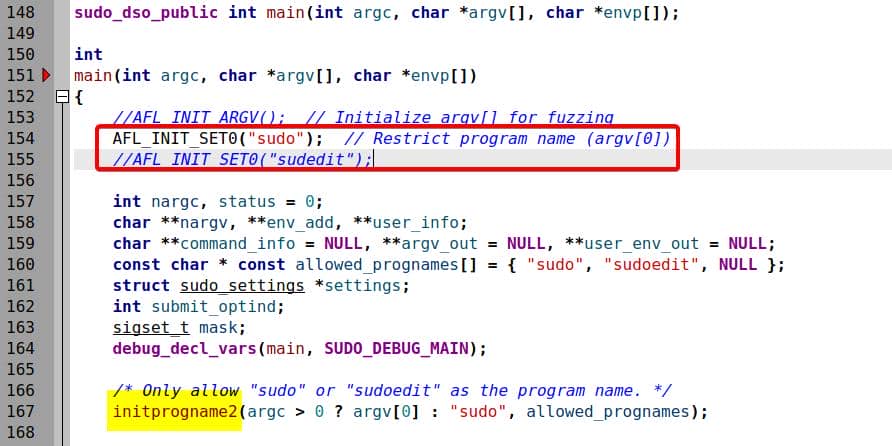
3.2.4. Override Progname
But there's a twist.
The function initprogname2() in lib/util/progname.c doesn't just trust argv[0]. On Linux, it can override it with the global symbol __progname (set up by crt0).
#include <config.h>

...

// [1] On systems that support getprogname() (e.g., BSD variants),
#ifdef HAVE_GETPROGNAME

# ifndef HAVE_SETPROGNAME
/* Assume __progname if have getprogname(3) but not setprogname(3). */
extern const char *__progname;	// Global variable

void
sudo_setprogname(const char *name)	// Substitution for the missing setprogname
{
  ...	// Just logic to define it as the global __progname
}
# endif

void
initprogname2(const char *name, const char * const * allowed)
{
  ... 	// logic to use getprogname() syscall to initialize program name
}

// [2] On systems without getprogname() (e.g., non-BSD Linux)
#else /* !HAVE_GETPROGNAME */

static const char *progname = "";

void
initprogname2(const char *name, const char * const * allowed)
{
  int i;
// [2-1] Config
# ifdef HAVE___PROGNAME
  extern const char *__progname;	// Global variable

  if (__progname != NULL && *__progname != '\0')
      progname = __progname;	// Use __progname
  else
# endif
  ... // logic to define program name if there's no HAVE___PROGNAME config
}

...The purpose of the progname.c file is to initialize and manage the program name (progname) used internally by sudo, under different OS and environment.
Our deployed environment is a non-BSD Linux, thus the code will head into branch [2] by skipping [1]. Then the code path will be decided on if HAVE___PROGNAME is configured. Before running ./configure ... we see this options listed in the config.h.in at line 1015 under the source root:
/* Define to 1 if your crt0.o defines the __progname symbol for you. */
#undef HAVE___PROGNAMEBut once we run ./autogen.sh and ./configure ... with no special flags specified, it's set to 1 by default:
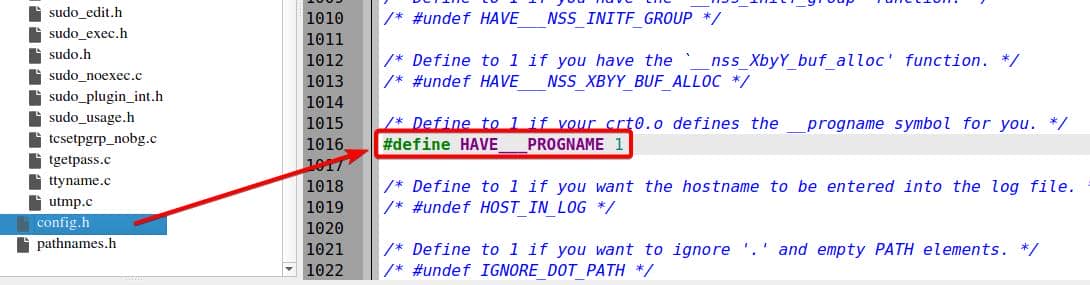
Translation: we think we're fuzzing argv[0], but the binary cheats and resets it—no matter what AFL injects, progname snaps back to __progname.
To actually fuzz argv[0], we must stop this normalization. Simply null out this section in progname.c by:
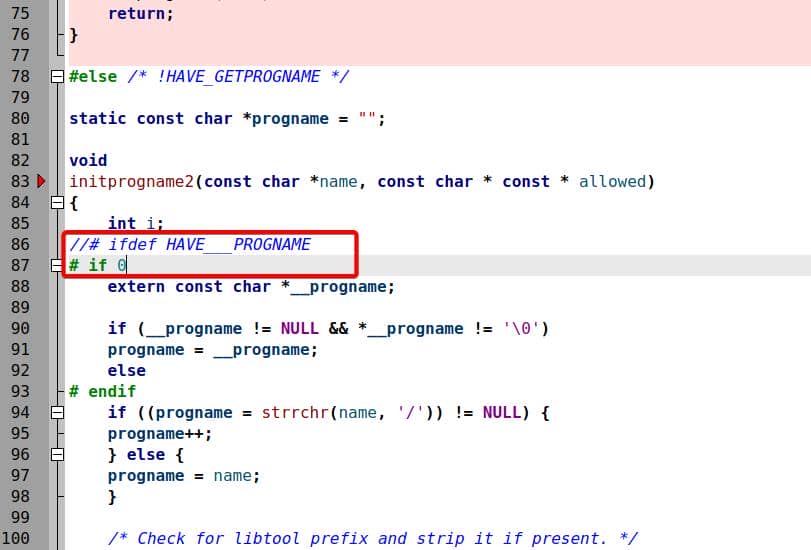
This leaves argv[0] raw and fuzzer-controlled
3.3. Harness Compilation
Once we've patched the source for auth bypass and argv[] fuzzing, it's time to build.
Configure the harness with AFL++ as the compiler, plus sanitizers for crash fidelity:
cd ~/fuzz/proj/sudo-1.9.5p1/src

# To install it to a local directory
mkdir -p ~/fuzz/proj/sudo-1.9.5p1/harness
./autogen.sh

# Configure AFLplusplus compiler and sanitizers:
CC=afl-clang-lto CXX=afl-clang-lto++ \
./configure --prefix=$HOME/fuzz/proj/sudo-1.9.5p1/harness --disable-shared --enable-static \
        	  CFLAGS="-fsanitize=address,undefined -g" \
          	LDFLAGS="-fsanitize=address,undefined -g" \
LIBS="-lcrypt"In my setup environment, I will have to fix some compilation issues:
On some setups
logsrvd/Makefile.infails at link stage. Patch it like so at line 45:MakefileLT_LIBS = $(top_builddir)/lib/iolog/libsudo_iolog.la \ $(top_builddir)/lib/eventlog/libsudo_eventlog.la \ $(top_builddir)/lib/logsrv/liblogsrv.la \ $(top_builddir)/lib/util/libsudo_util.la
Now build with sanitizers + AFL instrumentation:
AFL_USE_ASAN=1 AFL_USE_UBSAN=1 LLVM_CONFIG=llvm-config-15 make -j$(nproc)
sudo make installResulting harness binaries land here:
$ ls -lh  ~/fuzz/proj/sudo-1.9.5p1/harness/bin
-rwxr-xr-x 1 root root 1.2M Aug  1 21:07 cvtsudoers
-rwsr-xr-x 1 root root 2.8M Aug  1 21:07 sudo
lrwxrwxrwx 1 root root    4 Aug  1 21:07 sudoedit -> sudo
-rwxr-xr-x 1 root root 625K Aug 1 21:07 sudoreplay3.4. Harness Validation
A small strict: insert a debug print inside main() to show argv[0] after AFL initialization before build:
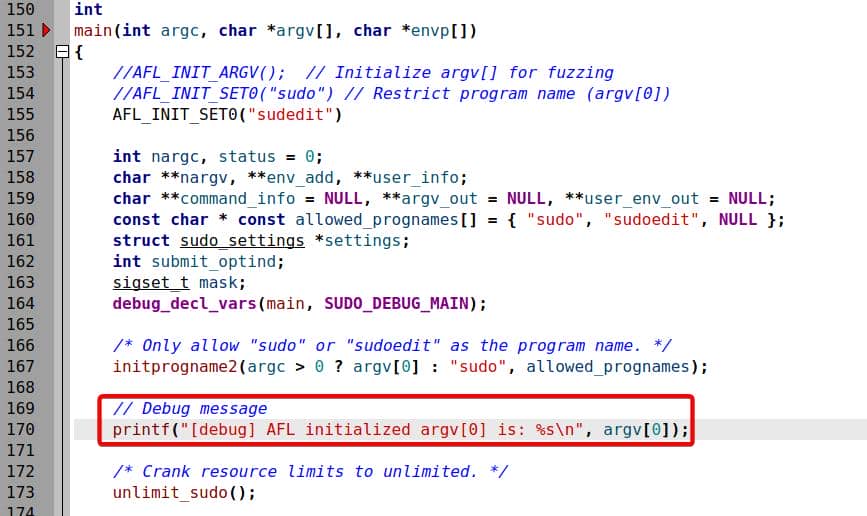
After integrating AFL-style instrumentation, we no longer pass arguments directly. Inputs must be NUL-separated argv buffers (\0 between args, \0\0 at the end).
Example input file:
echo -ne 'sudo\0-l\0\0' | tee test_inputRun through the harness:
cat test_input | harness/bin/sudoThis transforms into:
argv[0] = "sudoedit"   // hardcoded by AFL_INIT_SET0()
argv[1] = "-l"
argv[2] = NULLIf we previously create the harness using AFL_INIT_SET0("sudoedit"), even if we supply "sudo" as the first argument (argv[0]) in this input file, the output remains as "sudoedit":
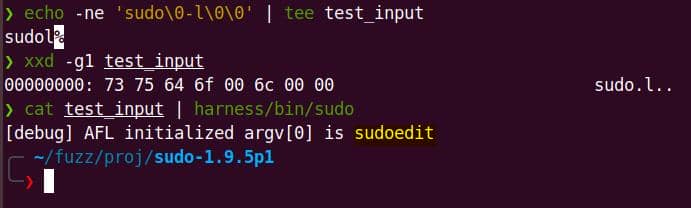
This helps us control which code paths get fuzzed, just by changing the string parameter inside AFL_INIT_SET0(_p).
Additionally, no password prompt appears—instead, auth fails instantly (as intended, thanks to our patched verify_user()):
int verify_user(...) {
    return false;
    ...
}Trace it with strace to confirm:
strace -e trace=write ./harness/bin/sudo < test_input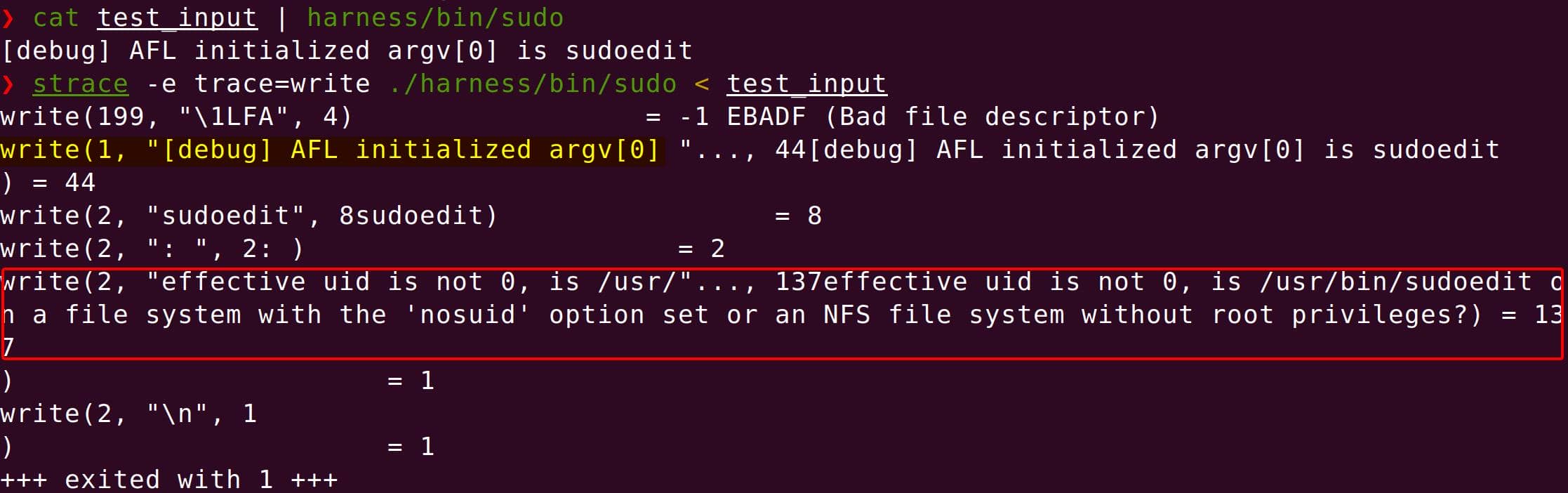
We see silent error writes to stderr — proof that auth short-circuits properly.
Finally, run the harness with afl-showmap to show which code paths (edges) are hit after instrumentation:
AFL_DEBUG=1 afl-showmap -q -o /dev/null -- harness/bin/sudo < test_input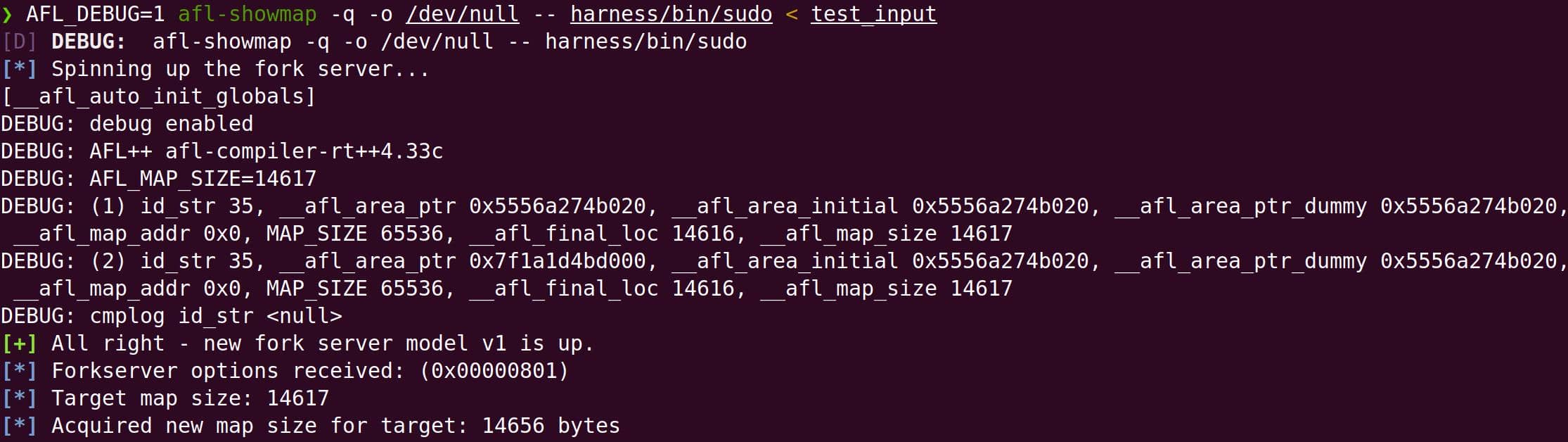
Now that our harness is functional, we need to feed it a corpus — a set of initial input files that AFL++ will mutate to explore different execution paths.
Comments | 1 comment
what is the password for writeup